r/PolyendTracker • • 1d ago

Stria Tracker, Testing new sample glide function

Thumbnail
youtube.com
0 Upvotes

not polyend, but a mobile tracker for phone when you forgot your poly tracker


r/PolyendTracker • • 1d ago

tracker-ff 2.0.0 beta 1: Tracker+ and Tracker Mini support, Capture, Stereo pairs, Tables, Tuning and MPE, testers wanted

Thumbnail
gallery
29 Upvotes

UPDATE: BETA 2 at the bottom of the post.

Hey all. tracker-ff 2.0.0 beta 2 is out as a pre-release, unofficial community firmware for the Polyend Tracker, built on Polyend's open source tracker-ce (not affiliated with Polyend, free, non-commercial).

It is the first tracker-ff release for all three trackers: the original Tracker, the Tracker+ and the Tracker Mini. The original Tracker build ran on my own unit as well as in the emulator, but I have no Tracker+ or Tracker Mini, so those two builds were tested only in an emulator. They have never run on real hardware and that is why I need testers with a Tracker+ or a Tracker Mini.

Back up your SD card before you flash anything (at least Projects, Patches, Plugins, Effects and Workspace). If something breaks or works, open an issue with your model, the steps you took and what happened. A photo of the screen helps a lot. Reports from the Tracker+ and the Tracker Mini are the most wanted.

Install: there is one zip for each model, at the end of the post. Each one holds the image under Firmware/ and the card files that model reads. The steps are the same for all three. Unzip the whole zip onto the root of the SD card and let it replace the files that are there. Then open Config > Firmware > Firmware update, select the .ptf from Firmware/ (it has the name of the zip) and confirm. Use the whole zip, not the .ptf alone. Config > Firmware then reads 2.0.0 tracker-ff. SHA256SUMS on the release page has the checksums of the three zips. If it does not boot, on the original Tracker put a known good .ptf in /Firmware with no other .ptf there, insert the card, power on and press the recessed reset pinhole on the bottom. On the Tracker+ and the Tracker Mini use the recovery steps Polyend documents for your model with the official Polyend firmware. The release page has the steps. Coming from 1.4.0 there is an upgrade guide.

Here is what is new and how to try each part. The full list is in the changelog.

Tracker+ and Tracker Mini. Everything from tracker-ff 1.4 is supported on both, plus the new 2.0.0 features below. Some things stay original only because they are hardware or stock firmware differences. The synth parts on the Tracker+ and the Mini keep the stock engines and the image also reads plugin synth engines.

Capture. Every note you play on the pads or over MIDI is kept, with nothing to switch on. To try it, play a few notes and press button 3 under the screen in the green mode of the pattern editor. The notes land in the track you are on with the first note on step 1 and one Undo takes the press back. Holding button 3 forgets the take and Config > Features > Capture switches it off.

Stereo track pairs and stereo recording (new on the original Tracker). Open Project Settings (File screen, F7) and link a pair in the Stereo pairs group (tracks 1+2, 3+4, 5+6 or 7+8) while the sequencer is stopped. A linked pair plays a stereo sample as one voice and the odd track plays it. To record stereo set Config > Line in channel to Stereo and record from Line in or Radio into a project that has a linked pair. The Sample Editor then edits both channels. The Sample Recorder also has a USB source that takes stereo 16 bit 44.1 kHz audio from the computer.

Tables. Every sample instrument and synth part gets a Table page as the last page of the instrument editor. A table has 16 rows with a transpose, a volume and one FX in each. To try it, fill a few rows and play a note of the instrument or put the new TBL step FX on the track. Holding Fx, Vol or F8 on the grid opens a picker with every FX. F5 copies, F6 pastes and F7 clears rows.

Tuning with Scala files. Open Project Settings (File screen, F7) and find the Tuning group. Notes per period, period size, base key and base frequency are rows there. The Scale file row lists the .scl files in the /Tunings folder of the card and the zip brings five examples. Pick one and its note count and period replace the first two rows, so a just intonation or Bohlen-Pierce scale plays on every key. It tunes sample tracks on all three trackers and synth parts on the original Tracker. A change is refused while the sequencer plays.

MPE out and MPE in. MPE out is the last row of Project Settings (Off by default, 1 to 15 member channels). With it on the MIDI instruments play through one MPE lower zone and every sounding note gets its own member channel. MPE in is on the Synth play page (Shift + Perform), where a controller with a pitch bend and a pressure for each note and the slide on the Mod wheel macro. It works over USB and DIN on all three trackers.

MIDI Program Change in. Config > MIDI has a Program in row, Off by default. With it on, a Program Change 1 to 16 on channel 1 to 3 over USB or the MIDI In jack picks bank slot 1 to 16 of Synth 1 to 3.

Reverse, Oscillator and Repitch. The play mode of a sample instrument gets 1-Shot Rev, Pingpong Rev and Oscillator. The Sends page of the instrument Params gets a Repitch row (Off or 1 to 255 steps) that makes the played part of the sample last that many steps at any tempo. Oscillator loops one cycle between the loop points at the pitch of the note.

Nine more chords for the MIDI Chord FX: minor add9, add9, 9, m9, maj9, 6/9, 7#9, 7b9 and 7b5. The Para engines ACD, JU6 and ALCO play the nine new chords as Para in 2.0.0.

Line in crackle at a slow tempo (original Tracker). The sound of an external synth on the Line in could crackle or break up at a slow tempo, mostly after Stop then Play. It plays cleanly now. Reported by avemaria666.

Two synth additions. On the original Tracker the Synth page (1/3) has a New note setting for what happens to the note a track still holds when the next one starts (Release, Cut, Fade or Continue). A Synth Automation slot can drive the pan, gain, reverb send or delay send of its synth part.

MIDI input floods. Dense MIDI notes or a very fast external clock over USB or DIN no longer stall the audio or reset the unit. The unit takes the notes and the clock pulses at the pace it can play and the rest waits for the next audio block.

Release notes and the full list with details: https://github.com/sbialy/tracker-ff/releases/tag/tracker-ff-v2.0.0-beta.2

Thanks for testing. Tell me what the unit did and which feature was involved.

Beta 2 Changelog:

[+] Capture works while stopped. Button 3 of the pattern editor writes the notes you played into the track with the sequencer stopped as well as running.

[+] Stereo pairs show as L and R in the Mixer (original Tracker). A linked pair is drawn as two strips under one label with a left and a right meter and one volume and one mute for the pair.

[+] Shift + FX1 and Shift + FX2 select FX3 and FX4. With 4 FX Slots on, holding Shift and pressing FX1 or FX2 in the pattern editor goes straight to FX3 or FX4 without the tap flip, as asked for in issue 2.

[+] NNA step FX. The new Q - NNA step FX sets the New note action for the note on its step only.

[+] New note and NNA on the Tracker+ and the Mini. A part that plays a plugin engine there gets the New note row on the Synth page and the Q - NNA step FX too.

[+] More for plugin synth engines on the Tracker+ and the Mini. They follow the pitch bend and the project tuning, play MIDI Chord steps as paraphony in JU6 and ALCO and take the bend and the pressure of each note from an MPE controller.

[~] One Project Settings page. The nine project rows of Config > Project Settings now live on the Project Settings page of the File screen (F7), with an Open the page row left in Config and Performance presets moved to Config > General.

[*] Project Settings value column. The Stereo pairs row (original Tracker) and the Scale snap row no longer show the tuning text when a Scala file or a tuning is picked.

[*] Tracker+ and Mini start up after the update. The beta 1 images could hang at 100 % after the update and only start again from the reset pinhole.

Files:

2.0.0b2 Original Tracker

2.0.0b2 Tracker Mini

2.0.0b2 Tracker Plus


r/PolyendTracker • • 3d ago

has anyone else tried the new Tracker Speech Gen effect?

3 Upvotes

i was just browsing the CE github repository and stumbled on some new editor effects including convolution reverb and speech gen. i'm not sure if they're supposed to be finished or not, but when i try to load the speech gen effect my Tracker+ crashes and restarts. it is a much bigger file than all the other effects, so maybe that has something to do with it. convolution verb works although it seems maybe unfinished in its implementation. i was just wondering if anyone else has checked this out and had any success with it. text to speech generation would be a very nice trick to have up my sleeve.


r/PolyendTracker • • 3d ago

Cold #polyendtracker

Thumbnail
youtube.com
4 Upvotes

r/PolyendTracker • • 5d ago

Tracker Synth Presets?

6 Upvotes

Hi everyone! First of all a huge thanks to everyone who helped me get the FF firmware up and running on my old OG! It was worth the hassle for sure.

I’m totally novice though when it comes to the synth engines (really interested in Perc especially), but is there anywhere to grab free presets to play with and learn from?

I feel like I’ve so much more I can do now and I’d love to tinker about with some presets rather than a blank slate and really see what it’s capable of!

Thanks guys and have a great weekend! 🙏❤️


r/PolyendTracker • • 5d ago

Feature request: custom scales

11 Upvotes

Hey there hackers! The firmware updates rolling out are insane and amazing! We are forever in your debts!

I wanted to field if it would be possible to add a feature that would allow for custom scales to be imported either via scala or something else. I'm trying to make a lot of microtonal music right now, and this feature would be absolutely insane! It would also be so cool if microtuned scales sent out pitch bend midi cc to external synths too! I dont know if this is even possible, but it would make a HUGE impact for the small microtonal music community.

Either way, great work all! The last few weeks have been so exciting!


r/PolyendTracker • • 7d ago

tracker-ff 1.4.0: FX3 and FX4, USB audio 8+3, USB drive, Parts, a synth play page and ALCO - deepest synth yet

Thumbnail
gallery
30 Upvotes

Hey all. tracker-ff 1.4.0 is out, unofficial community firmware for the original Polyend Tracker, built on Polyend’s open source tracker-ce (not affiliated with Polyend, free, non-commercial). This is the big one. Here are the highlights.

The two most requested features are in. FX3 and FX4 give every step two more FX slots, switched on per project on the new Project Settings page (File screen, F7) and off by default. USB audio 8+3 sends tracks 1 to 8 and synth parts 1 to 3 to the computer as 11 separate inputs.

USB drive puts the SD card on your computer. Switch it on in Config > Features (off by default, takes effect at the next start) and Config > USB > Storage shows the card as a USB drive. Back up the card before the first use and eject the drive on the computer before you press Exit.

Then there is Parts, a new way to create, explore and perform a song. Create: a Part is a source pattern for each of the 16 tracks plus a length and repeats. You build Parts in a Parts view on the Song screen (Shift + F8) and they play as your song. Explore: in Build mode hold a track button and tap a pad to give that track another pattern, so you recombine your patterns track by track. Perform: loop a Part, queue the next one while it runs and edit a pattern mid-play to hear the change at once. Details are in the changelog.

The Synth play page is a way to play the Tracker as a synth. Shift + Perform opens a page that plays one synth part from a keyboard or a DAW on USB or DIN. A/B adds a second part on the same keys with a Morph crossfade and up to 8 voices on each side. REC on the page records a take as a sample.

ALCO - deepest synth yet. It is a new synth plugin with 70+ parameters: two oscillators and a sub go through one of 20 algorithms and one of 10 filter entries, with 3 envelopes and 3 LFOs that sync to the tempo. The oscillators can play single cycle waves from /Waves (the A File and B File rows) and in Para chord mode one note sounds a chord with a strum.

You can shape ALCO patches in the browser with the FF Synth Editor, a free patch editor for the tracker-ff synth engines with nothing to install. Its 1.4.0 version covers all 19 engines of the 1.4 set plus the Console, Tube and Glue inserts and loads and saves .patch files from the SD card. It is unofficial and not affiliated with Polyend (the source is on GitHub).

Short installation info: unzip PolyendTracker_FF_1.4.0.zip onto the SD card overwriting old tracker-ff files and flash PolyendTracker_FF_1.4.0.ptf (it lands in /Firmware/) from Config > Firmware > Firmware update. Use the whole zip because 1.4.0 needs new card files (Plugins/Ext/modit.plg, Plugins/Synth/alco.plg and nine Effects/se_*.ptfx).

Tracker

  • New step FX: Chance FX (K), Snap FX (N, sets the scale snap of a track from a step on) and Tape (W stops a track and Z spins a note up from a standstill).
  • Pattern length for each track, Follow chord, a Random seed so the random parts play the same take every time and Send ducking for the delay and reverb returns.

Synth

  • JU6 has a Para chord mode with Strum. CS-Type uses less CPU with the same sound.
  • Morph FX (o) blends a synth part between two patch slots. Vary and Randomize on F4 of the patch editor moves every continuous value by up to a set percent. A strummed chord can lose level note by note.
  • ACD, VAP and WTFM sound the same as before to the last bit and use less CPU.

Thanks to TNoize for reporting the swing tempo error.

One thing to know: a project that uses FX3 and FX4 is silent in those two slots on firmware 1.3.x and on stock CE and loses their content when it is saved there with Save As. There is an upgrade guide in the zip too: https://github.com/sbialy/tracker-ff/blob/tracker-ff-v1.4.0/UPGRADING.md

Release, notes and the full list with details: https://github.com/sbialy/tracker-ff/releases/tag/tracker-ff-v1.4.0

Flash it with a backup of your Projects folder at hand. If something breaks, tell me what the unit did and which engine or feature was involved.


r/PolyendTracker • • 8d ago

Firmware issues :(

4 Upvotes

Hi guys

I tried to install the FF 1.2 firmware last week and it “bricked” my device. Just kept saying update failed and frozen on that screen.

it’s an OG. I tried flashing the FF firmware and I got Update Failed and I’m trying the pinhole on a 16gb card I formatted this morning but as soon as I power on I see the 30 second update but when I release the pin it says Emergency Update and freezes on that screen also and if I hold the pin it just doesn’t flash the firmware :(

I have tried a new card with older Polyend firmware that’s formatted to FAT 32 using the pinhole but it still won’t flash the older firmware that used to work (I tried CE but I can’t even get 1.8/9 running) I didn’t rename anything so I don’t know what happened.

Now it freezes on an update screen when doing the pinhole trick it won’t install the older ones.

Can anyone please help!? I haven’t a clue what to do… I really hope I can get it to work again 🥺🙏

Thank you so so much

EDIT: I got it guys!! Thanks so much! I have FF 1.2.0 on here! I thought it gave 6 more sample tracks but it’s 4 for synths? Just want to make sure. I have the synths and all now I’m so happy 😁
I was going to buy a plus but if we get a couple more sample tracks this is astounding (either way!) really, really appreciate the help. Does anyone know if there are plans for more sample tracks in the future? I seen 1.3.0 is out and 1.4 on the way 🙏🙏🙏

EDIT2: I put back in my old SD with all my content and I copied the plugins for the synths and effects and now I don’t have the synths :( I have 8 midi tracks which is strange. The effects are there so I don’t know why. Any ideas guys? I think I need to flash FF 1.2 on the regular SD but I’m getting failures again (but reverts back to FF 1.2 minus synths at least)

I don’t have any use for 8 midi lanes tbh at all so I’d LOVE to get those synths back they looked awesome!


r/PolyendTracker • • 11d ago

o3-303 v0.10.0, free acid firmware with a vowel on every step

Post image
12 Upvotes

o3-303 is free, open-source (GPL-3.0) firmware that turns the Polyend Tracker into a one-voice acid bass machine. I maintain it. It's unofficial and has nothing to do with Polyend. While it's installed it replaces the stock firmware, and you can go back.

**New in v0.10.0: it talks.** TRACT is a model of a human vocal tract that sits after the bassline. Give each step a vowel (A, E, I, O, U), nudge the tongue and lips, and the line starts saying things.

How to make it talk:

  1. Sample Edit opens TRACT, and Vol switches the mouth on.
  2. Hold a step pad and tap a vowel pad.
  3. The tongue and lips pads move a step by ±10.
  4. Turn on PLAY TRACT. Out of ideas? Column 10 rolls a new phrase.

Under the hood it's a 22-section Kelly-Lochbaum tube running at 22.05 kHz. The five vowel shapes are fitted to Peterson & Barney's 1952 formant measurements, with F1 and F2 within about 4 %. No samples, no vocoder.

**The rest of it**

- A 303-style voice built on Open303, saw or square. I won't claim it's identical to the real thing: if you own a 303 or a Devil Fish, I'd love your ears on it.

- 13 mods in the style of the Devil Fish, plus a sub-oscillator. Shift + Sample Load flips back to the plain 303 from any screen.

- GROWL (a vowel filter and a comb), WOBBLE (a tempo-synced LFO with 11 rates and 6 shapes), a five-model distortion and a delay.

- Sequencer: 48 patterns of 1 to 64 steps, with accent, slide, tie, ratchets, trig conditions, chance, per-step locks, motion recording and SONG mode.

- PERFORM turns the 48 pads into a live desk: mutes, fills, octave jumps, filter punches, beat freeze, rolls, tape stops, reverse, a wobble at any rate, and 8 snapshots with morph.

- 512 ready-made lines and sounds, projects that save themselves, recording to WAV, and MIDI keyboard, clock and learn.

**Before you install**

- It's a pre-release and needs more testing. Back up your whole SD card first.

- It's one monophonic voice. While it's installed, the Tracker's own tracker is gone.

- Projects saved by o3-303 v0.9.0 or earlier won't load in this version.

- Built and tested on the original Tracker hardware only.

- On the unit, with TRACT on, the audio engine peaked at 56.7 % of its time budget with zero dropouts.

To install, put the .ptf in the card's Firmware folder and use the hidden reset button, or update over USB. Section 2 of the manual covers the install and the way back to the stock firmware.

- Download: https://github.com/trak3r-os/o3-303/releases/tag/v0.10.0

- Manual: https://github.com/trak3r-os/o3-303/blob/v0.10.0/docs/MANUAL.md

- Source: https://github.com/trak3r-os/o3-303

Bug reports and feedback are welcome, here or on GitHub.


r/PolyendTracker • • 11d ago

Installed the 03-303 Firmware

51 Upvotes

Love it!


r/PolyendTracker • • 12d ago

Kids, Polyend Tracker & SP-404MKII — Making Tech House / Teodr — Нужно больше кача

Thumbnail
youtu.be
10 Upvotes

Finished another dawless tech house project and finally made a music video for it.

The Polyend Tracker handles the arrangement and acts as the main groovebox. We recorded some vocal lines with the kids, chopped them into samples, and used the SP-404MKII to trigger them and play with effects.

For the video, we took some inspiration from late '90s and early 2000s club music videos — back when all you needed was a DJ, a dancing crowd, and the absolute conviction that everyone was doing something terribly important.

Hope you enjoy it!

Music: https://band.link/teodr


r/PolyendTracker • • 12d ago

Polyend tracker Mobb Music

21 Upvotes

Mobb Bay Area Beat on Polyend Tracker OG


r/PolyendTracker • • 12d ago

One minute break from firmwares

Thumbnail
youtu.be
17 Upvotes

r/PolyendTracker • • 13d ago

OG frozen on ‘UPDATE FAILED’ and unusable after trying to flash a FW

5 Upvotes

Hey guys I went ahead and tried the FF firmware this morning (I really wanted 16 tracks for samples) and it didn’t work as you might have guessed.

And now I can’t flash any other official FW on my device, I’m not sure what to do…

My card and everything was working fine up to then. If anyone can help me I’d be so so grateful- I was so tempted by all the great features and I gave in even though I have had a lot of issues with my machine, which I hoped this would fix and make my original a plus lite

Has anyone else had this issue? If I need to back up everything I have to wait for payday to get a new SD large enough. But was wondering if I was to format a small card and put on the most recent polyend firmware could I at least flash it then and get my unit working?

Seriously would be so appreciated and if anybody had this happen but still got a new FW to work please let me know! I love my tracker and I dunno what went wrong


r/PolyendTracker • • 13d ago

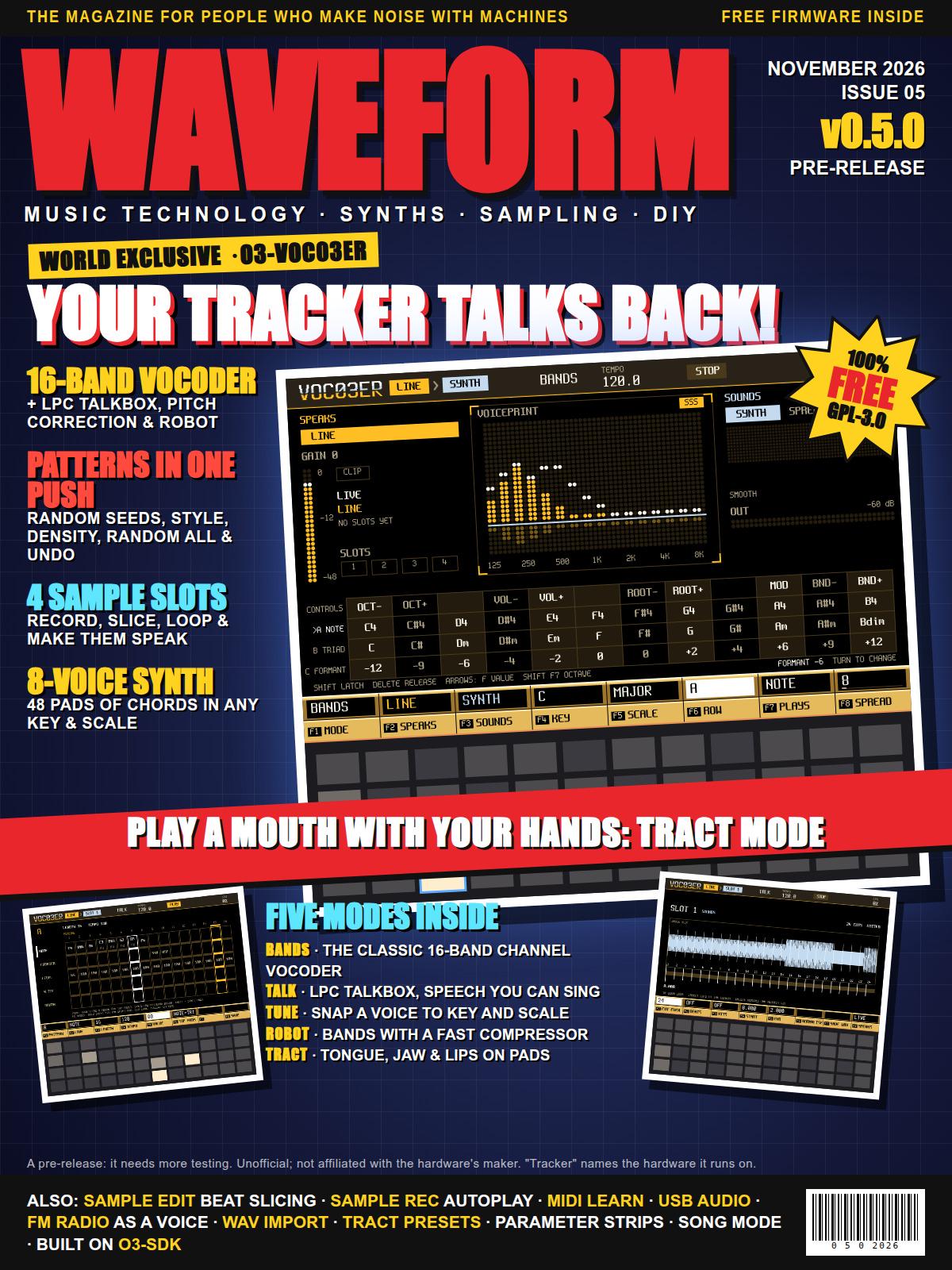
o3-voc03er v0.5.0: free, open-source vocoder/talkbox firmware for the Tracker. Now it writes patterns for you

Post image
14 Upvotes

o3-303 is free, open-source (GPL-3.0) firmware that turns the Polyend Tracker into a one-voice acid bass machine. I maintain it. It's unofficial and has nothing to do with Polyend. While it's installed it replaces the stock firmware, and you can go back.

**New in v0.10.0: it talks.** TRACT is a model of a human vocal tract that sits after the bassline. Give each step a vowel (A, E, I, O, U), nudge the tongue and lips, and the line starts saying things.

How to make it talk:

  1. Sample Edit opens TRACT, and Vol switches the mouth on.
  2. Hold a step pad and tap a vowel pad.
  3. The tongue and lips pads move a step by ±10.
  4. Turn on PLAY TRACT. Out of ideas? Column 10 rolls a new phrase.

Under the hood it's a 22-section Kelly-Lochbaum tube running at 22.05 kHz. The five vowel shapes are fitted to Peterson & Barney's 1952 formant measurements, with F1 and F2 within about 4 %. No samples, no vocoder.

**The rest of it**

- A 303-style voice built on Open303, saw or square. I won't claim it's identical to the real thing: if you own a 303 or a Devil Fish, I'd love your ears on it.

- 13 mods in the style of the Devil Fish, plus a sub-oscillator. Shift + Sample Load flips back to the plain 303 from any screen.

- GROWL (a vowel filter and a comb), WOBBLE (a tempo-synced LFO with 11 rates and 6 shapes), a five-model distortion and a delay.

- Sequencer: 48 patterns of 1 to 64 steps, with accent, slide, tie, ratchets, trig conditions, chance, per-step locks, motion recording and SONG mode.

- PERFORM turns the 48 pads into a live desk: mutes, fills, octave jumps, filter punches, beat freeze, rolls, tape stops, reverse, a wobble at any rate, and 8 snapshots with morph.

- 512 ready-made lines and sounds, projects that save themselves, recording to WAV, and MIDI keyboard, clock and learn.

**Before you install**

- It's a pre-release and needs more testing. Back up your whole SD card first.

- It's one monophonic voice. While it's installed, the Tracker's own tracker is gone.

- Projects saved by o3-303 v0.9.0 or earlier won't load in this version.

- Built and tested on the original Tracker hardware only.

- On the unit, with TRACT on, the audio engine peaked at 56.7 % of its time budget with zero dropouts.

To install, put the .ptf in the card's Firmware folder and use the hidden reset button, or update over USB. Section 2 of the manual covers the install and the way back to the stock firmware.

- Download: https://github.com/trak3r-os/o3-303/releases/tag/v0.10.0

- Manual: https://github.com/trak3r-os/o3-303/blob/v0.10.0/docs/MANUAL.md

- Source: https://github.com/trak3r-os/o3-303

Bug reports and feedback are welcome, here or on GitHub.


r/PolyendTracker • • 13d ago

tracker-ff 1.3.0 for the original Tracker: Now 30% less audio CPU than CE and with USB audio built in

Thumbnail
gallery
47 Upvotes

Hey all. tracker-ff 1.3.0 is out, unofficial community firmware for the original Polyend Tracker, built on Polyend’s open source tracker-ce (not affiliated with Polyend, free, non-commercial). Even if you skip every new feature it takes about 30 % less audio CPU than CE on any project CE can play.

Short installation info: unzip PolyendTracker_FF_1.3.1.zip onto SD card overwriting old tracker-ff files and flash PolyendTracker_FF_1.3.1.ptf (it lands in /Firmware/) from Config > Firmware > Firmware update

New

  • USB audio is built in. Switched on, the Tracker shows up as an audio input on your computer after the next start.
  • Glue, a bus compressor as a master insert, with Auto makeup and five characters (Clean, Glue, Smooth, Punch and Colour).
  • Paraphony for ACD: three new parameters (Chord Mode, Chord and Strum). Set Chord Mode to Para and a MIDI Chord step plays as one voice with one filter instead of a voice per note, so it is lighter on the CPU. Old patches load as Poly and sound the same. The patch Chord plays for notes from the pads, a MIDI keyboard and plain steps. A MIDI Chord step FX wins for its own step (the same goes for Strum).
  • Chord capture: play a chord on a MIDI keyboard with the cursor on a step, or hold some pads with the cursor on a MIDI Chord cell. The Tracker writes the chord for you, with a popup that names it (a ~ in front means a near match). One Undo takes it back.
  • Strum FX: u - Strum next to a MIDI Chord plays the chord notes one after another, up or down, 2 ms apart per unit.
  • Record join: notes you play together while recording land in one step with a MIDI Chord.
  • Synth order: Shift + F1 on the Model column hides and reorders the engine list. Guide: https://github.com/sbialy/tracker-ff/blob/tracker-ff-v1.3.1/docs/synth_order.md
  • Macro depth: a new patch scales a macro amount to the room between the parameter value and its end, so 1.00 reaches the maximum and -1.00 the minimum. Patches from 1.2.x keep the old rule. The unit has no row to switch the mode yet.
  • A Features page in Config. It lists USB audio and Chord names, each with its own settings.
  • Notes that would push a block over budget now start one block late instead of being dropped.

Changed

  • CPU upgrades for samples: the sample voice loops are cheaper and an unused input chain idles. Same sound.
  • CHIP is a plugin now, one of thirteen engines on the card. Same sound and parameters. It frees about 15 KB of flash.
  • The Patch FX (O - Patch) now applies the macros and the automation of the slot it switches to, not just the values.
  • Every step onto another engine in the Model list waits 1 s before it loads, built-in engines included, so scrolling no longer picks every engine on the way.
  • Less audio CPU elsewhere too: the short delay, the reverb (half rate, same room size, damping and decay) and the limiter. Switching the delay between mono and ping pong now crossfades instead of clicking.
  • Master insert 2 runs from internal memory, so it no longer writes to the data flash.
  • Installing an engine from the card no longer crackles.
  • The Transient Shaper has new envelope times. Shift with the add button in the Sample Loader adds files without jumping to the first empty slot.

There is a user guide for the chord and macro features: https://github.com/sbialy/tracker-ff/blob/tracker-ff-v1.3.1/docs/chords_and_macros.md

One thing to know if you update: because CHIP moved to the card, chip.plg has to be in /Plugins/Synth/, or your CHIP parts show Missing (they keep their settings and come back as soon as the file is there). The release is one zip with the firmware image inside. It unzips straight onto the card root, chip.plg included. There is an upgrade guide for 1.1.0 and 1.2.0 users in it too: https://github.com/sbialy/tracker-ff/blob/tracker-ff-v1.3.1/UPGRADING.md

Known issues are in the release notes. The main ones: the Scale macro mode of new patches has no switch on the unit yet. Glue and Phaser do not fit together in the two insert slots.

Release, notes and upgrade guide: https://github.com/sbialy/tracker-ff/releases/tag/tracker-ff-v1.3.1

Flash it with a backup of your Projects folder at hand. If something breaks, tell me what the unit did and which engine or insert was involved.

---- Update 1.3.1 fixes bug reported by TNoize


r/PolyendTracker • • 13d ago

I am reading the polyend official ce1.0.0 change log

Thumbnail
youtu.be
12 Upvotes

This is just if you want to hear the change log there are also links to download and read on your own.


r/PolyendTracker • • 13d ago

New to tracker mini

3 Upvotes

Hello, I recently got myself a tracker mini. It is my first polyend gear and my first tracker so far I like it. I have some personal preference that I wish it has. It is also a surprise that it has the ability to run games. I do have a few questions.

  1. what games do you have on your tracker mini?
  2. is there something as a beginner I should know?
  3. about the firmwares made by the community should I look into them?
  4. where can I get royalty free sample packs I can use with it? I do plan on releasing music made with it.

r/PolyendTracker • • 13d ago

track3r-os v1.4.0 is out: master EQ, pitch bend on the pads and six new sample plugins for your Tracker

Post image
28 Upvotes

New release of track3r-os, the free community firmware for the Polyend Tracker (unofficial, not affiliated with Polyend, GPL-3.0).

The suitcase is packed, and so is the flash memory: we squeezed the firmware just to make room for this last batch, and there's about enough left for a postcard. So, no new features for a while. Bug fixes, yes.

The headline features:

MST EQ: a five-band master EQ plus a bass boost, on a new Mixer page, saved with your project.

Bend and vibrato on the PIANO pads: hold the strip to bend ±1 or ±2 semitones and record it into the pattern. The MIDI pitch wheel bends sample voices too.

Six new Sample Editor plugins: WT Forge, WT Notes, Grain Lock, Pad Forge, WT Resynth and Pad Stretch.

Faster hands:

Shift+File saves from anywhere.

Focus Loop loops a selected block.

CHOP drops its slices straight into the pattern.

One picker for all the pad modes.

Updating from track3r-os 1.x takes a minute: copy the .ptf to Firmware/, then Config → INFO → F8. Coming from the official firmware, the install guide walks you through it. Back up your card first.

Download and full changelog: https://github.com/trak3r-os/track3r-os/releases/tag/v1.4.0

Tell us what you make with it, and send bugs and ideas through the GitHub issue forms.


r/PolyendTracker • • 14d ago

Recent opensource for OG - multiple usb outs

2 Upvotes

What with all the new firmwares becoming available on open source I was wondering if there are any that support recording multiple usb outs on the OG?


r/PolyendTracker • • 14d ago

Firmware FF 1.2.0? Synths and effects locations?? 🙏❤️

4 Upvotes

Hi guys I just finally downloaded this firmware for the OG I was hesitant to in case something went wrong (my tracker is always having bugs I hope this helps)

But to my surprise I read the synths and plugins worked on the OG. Only problem is it says to put them in the efffects and plugin folders - do I just create those folders on my SD?

I spent ages backing everything up so I hope wasn’t a waste. Also lastly, it says in the readme file also that you can only have one firmware when flashing. Does this include a backup reliable Polyend one and the new one or just the new one?

I hope I don’t brick my device and 16 tracks is amazing it’s basically the plus lite! Can’t wait to see what is to come and if anybody can help me I’d be so grateful I am so bad with firmware stuff (not a tech guy ironically lol)
Peace and thanks 🙏


r/PolyendTracker • • 14d ago

Five Eleven - new track made using the Tracker mini

2 Upvotes

Released a new track today. All my stuff starts on/in the Tracker mini and then I add stuff like the guitar in the DAW.

Video here: https://youtu.be/bzpAuEfoeJ0

Or on streaming sites via this link: https://ditto.fm/five-eleven

Let me know what you think.


r/PolyendTracker • • 15d ago

New firmware

4 Upvotes

Hi guys,

I have an OG tracker that has caused me a lot off issues over the years to the point I gave up on it despite loving it. Then I seen the mini and plus out while OG was not finished and as much as I wanted the plus (double tracks and synths etc) I couldn’t trust that a much more complicated machine wouldn’t have lots of bugs.

Can I ask your opinion on firmwares and the advantages and disadvantages please?

If there are any that add extra tracks, (I hear) the OG can run synths now!? And things like previewing large audio files and not having to import and take up all my space when I can just crop before hand. That’s all I know so far and I’m very bad with this stuff.

I’d really appreciate if anyone could point me in the best direction please? 🙏 I make idm, electronica (boards of Canada style and autechre) so maybe the best one for that style and do I need to have the new firmwares in a devoted folder - I keep all the recent ones on my SD as I have to flash back and forth at times to address bugs! I hope this is as good as it sounds and I hope we keep the tracker interface as I really like it

Thanks guys really


r/PolyendTracker • • 15d ago

Polyend Tracker and Hip-hop

14 Upvotes

Memphis beat on Tracker


r/PolyendTracker • • 15d ago

Free browser editor for tracker-ff and OpenTracker synth patches

Post image
20 Upvotes

I made a patch editor for the synth engines of tracker-ff (the community firmware for the original Tracker) and OpenTracker 2.x / 3.x. It runs in the browser and nothing needs installing.

You can play patches from the on-screen keyboard or a MIDI controller. You can also tweak them, use the randomizer to find new sounds and save them as files ready for your next Tracker session.

https://sbialy.github.io/ff-synth-editor/

This is an unofficial community tool and it is not affiliated with Polyend. The editor is MIT licensed.