r/PowerShell • u/Jagula • Apr 17 '26
Script Sharing PsUi: PowerShell UIs made slightly less shitty
I've worked on this over the past year and change. It's probably most useful for internal tools (tools for your helpdesk or whatever). It abstracts the horror of WPF over PowerShell into a slightly more palatable experience.
It'll allow you to avoid XAML. You won't have to worry about runspaces or Dispatcher.Invoke. You call functions, things show up on screen, the window doesn't freeze when your script runs. All the threading shit is buried in a C# backend so you can worry about the actual PowerShell logic.
If you've ever tried to implement WPF for PowerShell properly (runspace pools, synchronized hashtables, dispatchers) you know that setup is a massive pain in the balls from the start. One wrong move and your UI thread has shit the bed, your variables are gone, and your beautiful form has collapsed in on itself with the weight of a neutron star. I went through all of that so you don't have to. My sanity went to hell somewhere around month four but hey, the module (probably) works.
So how it actually works: your -Action scriptblocks don't run on the UI thread. They run on a pre-warmed RunspacePool in the background (pool of 1-8 runspaces, recycled between clicks so there's no spinup cost). When you define a control with -Variable 'server', the engine hydrates that value into the runspace as $server before your script runs, and dehydrates it back to the control when it's done. It's by-value, not by-reference, so form data (strings, booleans, selected items) round-trips cleanly. If you need to pass heavier objects between button clicks there's a $session.Variables store for that.
The host interception is there because running scripts off the UI thread breaks every interactive cmdlet. Write-Host doesn't have a console to write to. Read-Host has nobody to ask. Write-Progress has nowhere to render. Get-Credential just dies. So PsUi injects a custom PSHost that intercepts all of that and routes it back to the UI. Write-Host goes to a console panel with proper ConsoleColor support, Write-Progress drives a real progress bar, Read-Host pops an input dialog on the UI thread and blocks the background thread until you answer, Get-Credential does the same with a credential prompt, and PromptForChoice maps to a button dialog. The output batches in chunks so if your script pukes out 50k lines the dispatcher queue doesn't grow unbounded and murder the UI.
Controls talk to the background thread through a proxy layer that auto-marshals property access through the dispatcher. You don't see any of this, you just write $server and it works.
New-UiWindow -Title 'Server Tool' -Content {
    New-UiInput -Label 'Server' -Variable 'server'
    New-UiDropdown -Label 'Action' -Variable 'action' -Items @('Health Check','Restart','Deploy')
    New-UiToggle -Label 'Verbose' -Variable 'verbose'
    New-UiButton -Text 'Run' -Accent -Action {
        Write-Host "Hitting $server..."
        # runs async, window stays responsive
    }
}
Controls include inputs, dropdowns, sliders, date/time pickers, toggles, radio groups, credential fields, charts, tabs, expanders, images, links, web views, progress bars, hotkeys, trees, lists, data grids, file/folder pickers, and a bunch of dialogs. Light theme by default, dark if you pass -Theme Dark.
PSGallery:
Install-Module PsUihttps://github.com/jlabon2/PsUi
GIF of it in action: https://raw.githubusercontent.com/jlabon2/PsUi/main/docs/images/feature-showcase.gif
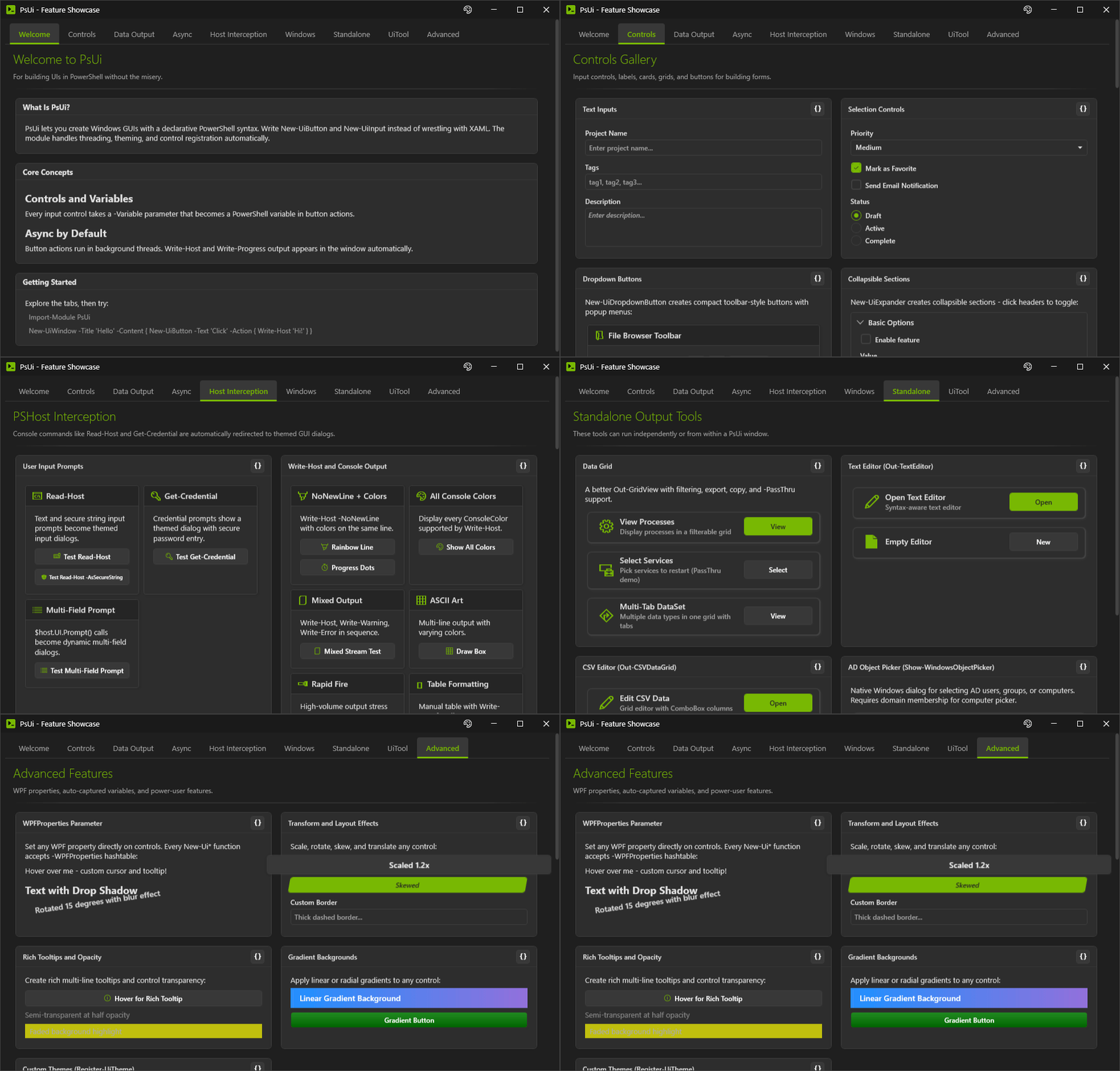
Works on 5.1 and 7. If you do try it and anything breaks, please open an issue and let me know.
23
u/StartAutomating Apr 18 '26
First up: Really cool work! (especially the massive grunt work of making your own host that works with WPF)
Second up:
All of this has happened before, and all of this will happen again.
I'm ex-MSFT, ex-PowerShell team. When I was on the team, I wrote a similar layer called WPK, which shipped with the Windows 7 resource kit. Around the same time, another PowerShell MVP named Joel Bennett wrote PowerBoots, which did almost the exact same thing. About a year later, we joined forces and made ShowUI (Gallery Link).
Plenty of people wanted a designer, and preferred XAML (this was back in the day when Microsoft provided Expression for XAML editing). Lots of people just kept building their own UIs from scratch, and Joel and I both lost some interest over time.
More recently https://github.com/mdgrs-mei/ has been building similar tools, too. WinUIShell lets you do similar things atop the WinUI ecosystem. GliderUI lets you do the same thing cross platform, with Avalonia
For my part, I've mostly switched to building Web Servers and pages with PowerShell. Probably the most notable project in this space over the past year is Turtle (check this page for over 130 demos).
The points of this long reply are:
Really appreciate the passion required to make this, and I like what I see so far.
Thanks,
James
P.S. Gave you a follow and star on GitHub. Lemme know if you want help or want to join forces with any of these other efforts.
6
u/sqloid Apr 17 '26
Wow! Great to see mature projects in PowerShell. Have you ever considered presenting this on the PowerShell Community Call?
3
u/BlackV Apr 17 '26 edited Apr 17 '26
wait I though that was the whole point (one of them) of wpf vs winform, cross platform
Amazing module
Edit: google tells me I'm thinking of MAUI (or avaloniaui) vs wpf....
Edit: Edit: Oh man this is pretty
16
u/zaels Apr 17 '26
Man, what a project. Thank you for your service to the community. I've thrown you a star on GitHub and will find time to play with it properly.
8
u/Takia_Gecko Apr 17 '26
This looks impressive! Will check it out
4
u/charliethe89 Apr 17 '26
Whoa nice, that would give a pretty UI installer for the powershell installation scripts i wrote recently
4
u/Szeraax Apr 17 '26
Seems like a good update to showUI from about 13 years ago which doesn't like core
3
u/ZexGr Apr 17 '26
Shut up and take my eternal gratitude for this. Thank you a thousand times
3
u/saGot3n Apr 18 '26
Hmm this is nice, I think I shall rewrite my PS xaml Gui for my SCCM PXE imaging gui with this.
3
u/Eylas Apr 17 '26
This is extremely cool, great work and I'm excited to take a look and tinker!
3
u/dathar Apr 17 '26
Damn wish this was out back when I made customer-facing UI for some very small scripts about ~8 years back. Nice stuff.
3
u/Chirag0005 Apr 17 '26
Great work
2
u/Atlamillias Apr 17 '26
New-UITool -Command 'cmd'is my newGet-Help 'cmd'.2
u/No-Youth-4579 Apr 18 '26
This is what I call a tool. Will definitely try it out!