r/Printing • • 5d ago

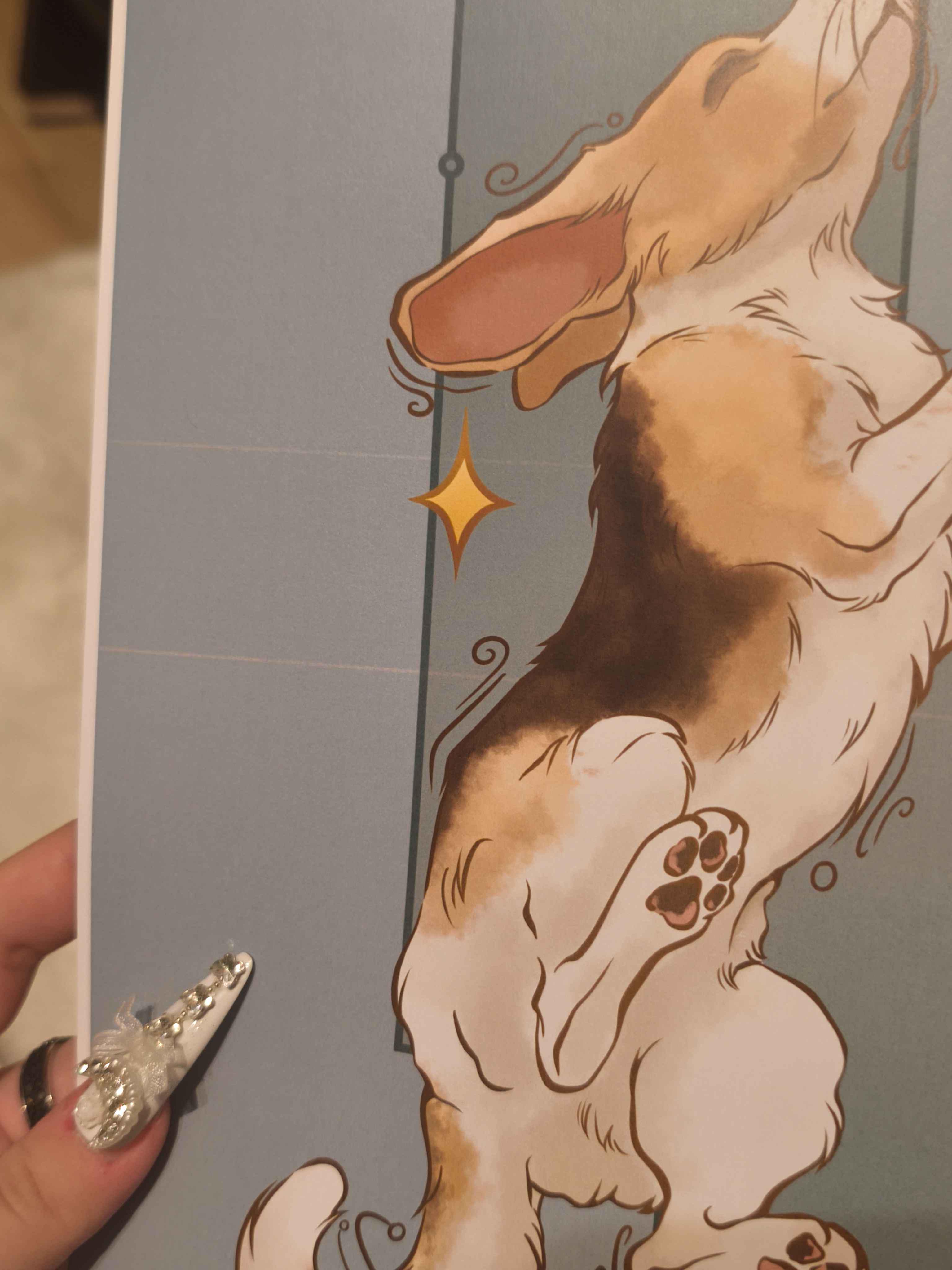
Please help with artifacts on print

The art was created in Clip Studio Paint, A4 300 DPI and i honestly have no idea what could be causing these artifacts in the print. I prepared it in PNG (RGB), TIFF (CMYK) and PDF (RGB). I visited two print shops just to be sure the problem is with the files.
In the first shop: the beige line was always in the same spot, sometimes there were two of them, no other artifacts.
The second shop: printed PDF, where now vertical lines appeared (??) and then I suggested they try TIFF, where I finally saw no lines, but it was very pixelated for some reason.
The painting does not show any of these lines. All help is appreciated!
Printer in the first shop was Xerox Versant 180, not sure about the second shop.

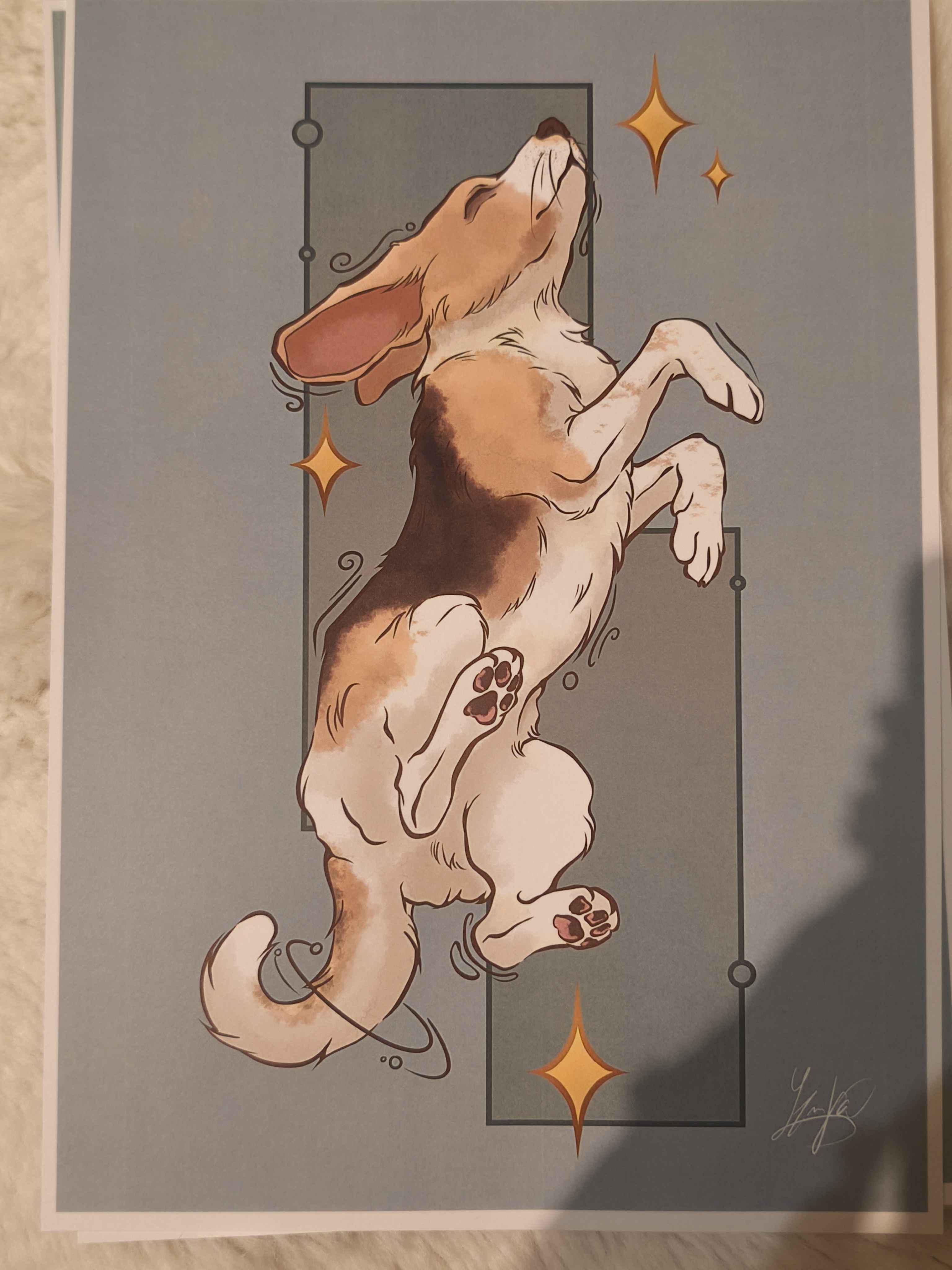
Second shop PDF
Second shop TIFF, pixelated
First shop
First shop
First shop
2 Upvotes

17 comments sorted by

5

u/roaringmousebrad Color Expert 5d ago

These line look to be printer artifacts, either a drum issue on a laser printer, or a head alignment or paper feed issue on an inkjet. Your files are all very probably fine. That being said, the hardest colours to reproduce of any machine, especially laser, are neutral greys, as they are usually made of a mix of CMY and some K, and a flaw in any of the drums will show some sort of colour streak

1

u/Taiyorine 5d ago

It's originally blue. But thank you for the info, the lady in the shop was adamant and rude that it was the file fault, showing me a print she printed before I came, which was black-background menu.

3

u/gatornatortater 5d ago

I am ashamed to say this, but there are a lot boneheaded people in the print industry. At least half of them are scared of computers. They are old school printers not wanting to stop being analog and/or tech fearing mac-heads.

What roaringmousebrad said is the most common digital printing issue and for this lady to suggest that a black background image was a fair comparison really shows how little she understands about printing.

The way this problem works is that these lines often show up and for most jobs, such as ones that have high density colors (like a black background) it isn't an issue. But when you have lighter colors, the issue shows up more. Commonly the solution is to clean the drum charge wires or replace the drum. Which can get expensive in parts and/or in time to get the mechanic in to stop the machine from printing and fix it.

When I've had jobs like this I'd reposition it on the paper, clean the wires, etc to get it to work. When that didn't work, I'd make a point of running the job right after the repairman fixes it, before it goes out of wack again. Sometimes you can only get it print only so good. That Xerox Versant isn't the most high quality machine.. it will be even trickier with that machine.

1

u/Taiyorine 5d ago

Hey, sorry to say, but I agree with you. I had a lot of problems when printing magazines for school projects before, where they could not crop it properly or even print the pages in the correct order.
The lady said they would call the mechanic right away if it was an actual problem, mentioning the prints she made before I came were fine. Even asked me what program I made it in, where she degradingly stated she doesn't even know what that is. I seriously though the files were in the wrong when two shops had problems printing it.
As you mentioned the colors - I actually printed a bunny print too at their shop, which showed the same line but it's nearly not visible.
I even emailed them before hand which format they prefer, if they prefer CMYK or RGB. They answered PNG/PDF and CMYK, but I can't convert a PNG to CMYK. The lady that was printing just saw a PDF and went for it. I think that was just supposed to be my cue to not go.
Sorry for the rant, I needed to get that out honestly. Thank you for all the help and info.

1

u/gatornatortater 5d ago

I should argue the other way to keep things in balance. As I mentioned, and others here as well, it is a tricky issue to deal with. Printing people's art can be a major headache if color matching is important, the use of printer unfriendly tones (like your piece here) and the fact that the quantities tend to be low. You have to charge extra when the prep is most all of the work and then it requires even more prep than normal. A total loss at most shop's normal pricing.

There is also a good chance that they were just on autopilot when they took the order and didn't think to ask about your expectations before getting started. But it does take some experience before you figure out when you should ask those questions.

FYI. Printers are mostly going to want pdf's in CMYK, unless it was created in RGB, then you should leave it as such and let the printer do the conversions. PNG files are often used for wide format sign shop stuff. The resolution expectations are lower there.

1

u/Taiyorine 5d ago

Thank you very much, I sure did learn a lot more about printers today and will try to find shops suitable for fine art print.

1

u/roaringmousebrad Color Expert 5d ago

I haven't delivered a job with images converted to CMYK for quite some time now. With the proliferation of different types of out put other than "standard" offset printing, it's actually best to provide images in RGB with a proper profile embedded. Most GOOD printers have a workflow that will handle the conversion better than you could ever, and you don't run the risk of deadening the colours by pre-converting to a CMYK space they are printing with.

That being said, if you are not using tools to preview what the conversion will look like, don't be surprised when your output looks different (like using the Proof Colours in something like the Adobe apps)

1

u/Taiyorine 5d ago

Great to know, thank you! I did preview the conversion too. But honestly, I don't know much about setting up the file the right way in CSP for print. I just did some research on ICC and other settings to be more aware next time.

3

u/roaringmousebrad Color Expert 5d ago

I’m a prepress person and I can say that none of the formats you are using would create different problems on different machines. That points to the output device.

2

u/liamstrain 5d ago

Those look to me like artifacts of the printers themselves, not a problem with the file.

Do you know what print technology they were using? High end art prints (archival, and usually giclee/inkjet) is pretty specialized and the printers themselves are very sensitive to the paper and a thousand other factors. It's almost an art itself.

1

u/Taiyorine 5d ago

I'm so sorry I honestly don't know anything about printing. But they advertise the printer as high-end Xerox Versant 180. The paper was matte 300 g/m2.

1

u/liamstrain 5d ago

I believe that's a laser printer - and they do sometimes have issues with large areas of solid neutral colors. What is your intent with the print? It might be you'll want to find a different kind of vendor.

1

u/Taiyorine 5d ago

I want to frame it as a christmas gift. I will try to look for different print shops but honestly, I'm not that hopeful anymore.

1

u/liamstrain 5d ago

look for people that specifically say they do fine art prints.

2

u/mflintjr 5d ago

Absolutely these are different printer defect issues. Not your file.

That being said this is a tough job to print. Neutral greys and solid light tones are tough as any tone change is very noticeable.

Best bet is to make friends with a printer. Explain the situation. You may pay more for it but if quality is what you need…

1

u/Taiyorine 5d ago

Thank you, I will try to look for other printers.

1

u/chain83 4d ago

Printer issue. Files are fine.
Cleaning the charging wire (likely enough for thin sharp lines) or replacing the drum should solve it, but these types of artifacts are common on toner-based printers, and getting it perfectly even for large solid-color surfaces with light colors is a pain on this type of printer.

I would recommend getting this printed on an inkjet.