r/QIDI_Max4 • u/Queasy_Ad4845 • 4h ago
Printing ASA

0
Upvotes
Why does ASA look like this when printing?
r/QIDI_Max4 • u/TheLegendTubaGuy • Mar 14 '26

I wanted to document as much of the machine as possible in one place as well as house some FAQs, mods, etc.
r/QIDI_Max4 • u/riba2233 • Feb 05 '26
Here is the list of all the instructional videos Qidi posted on their Youtube channel:
QIDI Max4 – Third Gen Active Chamber Heating
How to print large-sized PLA without warping?
How to install the extruder cooler?
QIDI Max4 Clear the Extruder Clog(Gear Version)
QIDI Max4 Replace the Cutter Blade
QIDI Max4 Replace the Extruder
QIDI Max4 Replace the Filament Runout Sensor
QIDI Max4 Clear the Hotend Clog
If you find any other please link them in comments, thank you :)
r/QIDI_Max4 • u/Queasy_Ad4845 • 4h ago
Why does ASA look like this when printing?
r/QIDI_Max4 • u/ASoundLogic • 13h ago
I'm looking for recommendations for additional strategies around mitigating exhaust regarding VOC particulates and smells. I suppose the best option is to connect the exhaust vent to a window.
Does anybody use an external filter adapted into the exhaust vent?
If anybody uses these approaches, I would appreciate recommended files to print exhaust adapters and a list of items used in the build.
Right now, I just have a stock printer with the built-in filter but I suspect I really should be doing more especially for engineering type of filaments.
r/QIDI_Max4 • u/Micky_TECH • 18h ago
How are you finding your MAX 4? How many hours of printing have you logged? How is its reliability?
r/QIDI_Max4 • u/Doc6933 • 2d ago
High all, I am new to 3d printing and recently purchased a Qidi max 4. I have had it about 3 weeks and have replaced 3 nozzles and 2 hot ends. The first nozzle was totally my mistake after watching the video on the qudi site I didn't realize that the hot end needed to be hot and broke the nozzle. Finally got it replaced but still having issues with clogs and the nozzles screwing really tight, enough that I broke the hot end. Replaced the hot end and printed like a champ for about 30 hours them another clog i clean out the clog and it's good for about an hour so after making the decision to change the nozzle it only screws in about half way before it gets tight. What am I doing wrong
r/QIDI_Max4 • u/MixtureWitty9892 • 4d ago
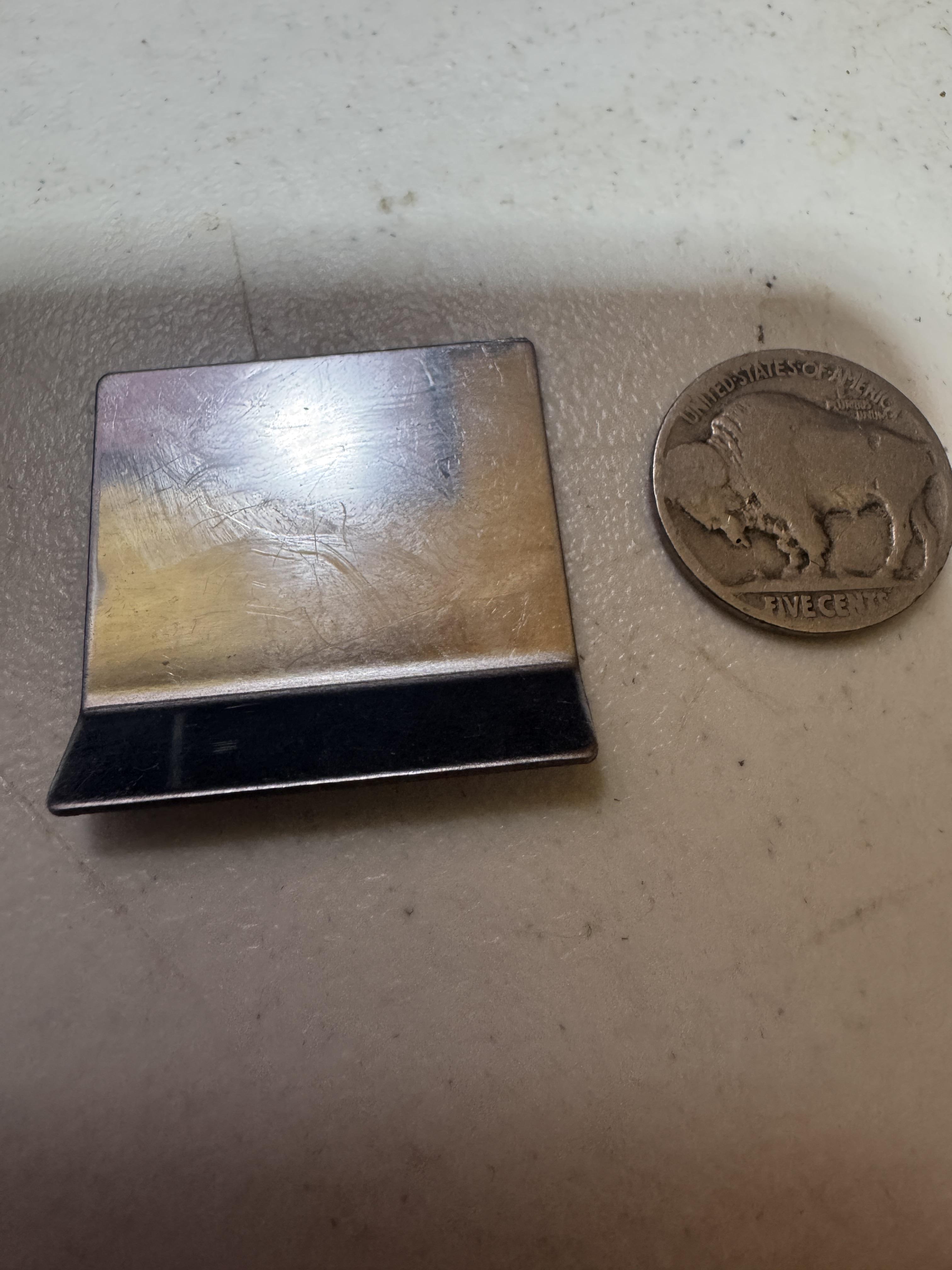
Is anyone able to help me understand exactly where it goes and how it's oriented? I
r/QIDI_Max4 • u/Boerny5dot2 • 4d ago
Hello Qidi community!
After more than 4,000 hours with my Creality K2 Plus Combo, I decided to get a MAX4 three weeks ago.
In those three weeks, I haven’t managed to print a single item.
The Qidi box fails to feed the filament entirely.
When using an external spool connected directly to the print head, the print stops after 30–120 seconds, accompanied by a message stating that the filament is running out.
3DJake has been corresponding with both Qidi and me, but so far, there hasn’t been a solution—or even any improvement!
Does anyone have any ideas?
Thanks for any helpful suggestions.
r/QIDI_Max4 • u/rtrski • 5d ago
EDIT - FIXED - adding a picture of the correct method in my comment, below.
So, I'm probably creating all my own problems. Just starting out, new to Klipper, to Qidi, to the material I'm starting to use (PCTG), and to OrcaSlicer. Using OrcaSlicer and Valve Oil vs. Qidi's own software or app.
I am running into a "Match Filament" problem that is graying out the "PRINT" button.
I got by it the first print accidentally I guess. I'd already loaded filament all the way to (and thru) the extruder, just by pushing it up there, heating the head, extruding a couple times. Print file (on USB, not pushing to printer thru computer, since don't have power to run computer and printer on same circuit safely) was just a saved gcode. I think I just told the printer when I loaded that I was putting in PETG, Generic. Hit the 'LOAD' button and it went thru a poop and clean cycle, then would let me print next time.
Second print I saved to USB as a 3MF which, I gather, includes all the filament info. So now the touchscreen wants me to 'load PCTG' ... and of course there's no such options in any of the materials listed on the touchscreen to just 'tell' the printer that's what's in there. I guess I can re-export as just a .gcode and get past this, but basically, what is the RIGHT way to do things?
I came from a rather basic prior printer so ... some of this configuration management overhead is software obstructive to me. I used to just load the filament, move the file via USB over, and go. Slicing the file was filament aware, but the printer never knew what the hell it had loaded just that something was loaded.
If I have to go to the filament page of the touch screen and re-hit "LOAD" every time, and then the print start itself includes a nozzle old filament purge, it just seems like I'm wasting a lot. (Using just G-Code.) Whereas I haven't figured out how to get the 3mf to print yet. (Mapping list to filament choice during slice.)
r/QIDI_Max4 • u/rtrski • 13d ago

My thanks to everyone who chimed in on size (previous post about footprint). If anybody else has this question in the future, to the best of my measurements:
I had to revise my feet captivators originally designed for something else because the rails on my tabletop are only 520 mm, and a full circle rim wouldn't leave me the necessary space to make them 8 to 10 mm tall for the 32 mm diameter plus 485mm spacing. But the feet do sit on the middle extrusion pieces not the outside table framing.
Why foot holders at all? Just so this thing doesn't walk it's way off the table. I know with rubber feet it should have some "stick", but color me cautious.
Next steps are finishing the internal unpacking and powering on for the first time. Cross your fingers for me that I don't have a bad QA start..
{EDIT - bullet formatting}
r/QIDI_Max4 • u/TheLegendTubaGuy • 13d ago

Latest Valve Oil has one click installs and configuration for OctoEverywhere and Obico!
Under settings -> Add-ons.
Enjoy!
r/QIDI_Max4 • u/TheLegendTubaGuy • 14d ago
Under the tune page you now have heat bed soak testing with the ability to run chamber heat at the same time and watch as it takes each mesh!
Available now in the latest Valve Oil! https://github.com/thelegendtubaguy/Valve-Oil
The Max 4 supremacy continues!
r/QIDI_Max4 • u/TheLegendTubaGuy • 14d ago
The max 4 supremacy continues!
r/QIDI_Max4 • u/TheLegendTubaGuy • 17d ago
In the latest version of Valve Oil there's an optional step loss monitor. It monitors the X/Y stepper encoders for potential position loss and pauses your print if it detects that. I'm not confident yet that it works properly, so I'd love if you have a few spare cycles to try it out.
To enable it, simply run SAVE_VARIABLE VARIABLE=tltg_step_loss_monitor VALUE=1 in the Fluidd console.
Latest release: https://github.com/thelegendtubaguy/Valve-Oil/releases/tag/v26.11.06.1
For those of you feeling really brave, there's now also an optional mainboard firmware that gets encoder data back in 8ms vs 50-75ms.
To install the optional Max 4 mainboard fix, SSH in and run cd ~/tltg-optimized-macros && ./mainboard-firmware.sh install (type FLASH when asked. Klipper will be down for about three minutes). ./mainboard-firmware.sh restore puts QIDI's firmware back. See Mainboard closed-loop reply fix.
To check that it's flashed correctly, your version number in Fluidd MCU Information should show as "02.01.01.12-tltg-clreplies1".
The Max 4 supremacy continues!
r/QIDI_Max4 • u/Skora360 • 17d ago

My Max 4 gantry sometimes slams into the frame for no clear reason and the motors continue to grind as though current sensing is disabled. Most recently it happened after I canceled a print, shortly after sending it from Orca. Any ideas on how to fix this? Is there a fork or an older firmware version that I can roll back to?
r/QIDI_Max4 • u/TheLegendTubaGuy • 18d ago
New name, new release, new fixes.
Support for the Plus 5 coming soon.
r/QIDI_Max4 • u/Kung_Tune • 20d ago
Is it possible to skip one or more macros during startup-print?
I use the same filament all the time.
On every startup sequence the printer
Many times, the print fails in beginning. It could be string or klump filament on the nozzle.
Sometimes the filament didn’t stick to plate as it should and you have to start over.
I’m so tried waiting for all the startup sequences to once again be ready.. the filament is the same, the flush is unnecessary and so on..
Is there a way around this?
r/QIDI_Max4 • u/Leather-Business-316 • 21d ago
Literally brand new max 4. This sound appear whenever i move the x or y. Help please
r/QIDI_Max4 • u/_Sulfer_ • 21d ago
Hi hoping someone can give some advice im looking at buying the the Qidi max4 combo. What im looking to do is print big multicolour light boxes. Ive seen quite a few people say its not the best for multicolour (my other option is the Kobra S1 max) and can have layer shifts and lots of colour bleeds. Has anyone got any experience printing lightboxes on this printer or could offer any advice please?
r/QIDI_Max4 • u/TheLegendTubaGuy • 23d ago
Hello everyone! This is a very big release so I wanted to walk through some of the features and options my Max 4 optimized configs installer now provides.
With version v26.10.29.1 the README and docs have been reworked to hopefully allow users to better find the information they're looking for. I think some people see these posts and think "yeah, but what does it do for me?", and that's fair. The README now answers that plainly.
Repo is here: https://github.com/thelegendtubaguy/Qidi-Max-4-Optimized
And now for new features...


If you use Spoolman, you can set up the config in Moonraker and you're off. It's that easy. The Spoolman card will show up in Fluidd and you can use the camera to scan QR codes.

Qidi has shifted the filament database on your printer to a json file you have to go and find. It's not hard, just cumbersome. Well now there's a whole page in Fluidd where you can easily edit what filaments are available to you in Fluidd and the printer's screen.

Speaking of Fluidd, we now install our own version of Fluidd with Qidi specific patches applied meaning you get an up to date Fluidd rather than the old stuff Qidi is shipping. This is tracked in a new repo available here.

Since Qidi has given up on maintaining Fluidd, let's just go crazy making it what it should be. The Qidi Box control card has always been lack luster. Well not anymore. You get a redesigned interface showing all 0, 1, 2, 3, or 4 boxes you have connected, the sensor status of the path, symbols showing you which filament is loaded, which slots aren't loaded, which filaments are grouped for auto runout spool change, and a nice big status indicator. In addition to the design, you get new buttons for manually jogging a slot in or out by 10mm. Ever have some random shit happen and wish you could just move a box slot manually? Now you can. There's a new macro to do this as well if you want to move much more than the default 10mm.


You now have control over how fast and how far your Qidi Box pushes and retracts. This is configurable by slot. Say you've got some super brittle filament in one slot that you'd rather push even slower than Qidi does by default, but some regular ol' PLA that you want to push at mach jesus. Easy.

Previously we shipped a new firmware for the toolhead that fixed a bug in reading the accelerometer data. This is an option to install during the optimized configs installer and is not done by default (or auto update). A new thing we're shipping is box firmware. The stock box firmware has one super fucking annoying quirk that it hides the real reason it shows as disconnected to Klipper on shutdown. This fixes that. It is VERY optional and most people probably shouldn't flash it, which is why it's not an option during installation. If you are having box disconnect issues, please see the repo for how to enable the box link monitor and how to flash this new firmware that lets us collect more data about this happening. Although I think I might have solved this, so keep reading.

Ever wondered what the printer screen is doing but don't want to walk over to it? Yeah me too. You can both view and control the screen via Fluidd.
Lastly, I wanted to talk about something that I get asked/see a lot of in the Qidi community... "Why not just go mainline?" The very simple answer is, because I have a warranty and I'd want to make these changes anyway. Any time I have asked "what does mainline do for you?" I always get some answer like "well I can control the box", okay so can I. Or "well I want a different screen app", okay... nothing is stopping you from doing that. Maybe it's just the pessimist in me, the realist in me, or just straight up ignorance... but I'd rather just fix the fucking thing so I have.
If you run into issues, please open an issue on GitHub! And enjoy being the envy of other Qidi owners!
r/QIDI_Max4 • u/Sport_Subject • 23d ago

As above trying to automated 4 layers of offset measurement.
r/QIDI_Max4 • u/munky8758 • 25d ago

.4mm nozzle, .2mm layer
r/QIDI_Max4 • u/TheLegendTubaGuy • 28d ago

Hello fellow Max 4 owners, me again.
I'm getting ready to ship the latest version of my optimized configs which includes a speed up to Qidi box load and unload speeds and makes everything configurable easily via Fluidd.
I would love to get more than just me testing this.
If you're interested, instructions to install the dev version are here: https://github.com/thelegendtubaguy/Qidi-Max-4-Optimized/blob/dev/DEVELOPMENT.md
r/QIDI_Max4 • u/rtrski • 28d ago
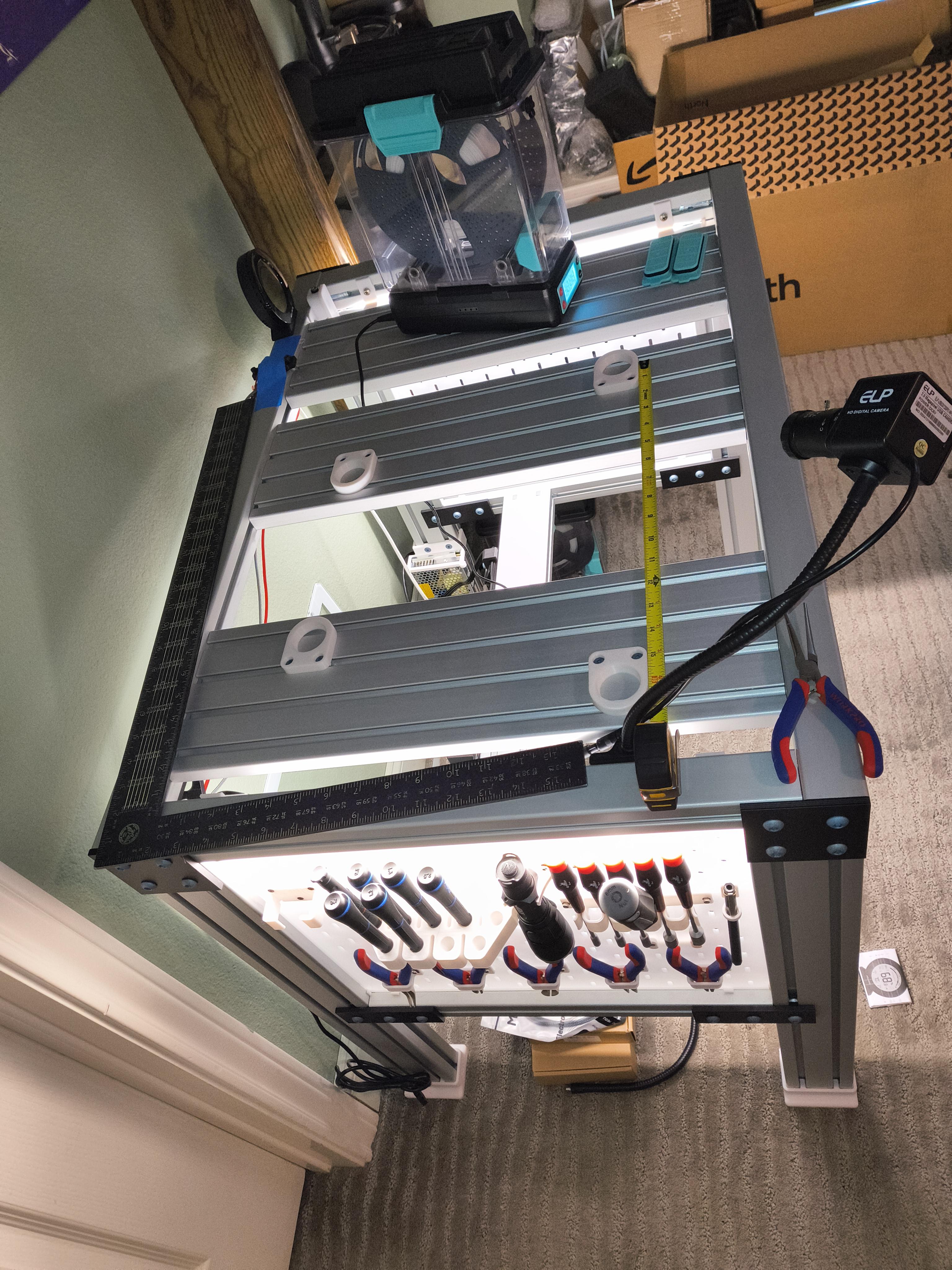
Specifically, where are the feet?
Considering one. Have an aluminum extrusion built table that's about 52cm front to back excluding the top edge of the frame. I know from specs that's narrower than the printer's depth. (With rail tops front and back it's 600mm but those "machining" extrusions are a tiny bit lower than the outlining rail top faces.) Width between those top 160mm wide pieces is easily adjustable.
Table was built for a different printer that's just not happening now (can see existing "foot constraints" mounted), so working on my Plan B options.
Thanks in advance for any info.
r/QIDI_Max4 • u/TheLegendTubaGuy • Oct 22 '26
Hello fellow Max 4 owners. It recently came to my attention that there's a bug in the accelerometer driver that was fixed in upstream klipper at the end of last year. This would require getting the firmware source for the THR, which Qidi has not published.
But we don't need them :)
The latest version of my optimized configs will patch the firmware and flash it for you. This is a potentially dangerous operation, so it does NOT do this by default and won't do it on an auto update. You need to specifically opt in to make this happen, which is why I'm posting about it.
If you want this bug fix, you will need to rerun the installer command. See the end of this post for more information.
The toolhead THR board's LIS2DW accelerometer has a FIFO bug that causes it to report about 1/5th the amount of data that it should. This results in noisy and slightly unreliable results for anything reading from this accelerometer (i.e. input shaper). See here for more info.
I sort of agree with you, that's why it's opt in only. If it helps you feel any better, it's technically Qidi's firmware package with a few bits changed. It uses their flashing method as well.
Qidi would probably say yes, but I disagree. You can reflash the original firmware, and future Max 4 firmware updates will wipe this out and it will need reapplied (another reason why you shouldn't update right away).
Yes! See here.

All good things! I fixed being able to set the Qidi box heaters via Fluidd. It prevents you from doing that if the filament you have loaded doesn't allow it, just like the screen. I also enabled full display via Fluidd by default for users that just install my optimized configs package but don't want to bother with doing anything else. These will roll out via auto update if you enabled it.