r/ROBLOXStudio • • 2d ago

Help Help please

Post image

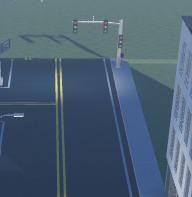
Does anyone know why there’s this grass overlay??? Please help I’m new to developing. It’s like an overlay picture of grass this will happen when I go far from an area where the grass will overlay the roads. I will try to get a video of this happening.

1 Upvotes

10 comments sorted by

1

u/AdvertisingRude4137 2d ago

Grass overlay? I'm sorry, but you are a bit too vague. Could you give more details?

0

u/Glum_Pirate9344 2d ago

It’s like an overlay picture of grass this will happen when I go far from an area where the grass will overlay the roads. I hope this helped I will try to get a video of this happening.

1

u/AdvertisingRude4137 2d ago

Oh, I know, it's just Roblox rendering chunks and it's all for optimization, try disabling StreamingEnabled (or enabling it, I forgot which one) in properties and it might not do this

1

u/Glum_Pirate9344 2d ago

It didn’t work sorry but I do have a video of this happening

1

u/AdvertisingRude4137 2d ago

Oh, sorry, I thought it was a model part. Roblox's terrain system optimizes itself automatically when far away, so i'm not too sure how to fix this, and thisnmight not matter too much if the player is on ground

1

u/Glum_Pirate9344 2d ago

Oh okay thank you for trying to help

1

u/ProposalRecent2292 2d ago

terrible image lmao. Im assuming there is grass from the terrain that is sticking out of the roads. To fix that, simply apply a different texture (like leaves) where the roads are which dont generate the grass effect

1

u/Glum_Pirate9344 2d ago

It’s this

1

u/ProposalRecent2292 2d ago

the issue might be the rendering fidelity you've set. Go into the studio settings and set the rendering quality to 21 and see if thats fixed

1

u/Glum_Pirate9344 2d ago

It didn’t work😢