r/SQLServer • u/Valuable-Ant3465 • Oct 05 '26
Question SQL Server 2016 patch without Azure portion
Hi, all
it's Oct 2026, official support for 2016 has been discontinued, and I just applied 2 updates to my SQL Server 2016 Express:
SQL Server 2016 Service Pack 3 (KB5003279) to 13.0.6300.2
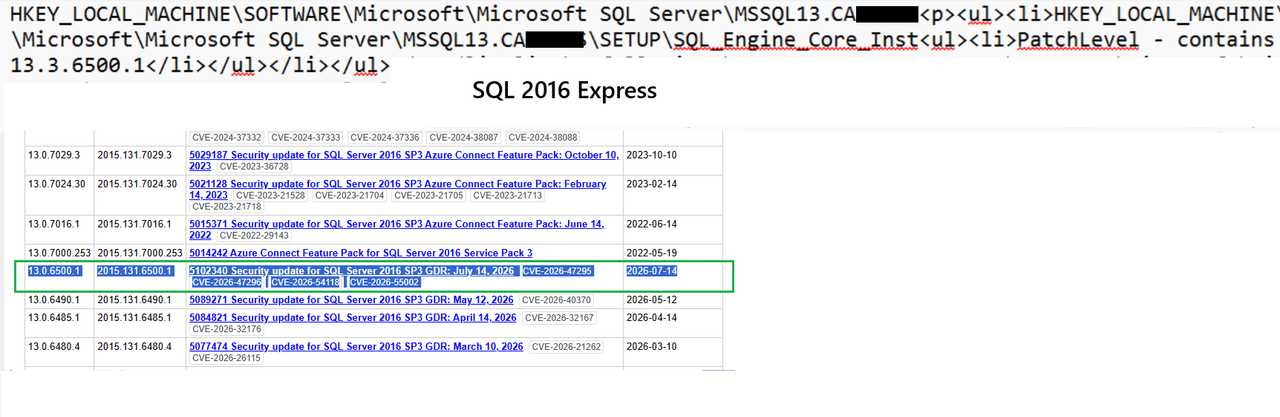
then Security Update for SQL Server 2016 Service Pack 3 GDR (KB5102340) to 13.0.6500.1
Both done with stopping services and restart. After this I got this message from scanning tool complaining about some bad values in Registry.
Do you think it's not important anymore, because of end of the life for 2016 ?
I also did not install any update after KB5102340 as I don't need any Azure.
I'm on MS Windows Server 2019.
Microsoft SQL Server 2016 (SP3-GDR) (KB5102340) - 13.0.6500.1 (X64)
Jun 10 2026 07:54:15
Copyright (c) Microsoft Corporation
Express Edition (64-bit) on Windows Server 2019 Standard 10.0 <X64> (Build 17763: ) (Hypervisor)
HKEY_LOCAL_MACHINE\SOFTWARE\Microsoft\Microsoft SQL Server\MSSQL13.CAxxxx\SETUP\SQL_Engine_Core_Inst contains 13.3.6500.1
Tried to rerun SP3, didn't help.
SERVERPROPERTY('ProductLevel') = 13.0.6500.1 *
While in registry: ...SSQL13.CAxxxx\SETUP\SQL_Engine_Core_Inst PatchLevel = 13.0.6500.2
Not sure if PatchLevel = ProductLevel ??? They are different by 1.
Thanks
VA
•
u/AutoModerator Oct 05 '26
After your question has been solved /u/Valuable-Ant3465, please reply to the helpful user's comment with the phrase "Solution verified".
This will not only award a point to the contributor for their assistance but also update the post's flair to "Solved".
I am a bot, and this action was performed automatically. Please contact the moderators of this subreddit if you have any questions or concerns.
5
u/dbrownems Microsoft Employee Oct 05 '26
"After this I got this message from scanning tool complaining about some bad values in Registry."
That's a bit vague.
2
u/CanProfessional766 Oct 06 '26
I wouldn’t ignore it just because SQL Server 2016 is out of support. The registry version mismatch may be a detection or installer metadata issue, but I’d verify it against Microsoft’s official KB before changing anything manually. If SQL itself reports the expected build that’s a good sign.
4
u/ihaxr 2 Oct 06 '26
Probably because it's end of life/support.
0
u/da_chicken Oct 06 '26
Wait, Express Edition?
Why in the world are you still using an unsupported version of Express? Express is free. You can move to 2025 for $0. It's just free. And in 2025 you get 50 GB databases now.
To answer your question directly, no, you're not getting the error because SQL Server 2016 is out of support.
However the error
HKEY_LOCAL_MACHINE\SOFTWARE\Microsoft\Microsoft SQL Server\MSSQL13.CAxxxx\SETUP\SQL_Engine_Core_Inst contains 13.3.6500.1doesn't make any sense at all to me if you're using Express Edition.MSSQL13.CAxxxxis the instance name of your server. For SQL Server Express, the instance name is fixed. It's alwaysSQLEXPRESS, just likeMSSQLSERVERis the default, unnamed instance. The registry path should beMSSQL13.SQLEXPRESS, notMSSQL13.CAxxxx. The only way to get a second instance like that, AFAIK, is to install a second instance of SQL Server Express on the same server at the same time.So that makes me think that you have multiple instances running, or that something else very strange is going on.
1
u/chenqiao Oct 17 '26
Welcome to the classic "SQL Server registry vs. actual binary version" mismatch. This is a known quirk with SQL Server service packs and GDRs, and security scanners love to trigger false positives because of it.
To answer your questions:
PatchLevel≠ProductLevelnormal? Yes, it can happen.SERVERPROPERTY('ProductVersion')returning13.0.6500.1is the absolute source of truth. That is exactly the correct build for KB5102340. The registry key showing13.0.6500.2or13.3.6500.1is a known setup bug where the installer writes slightly malformed or leftover version strings into the registry (the3typically represents SP3).How to fix it:
Since
SELECT @@VERSIONandSERVERPROPERTYare correct, your engine is actually fully patched. The scanner is just reading the wrong registry key.You can either:
13.0.6500.1.HKLM\SOFTWARE\Microsoft\Microsoft SQL Server\MSSQL13.<InstanceName>\Setupand changePatchLevelto13.0.6500.1. And checkHKLM\SOFTWARE\Microsoft\Microsoft SQL Server\130\Setupor the specificSQL_Engine_Core_Instkey and correct it to13.0.6500.1.Re-running SP3 won't help because the installer sees the core binaries are already at the GDR level, so it skips the registry rewrite.