r/SamsungTV • • 5h ago

Tech Support Reds blown out

Post image
1 Upvotes

The reds on my UN50TU7000FXZA are completely overblown in highly saturated scenes. Here’s a zoomed in clip of what I’m talking about. This photo is accurate to what the screen shows. I have tried every setting and cannot figure out how to resolve this. It’s been 6 years and I just basically live with it.


r/SamsungTV • • 8h ago

Tech Support Locking down TV functions

2 Upvotes

Model no UE50AU9000KXXU
Version 04 / UAU9000 / AU9000A-U50AA1

Long rambling post with a plea for help: Photo in comments

I have a neighbour who is 91 and starting signs of mild dementia and her TV is not helping her. She lives alone and has no children. Just a niece who lives 2 hours away. I pop in as often as I can.

She's a very clever woman. A research physicist in her day (worked in the lab next door to Charles Kao).

Her Samsung smart TV is causing her a great deal of distress. She's aware that she's losing her abilities and she hates having to ask for help.

She gets in a muddle with multiple remote controls and so the niece has configured things so that the Virgin TV remote works the TV, sound bar and the virgin box. We've hidden the TV remote.

Every now and then, she hits the power button on the remote and the TV goes to some kind of internet based Raduken thing and she can't get out of it. This needs me to go in and retrieve the TV remote from where we've hidden it and set the source on the TV back to the HDMI3 port.

Is there a way to lock down the TV so that it will only ever look at the HDMI3 port? Maybe an adjustment to the TV firmware would do it.

A solution would be a great help to a lovely old lady.


r/SamsungTV • • 13h ago

Tech Support Older Samsung TV: Xbox game screen oversized.

Post image
1 Upvotes

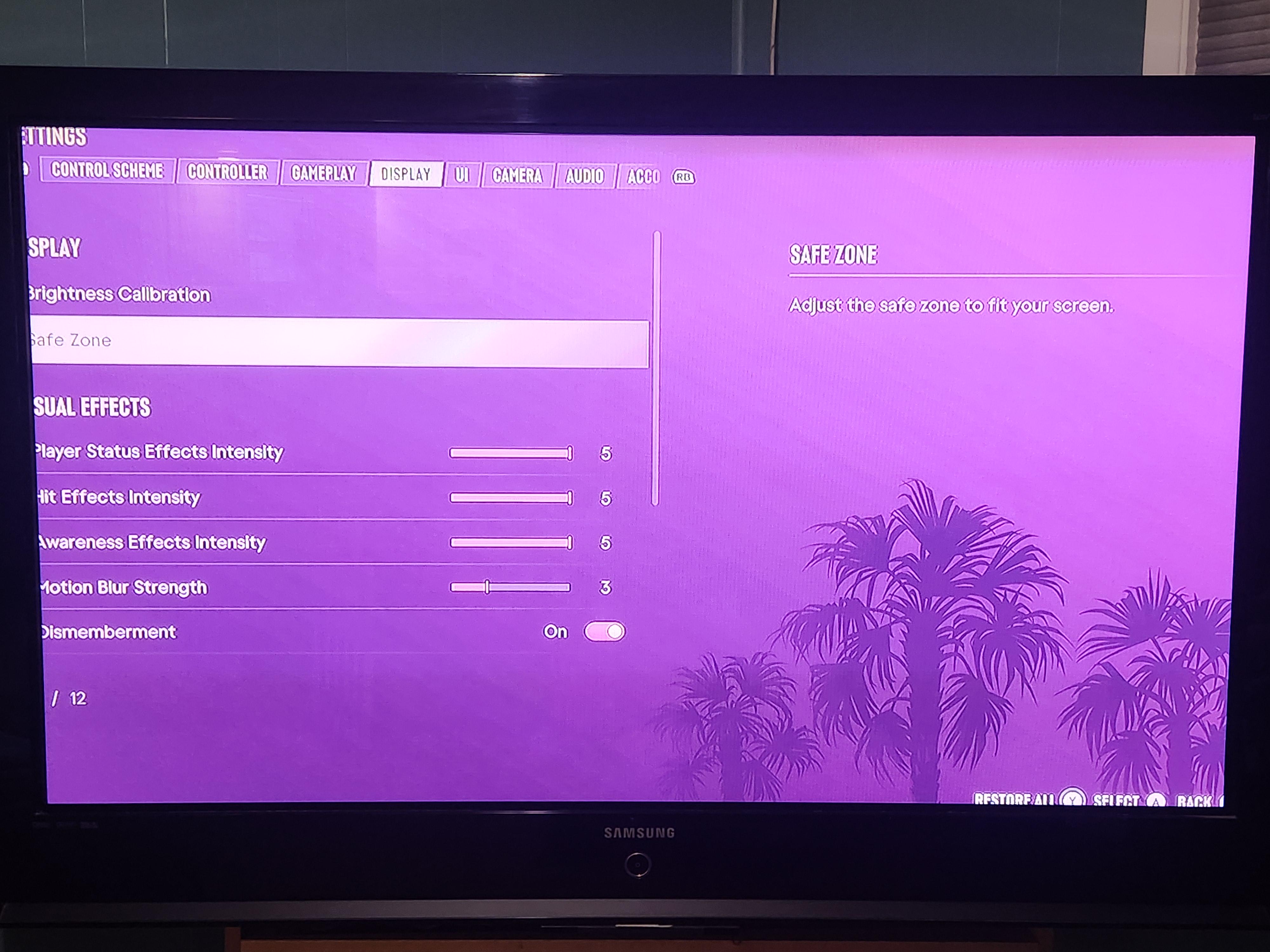
As seen in the image, some words/text are pushed off of edge of screen. Is there any way to fix this? The menu through the TV doesnt allow any adjustment and neither does the xbox. Are we just out of luck? This has been an issue in the past for games... but seems exponentially worse with gta6.

Model # HPS6373X/XAA


r/SamsungTV • • 1d ago

Tech Support Any idea about these bars across my screen?

Post image
2 Upvotes

These two bars towards the top and bottom. No idea when they became a thing. They could have always been a thing and i just haven’t noticed until GTA lol. Hoping it’s not an issue that would involve me needing to get a replacement/repair. They persist no matter what i’m doing on the TV. Recently updated it hoping it would go away. Thanks!

43” Q8F QLED
Model #: QN43Q8FAAFXZA


r/SamsungTV • • 2d ago

Tech Support Ambient Mode

Post image
0 Upvotes

Every time I try to load ambient mode on my (Samsung - 65" Class QN85A Series Neo QLED 4K UHD Smart Tizen) TV I just get a loading screen and no picture or option to change the screen image.

Any ideas on a fix or what is going wrong?


r/SamsungTV • • 2d ago

Tech Support Samsung TV TU32F6005F flashing red

2 Upvotes

Hi,

My TV can turn on and off, no graphic problems either. But I can't use the remote and I must use the button to turn it off.

There's a quick red blink and every time I try to use the remote, no matter the button, it opens the accesibility settings and after that it's just not responding to anything.

I've tried to unplug the TV or unplug the PS5 and the Apple TV or just the HDMI cable, but it didn't work. Maybe there's a software update to do but I can't access it.

Any idea about how I can fix this ?


r/SamsungTV • • 2d ago

Tech Support Samsung QN80H

2 Upvotes

Hi! I recently bought a Samsung QN80H. Is it normal for reflections on the screen to look wavy or distorted when viewing it from an angle?


r/SamsungTV • • 2d ago

Purchasing EU/UK What is the difference between the different Neo QLED?

2 Upvotes

What is the difference between the QN82H, QN80H, QN83H and QN84?


r/SamsungTV • • 3d ago

Purchasing EU/UK aesthetic flaw? S95H QE65S95HFTXXN

Post image
0 Upvotes

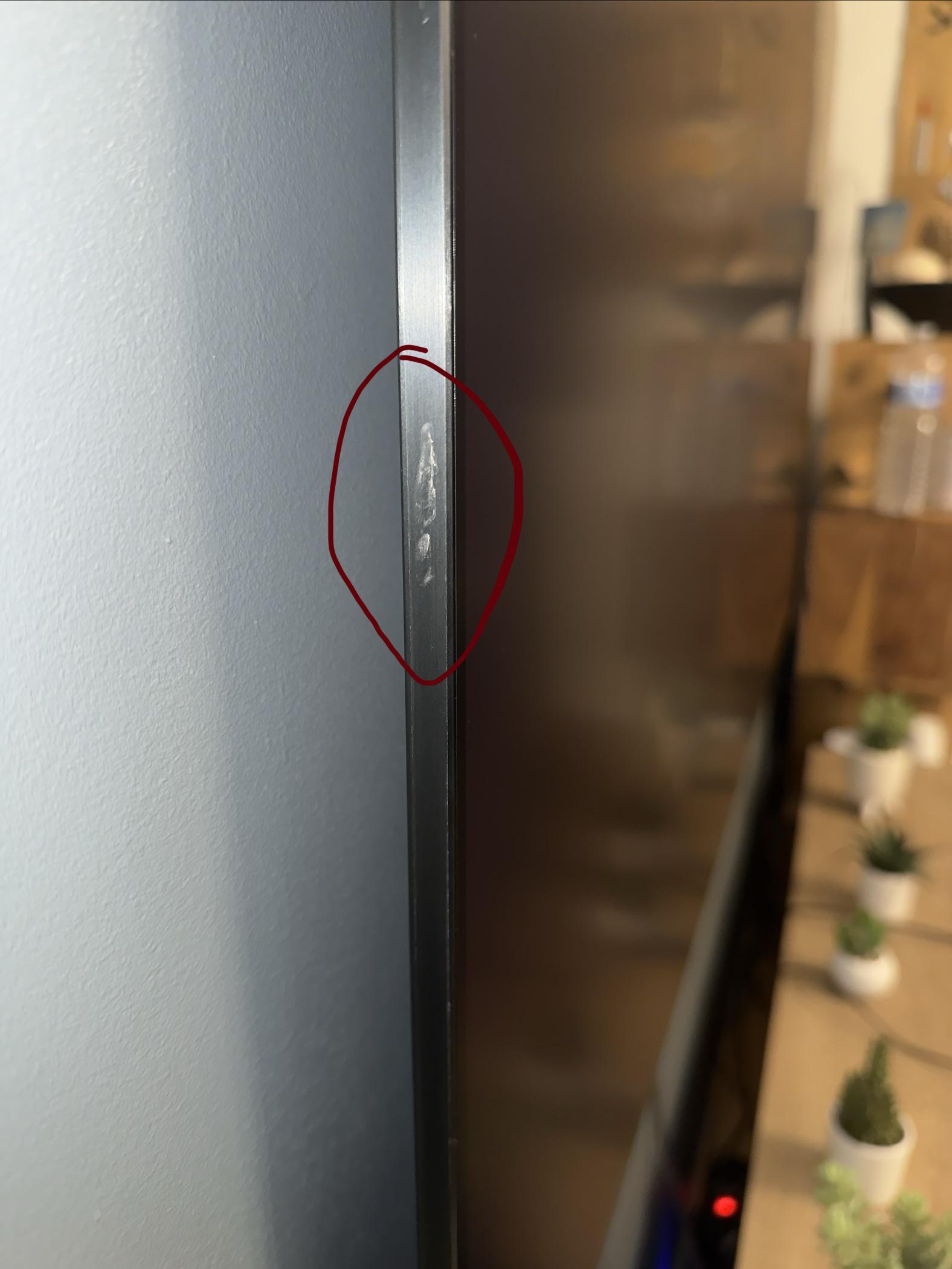
Hello, following the delivery of my S95H TV, I noticed a sort of chip or dent on the side, which has also damaged the protective film along the edges. In your opinion, is this a defect that could affect the durability of the TV? Thanks by advance for yours answers.


r/SamsungTV • • 3d ago

Tech Support Samsung smart TV 4k

4 Upvotes

After doing a software update on my samsung smart tv 4k, the screen stopped working. how can i remove the software update, how can I downgrade the TV's software update? Model: UN43RU7100FXZC Software Ver: T-MSLAKUC-1500.5 Serial: 08G93CEM700163H


r/SamsungTV • • 3d ago

Tech Support Old plasma TV I want to use for retro gaming can anyone help me pin point the issue? PN42A450P1D

Post image
1 Upvotes

Background -

The TV was working before being put into storage.

It spent approximately 3 years in an insulated storage area.

When I first tried plugging it in after storage, the red standby light came on.

The original AC power inlet/EMI filter assembly had noticeable corrosion, particularly around the ground pin.

There was also some surface corrosion on the PC cord plug.

Red standby light stays solid.

Issue -

Pressing the physical power button does absolutely nothing.

Pressing the power button on the remote also does nothing.

No relay clicks or other noticeable startup sounds.

No picture or screen activity.

I previously heard a very small crackling sound when plugging the TV in, although nothing visibly exploded or smoked, 95% sure it was just a board charging up.

What I am wondering -

Does this sound more like a failed main board or a faulty SMPS/power supply?

Can the standby portion of the SMPS work while the main power section is faulty?

What I have done so far -

Replaced the internal AC inlet/EMI filter assembly with a replacement compatible with the PN42A450P1D (Samsung IG-N06BES).

After replacing it, the standby light stopped flickering and now stays solid red.

However, the TV still will not turn on.

I understand that plasma TVs contain dangerous high-voltage circuitry, so I'm not planning to probe live circuits myself. But I am perfectly fine swapping boards in the TV as I have done so before.

Nothing else was corroded or rusted in the TV when inspecting inside

I also understand this TV is old but I want to fix it for fun

it would cost me maybe 70 dollars AT MOST to buy a SMPS and a main board, but I don't want to buy it if I do not need both

r/SamsungTV • • 3d ago

Purchasing EU/UK Can I hide the playback overlay? (Samsung S90D, USB video)

1 Upvotes

I have a Samsung S90D Smart TV (Tizen OS) and play video files directly from a USB stick.

Whenever I pause, fast-forward or rewind, a huge playback interface appears over the video, showing information like the timeline and remaining time covering a huge chunk of screen. It stays on screen for around 5 seconds, which is really annoying.

Is there any way to hide this overlay completely or minimize the display?

Thanks!


r/SamsungTV • • 3d ago

Tech Support HELP: Samsung Micro RGB R85H – pink/magenta tint on white at low brightness. 2nd unit, same issue. Samsung says “that’s how Micro RGB works”?

Post image
2 Upvotes

Samsung 65" Micro RGB, Samsung 65R85H (India)

The first unit had a pink/magenta tint on full-white screens. Samsung’s technician confirmed it and the unit was replaced as DOA.

The replacement has the same tint. Samsung’s engineer acknowledged it at my home, and Samsung even approved another replacement by phone. Then their head office reversed it: “the TV is OK, it’s red light diffusion, that’s how Micro RGB works.” No inspection report was shared.

What I see:

  • Full-white/grey screens turn pinkish/magenta, and it gets stronger at lower brightness
  • Pinkish patches at top-centre and bottom, slightly green on the right
  • It’s there in every mode; changing picture settings doesn’t remove it

I photographed it in RAW from a tripod, straight on: the shift is about Δu′v′ 0.008–0.012, mostly blue rising relative to green, not red. So “red diffusion” doesn’t match what I measured.

Image: true-colour photo vs the same photo with colour differences enhanced ×3.

R85H/R95H owners:

  1. Do you see a pink/magenta shift on a full-white screen at low brightness?
  2. Is this a known issue with Micro RGB, or a defective unit? Is Samsung right that it’s normal?

r/SamsungTV • • 3d ago

Purchasing US Best options under $500

1 Upvotes

Hello, I could use you wonderfully smart and plugged-in people’s guidance please!

I bought my Samsung UN55NU710D (which upon research is a LED LCD panel) back in 2019. It’s been fine, but now I have struggled with issues with certain apps like Netflix constantly freezing for over a year which at times makes the tv unusable.

I finally need to just bite the bullet and get a newer TV.

I can’t justify spending more than $500 and honestly, when I saw some TVs like the mini-LEDs are priced at $250-300 right now, that looked like a great deal to me. It’s even less than I paid back in 2019, I recall this TV being more like 400.

I don’t want to get a worse TV than I currently have, but it seems like no matter what new TV I get, it’ll be a technological leap from what I have?

Anyways— any opinions/expertise is appreciated!

I’ve been trying to dive into reviews but get pulled into the “best” TVs and I don’t have $1000+ for a TV.

Thank you!!


r/SamsungTV • • 4d ago

Tech Support Parts of screen being cropped off

Post image
2 Upvotes

Certain parts of my screen are still being scrolled off even when changing the aspect ratio from 16:9 to 4:3. Does anyone know how to fix this, it’s interfering with my game lol. If you look in the bottom right corner of the picture , you’ll see some of the buttons being cropped off. Model number is: HPS4233X. Thank you!


r/SamsungTV • • 4d ago

Tech Support Avoid at all costs

17 Upvotes

I just wanted to say how brutal Samsung televisions are. I bought a S90D last summer, obviously the evening before GTA6 my power supply goes like everyone else. Well documented and clearly a design flaw. After stumbling through support I am told I’m on the hook for a replacement power supply.

Every appliance in my home is Samsung. The second I get this television fixed, I am selling it. I will not buy anymore products from this company. Flawed product they don’t stand behind. Unbelievable waste of time and money. Irate.


r/SamsungTV • • 4d ago

Purchasing EU/UK OLED 77S90H or 65S95H

5 Upvotes

Hi, between these two, which one should I choose: a bigger screen (77S90H) or a better picture (65S95H), on paper at least? Does anyone have experience with either of the two?

Have the same panel QD OLED not WOLED (europe region)

These two TVs cost the same on Black Friday


r/SamsungTV • • 4d ago

Tech Support Left the tv on while I went shopping and came home to this? Am I screwed?

Post image
7 Upvotes

I can hear sound still when I hit the home button. Is it the panel or can hardware be loose or broken inside that’s replaceable? Tv is like a year old.

I think the Model is U8000F. My TV wall mount is blocking the tv information in the back.


r/SamsungTV • • 4d ago

Purchasing Asia/ME Need help finding a remote

0 Upvotes

Don’t know what remote is compatible with the tv
Model:- LA46B530P7RXZN


r/SamsungTV • • 5d ago

Tech Support no pictures just sound

Post image
1 Upvotes

hi everyone, i was playing gta 6 on my screen when all the sudden the tv stopped showing pictures.

I tried unplug and plug in but still the problem stayed the same, tried to unplug the playstation still the same even when trying to use the installed netflix app on the screen.

what should i do now

i have posted the model no. as a pic


r/SamsungTV • • 5d ago

Purchasing EU/UK Samsung software update bricked my $5000 TV? — any film played in any app makes the TV flicker to black every 1 second, only happens in apps.

3 Upvotes

Just did a software update for Tides on my QE85QN90, and the TV is now unusable.

SAMSUNG literally bricked my $5000 TV with a software update.

The moment I play any video inside any app, the screen flickers black every 1 second. This does not happen on the menu via smart hub channels, only in installed apps.

I already followed every single suggestion I could find:

  1. I already turned off all HDRI, enhanced clear, motion enhancement, and all other "smart features" off, and this did not fix the problem.
  2. I ran a Picture test that said "all tests successfully passed".
  3. Unplugged all HDMI devices.
  4. I did the full 2 min without power.
  5. Did the Hold the power button on the remote to clear cache.
  6. Did a Smart Hub Reset.
  7. Finally I also did a full factory reset, cleared everything, logged in with the user and reinstalled a random app (Netflix). The same thing, the moment a film starts playing the flickering is back.
  8. I tried to contact support, they basically got me to ask a forum, last question was "did you buy it over 2 years ago" and it just went to "sorry, we can't help you" and ended the conversation.

THIS IS 100% CAUSED BY THEIR UPDATE. Had absolutely zero problems, but every day they kept asking me to update...

I think it has to do with the way HDRI video feed gets processed (even if HDRI features are off).

Regardless of the cause, they basically software bricked my TV with the update -- which I'm pretty sure it's illegal, at least in EU.

Anyone else dealt with something like this? Any recommendations?


r/SamsungTV • • 5d ago

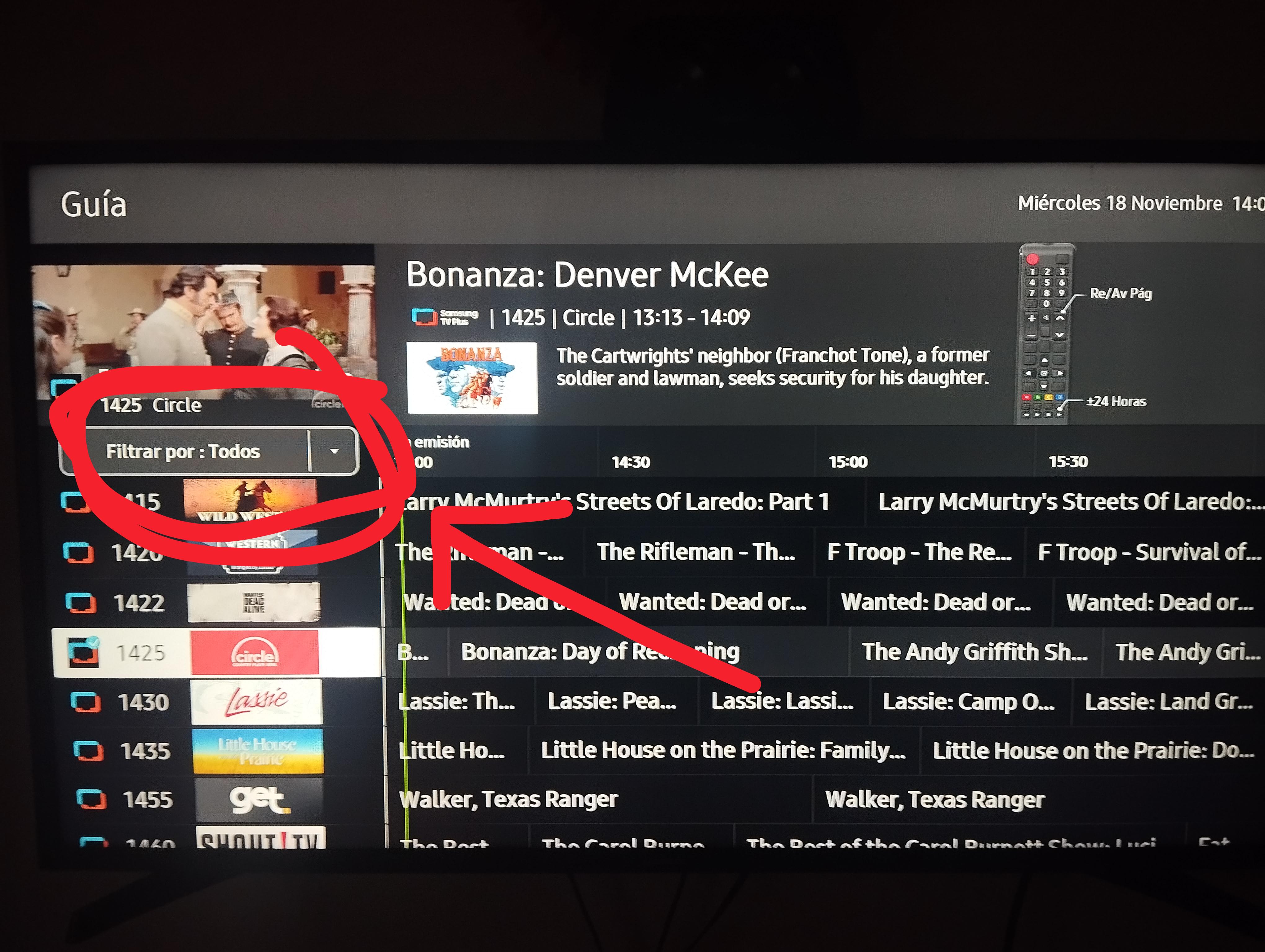
Tech Support Help getting to this filter in the guide

Post image
0 Upvotes

Is an old Samsung 5 series tv. How can I get to that filter list?

Model: ue40t5370auxzg

Software version: 2743


r/SamsungTV • • 5d ago

Purchasing US My $2000 lesson

32 Upvotes

In the words of the great Alanis Morissette, "You live you learn."

We purchased a 75" QLED Samsung television from Sams club as we have done in the past. But this time, eight months after having the TV, it started streaking inside. Upon receiving this television, we noticed what we thought was only cosmetic frame peeling. There was no impact, drop, collision, misuse, or accident involving this television, nor any sign of external damage on its box at arrival. The condition & issue was reported to Sam's Club when the television was initially received and unboxed. The screen and quality was superb! What a beauty!

We spoke to Sam's club, they offered to replace the tv or give us a $50 inconvenience fee. It was such a chore to get help to mount the tV. So We asked to take the discount, but $1 00 instead. Sam's agreed. What we did not realize was that the tv arriving already damaged meant a voided Samsung warranty.

Then 8 months later a visible line or streak begins bleeding at the same corner where the frame defect or damage was observed but about an inch higher.

Samsung sent out a tech to inspect and reported the damage. Long story short, Samsung said oh well too bad so sad. No warranty.

Lesson: Always take the replacement.


r/SamsungTV • • 6d ago

Tech Support Dead Pixels(s) or bug?

Post image
1 Upvotes

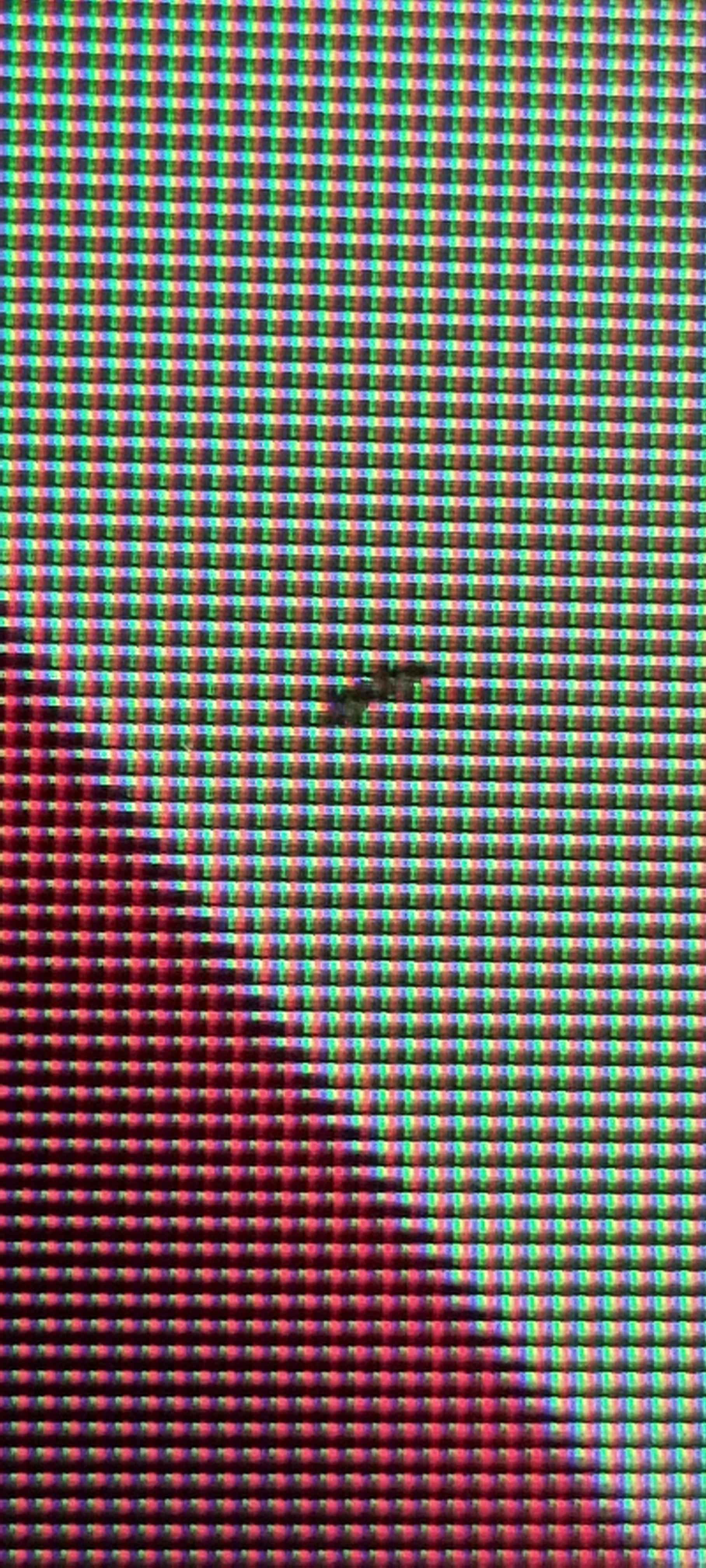
Hey all, quick question for anyone who's experienced this at all. I've just spotted this whilst gaming this evening, TV is a 2021 Samsung QLED QE55QN94AATXXU, could I get opinions on if it's a pixel issue or possibly a dead bug? I've run the diagnostic check in the settings and it's consistently there. Thanks.