r/SiserJuliet • • 18d ago

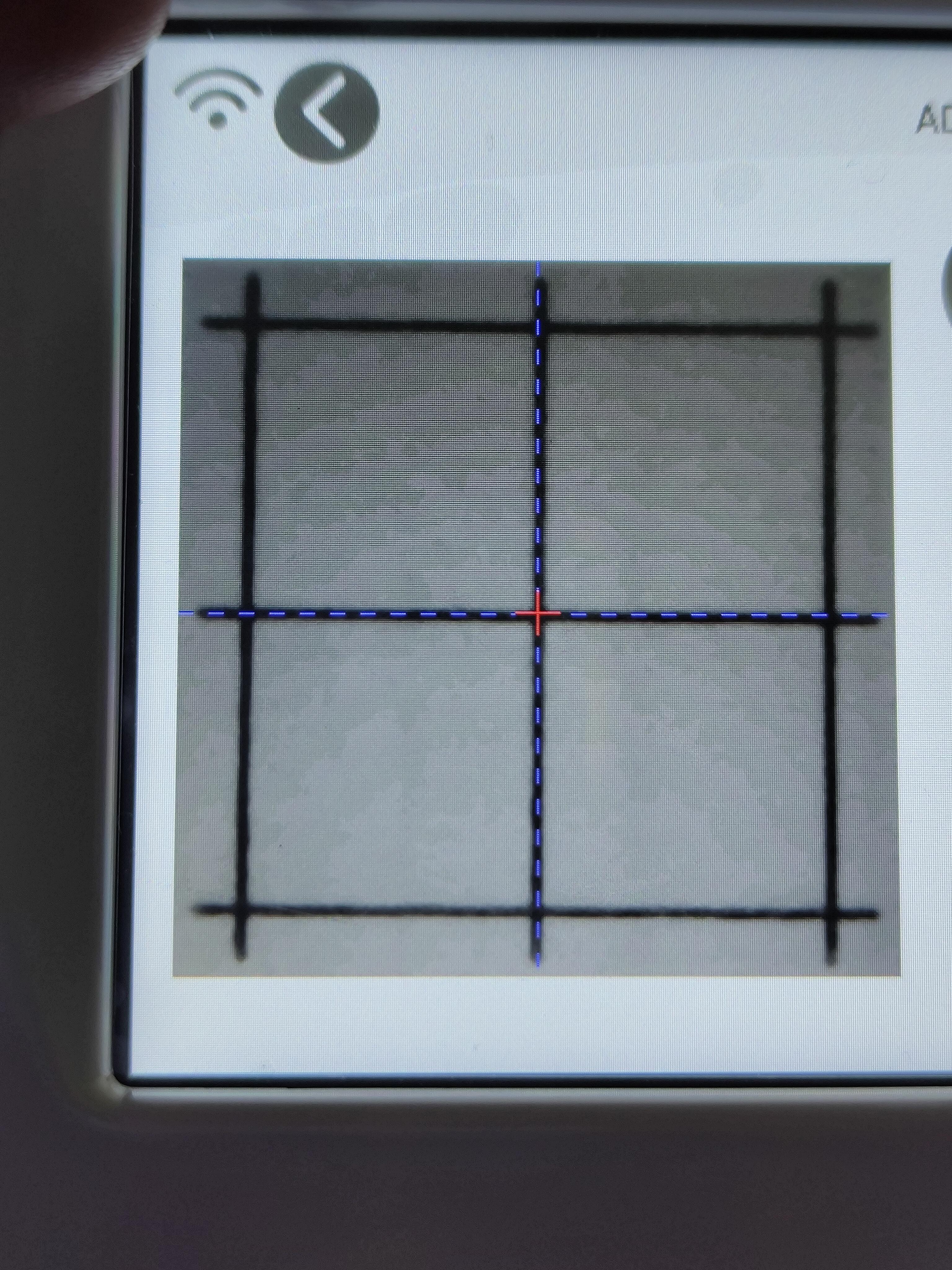
Calibration help please

Post image

How to fix this? The black drawn lines are straight but a little rotated clockwise. Like the upper vertical black line is more to the right and the lower is more to the left. The horizontal lines too. I've tried many times. I've also fed the mat with the paper numerous times. Rollers and down. Please help πŸ™ after service in my country is crap 😭

5 Upvotes

26 comments sorted by

4

u/DigitalDieCutting 17d ago

The best thing to do next is test this current calibration by printing and cutting a "litmus test sheet" with vertical and horizontal cut lines. I recommend using copy paper and either File 01 or 02 at this link, depending on if you prefer A4 or Letter size. Then, post photos of the first arrow cut and confirm if the second arrow matches the same cut. Do NOT keep repeating the calibration that uses a pen because there's a second step calibration that will tweak your calibration to align the BLADE (instead of the pen) with your printout. Instructions for THAT calibration are at the second link below:
https://drive.google.com/drive/folders/1i0xObh2M6DccCGQEkhvYQAzmpAF2zNIx?usp=sharing
https://drive.google.com/file/d/16Lksf97_6lSnyNU3z_b6epu9yU5kzDrf/view?usp=sharing

1

u/dean88dean 16d ago

I tried the instructions on the PDF using the blade and camera set, changing the arrow values but i used this image instead. I can't do anymore printing since my black ink is acting up and i ran 3 cleanings already, have to wait til tomorrow.

Cuts were inconsistent with all 5 images, but only a little bit off. Like on 1 image, left side of the square is cut centered but the right is a little to the left. Other images can have cuts not aligned on other sides too but not necessarily same with the other images.

Can this be due to a warped mat? It's new but incan see it's a lil bent where the rollers roll. And how do you guys feed the mat? You push it to the rollers and let the machine roll it in by pressing arrows or do you get the roller up then insert it in the lower the roller? And should all 3 roller levers be down at the back? I only do sticker print and cut.

1

u/dean88dean 16d ago

This is the image

1

u/dean88dean 16d ago

Also, is it required to stick the media as straight as possible to the mat and the mat as straight as possible to the machine? Is it also necessary to put the media on the lower left only?

1

u/DigitalDieCutting 16d ago

It's definitely not a requirement to have things as straight as possible... only straight enough such that when the camera stops where the software has told it to stop, it can take a photo and see the corner of the reg mark. Also, the printout can be anywhere you like on the mat but you don't want the mat bowing down, say, in the front because it's a 24" long mat and you've put the printout at the very top and the front of mat is drooping down due to weight. Does that sense?

Now, let me cover some more IMPORTANT aspects of getting accurate results: First... since you're trying to fix a calibration, make sure the Speed is set to 7. Later on, once you have the issues resolved, you can use a higher speed unless you're trying to cut RIGHT ALONG the printed image. If you have a contour added, then cutting at a speed of 9 or maybe 10 is fine.

Also, you don't want a pinch wheel in the middle of your mat. That will cause the mat to prematurely warp. So, you can unhook the bottoms of the two springs in the back, leave them dangling if you like and then that middle pinch wheel won't drop down. But if ever cut vinyl or HTV without a Mat, you can rehook them, if you like You can also fully unhook the top and bottom and put those springs into a drawer or whatever. :)

Next, you ALWAYS want the outer pinch wheels travelling in the non-sticky margins of the mat. Do not have one of them half-over/half off the mat. That can skew the mat. At the same, time those outer pinch wheels need to be over the grit shafts beneath and, again, not have a half/over, half/off situation. Think of balance and symmetry ALL the time with regards to pinch wheel locations. SO importing for keeping that mat traveling smoothly and evenly in and out of the cutter.

I don't 2 hoots about the circle or the star in your test shape for now. What matters are perfectly HORIZONTAL and perfectly VERTICAL lines. So, the square is fine if you don't want to use an arrow pointing to the right. I do need photos where I can clearly see the results close up which is why I always ask that my arrow file be used. That way I know if something posts a result and the photo is rotated or upside when I cannot determine from a square. But if you swear to confirm that what you post in a photo is identical to how you see the shape on the screen, then it's fine to use a square. :)

1

u/dean88dean 15d ago

My speed is at 5. My mat is 12x12 and a little bent from where the rollers are. I currently have little time and still have issues with the printer. When it is resolved i will unhook the middle roller springs and try the black arrow print and cut as well.

Is it really that hard to move the rollers? I find it most difficult to move the left one to the left end where it will still sit on the black texture underneath but away from the sticky part of the mat. I used two hands to move it.

I appreciate you and the other people responding and helping out ☺️ this is really stressing me out πŸ˜₯

1

u/DigitalDieCutting 15d ago

Yes, they are typically difficult to slide because you wouldn't want them vibrating out of place during high force cuts (as happened with other semi-pro cutters I supported years ago). I call it "tugging them into place" and I use two hands... one in the front and one in the back.

3

u/jselwood 18d ago

Hi, I see what you mean, but does it matter? I think for calibration as long as you are in the center it’s ok. Maybe I’m wrong though.

1

u/dean88dean 18d ago

I actually don't know but when you try to extend that pen line out it will be rotated more or must i say the gap to the blue line will be greater. I could be overthinking though 😣 can anybody confirm that their machines work perfectly with print and cut jobs but have this misalignment too in calibration?

2

u/ThisIsntRealWakeUp 17d ago

I don’t think it matters at all.

When you do a print and cut, the camera goes and scans registration marks on all four corners. From that it can calculate the tilt and skew of the printed page.

3

u/DigitalDieCutting 16d ago

So, maybe providing you a one page version of the manual calibration showing the IMPORTANCE of not using a page of randomly shaped stickers, but instead use some arrows will illustrate how you should first perform a basic test so that you can then adjust your calibration to be more accurate. Then we can better judge if the camera issue you first reported is affecting the accuracy of your results: https://drive.google.com/file/d/1JSEI0IH7gAWD_AT4GoeqYY0A8rndossW/view?usp=sharing

2

u/dean88dean 16d ago

I just saw this now and I've just responded to your previous reply πŸ˜…

2

u/dean88dean 14d ago

Ordered new mats but aftermarket ones so i can rule out warped mats. Will update soon

1

u/dean88dean 12d ago

I just did some prints and cuts. Followed your instructions and adjusted some things.

-Speed -7 -Used your black arrows file -Copy paper A4 -Did the adjusting of either x or y one tap at a time before cutting -New mat 12x12 light grip -Rollers: middle is unhooked. Both end rollers set to the sides where it won't touch the sticky part of the mat but still inside the grip underneath -Placed things in front and at the back of the machine to support the mat and prevent it from drooping.

Results: When i was trying to get the right Y, both arrows seemed to cut a lil bit lower (y=4.47) so i tried 1 tap higher (y=4.38) and the cut became higher. I tried 4.47 again but now it looks more equal. Is this normal? Like can 1 tap get you above or below the middle?

As for if both arrows for each cut setting cut the same, i can say almost like both are cut a bit higher but there can be a very small difference like the size of a thin hair.

How accurate should i expect this machine to be? Like how much is the smallest misalignment that is considered fine? Like don't expect it to cut perfectly in the middle of a .5mm line? Or can it do that?

This is the latest cut. Haven't tried an actual cutting yet. πŸ˜΅β€πŸ’«

1

u/DigitalDieCutting 12d ago

One tap is equal to 0.1 mm, thus the best the calibration it can do is Β±0.1mm. Now this is better than what other cutters in this same price range can offer but I do wish Siser had opted for a finer adjustment given other camera cutters designed and manufactured at the same facility have their scales set so that one tap is equally to 0.025 mm. With those, I honestly cannot tell the difference in a single tap but I certainly can with two taps (0.05 m). But not to worry. LDS offers a Contour Bleed and can be set small enough that it will compensate in the event you're needing to cut right along a printed image. If you are using an outer contour cut, then the Β±0.1mm should be small enough to not show up at all.

1

u/dean88dean 11d ago

So with the 0.1mm per tap and the machine's capability limitations, is this the best cut it can give? The misalignments are also inconsistent with different parts of the cut like some are cut more to the lower left, others to the upper right. Is this totally normal and within the accuracy and tolerance of the machine?

1

u/DigitalDieCutting 11d ago

Since I'm not a Siser representative I cannot attest to whether or not this is within their stated accuracy and tolerance. I urge you to contact Siser NA directly at this point for their input. Also, did you utilize the bleed or inset option I showed in my prior response (the cartoon cow screen shot) because they will most likely recommend doing it since they optied to have it included in their software.

1

u/dean88dean 10d ago

I intentionally did not use the bleed to see how accurately it will cut. I asked someone in siser asia group, i think he was an admin. I asked if this is as good as it gets with the machine's capabilities. He said definitely not.

1

u/DigitalDieCutting 10d ago

I would definitely take up Siser Garion's offer to help you privately. He's proven to be someone very qualified and an all-around caring person. Good luck and definitely let us know if you get the issue resolved. It's through the sharing of solutions that ends up helping many more cutter owners like you. :)

2

u/dean88dean 2d ago

currently still talking to him. will update when resolved. appreciate the help! thank you

1

u/DigitalDieCutting 2d ago

I did think of one more piece of information that would be very helpful in correctly analyzing what we're seeing... do ANY of these images have a white border, thus not presenting evidence of misalignment? For example, the octagon near the bottom right corner? Or others? Maybe if you could mark an X or something on any of the shapes in your prior photo that we should ignore based on them having all white around the outside? Thanks!!!

2

u/magic_matt1 17d ago

Did you try cutting after calibrating? You're looking for the center of where the lines crust, so your should be fine. I used this calibration once and didn't even bother with the pen or printing anything. I just had the blade cut the lines and lined up with that.

1

u/dean88dean 17d ago

Yes, i printed and cut and this is the upper right

1

u/magic_matt1 17d ago

You're going to want to try a manual calibration. Don't load anything into the machine, but press cut. While it's trying to scan, press and hold the little light icon in the bottom right corner of the screen, and release when the OK turns gray. This will take you to a manual alignment screen.

You want to move the red line in the opposite direction of where it's currently cutting. The back arrow on the top left will save it and you can try cutting a test sheet.

1

u/dean88dean 17d ago

Yes i did a kiss cut and this is the peel. Looks like shadows but they are the misaligned cuts.

1

u/DeathstrokePHP 18d ago

Try thicker paper? Maybe mat slippy? I would do print and cut with a black border square and see the result