r/Sketchup • u/egg_kun • 1h ago
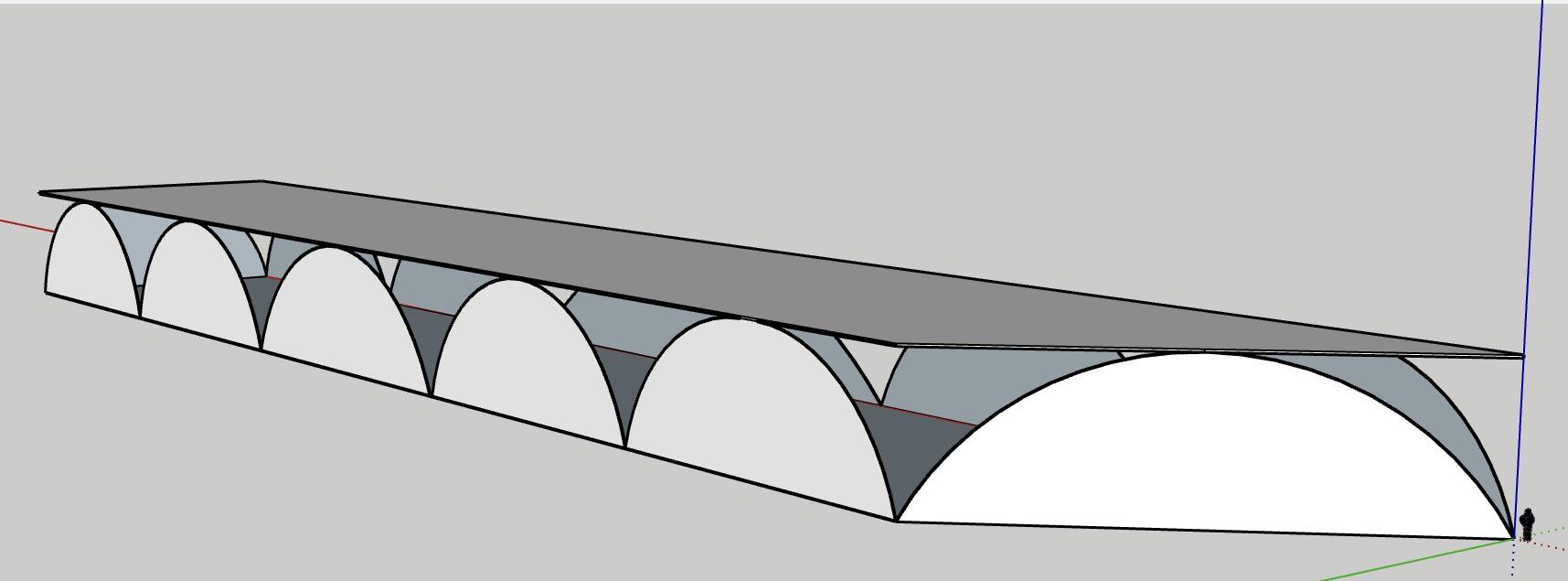
SketchUp 2027 lags due to Copy Along.
When I use Copy Along and try to change the trajectory of the copies, the performance drops VERY significantly, and I can’t do anything about it. Is there a way to fix this?
r/Sketchup • u/egg_kun • 1h ago
When I use Copy Along and try to change the trajectory of the copies, the performance drops VERY significantly, and I can’t do anything about it. Is there a way to fix this?
r/Sketchup • u/CryptographerOdd788 • 13h ago
Wanted to share a quick update on a SketchUp site-modeling workflow I've been building-you can now toggle between rectangular blocks or circular radius medallions on an interactive map right inside SketchUp, and it generates extruded buildings (with hollow courtyards), unified road networks, parks, water, and draped 3D topography at (0,0,0).
Curious what other map layers or export options you'd find most useful for early massing!
r/Sketchup • u/CryptographerOdd788 • 1d ago
Hey everyone,
As an architect, I got tired of juggling external .osm and .asc downloads or hitting 1 km² area caps every time I needed urban context massing. So I built SiteSprout 3D a native SketchUp extension with an interactive map window built right inside SketchUp.
How it works:
Happy to answer any questions or take feature requests for the next update!
r/Sketchup • u/CampaignFit9251 • 15h ago
Version: 26.11.22.08
Pull infinite guidelines without accidental mode switches — with built-in multiply and divide arrays.
Every SketchUp user knows the most common frustration of the native Tape Measure tool: you try to pull a parallel guideline, accidentally click near an endpoint or vertex, and SketchUp switches to measuring point-to-point instead of creating a guideline.
MoGrOv Tape Measure removes that interruption completely and brings SketchUp's array workflow directly to guidelines.
Multiply & Divide Guideline Arrays: Immediately after placing a guideline, create evenly spaced layouts without redrawing:
Feature
Native Tape Measure
MoGrOv Tape Measure (v26.11.22.08)
Clicking endpoints / vertices
Switches to point-to-point / guide point
Always pulls an infinite guideline
Mode switching
Context-dependent (easy to trigger by mistake)
Exclusive Down Arrow (↓) toggle
Multiply & divide (*N, /N)
Not available
Built-in with live distance updates & single Undo
Snapping to Blue Z-axis in open space
Inconsistent
Dedicated 3D ray-based axis snapping
Nested groups & components
Supported
Supported (respects local active axes)
Cursor feedback
Single cursor
Mode-specific cursors anchored to the tape hook tip
Compatibility: Tested on Windows (SketchUp 64-bit).
r/Sketchup • u/Late_Holiday_1133 • 1d ago
SketchUp Go can’t run extensions, so none of the cutlist plugins like OpenCutList work with it. I got tired of doing cutlists by hand for a cabinet project, so I built a website for it. You download the .skp from SketchUp Go, drop it in, and it gives you a cutlist with every part’s size, quantity and material. It also suggests sheet layouts for plywood and MDF, works out board feet for lumber, and makes a “shop packet” PDF with dimensioned drawings of every part. If you have a label printer, it’ll print 4" x 2" labels for each part too, which have been great for keeping my cabinet parts straight.
It’s free, no account or login, and it runs in the browser, including on iPad. Your model never leaves your device; it’s read right there in the browser. There’s a 24-second demo on the front page if you want to see it in action.
It works best if each part is its own component or group. If you named your components, it uses those names; anything unnamed, it asks you to name. There’s a sample bookcase if you want to try it without a model.
It’s very much a work in progress, and I’ve only tested it with my own Go models. I’d love feedback, especially if it chokes on your file. There’s a feedback link at the bottom of the site, or just comment here.
r/Sketchup • u/CampaignFit9251 • 1d ago
Hi everyone,
Modeling clean, watertight threads in SketchUp manually can be a real headache—especially when you need them to be 100% solid for 3D printing or Solid Tools.
I put together a quick video showing how my extension, MoGrOv Threads & Bolts, generates screws, nuts, and internal threads in just a few clicks with adjustable clearances.
It's free to download and use from my site: https://www.mogrov.pro (there's an optional donate button inside the plugin if you'd like to support development and remove the donation reminders).
I'd really appreciate any feedback, questions, or suggestions from fellow SketchUp users!
r/Sketchup • u/seattlecp • 2d ago

Vectorsmith is an extension for SketchUp that was just released for beta testing. The three tool sets currently contain a handful of parametric tools unique to sketchup, with a lot more to come. SITE and CNC will be free through version 1, and BASE is intended to be always FREE. Please check it out - vectorsmith.app
r/Sketchup • u/the_dosk • 2d ago
I try to get my shortcuts all on one side of the keyboard so that I don't have to shift my hand to the other end.
Does anyone else do this?
[Diagram has white text for button press, yellow for with Shift, orange for with Ctrl]
I've tried to pair up similar tools to the same button (plus Shift/Ctrl) - Tape + Protractor, Hide + Unhide all, Orbit + Pan etc.
My shortcuts:
Visibility
Component/Group
System
Views
Viewpoint
Select
Measure
Draw
Modifiers
r/Sketchup • u/Witt2026 • 2d ago
Debo hacer un camino en pendiente en mi terreno de sketchup y necesito ese pluggin, no puedo descargarlo en LibFredo6
r/Sketchup • u/bratphobico • 2d ago
so im trying to create a model for my assignment in uni, just wanted to know whether something like this would be possible to make at all on sketchup? if not i may need to pivot to using another software like blender but im more accustomed to using sketchup as an interior student (although as you can tell by me asking this question, im not too well versed in it yet) 😄
r/Sketchup • u/Any_Mud_639 • 4d ago
I am new on sketchup didn’t have no idea how things work. I’ve been trying to make the roof look organic. But have absolutely no idea how I can curve the roof. I’ve tried looking at videos, searching on the Internet, but still nothing. I’m not using a computer, since I saw there is an option if I download sandbox, but unfortunately, for now I only have my iPad.
r/Sketchup • u/PsychologicalCash713 • 5d ago
One of the things that always frustrated me in conceptual modeling is resizing a window or door without stretching the frame profiles, while having the wall opening boolean update automatically across thick walls.Been working on a lightweight browser-based modeler where custom IFC 4.3 properties directly drive the assembly dimensions and recalculate the wall opening CSG in real time.
r/Sketchup • u/akahsingla • 5d ago
r/Sketchup • u/vazoustudio • 5d ago
r/Sketchup • u/seattlecp • 6d ago
I am a recently retired landscape architect who spent many years modeling in sketchup, blender, revit, and 3d studio max, not to mention rendering with v-ray and other peripheral engines. One of my favorite things was writing code for autocad, however, and so it's been fun to realize some tools that I've always wanted to build but never had the time. Vectorsmith is a free download if you think some of them might be helpful (CNC needs some export confirmation with the Shaper Origin, but that will be soon)
r/Sketchup • u/Apart_Chocolate_3751 • 5d ago
Hi,
I have been using my add on between Blender and Sketch Up for a while, it enables you to live link from blender or bring Sketch Up models to Blender easily.
It’s a free add on so feel free to test it out. I appreciate any comments on it.
The links is in my profile, as I have noticed gumroad links are being banned.
r/Sketchup • u/Apprehensive_Fly_493 • 6d ago
r/Sketchup • u/Standard-Visual-7867 • 6d ago
I’m working on adding more hardware to EZ Cabinet, A freemium SketchUp extension I’ve been building, and I’d like some input before I decide what to model next.
The plan is to add three new pulls and three new knobs. So, are there any styles you use all the time, struggle to find a good model of, or just wish were easier to add to your designs?
Photos, screenshots, or links to real hardware. I’m open to anything from common styles to the more unusual stuff.
And if I want to use your hardware idea, I’ll give you a free EZ Cabinet license for contributing.
____________________________________________________________________________________________
You can find this extension and other free extensions at https://inveltools.com/
r/Sketchup • u/SpecialSimilar9719 • 7d ago
I mostly use SketchUp for interior and architectural projects, and I've been using Twinmotion for rendering. Lately, I've been trying out other options because I feel like I'm spending too much time going back and forth between modeling and rendering.
On a recent kitchen project, I had to adjust the island and cabinets a couple of times. The changes were pretty minor, but I still ended up going back to check the wood and countertop materials in Twinmotion, along with the lighting and camera views. Nothing major, but it gets a bit annoying when you're making changes throughout a project.
I've used Enscape a bit too, and it's definitely convenient for quick previews. Recently, I started testing D5, mostly to see how well it fits into my SketchUp workflow. The idea of using D5 Lite while I'm still making changes, then switching to D5 Render once the project is more settled, seems like it could fit pretty well with the way I work.
I'm still figuring things out, though. What I'm most curious about is how well materials and scenes hold up after multiple rounds of revisions, and whether it actually cuts down on the time spent rechecking everything.
For those who've been using SketchUp with D5 for a while, or have switched from Twinmotion, how has the workflow been on real projects? Any issues you only noticed after making the switch?
Getting a good render is one thing, but having a workflow that holds up throughout an entire project is another.
r/Sketchup • u/Objective_Ice_2346 • 7d ago
Hey guys, I'm relatively new to SketchUp and I think I finished framing the first floor and setting up some furniture to make sure everything would fit like I want it to. I would like to get some feedback on things that could or definitely should be improved before I move onto the second floor. (Don't mind the stairs, I don't know how to make curved stairs yet :D).
Link to my Tiny House: https://app.sketchup.com/share/tc/northAmerica/P9ofh7tHeNI?source=desktop&stoken=VvX0GjSUnwmZqklmBPAq1b80YIiej1COYy9XzoM9BXSZxnNtQM5FZnpAEnwt-NQW&rtc-engine-version=29
r/Sketchup • u/Plus-Squirrel2844 • 7d ago
So, how I work is I do initial quick visualization in enscape then after all's good I switch to vray. But yeah vray renders do take time.
But recently all my friends have switched to d5 and what I feel is it's somewhat better than enscape And the quality of the renders are quite good for the time it takes to produce. So does it make sense to switch to d5 completely instead of enscape to vray workflow?
The only issue I find is that d5 is rather a separate app Ani for all the lighting fixtures and future updates I'll have to change everything similar to lumion... That's the only thing I'm concerned about rn? So is it worth it?
r/Sketchup • u/branching_mind • 9d ago
I stumbled upon ModraUp ( https://www.modraup.com ) recently. The website advertises as a free alternative to SketchUp. It even seems to have implemented the Ruby API to be compatible with SketchUp.
r/Sketchup • u/zactastic_1 • 9d ago
hello, I wasn’t able to get my refund and the normal price is $399 per year. I still have eight months left on the transferable licensing for the pro version. If someone wants it for $150, please let me know.
r/Sketchup • u/Rayscaper • 9d ago
Rayscaper is a render extension for SketchUp: a physically based path tracer that renders your model live, right next to SketchUp, on Windows and Mac.
Rayscaper now has a showcase on its website, and I'd love to fill it with your work: rayscaper.com/showcase
If you've made a render with Rayscaper that you're proud of, send it in on the submit page. I look at every submission myself and review it within a week. The ones I pick go on the showcase, credited to you and linked to your portfolio or website if you have one.
What you need
You keep the copyright, and you can ask me to take your render down at any time.
Interiors, exteriors, products and details are all welcome. Renders with soft, natural light and a clear subject tend to stand out.
The showcase is empty right now, so the first good renders get the front row. Happy to answer questions here!