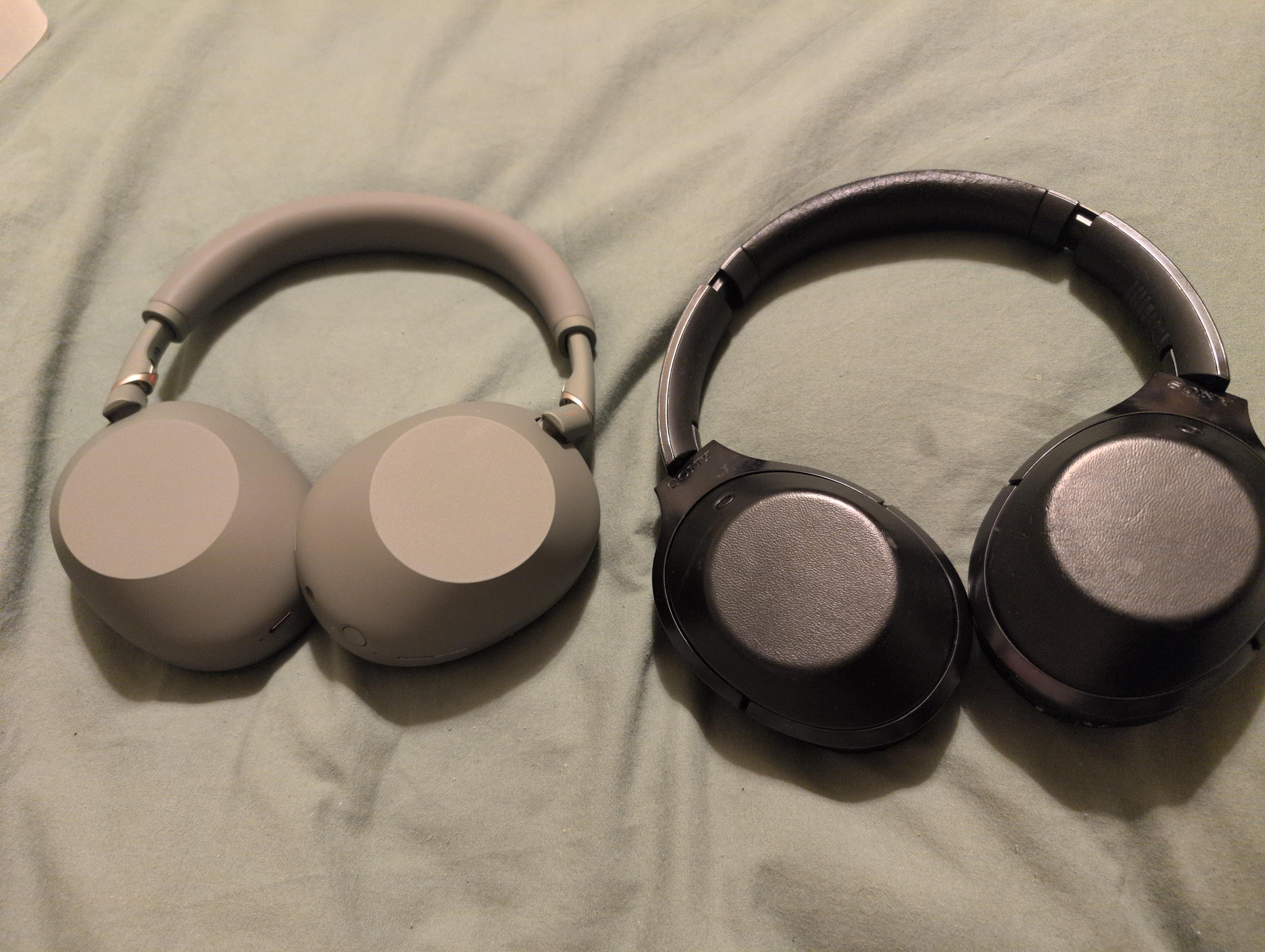
I’ve found the Sony WH-1000XM4 to be nearly perfect headphones for me. However, over time, a lot of my friends who have this model seem to be encountering the same set of issues with this model. Rather than buying a new pair, I decided to fix as many problems as possible and extend the life of my headphones for a few more years.
Here’s what my headphones looked like before:
Below, I’ll share simple fixes for three of the most common problems:
Earpad replacement
Headband leather replacement
Fixing ANC high-pitch noise
1. Earpad Replacement
This is the most common issue and also the easiest to fix. I recommend getting real leather (sheepskin) earpads instead of PU leather, as they’re much more durable. This is my second pair of replacement earpads, and I can already tell that real leather lasts significantly longer.
Step 1:
Use a slim, non-sharp tool to gently unclip the old earpads around the edges. They should come off easily.
Step 2:
Replace the foam dust filters and clean out any dust inside the earcups.
Step 3:
Align the new earpads properly, ensuring each pin is in the right place. Then, press them down to securely snap them in.
Over time, the ANC microphones can accumulate dust, leading to an annoying high-pitched noise. Here’s how to fix it.
Step 1:
Remove the earpads and dust filters. Use tweezers to carefully remove the gray rubber piece covering the ANC microphone.
Step 2:
Lift the ANC microphone with tweezers. You’ll see a dark fabric filter—this collects dust over time, which may contribute to the high-pitch noise. (I had already removed mine before writing this post.)
Step 3:
Use 70%+ isopropyl alcohol to gently remove the fabric filter. Take your time to ensure all glue and dust are completely removed. The microphone should look like this once cleaned:
Step 4:
Repeat the process for both microphones (left and right earcups). Then, reassemble everything.
Note: There’s no 100% guarantee this fix will last indefinitely. In some cases, the noise is caused by a damaged microphone, which would require replacement. If this fix doesn’t hold up over time, I’ll post a separate guide on replacing the microphones. For now, removing the fabric filter has completely eliminated the noise for me.
3.Head band leather replacement
Buy a replacement on Amazon, Aliexpress or other marketplace. I bought mine on Shopee( SE Asia). You need to find this
Mine cost me 2$, which is 100 times cheaper than headband replacement in authorized Sony Shop
Step 1:
Remove the right earpad and dust filter. Then, unscrew these four screws inside the right earcup.
Step 2:
Turn the headphones over and lift off the cover—it should come off easily.
Step 3:
Unplug the four connectors inside.
Step 4:
Unscrew these two bolts and gently lift the motherboard.
Step 5:
Using tweezers, place the main cable (rectangular) under the motherboard. Then, unscrew the two hinge bolts(circled in the image).
Step 6:
Lift the loosened hinge and carefully unplug the second hinge using a plastic tool. Be gentle— the earcup should detach easily.
Step 7:
Detach the plastic hinge from the main cable.
Step 8:
Unclip the plastic plate from its narrowest side. Lift it gently from both sides. You’ll see adhesive underneath—this is fine and doesn’t need replacement. Once the plate is off, unscrew the bolts underneath.
Step 9:
Use tweezers to remove the plastic caps on the opposite side of the "WH-1000XM4" logo. Do this on both sides and remove the bolts.
Step 10:
Remove the old headband leather and install the new one. Take your time to ensure a proper fit.
Step 11:
Reinstall the "WH-1000XM4" logo covers. These have plastic clips that help secure the leather, but you can also add a tiny piece of double-sided tape under the leather for extra hold.
Step 12:
Reassemble everything by following steps 8 to 1 in reverse order. Ensure all connectors are properly plugged in and the motherboard is seated correctly. While you're at it, clean out any dust inside the headphones.
My headphones after:
Every fix is super simple, requires no soldering, and takes at most 15–20 minutes.
This is my first Reddit post, so if you found it useful, I’m happy with it! Enjoy your headphones!
My partner just bought herself some XM6's, was just comparing them to my 1000x. What a difference! Sound profiles feel very different out of the box. What's everyone's experience of jumping from a much older pair to the newer versions? I think I might have to treat myself to at least the XM4Cs now.
So for background, I’ve had my XM5s for almost 3 years, I had the hinge issue and have been using the aftermarket hinge fix but I do see the wire starting to tear so I’m assuming they are on the way out. With Black Friday being here I figure now is the best time to get a new pair of headphones and I’m not sure if the 1000x is worth the extra money? I love my XM5s and don’t mind spending the extra money for the 1000X if they are noticeably better. However the XM6s are 350$ while the 1000Xs are 550$. Is the extra money worth it? Are they more durable and is th sound/ANC noticeably better? I would primarily use these for normal day to day (work, weight lifting, home) use.
I was looking to buy the xm6 buds. But I'm concerned about the fit and comfort of these buds. I have read bad reviews on the comfort of the buds. How are ur guys' experience using these buds? Thank you for your opinion!
I bought the Sony WF-1000XM6 through Amazon Warehouse for €159.39 (approximately $175) (Very Good condition). Unfortunately, the original foam ear tips in size M are missing.
Amazon offered me a €19.42 (approximately $21) partial refund, which would bring the price down to around €140 ($153).
Would you keep them for around $153 or return them and pay €220 (approximately $241) for a brand-new pair?
Disclosure: one of the apps below (Discata) is mine. The first two steps don't need it.
1. Start in Sony's own app (Sound Connect) Its equaliser is stored in the headphones, so it applies to everything you play, Spotify and Apple Music included. If the bass feels heavy, try Clear Bass a notch or two down before anything else.
2. Want a measured correction? Look up AutoEq Search "AutoEq [your model]". The AutoEq project publishes corrections from measurements for many Sony models; download ParametricEQ.txt. Sony's EQ only has a handful of bands, so you can't enter it exactly there, but you can copy its broad shape.
3. Applying the full correction
Streaming: on iOS 27, system-wide EQ apps (Pragmatic Audio PEQ, EffectDeck) can run a parametric EQ on everything; enter the bands from ParametricEQ.txt. Set Sony's EQ back to flat first so you don't stack two corrections.
Music files you own: any player with a parametric EQ. Discata (mine) has the AutoEq list built in, so you search the model name instead of typing bands. Free with an ad card between songs; one purchase removes it.
4. Two tips
Compare at the same loudness. Louder always sounds better for a few seconds.
Corrections are averages from a test rig. Treat them as a starting point and adjust to taste.
Which Sony did you get, and are you keeping Sony's default tuning?
Read all the reviews and comparisons on this sub but in my country both are the same price.
I have a small/regular size head, currently has the XM3 and love them. Just wish it has the auto pause when I take them off and multi device pairing, use an Android phone and MacBook laptop. Sound quality isn't a HUGE deal for me.
Edit: I don't use them much for phone calls. I mainly use them at home and don't take them out. I do want my next pair to last for a 3+ years.
Wondering if anyone can confirm if the device switching has improved to be faster/more seamless like on the XM6s? Or is it basically the same as on the XM4s? Tried the XM6 but they hurt my head after a couple of hours, but I loved how much better switching devices was. Looked at a bunch of reviews but no one really commented on this.
I was looking for headphones on bestbuy and see this deal on xm5s for $170 usd. I am aware of the hinge issues but at this price would it be worth it to buy then and just try to take really good care of them and hope the hinge lasts me a while or is it not worth the risk?
My Sony WF-1000XM4 charging case was dropped while closed. Since then, the LED doesn't illuminate when opening the lid with both earbuds inside. However, the LED works immediately when I remove either earbud and works during other operations. The lid's magnetic snap is normal. What's the likely fix for it
I’m getting XM4C FOR $150 and XM6 for $300 after taxes and everything. Which one would you buy? I’m confused because of the price difference. While the xm6 felt slightly better but does 150 difference justify it?
Randomly after like 2 hours of general listening either music or gaming the audio hiccups like every other second or so. So far my fix is just turning it of and off again. Which will work but after a few hours same issue again. This wasn't an issue with my much older pair of WH-1000XM3 but the battery on that thing had degraded. Curious if anyone has had this issue if not might just use the best buy plan I have on it to exchange it for another since I love the general feel and quality of these headphones. Also haven't tried for prolonged use if the issue persists on my phone or other devices so far may update later if it does.
I dont have any nearby location i can go and compare the headphones but i did ordered the xm6 and in process of returning them because they felt uncomfortable on my ear. The clamping pressure wasnt the issues, but the cushions made my ear sore as some part was on the ear rather than surround it.
So wanted to know if there's any difference? Or just go with another brand? I'm not an audiophile. My only requirements are comfort, anc and budget
Hey all! I got tired of grabbing my phone every time I wanted to switch noise cancelling or tweak the EQ. Windows and Mac have been getting community apps for this, and I got jealous, so I built Antiphase, a system tray applet for KDE Plasma 6.
It shows battery (including earbuds and case), switches Off/ANC/Ambient, handles Adaptive Sound Control scenes, has a full EQ (10-band editor on the XM6), DSEE, Speak to Chat, Auto Power-Off, and shows the active codec. Changes you make on the headphones show up in the tray within a few seconds.
I've only been able to verify it on my WH-1000XM6. XM3/4/5, WF-1000XM4/5/6, CH720N, LinkBuds S and ULT WEAR are implemented from the community protocol work but untested, so if you're on Linux with one of those, I'd love to hear if it works!
It's free and open source (MIT), unofficial and not affiliated with Sony. Screenshots and install instructions are in the repo: https://github.com/Shy-Doge/Antiphase
Just purchased a set from BestBuy for $180 after tax.
I'm happy to announce that I've just cancelled that order due to the insane amounts of feedback and posts from community members reporting broken hinges, drivers, and headbands!
Guess I'll keep on looking lol....
Thanks for helping me dodge a bullet! Shame on you Sony.
I’m experiencing a weird audio issue with my Sony LinkBuds S since switching to a new phone, and I’m completely out of ideas.
The Problem:
When connected to my new phone, the low frequencies (bass) heavily bleed into the mids and highs. As a result, vocals sound muffled, heavily distorted, and there is noticeable clipping—almost as if the bass is completely drowning out the rest of the mix.
How I know it’s not the earbuds:
When I connect the LinkBuds S to my old phone, they sound completely normal and crystal clear. I even tested switching back and forth between the two phones during the same listening session—the issue immediately appears on the new phone and disappears on the old one.
What I have already checked and tried:
- Sony Sound Connect App: Verified that all settings (EQ, Clear Bass, DSEE, etc.) are 100% identical on both phones.
- Spotify: Checked all audio quality, normalization, and EQ settings—they match my old phone completely.
- Bluetooth Connection: Unpaired/forgot the earbuds completely and re-paired them from scratch.
- Network Settings: Performed a full network/Bluetooth settings reset on the phone.
- Factory Reset: Did a complete factory reset on the LinkBuds S themselves.
- System Updates: Confirmed the phone's OS and all system apps are fully up to date.
Device Info:
Earbuds: Sony LinkBuds S
New Phone: Pixel 10 / Android 17
Old Phone: Pixel 7
Any help or ideas on what else to check in the Developer Options or system settings would be greatly appreciated!
PS: I'm very sorry for using AI to write this post, but my english and technical knowledge is not that good so I think this way you can understand my problem easier. Also I'm not frequently on reddit so I don't really know how this works...