r/StableDiffusion • u/IE_5 • Oct 18 '22
Discussion 4090 cuDNN Performance/Speed Fix (AUTOMATIC1111)
I made this thread yesterday asking about ways to increase Stable Diffusion image generation performance on the new 40xx (especially 4090) cards: https://www.reddit.com/r/StableDiffusion/comments/y6ga7c/4090_performance_with_stable_diffusion/
You need to follow the steps described there first and Update your PyTorch for the Automatic Repo from cu113 (which installs by default) to cu116 (the newest one available as of now) first for this to work.
Then I stumbled upon this discussion on GitHub where exactly this is being talked about: https://github.com/AUTOMATIC1111/stable-diffusion-webui/issues/2449
There's several people stating that they "updated cuDNN" or they "did the cudnn fix" and that it helped, but not how.
The first problem you're going to run into if you want to download cuDNN is NVIDIA requiring a developer account (and for some reason it didn't even let me make one): https://developer.nvidia.com/cudnn
Thankfully you can download the newest redist directly from here: https://developer.download.nvidia.com/compute/redist/cudnn/v8.6.0/local_installers/11.8/ In my case that was "cudnn-windows-x86_64-8.6.0.163_cuda11-archive.zip"
Now all that you need to do is take the .dll files from the "bin" folder in that zip file and replace the ones in your "stable-diffusion-main\venv\Lib\site-packages\torch\lib" folder with them. Maybe back the older ones up beforehand if something goes wrong or for testing purposes.
With the new cuDNN dll files and --xformers my image generation speed with base settings (Euler a, 20 Steps, 512x512) rose from ~12it/s before, which was lower than what a 3080Ti manages to ~24it/s afterwards.
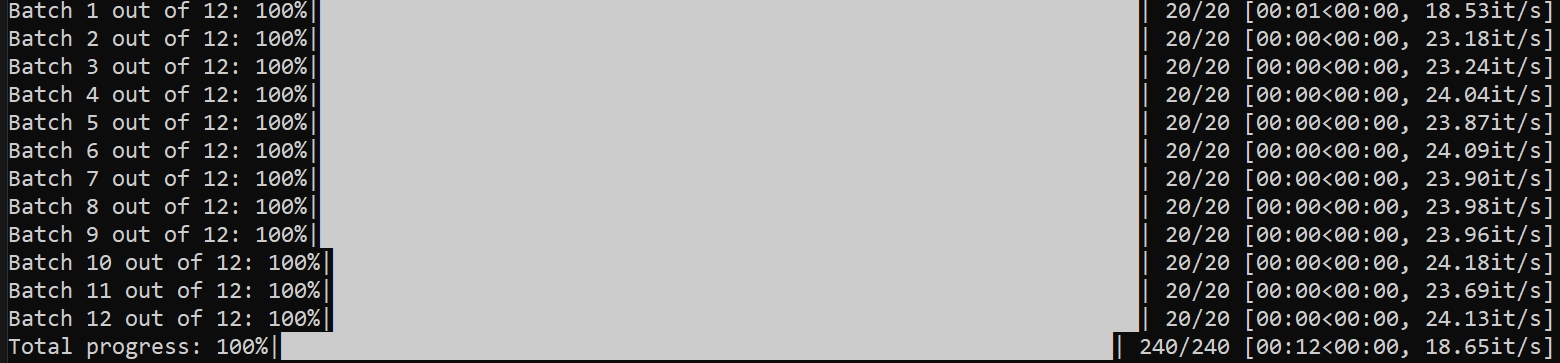
Good luck and let me know if you find anything else to improve performance on the new cards.
2
u/kenzosoza Oct 18 '22
Strange but no speed improvement for me
23
u/OrdinaryGrumpy Mar 17 '23 edited Mar 21 '23
UPDATE 20th March:
There is now a new fix that squeezes even more juice of your 4090. Check this article: Fix your RTX 4090’s poor performance in Stable Diffusion with new PyTorch 2.0 and Cuda 11.8
It's not for everyone though.
- - - - - -
TLDR;
For Windows.
5 months later all code changes are already implemented in the latest version of the AUTOMATIC1111’s web gui. If you are new and have fresh installation the only thing you need to do to improve 4090's performance is download the newer CUDNN files from nvidia as per OPs instructions. Any of the below will work:
https://developer.download.nvidia.com/compute/redist/cudnn/v8.6.0/local_installers/11.8/
https://developer.download.nvidia.com/compute/redist/cudnn/v8.7.0/local_installers/11.8/
https://developer.download.nvidia.com/compute/redist/cudnn/v8.8.0/local_installers/11.8/
If you go for 8.7.0 or 8.8.0 note there are no zip files. Download the exe and unzip. It’s same thing.
That’s it.
- - - - - -
This should give you 20its/s out of the box on 4090 for following test:
More Info:
8
u/ProperSauce Dec 23 '22
I'm stuck at 8it/s with my 4090 :/
Followed all steps above, twice.
5
u/McColbenshire Nov 05 '22
Anyone know what this error is being caused by? I've attempted to generate my own xformers/use the ones here but no matter which i use i cannot get past this error "The procedure entry point ?matmil@at@@ya?AVTensor@1@AEBV21@0@Z could not be located in the dynamic link library D:\stable-diffusion-webui\venv\Lib\site-package\xformers_C.pyd"
in the actual cmd line it states this after clicking ok"WARNING:root:WARNING: [WinError 127] The specified procedure could not be found Need to compile C++ extensions to get sparse attention suport. Please run python setup.py build develop"
4
u/ImportanceTraining56 Dec 06 '22
it would be very helpfull if someone can make a video tutorial for a clean install from the beginning.. I've done all the instruction but seeing no difference
3
u/SmithMano Oct 22 '22 edited Oct 22 '22
Someone mentioned using "--reinstall-xformers" after doing the upgrade, which raised my it/s from ~14 to ~18.
Edit: After installing updated transformers mentioned here, I'm up to 24 it/s
3
u/Inevitable-Start-653 Nov 05 '22 edited Nov 05 '22
Dude.... thank you so much!! I went from about 10 to 30 thank you! I don't know if this matters or not but I don't have anything else but the rtx 4090 on a pcie5 x16 lane. Maybe there is still room to get higher? I don't have an oc card, it's the msi trio card.
3
u/SimilarYou-301 Jan 26 '23 edited Feb 23 '23
Latest cuDNN, not sure if this works with WebUI yet, but it seems like the right feature version:
https://developer.download.nvidia.com/compute/redist/cudnn/v8.7.0/local_installers/11.8/
Update: There's a newer version as well but I get this error with it on WebUI Easy Installer: "Could not locate cublasLt64_12.dll. Please make sure it is in your library path!"
https://developer.download.nvidia.com/compute/redist/cudnn/v8.8.0/local_installers/11.8/
(edit: Thanks EternalSea!)
3
u/MetroSimulator Feb 25 '23
Sorry for the Necro, but someone know if there's a way to get the ,dll files from latest directory? They're not offering the zip anymore, just installation
https://developer.download.nvidia.com/compute/redist/cudnn/v8.8.0/local_installers/12.0/
2
u/Bachine55 Oct 24 '22
I'd did all step from both posts and still maxing out at 15 it/s on my 4090
2
u/4lt3r3go Dec 26 '22
are this tweaking also giving some benefits for 3090?
2
u/Guilty-History-9249 Jan 20 '23
It looks like you had gone done the same path I just did over the last few days.
I had independently discover this and have updated the A1111 community and PyTorch community so they can get this fixed without users needed to hack it. I have a 4090 on a system with an i9-13900K DDR5-6400 CL32 memory. I just got the follow for basic 20 step euler_a 512x512 images using SD 2.1:
100%|██████████████| 20/20 [00:00<00:00, 39.61it/s]
100%|██████████████| 20/20 [00:00<00:00, 39.64it/s]
100%|██████████████| 20/20 [00:00<00:00, 39.75it/s]
2
u/Guilty-History-9249 Feb 09 '23
The fix for this has been merged into the nightly build of PyTorch 2.0.
There is no plans to backport this to earlier versions like 1.3.
To get it you either need to install the nightly build or wait till GA and another month? or so.
2
u/vff Feb 10 '23
Just stumbled across this. Thank you! I went up from 13 it/s to 30. Such an incredible difference!
2
u/vff Feb 10 '23
I found a Windows setting that gave me an extra 15% or so boost on top of this: Turning off Hardware-Accelerated GPU Scheduling in Windows. It requires a reboot to change it. It seems to make other applications and benchmarks slightly slower but somehow makes this faster. Here is how to change the setting.
2
u/toiurgy Feb 15 '23
after add '--xformers' and those bin files changes, i went from 5~6lt/s to ~30lt/s !!!
2
u/Sir_McDouche Mar 26 '23
So what's considered a "good" speed for a 4090 GPU? After a whole day of messing around with Torch 2 and cuda updates I'm running benchmarks at a stable 29-30 it/s. But some people are claiming to be getting 30+ and even hitting 40 it/s. Xformers broke after all those updates and I'm wondering if getting them to work again would improve anything. I'm currently using the setup from this article with "--opt-sdp-attention" instead of xformers in webui-user.bat file.
2
u/Guilty-History-9249 Oct 11 '23
Here's a thread I created for the next perf steps beyond the 39 it/s. My id is aifartist on github.
https://github.com/AUTOMATIC1111/stable-diffusion-webui/discussions/7860
1
u/ganbrood Dec 21 '22
hey thank you much, this immediately double the speed on my 4090 to 23+ iterations!
1
u/BlackDragonBE Feb 15 '23 edited Feb 15 '23
I have a RTX4070Ti and I get around 8.50 it/s after doing all of this (up from about 2it/s). Is this the expected performance for this card?
I'm on Windows 11.
Edit: It was A LOT slower because I have a negative prompt by default. With just a positive prompt, the speed skyrockets to 14 it/s, which is in line with what I would expect.
1
u/YobaiYamete Mar 09 '23
Do you know, is 8.6 still the way to go? Or should I get 8.8 from here?
I've been struggling to get my 4090 speeds up for months T_T
1
u/NetKingTech1 Mar 12 '23
AMD 5900X 64GB DDR4 NVME M2 RTX 4090 Torch cu117 cudnn 8.8 xformers 0.16 installed Windows 11
Getting 5IT/S
Deleted venv folder reinstalled. Replaced the dll files with cudnn 8.8 dll files. verified launch.py is up to date as per the instructions. Added --xformers to command line arg in webui-user.bat
Hardware acceleration is on in Windows.
Can't get over 5 it/s.
Any advice would be most appreciated.
1
u/jeffjag Mar 13 '23
is this a newer version of the cudnn? just navigated in the tree back to the folder above v8.6.0 and found v8.8.0.
Has anyone tried this version?
https://developer.download.nvidia.com/compute/redist/cudnn/v8.8.0/local_installers/12.0/
1
u/SuperTankMan8964 Mar 18 '23
The problem still exists, I did these changes and went from 13it/s to 30 it/s... how unbelievely stupid that my GPU is underperforming that I was slow-generating all this time.
1
u/Robeloto Mar 24 '23
Getting 6 it/s with my 4080 after following these steps. I had 4 it/s before, so I did a strong increase of 2 it/s. :'(
1
u/BillyGrier Nov 20 '23
For anyone coming back here after noticing a slowdown to ~25it/s ish after a while, that doesn't resolve by replacing the cudnn files, deleting/resintsalling the VENV, etc. Check settings/optimizations and see if
"Batch cond/uncond (do both conditional and unconditional denoising in one batch; uses a bit more VRAM during sampling, but improves speed; previously this was controlled by --always-batch-cond-uncond comandline argument) is untoggled.
I just spent a bunch of hours figuring out that somewhere along the line I toggled that off (troubleshooting an OOM I'm sure). Turning it off I get 25it/s - with it on (default) I get the full 35/36ish it/s outlined here that I had been getting since this was all discussed last year.
Hope this helps someone else - only reason I came back to toss it in here. Cheers!
1
u/audax8177 Dec 08 '23
there are new versions of cuDNN
https://developer.download.nvidia.com/compute/redist/cudnn/v8.7.0/local_installers/11.8/
https://developer.download.nvidia.com/compute/redist/cudnn/v8.8.0/local_installers/12.0/
1
u/TahPenguin Jan 13 '24
Is this still needed? I've installed A1111 two weeks ago.
0
u/[deleted] Dec 04 '22
[deleted] — view deleted comment