[System] Added a Back gesture: Swipe inward with one finger from the bottom left or right edge of the screen to go back (only available in third-party apps).
Adjusted:
[Document] Changed the default file format for newly created Word documents from DOC to DOCX.
[Document] When viewing landscape pages in portrait mode or portrait pages in landscape mode, in-page navigation has changed from half-page turning to two-finger panning. The half-page indicators in the page number bar have also been removed.
Optimized:
[Note] Improved the PDF export functionality.
Supports exporting covers.
Supports generating a clickable table of contents from headings within the resulting PDF.
Supports generating bookmarks grouped by covers, headings, keywords, and stars for quick navigation to the specific pages.
[Document] Supports real-time two-finger zooming.
[Settings] Supports disconnecting and reconnecting paired Bluetooth devices.
Fixed:
[System] Fixed the issue where installing an update package older than the current system version could cause the device to become unusable.
[System] Fixed the issue where the Enter key on certain external keyboards was incorrectly recognized as a left mouse button click.
[System] Fixed the issue where the calligraphy pen did not render strokes correctly based on the selected writing posture.
[System] Fixed the issue where some email services using Sectigo certificates could not be connected to.
[Note] Fixed the issue where the first stroke was unresponsive after waking the device from sleep.
[Note] Fixed the issue where accidentally touching the page number bar while writing caused strokes to be lost.
[Note] Fixed the issue where strokes were displayed incorrectly when switching between landscape and portrait notes.
[Plugin] Fixed the issue where installed plugins were not displayed correctly after a system update.
[Plugin] Fixed the issue where installing certain plugins could prevent writing in the Note app.
[Plugin] Fixed the issue where pasted strokes could be lost when switching between notes via a plugin.
[System] Added a Back gesture: Swipe inward with one finger from the bottom left or right edge of the screen to go back (only available in third-party apps).
Adjusted:
[Document] Changed the default file format for newly created Word documents from DOC to DOCX.
[Document] When viewing landscape pages in portrait mode or portrait pages in landscape mode, in-page navigation has changed from half-page turning to two-finger panning. The half-page indicators in the page number bar have also been removed.
Optimized:
[Note] Improved the PDF export functionality.
Supports exporting covers.
Supports generating a clickable table of contents from headings within the resulting PDF.
Supports generating bookmarks grouped by covers, headings, keywords, and stars for quick navigation to the specific pages.
[Document] Supports real-time two-finger zooming.
[Settings] Supports disconnecting and reconnecting paired Bluetooth devices.
Fixed:
[System] Fixed the issue where installing an update package older than the current system version could cause the device to become unusable.
[System] Fixed the issue where the calligraphy pen did not render strokes correctly based on the selected writing posture.
[System] Fixed the issue where abnormal screen refreshes could occur during writing and erasing.
[System] Fixed the issue where some email services using Sectigo certificates could not be connected to.
[Note] Fixed the issue where accidentally touching the page number bar while writing caused strokes to be lost.
[Note] Fixed the issue where strokes were displayed incorrectly when switching between landscape and portrait notes.
[Plugin] Fixed the issue where installed plugins were not displayed correctly after a system update.
[Plugin] Fixed the issue where installing certain plugins could prevent writing in the Note app.
[Plugin] Fixed the issue where pasted strokes could be lost when switching between notes via a plugin.
I just wanted to see if there are currently any plans to improve handwriting recognition? Or if theres a way to improve the devices recognition of my particular handwriting style?
Hi everyone, I extended one of my first Plugins (Textbox Tools), to become "Manuscript". It allows importing one or more txt files (particularly markdown), laying them out on a note, editing them with edit markers and writing them back to the txt files.
But you can also simply use it to edit textboxes, I found the double tap, textbox jumping around, writing, waiting for recognition cycle very tiresome and find just marking everything up and preparing replacement texts much more efficient.
This is still definitely in beta, so please let me know if you experience any issues, around recognizing marks or texts or anything else that looks off.
One known restriction: works only on the default system font and user added fonts.
Currently you can try it out it via the beta that is available at https://github.com/tilmanbergt/manuscript Once it is a bit more solid, I will submit it InkHub as well.
It seems like theres a decent amount of people who sideload a variety of Back button onto the device to be able to use other apps and functions. Is it worth then requesting that we get an official Supernote version of this already built in function rather than having to use a workaround?
I was installing some plugins and trying them out, and suddenly now all of them are gone except for stickers. When I go to the apps -> plugin tabs nothing shows up and I’m not sure why?
I just received my Manta and would like to install the Superdashboard plug-in. I know I need the current Beta for that but I'm concerned about stability and losing my notes. Suggestions?
Loving the beta. I would like more plugins and also maybe make the calligraphy pen a little better. I'm trying to learn to use it more and how to use it properly. So far I am loving how everything connects. Love the floating toolbar too.
Is it just me or is everyone else experiencing this? I updated to the latest update it offered and now my Supernote is slow, lags when switching screens and my pen doesn’t write smoothly or it doesn’t pick up all the movements. I tried updating it again, restarting, recalibrating the pen and just plain turning it off. No dice! Any solutions or suggestions?
I generally use the rotating feature included in the lasso to correct the level (horizontality) of my handwriting, and find it very very difficult. Controlling the rotation on the center of rotation makes it almost impossible, because a small input had a great effect. It would be very different if we could take action at distance from this rotation center, on the edge for example.
Another thing which would be great would be a « magnetic » alignment, should the software be able to recognize the main direction of our handwriting. For exemple if my writing is 3° up the rotating feature would stick it to 0°. But I am afraid this would require a lot of work, and I don’t want Chauvet to become too big…
But about the rotating feature, I would really appreciate to be able to use it with more precision, I think it is way too sensitive at this moment.
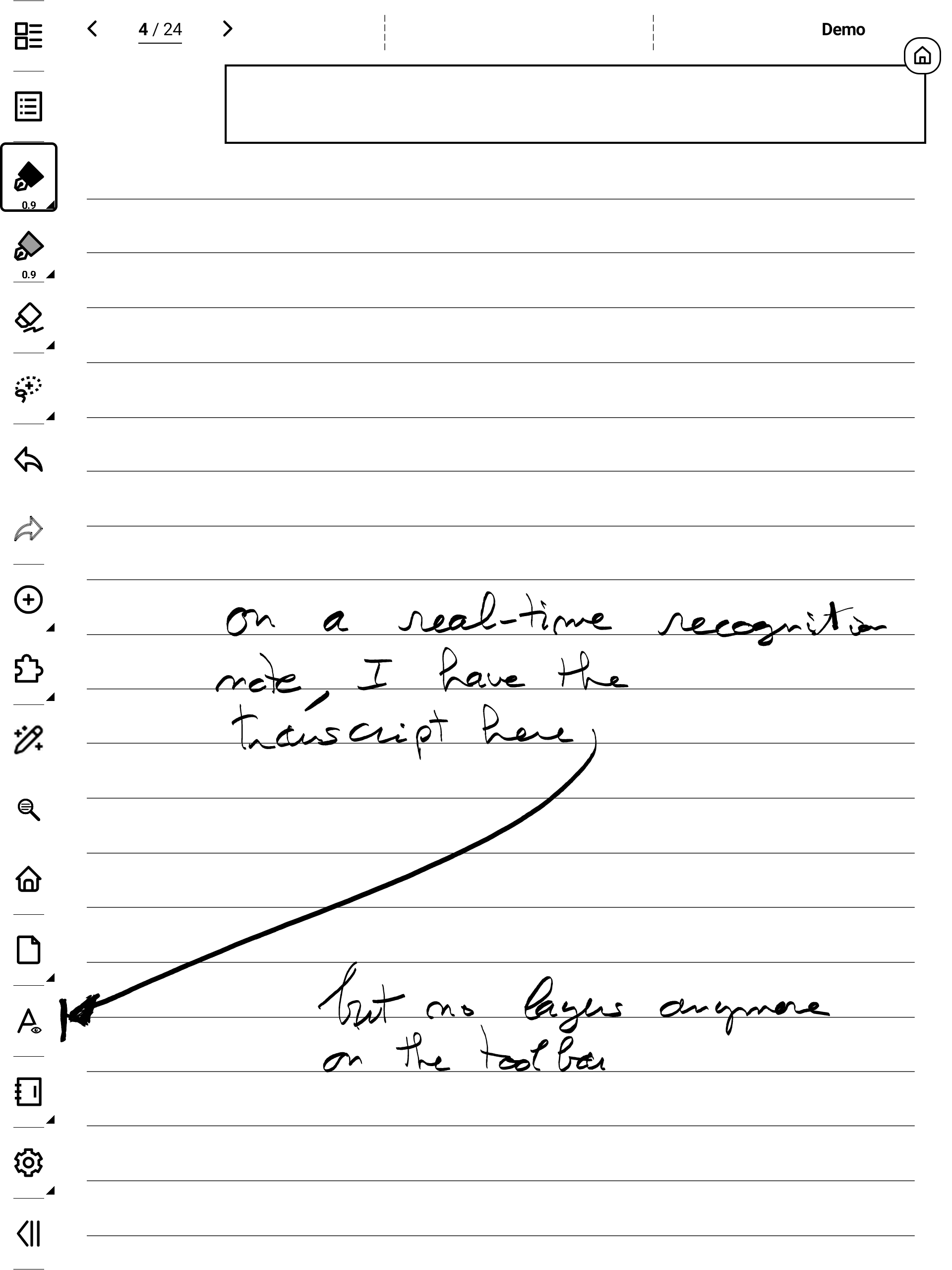
I love the new toolbar personalization setup, but I have experimented a strange behavior :
- On a note with Real Time recognition, I have the icon for the Transcript (normal), but then I lose the one for the layers. And when I search the settings of the Toolbar, I don't see anywhere the Layers, as if the feature was not existing anymore.
And also not available on the customization, as you can see here: (I have searched on all the other tools menu, but haven't seen it anywhere.)
- While on a note without the Real Time recognition, the icon for the Transcript doesn't exist (also normal), but the "layers" re-appears ! And on the Toolbar settings, the layers are on the Primary tools:
And see here, second line, second icon is the "layers" :
So, bug ? Or any other difference between those 2 notes that could explain the Layers to be unavailable ? I have seen only the Realtime recognition as a difference, but maybe something else.
Also I love that we can select whatever we want on the "Primary tool", even plugins, but then the items that we choose to hide are not accessible anymore at all.
Could we also choose to add some of the "Removed from Primary Tools" to the other dropdown menus ? For exemple I would love to add more the pens and the eraser to the "Page" submenu. Because today what is "removed", is not accessible anymore at all, so more plugin buttons means no more some of the native primary tools at all, and this is annoying.
Endpoint Lasso v0.2.0 — sends NOTE lasso data or DOC selected text to a configurable endpoint. This one is source-only because the endpoint is configured at build time.
The first four have downloadable .snplg release files. Endpoint Lasso has build instructions for using your own endpoint. They are rebuilt for the current SDK, but I have not re-tested every plugin on every model and current firmware.
I don't have the bandwidth to put them through the current InkHub submission workflow.
Is it possible to disable the quick menu that comes up if you hold the pen in position? I like to draw in the notes app and that feature is messing with my flow.