r/Tahoma2D • u/InternationalFall591 • 4d ago
Sharing first time animating! (not pixel art)

41
Upvotes
quite enjoyed using the software
an oc
r/Tahoma2D • u/InternationalFall591 • 4d ago
quite enjoyed using the software
an oc
r/Tahoma2D • u/SomeGuyFromSF • 8d ago
Hey all, I am a professional animator and college instructor from California.
One semester I was asked to teach an online course for Intro to Animation. Since most schools have an Adobe account I typically use Adobe Animate but since the course was online and students did not have access to a computer lab I decided to use Tahoma2D / OpenToonz. I created an entire course and since I may not be able to use it again I decided to through it up on YouTube to add to the Tahoma2D / OpenToonz community. I am big fan of the open source community as a whole. Here it is:
https://www.youtube.com/playlist?list=PLrm8Jlne_z1j_tRVOn-IXuH5aeaCbjl36
If you are looking for a guide to get you started on the basic tools of Tahoma2D you might find my course helpful. This is an Intro to Animation, so the concepts are fairly basic.
If you have have suggestions with things I can do to improve the course let me know.
r/Tahoma2D • u/Ire_Naru • 15d ago
Hello! I'm new to the program and I've got one week to make a short animatic. My idea was to import the storyboard I made in paper and then slowly add as many inbetweens as I can in the time I have. The thing is, I imported and placed the storyboard drawings in their respective frames, but I'm having problems to edit those drawings in place. I can't enlarge the drawings unless I use the animate tool, but I don't want to animate them. And when I do use the anime tool, all of the storyboard images get larger along with the first one I modify. They are all affected the same which is a problem because there are some that I want to edit differently. When I try to use the select tool instead, the images get cut when I resize the frame? Why is it working like a lazzo tool? Isn't there a normal way to move an image in the canvas? I'm reading the user manual as I write this but I can't find anything. Help would be much apreciated!
r/Tahoma2D • u/voidcant • 17d ago
Why is the brush’s opacity suddenly lower??? I’m new to the program and it was completely opaque when I was using raster layers but whenever I try to draw on the vector layer it just does this????
r/Tahoma2D • u/virtual_sun_ • 18d ago
This tab pops up listing a few levels every time I try to open a certain scene
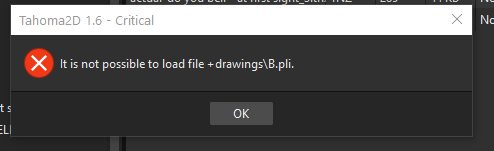
The weird part is all my level paths aren't to any of the drawings this notification lists??? A few months ago i came from opentoonz to tahoma2D so maybe it's related, i'm not sure. The scene still loads fine though. Does anyone know how to get rid of this tab that shows up? Or if it'll cause any issues in the future?


I hope I'm being clear enough lol
r/Tahoma2D • u/Sea-View6159 • 19d ago
Im new using Tahoma2D, and ive been searching for tutorials or some advice online to do pixel art, but i couldnt find anything related. Any help is welcome
r/Tahoma2D • u/Colonel_Yuri • 19d ago

I thought about using matte in/out, bu the problem is that I would have to do it manually for each layer. I've been using alpha lock for the effect of a smart-raster layer on top of a vector layer, unfortunately this doesn't seem to carry through via rendering however. Am I going to have to hard modify the actual drawings?
r/Tahoma2D • u/Few-Analyst6301 • 25d ago
I've recently encountered a problem where zooming in does not work when I use Keybinds or my drawing tablet's keybinds.
It's a weird issue of sorts because "Zoom Out" works perfectly fine. I want to ask if anyone has any idea how this could be fixed or if there need to be certain requirements/prerequisites for it to work.
r/Tahoma2D • u/CloudyPapon • Oct 26 '26
im new at this program, what's going on why using the vector paint bucket is so complicated
r/Tahoma2D • u/Accurate_Tip5983 • Oct 23 '26

When i try to import a background it gives me this error
r/Tahoma2D • u/Worried-Confection45 • Oct 09 '26
Does anyone know how to add brush packs and brushes into Tahoma?
I used to know, but then I forgot :(
r/Tahoma2D • u/AmazingSmasha • Oct 09 '26
Basically im trying to draw a symetrical object, and i've been trying to use the control point editor to adjust my lines. It however only adjusts one side even with the symetry tool on.
Is there a way to make it affect both sides?
r/Tahoma2D • u/Complex_Tower7551 • Oct 09 '26
Hello there fellow artists, I've wanted to start using Tahoma and slowly learn how it works and what not. I've looked at a couple tutorials and set up my table in a way that's comfortable for me.
However whenever I start drawing and do a mistake I press Ctrl+Z to undo it. but "Ctrl" is also a shortcut to straight line tool on default brush. And so I make a straight line by mistake and it can turn in to a small looping motion on undoing a straight line just to put down another one.
Does anyone knows how to disable/re-bind the brush shortcuts in Tahoma2d? I'm genuinely loosing my mind over it. I've looked at every possible tutorial and they all use it, but no one ever explains how to change the shortcuts.
Thank you.
r/Tahoma2D • u/KingOogaTonTon • Oct 08 '26
I animated an entire scene, but I realized the timing is off at the beginning and want to push everything back. I can do that easily with specific levels, but then it becomes misaligned with the corresponding keyframes. Is it possible to move all the kryframes at once, without have to shift click 100s of keyframes to draft them?
r/Tahoma2D • u/Colonel_Yuri • Oct 05 '26

Hello. I've been having an issue where an already deleted layer is now affecting me by saying that it can't save an audio file, despite the fact that I already deleted it from the layer. i searched inside the .tnz file and it turns out that the level is still inside the scene file, causing problems. How do I properly get rid of it to stop getting the annoying pop-up every time I save?
  <levelSet>
    <levels>
      <soundLevel id='1'>
        Scene_1_provisional
        <type>
          sound
        </type>
        <path>
          "D:\\General\\Uriel\\2024 Youtube\\House Call For Sandra\\Audio\\Project_Master\\Scene_1_provisional.wav"
        </path>

      </soundLevel>
      <level id='2'>
        A
        <info dpiType="image"/>
        <path>
          "+drawings\\A.tlv"
        </path>

      </level>
      <level id='3'>
        B
        <info dpiType="image"/>
        <path>
          "+drawings\\B.tlv"
        </path>

</level>r/Tahoma2D • u/Goiabadax • Oct 03 '26
HELP MEEEEEE, PLEASE...
Alguém sabe como fazer na camada vetorial, por exemplo, fiz um desenho mas agora quero preencher com alguma cor do lado de fora e o lado de dentro do desenho, mas o problema é:
As linhas coloquei na cor preta e quero pintar de verde, mas se eu seleciono a cor verde a linha também fica verde, e eu realmente não sei como resolver isso.
Segundo problema, se eu preencho com o balde por dentro dar certo, mas se eu quero colorir todo o fundo da área simplesmente não acontece nada quando uso o balde.
Observação: Sou iniciante e nunca tinha me aventurado antes no mundo da animação, então tudo é novo para mim.
r/Tahoma2D • u/Dazzling_Yam_6003 • Sep 30 '26

Hey I'm a newbie with Tahoma2D and while attempting to upload my drawings for a cutout animation this ended up happening.
How do I adjust it?
r/Tahoma2D • u/Naiive_Bear • Sep 29 '26
I use a Microsoft surface and I’m trying to download the app. Whenever I finish using the installer and open the app, it just shows me an error. Is there any workaround for this or do I need to use some other installer?
r/Tahoma2D • u/dearlydecaying • Sep 29 '26

this issue started for me recently, and i can't find anything helpful to fix it. this has persisted across different versions of the program and different builds. uninstalling, reinstalling, restarting, and looking at the documentation haven't helped. there's very little here to use as troubleshooting reference.
has anyone else dealt with this? how do i fix it?
r/Tahoma2D • u/red_rodney_ram • Sep 28 '26

I'd like to switch over from OpenToonz to Tahoma2D, but whereas OT works just fine on my computer, T2D doesn't. I'm running version 1.6.3, but regardless of which version I use, the canvas is always a black screen. As you can see in the top right thumbnail, it does record what I draw there, I just can't see anything on the canvas itself. For reference: I'm running this on my laptop, which is an ARM64-based PC. It has a Snapdragon(R) X 120-core CPU, and the graphics card is Qualcomm(R) Adreno X1-85.
r/Tahoma2D • u/shitaccount666 • Sep 23 '26
title
also there isnt a flair for "question" lol 😑
r/Tahoma2D • u/Heart-Headlocked • Sep 12 '26
Sorry if my english is poor, non native english speaker here.
But, i've been a huge fan of animatics for a while, having seen plenty of awesome videos from plenty of talentted creaters online, and I've been dying to join in the scene and make some animatics as well to post.
After a lot of research i came across both tahoma2d and opentoonz, and now i'm wondering if anybody would reccommend it as a good software to create animatics with?
Thank u to any help, advice or tips that you can offer me !