r/Tailscale • • 1d ago

Misc Pure Java Tailscale library For Embedding Tailnets In Your Java Application

36 Upvotes

I've been developing JTail, an independent, pure-Java implementation of a Tailscale client designed to let Java applications join a tailnet directly, without requiring a separately installed Tailscale client.

The motivation was straightforward: Tailscale's tsnet makes it possible to embed tailnet connectivity into an application, but it's built around Go. For Java developers, using that functionality has traditionally meant introducing native bindings or running an external Tailscale process.

JTail takes a different approach. It's implemented entirely in Java and does not depend on Go, CGo, JNI, JNA, or native libraries.

What JTail provides:

  • Connect Java applications to Tailscale or Headscale networks.
  • Establish WireGuard-based connections to other tailnet devices.
  • Support direct peer connections and DERP relaying.
  • Provide TCP, UDP, and ICMP networking.
  • Support IPv4, IPv6, and MagicDNS.
  • Integrate with Java networking through its API.

The goal is to make tailnet connectivity something a Java application can incorporate as part of its own functionality, rather than something that must be installed and configured separately on the host.

JTail is an independent project, not an official Tailscale product. It is still young, and I'm continuing to develop and validate its compatibility.

GitHub: https://github.com/EasyG0ing1/JTail

Maven Central:

<dependency>
    <groupId>com.simtechdata</groupId>
    <artifactId>JTail</artifactId>
    <version>1.0.0</version>
</dependency>

I'm interested in feedback from other Java developers, particularly anyone exploring embedded networking, Tailscale integration, or applications that need secure connectivity between distributed services.


r/Tailscale • • 1d ago

Help Needed Derp, peer relay and oddness

7 Upvotes

I have 1gb up and down at home and a static IP. But, I can't seem to get tailscale to not run over derp. The exit node is running on proxmox, in ubuntu server VM.

Oddly, trying to troubleshoot it tonight I setup a peer relay to see if that could fix the issue. I've put in port forward rule on my router for the exit node, that didn't make a difference, so setup the peer relay and also port forward rule for that.

Hadn't fully finished doing the peer relay in the admin console before falling asleep.

Woke up, did a ping of the exit node, and oh, its now pinged straight through. Finally a direct connection. I do another ping and it goes through derp again.

Any ideas what is going on?


r/Tailscale • • 1d ago Bravo Heartwarming

Discussion I made a free tool that turns your Tailscale policy file into a diagram you can edit (runs locally)

59 Upvotes

My tailnet started as my NAS and my laptop. Now it's the NAS, two Pis, a VPS, the kids' tablets, my wife's laptop and a Home Assistant box. At some point my policy file turned into a pile of tags and groups that I was scared to touch. Whenever I changed a grant, I'd find out a week later that the kids' tablet could reach Proxmox, or that Jellyfin stopped working on the living room TV.

So I built Tailsketch over a few evenings that makes everything visual: https://tailsketch.com/app

It runs for free, locally on your browser and you don't need an account.

What it does:

  • You paste in your policy file and it draws who can reach what, and on which ports, as a visual diagram
  • You can import your device list, and it shows what the policy means for each machine, by hostname. So you get "the kids' tablet can reach jellyfin:8096".
  • You can edit the diagram and export a policy file. Edits are applied as patches to your original text, so your comments and formatting survive.
  • It warns about undefined tags, nested groups and ports in the wrong place.

Everything runs in your browser, and your policy file is never uploaded.

It's not affiliated with Tailscale, it's just a side project. If it chokes on your policy or something looks wrong, feel free to message me! Please rename things before you send anything. I'd love to hear what breaks!

policy sketch
devices sketch with the policy applied

r/Tailscale • • 2d ago

Help Needed Mullvad exit node: no WireGuard handshake on Linux and macOS, iOS works on the same network

2 Upvotes

Since about two weeks ago, Mullvad exit nodes (the Tailscale add-on) do not work on two of my devices, while my iPhone works fine on the same home Wi-Fi.

Setup

  • Linux server: Ubuntu 26.04, tailscale 1.104.7
  • Mac: Standalone app, 1.104.7
  • iPhone: 1.104.7 (works, also on the home Wi-Fi)
  • All three are in the Mullvad device list (3 of 5)

Symptom
When I set a Mullvad exit node (pt-lis-wg-201, and others on the Mac), all internet traffic stops. DNS times out, and tailscaled logs:

dns udp query: waiting for response or error from
[10.64.0.1 ...]: context deadline exceeded

tailscale status --json for the Mullvad peer:

CurAddr: 149.88.20.206:51820 (IPv4)
TxBytes: 6396
RxBytes: 0
LastHandshake: 0001-01-01T00:00:00Z

So the handshake initiations go out, but the Mullvad server never answers. The same server works on the Linux box on 1.104.5 (a week ago).

What I tried

  • Mac: tailscale up --force-reauth. It worked for about 2 minutes, then stopped again with the same symptom.
  • Linux: removed the device from the Mullvad list in the admin console and added it again. The Mullvad peers disappeared from that node for about 30 minutes, then came back. Same failure.
  • Restarted tailscaled.
  • The iPhone works on the same network, so I do not think the router blocks UDP to Mullvad.

On the Mac, during one failure, the Mullvad endpoint also flapped between IPv4 and IPv6 every few seconds (the home network has no IPv6). On Linux the endpoint stays IPv4.

My guess is that Mullvad does not have the current node keys of these two devices, but I do not know how to check or force that from my side.

Has anyone seen this, or found a way to re-register a node's key with Mullvad?


r/Tailscale • • 2d ago

Help Needed Set up help with Docker instance & Tailscale

Thumbnail reddit.com
1 Upvotes

r/Tailscale • • 2d ago

Discussion Client unreachable to one node after its Tailscale IP was changed to a different 100.x range — reproducible, looking for a mechanism

0 Upvotes

Changing a client's Tailscale IP in the admin console made one node unreachable from it, and changing the IP back fixed it instantly. Only the client's own IP was changed — no policy, route or node-side changes. Trying to understand the mechanism.

Setup: ASUSTOR AS5402T NAS (100.100.1.1), official tailscale 1.104.7 via a third-party NAS package, iptables firewall mode, advertising 192.168.1.0/24. Client: iPhone (Tailscale 1.104.7), member of a group with grants to that subnet and to the NAS itself.

Test (client on cellular, Wi-Fi off):

  1. iPhone at 100.100.1.x → NAS reachable (both smb://192.168.1.2 and 100.100.1.1). Verified right before and right after the test.
  2. Changed the iPhone's IP to 100.100.3.17 in the console → both targets time out.
  3. Waited 8+ minutes, and toggled Tailscale off/on → still times out.
  4. Changed the IP back to 100.100.1.x → works again immediately.

Per the docs, reachability should depend on routes + ACLs/grants, not on the specific 100.x value — and other peers on 100.100.2.x work fine in the same tailnet as an exit node. So what could make the receiving node care about the client's address range? A stale packet filter/netmap on the NAS that only an address change flushes? Happy to capture a bugreport or firewall dumps next time if someone tells me what would help.


r/Tailscale • • 2d ago

Help Needed Proton VPN + Tailscale on MacOS

6 Upvotes

Is it possible connect to Proton VPN and Tailscale (I use Tailscale to connect services and machines in my Homelab) at the same time? I find out https://tailroute.app which is probably for what I need (all traffic routed to Proton if it not in Tailscale address, but I am not sure that app is legit and this aproach is safe). I think about this, because simple webbrowsing on Proton speed up twice (what is very interesting itself!), but when I connect to Proton I lost connection to Tailscale.


r/Tailscale • • 2d ago

Misc 小型项目合作

0 Upvotes

正在做一个面向在马来西亚、新加坡和泰国的中国外派人员、协助访问国内区域服务的网络连通性小项目,想找 1–2 位国内光纤网络稳定的朋友做技术交流与节点测试。

要求与边界说明:

自有设备: 熟悉 OpenWrt 与 Tailscale,使用自己现有的路由器/软路由或迷你主机运行节点配置,无需寄送任何硬件。

安全与隔离: 做好防火墙与内网隔离,不宣告内网网段,确保节点流量与家庭内网及个人设备分离,随时可自行启停。

规则与合作: 有明确的带宽与防滥用限制;具体合作方式与补贴细节有意向者可私信沟通。

家里有稳定光纤、平时折腾 OpenWrt / Tailscale 且对这类测试感兴趣的欢迎私信交流。


r/Tailscale • • 2d ago

Discussion Heads-up for k3s/flannel over Tailscale: restarting tailscaled can silently isolate a node

3 Upvotes

If you run k3s (or flannel's VXLAN backend) with `flannel-iface: tailscale0`, a `tailscaled` restart or package upgrade can leave that node unable to reach Pods on other nodes. The node stays `Ready` and nothing alerts.

When `tailscale0` goes away, the kernel removes `flannel.1` with its routes/ARP/FDB entries. flannel recreates the device ("VXLAN device flannel.1 recreated successfully") but only rewrites routes when a remote lease changes, so they never come back until flannel restarts.

Fixed upstream in flannel-io/flannel#2618 (released in flannel v0.28.11; k3s `main` still pins v0.28.10). Until your k3s includes it:

- restart `k3s`/`k3s-agent` after restarting or upgrading `tailscaled`

- check that `ip route | grep -c 'dev flannel.1'` equals the number of other nodes

- consider pausing Tailscale auto-updates

Write-up with logs, root cause and a PromQL alert: https://dev.to/ryan0215/restarting-tailscale-silently-isolated-a-k3s-node-fixing-a-flannel-vxlan-bug-upstream-1p0n


r/Tailscale • • 2d ago

Help Needed I’m tired of this

Post image
48 Upvotes

I have an iPhone and every time I try to use my exit node in tailscale while I’m not at home Internet stops working until I deactivate Tailscale


r/Tailscale • • 2d ago

Question Tailscale Security/Trust Concerns?

74 Upvotes

My wife and I use a medical camera to monitor our baby at night for seizures from our phones when at home and connected to the home wifi. This specific camera does have "internet access" to allow you to view it when not connected to the home wifi, but we have been unable to set it up due to a carrier grade NAT and our internet company charges a decent monthly amount for a static IP. I looked into using Tailscale as a VPN through my desktop at home so I can view the camera and events while I am at work, is this something you would personally trust? What are the risks of being hacked with Tailscale? I am not the most technically inclined person; I am certain I can get this set up and working but not knowledgeable enough to know if this would be a bad idea.


r/Tailscale • • 2d ago

Help Needed Windows Tailscale subnet router: Azure VM can reach my LAN, but LAN hosts can’t reach the Azure VM

2 Upvotes

Got a weird one. I have a Windows Server 2025 VM (Hyper-V) at 10.1.0.5 running Tailscale as a subnet router, advertising 10.1.0.0/24 and a bunch of other subnets. It’s also an exit node. On the other end is an Ubuntu VM in Azure (100.126.126.103) running tailscale up --accept-routes. ACLs are still the default allow-all.

Tailnet to LAN works fine. From the Azure box I can ping 10.1.0.40 with no problem. Going the other direction is the issue. From 10.1.0.40 I added a static route for 100.126.126.103 via 10.1.0.5, and ping and port 22 just time out.

Here’s what I’ve checked so far:

  • tcpdump on the Azure VM’s tailscale0 shows every echo request from 10.1.0.40 arriving, and the VM sends a reply for each one. So the forward path is fine and the VM knows how to answer.
  • Forwarding is enabled on both interfaces on the Windows box (Get-NetIPInterface).
  • Turning Windows Firewall off on the router changed nothing.
  • pktmon on the router shows the request coming in on Ethernet and getting handed to the IP stack. I haven’t found the reply leaving toward .40 yet.
  • The Hyper-V vSwitch is a plain external one with no extensions.
  • Only the Windows node has the Subnets badge in the admin console, so I don’t think another router is stealing the 10.1.0.0/24 traffic.

Should this config work? Anyone gotten LAN to tailnet traffic working through a Windows subnet router with replies coming back?


r/Tailscale • • 2d ago

Help Needed tailscale for remoting into a computer?

10 Upvotes

Noob here, and just starting to research some ideas, and am wondering if tailscale could be the solution.

Problem: I have a desktop computer, that I want to be able to remote into from outside the network by multiple computers.

Simplified Example: I need someone to upload a ton pictures (10-30gb of data) from their laptop, onto the SSD of the desktop, remotely.

Additionally, if it would also be possible to then be able to remote into the desktop, via windows remote desktop, to the desktop pc.

My thought is to set up a tail scale connection, connect all the laptops to the desktop, and mount the drive. Then since it should be on the same vlan, users would still be able to windows remote desktop into the desktop

I know no matter what I do, It will be a bit of a laggy experience depending on internet speeds. ( The desktop is running on a fiber 1gb up/down network, and if thats not good enough, I can upgrade to a 3gb up/down plan )

This would only need to be accessed occasionally, maybe 2-3x a month so it doesn't need to be a flawless setup.


Basically the desktop is our rendering desktop for some 3d software, and its far more powerful than other users laptops. The idea being that someone remotely can upload their photos to the folder on their "My PC" as a mapped drive, and then when needed to process the rendering, they can remote into the desktop to get that going.

( the rendering software is pretty hands off, the user won't be doing anything super detailed, but does need a native windows environment )

If this was all local network, it would be pretty easy to do, just connect all the devices to the network, map the desktop drives on the laptops, then use windows remote desktop to log into the machine.

I know there's other remote desktop software out there, rust desk, chrome remote desktop, etc, but I don't think any of those solves the issue of wanting to have a drive mapped on the laptop as well.


r/Tailscale • • 3d ago

Misc ESP32-S3 Tailnet gateway update: new demo, LTE/Ethernet support and v3.0.30 (now RecoveryGateway)

35 Upvotes

Hey everyone!
First of all, apologies for posting about this project again so soon. I shared it here a little over a week ago, but looking back, I realized my previous post didn’t really explain how it works or what you can actually do with it.
So I made a new short video demonstrating the main features.
One important update: the project has been renamed from ESP32 Tailnet Gateway to RecoveryGateway (Mattboxx Edition). It’s the same project, just with a new name.
For anyone who missed the previous post, RecoveryGateway is open-source ESP32-S3 firmware that provides several optional Tailscale/Headscale gateway and recovery features.
The main use case is connecting devices that can’t run Tailscale to services on another network.
For example, imagine an MQTT device on your local LAN that needs to communicate with an MQTT broker on another Tailnet-connected network.
Instead of installing Tailscale on the IoT device, it connects to the ESP32’s local IP and port. RecoveryGateway selectively forwards that TCP/UDP connection to the remote service through your Tailnet.
No VPN client is needed on the IoT device, and you don’t have to expose the entire remote network.
But that’s only one of its features:
Remote NAS/PC recovery without a VPN: Wake-on-LAN through Telegram or ntfy, with checks to verify that the device actually responds.
4G/LTE backup Internet: Support for USB LTE sticks/modems or UART-connected cellular modules, with automatic failover.
Ethernet support: USB Ethernet adapters (beta) or W5500 modules over SPI (experimental).
Subnet routing and exit-node roles: Different Tailnet routing options depending on your setup.
IoT Wi-Fi gateway: DHCP, DNS, NAT and firewall functionality.
Home Assistant integration: MQTT Discovery, device status and controls.
Monitoring and diagnostics: Event history, resource trends, logs, network tests, configuration backups and OTA rollback.
The project has also reached firmware v3.0.30, following several improvements, new capabilities and bug fixes throughout the recent 3.0.x releases.
You can install it directly from a browser using a compatible ESP32-S3 board. No compiling or IDE required.
This is a lightweight gateway intended mainly for IoT, automation and control traffic, not a replacement for a high-performance Linux router.
I’m still actively developing and testing it, and I’d genuinely appreciate feedback, especially from anyone interested in testing different USB LTE modems or Ethernet adapters.
Web installer:
https://mattboxx.github.io/RecoveryGateway/install-firmware/
GitHub:
https://github.com/Mattboxx/RecoveryGateway
The project is free and open source, built on Csontikka’s original ESP32 Tailscale subnet-router work.
Thanks for checking it out, and let me know what you think!


r/Tailscale • • 3d ago

Help Needed Mullvad exit nodes do not show up on my iphone

1 Upvotes

I'm a longtime user of both, and a few weeks ago I noticed that the exit notes for the Mullvad service simply we're not showing up on my iPhone. I've deleted and reinstalled the app. I removed my iPhone as a device in my admin console and re-added it. Nothing seems to work. On my Apple laptop, those exit notes show up just fine. I'm baffled. Does anybody have any suggestions for troubleshooting and even better, a fix? Thanks gang.


r/Tailscale • • 3d ago

Discussion I made a local iOS and Android app for managing Proxmox, Docker, and SSH over Tailscale

0 Upvotes

I keep my homelab off the public internet and only reach it through Tailscale, and dealing with it from my phone was always a pain. The Proxmox web UI is rough on a small screen, and jumping back and forth between an SSH app and browser tabs gets old fast when you just want to check why a container died.

Thats when the random domain I bought happened to be great landing spot, Clustara, my app for iPhone, iPad, and Android. It talks directly to your hosts over LAN or your tailnet with no cloud relay, no account,\ and no telemetry. Keys, API tokens, and passwords stay on the phone behind Face ID or fingerprint.

What I use it for most:

  • Seeing what broke on one screen (unreachable hosts, stopped VMs/LXCs/containers, failed backups, and optional CPU/RAM/disk alerts)
  • Restarting a stuck VM or container with a confirmation prompt so you don't fat-finger a reboot
  • Opening an SSH shell, Proxmox console, or Docker container shell with Esc, Tab, Ctrl, arrows, search in output, and saved snippets
  • Following live logs from systemd journal, /var/log, Docker, and Proxmox tasks
  • Home and lock screen widgets plus optional background check alerts

There's a built-in demo lab inside the app if you want to look around before adding a real server. Free download with a 14-day full trial, then $1.99/mo, $7.99/yr, or $10.99 one-time.

https://clustara.com (App Store and Google Play links are right on the page)


r/Tailscale • • 4d ago

Help Needed Win 11: Mullvad blocks incoming Tailscale RDP Connections

Thumbnail reddit.com
1 Upvotes

r/Tailscale • • 4d ago

Misc Got Tailscale running directly on a Fiberhome ONT

40 Upvotes

Sharing this in case anyone else wants to run Tailscale on an ISP-supplied ONT.

I wanted the ONT itself to be a Tailscale node (as it runs a mini custom linux build), so I wouldn’t have to leave a PC running just to reach my home network. I use it for Sunshine and Jellyfin and I originally wanted it for a SIP softphone

My setup:

-Fiberhome HG6145F1 ONT, running the Socratech WebUI custom overlay

-SSH enabled on port 2222

-The ONT has very little free flash, so I put the Tailscale files on a USB drive plugged into the ONT

-A small shell script I wrote starts Tailscale, and a second script launches it automatically on boot

-My line isn’t behind carrier NAT. The public IP matches the ONT’s ppp0 address, which should help direct connections

How I did it:

-Got SSH access to the ONT.

-Checked what the firmware supports.

-Copied the Tailscale binaries to the USB drive.

-Wrote a script that starts tailscaled with its state stored on the USB drive and then brings Tailscale up.

-Added a boot script so it starts on its own after every reboot.

Result
The ONT is now a permanent node in my tailnet. I use it to reach Sunshine and Jellyfin from outside my home.

I’m not a dev lol, so I did this by trial and error.


r/Tailscale • • 4d ago

Help Needed Tailscale setup feedback and suggestions

1 Upvotes

Hi all,

Tailscale newbie here. Just wanted to get your opinion on my current setup.

I have a Glinet Brume 3 at home setup as an exit node. I travel with a Glinet Slate 7.

I travel with my work laptop, multiple phones, tabs and a Chromecast. None of individual devices have Tailscale installed. Only the travel router has it. The exit node is only required for my work laptop. Is there a way I can make just the work laptop use the exit node?

Also, I recently came across a post on the Glinet subreddit where the router advertises the tailnet name to the connected devices, since I didn't want my work laptop to see that, I followed the steps and fixed it. Would like to know if there are any similar tips. TIA


r/Tailscale • • 4d ago

Misc tsdrop: better airdrop for linux <-> IOS on your tailnet

4 Upvotes

I wanted AirDrop between my Arch laptop and my iPhone. Taildrop almost does it, but sends fail when the laptop is asleep/off, text arrives as a .txt file, files sit in the Tailscale app on iOS with no notification, and you have to work out of the tailscale app, which is inconvenient imo.

tsdrop is a small Go binary that uses the LocalSend protocol over your tailnet. Text and links land on your clipboard. If an always on box like a homelab is around, it holds drops until the laptop wakes up. The iPhone needs no app: there's a sharesheet Shortcut (which I included in the repo), plus a homescreen PWA that gets push notifications when something is waiting for you. Made it with claude code, but I've been dog fooding it the past few weeks and everything has worked fine.

https://github.com/MaxwellIsaacs/tsdrop


r/Tailscale • • 4d ago

Help Needed NordVPN on my server - Tailscale stopped working

Thumbnail reddit.com
1 Upvotes

r/Tailscale • • 4d ago

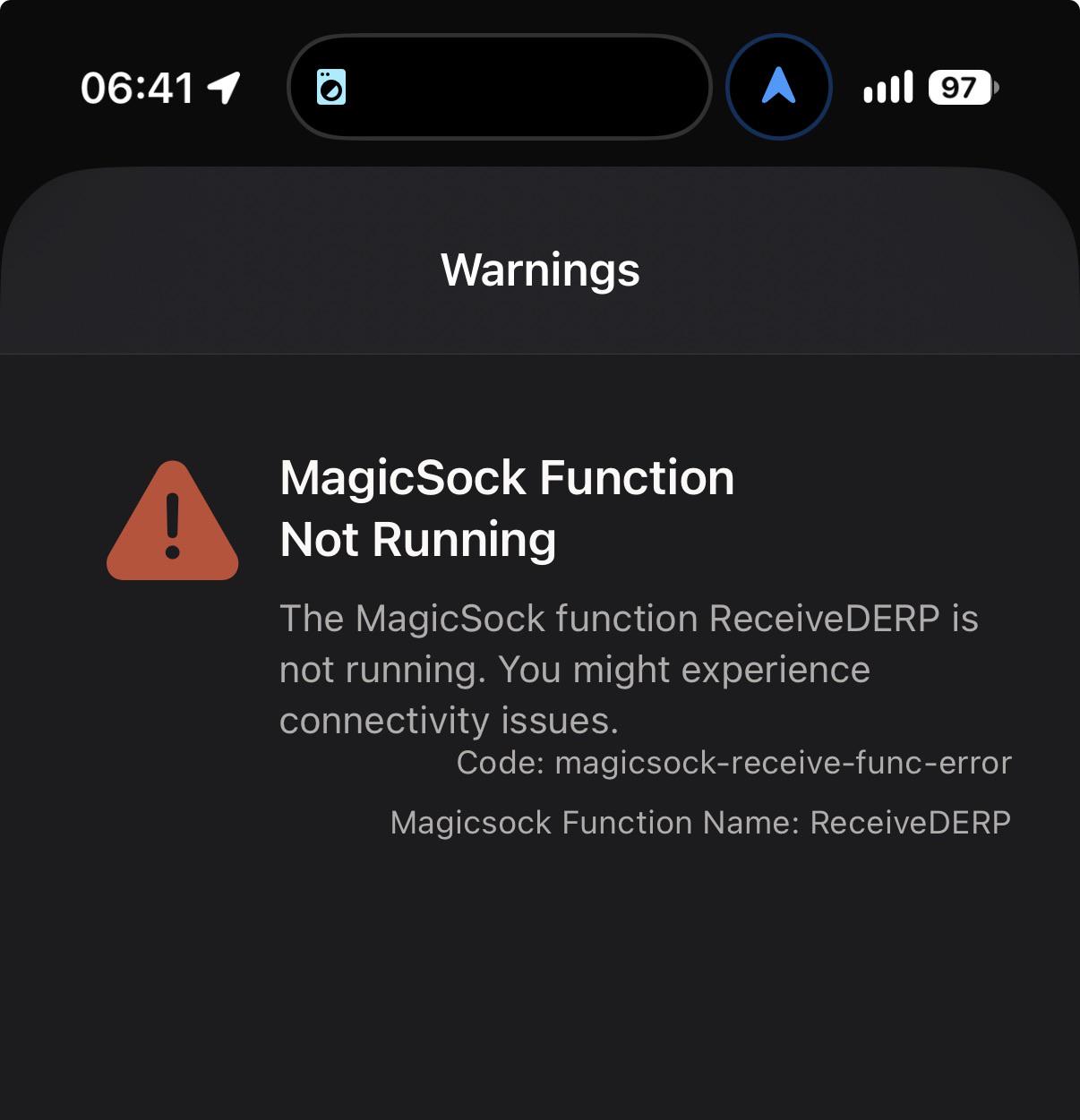
Help Needed Magicsock not working

Post image
4 Upvotes

Can someone help me solve this problem I have since three months?

If I activate VPN on Demand on all the iPhones of my family, they have connectivity issues as soon as I go outside my house. The VPN turns on promptly as I connect to the mobile data, but it does not work properly. It says “Magic Sock function not running”. How do I solve this?

To make it work I need to go to settings, disable VPN on Demand, go back, disable the switch… reenable the switch and it works.


r/Tailscale • • 4d ago

Discussion Tailscale Holy Grail

295 Upvotes

I'm just here to rant about how awesome Tailscale really is. I was this close to purchasing the Mullvad VPN through tailscale to have the best setup, but the only reason I was hesitant is because before I heard of Tailscale, I purchased a 5 year plan of Adguard VPN.
My current set up involves Adguard Home running on my home network. I've configured Tailscale DNS settings to point to my Adguard Home server.
I also have a couple devices on my tailnet set up as exit nodes for whenever I travel out the country. I've had this setup working quite well for the past few months, but then today I started thinking: what if I install Adguard VPN on one of my exit nodes?? I mean that's all Mullvad VPN is doing too, allowing you to connect to their exit nodes.
So after some tinkering, I installed Adguard VPN on an old laptop that's running Linux Mint, and I have it configured as an exit node and voila. I've connected my iPhone to that exit node, checked out ipleak.net and everything looks to be set up correctly!!

I also have Jellyfin set up on that same laptop with several hundred movies.
Now I have the benefits of Adguard adblocking wherever I am in the world. Being able to access Home Assistant, Music Assistant, Jellyfin etc from whenever, along with the benefit of looking like I am anywhere else in the world.
How freaking awesome is that.
Once my 5 year plan with Adguard VPN is up, I would definitely consider Mullvad VPN just to support the cause.

Thank you Tailscale!


r/Tailscale • • 4d ago

Question Default Tailnet option for SSH?

3 Upvotes

I use TS SSH, however I now login to the tailnet using a secondary account so I can use a passkey.

By default it tries to use the passkey's tailnet to authenticate SSH using the web link, which of course fails. So I have to then navigate to the TS Admin Console, select the correct tailnet and then click back to authenticate using the same link, which then works.

Is there any way to set a tailnet as the default?