r/ThermalGrizzly • • 3h ago

Question/Advice Current imbalance only when using VR/HMD, stable everywhere else

1 Upvotes

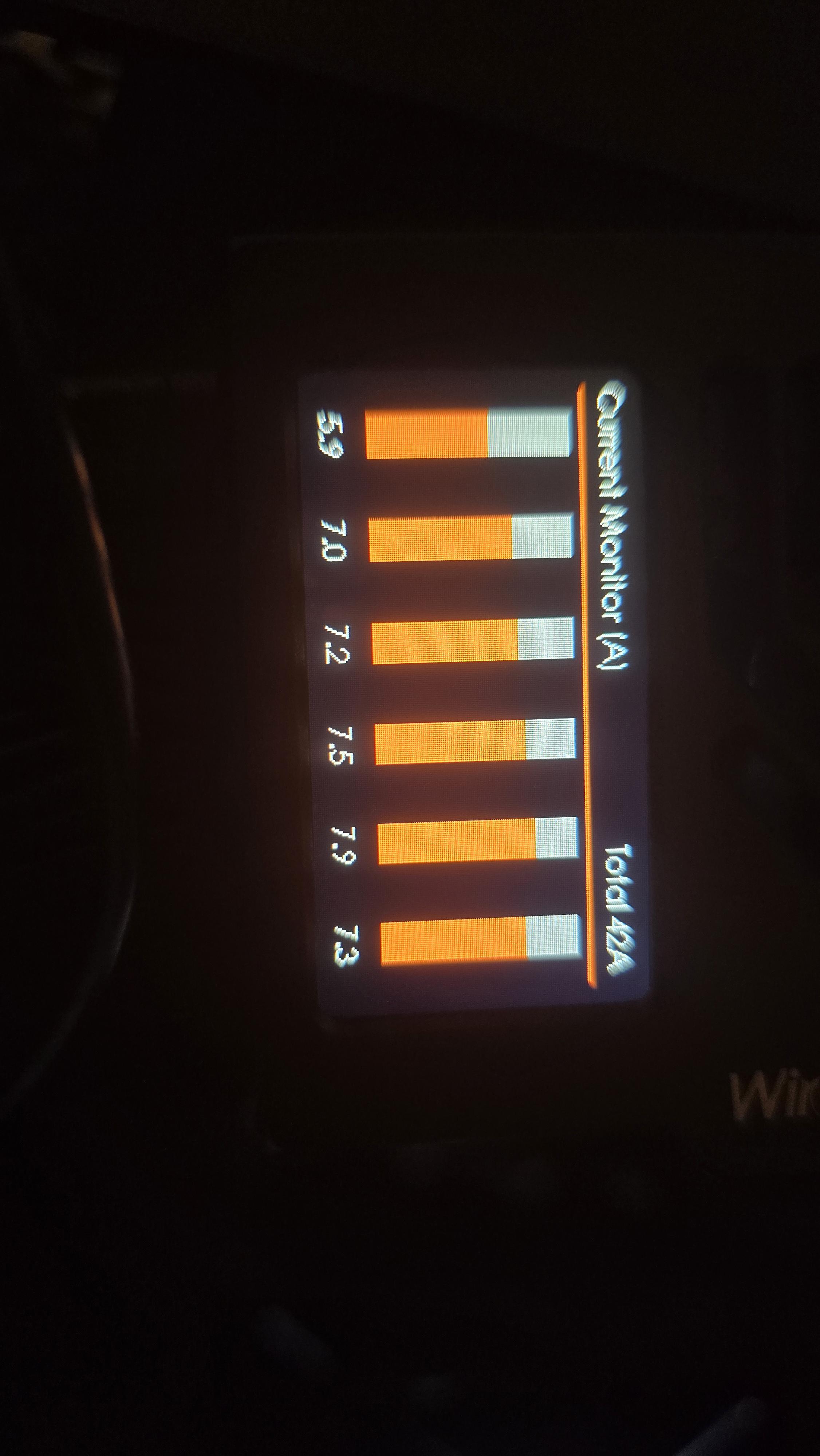
My PC has a 5090 Astral with the WireView Pro II. I’m seeing big current imbalances, but only when using VR. It gets to the point where I get those current imbalance warnings.

I am new to VR as a whole, using a Pimax Dream Air.

Before I tried VR, I had no issues whatsoever with current imbalances. I run my 5090 on a stable undervolt that works for me. I've never seen any concerning fluctuations just using my monitor (@3440x1440) and used benchmark tools like 3Dmark to put my system under stress to monitor stability.

What I’ve tested so far:

  • Normal gaming on monitor: perfectly stable
  • Full 3DMark runs (undervolted): stable
  • VRMark Blue Room on monitor: stable
  • VRMark Blue Room in HMD mode (through the headset): big imbalance and fluctuations immediately
  • VR games (I have tried Pools and Star Citizen): same imbalance

With my undervolt, no pin ever exceeds 9.5 A (it's like 7.5A max), but the difference between pins gets quite large under VR. The fluctuations are probably random, but at times it looks almost sequential (goes pin per pin). Connector stays relatively cool (51C), granted I never dared to run it for long.

PSU I use is an MSI MEG Ai1300P with its native 12V-2x6 cable. The cable is fully seated on both ends.

Is this something I should treat as a real problem and try to fix (different cable, etc.), or is it acceptable to keep using as long as I stay under 9.5 A and just try to keep an eye on it from time to time during VR sessions? Besides the imbalance warnings on the WireView during VR, I have soft shutdown (on WireView) and HWInfo alerts set up. Neither have gone off yet.

I just find it weird that I only have this issue in VR. It's super stable during benchmarks or gaming normally on a monitor.

Thanks in advance for any input or advice.


r/ThermalGrizzly • • 12h ago

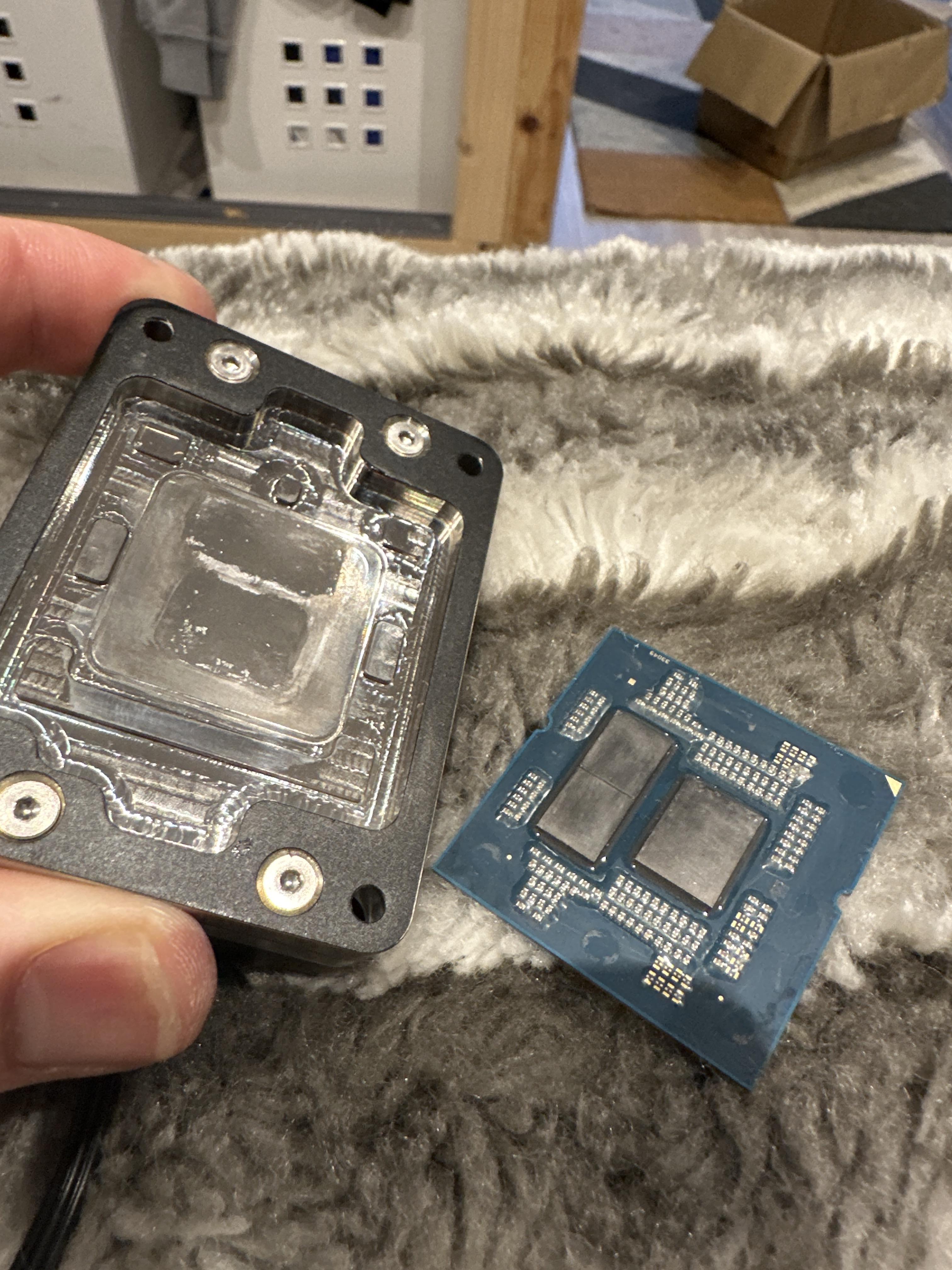
Discussion Is this normal , it keeps happening when temps rise

Post image
8 Upvotes

Thermal Grizzly Liquid Metal and 9950X3D

Keep ending up with a dark film/coating which is dirty to the touch (this is once wiped off with isopropyl


r/ThermalGrizzly • • 17h ago

Question/Advice WireView Pro II Noctua Edition - Strange discoloration around 12V-2x6 connector. Should I be concerned?

Post image
8 Upvotes

Hi everyone,

I'm using a Thermal Grizzly WireView Pro II Noctua Edition (Reversed) with an RTX 5090 AORUS Master and be quiet! Pure Power 13 M.

I've noticed some unusual dark discoloration around the connector (see photo).

Picture of the issue:

https://imgur.com/a/2vuRvxH

The GPU power connector is fully seated.

I also experience intermittent GPU disconnects: fans suddenly ramp up to 100%, nvidia-smi loses the GPU, and WireView reports 0 W. However, no faults appear in its logs.

My questions:

  • Does the discoloration look like heat damage?
  • Has anyone experienced something similar?
  • Would you recommend an RMA?

r/ThermalGrizzly • • 1d ago

Feedback Very happy with the WireView Pro 2 Wired!

Thumbnail
gallery
50 Upvotes

Fitted this today as I noticed they were back in stock in the UK, not sure when I last checked tbh but whenever I seemed previously they were out of stock… anyway, what an awesome piece of kit, properly well made and it just works! As per pic 2 thankfully all looks good after running a stress test for a good 45 minutes.

Where do people place your 2 probes? I ended up putting External 1 card side pushed next to the 12VHWPR connector and External 2 as an ambient case reading from below the card.


r/ThermalGrizzly • • 1d ago

News Black Friday: Deals from Our Partners

Thumbnail
thermal-grizzly.com
8 Upvotes

While we don't offer Black Friday deals at our shop this year, we've put for you together are list of deals at our reseller partners and marketplaces.


r/ThermalGrizzly • • 3d ago

Question/Advice Reseated, changed cables, even changed PSU...

Post image
11 Upvotes

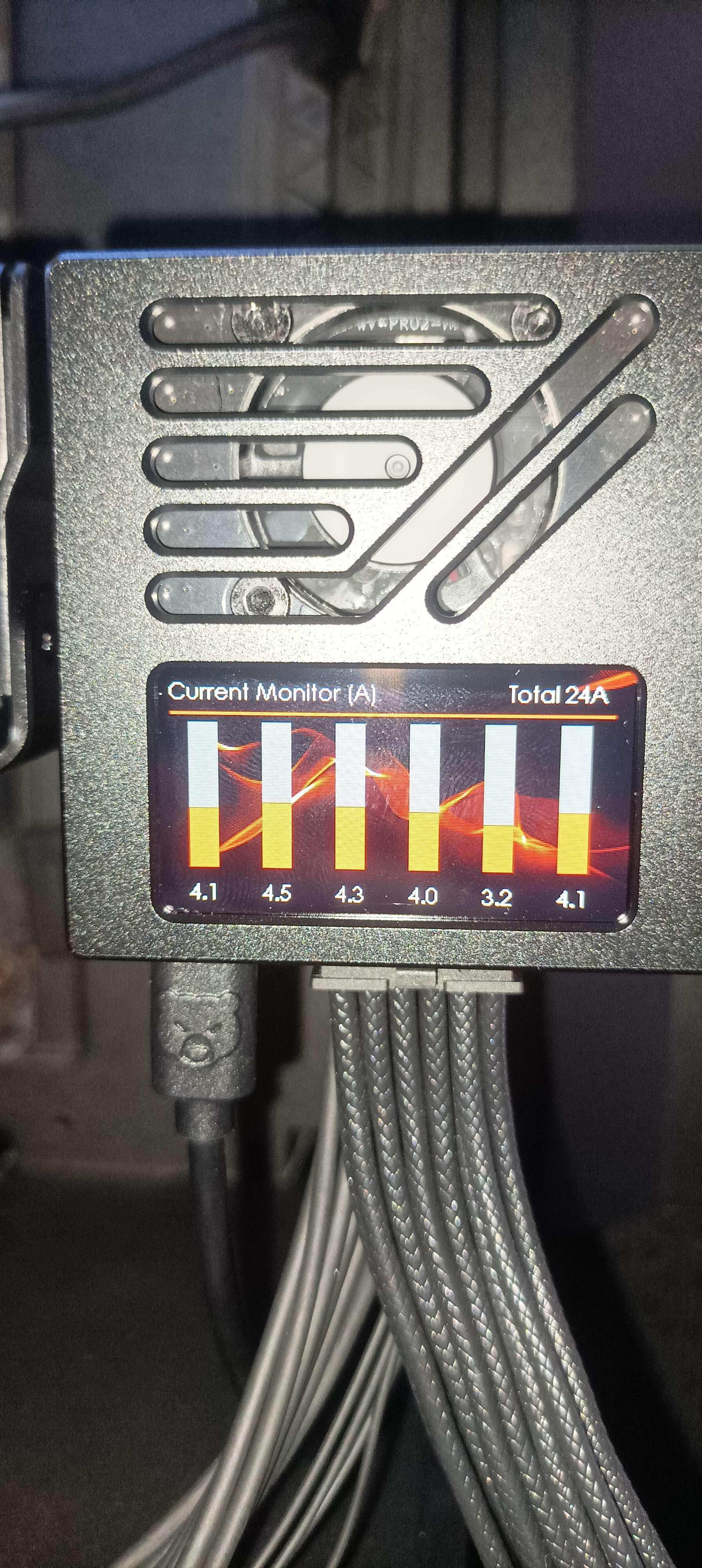
Pin 1 constantly lagging behind, pin 5 constantly ahead... is this a problem on the GPU receiver end? Is that even a thing?

edit: update for anyone interested - changed psu one final time (lian li sp1000p) and its perfectly flush across all pins.


r/ThermalGrizzly • • 3d ago

Question/Advice Wired WireView Pro II now or wait for Noctua edition?

0 Upvotes

I have a 5090 FE and wasn't sure what to do. Only learned about this product recently and from what I've learned it seems to go out of stock constantly? Should I just bite the bullet and grab this now or wait for the Noctua version?

I was considering the Noctua version as I've seen some reports that the current fan is a piece of junk prone to failure and will make loud rattling noises. I've also seen posts saying it isn't an issue at all and that it rarely turns on. Are the issues here overstated? Do you even need the fan on? My room can get quite warm depending on the time of year. Sometimes over 80 degrees.

Also, how does the WireView compare to other options like MSI/Corsair PSU's or Coolermaster gpu shield?

btw why is shipping $29.13? 😭 Goes from about $170 to nearly $200

edit: Ordered it! Hopefully theres no issue!


r/ThermalGrizzly • • 5d ago

Feedback Another current imbalance post

7 Upvotes

Got a WVP2 a few weeks ago. At full load I was getting 1.5A-2A+ imbalance. No alarms or shut downs but pin 6 was regularly going above 9A.

I've seen quite a few posts/comments about this and the most common fix is to re-seat the cable or even replace the cable.

I tried 2 different cables and both were exactly the same (1 was stock PSU cable and one Corsair thermal protect). Anyway, I picked up an MSI AI1300TS today, removed the WVP2, low and behold the imbalance was down to 0.3A max with no pins going over 8A.


r/ThermalGrizzly • • 5d ago

News MMM is having TG 20% sale!

5 Upvotes

ModMyMods is having a 20% off ThermalGrizzly sale in case anyone was looking.

I happened to be and ordered a full set of Deltamate rotary fittings for my new build! Thought it was a pretty good deal; just wish they had the Phasesheet Pro in stock 😂 Cheers!


r/ThermalGrizzly • • 5d ago

Build showcase First Custom Loop

Post image
16 Upvotes

r/ThermalGrizzly • • 5d ago

Other WireView Pro II Unofficial Linux software update: several WireViews on one PC

9 Upvotes

An update on wireview-linux and wireview-hwmon, my unofficial Linux software for the Thermal Grizzly WireView Pro II. Last time it was about WireView Mini and reducing footprint, this time, wireview-linux 1.5 and wireview-hwmon 1.9 add support for more than one WireView in the same machine.

The problem

Everything assumed one WireView per PC. The desktop app, WireView Mini, the daemon and the hwmon driver each took the first unit they found, so with two GPUs you could only watch one of them.

What changed

  • Each WireView is its own device in the app and in WireView Mini, with its own readings, chart history, nickname, fault alerts and shutdown on fault
  • A fault on a unit you aren't looking at still raises the alert
  • The selected unit is remembered by its chip ID. --device picks one for a run, by nickname, chip ID, or the last 4 or more digits of its USB serial. The app and Mini share the choice
  • Optional tray icon per WireView, each with its own readings menu. Mini's tray menu lists every unit with its power or fault, and clicking a line selects it
  • Firmware updates go to the selected unit only, on its own USB port (dfu-util -p on Linux; on Windows the native flasher opens only the bootloader on that port). The other units keep their readings, alerts and LAN publishing while it flashes, also when Mini does the flash
  • The udev rule adds a /dev/wireview-<USB serial> link per unit

Daemon and hwmon

wireviewd in wireview-hwmon 1.9.0 drives up to 8 WireViews, and each gets its own hwmon device: wireview, wireview1, and so on, with a label made of the edition and the last digits of the USB serial. sensors and anything else that reads hwmon see them separately. wireviewctl devices lists them:

IDX STATE      USB SERIAL    EDITION                          PORT          HWMON
0   connected  xxxxxxxx4E46  WireView Pro II Noctua Edition   /dev/ttyACM0  hwmon5  (primary)
1   connected  xxxxxxxx3245  WireView Pro II                  /dev/ttyACM1  hwmon8

and --device picks one for every other command. The daemon and CLI are now GPL-3.0-or-later; the kernel module stays GPL-2.0.

Unraid

Plugin 0.17.0: the dashboard tile shows each unit under its own name, with a combined headline on top. The settings page lists the units and has a picker for device info and config, so Apply, the NVM buttons and Clear Faults only touch the unit you picked. Fault notifications name the unit.

Upgrading

  • One WireView: nothing changes
  • Several WireViews with the daemon: update wireview-hwmon to 1.9.0 and reload its module (or reboot). With an older wireview-hwmon the app sees only the first unit through hwmon
  • Windows: replace wireview-mini.exe with the one in the zip

Install

  • Windows: wireview-mini-1.5.0.0-windows-x64.zip from Releases. Mini is still a companion to the official app
  • Linux: PPA, .deb, COPR/.rpm, AUR (wireview-linux-bin), tarball, all with WireView Mini. The Flatpak has the app only. Mini is now in the Nix package too
  • Unraid: Community Applications, search WireView

Feedback welcome, especially from anyone running two or more WireViews, since I've only tested with two.

Unofficial, not affiliated with Thermal Grizzly or ElmorLabs. Thanks to Thermal Grizzly for the Noctua Edition development unit. Firmware flashing is at your own risk.


r/ThermalGrizzly • • 5d ago

Question/Advice Wireview Pro 2 Wired Bent Cables

Thumbnail
gallery
8 Upvotes

Received my WVP2 Wired direct from Thermal Grizzly for my 5090FE and I was impressed with the speed of service and delivery.

I did notice that the two outermost cables 1 and 6 were “bent”, like they were forced and buckled during manufacturing. I’m not an EE but my understanding is that sharp bends and crimps should be avoided as they can cause resistance which is a key factor with these cables that can lead to imbalance and burnt cables. Another thing I noticed is that the length of the top row and bottom row of cables does not seem to be the same which results in more looping and more cables everywhere.

Should I be concerned? Is this normal in how these are made and has anyone else seen similar with their units? Am I nitpicking? Just want to make sure my insurance on my 5090FE isn’t subpar quality.

For actual results my cable spread under load looks good, <1A difference under load so I’m not overly concerned. Another interesting thing was the ROG Equalizer was sensing at 450W, swapping back to the Lian Li Edge cable brought it back to 600W, as it is a very high quality cable. Another observation is that the WVP2 seems to have amplified coil whine under load but that is somewhat anecdotal.


r/ThermalGrizzly • • 5d ago

Discussion RTX Lens - Monitoring software for RTX 5080s / 5090s and compatible devices

Thumbnail
gallery
56 Upvotes

(Sorry for the repost - the original thread I reposted here was deleted from the subreddit it was originally in)

Hey everyone,

Last time, I posted about a Corsair Xeneon Edge widget that I've made. I've been thinking about expanding it with more features and tools, so I decided to create RTX Lens, a software to monitor power on compatible RTX 5080s and 5090s (basically, just Astral) and devices that report per-pin currents. This project is mainly driven by my double paranoia about the 12VHPWR connector melting, since I own 2 5090s.

RTX Lens is an open source desktop and mobile application, with a Windows service supporting the main functionality. It supports multiple GPU readings, power readings from compatible devices (see below), warnings, performance charts and remote monitoring. The app is completely free.

This is not affiliated with Thermal Grizzly. It's only an enhancement based on their hardware.

Features

  • See current, voltage and per-pin amperage on compatible devices (list below)
  • Compare readings at both ends of the cable on supported devices
  • Track GPU power, temperatures, clocks, fans, VRAM usage and power/PCIe states
  • Record sensor reading sessions. Capture GPU stats in a timeframe for analysis
  • Get alerts for heat, overcurrent, pin imbalance, on your desktop or mobile
  • Fully customizable warning profiles, with multiple profiles active at a time
  • Customizable sensor priorities, when multiple sensors report the same info
  • Customizable chart and bar limits
  • Set an optional shutdown if a warning persists
  • Get live readings on your phone or Corsair Xeneon Edge (widget)
  • Adjust WireView Pro II settings from the app itself
  • Set a custom fan curve for supported MSI PSUs (MPG Ai1300TS and Ai1600TS)
  • Set Safeguard+ alarms per connector and review what triggered them
  • Bundled Safeguard+ scripts to run through MSI Afterburner on alarm
  • Full customization of read & stream intervals
  • Full customization of the look and feel of all apps

Supported devices

  • WireView Pro II (Regular, Wired and Noctua)
  • Asus ROG Astral 5080s and 5090s
  • MSI MPG Ai1300TS and MSI MPG Ai1600TS

Remote monitoring

The app supports remote monitoring through iOS and Android apps. Currently, the iOS app is submitted to Apple's TestFlight and is being tested by 3 testers. I am awaiting for Apple to approve the iOS app for App Store submission. Download is currently available through Apple's TestFlight.

The Android app is currently provided as an APK. Optionally, you can install the iOS app through sideloading (guide provided at RTX Lens website).

Aside from monitoring, if the Windows service detects an issue that produces a warnings, the mobile app is notified and a mobile push notification is sent. So you can receive, for example, overcurrent or imbalance warnings from WireView Pro II to your mobile device. It supports connections over local network and externally (IP address or no-ip DNS, with auto updates when the IP changes).

Future roadmap

  • Add more possible reactions to warnings (in-app), without relying on 3rd party tools
  • Add stress tests to run in tandem with the performance chart recorder for quick observability
  • Various undervolt tools to help users figure out whether their UV is unstable and at which point
  • Support multiple computers for remote monitoring
  • Enhance sensor readings and values
  • Support remote monitoring through self-hosted web application, instead of mobile app (for cluster monitoring)

Various facts

Per-pin current monitoring is only available to the devices in the list above, GPU metrics can be read from any Nvidia card, since they are pulled through Nvidia APIs.

The project is fully open source, including the desktop, mobile apps and widget. Nothing is walled behind payment. It's a free tool, for enthusiasts, gamers or anyone who wants to keep an eye on their cards. You can optionally support me through donations. All donations go towards maintenance and feature development.

The project is not vibe coded. I am a software engineer (currently staff software engineer at a major EU company) with around 20years of experience. AI was used to assist development with generated code hand-checked and tested on actual hardware (I own 3 WireViews, 2 regulars and 1 wired - 2 RTX 5090s & 1 RTX 5080 and 2 MSI MPG Ai1300TS PSUs). The website is definitely vibe coded and parts of the app UI, I suck at UI/web design.

Feedback

Keep in mind the project is in beta-ish phase. Issues might be present but nothing serious is to be expected. All apps (desktop, mobile and widget) were tested on real hardware on multiple systems but a feature here and there might not work as intended. I tend to fix issues and release builds within hours after a report comes in.

If you give it a go, I'd love to hear what hardware you're running it with and how it works for you. I'm happy to help with setup or dig into anything that looks off. I’m also open to supporting more hardware. Various community members helped test WireView support, so if you've got a device you'd like to see added and you're up for testing it, let me know. If you have a feature that you'd like to see, drop me a message through any of my contact channels and we'll discuss how it can be implemented and if it fits the app.

Download | Screenshots | GitHub | FAQ

r/ThermalGrizzly • • 6d ago

Question/Advice Can use wireview pro 2 (normal) flipped on 5080 windforce sff?

3 Upvotes

It’s basically the title I want the connector for the cable to be at the top because I have a 90 degree cable.
Can I do this or I should go with the revesed and buy a new cable?
Thanks!


r/ThermalGrizzly • • 7d ago

Question/Advice WireView Pro II Wired + RTX 5090 FE — Is ~15% current imbalance normal?

Post image
19 Upvotes

Hi everyone,
I recently bought and installed a Thermal Grizzly WireView Pro II Wired on my RTX 5090 Founders Edition.
I’ve been testing it under heavy GPU loads and wanted to get your opinion on whether the current distribution looks healthy or if I should reseat the power connector.
My results:
FurMark (Vulkan, 4K): Approximately 450–475 W, with a 0.7–0.9 A difference between the highest and lowest current readings.
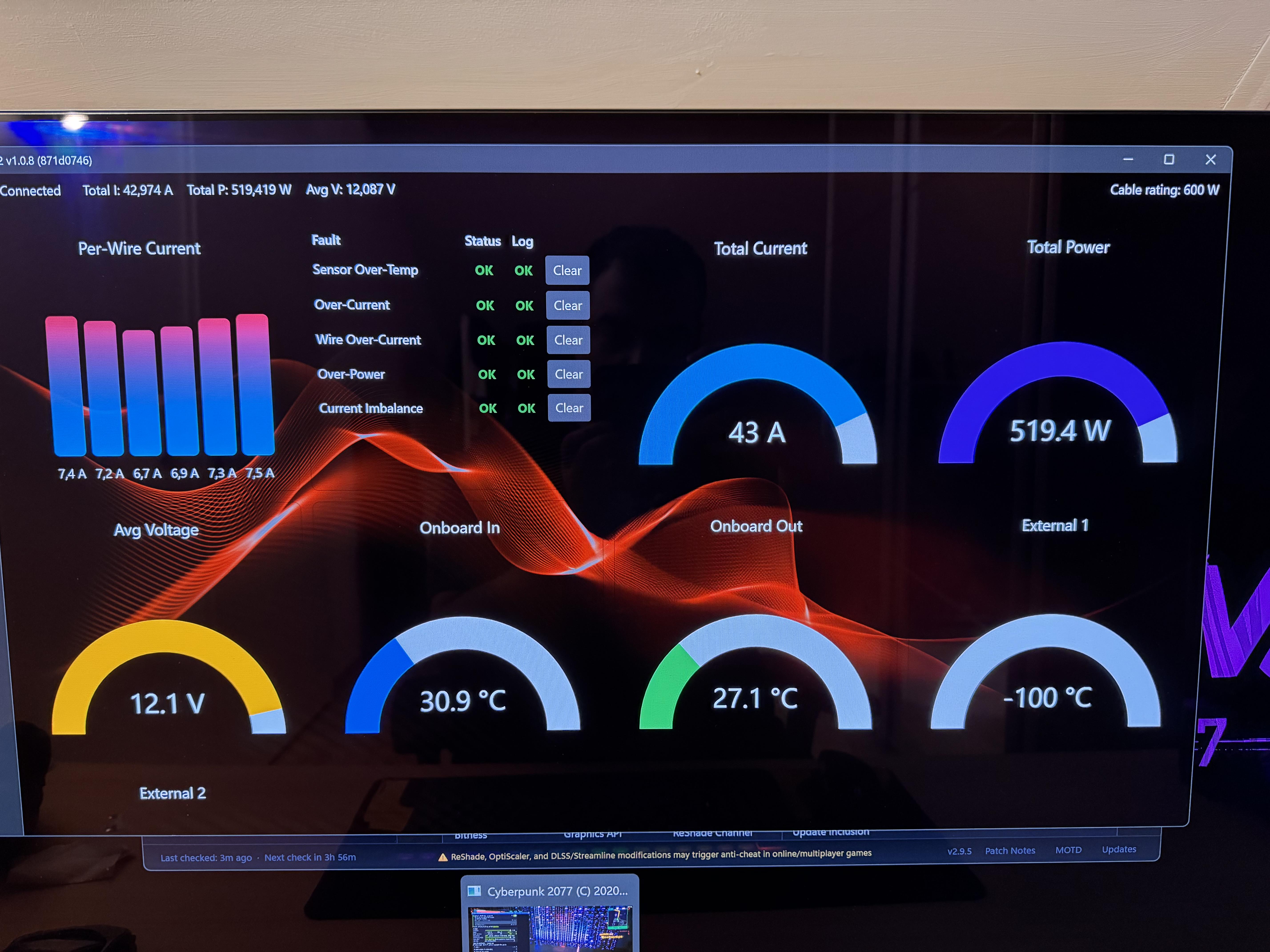
Cyberpunk 2077 (max settings, path tracing): Approximately 520–525 W, with individual wire currents ranging from 6.7 A to 7.8 A.
Maximum observed imbalance: Around 15%, as calculated by ChatGPT using the highest and lowest wire currents.
Voltage: Stable at approximately 12.09 V.
WireView status: All indicators green, no current imbalance or overcurrent warnings.
Interestingly, wires 1 and 6 consistently carry slightly more current than the others.
ChatGPT suggested these readings look acceptable, but I’d appreciate opinions from people experienced with the WireView and 12V-2x6 connectors.

Is this level of current imbalance normal for an RTX 5090 FE, or would you recommend reseating the cable?

I really appreciate your suggestions as I’m totally new at this


r/ThermalGrizzly • • 7d ago

Question/Advice Thermal Grizzly Wireview Pro 2 Wired from Amazon

Thumbnail
a.co
5 Upvotes

I purchased and installed this listing of wireview pro 2 wired from Amazon. It came new. Do I still get the warranty if anything melty happens to my 5090?

Thanks!


r/ThermalGrizzly • • 7d ago

Question/Advice Considering a wireview 2 pro

2 Upvotes

I see the tutorial on how to put it in the card, and it also shows its possible to put sensors on on the card to check temps etc.

Im not that technical, I just want to plug it in and see that everything is ok or not on my per pin cables.

Is it possible to not use the extra futures? And does it come stock with an alarmsound if one of the wires gets too unstable?

Thanks.


r/ThermalGrizzly • • 7d ago

Question/Advice 1000w psu for a 5090 and 9950x3d is enough?

11 Upvotes

I planning of buying the 5090, I already have the 5080 but looking at the market and probably the new 60 series to 2029 I want to switch, do u think is enough with 1000w? Is an Aorus Master Ice, my plan undervolting the 5090 too.


r/ThermalGrizzly • • 8d ago

Question/Advice Front Io splitter

7 Upvotes

Hi, I want to hook up the auto shutdown part of my wireview pro 2. I have a lian li o11 mini V2 case that doesn't have the individual headers for the power button and the rest but an single/unified plug that goes on the motherboard in itself. Where can I buy a splitter? I'm not even sure what would be the correct search term.


r/ThermalGrizzly • • 8d ago

Question/Advice WireViewer Pro 2 Wired pin balance opinions

Post image
19 Upvotes

Hi all, today WVP2 arrived and this is what i get, is this too much inbalance or im fine?


r/ThermalGrizzly • • 8d ago

Question/Advice Am5 contact frame

1 Upvotes

Forgive me Guys, might be a dumb question but…

Do I have to remove the cpu when when installing the contact frame or can I unlatch, remove the existing standard frame and leave the CPU in place while installing the contact frame?

Cheers


r/ThermalGrizzly • • 8d ago

Feedback Improving current balance adventures

Thumbnail
gallery
7 Upvotes

Initially, the current delta between the highest and lowest pins was at around 1.4-1.5A with the 3-year old OEM 12VHPWR ATX 3.0 PSU cable. I re-seated all the connections and the delta went down to about 1.1A. I replaced the cable with a custom 12V-2x6 one and now the average delta is down to 0.8A and this is with a GPU load of over 560W.

Besides being a monitoring and protection device, while not the absolute most accurate, I think the Wireview Pro II can be pretty useful as a basic GPU power delivery diagnostic tool IMO. I like the data logging feature so I can see what's really going on over time.


r/ThermalGrizzly • • 9d ago

Question/Advice Any ETA on the TG PTM Pro in Indonesia?

1 Upvotes

Ive been looking around and comparing PTMs on local marketplaces here in Indonesia, and TG just recently unveiled their new PTM Pro line on their website. However, I havent seen any listings for it on Indonesian marketplaces yet. Any predictions or news on when it will become available in Indonesia?


r/ThermalGrizzly • • 9d ago

Question/Advice MacBook M3 Max memory thermal solution

1 Upvotes

Hi, I'm gonna change thermal paste on the CPU to TG phasesheet PTM and put thermal pads on the heatsinks. I'm struggling with the memory. Does anyone know which Thermal Grizzly product will be an equivalent/can be used as a substitute to Apple's paste that they use on memory? Can't really find much information about what they are using and it makes it difficult to find a replacement.

Preferably non conductive, I have some TG Putty Pro, but I'm afraid that it will be too thick

I know that ifixit sells a kit, but it's dogshit