r/Thunderbird • u/antdude • 9h ago
News Thunderbird v153.8.0esr released!
thunderbird.net
18
Upvotes
r/Thunderbird • u/FarmandDK • 7h ago
Hallo all.
I've recently switched to mailbox.org. so far I'm pretty satisfied.
Now I need a mail client. Any of you guys who can chime in with how mailbox works on thunderbird.
Also.. how is overall safety on Thunderbird?
Thanks 👍
r/Thunderbird • u/denis1276 • 19h ago
Unread count badges are available on supported Linux taskbars
Thundermail built-in add-on updated to v2.0.30
OTR chat encryption is disabled by default for profiles that never used it
The Subscribe dialog continued to show "Please wait" after loading
The Quick Filter keyboard shortcut could stop working
Compose commands failed when feed articles were displayed as web pages
Shift+Space scrolled messages down when focus was in the message list
Selecting a message in a thread summary did not scroll it into view
Changing saved search matching options could insert an invalid search field
Ctrl+Enter could require two presses to send a message
Tab from the Subject field required an extra press to reach the message body
Ctrl+V could unexpectedly send a message
Forwarding IMAP messages failed in some folders with spaces in their names
Contact edits by Manifest V3 extensions stored excess data and caused slowdowns
Birthdays without a year were not saved in Google address books
New Contact and New List were missing from the address book context menu
Editing vCard 3.0 contacts could lose the preferred phone number
Some CardDAV birthdays without a year incorrectly displayed the year 1604
Adding a second Exchange account could show messages from first account
Concurrent offline Exchange downloads could display the wrong message body
Sending messages could incorrectly report an error applying filters
SMTP CRAM-MD5 authentication could fail with some server challenges
Some IMAP messages caused the message pane to reload endlessly
Visual and UX improvements
r/Thunderbird • u/MisterFuzzyGuy • 6h ago
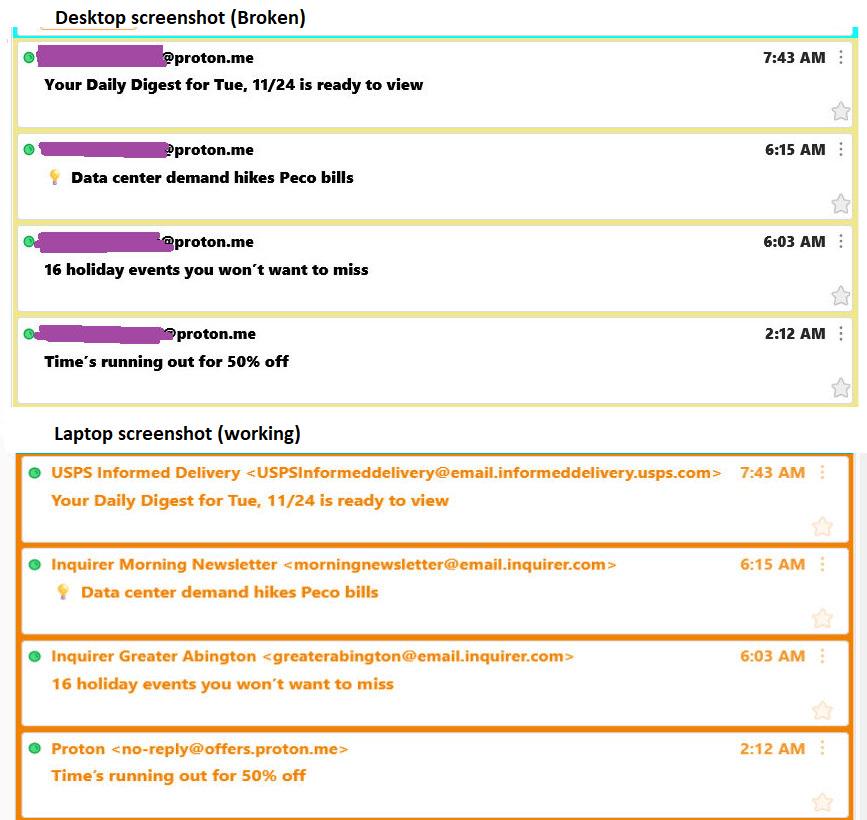
I am having the same issue as described in this Bugzilla Support issue:
https://bugzilla.mozilla.org/show_bug.cgi?id=2089607
From the bugzilla report:
Each card's first line shows the recipient(s), not the sender. For a message from another person where I am the To recipient, the card shows my own name.
For a message with several recipients, the card lists the recipients.
The header pane shows the correct sender for the same message.I attempted to change mail.threadpane.use_correspondents to false, but that did not fix the issue.
NOTE: In table view, the Sender's name displays correctly.
Cards view shows the sender for incoming mail in the Inbox, as it does in Table view.
Additional information:
Similar recent reports on macOS only:
https://support.mozilla.org/questions/1568004 (not reproducible on Linux)
https://www.thunderbird-mail.de/forum/thread/97993 (TB 140.7.1/140.8.0 ESR, macOS)
End Bugzilla Report
Differences are:
I would like some advice on how to compare the two configurations. What files control how the cards are displayed in the inbox? I really don't want to start over with a new configuration, which IMHO would solve the problem.
I tried copying the prefs.js file from the laptop, to the desktop. It broke the profile completely. I sort of expected that, as the Laptop prefs.js file is 14kb, and the desktop prefs.js file is 22kb. Also, the profile directories are different:
Laptop:
%userprofile%\AppData\Roaming\Thunderbird\Profiles\n9d3q3n8.default-release\prefs.js
Desktop:
%userprofile%\AppData\Roaming\Thunderbird\Profiles\dchwbkav.default-release\prefs.js
r/Thunderbird • u/The_Hamster_Shagger • 8h ago
Hi.
Are there any differences between (the same versions) of thunderbird on f-droid and the one from official play store? I assume the one on f-droid is official as well, rigth?
r/Thunderbird • u/mark3nb • 22h ago
It's an official addon that can directly be installed from Thunderbird but I saw 0 reviews or discussions about, hence I'm a little scared of installing something potentially so dangerous.
Anybody can vouch for its safety?
r/Thunderbird • u/Vorlonagent • 1d ago
Hi, I have my own domain with a small hosting service. I have 1 e-mail address and it uses POP3.
When my internet provider changed my IP last week, I got blocked from getting e-mail. My hosting provider said blocked my IP for "port scanning" because Port 143 was being queried when I was getting mail. My provider added that Port 143 is the default IMAP port. I should change it to 993, the port the hosting service actually uses for IMAP.
But as I said, I don't use IMAP. For anything. Why is Thunderbird messing with Port 143 then? More important, how do I make it stop?
I test-started an IMAP account and 143 is the default port it starts with.
I have asked my hosting provider if this was happening before my IP change, and if so why this is a problem now, but I'm writing that e-mail at the same time I'm writing this post so I have no reply.
My Thunderbird version is 153.7.0esr (64-bit). Thunderbird says it is up to date.
r/Thunderbird • u/kallocain_green • 2d ago
I use Thunderbird for desktop (macOS), but am an iOS/iPadOS user for mobile.
I've reviewed your Roadmap again at https://roadmaps.thunderbird.net/en-US/ios/ and noticed what has been "shipped" and what is being worked on.
Is there an ETA for putting something - even a very basic something - out on Test Flight to let us see where things are going for iOS and provide you with a bit of users' view on things? Regular Test Flight users know the risks.
I would like to give Thundermail a try (I was an early volunteer to test it) and see how it stacks up against Proton Mail. But, if I don't get a full-featured Thunderbird client for iOS with PGP encryption and so on offered by and used in the macOS version of the Thunderbird app, I cannot subscribe to it long-term.
So, how soon might it be possible for selected customers to poke around and check out Thunderbird for iOS in a testing capacity?
Thank you in advance! Keep up the good work 🙂
r/Thunderbird • u/Constant-Dimension99 • 2d ago
Hi
In light of the recent comedy regarding Nvidia logging causing massive writes to disk, I thought I should check whether I were affected.
Instead I discovered that Thunderbird's indexing system were writing approximately 15GB/day to my drives.
Shurely shome mishtake!
(I've now completely disabled indexing and TB is behaving normally in that the writes are no longer in evidence)
What catastrophic bollocks is this problem?
r/Thunderbird • u/GritSar • 2d ago
Hi all,
I'm the developer of InboxPie. It's an OpenSource Thunderbird add-on that scans your mailbox and shows where your email comes from: by year, month, domain and sender. Then you can select what you don't need and move it to Trash in bulk.
Everything runs locally. It only reads metadata (sender, subject, date, folder, read status, size) and never message bodies. No servers, no tracking, no AI.
New in 1.0.6:
We have 170+ users and growing - would love to hear your feedback and feature requests on how can we help manage inbox effortlessly and for free #FreeYourInbox #DeClutterYourInbox #InboxPie
r/Thunderbird • u/JonDGuts • 4d ago
I’ve started paying more attention to my privacy and began by de-Googling my phone, switching to alternatives like Proton, DuckDuckGo, etc. Recently, I heard about Thunderbird in an unrelated subreddit. After looking into it a bit, I couldn’t believe there was a free, privacy-focused app used by millions of people.
So, when it comes to using thunderbird, what downsides have you seasoned users found that don’t get talked about enough?
r/Thunderbird • u/caseyhconnor • 4d ago
(Edited to de-snark)
I've read a lot of posts complaining about the less-than-great coverage of the built-in dictionary. Is there any solution? I've been adding words to my personal spell check list for like 20 years and it's still annoying... almost every email of any length needs a new word added. It constantly makes me doubt my own spelling of common words: "Wait... that isn't how you spell 'tensioned'?" It also seems like they use a very old English dictionary: judging from the google ngram usage of many of these words, I'd guess the Tbird dictionary source is dating to like 1940-1950?
I assume that adding fifty thousand or so words to persdict.dat isn't going to go well, yeah? Thanks for any tips on fixing this.
Here are some missing words that I have had to add to the spell checker over the years:
ahold
anonymized
aspirational
booker
contemplations
directionality
gauged
ignorable
inhabitance
instinctually
interpretable
listenable
obstinance
raccoons
raptor
recreationally
remediate
replicable
searchable
selectable
teleport / teleportation / teleported
tensioned
trustable
untrusted
virality
And here are many more:
accelerometers
admin
app
apps
arachnologist
Bcc
carabiner
cardioid
checkbox
compostable
confrontationally
contactor
deliverability
dialoguing
disqualifiers
ethernet
evolutionarily
gasketed
housemate
housemates
inclusivity
infantilized
internet
interoperation
lethality
messianical
metabolizer
meteorologically
minimalistic
misremembering
nonlinearities
obfuscatory
online
ornamentals
parseable
perceptibility
posable
potentiate
prioritization
programatically
programmatically
quinoa
recalibrating
reignition
reinstallation
reinstantiates
repositioned
resort's
sensical
signifier
signifiers
snuck
sociopathy
spam
spammers
stylings
submittal
toolbars
tribalist
unaddressed
underlayment
undirected
unenthused
unsubscribe
versioning
virality
voicemail
webserverr/Thunderbird • u/wy471 • 4d ago
I have check new article set on on 10min but Thunderbird never refresh the RSS feed automatically. I always need to refresh it manually.
r/Thunderbird • u/JRayMaySayHey • 4d ago
Using Thundermail, you get 15 aliases that all get sent back to the main address in Thunderbird.
When replying to an email sent to an alias, it sends from the base hidden email.
It seems like the solution is to add every alias as an account/identity in Thunderbird to be able to select it from the drop down menu. Is this the only and correct way of doing this? Adding in 15 separate addresses seems like it would really clutter up the menu when trying to switch between my 4 actual inboxes...
r/Thunderbird • u/CitizenDee • 4d ago
Please tell me in 2026 (nearly 2027) this isn't a missing feature. Am I doing something wrong? How do I attach a PDF agenda for my customer meetings?
r/Thunderbird • u/Entire-Picture3990 • 4d ago
Are there any places online where people share Thunderbird message filters specifically for email headers like Received?
Received: from 185.152.198.209 (EHLO rev-209-198-152-185.lombard.sk)
by 124.83.239.100 with SMTPs;
Fri, 20 Nov 2026 09:59:21 +0900
r/Thunderbird • u/clau-de • 5d ago
Seeing Outlook go down (again) really shows why local-first email clients matter. While New Outlook basically locks you out when Microsoft's cloud down, at least Thunderbird lets me access and search my local archive offline
Curious how many folks here actually switched from Outlook recently because of reliability issues?
r/Thunderbird • u/OldDomG • 5d ago
Why do I have to actively go into the Thunderbird android app and pull refresh to receive emails? Shouldn't it just receive them naturally like every other email app? Have I set the app up wrong? Please explain to a confused old man
r/Thunderbird • u/rsinghal1965 • 5d ago
r/Thunderbird • u/Theo1352 • 6d ago
All,
Just upgraded to 160, and I have 6 icons that appeared on the menu bar, all the way to the right hand side.
Can't move them, can't delete them.
Why did they suddenly appear, and how can I move them to the left or delete them?
Thank you, in advance.
r/Thunderbird • u/Reverserer • 6d ago
Whenever I move or copy an email to a subfolder it marks it as a draft. It is soooo annoying. Is there a fix?
r/Thunderbird • u/LeoWitt • 7d ago
"Use Paragraph format instead of Body Text by default" is unchecked.
Body text is used. You see full end to end sentences in thunderbird compose window. but then when i sent it to someone, its actually in paragraphs. I tried a bunch of tests and did Select all, remove all formatting, etc....
Any ideas?
r/Thunderbird • u/Top-Journalist104 • 7d ago
I have a legacy u/stny.rr.com RoadRunner email address that I have used in Mozilla Thunderbird on Windows for over 10 years. Outgoing email suddenly stopped working today, and I am stuck in an authentication loop.
Here is what I have already verified:
webmail.spectrum.net): Logs in and sends/receives normally with my current password.mail.twc.com on Port 993 (SSL/TLS, Normal password) connects and downloads new messages normally.mobile.charter.net on Port 465 (SSL/TLS, Normal password, full email address as username) successfully establishes a connection to the server, but Spectrum's server immediately rejects the login (Login to server mobile.charter.net failed). Port 587 (STARTTLS) does not connect.spectrum.net to try forcing a server re-sync.Front-line phone support declined to help or escalate because Webmail works. Could a Spectrum specialist please look into re-syncing my legacy RoadRunner mailbox's third-party SMTP authentication on the backend so I can send mail through Thunderbird again?
r/Thunderbird • u/WonderSkydive • 7d ago
He publicado Birdtray 1.14.0, una edición comunitaria que añade soporte para KDE Plasma Wayland. Ahora puedes ocultar y restaurar la ventana de Thunderbird desde la bandeja del sistema tanto en Wayland como en X11.
La versión conserva las correcciones para el contador de mensajes sin leer, que en ocasiones podía dejar de actualizarse. Puedes elegir qué carpetas supervisar, personalizar los colores del contador y aplazar las notificaciones. Funciona sin instalar ninguna extensión en Thunderbird.
He probado el contador y el control de ventanas en Kubuntu 26.04 con Plasma 6, tanto en X11 como en Wayland. La publicación incluye un paquete .deb para Ubuntu 26.04 Resolute (amd64), el código fuente y documentación en inglés y español. Esta edición parte de Birdtray 1.11.4 y conserva la licencia GPLv3 y los créditos originales.
Proyecto y descargas
https://github.com/WonderSkydive/birdtray
Si la probáis, me interesa saber cómo os funciona. Si encontráis algún fallo, indicad qué versión de Thunderbird usáis y si vuestra sesión es X11 o Plasma Wayland.
¡Gracias!