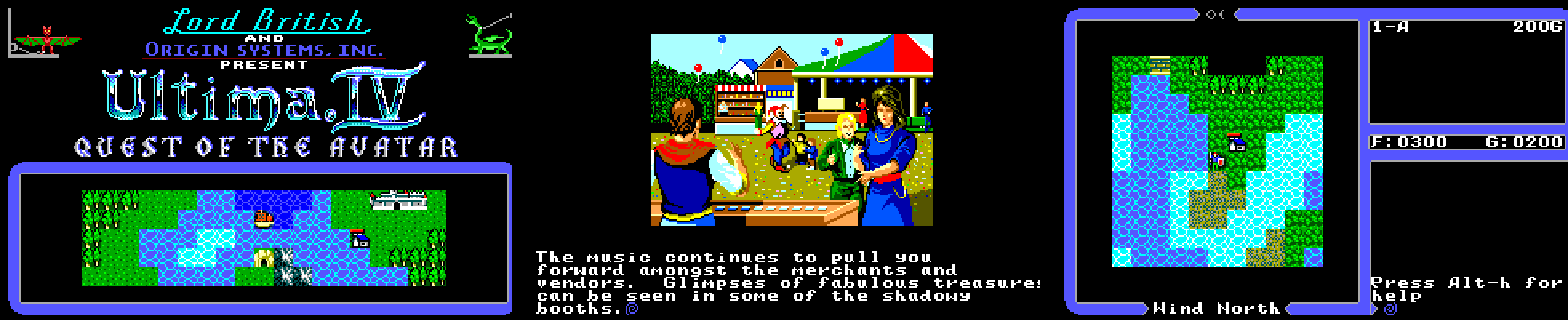
I'm the creator of the ultima3 and ultima5 updates. Recently I put out and update for the u3 build that incorporates the look & feel of the ultima5 version, and I'm building the ultima4 version right now. The idea is that a new player could play 3, 4, and 5 with a consistent look and feel, including the tile sets and controller support, etc.
I'm planning on doing a new video covering these updates as well as highlighting some of the other Ultima ports people are working on. So far I have the following - I haven't played these myself yet but the creators reached out to me to check them out:
Are there any others people would recommend as ready for prime time for me to cover in an upcoming video?
Also, if you haven't checked out the updates on both the ultima 3 and ultima 5 releases, there have been a lot of changes since last time, including tons of bug fixes, new tile sets, etc.
Thanks to everyone for their support and bug fixes, especially GitHub user tuono21 for reporting many great catches!
Just wanted to add some screenshots Ultima 5 via an Apple II emulator that I built. I remember fondly spending hours and hours playing Ultima 3, 4, and 5 on the Apple II, writing down clues and conversations with pen and paper, and reading the manuals about the monsters in the Ultima universe!
Brings back such wonderful memories! I've just started playing again but it's difficult to set aside a few hours in a stretch so it's become a casual-gaming affair for me. Lol.
Hi everyone! I’ve built a new engine for Ultima VIII: Pagan that runs the original game without DOSBox. It’s based on the great work of the ScummVM team (formerly Pentagram). It’s already fully playable, and all you need is your own copy of the game.
A few highlights:
Better graphics with widescreen, zoom and dynamic lighting
Modern controls for mouse, keyboard or gamepad (Steam Deck too)
Improved UI with a minimap, quest journal and health bars
Better inventory with fixed slots
Supports Dustin Naegel’s orchestral album instead of the original MIDI music (Download on Bandcamp)
Every improvement can be turned off individually if you prefer the original experience.
This video shows the graphics options of PaganRebuild: switch between filters, turn the lighting on and off, zoom in and out, and the experimental rotatable view: https://youtu.be/m2YyI6m_23A
I was just watching a retrospective on it, and the cuts are so sad! Having each ofbtrh banes take over or terrorize each town in there own way sounds amazing!
Were there ever any projects to try realize to potental of the game? To fill it in with some fan made revamp?
Quick recap Quest of the Companions is a custom Exult build that started as a Co-Op build with an emphasis on updating keyboard navigation and adding native controller support. In order to have the game fully playable with a controller, I needed to create ways to target, select, move, and drop items without a cursor, so a Targeting system was built.
Along the way, a companion skills system was added to make combat a bit more interesting for companions controlled by another player. Iolo can use barding skills, Jaana heals, and Spark uses his slingshot to do trick shots.
The game has been fully playable for a month, and many Redditors have confirmed that they have completed a full playthrough, including using only a controller.
Journey Continues My personal Co-Op playthrough is still ongoing. We have finished Britain, moved on to Cove, and now discovered a gruesome double murder in Minoc. The residents are trying to pin the act on the Gypsies, but those Fellowship members are very suspicious.
New Updates
Lighting system - No original artwork has been touched; no textures changed. The lighting system paints over the pixels by adding layers. Shadows are based on the "sun position". In order to get some cool shadows, the sun's noon position was made the northern edge of the screen as opposed to the more realistic "overhead". An overlay to make the world exposed to sunlight hotter was also added.
In doors was tricky as the game switches between indoor and outdoor states. Lighting floods interiors through open shutters, glass windows, and open doors. It's pretty cool that when an NPC now opens a shutter and says "That's better," you can visually see it.
Torches, candles, ovens, and even magic items now emit light and cast shadows as well. I tried to keep the effect subtle.
Initial builds were causing dramatic framerate drops, so pixel and sunlight position calculations had to be spread through all available CPU cores. A fix was just deployed today that should keep framerates relatively the same as with lighting off.
Enhanced Combat - Aside from the companion skills, it was still a bit of a free-for-all. Yes, you can use the built-in U7 combat tactics, but I barely remember what those icons do. I didn't want to switch to turn-based; better developers than I are doing that. If you haven't seen U7 Revisited, are you even an Ultima 7 fan?
Instead, I added battle orders to command companions (excludes any controlled by a human).
To make combat more dynamic, flanking and backstab damage was added. This goes both ways, so don't get surrounded.
Not sure Dupre would ever backstab anyone..
A few other minor changes include a new "Feed" system. I never liked the automode where you hit one key and companions are fed. I felt this went against the essence of the OG. Now, when you press "F", you see a list of all food carried in your inventory. Select a food item and then select a companion.
Oh, others had asked about videos of Co-Op in action. I recorded a bunch of bad videos and tried editing them together, and one thing I realized quickly is that U7 is a very SLOW game. Most of the videos were of us reading dialogue together and making snide remarks. Combat is still very fast, and with more companions being controlled by players, it's even easier, so we play with the increased Exult difficulty. I have no idea how to make a video that would highlight the fun of experiencing U7 in Co-Op so if anyone has any ideas, I would love to hear them. Maybe more of a trailer type video with quick shots?
Open Ultima 8: a new open-source engine for Ultima VIII: Pagan, written in Rust (looking for testers!)
Hey all! For the past while I’ve been building Open Ultima 8, a from-scratch engine for Ultima VIII. You point it at your own copy of the game and play it on a modern PC. The screenshots are from the current build (v0.4.8).
What it is
A new engine that reads the original game files, maps and scripts and runs the original game logic, so it plays like Pagan. It doesn’t come with any game data; you need your own copy (GOG works).
Checked closely against the real DOS version. I run the original side by side in DOSBox and compare: saves, combat, stealing, magic, timings, even where the flames from Fire Shield land.
Saves work both ways: the original DOS game can load saves made in Open Ultima 8, and the other way round.
Native builds for Linux, Windows and macOS (Apple Silicon too, a platform U8 never had).
What’s new compared with the original
Smooth zoom (1× to 8×) and upscaling filters: xBR, xBRZ, sharp-bilinear and a CRT look
Any window size, widescreen
A smooth camera option (no more screen jolts when you jump)
Readable book and scroll text, and the original’s typeset text if you prefer
Quieter fires, drips and the clock ticks (the originals were LOUD), with a separate ambience volume
Quick save/load, Discord status, and the original developers’ cheat menu as an option
What I need: testers!
It’s playable, but Pagan is a big, strange game and I can’t hit every corner alone. If you have a copy, please play it and report anything that looks, sounds or behaves differently from how you remember the original: crashes, stuck scripts, wrong drawing order, people in the wrong place, puzzles that don’t work.
A pointless endeavor on a whim. I mean, UO isn't really big anymore, nor would anyone need to play it from a C64. But here it is. It runs and connects to a real 3rd party server. So far I've only tested it on UOX3. Full hardware compatibility is the goal, so far the only cheat is that I have a python script stitching a couple of split movement packets coming out of vice, which I'll fix in client later. Within vice, I have it setup with a turbo232 and an REU, both of which are real, period correct, devices. Right now I'm doing a petscii interface so I can focus on the mechanics of it first. Graphics and sound assets will come later, if I don't run into a brick wall before. The memory of the REU isn't really used yet, the MMU is being used for its DMA, acting as a blitter, with a small amount memory for buffering the communication. I'm working on terrain/map next. Since the video was recorded , I have added war/peace mode and combat. https://youtu.be/p4gL2cz6DYA
Awesome Games Done Quick Schedule has been released. Ultima IX speedrun by Lemming is scheduled for 1:39PM on Wednesday January 6th. The run is the finale of the Awful Block of games where runners play some of the worst games as fast as possible. The run is estimated to take 45 minutes, though that is marathon often generous incase of unforseen circumstances so the run is likely much shorter than the estimate.
Well it finally released today! I spoke to three people from the community and they were great guests and complimented my journey through Ultima and its history, incredibly well! Additionally, my journey led to an insane conclusion that I genuinely couldn't have predicted. Anyway, hope you all enjoy, consider me an Ultima fan for life!
Just what the title says. I've only ever played 7 (which I absolutely love) and am looking to play the rest of the series but I only game on my steam deck in handheld mode these days. Is it feasible to play them that way or would it be too clunky or just not be worth it?
Hi everyone! I've finished a complete **Brazilian Portuguese** translation of **Ultima VII: The Black Gate** with **Forge of Virtue**, made for **Exult 1.12.1**.
**What's translated:**
- All dialogue, books, scrolls, signs and plaques
- Item names, game messages and cursor warnings ("TOO HEAVY", "OUT OF RANGE"...)
- Intro, ending (with subtitles for the Guardian's lines) and menus
- Spellbook, stats panel and inventory screens
- Exult's own menus, options and credits
Accented letters (á, ç, ã, etc.) were added to the game fonts. Voices remain in English, with Portuguese subtitles.
**Installing:** a Windows installer either patches an existing Exult 1.12.1 or installs a translated build of Exult. There's also a .zip for manual install. You need your own English copy of the game (the GOG version works).
All tools and scripts used to build the translation are in the repo, in case they help anyone doing other languages. It's a non-profit fan project. Feedback and bug reports are welcome. **Serpent Isle is in progress!**
---
🇧🇷 **Em português:** tradução completa de Ultima VII: The Black Gate + Forge of Virtue para o português do Brasil, no Exult 1.12.1. Inclui todas as conversas, livros, itens, menus, introdução e final com legendas, e as fontes têm acentos. O instalador traduz o seu Exult ou já instala o Exult traduzido. É preciso ter o jogo original em inglês. Serpent Isle em andamento!
Just been playing around with Claude Code's new theming functionality and I got it to build this Ultima 6 inspired theme. Thought you guys might like to see. Probably not very usable but fun 😄
Hey all, it's been a few weeks since I posted about XU4 Legacy Edition here, and 1.3 is out now with a lot of new stuff since 1.0, so I thought I'd post an update for anyone who's interested. I won't make a post every time, I just thought this was a huge milestone and worth promoting a little bit.
Thank you to everyone who commented, tested and sent feedback on the first post. I've taken a lot on board, and mixed this with my own goals, and the work done on the Ultima III and V ports by u/rootException to really try and push this forward. I was very inspired by those releases in the push from 1.2 to 1.3, and did try to match some of those extra QOL features he came up with to make this even better. A shoutout to u/randyrobbinsmusic and u/Cassoule who have really helped with testing and allowing me to ask specific things of them to test.
The goal is still the same: make it as easy as possible for someone new to check out Ultima IV and help keep the legacy of the game alive. Nearly everything new is an option you can turn on or off, and the "Classic" setting keeps the rules as they were. But the content remains the same, and
It's still a fork, still open source, and still ships with no game data. You need your own copy: the GOG release is free, and the Steam release is now picked up automatically too.
For anyone who missed 1.0, it already had all of this on top of the regular XU4 release:
an SMS-style UI option, turned on as soon as a controller is detected: press A (or Enter) for a menu of actions, and conversation topics unlock as you talk, so no typing is needed at all
Apple II tiles and music, if you have the disk images
the GOG install is found automatically on Windows
GOG's ULTIMA4.TXT split up and readable in-game
the module list only showing mods whose files you actually have
New for graphics and music since 1.0:
C64 disc support: handling both the C64 original and the u64remastered fan release, full tileset and soundtrack available as options if you supply the disc images
SMS ROM support: a full tileset ported from SMS to XU4, with the SMS soundtrack also available, similar to above if you bring a ROM. There's also a "Fill Space" option so the smaller SMS tiles show more of the world instead of sitting in a black border designed with this skin in mind.
NES ROM support: a full tileset ported from NES to XU4, with the NES soundtrack also available
a CGA module that uses the DOS release's own four-colour files
More full UI skins: the SMS, NES, C64 and Apple II modules now frame the screen with the borders from their own versions, fonts used all over are the platform fonts
You should be able to supply something like a u4multiplat.zip and the game should just read in the other platform files.
you can switch graphics anywhere, in a town, a dungeon, a battle or mid-conversation, without saving or restarting unlike the original XU4.
full NES tileset in gameSMS tileset in-game, you can expand the window too if you'd like to fill the space, but it defaults to the regular view distanceC64 tilesets, original on top and remastered below
Quality of life features, etc:
the books open in context: when the intro asks if you want to read the History of Britannia, saying yes now opens it right there. The books are split into chapters, in three text sizes, and with spell info turned on, a spell or reagent opens its page in the Book of Mystic Wisdom. We also now support the text file formats found in other free u4 zip files hosted on various dragon websites or internet archive.
Here is the prompt, it'll open up the reader exactly where you are in the flow of play
there's now a world map of Britannia, drawn with whichever tileset you're using, with the cloth map's place names in runes or English. In play it only shows what you've explored, so a Gem is still worth having, and it can label places you've visited and places you've only heard about.
Full map rebuilt using the XU4 rune fonts, and built to match the cloth map that shipped with the game
you can now play the whole game with just the mouse or taps, and there are new builds for macOS, Android, the web (which also works on iPhone and iPad if you add it to your home screen) and a Flatpak for Linux and the Steam Deck.
talk topics now unlock more accurately using the Master System's own rules for each person (so a topic only appears after the right answer or hint), and topics you've already asked show in grey. Shrines and barkeeps let you pick from what you've heard instead of typing it. This was enabled by a machine decompilation/recompilation and PC port of the SMS original, which allowed me to track down and fix many issues from the original release. (By the way, that's a full PC port of the SMS version, if you're interested in that instead, still working on rewriting all the assembly into C but it's almost done in that respect too)
a proper game menu with a Journal (virtues, quest items, and the clues you've heard by place, plus who still knows more), How to Play, a Tips book, a dungeon auto-map, combat tips in your first fights, and a full walkthrough Spoiler Guide that stays hidden unless you turn it on (check the settings menus)
This is the guide, I actually threw this at claude and got it to verify my understanding using the real game's backend flags for progression to make sure it's not nonsense, but I'm also new to this!
Legacy Edition Options, now seven pages with a description for each option: difficulty presets (Story, Modern, Classic) that it can ask you about at New Game, auto combat that hands back control when someone's badly hurt, snap attacks, quick spells in the fight menu, shops that compare gear and grey out what you can't use or afford, spells listed by what they do, folded repeated moves ("North x5"), smooth motion, coloured party status, autosave and save history, several characters, and a choice after a party wipe (last save, an earlier save, or Lord British's aid)
This pic was taken a while ago, I think I added even more tbh
the Steam version is found on its own (Windows, Linux and Steam Deck), with optional Steam Cloud saves, and zips of the game in pretty much any layout work too
remappable gamepad buttons, Alt+Enter/F11 for full screen, a portable mode on Windows and Linux, menu sounds, and an optional update notice
The full list is in the release notes. I'm still testing heavily, as I play through the game, so I'd love any feedback, bug reports or ideas either here or on GitHub. I'm especially curious what would help someone completely new to Ultima get into it like I have been (between being completely sucked in by WoW Forever oops).
And I still have some features I want to add, but anything else I'm also completely open to. Coming up next in 1.3.5 or something will be support for the SMS FM synth soundtrack, as well as a "50hz" toggle for the SMS soundtracks. I wanted to get that into 1.3 but it's actually taken quite a bit of work to make sure it sounds good. Most other features on my list are small though.
AI disclaimer: yes, of course, I used Claude Code to help with this project, like the amazing Ultima III and V ports out there. While Claude is great at putting together large changes (upgrading the backend for new platform support would have taken months and months), the real work on my end has been testing. Every new feature I've added has been code reviewed by me and also tested to make sure it does exactly what I want it to do and meets my quality standard. That said, obviously issues may have been missed as I'm just one person. But I'm keen to keep polishing this and get it to where it needs to be. This has cut down what would take months to weeks, but it has still been a pretty consistent amount of work for me, for those weeks. Claude gets a lot wrong, and makes assumptions that make no sense in the context of the codebase and the game, but working with something is a lot quicker than starting for scratch, especially when a lot of coding can be ultimately fairly standard or boilerplate. Happy to go into more detail about my process if anyone is interested. I've tried to tackle this hobby project as close to how I would develop this myself in my full time job.
Before the pitchforks come out: this is not an AI-generated game, remake or "reimagining". No generated art, no generated quests, no synthetic voices, and no "Claude make Ultima 9 Bob White Plot real ok pls thx!" This is not a steaming hot pile of vibe vaporware mess. It's Ultima IX: Ascension, the one you own on GOG or I guess now even Steam, untouched; for better or worse till death do you part.
What U9GL does is add a new OpenGL renderer alongside the game's original DirectX 6, DirectX 7 and Glide renderers. It simply adds a new lighting engine and patches bugs that have crashed this game for over 25 years. Your u9.exe is never edited(if you turn on the large-memory option, U9GL runs a copy of it instead), and turning everything off gives you the original game back.
About AI, since you'll ask: I used an AI coding assistant to help reverse-engineer the engine and write the C code, and the project's README says so openly. Every feature and fix was tested in-game by human(s), often run after run, with crash logs, until it was resolved or I gave up. The AI was a tool in the workshop. It isn't the product. Britannia is still Origin's.
What the new renderer adds
Per-pixel lamp, candle and torch light that stays on its own side of walls(in the original, light shines straight through them)
Sun shadows that follow the time of day, lengthen toward evening and fade in storms
Moon shadows at night, strongest at full moon
A night look, so lamps actually stand out after dark
Underwater haze, caustics and light shafts
Longer draw distances, support for replacement HD textures at any size(bring your own), and the game's brightness setting actually working
An optional live web dashboard: the Avatar's stats, spells and status effects, where you are, and how the game is running
The launcher's graphics and game settings are customisable.
The fixes
Crashes that no longer happen:
Loading certain saves
Spells: a spellcaster teleporting, a spell or a creature's attack landing after its caster is gone, and Lord British vs. Blackthorn, where overlapping Rings of Fire were mistaken for a spell and deleted mid-fight
A cutscene starting or being skipped
Flying fast while the world streams in and out
A dragon attacking a target it had already lost, and creatures still around the Avatar after he dies
Asking for one of the handful of models stored in a layout the game can't read(it now draws a placeholder)
Arriving at a new map after it unloaded the object a sound belonged to
Cleansing a shrine whose rune or item was picked up, moved or left on another map
Gameplay bugs:
Ever have problems swimming/holding breath in Serpents Hold or William Lett's quest? Problems solved.
Hostile NPCs that chase you but never attack: now every creature fights back
Spellcasters whose teleport played its effects but left them where they stood now land, on the ground rather than in the air or on a roof
Chasing enemies head for where you are now and go round what blocks them, instead of walking past you or sticking behind a tree
Birds and vultures stuck inside trees, crying again and again, are set down nearby
Doors that swing past closed, wobble, or stop half open but count as shut
Shopkeepers who climb onto their counters to read the book there, and stay up
Sir William Lett's book now teaches the last two-handed move when read from your backpack, and tells you whether you learned it
Slow-motion animation after ~25 days of Windows uptime(yes, really, and Fast Startup makes it common, because a Shut down doesn't reset it)
Meshes that were never unloaded: near Moonglow their count climbed by thousands a second
Visual bugs:
Flames, sparks and lava bursts without purple boxes around them
No rain splashes on floors indoors
No storm haze filling rooms
No lightning flashes inside closed halls like Lord British's throne room
Bonus: lost content
The game shipped with a finished halberd and left every one in the world as scenery. Now you can pick it up and fight with it.
To play: your own GOG or Steam copy of Ultima IX, installed. No game files are included. Extract U9GL into your game folder, so u9gl sits beside u9.exe, and run u9gl\U9GL.exe.
U9GL is in beta (0.x): more fixes and features are coming, and with a game this buggy you'll likely find problems I haven't. Please report them on GitHub.
It's free for personal, non-commercial use, and the full source code is published alongside it(source-available under a non-commercial licence). Screenshots, the full list and the licence are here:
I bought Ultima VII on Steam and got it running through Exult.
But is there a way to make the original Steam Play button launch Exult instead of DOSBox, while keeping the original Steam game identity (AppID), Overlay, and Game Recording?
I know I can add Exult as a Non-Steam game, but I'd rather keep everything under the original Ultima VII entry.
No matter where I move the files or point the cfg file to look seems to help. I boot exult and it tells me to edit the config file. I’ve been screwing around with this for two hours and I’m completely flustered. I’ve tried everything I’ve read online and nothing helps. I have the GOG version of the game and the newest release of exult. If anyone can help me I’d greatly appreciate it.
I’m the solo developer of Shards of Nidon, a free browser RPG inspired by the exploration and danger I loved in older Ultima games.
You arrive carrying a sealed letter for a warden who no longer recognizes you. Then the bells of Brennovik start ringing with nobody at the ropes.
The latest build improves the town and its interiors, adds a woodland route to explore, and gives the ravine and cavern a more consistent look. There are also mounted escapes from cloaked pursuers, party battles, and assassins who can stalk and ambush you in town.
I’d appreciate feedback on one thing: where did you first want to keep exploring, and where did you start losing interest?
This is an unfinished alpha. I use AI-assisted development and some AI-generated artwork, but none is final These screenshots are actual gameplay captures.
One of the things I loved about Ultima VII was that people had their own lives to get on with. There was something enjoyable about just stopping and watching them for a while.
I've spent years trying to capture that feeling in Code of The Savage. Giving someone a timetable is one thing. What interests me is what they actually do with their day, and how they react when things go wrong.
A player could rush through and miss a lot of this. But those little details are a big part of why I wanted to make this game.
I put this video together to give that side of it some attention. Thought you lot might appreciate it.