r/VideoProc • • 1d ago

🎞 VideoProc Converter AI Enhance Family Photos and Videos for Thanksgiving – VideoProc Black Friday Sale

Post image
1 Upvotes

Thanksgiving is a good time to revisit old family photos, share home videos, and capture new moments together. But older footage may look blurry or grainy, while new recordings aren't always perfect, especially when shot indoors or on a phone.

If you're planning to give those memories a little refresh, VideoProc Converter AI offers a few tools worth exploring:

·        Improve video quality: Upscale low-resolution footage to HD or 4K, reduce noise, and improve video quality.

·        Restore old photos: Enhance image clarity, restore facial details, and colorize black-and-white pictures.

·        Fix shaky clips: Use AI Stabilization to smooth out handheld recordings.

·        Clean up audio: Reduce distracting background noise with AI Noise Suppression.

·        Get media ready to share: Trim, merge, convert, and compress videos for different devices.

You can also use its media conversion tools to prepare Thanksgiving-themed movies for the kids or get video and audio files ready for your family gathering.

We're also running a Black Friday Sale with up to 50% off selected VideoProc Converter AI licenses, including Lifetime and Family options.

If you're interested, you can check out the press release here:
https://www.einpresswire.com/article/958505557/videoproc-2026-black-friday-deals-save-up-to-50-on-ai-video-and-image-enhancer

Hope everyone has a lovely Thanksgiving! What kind of family photos or videos are you planning to revisit or share this year?


r/VideoProc • • 22d ago

🎞 VideoProc Converter AI VideoProc's 8th Anniversary Cash Prize Draw Results

1 Upvotes

Hi everyone,

VideoProc is celebrating its 8th anniversary, and we've completed the anniversary cash prize draw. Congratulations to the 30 selected participants: 10 will receive $10 each, and 20 will receive $5 each. The winners' email addresses are partially masked below to protect their privacy:

We'll contact the winners by email over the next 7 business days. Please check the inbox associated with the email address you used to enter. 

Thanks again to everyone who took part and continues to support VideoProc. Happy 8th anniversary!

Anniversary pages:

https://shorturl.at/x7g4X

https://shorturl.at/QOZnD


r/VideoProc • • 26d ago

💬 General Discussion Video enhancement

Thumbnail reddit.com
1 Upvotes

What’s a good video enhancement app for IPhone?


r/VideoProc • • 28d ago

📸 Showcase Your Work Made a Halloween AI Video About Two Cats on a Little Adventure

0 Upvotes

Made this short AI Halloween video featuring two curious kittens who find a mysterious key and discover pumpkins and candy. Went for a cute, slightly magical Halloween vibe.

Generated at 720p with Seedance 2.5, then upscaled to 4K (2880 × 2160) with VideoProc.

Hope you find a little unexpected luck of your own this Halloween. 🎃🍬


r/VideoProc • • 28d ago

📸 Showcase Your Work Share: Dreamy Halloween Wallpapers in 4K 🎃🌙

Thumbnail
gallery
1 Upvotes

A softer take on Halloween — dreamy skies, glowing moons, and aesthetic scenes with a touch of spooky magic. 🌕✨

Sharing these 4K wallpapers for anyone looking to give their desktop a little Halloween makeover. Feel free to pick your favorite!

Created with Midjourney and upscaled to 4K with VideoProc Converter AI.

Which one would you use as your wallpaper?


r/VideoProc • • Oct 23 '26

📸 Showcase Your Work What if Elon Musk took the Tesla Roadster for a test drive?

0 Upvotes

I imagined a rocket-powered Roadster test drive going something like this… a confident takeoff, a wild mid-air roll, and a landing that leaves the driver seriously regretting his life choices. 🤢

This comedy video was generated by Kling AI for free. Then I upscaled it from 720p to 1080p.

Be honest: would you dare to take this thing for a spin, or would you leave the test drive to a professional pilot? 😂


r/VideoProc • • Oct 20 '26

🎞 VideoProc Converter AI VideoProc’s 8th Anniversary: A Look Back at 8 Years of Development

Post image
2 Upvotes

VideoProc is celebrating its 8th anniversary! Since launching in 2018, it has evolved from an everyday video processing tool into a more comprehensive solution for video, image, and audio enhancement. Here’s a look back at some of the key milestones along the way.

·        2018: VideoProc launched with tools for video conversion, compression, recording, and 4K video processing.

·        2021: VideoProc Vlogger was introduced as a free video editor for beginners and hobbyist creators.

·        2023: AI-powered Super Resolution, Frame Interpolation, and Stabilization expanded the ways users could improve video quality.

·        2024–2025: AI capabilities continued to develop across video, image, and audio enhancement.

·        2026: Updates brought more consistent colors in AI upscaling, new face restoration models, more flexible compression controls, and improved workflows.

Over the years, the ways people use VideoProc have also evolved. Many users still rely on it for everyday tasks like converting and compressing videos, while others use its AI tools to reduce noise in low-light footage, restore details in blurry photos, or improve older family videos. Ease of use, having multiple tools in one place, output quality, and the lifetime license option are among the benefits users frequently appreciate.

Looking ahead, the focus remains on refining AI enhancement, improving processing efficiency, and making everyday workflows more convenient without adding unnecessary complexity.

Eight years is a good opportunity to reflect on how far the product has come — and on what still needs work. Thanks to everyone who has used VideoProc and shared feedback over the years!

For more details, read the full press release: https://www.einnews.com/pr_news/950669057/videoproc-marks-eight-years-of-video-processing-innovation-with-ai-enhancement-tools-and-anniversary-offers


r/VideoProc • • Oct 15 '26

🎞 VideoProc Converter AI VideoProc Converter AI 8th Anniversary Sale – 62% Off Lifetime Licenses + Free Gifts

4 Upvotes
VideoProc Converter AI 8th Anniversary Sale

Hi everyone,

VideoProc is celebrating its 8th anniversary with a special offer for anyone who works with videos, photos, or audio and wants a versatile set of media tools for everyday use.

As part of the anniversary sale, you can get 62% off a lifetime license, with free lifetime updates and a bundle of bonus software, including VideoProc Vlogger and other video, photo, and system utilities.

VideoProc Converter AI combines AI-powered enhancement with everyday media tools, so you can use it to:

·        Enhance low-quality videos — upscale footage to HD or 4K, reduce noise, and improve clarity.

·        Restore and upscale photos — enhance image details, restore faces, and colorize black-and-white photos.

·        Smooth and stabilize footage — increase frame rates and reduce camera shake.

·        Handle everyday media tasks — convert video/audio/DVD formats, compress large files, edit clips, record your screen, and download videos.

If you’ve been considering a lifetime license instead of an ongoing subscription, the anniversary offer may be worth a look.

See the anniversary offer and details:
https://shorturl.at/if9Al

Feel free to ask if you have questions about the features or licensing. We’re happy to help.


r/VideoProc • • Sep 21 '26

🎞 VideoProc Converter AI VideoProc Converter AI V8.12: New iPhone 18 Support + Smaller Installer

3 Upvotes

We’ve just released VideoProc Converter AI V8.12 for Windows and Mac, with broader support for the latest Apple devices and systems, plus a few practical improvements under the hood.

Update: VideoProc Converter AI V8.12

What’s new:

  • New iPhone 18 series support — V8.12 supports the iPhone 18 Pro, iPhone 18 Pro Max, and foldable iPhone Duo, making it easier to convert and prepare videos and DVDs for playback on the latest iPhones.
  • Nearly 40% smaller Windows installer — The Windows installer has been reduced from around 460 MB to 290 MB, making it faster to download and easier to install, especially on slower or metered connections.
  • Improved Downloader compatibility — Updated Python and related components to provide a more up-to-date foundation for downloading from supported online video sources.
  • RTX 50 Series optimization — Added support for the NVIDIA RTX 50 Series AI runtime to improve compatibility with newer RTX GPUs.
  • macOS 27 support — VideoProc Converter AI is now compatible with macOS 27, allowing Mac users to continue using the software after upgrading to Apple’s latest desktop OS.

👉 Read the full announcement: https://shorturl.at/wUllt

If you’re already using VideoProc Converter AI, you can update to V8.12 directly. New users can check out the latest version and licensing options on our official website.

What would you like to see us improve or add in the next version?


r/VideoProc • • Sep 14 '26

💡 Tips & Tricks Live! The Night They Drove Old Dixie Down by Tom and Mary Kay [Music]

Thumbnail
youtube.com
2 Upvotes

Sharing a tip: Here's a really good way to use VideoProc fix up old super low resolution footage. First I took my low-res video and improved the resolution using the Anime selection in VideoProc. Then, I got another online app to create a video of a family looking at a green screen TV, so that I could use my video editing app to put my video on the TV screen. This way, I did not end up with a really blurry fuzzy result, because I didn't have to increase the size of my original video. And I think the result makes a nice video, don't you? Well here is my example in case you can get ideas from my experience when making your own videos - https://www.youtube.com/watch?v=WlWuKIv6Ky0


r/VideoProc • • Sep 11 '26

❓ Ask the Community I need help upscaling a couple videos

1 Upvotes

So a good friend of mine had his motorcycle stolen the other day and the only footage he has are these two can someone please help upscale these and clean it up a bit? Thank u.

https://imgur.com/a/k2ut1jK


r/VideoProc • • Sep 09 '26

📸 Showcase Your Work How I use VideoProc Converter to improve low res cell phone videos for creating my Music Videos

Thumbnail
youtube.com
2 Upvotes

Even though only so much can be done with a very shaky handneld low-res cell phone video, I want to share the results of a video of a recent live performance of ours. It's a 3 step process: I improved by FIRST using the VideoProc stabilization on the original video file, and then NEXT I ran the stabilized mp4 through VideoProc's enhancement process to improve the clarity and resolution. After getting a much more stable mp4 this way, I could create my music video from it. BTW The audio was in need of improvement as well, being from the cell phone mic, so I used a DAW to improve that. Hope this gives you ideas! I am posting the result. Please leave me a comment or ask if you have any ?s - I really like what VideoProc did because I wanted to save the musical moments!


r/VideoProc • • Aug 31 '26

❓ Ask the Community Is it possible to enhance this video enough to make out the license plate on the trailer?

Thumbnail
gallery
3 Upvotes

My truck was stolen and the local lottery office got a video of the theirs unloading the contents of my truck into a trailer.
Is it possible to enhance this video enough to make out the license plate or any faces? It is an .avi file 602MB large.
I would appreciate any suggestions or assistance!
Thanks!


r/VideoProc • • Aug 29 '26

❓ Ask the Community Deutsch Streamingseiten

1 Upvotes

Hi. Ich suche Streamingseiten für DEUTSCHE filme. Die auch funktionieren. Ich spreche zwar fließend Englisch, hasse aber Filme mit Englischer Sprache. Es wäre geil wenn Ihr mir etwas empfehlen könnt.


r/VideoProc • • Aug 29 '26

❓ Ask the Community Old Laptop

1 Upvotes

Are there any good and reliable editing software for gaming videos that's using an old laptop?


r/VideoProc • • Aug 23 '26

❓ Ask the Community Is there a "comparison" tool to show the difference in 1080P 3K/5K/10K bitrate video?

1 Upvotes

Basically a tool that shows a side by side comparison of the same video in each bitrate.


r/VideoProc • • Aug 20 '26

📸 Showcase Your Work Building a Borwser Native video editor SDK (npm library) , with 1080p browser export

1 Upvotes

Are you tired of reading these kinds of posts ?

Trust me my project works and gets you to production because we haven't followed the traditional ffmpeg integrations rather built an NLE Timeline engine and a decoding and encoding paths in realtime using media bunny and webcodec.

If you have worked on something similar, what problems did you face?


r/VideoProc • • Aug 13 '26

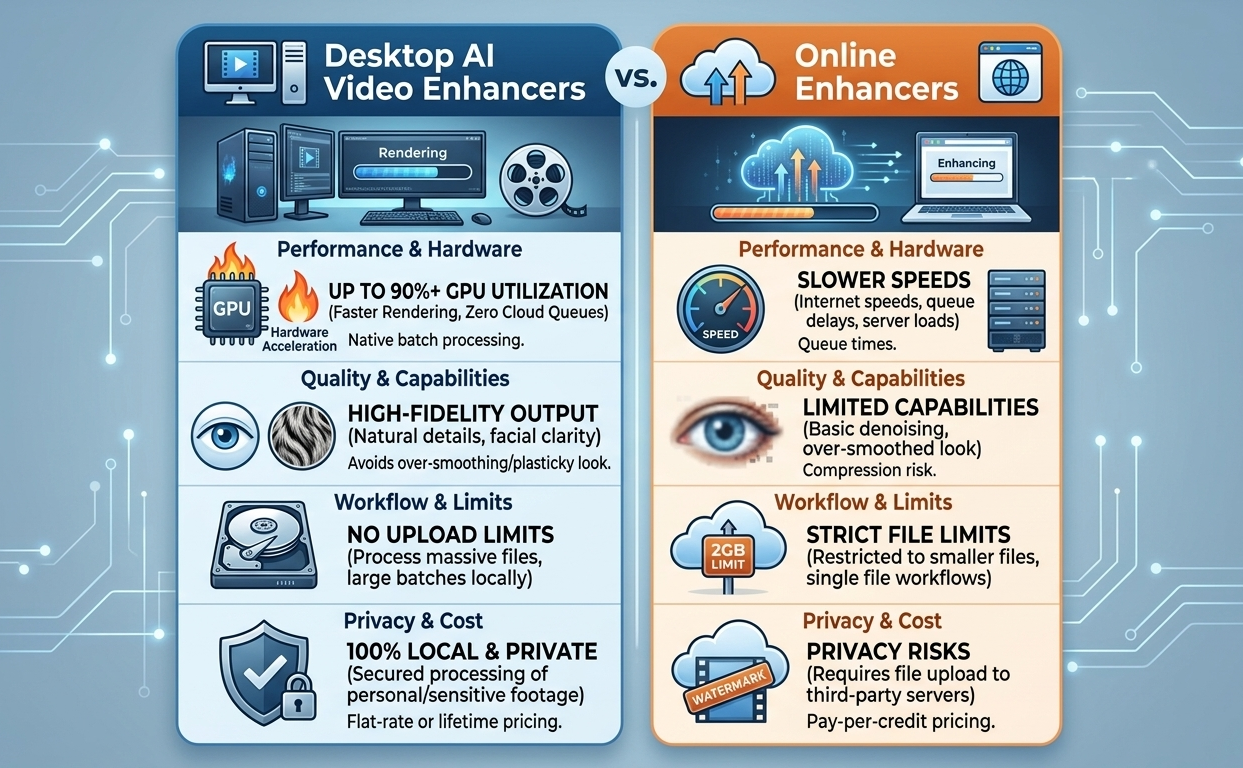
💬 General Discussion Desktop AI Video Enhancers vs. Online Enhancers: Why Local Processing Wins (Detailed Comparison)

Post image
4 Upvotes

After testing various AI video enhancement tools, I’ve put together a breakdown comparing Desktop AI Software directly against Online/Cloud-based Video Enhancers. If you are trying to decide whether to upscale or restore video locally or on the web, here is how they stack up across key dimensions.

1. Performance & Hardware Efficiency

o   Processing Speed & Acceleration:

  • Desktop: Hardware acceleration (NVIDIA/AMD/Intel GPUs) enables significantly faster local rendering. No waiting in cloud rendering queues, no server throttles, and no failed upload retries.
  • Online: Slower processing speeds due to queue delays, connection speed bottlenecks, and cloud server loads.

o   GPU & CPU Utilization:

  • Desktop: Desktop apps like Aiarty, VideoProc, and Hitpaw, can push GPU utilization up to 90%+ for maximum speed, while keeping CPU usage low (~35%), allowing your system to run smoothly in the background.
  • Online: Bypasses local GPU entirely. However, the web browser often taxes the CPU higher during uploads and previews.


2. Quality, Capabilities & Restoration Depth

o   Output Clarity & Artifacts:

  • Desktop: Topaz Video, for example, can deliver high-fidelity output. Tailored AI models recover natural details (faces, hair, fur, fine textures) without creating an over-smoothed or "plasticky" look.
  • Online: Mostly suited for mild enhancement on already decent footage. Heavy compression artifacts can easily trigger over-smoothing or loss of detail.

o   Denoise & Deblur:

  • Desktop: Generally offers stronger denoising and deblurring, with some tools providing strength controls to fine-tune noise reduction and preserve details while avoiding an overly smoothed look.
  • Online: Often provides basic noise reduction with fewer controls; heavier noise may lead to over-smoothed details or visual artifacts.


3. Workflow & Limits

o   Max Upload & File Sizes:

  • Desktop: No upload limit. Process multi-gigabyte or feature-length videos directly from your local storage.
  • Online: Strict file-size or duration caps (often restricted to a few hundred MB or up to ~2GB).

o   Batch Processing:

  • Desktop: Native support for batch processing multiple files simultaneously.
  • Online: Generally requires uploading and setting parameters one video at a time.


4. Privacy & Cost

o   Privacy & Security:

  • Desktop: 100% Local & Private. Sensitive or personal footage never leaves your hard drive.
  • Online: Requires uploading footage to third-party remote servers, raising privacy risks for personal or commercial projects.

o   Pricing Structure:

  • Desktop: High cost-efficiency, often available via flat-rate subscriptions ($30–$60/year) or one-time lifetime licenses.
  •  Online: Pay-per-credit or pay-per-minute models. Upscaling higher resolutions (like 4K) quickly consumes credits and becomes expensive over time.


TL;DR: If you need to quickly fix a short clip on the go, Online Enhancers are convenient. But for privacy, heavy-duty detail recovery, batch work, and handling large files without subscription credit traps, Desktop AI Software remains the clear winner.


What tools are you guys currently using for your video workflows? Let me know in the comments!


r/VideoProc • • Aug 11 '26

❓ Ask the Community Best app for Android upscaling my images?? Device Redmi Turbo 4 Pro (Snapdragon 8s Gen4)

Post image
1 Upvotes

r/VideoProc • • Jul 20 '26

❓ Ask the Community Fast workflow for videos with Suno songs?

2 Upvotes

Hi everyone,

I'm looking for a fast workflow or app to turn my Suno songs into simple videos with subtitles.

Ideally I'd like something that can:

  • Display the album cover in full screen (or with a clean background).
  • Generate nice-looking, synced subtitles/lyrics automatically.
  • Export directly to YouTube or social media (optional)

I'm not looking for a full video editor—just something quick and efficient, something really easy.


r/VideoProc • • Jul 18 '26

❓ Ask the Community Best audio editing program?

7 Upvotes

Hello~! I’m planning on making a silly video eventually, and would like to know if there’s a free software that could edit, trim, and add effects to audio. Mostly simple stuff like a low pass filter, adding another track to have music or a sound effect under it, etc.! I’d hate to go back to my roots and just use windows movie maker again hahahaha


r/VideoProc • • Jul 15 '26

💡 Tips & Tricks A simple way to make GPT-5.6 Sol Ultra faster and less expensive in Codex

1 Upvotes

After trying GPT-5.6 Sol Ultra for a while, my biggest issue wasn’t the quality. It was the speed and cost.

Higher reasoning effort adds latency, but I found the bigger bottleneck was the number of heavyweight subagents being launched for simple tasks like codebase exploration, file search, and implementation checks.

What worked better was keeping Sol Ultra as the main agent and locking the default subagent to GPT-5.6 Luna Low. Most subagent runs now return in two or three minutes, while Sol Ultra stays focused on planning, judgment, and final implementation.

I edited:

~/.codex/agents/default.toml

name = "default"
description = "General-purpose subagent locked to gpt-5.6-luna with low reasoning."
model = "gpt-5.6-luna"
model_reasoning_effort = "low"

developer_instructions = """
You are a general-purpose subagent used by the main agent for exploration,
retrieval, and verification.

Only investigate and report findings. Do not modify files, make final
decisions, or spawn additional subagents.

Return:
- verified facts with precise file:line references
- exact names, paths, symbols, signatures, and values
- a clear separation between facts and inference
- explicit notes about anything missing, uncertain, or contradictory

Keep the output dense, concise, and directly usable by the main agent.
"""

[features]
image_generation = false

The important part is not just changing the model. It is also limiting what the subagent is allowed to do.

I use Luna Low as a scout: it searches, verifies, and returns evidence. It doesn’t edit files, make architectural decisions, or create more agents. The main agent still handles the work that actually benefits from deeper reasoning.

So the basic idea is:

"Use Sol Ultra for judgment and execution. Use Luna Low for information gathering".

This has made Sol Ultra feel noticeably more efficient for me without giving up the deeper reasoning where it actually matters.


r/VideoProc • • Jul 14 '26

❓ Ask the Community Video recording software that also creates transcriptions?

Thumbnail reddit.com
1 Upvotes

I want to record videos, and currently use OBS to that extent. But I would also like to create transcriptions alongside them, and have them exported as a separate text document or something. This might sound strange but I just would like to have them so I can easily read over what the content of the video was like and maybe even set something up so I can search for a specific video based on its content. Is there a single piece of software for computers that you’re able to both record from an external camera with, like how you can with OBS, while it also creates a transcription you can save separately? Or is my best bet just to keep using OBS and instead to generate the transcription separately using some other piece of software or service? It’d just be nice to have one piece of software that does it all, so I can have a nice and easy pipeline. Thank you for any suggestions!


r/VideoProc • • Jul 13 '26

🎞 VideoProc Converter AI how to export 16:9 videos into 9:16 without cropping

1 Upvotes

hi, im using videproc ai version 8.11

i have game clips that are 16:9 and i want to export them as 9:16 for youtube shorts (however, not by cutting sides off, but instead by adding black stripes on bottom and top) and whatever i try it just exports as 16:9 or its 9:16 but the video is weirdly stretched