ScrapeBadger is a web scraping API built for developers. It handles proxies, JavaScript rendering and anti-bot challenges, and adds dedicated scrapers for specific platforms, including a family of Google scraper APIs. There's also an MCP server for AI agents. Before ScrapeBadger, Dom founded the digital marketing agency Webdy and co-founded WISS, a Shopify app venture.
Dom drives growth at ScrapeBadger, so he sees the scraping API market from the business side, which most people buying these APIs never get to. Casper brings the engineering side. You can find Dom on LinkedIn and Reddit, and Casper on Reddit.
Most web scraping APIs pitch the same things: rotating proxies, JavaScript rendering, anti-bot bypass and one simple endpoint. Far less is said about why a new one gets built, how it finds its first customers, and what the economics look like once proxy costs and failed requests are in the picture.
What a managed API is worth next to running your own stack is hard to judge from the outside, and Google makes it sharper. Search results are one of the most common things people scrape, and keeping a Google scraper working is a job of its own. The answer affects cost, reliability and how much you end up maintaining yourself.
This one is about the business behind a scraping API, so questions about the market, pricing, Google scraping and how a managed API works are all fair game. With Casper in the thread, the engineering side of Google scraping and managed APIs is on the table too.
We can dig into:
Why build another scraping API. what the market looks like from the inside, what's still missing, and where a new player can fit
Winning customers in a crowded market. how a new scraping API gets its first users, what buyers actually compare, and what makes them switch
Pricing and the economics. how credits and per-request pricing work, what a failed request should cost, and where the cost comes from
Scraping Google. why Google is hard to scrape reliably over time, and what it takes to run a Google scraper API
What a SERP API has to return. AI Overviews, ads, local and shopping results, how that data gets structured, and who actually buys it
The managed API model. what you hand over when you send a URL and get data back, and what the team behind it deals with when targets change
Managed API vs. dedicated scrapers. a general scrape endpoint compared with per-site extractors for Google, e-commerce and social, and when each one makes sense
Build vs. buy. when paying for a scraping API beats running your own scrapers, and how to test a provider properly
Anything else on your mind. a Google scraping problem you can't solve, a provider claim you don't believe, or a question about running a scraping business
If you've ever wondered "Why would anyone start another web scraping API?", "Why is scraping Google so much harder than most sites?", or "What am I actually paying for with a managed scraping API?", this is a good one to ask.
We've now had sixteen AMAs with the community, covering proxies, anti-bot systems, browser automation, AI scraping, scraping law and more. You can find all of them in the AMA section of the Web Scraping Insider page.
Now for #17, we're looking at scraping APIs from the business side, with a founder who chose to build one in a market that already has plenty. If you're building web scrapers, data pipelines, SEO tools, AI agents or products that depend on web data, or you're simply picking a scraping API, come join the discussion.
Drop your questions below.
Dom and Casper will be answering them during the AMA.
Driver builds browser infrastructure for unblocked access to web data. Its approach is real Chrome on physical devices rather than virtual machines, and teams connect to it from Playwright, Puppeteer, Selenium or any MCP client.
Alexander is a two-time tech startup founder with two exits. Earlier, Alexander was Entrepreneur in Residence (EIR) at Massive and bootstrapped the profitable ventures Aperack and Shiftproxy. You can find Alexander on LinkedIn and Reddit.
Most anti-bot advice is about what a browser reports: fingerprints, headers, patches and stealth plugins. Far less is said about what the browser is running on. A headless browser in a container, a cloud VM and a real machine with a real GPU can all load the same page, and anti-bot systems may treat them very differently.
How much the hardware matters compared with fingerprints, IPs and behavior is hard to judge from the outside, and the answer affects success rates, cost and how much patching you end up maintaining.
This one is about the hardware behind the browser, so questions about anti-bot detection, browser infrastructure, scale and cost are all fair game.
We can dig into:
Real hardware vs. virtual machines. what an anti-bot system can tell about the machine behind a browser, and why a cloud VM can look different from a real device
What gets checked beyond the IP. GPU and rendering signals, input events, fingerprint consistency and network reputation, and which are hardest to get right
Real hardware vs. stealth tooling. patched Chromium, stealth plugins and spoofed fingerprints compared with running a real browser, and where each one breaks down
Headless vs. headful. whether the difference still matters, and what a "real" browser session actually means
Running browser infrastructure. what it takes to operate real browsers at scale, from devices and sessions to profiles and IPs
Scale, speed and cost. how real-hardware browsers compare with cloud browsers on concurrency, startup time and price, and when the trade-off is worth it
Browsers for AI agents. how agents use remote browsers, and what changes when a model drives the session instead of a script
How to evaluate a provider. which benchmarks mean something, which claims to question, and how to test a browser provider properly
Anything else on your mind. a site you can't get past, a stack decision you're stuck on, or a question about building infrastructure in this space
If you've ever wondered "Why does my script work on my laptop but get blocked from a cloud server?", "Can stealth patches and spoofed fingerprints ever match a real device?", or "Is running browsers on real hardware worth the extra cost?", this is a good one to ask.
We've now had fifteen AMAs with the community, covering proxies, anti-bot systems, browser automation, AI scraping, scraping law and more. You can find all of them in the AMA section of the Web Scraping Insider page.
Now for #16, we're going back to browsers and anti-bot systems, with a look at the hardware and infrastructure underneath them. If you're building web scrapers, browser automation, AI agents or products that depend on web data, or you're simply deciding how to run your browsers, come join the discussion.
A lot of scraping work starts as "we need the data from these sites" and then the real requirements show up halfway through: which fields, how fresh, which locations, what counts as a match across sites.
For people who take this on (in-house or for clients):
- what do you nail down before writing any code?
- how do you handle "can you also just add..." once it's running?
- do you scope by fields and frequency, or by sites, or both?
We tested a TikTok hashtag scraping pipeline across 8 niches — here’s what it collected
We built a three-step workflow in A-Parser that takes a list of TikTok hashtags, finds videos, collects their metrics, and downloads subtitle text when it’s available.
For the test, we used 8 hashtags including tiktokshop, aitools, personalfinance, smallbusiness, marketingtips, skincare, productivity, and ugccreator.
The run produced:
240 video links
239 unique videos
240/240 metric rows with status OK
150.6M total views across the dataset
184 subtitle downloads, all returning HTTP 200
The export includes video URLs, publication dates, authors, follower counts, views, likes, saves, comments, shares, engagement metrics, music data, subtitle info, and cleaned descriptions. Subtitle text is saved separately for videos where TikTok exposes a subtitle track.
The workflow uses Chrome only for hashtag pages, while video metrics and subtitle downloads run over HTTP, which keeps the heavier browser step limited to discovery.
We also included a ready-to-import preset bundle so the whole pipeline can be reproduced without building it from scratch.
Hi everyone, I'm Pier and I run The Web Scraping Club. We just rebuilt our proxy price benchmark: 26 providers, 689 plans, collected from public price pages or entered by the providers themselves, each with the date it was last checked.
You know that comparing prices between different vendors is a pain in the back, so we rebuilt this tool.
There is a calculator: enter your monthly GB or number of IPs and it shows the period and yearly cost of every plan that fits, ranked in USD.
If your X/Twitter ingestion jobs (twscrape, twikit, Rettiwt-API, agent-twitter-client, RSSHub, or custom GraphQL clients) suddenly started throwing HTTP 404 or KeyError: 'legacy' / Cannot read properties of undefined (reading 'screen_name') yesterday around 03:50–05:00 UTC (Nov 21), three changes shipped together on X's Web GraphQL stack:
SearchTimeline rotated its queryId & tightened features + x-client-transaction-id checks: Hardcoded GraphQL operation hashes immediately started returning 404/500, and bundle regex extractors hit ClientTransactionNotInitializedError.
user.legacy was completely removed inside SearchTimeline responses: While tweet text/metrics still live under tweet.legacy, the embedded author object (tweet_results.result.core.user_results.result) no longer has a .legacy dict at all.
Aggressive "inauthentic behavior" sweeps: Cookie pools retrying failed SearchTimeline calls in tight loops got hit with waves of session locks and Arkose challenges.
Old user.legacy → New Split Sub-Object Mapping (Nov 21, 2026+)
Field
Old Path
New Path
Username (@handle)
user.legacy.screen_name
user.core.screen_name
Display Name
user.legacy.name
user.core.name
Created At
user.legacy.created_at
user.core.created_at
Avatar URL
user.legacy.profile_image_url_https
user.avatar.image_url
Followers / Following
user.legacy.followers_count
user.relationship_counts.followers
Tweet / Media Count
user.legacy.statuses_count
user.tweet_counts.tweets
Bio
user.legacy.description
user.profile_bio.description
Location
user.legacy.location
user.location.location
Verified
user.legacy.verified
user.verification.verified
If you maintain your own parser, make sure your author extractor falls back to core / relationship_counts / avatar instead of assuming user['legacy'] exists.
I've been doing some rough calculations on whether we should continue maintaining our in-house scraping infrastructure or move more of it to a managed API.
The current setup isn't particularly complicated.
We have Python scripts for fetching pages, Playwright for JavaScript rendering, a proxy service for blocked requests, custom HTML-to-Markdown conversion and a few retry mechanisms.
Individually, none of these components is particularly difficult.
The maintenance is where things get interesting.
A website changes its layout, a proxy starts getting blocked, a JavaScript-heavy page returns incomplete HTML, or a request times out. Suddenly, something that was supposed to run unattended needs someone's attention.
I've been comparing managed options like Apify, Firecrawl, Bright Data and context.dev.
My understanding is that they solve slightly different problems.
Apify has a large ecosystem of reusable actors, which is useful when you need site-specific scraping workflows.
Firecrawl focuses heavily on crawling and converting web content into formats useful for LLM applications.
Bright Data offers a broader web data collection and proxy infrastructure.
Context.dev combines scraping, crawling, structured extraction and website monitoring through one API.
The last one is interesting because it could potentially replace multiple components rather than just the fetching layer.
But I'm still trying to work out the economics.
For those who've moved from self-hosted Playwright or custom Python scrapers to managed scraping APIs, what actually made you switch?
Was it infrastructure cost, engineering hours, reliability or simply not wanting to maintain another service?
If a scraper feeds Airtable through Make, automatic repair sounds useful. Until the "fix" starts collecting the monthly subscription price instead of the normal purchase price, and everything downstream keeps running.
Where would you put the approval step?
Changing a selector ? It does feel reasonable. Changing which field gets collected feels like something someone should check. Curious how people handle this, especially when the person maintaining the workflow isn't a developer.
Hi all. I'm pretty new to scraping, so sorry if this is a basic question.
I'm trying to copy job offers from a public job board into my own database (nursing jobs in France, about 2,300 offers). There's no API that I could find. The site shows 9 offers per page, newest first, and you move through the pages with ?page=1, ?page=2, and so on, about 256 pages. If I go too fast it blocks me with 503 errors, so I go slowly.
My problem: while I'm going through the pages, new offers appear at the top and old ones disappear. So everything shifts. Some offers I see twice, and some I never see at all, because they moved onto a page I had already read.
What I ended up doing (and this is where I think I went overboard):
I read the listing in 3 chunks a day, with a small overlap between chunks.
I save every offer id I've ever seen, so I only download new ones.
I built a separate script that takes a full "photo" of the listing once a day and compares it with my database, to check whether I missed anything.
It works: the one offer I missed got picked up the next day. But it feels like a lot of machinery for what should be a common problem, and I feel like I'm missing an obvious trick.
So my questions:
Is there a simple, standard way to handle a paginated listing that changes while you read it?
Should I read it in a different order, or re-read some pages, or is "just go round again" what everyone does?
Is there something I should look for on the site first (a hidden data feed, a sort option, a "show more per page" setting) that would make this easy?
Thanks for any pointers, even "you're overthinking it, do X" would help.
Disclosure: we're a team at a residential proxy provider. No product names or links, just measurements.
If your scraper sends perfect Chrome headers from a clean residential IP and still gets a 403 or a challenge page, the block often happened before your headers were read: at the TLS handshake. JA3/JA4 hash the ClientHello (cipher list, extensions, ALPN), and different clients look nothing alike. Same machine, same target:
- Python urllib (3.14): 18 cipher suites, no ALPN at all
- Chromium: 15 cipher suites plus GREASE, offers h2
So "Chrome UA + Python TLS" is a mismatch before a single header is read. A few things we learned the hard way:
A residential IP doesn't fix it. A normal HTTP/SOCKS proxy just tunnels your bytes (CONNECT), so the target sees your client's ClientHello, not the proxy's. The IP and the handshake are separate signals.
JA4 is harder to dodge than JA3. Chrome shuffles its extension order on every connection, which broke JA3 (one browser, endless hashes). JA4 sorts before hashing, so shuffling no longer hides you, and a non-browser handshake stays recognizable.
HTTP/2 is the next fingerprint. SETTINGS values, window update size and pseudo-header order (Chrome sends :method, :authority, :scheme, :path) all identify the client. Matching TLS but not HTTP/2 still stands out.
HTTP/3 is easy to get backwards. Some libraries now impersonate h3/QUIC too, and QUIC has its own fingerprint (JA4 starts with "q" instead of "t"). But Chrome doesn't use h3 through an HTTP or SOCKS proxy, since those can't carry UDP, so it falls back to h2. Behind a proxy, h2 is what a real browser looks like; h3 impersonation only matters on direct connections.
Real example: on a Cloudflare-protected site a plain client got the 403 "Just a moment" page, and the same page with a Chrome-like TLS + HTTP/2 fingerprint came back 200, no headless browser.
Quick way to check your own stack: point it at any TLS echo service (browserleaks has a TLS page) and compare the JA4 with what your real browser shows on the same page.
Curious what others see: has anyone measured how often sites actually block on JA4 alone vs. JA4 combined with HTTP/2 or behavior?
We’re a small team building an app that compares two perfumes side by side: price, reviews, specs and a short pros/cons for each.
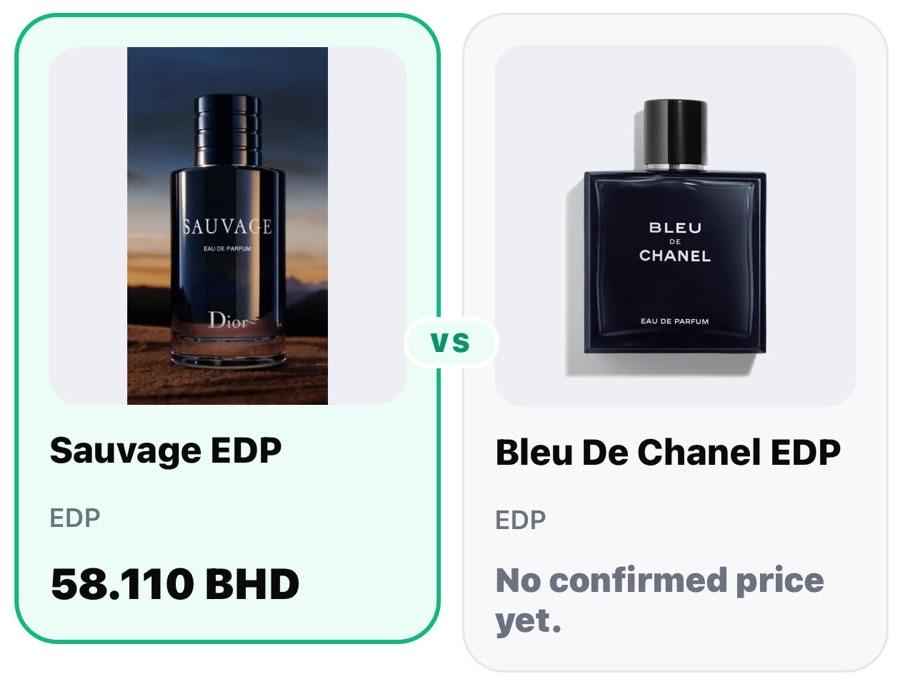
Prices are where it falls apart. Popular perfumes are listed on plenty of local store sites with the BHD price right on the page, and we still miss them more than we should. Often it’s one-sided: same comparison, Sauvage gets a price and Bleu de Chanel gets “no confirmed price yet” (screenshot).
Current flow (Python): search for the product, pick likely store pages, fetch them, read JSON-LD / OpenGraph / microdata (plus Shopify and Woo JSON where we can), fall back to an LLM. The whole comparison gets roughly 25 seconds.
Tried: curl_cffi with Chrome impersonation (best results, and free), Playwright, patchright, crawl4ai, Firecrawl, Scrape.do, Zyte, Bright Data, and Claude with its web search tool on top. Still comes back empty way too often.
And if a user pastes the two product links or uploads photos of the bottles instead of typing names, it often just dies. Timeout, or nothing comes back.
Wrong currency? Sponsored listings mixed into organic results? Half the catalogue missing? What passed your checks, and what eventually exposed it?? Especially interested in the assertion you added afterwards.
I've been building grocery data scrapers for a food-ingredients app, and one problem took more thought than I expected, so I'm sharing how I handled it.
**The problem:** Blinkit (Indian quick commerce) has a clean product API: price, MRP, stock, the full ingredient list, nutrition text, manufacturer, and FSSAI license. What it doesn't have is a barcode. No EAN field anywhere, and the barcode is what you need to match products across stores or against Open Food Facts.
**What worked:** most packaged products have a back-of-pack photo in the gallery, and that photo usually shows the barcode. So:
Pull the full image gallery from the product endpoint.
Scan the images **last-to-first**. Blinkit usually puts the back-of-pack shot at the end, so you usually hit it early and can stop.
Decode with `zxing-wasm` (ZXing compiled to WebAssembly, so it runs in plain Node with no native dependencies), restricted to EAN-13, EAN-8, UPC-A and UPC-E with `tryHarder` on.
**Validate the check digit**, because a false positive is worse than a miss.
**Two gotchas:**
- **The CDN serves WebP to browser-like clients.** My first run decoded almost nothing because the decoder can't read WebP. Sending `Accept: image/jpeg` gets JPEGs back. That one header was the difference between barely working and working. - **Coverage depends on the category.** In my tests: 9 of 16 peanut butters, 34 of 100 products in a general run, 4 of 27 chocolates. When a gallery has no barcode photo, no decoder will find one. I report `null` rather than guess.
Decoding takes about 50 ms per image, so it adds well under a second per product.
**Other details if useful:** - Category path (l0/l1/l2) isn't on the product object; it's in a separate category-bar tracking block. - Nutrition comes either as a text block ("Energy - 325 kcal\nProtein - 7.7 g") or as separate attributes. I parse both into one `{energy_kcal, protein_g, ...}` object and normalise aliases like "Total Sugars" / "Sugar" / "Total Sugar".
Happy to answer questions about the approach, or to compare notes if you've solved this differently (e.g. matching products by name and pack size instead).