r/WoWMacros • • Nov 10 '22

Macro 101: What is a macro, and how can I use them?

13 Upvotes

Introduction

To answer the title in brief:

In World of Warcraft, a macro is shorthand, simplified coding that allows a player to customize the way in which they use their skills through the use of slash commands. If you're here, then you've already opened up the in-game menu, seen or clicked on the big red "Macro" button, and said, "huh?"

To answer it in detail:

The World of Warcraft client uses Lua scripting, paired with its own API, to show things, do things, or otherwise allow the player to input commands and interact with the game. The WoW API is officially documented here, but Wowpedia does a good job of explaining what everything does on their World of Warcraft API page.

While it is possible to run a lua script directly in the game's chat, for the majority of players it is safer and easier to use simplified slash commands. For example, it is much easier to cast Fireball by clicking on the spell or typing "/cast Fireball" into the chat than it is to type "/script CastSpellByName("Fireball")". In fact, before you can use lua scripts in your macros at all, the game prompts you with a warning that a broken script can cause unpredictable client behavior (such as inadvertently disabling your mouse click,) and requires you to accept this risk before you can use scripted macros.

As a macro is limited to 255 characters, and as the simpler slash commands are often shorter, it is often much easier to make a robust macro utilizing the slash command system than it is to run a lua script that calls from the WoW API. In our example, "/cast Fireball" takes up 14 characters, while "/script CastSpellByName("Fireball")" takes up 35 characters, 2.5x as many. The slash command system is generally the route that you'll want to take for 95% of the macros that you might want to create.

In general, the WoW API and lua scripting are used almost exclusively to create addons for the game client, while slash commands are used almost exclusively to create player macros.


Why might I want to use a macro?

World of Warcraft gives you dozens of skills to play with, but most players will find themselves overwhelmed by options at times. WoW is a game that gives you a handful of core skills, and a sea of niche, situational, or flavorful skills to provide variation in gameplay each time you sit down and log in.

For example, a Hunter might never use their Tar Trap in the Freehold dungeon, but it's almost a necessity in Blackrock Depths, where an enemy fleeing might pull another group or two before the party is ready to fight them. The skills that you have will all find some use at some point in your Warcraft career, and having the right skill at hand at the right time can sometimes feel like an impossible task. Thankfully, the macro system helps eliminate a lot of the "bar bloat" you might encounter by allowing you to combine skills into a single button.

A good example of this is the Feral Druid skill Tiger's Fury, which is improved by the Predator passive talent. The two of these combine to make Tiger's Fury something that you'll want to use pretty much whenever it's available, but micromanaging that activity can be cumbersome or feel like a chore in longer fights, such as against a boss. If you wanted to, you could use the macro system to bind Tiger's Fury into your Rake skill, which is one of your important tools you'll be using often anyway. What might that look like?


Creating a macro: Basics

All items and skills attached to a character, either through their spellbook, equipped on their hero panel, or in their inventory bags can be bound in and used by macros. This allows you to customize the way that you'll play the game, but there are a few limitations. The biggest of these is the global cooldown that most of your items and skills share.

In short, a cooldown is the amount of time remaining after a skill is used until you can use it again. The global cooldown (or GCD) is a period of usually 1.5 seconds after using a skill before you can use your next skill. For example, if a warrior uses their Hamstring ability, they'll need to wait 1.5 seconds for the activated global cooldown to finish before they can follow up with their Slam ability, even though neither ability has a cooldown. For other skills that do have a cooldown, such as Shield Slam, they'll need to wait 9 seconds before they can Shield Slam again, and 1.5 seconds before they can use any other skill.

Not all skills interact with the global cooldown. The Druid's Tiger's Fury skill we talked about above is an example of one such ability. If we wanted to create a macro that combines Tiger's Fury and Rake, then we'd need to first open the macro interface. We can do this either by opening the game's menu and clicking the Macro button, or by typing "/macro" into the game chat. Once the macro interface is open, we can click on the "New" button in the bottom-center of the window. This allows us to choose a name and an icon.

For most macros, you'll want to use a special command to display the icon and information of the skill you're binding. We'll go over the command later in this lesson, but it's important to understand that this command exists before selecting an icon for your macro. If you plan on allowing the game to display your skills for you, then by selecting the red ? icon, this special command will fill in your macro's icon for you later on. You can name a macro anything you'd like. Some examples include the location you'll be binding it (ex: 1 for a macro that will be activated by your 1 key,) the name of the skill (ex: Rake for a macro that will use Rake,) or a blank space (so that the macro looks like a basic skill icon,) but any name will work as long as you'll remember what it means. Once you've chosen your icon and name, click the "Okay" button at the bottom.


Creating a macro: #showtooltip

Now that you have a macro ready, we can start entering some commands. Let's start with the special command we mentioned before.

#showtooltip

This is a special command that you'll usually place at the start of most of your macros, and especially if you selected the red ? icon as the icon. This command instructs the game to pull the name, info box, and icon of whatever item or skill is currently being called forth by your macro. If nothing is being called by the scripts below, then you can instruct the macro to call some specific item or skill available to your character.

#showtooltip Reincarnation

As an example, this will show the information and cooldown remaining on a Shaman's Reincarnation passive ability if the red ? icon has been used. While the macro can't be activated or clicked to do anything, sometimes passive abilities like this can be nice to visually keep track of.

The same can be done with items. For example, you may be exploring Pandaria to collect Golden Carps to turn into Fish Cakes for the daily quest A Feast for the Senses.

#showtooltip Golden Carp

The above macro could be placed on your bar to help you to keep track of how many Golden Carps you currently have in your bags. While not entirely necessary, simple macros like this can make some collection quests (such as collecting parts for the Sha'tari Skyguard or Saberstalkers factions) a little bit more convenient.


Creating a macro: /cast

Now that you understand the basics, let's create, then discuss, the Tiger's Fury + Rake macro that we've been talking about. You can use the slash command "/cast" to use any ability in your spellbook.

#showtooltip Rake
/cast Tiger's Fury
/cast Rake

This macro will show on our bar as Rake, but when clicked it will first activate Tiger's Fury before using Rake. Even though Rake activates a global cooldown, Tiger's Fury does not. This means that we can use Tiger's Fury followed immediately by any other ability. By binding it to Rake, an ability that we use often, we can use Tiger's Fury whenever it is available without needing to manually track or micromanage the skill, beyond recognizing that Tiger's Fury grants us 50 energy when activated. As long as we try to use Rake whenever we are missing at least 50 energy, we'll always be able to make the most of Tiger's Fury.

You can do this for other classes as well, as there are many skills that players may want to bind together, such as a Priest binding Fade into Mind Blast to instantly help mitigate their threat generation, or a Paladin binding Hand of Reckoning into their Judgment to easily maintain threat during heavy DPS burst windows.

#showtooltip
/cast Mind Blast
/cast Fade

Because Fade can be used independently of other skills, and because it drops your threat, we'll want to use it only after we generate a ton of threat with Mind Blast. Because Mind Blast is the first skill cast in our macro, it's the one that'll show up with #showtooltip, which is what we want.

#showtooltip 
/cast Judgment
/cast Hand of Reckoning

Because Hand of Reckoning can be used at any time, like Fade, and because we don't really care when we taunt, we can make this macro the same way as our previous macro.

The easiest way to know which order to use your skills is to first read your skills and understand how they're meant to work. If Fade is placed before Mind Blast, it won't help our priest with a spike of threat from Mind Blast, and so the skill order matters. Likewise, if we use Tiger's Fury after we use Rake, then Rake will miss out on the 15% damage boost granted by Tiger's Fury.

You'll also need to keep track of which skills activate the global cooldown. You can do this either by searching the skill on a website like WoWhead or WoWDB, or by visiting any target dummy (such as the ones in Orgrimmar or Stormwind) and clicking your skills to see which ones refresh. Any skills that share the global cooldown can't be used at the same time.


Using Macros

Now that we have our macro created click save, then we'll need to click and drag it to one of our action bars. Once placed, we can now go to any target dummy or enemy we can fight and try it out. If we did everything right, then our macro is finished. If it isn't working as intended, then we need to go back and figure out why.

A common reason why a macro might fail is because two different types of skills are trying to be bound together. For example, the Death Knight skill Death and Decay requires you to select an area to cast using a big green circle called a reticle. If you try to use Death and Decay at the same time as your Anti-Magic Shell, then your reticle will get cancelled if you try to use Death and Decay first. This happens because any action will cancel your casting reticle until it's placed. To use these skills together, you'd have to use your Anti-Magic Shell first, then activate the reticle.

#showtooltip Death and Decay
/cast Anti-Magic Shell
/cast Death and Decay

You can get around this by eliminating the reticle with conditionals, but we'll go over those in more detail when we do our Macros 102 lesson. The main thing to understand from this example is that a casting reticle can be a common cause of failure in your macros, and would prevent a Shadow Priest from binding skills like Shadow Crash together with Fade, as Fade wants to be used after all of your other skills.

Many common reasons for why a macro might break come down to the interactions between your different skills, and so it's very important to spend some time reading the information that your spellbook, talents, items, and equipment are showing you before trying to create something. More than anything else, a working macro represents your complete understanding of how your skills interact with each other. You'll need to spend some time reading and playing with a target dummy before you can think about what you'd like to create.


Conclusion

This lesson focused on the basics of what a macro is, why they can be useful, and provided a few simple, practical examples of how to use them in your day to day experiences with the game. We also talked about why some macros fail, and the importance of knowing how your skills work and what they do so that you can correctly order them in your macros.

The examples used here aren't necessarily competitive or top tier, but rather serve to demonstrate how a macro might be created. In general, good macros aren't going to make you a better player, and you won't instantly deal more damage or survive longer in fights by using them. However, a good understanding of how a macro works and why you'd want to pair skills together will make you a better player, as it'll help you to better understand the skills at your disposal and how to use them.

Macros are a way for us to consolidate the amount of space the skills on our bar take up, and provide us with conveniences while exploring, questing, raiding, or engaging in PvP. They're a way for us to help organize the information that we have, and give us a way to use it in ways that we find useful or compelling.

They're not necessary, either: you can have a fun and enriching WoW career using solely the skills in their default forms as provided to us by the in-game spellbook. However, you'll find that as you get better at the game, the convenience of using certain skills, or summoning certain mounts, or tracking certain items makes for a much more rewarding gameplay experience as you'll spend less time on maintenance and more time on having fun.

In our next lesson, we'll focus exclusively on conditionals: what they are, why there are so many, and how to use them.


r/WoWMacros • • 19h ago

Cycle between music modes

1 Upvotes

Made a macro to cycle between the music settings on, off and loop:

/run local s,m,l=SetCVar,"Sound_EnableMusic","Sound_ZoneMusicNoDelay"if GetCVar(m)=="0"then s(m,1)s(l,0)print("Music: On")elseif GetCVar(l)=="0"then s(l,1)print("Music: Loop")else s(m,0)print("Music: Off")end


r/WoWMacros • • 1d ago

[Help] Casting spells on self or target while ignoring Totems.

1 Upvotes

Trying to get a casting macro to work for general healing spells and utility spells to work for shaman, however even when mousing over the party frames, the hit box is selected for totems which results in a wasted cast. Is there any way to put into a macro to ignore friendly totems or totems in general?

I accept if its just a skill issue on my end, ha.


r/WoWMacros • • 3d ago

Re: Forever macro, halp me merge 2 spells into 1 button

1 Upvotes

Just wanted to clean up my action bar a little as rogue's ghost strike, unlike retail's shadowdance, doesn't give you a "stealthed" status during its duration, but simply allows you the usage of specific stealth-only spells while retaining the default action bar. so you essentially need to figure out how to map for 2 additional stealth-only spells outside of your steath action bar.

Take ambush for example: I wonder if there is a way to macro it so when you press the button, use ambush when you are able to (ie under ghost strike's buff), or otherwise default to backstab? I couldn't make a simple macro like

/cast ambush
/cast backstab

or /cast ambush; backstab

work presumebly due to both spells are on gcd. I also wasn't able to use [stance] tag as ghost strike doesn't technically put you in stealth.

Any input would be appreciated!


r/WoWMacros • • 5d ago

[AP] Druid Shift macro [help] sending from cat to travel/caster when it shows prowl

1 Upvotes

#showtooltip
/cast [mod:ctrl] Bear form; [mod:shift] Cat Form; [mod:alt] Travel Form; [swimming, no combat] Aquatic form
/cast [form:1] Enrage; [form: 3] Prowl; [form: 0, nocombat] Travel Form

ctrl puts me into bear, shift puts me into cat, alt puts me into travel. cool click while bear = engrage, click while cat = prowl. cool.

While already bear, ctrl click feels like it should unshift and the button shows bear form, but it sends me to travel While already cat, shift click feels like it should unshift and the button shows cat form, but it sends me to travel


extra, probably unhelpful info: when testing it holding shift, using only the first /cast, elf shifts to cat, then to elf (but showed uncat)

when I reversed the order of the two /casts and retested, still holding shift, elf to travel to cat to elf (but showed prowl)

Bear has similar issues


r/WoWMacros • • 5d ago

/cast overpower/execute/heroic strike/victory rish/charge

1 Upvotes

Im trying to reduce keybind count by combining as much as I can.

Stacking these doesn’t seem to work.

/cast execute
/cast overpower
/cast victory rush
/cast charge

Figured this would be useable even if I had to spam it alittle.


r/WoWMacros • • 6d ago

Paladin: Seal + Judgement Macro

1 Upvotes

Hello,

I'm trying to get my head around getting these macros to work in WoW Forever.

I currently have:

#Showtooltip Seal of the Crusader
/cast Seal of the Crusader
/cast Judgement

#Showtooltip Seal of Fury
/cast Seal of Fury
/cast Judgement

#Showtooltip Seal of Righteousness
/cast Seal of Righteousness
/cast Judgement

However, the only one that works is Seal of Righteousness. It activates the Seal, and fires off a Judgement, since it is off the GCD.

All of the other Seals I've tried this with, successfully activate the Seal, but fail to cast Judgement and instead give the error you get when you try to use Judgement without a Seal.

I'm trying to figure it out, and I think I must be missing something really obvious.

Any assistance is greatly appreciated!


r/WoWMacros • • 8d ago

Why does this macro shapeshift druid Cat into Bear? Yet it turns Bear into Elf/Tauren.

0 Upvotes

Update: For whatever reason "form:1" is ignored if the F is capitalised.


It is supposed to also turn cat druid into elf/tauren.

showtooltip [noswimming]Travel Form;[Swimming]Aquatic Form;

/cast [noswimming,nocombat,Form:0/4,noform:1,noform:3]Travel Form;[nocombat,Form:1,noswimming]Bear Form;[nocombat,Form:3,noswimming]Cat Form;[nocombat,Swimming]Aquatic Form;

And with formatting:

/cast 
[noswimming,nocombat,Form:0/4,noform:1,noform:3]Travel Form;
[nocombat,Form:1,noswimming]Bear Form;
[nocombat,Form:3,noswimming]Cat Form;
[nocombat,Swimming]Aquatic Form;

My target is a macro which turns Cat, Bear and Travel into elf/tauren, elf/tauren into travel, and all forms to aquatic if swimming. And also to go from Cat/Bear into travel with mod:alt.

[form:1/3,nocombat,mod,mod:alt]Travel Form;

EDIT:

I appreciate "Form:0/4,noform:1,noform:3" ought to be redundant, but for some reason it does operate differently without.


r/WoWMacros • • 9d ago

Stance macros not working

Thumbnail reddit.com
1 Upvotes

In Forever


r/WoWMacros • • 10d ago

/click ActionButton1 macro Help needed !

0 Upvotes

hello everyone

started playing WoW Forever and noticed /click ActionButton macro doesnt work as it used to...

for example /click ActionButton1 works ONLY if in ActionButton1 spot is NOT another macro...

If you put a spell from spellbook, no problem, /click ActionButton1 works all day long...

BUT if instead you write a short macro "/cast Rejuvenation" and place it in ActionButton1 spot instead, than /click ActionButton1 doesnt work...

Please help. Is this a hard limitation? Can i somehow circumvent it??

I have tried OSKeys addon, that works great for this type of stuff, but as soon as you use a class that has stance changes (and different abilities depending on stance), than addon cant help much...


r/WoWMacros • • 14d ago

Re-Equip Preferred Unstealthed Main Hand Weapon After Stealth Command

2 Upvotes

Im new to wow and have figured out how great macros are. Im currently using..

#showtooltip Stealth
/equipslot 16 Dagger Name
/cast [nostealth] Stealth

but when I recast stealth to leave it/after breaking stealth I would like my dagger to be replaced with my axe (my preferred main hand). Cant seem to find a solid answer anywhere and my brain is rather smooth, any help would be great.


r/WoWMacros • • 14d ago

Specifying character language in an rp macro

3 Upvotes

Is there any way to specify which language my character uses in a /say part of an rp macro?
Also while I'm here, is there a way to make your character not do the moving hands around motion when doing a /say line in a macro?
I want my gal to use Gutterspeak


r/WoWMacros • • 17d ago

WoW Forever Rouge - Shank macro

4 Upvotes

Hi, has anyone tried creating a macro with "Shank" yet?

I tried combining it with Cheap Shot or Sinister Strike, but it doesn't work.

Is it just me?


r/WoWMacros • • Oct 04 '26

Can pets /totems be used as "memory" to toggle the behavior of a macro?

0 Upvotes

Be damned use cases and context (aside the general assumption that equipment sets aren't a thing), here's the goal.

= = = Goals

I've got three active trinkets I want to swap between for slot 13, and two passive trinkets I want to swap between for slot 14.

Shield Block is already bound to two separate macros, one is worded like this...

/cast Shield Block
/use 13

... and the other casts Hamstring instead of using the slot 13 trinket, in case I need to save it for something. Do note that this macro does NOT know what trinket is actually in slot 13, it just uses it.

= = = Setup

I have two pets and a totem to work with: Crabulon and Rauru for pets, and the Poison Extraction Totem as the totem.

= = = Intended Method

I want a single macro to check whether Crabulon or Rauru exists to be targeted. If Crabulon exists, equip active trinket A. If Rauru exists, equip active trinket B. If neither exists, equip active trinket C.

While this could be on a separate button, ideally I'd like the same macro to check if the Poison Extraction Totem exists. If it does, equip passive trinket 1. If it doesn't, equip passive trinket 2.

= = = Why

I'm lazy and weird.


r/WoWMacros • • Oct 01 '26

Clever Priest Power Infusion set up no focus no addons

7 Upvotes

Hi all,

for a priest friend of mine, who was typing each time chars names in his macro to cast his PI on them, i thought about something more user friendly, and came to this :

  1. You're gonna create an empty macro named "myPI", THE NAME IS VERY IMPORTANT. This macro will be the one u use during combat, bind it where you usually bind your PI spell/macro in your bars
  2. You're gonna create a SECOND macro (I named mine "SET_PI_TARGET" but this one you can name as you want), containing following code :

/run if UnitExists("target") then e="myPI";f="INV_Misc_QuestionMark";for i=1,4 do u="party"..i;if UnitIsUnit("target",u) then EditMacro(e,e,f,"/cast [@"..u.."] Power Infusion") end end end

HOW DOES IT WORK ?

Let's take an example :

- You're going into a dungeon, and want to set your PI on let's say, the mage of the group for example

- You're going to select as active target this mage, and click on the second macro ("SET_PI_TARGET" if you named it as i did)

- Dungeon starts and when you want you click on the first macro you binded in your bars, and hop ! Magic ! The PI is launched on the mage

No need to set up focus, you can use focus for anything else now.
No need to update a macro with the character's name of your PI target

Try it and let me know :) (I tried it on my side and it works fine, tell me if you got any issue)

PS : "Power Infusion" is the name of the spell in English, if you have another language active for your game, change the name of the spell in the second macro, beware case sensitivy!


r/WoWMacros • • Sep 20 '26

[MISC] How to access non-standard images for macros? (see comment)

Post image
8 Upvotes

r/WoWMacros • • Aug 26 '26

Help with two-line macro

Thumbnail reddit.com
0 Upvotes

r/WoWMacros • • Aug 24 '26

Conditional macros stopped working (2026 Aug)

3 Upvotes

Guys … something happened again with the macro handling of the classic clients ? My conditional macros were working for ages up until now (first click - weapon swap, second click- Shield Bash) … it seems related to internal gcd ?!

System popup message said to this below always - Ability is not available yet

#showtooltip Shield Bash
/startattack
/stopcasting [noworn:Shields]
/equipslot 17 Aegis of the Scarlet Commander
/equipslot 16 Vanquisher's Sword
/cast [form:3,worn:Shields] Battle Stance
/cast Shield Bash

I’ve reworked this and now it works but I’m still wondering what’s causing this now ?! Anyone else experiencing the same recently?!


r/WoWMacros • • Aug 22 '26

Trying to [btn:#] with /countdown

1 Upvotes

/countdown 5 [btn:1]

/countdown 0 [btn:2]

/readycheck [btn:3]

I've tried a variety of things, moving things around, eliminating one or more elements of the macro, etc. to try to get this to work and I'm not certain it's even possible at this point. Any help is appreciated.


r/WoWMacros • • Aug 18 '26

[mod:shift] doesn't work?

2 Upvotes

Hi... I can use "mod:alt", "mod:ctrl", "nomod" the way you would expect... but "[mod:shift]" simply will not trigger.

Is this a regularly known issue? Is there a workaround??

[Retail]


r/WoWMacros • • Jul 18 '26

Hello, I was wondering if a Click to Move macro is possible?

0 Upvotes

I play on a server for WoW that doesn't have this enabled and my cousin who is a quadrapalegic really needs this option in order to play the game properly. Does anyone know if it's possible to make some sort of in-game macro for it? Thanks!


r/WoWMacros • • Jun 24 '26

I got tired of rebuilding my macros every time I changed WoW's language, so I made an addon

9 Upvotes

The problem:

If you switch between languages (for example English ↔ German), a lot of macros stop working because spell names, talents and mounts all have different localized names.
So I started building an addon that scans your spellbook, talents and mounts, builds a translation database, and can automatically translate your existing macros between the languages you've scanned.

Example:

German macro:

#showtooltip Tötungsbefehl
/petassist
/petattack
/cast [@pet,dead] Tier wiederbeleben;
/cast [@pet,noexists,mod:shift] Tier wiederbeleben;
/cast [@pet,noexists] Begleiter 1 rufen;
/cast Tötungsbefehl 

becomes:

#showtooltip Kill Command
/petassist
/petattack
/cast [@pet,dead]Revive Pet;
/cast [@pet,noexists,mod:shift]Revive Pet;
/cast [@pet,noexists]Call Pet 1;
/cast Kill Command

I originally built this for myself (it's also my first 'mayor' Addon), but figured other multilingual players might find it useful as well.
It's still a work in progress and I'm mainly looking for feedback and weird edge-case macros that might break the parser.

If anyone wants to try it out:

https://www.curseforge.com/wow/addons/macro-translate

What are the strangest macro setups you've encountered that might be worth testing?


r/WoWMacros • • Jun 15 '26

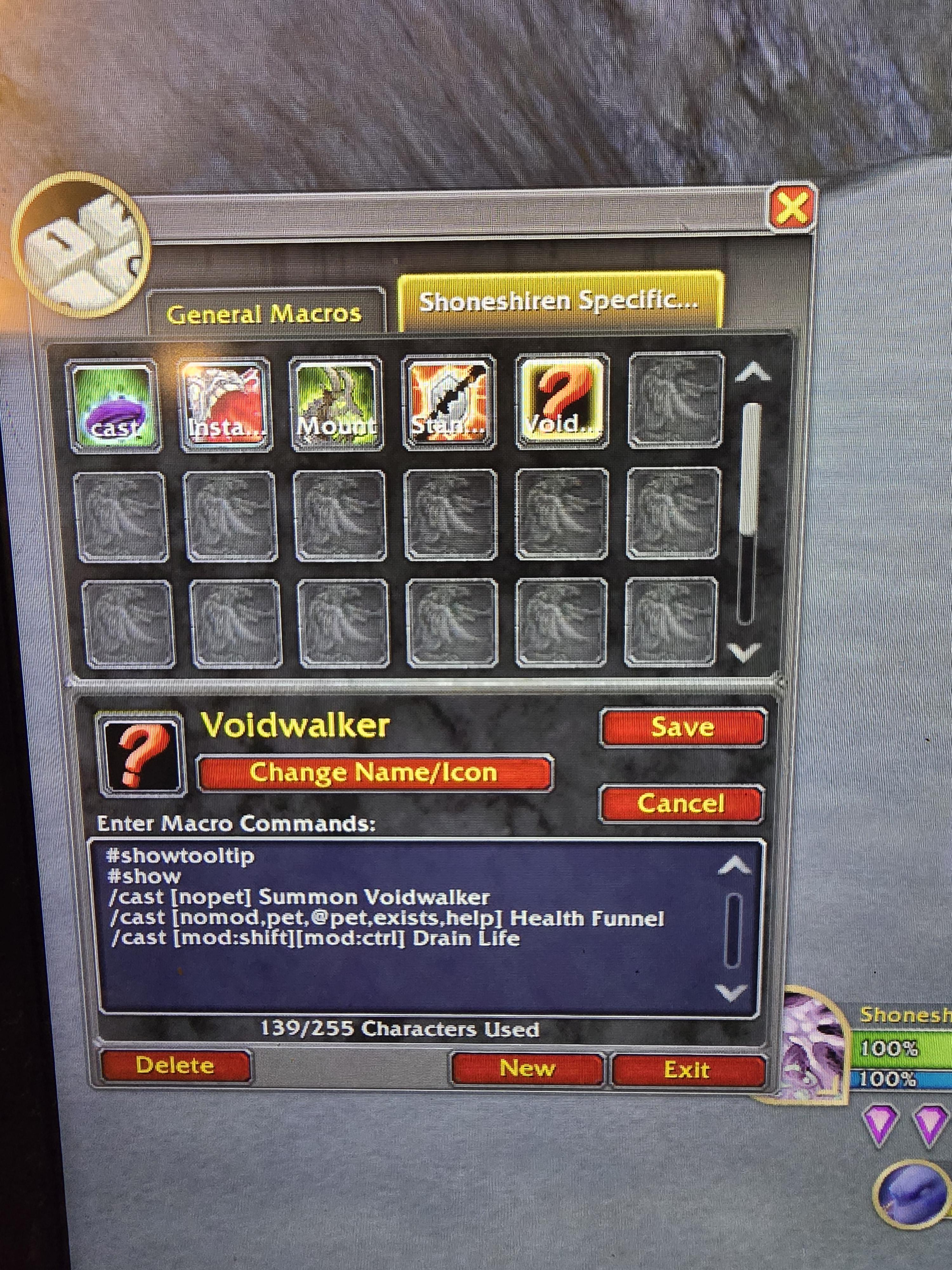
Warlock voidwalker macro

Post image
1 Upvotes

I am returning to wow having not played since early dragonflies and my voidwalker macro broke, can anyone explain how to fix it?

Edit: my wife figured it out they removed health funnel


r/WoWMacros • • Jun 14 '26

trying to use an item if im below a certain health threshold. tbc anniversary

Post image
0 Upvotes

i basically want my panic powerword button to automatically drop a jewelcrafting statue if im hurt. i dont really know what im doing if im being honest. the health check seems to work but it throws an error if i try to have it use an item instead of an emote. if anyone with more experience could let me know if this is something that can be done or not id really appreciate it