r/WorldMachine • • 9d ago

Best tutorial series

1 Upvotes

Hey there, I am a beginner to solo game development. It looks like World Machine Dragontail Peak with VDM is my best bet for the types of terrain I'd like to create for my Unreal Engine project. Currently using 5.8, but may switch to 5.9 if it's more stable.

Could anyone here point me towards a good tutorial series for working between World Machine and Unreal?

I am subscribed to Udemy, but they don't appear to have anything for this workflow. Appreciate the help.


r/WorldMachine • • 15d ago

Help Anyone know how to actually get a response from World Machine support?

1 Upvotes

I bought a World Machine license on 21 October and put in a refund request on 2 November. I’ve followed up twice since then and still haven’t heard anything. The ticket is just sitting there marked as open.

I’m in the UK and requested the refund within 14 days of buying it. I was sent over to PayPal during checkout and don’t remember agreeing to waive any cancellation rights, so I also asked them to check whether they had a record of that.

I’d much rather sort this out directly with World Machine than have a refund forced through, but with no response I’ve had to escalate it to PayPal. I’m happy for World Machine to deactivate the license if they process the refund.

Has anyone else had trouble getting hold of them? Is there a better way to contact them?

If anyone from World Machine sees this, I can send my ticket number over privately. Thanks.

**Update**: Refund was processed without any issues. I am guessing the developer just was away or unable to respond sooner.


r/WorldMachine • • 20d ago

Any Advice on Map

2 Upvotes

Hello, I'm making a large adventure map. I am exporting the height and layers to worldpainter to create a minecraft world with it. I'm looking for any feedback on my devices and setup. I think there's probably ways to make the setup better. I'm also looking for any advice on how to make the snow cover taper out. Sense it's going to worldpainter and minecraft, the snow mask just 1s or 0s, but I don't want a hard edge where it starts. I want small patches to fade to large patches for the taper up from the base of the mountains.

I will be adding additional features to the "additional mountains," "lonely mountain," "Ring mountain," and "ocean," this is basically my first draft with just a bit on each section, as a proof of concept to test settings. I'm currently importing this to worldpainter to see how it looks.

https://drive.google.com/file/d/15jB8uJ31xX6icpfo9dm3RE7P5U8y4wkQ/view?usp=drive_link


r/WorldMachine • • 25d ago

Water Help

Thumbnail
gallery
1 Upvotes

Can anyone help me with why my water looks like this?? I guess what I'm asking is how do I define how deep the lake is? Why does it extend to the height limit??


r/WorldMachine • • Jul 19 '26

Brand New to World Machine, and when using my drawn map to create points in

2 Upvotes

So I have a map I have drawn for my video game, where the map was created from old wear and tear on a bathroom wall.

I brought World Creator first, but at large scales it kind of falls apart, so I turned to World Machine, atleast to get a base for the world, the map is quite big, at 28km by 32km, and this tracing feature (by going to generator > shape) is something that is extremely useful especially to get clean 3D data (as it is generated in world machine) as opposed to how world creator does it via masks, if you want custom terrain, which then relies to heavily on your masks data creating choppy results. So World Machine wins hands down for my needs.

However, its not a technical issue now or a limitation, but a useability issue. When creating the outline shape its fine, out of the box, but if I miss click twice on the left click or miss click once on the right click, it completes the current shape I am using, even when I don't want it complete.

The problem is once the shape completes, I can't then go back and edit it as freeform or as universally as I did prior to completing the shape (see video).

it appears to my knowledge the only option after a shape accidently completes and joins up, my only option is extend shape, which means I then have to click within the completed shape and drag, which is serviceable, but it only creates points every so often, and I can't click to just add points, like before the shape completed.

this means I have to go back and drag points every. single. time and Im someone with cerebral palsy, Im going to misclick / shake / have a spasm in my fingers, occasionally. Even normal non disabled people would do this.

So my question is how do i when this occurs and the shape accidently completes go back to how it originally was, where I could just click and place points without dragging. Because the dragging puts points down every so often like equal distance per point, but i don't want that, as my map is massive and there are crevasse and shapes around the map edge.

Really stuck here, and when you try to look this stuff up, its all tutorials 6+ years old with a completely different interface. Its rather confusing.

r/WorldMachine • • Feb 20 '26

How do I fix the size of my heightmap input

1 Upvotes

So I am new to this application and I am trying to import an existing heightmap I have.

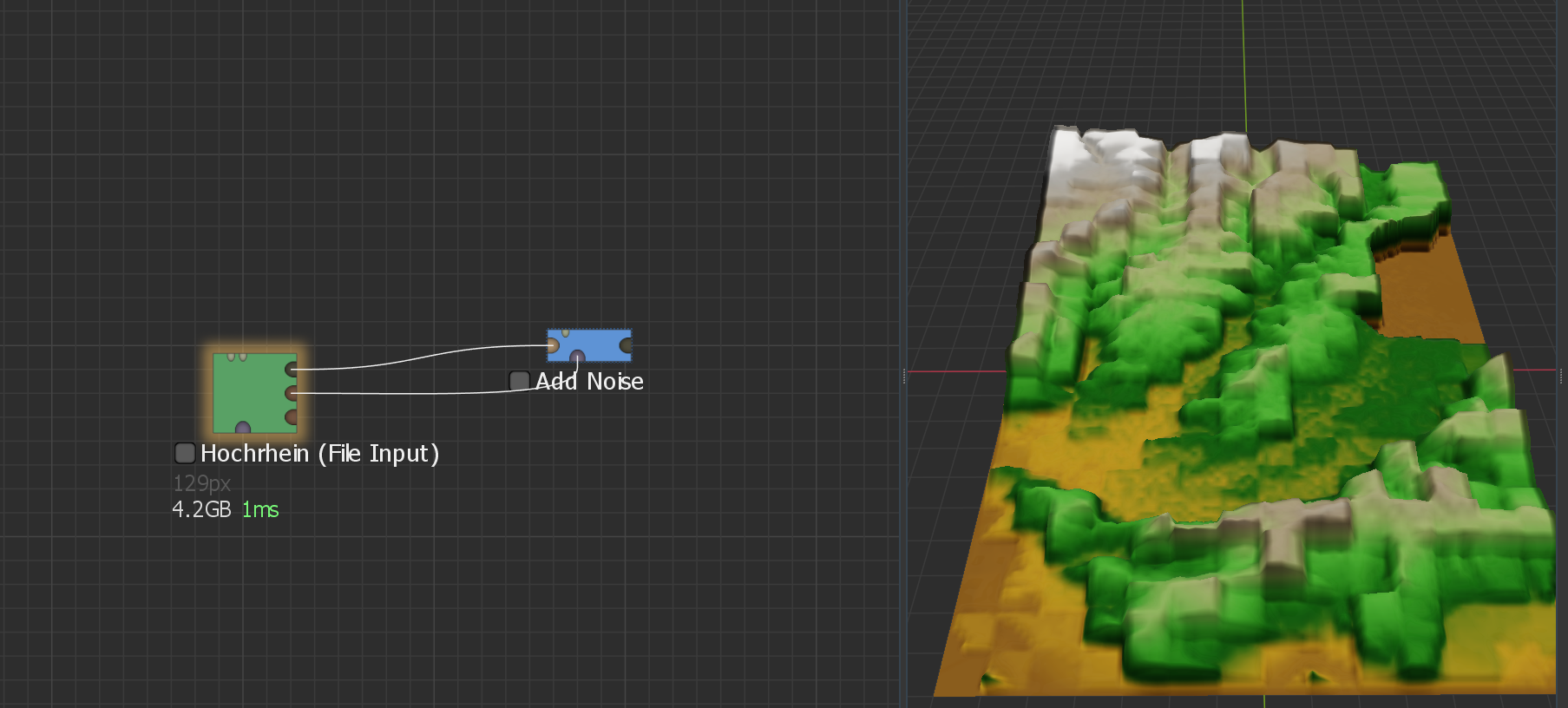
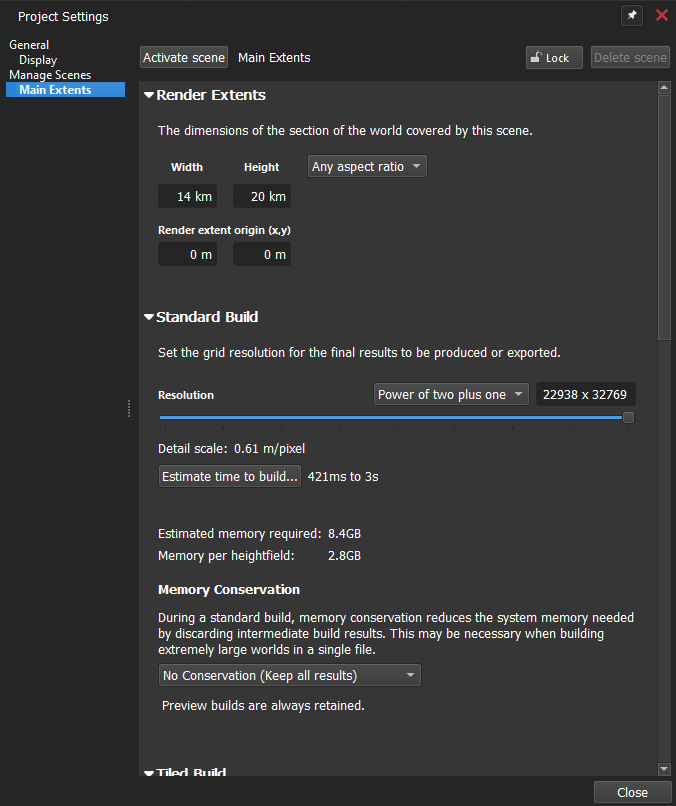
Its a .png file heightmap with 28000x40000px in size. I am trying to use that as heightmap input. The world size should be 14km * 20km. Unfortunate it is just 129px wide lol.

Project Settings
Heightmap input settings
How it looks like..

r/WorldMachine • • Dec 29 '25

Showcase I think I'm addicted to mountains

Thumbnail
gallery
27 Upvotes

r/WorldMachine • • Nov 22 '25

PC Specs for WM

1 Upvotes

This has not been discussed recently, so I wanted to ask what kind of PC specs work well for WM. Building a new comp with WM in mind. I don't need the best of the best per se, but I can spend a few thousand to get the machine I want. What is recommended?


r/WorldMachine • • Nov 07 '25

Showcase 100% Procgen Himalayan Mountain Range

Thumbnail
gallery
20 Upvotes

Rendered within WorldMachine with a photoshopped sky on the second pic


r/WorldMachine • • Sep 21 '25

Showcase Recreating Skyrim's Mountains

Thumbnail
youtube.com
6 Upvotes

r/WorldMachine • • Sep 08 '25

Select Height not completely black and white

Post image
2 Upvotes

I´m doing a tiled build and for some reason on this one tile the output, which is suppposed to be a mask of just the land, ALWAYS turns out grey in some places.


r/WorldMachine • • Aug 15 '25

Showcase Making terrain at massive scales is difficult, but possible.

Post image
23 Upvotes

r/WorldMachine • • Jul 11 '25

Some renders of a coupoe projects I did

Thumbnail
gallery
11 Upvotes

Those three renders were made for me as a way to test Texturing and layering.


r/WorldMachine • • Jul 11 '25

Showcase Icelandic Landscapes. World Machine + UE

Post image
17 Upvotes

r/WorldMachine • • May 29 '25

Render time 4 cores

1 Upvotes

Hello all,

Just wondering, what time differences are we talking about between indy and pro version?

Rendering time could be lowered if you create multiple smaller maps not? Not everyone has super powerful PC hardware to create big worlds.


r/WorldMachine • • May 29 '25

World machine - example world UI

1 Upvotes

Beginner here.

How do you click from tutorial 1 to tutorial 2? These are called "groups"


r/WorldMachine • • May 20 '25

Showcase World machine is definitly underrated software, though it is pretty clunky and hard to use

Thumbnail gallery
11 Upvotes

r/WorldMachine • • Apr 07 '25

Help Willing to Pay, World Machine creators I need your help!

Thumbnail
gallery
9 Upvotes

Hi all!

I’m a fan of geopolitical economic war games, and I’m trying to build my own game. I’m a seasoned engineer making my first game, that depends very heavily on the game’s map.

After trying for a loooong time, I realize I am not the best at World Machine, and I would like to pay anyone that is well versed in World Machine for your help!

I want to create multiple layers of 3d world terrain, so that I can create the effect of users zooming in from space, down to the city level.

Im attaching what my failed attempts of World Machine looks like.

If you’re great at World Machine and are willing to help (in whatever level you choose), I’m very willing to spend thousands for your help!

Please share below your level of interest, questions, and something you’ve made.

Thank you so much!


r/WorldMachine • • Jan 06 '25

I need guidance to export a map to Unity

2 Upvotes

I want to make a game map based on a real-world place. I have the map and texture exactly like I want them in World Machine:

SceneView shows me exactly when I envision as the end result:

But then when I export the asset files, then import them into Unity, I get either a flat plane or an accordion:

I've tried importing as mac, as windows, flipped vertically, not flipped vertically... I'm pulling my hair out. I see exactly what I want in WM but I can't seem to translate it into Unity. Does anyone have any tips or advice?


r/WorldMachine • • Dec 22 '24

Help Combining Map sections into one

2 Upvotes

Hi, so I am having this issue where when I combine 3 different map sections into one it results into lines being drawn between the barders. Is there any workaround or a solution to this?


r/WorldMachine • • Oct 27 '24

Just realized I forgot to share this here.

Thumbnail gallery
7 Upvotes

r/WorldMachine • • Oct 17 '24

Showcase Lightning

Post image
12 Upvotes

r/WorldMachine • • Sep 14 '24

Help WM to Older UED - Downsize Built Resolution?

1 Upvotes

I want to take a terrain built at 8k and downsize it to 1k so I can use G16 to import it for a UT2004 terrain.
I'm feeling a little nostalgic and I'd like to plink away at an ONS map that I always wanted to build but never got the time for.
I feel like I remember there being a resize option in the file output nodes but I don't see anything obvious in the menus or nodes.
Using WM 4031.2
SOLUTION IN COMMENTS


r/WorldMachine • • Sep 04 '24

Need Help for Unreal Engine 5 import

2 Upvotes

I got World Maschine because the Landscape Editor integrated in the UE takes too long to produce something reasonably good-looking.

However, I probably have problems with it. No idea why that is. I watched this video about it: https://www.youtube.com/watch?v=GtEnAw-soo8&t=521s

In the video you can see that Unreal Engine also imports the textures. What exactly am I doing wrong?

Build Window
World Maschine
End result WTF?

r/WorldMachine • • Sep 03 '24

Issues with tiled build & export

1 Upvotes

Literally had to find my reddit login info to make this post. Please redditors, I need a hero.

I'm attempting to export a tiled build (2048x2048 tiles, 2x2, so 4 tiles total) nothing insane I'd say.
File > Export Terrain Files > Tiled Build & Export

And nothing. Literally nothing happens. No prompt, no popup, no build progression screen, nothin'.

And yes, I've already changed my temp file location path like 6 times to various different folders, some on the desktop, some on an external SSD, etc etc. Still getting nothing.

The only other thing I can think of is I'm running out of RAM or it's maxing out the HDD/SSD, but I have no idea.

Any help would be greatly appreciated.

Edit: Yes, my output devices' "Participate In Tiled Build" boxes are checked