r/WowUI
•
u/johnnywormsFGC
•
8d ago
•
 2
UI [UI] An In-Game Edit-Mode Layout
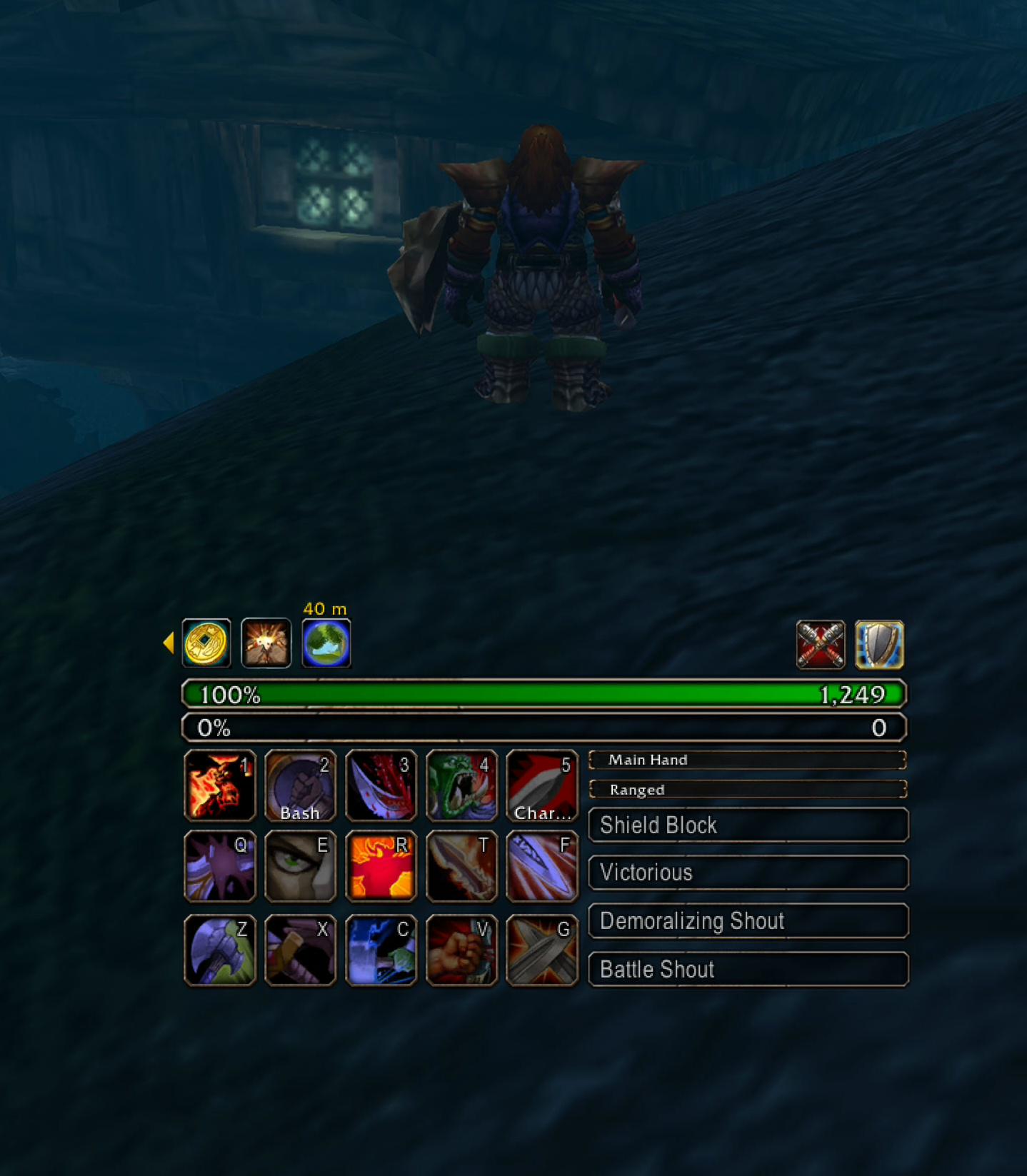
I actually have so much fun messing the the UI, its kind of addicting for some reason. Making new layouts for different characters.
This may be my last one before I break and get an addon. It was fun working within the limitations of in-game edit mode. Mostly i wish you could remove more things: my biggest annoyance is the dang bag and menu bars, ugh.
I want as mininal buttons as possible, so i'm going to make shift modifies for each key here. I've played enough warrior to hopefully remember what I put "behind" some keys.
Anyways, I was inspired somewhere on reddit, so thought I'd share and hopefully inspire someone else and spark a new idea for them.
Thanks for reading.
14
u/maqisha 8d ago
Now show where the other 30 spells and consumables are 🥸
4
u/johnnywormsFGC 7d ago
Okay, I’ve been thinking about this all morning and I think I cracked the code for my setup: modifier macros.
I was originally going to memorize what was under each key, but instead I named each macro after the Shift ability. That gives me a little reminder under the icon.
For example, 4 is Demoralizing Shout, but when I hold Shift, the icon switches to Battle Shout and shows its tooltip and cooldown. So SHIFT+4 gives me Battle Shout, and a naked 4 gives Demo Shout.
I’m going to group abilities in ways that make sense to my brain. You can also use ALT and CTRL, which means my 15 favourite keys could potentially hold 30, 45, or even 60 actions. I probably won’t need all of them, but it’s cool to have the option. Maybe ALT+keys are like non-combat stuff, not sure yet. OR like all ALT keys are pet for example.
Here’s the basic formula:
#showtooltip
/cast [mod:shift] Shift Ability; Normal Ability
And my actual shout example:
#showtooltip
/cast [mod:shift] Battle Shout; Demoralizing Shout
Pick the question mark icon when making the macro so the icon changes when you hold Shift. If Shift+the key is already bound to something else, you may need to remove that binding first.
I'll continue to test and see how everything feels, but so far it feels like home.
6
u/wallyflops 8d ago
Share it!
2
u/johnnywormsFGC 8d ago
Hey, I'm glad some people found it inspiring. Makes me want to cook up even more ideas. I appreciate ya.
Okay, I've never shared one before. And the rest of the UI needs more tinkering. But here's the 15 bar layout:
5 0 59 0 0 0 4 4 UIParent 1012.0 -440.0 -1 ##$&%)&('-)$+#,# 0 1 0 0 0 UIParent 1851.7 -191.8 -1 ##$$%)&'')(#,# 0 2 0 0 0 UIParent 855.5 -952.2 -1 ##$%%-&('%(#,$ 0 3 0 0 0 UIParent 855.5 -1048.2 -1 ##$$%)&('%(#,# 0 4 0 7 7 UIParent 417.0 1142.0 -1 ##$$%/&('%(#,# 0 5 0 2 8 MultiBarLeft 0.0 -4.0 -1 ##$$%/&('((#,$ 0 6 1 1 4 UIParent 0.0 -50.0 -1 ##$$%/&('%(#,$ 0 7 1 1 4 UIParent 0.0 -100.0 -1 ##$$%/&('%(#,$ 0 10 0 0 0 UIParent 1213.1 -875.0 -1 ##$$&('' 0 11 0 4 4 UIParent -738.4 -210.0 -1 ##$$&&'%,# 0 12 0 0 0 UIParent 1454.4 -952.4 -1 ##$$&('% 1 -1 0 4 4 UIParent -616.6 -233.4 -1 #$$#%# 2 -1 0 0 0 UIParent 1682.7 -896.5 -1 #$$#%(&( 3 0 0 0 0 UIParent 13.7 -6.0 -1 $#3# 3 1 0 1 1 UIParent -0.0 18.2 -1 %#3) 3 2 0 4 4 UIParent -582.0 79.0 -1 %#&$3# 3 3 0 0 0 UIParent 31.4 -93.3 -1 '#(#)#-k.G/$1#305#6(7.8#9( 3 4 0 0 0 UIParent 284.7 -0.0 -1 ,#-#.;/$0#1#2(3#5#6(7#8(9( 3 5 0 2 2 UIParent -1599.7 -427.5 -1 &#*$3# 3 6 1 5 5 UIParent 0.0 0.0 -1 -=.+/#4$5#6(7-7$8(9( 3 7 0 0 0 UIParent 618.3 -831.5 -1 3) 4 -1 0 0 0 UIParent 766.3 -646.6 -1 # 5 -1 0 4 4 UIParent 407.0 -440.0 -1 # 6 0 0 0 0 UIParent 839.7 -724.0 -1 ##$$%$&,(()( 6 1 0 2 0 BuffFrame -4.0 0.0 -1 ##$$%#''(()(-# 6 2 1 1 1 UIParent 0.0 -25.0 -1 ##$#%$&.(()(+#,-,$ 7 -1 1 7 7 UIParent 0.0 -4.0 -1 # 8 -1 0 0 0 UIParent 34.0 -987.2 -1 #%$U%$&7 9 -1 0 4 4 UIParent -522.0 -580.0 -1 # 10 -1 0 7 7 UIParent 672.0 672.0 -1 # 11 -1 0 4 4 UIParent 553.0 -420.0 -1 # 12 -1 0 4 4 UIParent 925.0 -36.3 -1 #K$#%# 13 -1 0 8 2 MainStatusTrackingBarContainer 0.0 4.0 -1 ##$#%# 14 -1 0 6 0 MainStatusTrackingBarContainer -0.5 3.5 -1 ##$#%# 15 0 0 0 0 UIParent 1534.3 -1184.0 -1 &$ 15 1 0 7 7 UIParent 0.0 2.0 -1 &# 16 -1 0 4 4 UIParent -623.3 -300.0 -1 ## 17 -1 0 7 7 UIParent 5.0 662.0 -1 ## 18 -1 1 5 5 UIParent 0.0 0.0 -1 #- 19 -1 1 7 7 UIParent 0.0 0.0 -1 ## 20 0 0 7 7 UIParent -1009.0 322.0 -1 ##$/%$&('%(-($)#+$,$-$ 20 1 0 6 0 BuffIconCooldownViewer 0.0 4.0 -1 ##$*%$&('%(-($)#+$,$-$ 20 2 0 7 7 UIParent -897.5 322.0 -1 ##$$%$&('((-($)#+#,#-$ 20 3 0 0 0 UIParent 1093.3 -981.8 -1 #$$$%#&('#(7)#*%+#,#-$.F 21 -1 0 0 0 UIParent 856.3 -911.8 -1 ##%#&#'#(#)#*K+#,*-#.#/-0$1# 22 0 1 8 7 UIParent -457.0 336.0 -1 #$$$%#&('((#)U*$+%,$-#.#/U0% 22 1 1 1 1 UIParent 0.0 -40.0 -1 &('()U*#+% 22 2 1 1 1 UIParent 0.0 -90.0 -1 &('()U*#+% 22 3 1 1 1 UIParent 0.0 -130.0 -1 &('()U*#+% 23 -1 0 0 0 UIParent 1848.7 -20.8 -1 ##$#%%&l'R(#)U+$,$-,.(/# 24 -1 0 1 1 UIParent -0.4 -202.0 -1 # 25 -1 0 0 0 UIParent 617.2 -944.4 -1 # 26 0 0 7 7 UIParent -1013.7 420.0 -1 #$ 26 1 0 7 7 UIParent -895.0 420.0 -1 #$ 27 -1 1 4 4 Minimap -68.0 -68.0 -1 #- 28 -1 1 4 4 UIParent 0.0 0.0 -1 #( 29 0 0 0 0 UIParent 1092.1 -953.0 -1 #&$U%#&7'#($)# 29 1 0 7 7 UIParent 685.2 1081.6 -1 #&$U%%&7'#($)# 29 2 0 0 0 UIParent 1092.4 -969.8 -1 #&$U%#&7'#($)#
2
u/RageMachinist 8d ago
How are you able to edit the personal resource bars? I can turn them on but I can't move them in edit mode (in WOW:Forever).
Edit: nvm, got it. You have to enable it in the Edit Mode settings. That's different than the...errr I forget...other settings.
2
u/SuperStileStar 7d ago
Is there away i can copy and paste your UI setup into my game? Its super clean i am looking for something like yours
24
u/egotistical-moron 8d ago
Looks clean
4
u/Ringlhaeuser 8d ago edited 8d ago
love it! I kept my forever ui mostly default but used edit mode and no addons in retail and classic for my interface. I understand it's kinda uncomfortable compared to downloading a premade interface, but I would realy love to see more of that kind of interface!
edit: i think I will kinda steal that layout and try to use addons sololey for shift and ctrl bindings. actionbarpaging should do it, but I'll test it afterlwork.
4
u/DukeBoom 8d ago
I'll be using this as inspiration for my next round of ui fiddling!
Charge on 5 is diabolical behaviour though.
4
u/LocalTicoBroje 8d ago
How did you get your health and rage bars like that? I've been trying to figure out something similar
1
u/Louieyaa 8d ago
i just hide my bag and menu bars until i hover over them lol. they're unsightly
1
u/PraetorOjoalvirus 8d ago
It looks very nice, but there's just not enough room for every ability that's needed.
1
u/finenite 8d ago
How did you get the action bars down to 5 slots? Lowest it let's me go is 6
1
u/castilhoslb 8d ago
I'm stealing this can u make a fast tutorial xd
1
u/Zaeedi 8d ago
Yooo, i want this for my warrior. Can we copy this somehow?
1
u/TrappyMFN 8d ago
Funny I have taunts on R and gap closers on 5 too
1
u/SleazyAndEasy 7d ago
I love simple bars like this but always wonder where people put all the other spells? Like hamstring
1
u/National-Abalone-487 4d ago
How did you manage the shield block bar? I’ve been looking for a WeakAura or addon for it and nothing seems to fit
1
u/Tom_Clancy7 2d ago
Can i use this in TBC Classic Anniversary?
3
u/punnotattended 8d ago
Do you have target unit frames enabled?
2
u/Melomaniacal 8d ago
Love it, very creative!
For what it's worth, I do the same thing with my action bar (one bar that reacts to modifiers for paging), and I really enjoy it. First addon I got was something to enable paging modifiers to accommodate that. It forces you to be very comfortable with your hotkeys, which I view as a good thing.
But yes, once you open the door to addons, it's truly a pandoras box that's hard to close.
2
u/Cheap_Grapefruit_908 8d ago
unique for sure, not my cup of tea but very different to the usual battle cruiser/minimalism UIs. GJ.
2
u/Vissotos 8d ago
Man that looks so clean, would you mind sharing it with us? Love the idea of minimal addon interfering!
2
u/gul__dan 8d ago
Share it pls
2
u/saintnickel 8d ago
Super clean! I play prot warrior as well. Inspired by this
2
u/keasbeexd 8d ago
Would love to see more and the export!
2
u/extrayeasty 8d ago
What are those Shield Block / Victorious / Demo Shout / Battle Shout boxes?
2
u/KnightOfTheStupid 8d ago
Very creative! The more compact-looking addons usually aren't my cup of tea but this is great and I love the layout of your CDs in rows next to your bars. What does your enemy unit frame look like?
1
u/Reclusiarch_Mer_Grim 8d ago
God damn this looks clean, nice job!
1
u/Undercover_Nerdd 8d ago
If it works for you, it works
1
u/Autisticparadise 8d ago
wow that looks great, how did you manage this?
1
u/Aswizzle77 8d ago
Woah
1
u/bifflin 8d ago
Looks clean! I appreciate that everything lines up here.
Just a suggestion:
Consider using the CD Manager buffs of your choosing to display on the upper left of your health bar instead of using the whole buff bar. I only mention this because it can easily get cluttered with consumes/world buffs/friendly player buffs/etc. that aren’t super necessary to track in the center of your screen.
Of course, you can use the yellow arrow there to consolidate long-duration buffs as well, but just wanted to offer an alternative tracking method
1
u/krybtekorset 7d ago
Hey OP. This is real neat. Good shit.
1
u/DiMit17 7d ago
Very slick
1
u/Saedisi 7d ago
I'm trying with a controller. Would absolutely love to see something this clean for controller inputs. Like a simple grid with left hand side showing prompt ie: LT, RT, both and then lists the buttons across like yours. Just cause i'm using a controller (to see if it can be done) I don't want the round aesthetic.
1
u/Zekler 7d ago
I would recommend OPIE. if you want to have easy access to, consumes, hs, mounts etc. That would fit in the rest of the binds
1
u/kidshit 6d ago
Really like this setup. Gonna save this so I can do something similar on my warrior. Goood work 👍🏼👍🏼👍🏼