r/XMG_gg • • 2h ago

Troubleshooting / Maintenance / Tech Support Could this be the Reason for my Gpu overheating?

Post image
2 Upvotes

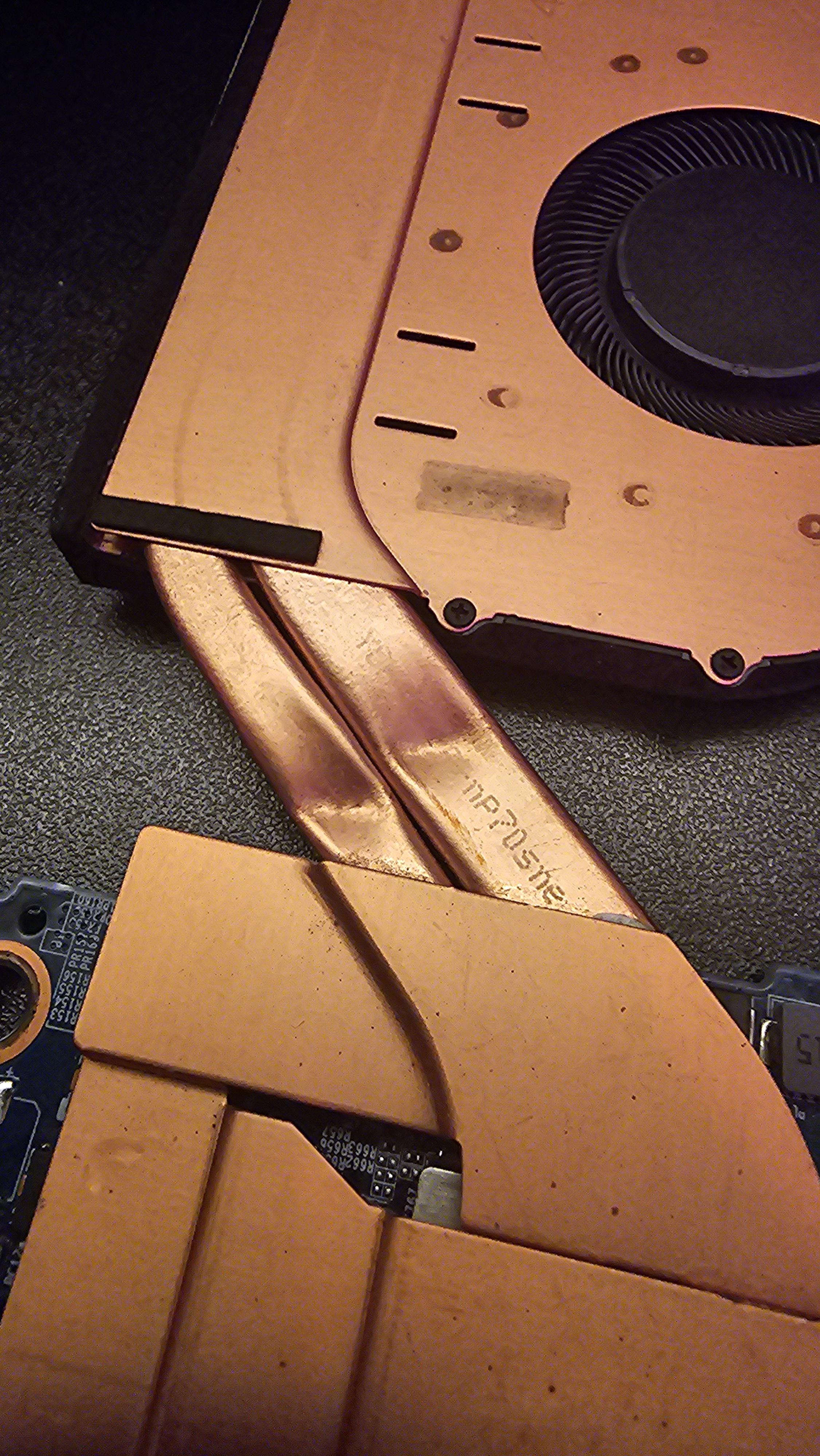
I've got my XMG laptop sent to me like this,is this normal, and might this be the reason for the GPU overheating and always crashing?

​A bit of context:

The laptop is a few years old. Ever since I got it, the GPU never worked that well, and it started to always overheat and shut down whenever I used the NVIDIA GPU, i always had to switch to CPU only. Now I'm using it as a server running on the CPU only. It looks like a mess. Sadly, I didn't notice it early enough, so there's no way of returning it. I got it as a company gift, so I was never able to show proof of purchase or anything similar (i left the Company). It's a few years old and not new anymore, but I never dropped it and nothing ever happened to it, so I assume a bend like this just can't happen randomly, definately did not happen during disassembely.

​It's an XMG Focus 17, by the way.


r/XMG_gg • • 3d ago

Review / Buying experience XMG PRO 16 (M25)

4 Upvotes

Hello, I am considering purchasing the XMG PRO 16 (M25) model; is the chassis of this model made entirely of aluminum?


r/XMG_gg • • 3d ago

Review / Buying experience XMG Neo 16 (M26) review: One of the best gaming laptops finally gets G-Sync

Thumbnail
notebookcheck.net
11 Upvotes

r/XMG_gg • • 5d ago

Troubleshooting / Maintenance / Tech Support XMG Core 17 2021 performance issues

1 Upvotes

Hi everyone,

I've been having performance issues with my XMG Core 17 (2021, Ryzen 7 4800H, RTX 3060 115W+15W) since I bought it. Back then I noticed it came with single-channel RAM and upgraded to 32GB Dual-Channel, which helped a bit, but gaming performance (for example in CS2) has always been noticeably below what reviews showed, even on the internal 1080p display, and now on an external 1440p monitor (requiring lowest settings and lower res just to hold 144 FPS).

About a month ago I repasted the CPU and GPU with Thermal Grizzly Hydronaut, which improved temperatures by 5-10°C, but the CPU still hits an average of 94–95°C under load.

Here are my current benchmark results (Overboost profile, plugged in):

3DMark Steel Nomad: 1,991 pts (GPU peaked at 119W, stable clocks/temps)

Cinebench 2026 (Multi-Thread): 2,421 pts (CPU averaged 94–95°C throughout the run)

I do have HWinfo protocols while running the benchmarks if needed. Where could be the issue here?

Thanks a lot.


r/XMG_gg • • 6d ago

Troubleshooting / Maintenance / Tech Support BIOS update issue

1 Upvotes

Hi,
I have a SCHENKER MEDIA 15 M22, RTX 3050.
My BIOS was 1.07.11RTR and I attempted the official update to 1.07.13RTR2.
BitLocker was suspended and Secure Boot disabled.
I booted the supplied EFI Shell, ran MeSet.efi, the system rebooted normally, then I returned to the firmware folder and ran FLASHME.nsh.
The system subsequently went through an automatic restart/shutdown and is now completely unresponsive: no display, fan, keyboard light, or charging/power LED. A single normal press of the power button produces no response.
Does anyone have any suggestions on what to do next? I have emailed support but I thought people here might be faster ;)


r/XMG_gg • • 7d ago

Discussion Request: Owner with M26 with 5090 (or 5080) and also mini-led screen, send me their vbios.

4 Upvotes

Looking to port advanced optimus to E25/A25. I need your vbios!
You can use GPUz to dump it. A screenshot of your GPUz screen is also needed.


r/XMG_gg • • 12d ago

Troubleshooting / Maintenance / Tech Support Headset schaltet sich ab

3 Upvotes

Hallo,

ich habe mir einen apex 17 (m25) laptop gekauft. mein problem ist, dass sich mein headset (mit dongle verbunden) immer wieder selbst abschaltet. ist bei meinem alten laptop nie passiert. ich habe die automatische abschaltung von dem headset deaktiviert, die abschaltung der usb ports abgeschaltet, die energieoptionen angepasst. trotzdem passiert es noch immer. wenn ich ein spiel spiele kann ich mich dann auch kurz nicht mehr bewegen im game bzw. heute war sogar das bild kurz weg. ich verwende meinen tv als hauptbildschirm. vielleicht kann mir jemand helfen.


r/XMG_gg • • 13d ago

Discussion MechControl: a free, open-source, lightweight replacement for XMG Control Center

Thumbnail
gallery
50 Upvotes

I wrote a native replacement for the Control Center. It needs no .NET and runs no background services.

Why switch:

  • Much lighter: CPU and RAM use is about 90% lower than the OEM app. It reads and writes the EC far less often, with much less overhead per access.
  • Linked fans: the CPU and GPU share one heatsink, so in CPU-only loads both fans spin up together. That cools better and runs quieter. Fan curves are fully configurable.
  • A real charge limit: set any charge percentage you want, for true stationary use. The limit holds even while the laptop is off and plugged in.
  • Global profiles: 5 slots, each storing power, fans, battery, lighting and liquid cooler settings. You can switch them from the tray.
  • Software shunt mod for RTX 4000/5000 GPUs: an optional NVIDIA unlock raises the power ceiling and lets you change the GPU current limits. A live view shows which power or current limit is holding the clock back, so you can tune each limit precisely.
  • DLPPC disable: keeps GPU memory at full speed in games instead of letting the driver drop it a step when power-limited.
  • Detailed telemetry and logging: NVIDIA rail currents and power, plus EC readings the OEM Control Center doesn't show.

Also included: CPU PL1/PL2/PL4 and temperature limit, GPU TGP and Dynamic Boost, a thermal failsafe, keyboard and light bar lighting, mini-LED local dimming, automatic re-apply after sleep or an EC reset, a command-line tool for scripting, and a fix for black screens when the display wakes in dGPU mode.

It has been tested on several Intel and AMD laptops with RTX 5000 GPUs, and on some with RTX 4000 GPUs. Feedback and logs from other models are welcome.

Download / source: https://github.com/Liddo-kun/MechControl-RE


r/XMG_gg • • 12d ago

Shipping Xmg New market

1 Upvotes

Is it posible to buy xmg in Russia?


r/XMG_gg • • 13d ago

Troubleshooting / Maintenance / Tech Support XMG Core 17 no power

2 Upvotes

Hi,

I was cleaning the laptop fans due to weird noise. I opened up, cleaned everything, applied new thermal paste etc. the usual process. While closing down, the tip of the metal tubes touched the motherboard and there was a spark. Please note that during this the power cable was not connected but the battery was.

Is it possible that I fried the motherboard, and how does the process work if I want to send a device for troubleshooting?

XMG XCO17AE21, purchased in 2021.

Thanks


r/XMG_gg • • 14d ago

Troubleshooting / Maintenance / Tech Support BIOS Update Request (AMD fTPM 3.47.0.5 / PA-420 Attestation Issue) – XMG CORE 15 (AE21)

8 Upvotes

Hello XMG Support Team,

I own an XMG CORE 15 (ID: XCO15AE21) equipped with an AMD Ryzen 4800H processor.

I am currently unable to play Call of Duty: Modern Warfare 4 online because the Ricochet Anti-Cheat blocks access with a "BIOS Firmware Update Required" error. While UEFI and Secure Boot are properly enabled, Windows tpm.msc reports that my AMD fTPM manufacturer version is currently 3.47.0.5.

As documented in AMD Security Bulletin PA-420 and Activision's official TPM 2.0 requirements, fTPM versions with a 0 in the third position (3.xx.0.x) fail remote attestation and must be updated to a patched AGESA/fTPM version (such as 3.92.5.x or 3.94.2.x).

I have already checked the Schenker download portal for XCO15AE21 and installed the latest publicly available BIOS, which still leaves the fTPM on version 3.47.0.5.

Could you please let me know if an updated or beta/test BIOS incorporating the fixed AMD fTPM firmware is available for the XMG CORE 15 (AE21) platform, or if one is currently in development?

System Details:

  • Model: XMG CORE 15 (AE21)
  • Serial Number: [Indiquez le numéro de série situé sous le PC]
  • CPU: AMD Ryzen [7 4800H / 5 4600H]
  • Current BIOS Version: [Indiquez votre version BIOS affichée dans msinfo32]
  • Current TPM Manufacturer Version: 3.47.0.5

Thank you very much for your time and support.


r/XMG_gg • • 18d ago

Troubleshooting / Maintenance / Tech Support Oasis combability question

4 Upvotes

I have neo 16 e23. will oasis mk2 version 3 be compatible with my laptop, or should I specifically buy v2? I don't see it available in the store.


r/XMG_gg • • 18d ago

Troubleshooting / Maintenance / Tech Support XMG NEO 16 (E25) keeps hard freezing — BIOS/EC update and Windows repair haven’t fixed it

9 Upvotes

Hi everyone,

I’m hoping someone from XMG, or someone who has run into a similar problem, can help me figure out why my NEO 16 keeps freezing. For everyone that "cares": yes, this post has been created with the help of AI, because I am not a native speaker.

When it happens, the picture stays on the screen and the laptop stops responding. The only way to recover is to force it off and restart it. I’ve already updated the BIOS and EC, reinstalled the NVIDIA driver and completed a Windows repair installation, but the freezes are still happening.

There were also earlier crashes with UNEXPECTED_STORE_EXCEPTION (0x154). The latest incident was a complete freeze without a visible blue screen or a usable system crash dump. I haven’t found a reliable way to reproduce it yet. All other freezes also were without a blue screen.

The setup

  • Laptop: XMG NEO 16 (E25)
  • CPU: Intel Core Ultra 9 275HX
  • GPU: RTX 5090 Laptop GPU, 24 GB VRAM, plus Intel integrated graphics
  • RAM: 32 GB, consisting of two Kingston KF556S40-16 modules running at 5600 MT/s
  • SSD: Samsung 990 EVO Plus 4 TB, firmware 2B2QKXG7
  • Windows: Windows 11 Pro, reported as 26H2, build 26300.9711
  • BIOS / EC: N.1.33A27 / 2.11
  • NVIDIA driver: 617.42 (haven\t updated yet to the latest version, as it says the new version also can cause crashes, will do later)`
  • Intel graphics driver: 32.0.101.6733
  • Control Center Service: 5.57.51.44 (same as NVidia driver)
  • Microsoft 365: 64-bit, version 16.0.20527.20150

These are the versions recorded in the diagnostics on 8 November.

What happened during the latest freeze

I left the laptop running overnight with both the display timeout and sleep set to “Never” on AC power. Office was installed, but its applications were closed (this maybe interesting, because it freezes often, when I use office 365, but not always).

In the morning, the screen was frozen. The graphics-reset keyboard shortcut didn’t do anything, (no shortcut did) and I had to force a restart.

The laptop has also frozen with and without an HDMI monitor connected or any additional device such as a mouse, camera or keyboard.

What I’ve tried

BIOS and EC update:
The update completed successfully, taking the laptop from BIOS N.1.13A09 / EC 1.12 to BIOS N.1.33A27 / EC 2.11. It has frozen again since then.

Windows repair:
The repair installation through Windows Update completed successfully on 3 November. This was an in-place repair. I don’t have a clean-install don yet and I frankly need to avoid that as I need the laptop on a business trip.

NVIDIA driver reinstallation:
I reinstalled the driver. At one point, the external HDMI display wasn’t being detected, and another reinstall fixed that particular problem. The freezes continued.

SSD checks:
The full Samsung SSD diagnostic scan completed with zero errors, and the health/SMART information looked normal. The SSD was around 40–44°C during those checks.

Office reinstallation:
I uninstalled and reinstalled Microsoft 365 because I had also been having problems involving Office. The latest overnight freeze happened with the Office applications closed.

Power settings:
The laptop is using the Windows Balanced plan. As mentioned above, sleep and display timeouts were disabled on AC for the overnight test. The diagnostic export also shows PCIe Link State Power Management set to Maximum power savings, and the hard-disk timeout set to 30 seconds. The system supports Modern Standby.

What the logs show

I’ve collected the System and Application logs, reliability history, hardware and driver information, and the power and crash-dump settings. Nothing in them clearly explains the latest freeze.

After the forced restart, Windows recorded Kernel-Power Event 41, with:

  • BugcheckCode = 0
  • SleepInProgress = 0
  • ConnectedStandbyInProgress = false

An earlier restart had ConnectedStandbyInProgress = true, so the incidents haven’t all been recorded under the same conditions.

The missing dump is making this difficult to investigate. Automatic memory dumps are configured, automatic restart is disabled, and there is a system-managed pagefile on C: with 22,528 MB allocated. Despite that, the latest check found no MEMORY.DMP, system minidump or dump in LiveKernelReports.

There are some older application dumps, but nothing usable for the latest system freeze. Older logs also contain two volmgr Event 161 errors for failed dump creation, with BugCheckProgress = 0x00040049.

There are a few other findings that may or may not be relevant:

  • An nvlddmkm Event 153 from 23 October, reporting an error on GPUID: 200.
  • A Disk Event 11 on 6 November referring to \Device\Harddisk1\DR1.
  • An informational WHEA-Logger Event 3. Earlier restart records show WHEABootErrorCount = 1, while the latest shows 0. I don’t have a specific component identified from this.

Control Center and Windows Search errors

Two recurring issues stood out in the Application log, although I don’t know whether they are connected to the freezes.

GCUService / Control Center

There are five GCUService.exe crashes on 6–7 November. The details are:

  • GCUService.exe version 1.0.2.70
  • Reported faulting module: KERNELBASE.dll, version 10.0.26100.9711
  • Exception code: 0xe0434352
  • The associated CLR20r3 reports mention System.Management, version 4.8.10001.0

There isn’t a useful stack trace or inner-exception message in the export. These crashes happened before the latest overnight freeze; none was logged around the freeze time. (app. 4 a.m.)

Control Center Service is still on 5.57.51.44. I’m looking at 5.57.51.60 as a possible update, but haven’t tested it yet.

Windows Search

Between the evening and morning diagnostic captures, there were:

  • 17 Windows Search Event 10024 entries, saying a filter-host process had stopped responding and was forcibly terminated.
  • 10 .NET Runtime Event 1022 entries, reporting a failure to initialise the profiler-attach infrastructure, with HRESULT 0x80004005.

Six of the .NET entries share a process ID with a Search filter-host process that was subsequently terminated. The logs don’t identify the file or filter DLL involved, and I don’t know whether these errors are related to each other or to the system freezes.

There were also two PDF24 Reader 11.30.1.0 application hangs on 5 November.

What would you try next?

Does any of this look familiar to XMG or other NEO E25 owners?

I’d particularly appreciate advice on:

  • Whether this Windows build and driver combination is suitable for the current BIOS/EC.
  • Whether Control Center 5.57.51.60 addresses the GCUService errors, and how XMG recommends installing it.
  • How to capture useful evidence when the laptop freezes completely without producing a dump. A manually triggered dump has been suggested, but I currently don’t have an external USB keyboard with a Scroll Lock key.
  • How to find the actual file or filter behind the Search hangs.
  • Which hardware or software tests would be most useful next, and when it would make sense to send the laptop in for inspection.

I can provide redacted log extracts and further diagnostics privately to XMG support.

Thanks for taking the time to read through this. I know there might be useless information, but maybe anyone can tell me anything about it? Thanks in advance!

r/XMG_gg • • 18d ago

Discussion Student looking for a laptop to keep 5+ years: is XMG worth it?

11 Upvotes

Hi everyone,

I'm a student, carrying my laptop in my backpack every day for classes, so I'm looking for something that can easily last me over 5 years without overheating or breaking down, unlike most standard laptops out there.

I noticed some nice discounts on the pre-configured models, but even with a sale, it’s still quite a bit of money for me. I just want to make sure the price gap compared to regular brands makes sense. I only discovered XMG yesterday, but I really like what they do in terms of build quality and repairability.

I'm mostly wondering which chassis would be best to get decent battery life for a day of classes, good cooling with an RTX 5060, and something sturdy enough for the daily commute.

Also, what actually makes them hold up better than others in your experience ? And once the warranty is over, is it still realistic to easily find spare parts like a battery, fans, or get BIOS updates down the road ?

Any feedback or advice would be super appreciated, thanks !


r/XMG_gg • • 21d ago

Review / Buying experience Pro 16 VE (i9-14900HX) vs Apex 16 Max (Ryzen 9 8945HX) with RTX 5070 Ti - which one?

3 Upvotes

Hi all, I'm upgrading from an old GTX 1650 laptop and need a machine for local ML training (long GPU runs, PyTorch, data loading), plus university work. I'm in Germany and want a US International layout.

I've narrowed it to two XMG configs, both with RTX 5070 Ti, 32GB RAM and 1TB SSD, at almost the same price after Black Deals (about 2,920 vs 2,905 EUR):

- PRO 16 VE (M25): i9-14900HX, Wi-Fi 7, DDR5-5600, basic 24-month warranty

- APEX 16 MAX (M25): Ryzen 9 8945HX, Wi-Fi 6E, DDR5-5200, 24-month Platinum Guarantee

Questions for owners:

  1. Any real-world difference in thermals or fan noise under sustained GPU + CPU load?
  2. Any stability issues with the 14900HX in the Pro 16 VE?
  3. Is the Platinum Guarantee worth it, and how has XMG support and repair turnaround been for you?
  4. Anything else I should know before ordering?

Thanks!


r/XMG_gg • • 22d ago

Troubleshooting / Maintenance / Tech Support Random system freezes with buzzing sound followed by automatic restart

5 Upvotes

Hi everyone,

I’ve been experiencing a recurring issue with my laptop recently, roughly once every 2–3 days.
During normal use, the entire system suddenly freezes and makes a loud, harsh buzzing sound. The sound continues for around 3–5 seconds before the laptop automatically restarts.
I’ve checked Windows Event Viewer, but the only relevant logs I can find indicate that the system shut down unexpectedly (Kernel-Power). There doesn’t seem to be any information explaining what actually caused the crash.
Has anyone experienced something similar? What could be causing this, and how should I go about troubleshooting it? Are there any specific logs or diagnostic tools I should check to narrow down the possible causes?
Any advice would be greatly appreciated. Thanks in advance!

(My laptop is Neo16 A25 with 9955hx3d+RTX5080, BIOS and control center are updated to the latest version, and all BIOS settings have been reset to their defaults.)


r/XMG_gg • • 23d ago

Review / Buying experience This Gaming Laptop is Water Cooled! - XMG Neo 16 (2026) Review

Thumbnail
youtube.com
10 Upvotes

r/XMG_gg • • 24d ago

Discussion Thoughts on APEX 17 (M25)

3 Upvotes

Hello all. I am thinking about buying a prebuild APEX 17 (M25) with Ryzen 9 9955HX & RTX 5070. I searched online, but I couldn't find any user reviews. Does anyone here use this laptop? If so, I’d like to know if it has any recurring (chronic) issues like throttling or something else. I’m aware that the computer comes with Windows 11 Home, but I’m still using Windows 10 and would like to continue using it. Would there be any problems with the drivers? Currently I am using Lenovo LOQ 15APH8 with Ryzen 7 7840HS & RTX 4060. Should I wait, or is it worth upgrading?


r/XMG_gg • • 24d ago

Troubleshooting / Maintenance / Tech Support Fusion 15 (XFU15L19) on Linux: random hard freezes, all right at a sysstat run (every 10 min). Anyone seen this?

2 Upvotes

System

  • XMG Fusion 15 (XFU15L19, board LAPQC71A), BIOS 0158 (Nov 2022, newest on the download page)
  • i7-9750H, GTX 1660 Ti, 16 GB, Samsung 970 EVO Plus + SM961, Intel AX200
  • Ubuntu 24.04.5, TUXEDO kernel 7.0.0-113038 (also froze on -111031), tuxedo-drivers 4.25, TCC 3.1, NVIDIA 580 open, X11
  • Battery was once replaced because original battery health was at ~30% after 4 years of use.

Symptom

Since Oct 12 I get complete hard freezes. Picture and clock stop, no TTY switch, Magic SysRq does nothing (it works normally, tested), and the hardlockup watchdog (hardlockup_panic=1, panic=20) never reboots it, even after waiting 5 minutes. pstore is empty and nothing reaches the logs. Only holding power helps. It happens at light load or idle, on AC and on battery. 9 freezes so far: sometimes several a day, sometimes none for a week.

The pattern

Every freeze happened within seconds of a sysstat-collect.timer run (sysstat samples every 10 min, OnCalendar=*:00/10), and that run never makes it into the log:

Oct 12  14:50  15:20  16:10  16:40
Oct 13  16:20
Oct 19  13:00
Oct 27  23:00
Oct 28  13:00  13:20

That is roughly 1 freeze per 300 runs. Odd part: sysstat ran ~900 times from Sep 30 to Oct 11 without a single freeze. The freezes started way earlier (months ago) but documented from the Oct 12, the first day the CMOS lost power. The coin cell seems weak (the RTC has reset to 2018 several times since), so the BIOS is probably back on defaults.

Suspected mechanism (not proven)

The collector sadc reads /proc/tty/driver/serial for serial-line stats (A_SERIAL). When root reads that file, the kernel wakes every real UART to read its modem lines. On this laptop the only one is the PCH LPSS UART (00:1e.0, Cannon Lake Serial IO UART 8086:a328, ttyS4), which otherwise sits in D3hot. My guess is that this wake-up occasionally hangs the PCH, and with it the whole platform. That would explain why even SysRq and the NMI watchdog are dead.

FYI: on Ubuntu/Debian the sysstat systemd timer runs even with ENABLED="false" in /etc/default/sysstat. Check with systemctl list-timers | grep sysstat.

Tried / ruled out

  • Graphics: froze on iGPU only (X11 and Wayland) and in hybrid mode
  • NVMe power saving off (nvme_core.default_ps_max_latency_us=500): still froze
  • AC vs. battery, with/without USB devices: no difference
  • Masked power-profiles-daemon (clashes with TCC): no change
  • SSD SMART clean, Memtest (one pass) OK
  • Disconnecting and reconnecting the battery pack: still froze afterwards

Testing now (since Oct 28)

sysstat without serial stats: SADC_OPTIONS="-S DISK,-A_SERIAL" in /etc/sysstat/sysstat, plus moving /var/log/sysstat/saDD aside (otherwise the old activity list stays until midnight). I verified that the UART no longer wakes up during a run.

  • Still freezes at :x0 → disable the sysstat timer completely
  • Freezes at other times → theory wrong, next intel_idle.max_cstate=4, then pcie_aspm=off

Questions

  1. Has anyone with a Fusion 15 or another laptop on the LAPQC71 board seen hard freezes like this (Linux or Windows)?
  2. Does anyone know what the LPSS UART (00:1e.0) is used for on this board, or whether it can be turned off in the BIOS?
  3. Is there a BIOS setting that is known to matter here and that would have gone back to default after a CMOS reset?

Thanks!


r/XMG_gg • • 25d ago

Discussion Control center for GK5MR0O?

3 Upvotes

Please help!! Thank you very much!

Intel Core i5-10300H
GPU NVIDIA GeForce RTX 2060 Laptop
VRAM 6 GB GDDR6
RAM 16 GB DDR4


r/XMG_gg • • 25d ago

Troubleshooting / Maintenance / Tech Support Fusion 15 L19 - camera not working

4 Upvotes

On both Windows and Debian, the camera is not being detected, I think for more than year. Today, I re-flashed the BIOS and reset the config to defaults, no success. I guess at this point I should check for the physical issue - where should I look inside?

Or is there anything else I should try on Windows / Debian before the disassembly?


r/XMG_gg • • 26d ago

Portfolio / Roadmap / Specifications Black friday deals

1 Upvotes

Hi XMG,

I see you are doing pre black friday deals on selected ready to ship laptops and I was going to get one. Problem is the german keyboard, so was wondering if the same deals would be available for bf with customisable keyboard ?

And can people confirm that right now, just before black friday, is probably the worst time to get a new laptop ? Just wait right?

Than


r/XMG_gg • • 28d ago

Troubleshooting / Maintenance / Tech Support Speaker Drivers not working/finding ?

4 Upvotes

I have a Neo 16 E23 with the 4090.
Since a couple of months now, the speakers won't work. I tried to install all the drivers on the XMG website, also downloaded the Realtek ones.
After installation and restart, they still do not appear in the device manager, nor anywhere else.

I was able to get them running once by using the "disable driver signature" (Hyper V hack) but I only worked once.

I also do know it's not hardware related, but software.

Anyone who could lend a helping hand ?
Running Windows 11 btw.


r/XMG_gg • • 29d ago

Troubleshooting / Maintenance / Tech Support XMG NEO 17 E21 (Ryzen 9 5900HX + RTX 3080) stuck at 210 MHz / 8 FPS — BIOS/EC update + OEMSEVTOOL appears to have fixed it

3 Upvotes

Hi everyone,
I wanted to document my experience in case it helps someone else with the same problem. I spent a lot of time troubleshooting this, and I was getting close to assuming that my motherboard or GPU was defective.
System
Laptop: XMG NEO 17 (E21, 2021)
CPU: AMD Ryzen 9 5900HX
GPU: NVIDIA GeForce RTX 3080 Laptop GPU, 16 GB
Original power supply connected
BIOS before update: N.1.24A10 / version 1.24 displayed in the flash utility
Operating system: Windows
Problem: Severe performance loss across multiple games
The problem
The laptop used to run my games properly, but performance deteriorated dramatically.
In Resident Evil 2 Remake, I was getting only around 8 FPS. BeamNG.drive was also affected, with performance dropping to approximately 10–16 FPS after initially running better.
The GPU clock was repeatedly reported at around 210 MHz, even under load. GPU temperatures were relatively low, approximately 43–50 °C during some of my tests. HWiNFO showed YES flags at THERMAL and POWER GPU THROTTLE
This did not look like ordinary thermal throttling.
What I had already tried
Before contacting XMG and following their firmware instructions, I had already tried numerous troubleshooting steps:
NVIDIA driver reinstallations, including DDU
Different driver versions
DirectX 11 and Vulkan in BeamNG
BeamNG Safe Mode and clearing the cache
Lowering graphics settings and disabling DLSS
Forcing the NVIDIA GPU in Windows and NVIDIA settings
Different Windows power plans
Checking GPU clocks, power and temperatures with monitoring tools
Reinstalling or testing different versions of relevant software
None of these attempts had resolved the severe performance limitation.
What finally appears to have helped
After contacting XMG support, I followed their firmware update instructions for the NEO E21.
Important: Use the official update package and instructions provided for your exact model. Do not use firmware intended for another laptop configuration.
1. BIOS / EC firmware update
I prepared the USB stick for the EFI Shell and entered the BIOS update directory.
I ran the supplied F.nsh script from the 1_BIOS directory.
The AMI flash utility displayed:
FFS Checksums: Pass
but also:
Check RomLayout: Fail
The utility then prompted me to confirm whether I wanted to continue. I proceeded with the XMG-provided update process, and the firmware update began. The screen displayed a PSP NCB update progress bar and warned not to turn off the system.
The laptop subsequently returned to the BIOS, where the updated BIOS version was displayed.
Please do not interpret my experience as a recommendation to ignore flash errors. If your utility displays a different error or you are unsure whether your firmware package is correct, contact XMG before proceeding.
2. OEMSEVTOOL
Next, I ran the OEMSEVTOOL supplied in the same update package.
The package contained separate executables for the RTX 3070 and RTX 3080 configurations.
For my NEO 17 E21 with RTX 3080, I used:
XNE17AE21_RTX-3080_GM7ZG8S_230W_oemsevtool.exe
I launched the supplied Setup.bat as administrator, following the included instructions. The procedure completed successfully.
Do not use the RTX 3070 executable on the RTX 3080 configuration. Check the exact model and package documentation.
3. Control Center
I then updated/reinstalled the XMG Control Center as instructed and restarted Windows.
The BIOS/EC update, OEMSEVTOOL and Control Center procedure was performed as part of the same troubleshooting session, so I cannot yet identify which individual step was responsible for the improvement.
The result
After these steps, I tested Resident Evil 2 Remake again.
Before the update, I had been getting approximately 8 FPS.
After the update procedure, the game showed approximately 120–126 FPS in the footage I captured.
That is an enormous difference and a very encouraging result!
However, I still need to perform further testing, particularly in BeamNG.drive, and verify the GPU clock and power consumption under sustained load using HWiNFO.
At this point, I consider the issue provisionally resolved in Resident Evil 2 Remake, rather than claiming that every game and every workload is fixed.
EFI Shell: The BIOS update directory and the F.nsh script.
AMI firmware utility: The Check RomLayout: Fail message and subsequent update prompt.
Firmware progress: The PSP NCB update progress bar.
OEMSEVTOOL: The folder showing the separate RTX 3070 and RTX 3080 executables.
Performance result: The Resident Evil 2 Remake footage showing approximately 120–126 FPS after the update.
I will add HWiNFO sensor screenshots and further BeamNG results once I have completed those tests.
Questions for the community
Has anyone else experienced the RTX 3080 becoming stuck at approximately 210 MHz on the XMG NEO E21?
Did a BIOS/EC reflash, OEMSEVTOOL or Control Center reinstall resolve the issue for you?
I would especially appreciate reports from people who experienced the same severe performance drop despite normal GPU temperatures.
Hopefully this helps someone avoid spending money on unnecessary hardware replacement before checking the firmware and configuration.
Thanks to the XMG support team for providing the update procedure.