r/aspirebudgeting • • 1d ago

Aspire v4.2 adds a Ledger check that confirms every dollar in your accounts is in your budget, a Runway estimate of how long your money would last, and a faster Dashboard.

16 Upvotes

Aspire v4.2 is coming soon, and it’s built around one idea: you should be able to trust your budget at a glance.

There are two new things on your Dashboard. The Ledger check tells you whether every dollar in your accounts is actually in your budget, and points you to the exact row when it isn’t. Runway tells you how many months your money would last at the rate you usually spend. Under the hood, the Dashboard also got a lot less work to do every time your spreadsheet recalculates.

All of it is part of the free spreadsheet. You don’t need the add-on or a subscription.

Ledger check: does everything add up?

A zero-based budget rests on one promise: every dollar in your accounts has a place. It’s either in a category or waiting in Available to budget. That means two totals should always match: what’s in your accounts, and what’s in your budget.

In practice, a few small slips can quietly break that promise. A transaction imported without a category. A transfer between accounts where only one side got entered. A category you renamed while older transactions still use the old name. None of these throw an error. Your budget just stops adding up, and you might not notice for weeks.

The Ledger check watches for exactly these. When everything balances, you see a green check and Everything adds up. When something doesn’t, you get a short message naming the problem:

  • Uncategorized money: a transaction with no category
  • Missing account: a transaction with no account
  • Unmatched transfer: an account transfer missing its other half
  • Unknown category: a transaction or category transfer using a category that no longer exists
  • Split doesn’t add up: a split transaction whose parts no longer match its total

Underneath is a hint that tells you where to look, like “Row 412 on Transactions has no category.” Fix that row and the hint moves to the next one. When the last one is fixed, you’re back to green.

It also understands split transactions. A split’s parent row has no category and its parts have no account, which would normally look like two problems. The Ledger check recognizes splits made by the add-on and only speaks up if one gets broken.

One thing worth knowing: a green check means your spreadsheet agrees with itself. To know it also agrees with your bank, reconcile your accounts. Together, the two tell you nothing is slipping through the cracks.

Runway: how long would your money last?

Runway answers a simple “what if”: if your income stopped today, how many months could you keep going?

It takes your account balances (cash minus credit card debt) and divides them by your average monthly spending over the last 12 full months. Income, transfers between your own accounts, and balance adjustments are left out, so the average reflects what you actually spend.

Why 12 months? It’s the shortest window that includes a whole year, so once-a-year bills like insurance and property tax, and seasonal spending like the holidays, each count exactly once. It’s also recent enough to reflect how you live now, not how you lived three years ago.

A few things Runway handles for you:

  • New budgets. Runway waits until you have 3 full months of history, then averages over what you have until you reach 12. The average shows how many months it’s based on.
  • Splits. A split purchase counts once, not twice.
  • Debt. If your card balances are larger than your cash, Runway goes negative. That’s not an error; it’s telling you how far you are from zero, in months of spending.

It’s not a forecast, and it’s deliberately conservative: it assumes no income at all. But as a quick read on how big your cushion is, and whether it’s growing, it’s one of my favorite numbers on the Dashboard now.

A faster Dashboard

The category table on your Dashboard used to calculate each row with its own set of formulas. With 100 category rows and three calculated columns (Available, Activity, and Budgeted), that was hundreds of separate formulas, each reading through your full transaction history on its own.

In v4.2, each of those columns is a single formula. It looks up your transaction data once instead of once per row, and calculates every row together. You’ll see the same numbers, with far less recalculating behind them. The difference is most noticeable in spreadsheets with a few years of transactions.

I also went through every tab looking for places to simplify, and fixed a handful of small things along the way:

  • Spent this month counts split transactions once. Previously, a split purchase could be counted twice: once for the parent row and once for its parts.
  • “Amount needed” on the Transfers tab no longer counts category transfers dated after the current month.
  • Every formula reads your data the same way. Formulas that still pointed directly at sheet ranges now use the same named pointers as everything else, which makes the spreadsheet more consistent and easier to build on.

For builders

If you build your own reports on top of Aspire, two new pointers are available:

  • trxStatus for the transaction status column (✅ settled, 🅿️ pending, *️⃣ reconcile marker)
  • trxIds for the transaction ID column, including the IDs that mark split transactions

Both resolve with =_(trxStatus) and =_(trxIds), just like the existing pointers. The full list is in the Builder’s Guide.

Getting v4.2

I'll be posting this to the site in the next few days after I do a bit more testing on these new features.


r/aspirebudgeting • • 8d ago

A little technical help

2 Upvotes

Howdy, I recently decided I want to started budgeting. I picked up the Aspire sheets, added my accounts and their initial balances, and went through the configuration tab and started setting up categories. Once I got something i thought I could start with i jumped over to the Transfers tab to start portioning everything out. I keep on running into an issue where a category says it has no monthly assigned to it. My current fix has been to insert a row and recreate the category. I plan on tweaking this a lot more and don't want to break a bunch of categories if I insert rows as i work on reigning in my spending. Any ideas?


r/aspirebudgeting • • 24d ago

How to restore formulas in 'Income vs Expense' tab

2 Upvotes

I accidentally deleted all the formulas in this tab and lost the ability to undo. Is there an easy way to pick up the formulas for this? I saw I could uninstall the add on and maybe re-install it but not sure what downstream effects that would have.


r/aspirebudgeting • • Oct 20 '26

How to set up for the next month?

1 Upvotes

Hi, I just started using aspire and I’m loving it. I just finished budgeting Sept and I’m ready to start Oct but do we just continue adding transactions on the list? Over time that seems like it will get cumbersome to scroll through thousands of transactions. But if I delete the data it changes my numbers…can I create a new sheet and input the data for a new month there?


r/aspirebudgeting • • Sep 29 '26

Please help me again. Thanks in advance!

Thumbnail reddit.com
1 Upvotes

r/aspirebudgeting • • Sep 13 '26

What am I doing wrong?

2 Upvotes

The monthly amount due for my monthly bills changes, so I have to change the budgeted amount for that category on the Config tab. However, the Dashboard's "Category Details" then incorrectly displays the new budgeted amount in the field labeled "Budgeted Last Month". It also incorrectly calculates and lists the difference under the "Carried Forward" field, and incorrectly adjust the "Available" amount in Column one on the dashboard to include the nonexistent funds listed as carried forward. What am I doing wrong? Thanks for your help!


r/aspirebudgeting • • Sep 08 '26

Formula missing

2 Upvotes

Hello, I’ve just downloaded the spreadsheet and started configuring it. In the dashboard in Subscriptions there’s no formula at available column, it just shows 122. (E19 cell) What’s the fix to it?

Best regards.


r/aspirebudgeting • • Sep 01 '26

Please help answer my newbie questions at end of first month

1 Upvotes

Aug 2026 was my first month. It's been challenging but all Accounts are reconciled accurately so YAY. However, I need help with the following before I set up Sept:

  1. Why does my dashboard show no activity and no amount budgeted for all categories? (I assume I need to correct some mistake.)
  2. How do I set up and use for Sept? (ie I need to change category amounts without Aug carry-forward amounts changing?)
  3. What category do I create for credit card payments?
  4. When do I use the Balance Change catagory?
  5. Do I select the *️⃣ for each Category Transfer entry?

I may have more follow-up questions. Hope someone helps so I can finally use a budget successfully. Gave up on Everydollar because it lacks the credit card usage I need incorporated. I so hope all my hours spent setting up, correcting and using this one will end up well spent, with your help please! Thanks!


r/aspirebudgeting • • Aug 27 '26

Version 4.1 hidden categories

1 Upvotes

Hey there, just sorted myself out with V4.1 and noticed the hidden categories... but when I try to use it, it seems the formulas are not in it to work. Anyone else have this problem?


r/aspirebudgeting • • Aug 24 '26

Love Aspire Budget, hate Google

0 Upvotes

As above, are there any similar alternatives that I can download and use in Open Office? Many thanks :)


r/aspirebudgeting • • Aug 13 '26

Quick Help would be appreciated

1 Upvotes

Hey guys, absolutely love the new update, longtime Aspire user, and it's helped me so much keep my finances in check. Just a quick question: for the new update, when I try to change the currency to GBP rather than USD, I keep getting an error code come up, and I was wondering if anyone has managed to find a workaround for this yet. I've changed currency that I use to GBP but I'm still getting the error code.

Thanks for all the help :)


r/aspirebudgeting • • Jul 23 '26

How to track student loans.

2 Upvotes

I am trying to use v4.0 but I am not sure how I am supposed to track student loans or any other long term debt. The videos on YouTube are very outdated and I can't seem to find any answer to this. Thanks for any help!


r/aspirebudgeting • • Jul 20 '26

Love Aspire Mobile

4 Upvotes

First of all, want to say that I love Aspire Mobile! But I would like some kind of toggle that I can choose how I want it to sort my spreadsheet transactions list after putting a new transaction from mobile, it seems to make it default to newest first, and I prefer oldest first so when I add new transactions from the spreadsheet it goes in order at the bottom. Not a dealbreaker, and I know I can change the sort order using the extension settings but it’s just extra clicks I’d not have to do if not necessary.


r/aspirebudgeting • • Jun 28 '26

Looking for Budgeting App Users for a Short UX Research Survey (5-10 min)

1 Upvotes

Hi everyone!

I'm a design student conducting UX research for a case study on improving how budgeting apps let users report bugs and track developer responses.

If you've ever experienced issues like incorrect balances, missing transactions, syncing problems, or any other bug while using a budgeting app, I'd really appreciate your input.

The survey is anonymous, takes about 5–10 minutes, and is being conducted for educational purposes only.

Survey Link: https://docs.google.com/forms/d/e/1FAIpQLSeS5E2fzZzjQzZNIReTvZarPuT_PabRs-5MP2mpethV5UF5Eg/viewform?usp=dialog

Thank you for your time and help!


r/aspirebudgeting • • Jun 10 '26

What's new in 2026: a revamped add-on with reports, CSV import, and auto-categorization

13 Upvotes

Hey all, I've been pretty quiet around here and wanted to pop in and share what I've been working on this year for Aspire.

First, a new way to view your data

The add-on now has built-in reports that read from your existing spreadsheet data:

  • Spending breakdown by category
  • Income vs. expense, month by month
  • Trend tracking for any category over time

Totally free. Just install the add-on and they're in the sidebar. I'm really happy with how these turned out.

Income vs. Expense
Spending Reports
Trend Reports

For the "I hate entering transactions by hand" crowd

I also built a paid tier called Aspire Turbo ($5/mo, 7-day free trial) for people who are drowning in manual entry. It does two things:

  • CSV Import - you download your bank statement, drop it in, and it remembers your bank's format. First time takes a minute to map columns, after that it's basically one click. We generate a unique ID for each transaction when importing so duplicates are caught before we write any data to the sheet. When you're first starting out, you may experience a duplicate here or there as the system tries to reconcile between imported and manually entered transactions.
Import CSV dialog
  • Auto-Categorize - looks at your past transactions and suggests categories for new ones. No AI, no bank login, no third-party anything. Just your own history doing the work.
Auto categorization

Honestly, if you only log a handful of transactions a month you probably don't need it. But if you're the type who logs lots of transactions over several accounts or puts off entering a month's worth of spending because it's tedious... that's what these two features are for.

Other ideas for features

I have a few other ideas for add-on features:

  • Transaction splitting
  • Quick budget (auto fund categories each month)
  • Subscription finder
  • Category tuner (are you overfunding or underfunding)
  • Other reporting types
  • Daily/weekly spending summaries

I've got ideas but I'd love to hear what actually bugs you about your workflow. What takes too long? What's annoying? Let me know.

I hope you'll give some of these new features and try and let me know how they go and how I can improve them.

AspireBudget.com

Aspire Budgeting Add-on


r/aspirebudgeting • • May 30 '26

Announcing Emberlay - An Encrypted Vault for Your Family's Important Documents

Thumbnail
gallery
3 Upvotes

Hey everyone,

I'm Matt, the person behind Aspire Budgeting. I built Aspire because I wanted to help people get their financial lives organized, so they're prepared for emergencies, future plans, and whatever else comes up. But finances are one piece of a bigger picture. I've always felt there are other parts of "being prepared" that don't have good tools yet.

Over the past year or two I've been thinking specifically about legacy planning: helping families and friends be more prepared for the unexpected. What happens to your important documents if something happens to you? Insurance policies, account credentials and passwords, legal documents, medical directives. Most of us have this stuff scattered across email threads, cloud drives, and filing cabinets that no one else knows how to access, and even if they did, hunting all this information down would be hard.

That's why I built Emberlay, an encrypted digital vault designed for families.

https://emberlay.com

There's more information on the site, but here are some of the basics.

What it does:

  • You upload important files (any type: documents, photos, videos, password exports, whatever you need)
  • Everything is encrypted on your device before upload using AES-256-GCM. Zero-knowledge architecture means even I can't read your files
  • You designate Trusted Partners, the people who should be able to access your vault if you can't (spouse, adult child, attorney, close friend)
  • You give each trusted partner your private key. They can only claim access through a multi-step process with a cool-down period (3 days to 1 month) where you're notified and can cancel
  • You control access at the file level. Give your spouse access to everything, limit financial docs to your attorney, restrict medical records to a specific family member

No AI scanning your documents. No passwords to lose (magic link auth). No complicated account setup for you or your Trusted Partners. And a legacy checklist to help you think through what you might want to store.

Unlike sharing a Google Drive link, your partners can't passively browse your files. They have to initiate a claim, and you get notified with time to cancel.

Where Emberlay is today:

It's early. The core product is established (vault, encryption, trusted partners, claims, per-file access controls) but there's a lot of room to shape where this goes next. If this is a problem space you care about, and given that you're in a community built around getting your financial house in order I'd guess it might be, I'd genuinely love to hear your feature ideas and feedback.

Questions I have for you:

  • How are you handling this today? Do you have a system for making sure the right people can access the right things if something happens to you?
  • What's kept you from setting something like this up before? Is it a trust issue, a time issue, or just not knowing where to start?
  • You've already put thought into organizing your finances. Has that ever made you think about what happens to all of that if you're suddenly not around to explain it?
  • What would a tool like this need to do before you'd trust it with your most important documents?

For this community:

To help get some feedback from an early batch of users, I've set up a coupon for 50% off forever. The first 25 people from this community to use it when they create their account can lock that rate in permanently. Just use code ASPIRE.

Emberlay is $30/year normally, so this brings it to $15/year.

If you have questions about how it works, the encryption model, or anything else, happy to answer here.


r/aspirebudgeting • • May 07 '26

New to Aspire, question on credit cards

3 Upvotes

If I list a monthly expense as “non reportable”, this means this is a fixed monthly expense and it won’t list this in the transactions tab since this is not a category. What if this transaction is charged on a credit card? Is there a way to handle this so that this will automatically be applied to the credit card balance in aspire, or do I have to list it as a reportable expense so I can manually add it to the credit card balance?


r/aspirebudgeting • • May 05 '26

Can't figure out Available heading on dashboard v3.3

2 Upvotes

I'm new to Aspire and my friend sent me their 3.3 version I believe. I set up my budget for this month and thought everything looked good but when I added transactions for some of my categories it's reading as negative instead of counting towards what I budgeted for the month. Is there anyway to fix it or is it just reading stuff from the previous month and I have to reconcile it another way?


r/aspirebudgeting • • May 02 '26

Credit card balance on Dashboard tab doesn't match balance on Transactions tab

1 Upvotes

Hi folks, pretty much the title. Running into this strange issue just after I balanced my budget this month. The balance on my credit card, as seen on the Dashboard tab, was -$300 when all was said and done (even though I thought I'd just paid it off!). I thought my math was wrong. Then, when I went to the Transactions tab I saw the balance for that sane credit card was $0. For some reason it's not the same between Dashboard and Transactions.

A previous post said it was due to the lack of a starting balance, which I have. Anyone know any other possible cause? It feels like one formula or the other is messed up, but I definitely didn't edit anything manually, just the stuff in the transactions fields.


r/aspirebudgeting • • Apr 08 '26

"Array arguments to sumifs are of different size." error message on the values for Activity in the Dashboard tab.

1 Upvotes

These showed up after I updated my transactions. I added several rows to keep the dates in order, not sure if I did something wrong? All of the rows I added *look* the same as my other rows, and they still have the same formatting as the others, so I thought it would be fine, but now I'm not sure. How can I fix this?


r/aspirebudgeting • • Mar 31 '26

Still having problems with categories

Post image
2 Upvotes

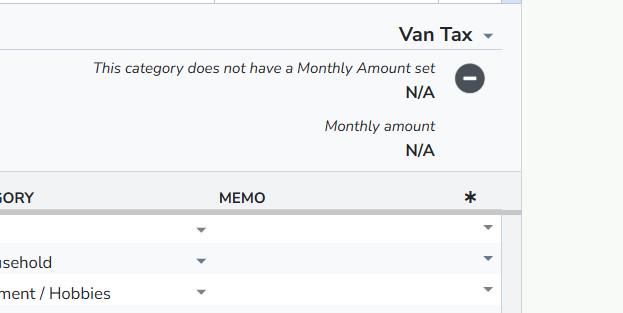
I really do find this spreadsheet to be a great alternative to YNAB. However I'm still having some battles with it. I have started afresh with the spreadsheet and followed the instructions someone gave recently on how to add new categories. I need way more expenses and no subscriptions and tried inserting a new row, then copy paste the rows from the existing categories. However I'm still having trouble with numbers not carrying over to the Transfers tab (where you can quickly reference how much money to assign a category). On the screenshot it says I haven't set a monthly account, but I have in the config tab.

Can anyone definitively explain how to add more rows in the config tab without messing up the spreadsheet. It's a shame as the creator seems to have released this update but then abandoned the project without any updated instructions. I really love this spreadsheet so it's a bit frustrating.


r/aspirebudgeting • • Mar 25 '26

New to Aspire

3 Upvotes

How are you guys tracking investment allocation? I am putting away a good chunk of my pay cheque to a savings account that I later allocate to my retirement fund or my TFSA. I've inputted starting balances for these accounts, but its showing me i have all that money under available to budget, but that money isnt too budget, its already saved. Should i just not track those here and use this for my day to day?


r/aspirebudgeting • • Mar 22 '26

Dashboard account balance not updating

2 Upvotes

Hi! My dashboard account balance does not change when I add new transactions :( I noticed that it only reflects the transactions from rows 1-106. when I type a new transaction from rows 107 onward, the account balance does not change. Any help on this please?


r/aspirebudgeting • • Feb 27 '26

New here from YNAB - getting 1 month ahead question

5 Upvotes

Hi all, firstly thanks to the creator of this spreadsheet. I've been looking for an alternative to YNAB as although I've learned so much from it I don't want to be paying a subscription for the rest of my life. I always try to eliminate unnecessary expenses.

I think I'm getting the hang of Aspire now, got it set up ok after a bit of experimentation. Something I gained from YNAB was the importance of getting a month ahead. Is this something that Aspire supports? So far I can only see that for example I can put £250 in my food category (for March). But as I use that up, I can't see how I can start allocating my next £250 for April. Would appreciate any tips for a newbie. As I've seen there's not much help support due to the 4.0 update at the mo.


r/aspirebudgeting • • Feb 23 '26

At any given time, what should the "Available to Budget" number match in relation to the cash I have?

2 Upvotes

I know this is meant to be a "zero budget" so should that number always look to be zero once all my budget allocations are made for a specific month? Or should it equal the amount of cash I have on hand?