If you have a suggestion you would like to add to this list, please comment it on this post. If I add the suggestion, I will tell you and remove your comment so I can more easily access other comments.
Hello there i am very new into this, so i was trying to make one of my favorites flowers from the flower arrangement 10345, my problem is : i cant fit the 12 butterflies, i try the snap button but that make it worse, how could i move milimetrical the piece 5264 so they can fit?
I've been working on eyesight-ng, a modern reimplementation of BrickLink Studio's eyesight renderer, built on a modern C/C++ foundation with Blender Cycles integrated.
eyesight-ng targets modern GPU hardware, including:
NVIDIA RTX 50-series (incl. Blackwell)
AMD Radeon GPUs (RDNA 1-4)
Intel ARC
Apple Silicon (CPU and METAL)
I'm currently looking for people willing to test the renderer on different hardware, compare rendering results, report bugs, and help identify areas that still need improvement.
If you're interested in trying it out or helping test it, check out the project here:
Feedback, bug reports and performance comparisons are very welcome!
This is still an actively developed project, so expect rough edges. 🙂
Disclaimer: eyesight-ng is an independent, vibe-coded clean-room technology demonstrator. It is not affiliated with, sponsored by or endorsed by the LEGO Group or BrickLink. LEGO is a trademark of the LEGO Group. BrickLink, BrickLink Studio and Eyesight are trademarks or product names of BrickLink / the LEGO Group. These names are used only to describe compatibility. eyesight-ng contains no code from legacy Eyesight and ships no BrickLink or LEGO data.
(Won't make any more repostings related to Wave 1 beyond this, not trying to karma farm etc, and don't want to unintentionally spam 🙇thank you for feedback thus far!)
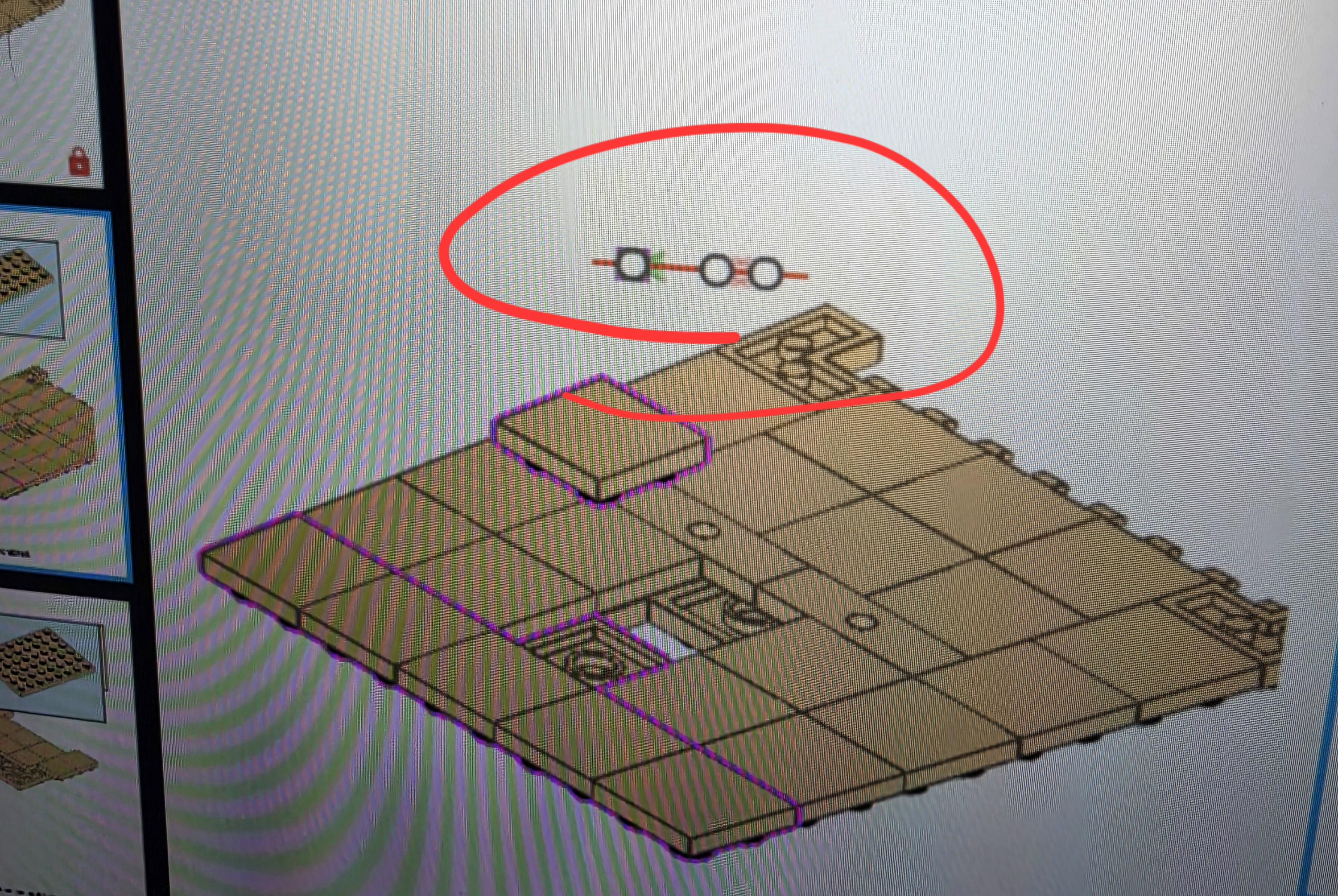
Trying to make some instructions, and I see the symbol circled in the below image in one of my steps. It can't be deleted or moved, and is accompanied by the 2x2 inverted tile showing as above the rest of the submodel. No buffer exchange is active.
Been working on this project for a long time now and finally have "Wave 1" all set to go, so sharing it here as I've gotten good help and advisement from the community here as I've wrangled with Bricklink Studio over time (not on this account; this is one I made just for the project to keep it separate from my other posts elsewhere).
There's five sets in this first "Wave", and the first one got approved just a few hours ago; now the other four are submitted and awaiting approval. Each set upload includes the instructions, fancy renders, the custom rulebook and rule sheets for each set, the Studio file itself for others to have fun with, and all the custom decals and .part files (drew most of these myself, no AI etc for any of it - just redrawing based on official arts or fanart or occasionally things found via Mecabricks, all credited in the set write-ups accompanying each one).
Hope others can have fun with all of this too as the other sets go live; I've just really wanted to share the project for a long time and am very excited that it's finally ready for sharing with others. =)
Edit: Also, I promise the repost is not meant as karma farming or whatnot! IDGAF about internet points lol. Just wanting to share in relevant places now that it's becoming available. ^^
I'm trying to export my Part Designer pieces to an external HD instead of my computer. Would it be possible to move the Stud.io folder to the HD, so the parts can get exported there?
hi all, im trying to redesign my city layout on studio and was wondering if anyone has the files for 76178 Daily Bugle & 11371 Shopping Street please? ive had no luck finding them on bricklink or any where else on the internet.
Hey guys, really need some help from you brick geniuses here.
I wanted to gift my bf a custom set for his birthday, i wanted to do a kind of miniature version of a building from the pics (Médiathèque d’Anzin). Started doing it in studio, but quickly realized it’s kinda hard for someone with 0 prior experience (who could have thought).
Sooo… kinda feeling like outsourcing it rn. I would love to hear from you, do you think it’s even doable? I was picturing a set of 200-300 max (?), no interior, a little bit of context. If in your opinion it could work, would you be down for the job? and, ofc, for how much?
Has this happened to anybody else? I guess it may be backend stuff related to the BrickLink outage, but I only noticed the issue today.
I went to search for the 1 x 4 printed piano keyboard tile and found that it and all the other decorated tiles had disappeared from the parts list. I haven't done an exhaustive search for everything else that's missing, but it looks like there's also far fewer minifig heads than there should be - just about 84 in total.
Restarting Studio didn't fix the issue. Anyone else have this problem?
EDIT: Problem solved - thanks to u/Nexusnui for letting me know I must have clicked the decorated parts toggle without noticing.
I've re-applied and re-exported the left-hand wedge multiple times, but the results are still the same. As far as I can tell, this only happens with left-hand wedges and not right-hand wedges. Other custom parts have exported just fine, so I suspect it might be a problem with the Studio part data.
My .io file studio 2.26.10_1 keeps getting seemlingy randomly corrupted/changed every so often i open it after saving:
- Some submodel instances get exchanged for other submodel instances, rendering my building useless – and unpredictable to repair each time.
Possible reasons to look into:
- my model has five rather large reference images imported (building plans) - my model has multiple instances of a submodel which consists of only one part (i want to easily be able to alter "that one brick" later). - yes, bricklink is currently offline, but 1) the error persisted earlier, 2) i was not 0logged-in. - i've had waaaay larger models, so size/dimensions most likely won't be it.
My setup
- studio 2.26.10_1 - Windows 11 - 11th Gen Intel(R) Core(TM) i9-11900K @ 3.50GHz (3.50 GHz) - GPU: NVIDIA GeForce RTX 3070 Ti (8 GB)
Since it's a commission that's rather ... unfortunate to say the least.