r/chrome_extensions • u/OnlyBlueberry5919 • 3h ago
Self Promotion View Album ratings and reviews directly in Spotify , Apple Music, Deezer, Youtube music
Works on the WebApps, if you're a music nerd and digger like me, give it a try
r/chrome_extensions • u/OnlyBlueberry5919 • 3h ago
Works on the WebApps, if you're a music nerd and digger like me, give it a try
r/chrome_extensions • u/Luke17man • 3h ago
Hey guys,
I hope you can shed some light on this. I'm looking for guidance and a better understanding of the Chrome Web Store and its analytics.
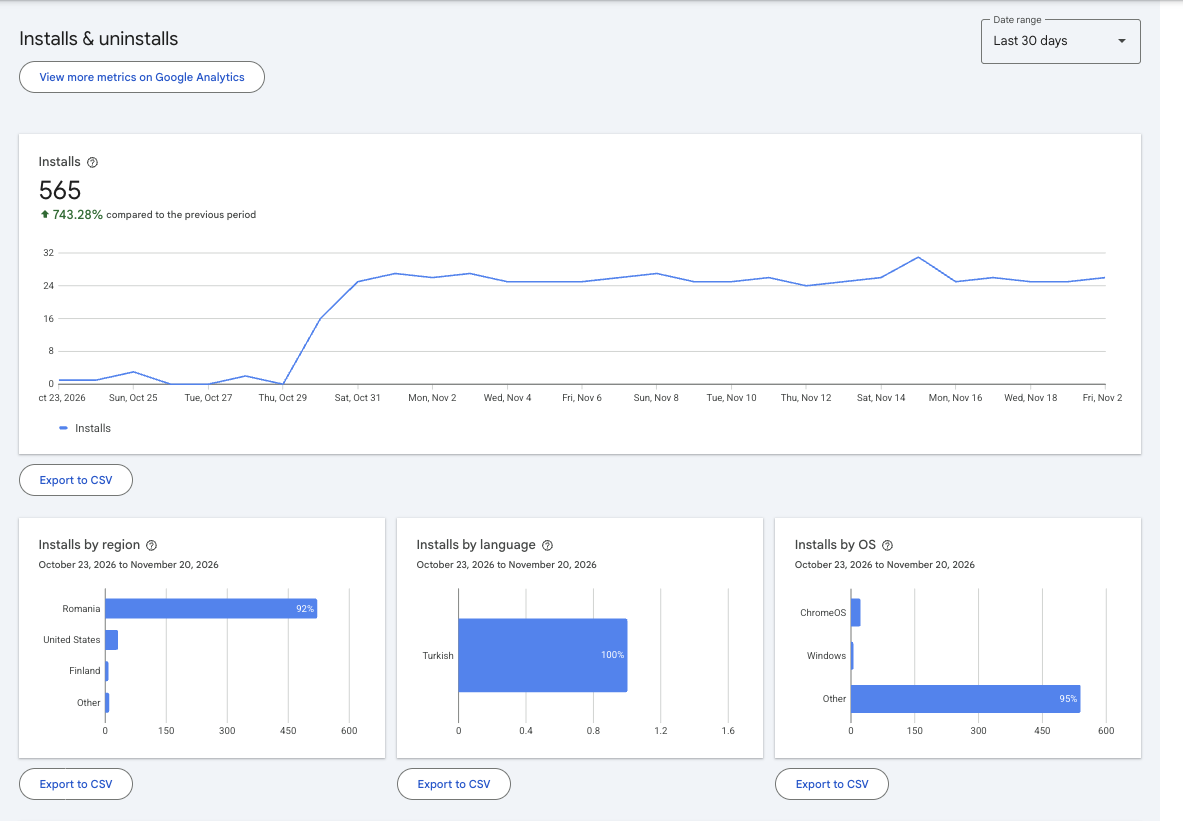
I launched my Chrome extension, Shepherd (a software guidance tool that lets users create guides on top of software products), about a month ago, and it has over 600 installs.
The problem is that it's had zero activity, users aren't even opening it. I know this because I built custom analytics into the platform to track when someone opens the extension, and it has recorded nothing.
Any ideas? Can you guys help me understand what these installs might be and why no one is using, or even trying the platform?
Thanks,
Luke
r/chrome_extensions • u/Icy_Principle7936 • 10h ago
Hi, I'm the developer. My bookmarks bar was always full, so I made a second row that sits above the web page and keeps my folders in view.
What it does:
- a second row with up to 7 folders you switch between in one click
- a folder can open as one wide Mega menu with columns, and you can edit it in place with Undo
- save the current page or all open tabs, search your bookmarks without leaving the page
- Classic mode works like Chrome's own bar, so there is nothing to set up
- private folders locked with a password or PIN
- 57 interface languages, light and dark themes
It is free. No account, no ads, no analytics, and your bookmarks stay in the browser. Works in Chrome and Brave.
Store link: https://chromewebstore.google.com/detail/cbpekbmkijoehmojdcfnchhgpmkcgmif
Site and help: https://secondbookmarkbar.com/
I would like to hear what annoys you about how you handle bookmarks today, and what you would change here. I read every comment.
r/chrome_extensions • u/Unplugged_67 • 1h ago
Hi all, I built this because I kept doom scrolling on shorts and Instagram Reels.
**What it does**
YouTube: removes Shorts everywhere (a Shorts link plays as a normal video), hides recommendations on the home page, beside videos and at the end, and turns autoplay off. Search and subscriptions are untouched. There's an optional daily watch limit, and a button that brings the home page back for 15 minutes when you do want to browse.
Instagram: opens to your DMs instead of the feed; Reels and Explore are blocked, but a reel someone sends you still opens.
Episode limits for streaming sites you add yourself: a daily episode cap and a prompt before each next episode.
Blocks program downloads (.exe, .msi and similar) until you confirm, and stops pop-up tabs and redirects on sites you list.
Settings lock: stricter changes apply instantly, looser ones wait 24 hours.
**Privacy:** no account, no server, no analytics. Everything is stored in chrome.storage on your machine. It only runs on YouTube, Instagram, TikTok and sites you add yourself (each one asks for permission separately).
Chrome Web Store: https://chromewebstore.google.com/detail/eoijdcgidkcdkompnmimapkinnhkfabk
It's free. I'd really appreciate feedback, especially if something breaks on a site or a feed sneaks back in.
r/chrome_extensions • u/Dangerous-Low-5744 • 1h ago
I got tired of switching between three different chat exporters — especially since Google Gemini still lacks a native single-chat PDF/Markdown export (forcing full Google Takeout dumps) and most extensions either ask for <all_urls> permissions or charge monthly subscriptions.
So I built ThreadVault, a lightweight Manifest V3 extension that runs 100% locally in the browser strictly on the 5 supported AI domains (ChatGPT, Claude, Gemini, and Google AI Studio):
.md file downloads.zip archivesChrome Web Store link: https://chromewebstore.google.com/detail/fdmgjoookjehdapedkliklooogphilnj
Would genuinely appreciate any feedback or edge cases (especially weird Gemini/Claude DOM layouts or LaTeX rendering quirks) so I can improve v1.0.1.
r/chrome_extensions • u/Over_Emergency_4757 • 2h ago
I built a browser extension for something I do a lot: pick the best shot from a burst and tidy up the album afterward. Light Table opens right inside Google Photos, with a square photo grid, a full-screen X/Y comparison, and keyboard shortcuts for stepping through candidates and selecting rejects.
In 0.7.0, the grid and comparison ribbon render only the items near the viewport, and the grid appears while filenames are still loading. The same UI is available as a Tampermonkey userscript.
The 18-second clip shows the actual build in Chrome with a mocked backend. I’d welcome feedback on the install experience or how the grid feels with a large album. Source and unpacked extension instructions
r/chrome_extensions • u/NecessaryWin3758 • 3h ago
Hey everyone,
I just published DropICS, a lightweight Manifest V3 extension that lets you drag and drop .ics or .csv files directly onto Google Calendar—or right-click any .ics link on the web to import it without downloading the file first.
Why I built it (and the architecture choice)
Google Calendar on the web still buries .ics imports behind Settings → Import & export → file picker. Most existing extensions solve this by asking for full Google Calendar OAuth scopes (calendar.events or read/write access) and routing files through an external backend.
I wanted zero OAuth prompts, zero servers, and minimal permissions:
.ics/.csv locally and hands the payload straight into Google Calendar's existing web import flow using your active browser session.contextMenus so you can right-click any .ics link on a webpage and trigger a preview + import directly.Looking for feedback on:
.ics parsing edge cases: Recurring events (RRULE), non-standard VTIMEZONE blocks, or Outlook/Apple Calendar quirks—if you run into any files that render weird in the preview, let me know.calendar.google.com.Thanks for checking it out!
r/chrome_extensions • u/DataTools_AI • 4h ago
Copying a table from a webpage and pasting it into Excel still breaks more often than it should. Leading zeros on IDs disappear, accented characters turn into garbage in the CSV, footnotes like [a] or [1] sneak into cells, and merged headers land in the wrong columns.
A workflow that has been more reliable:
What it does under the hood, briefly: the conversion runs in your browser. The table is not uploaded. The free plan exports the selected HTML table, up to 5 times a day, to Excel, CSV, or a new Google Sheet (that last option pastes into Sheets without signing in to Google inside the extension).
Limits that are already known, so this does not oversell it:
Disclosure: I built this as DataTools AI.
Chrome Web Store: https://chromewebstore.google.com/detail/dpebknelkijgpifnioepkfpfkniopaoi
If you try it on a messy table, I would genuinely like to hear where it fails — a specific site is more useful than a general "it didn't work." I'll reply in this thread.
r/chrome_extensions • u/igFrostt • 4h ago
I’m Shahriar, and I make UnfollowX Pro, a free desktop Chrome extension (Chrome 116+) for cleaning a Twitter / X following list.
The problem I was trying to solve: X still has no bulk-unfollow button, so people either click through hundreds of profiles by hand or paste a console script that unfollows whatever is on screen. I wanted something that shows every account first, lets you protect people you care about, and then works through a selection at a pace you can actually see and change.
What it does today:
It’s free forever — no sign-up, no X password, no subscription, no premium tier. Lists stay in Chrome storage on your computer. Optional anonymous usage stats can be turned off.
I want to be clear about the limit that isn’t under my control: X applies its own rules and rate limits to every account, and no extension can guarantee it won’t restrict you. I default to a conservative pace on purpose.
Chrome Web Store: https://chromewebstore.google.com/detail/igpjmagghnibmjkkdcgpjgpkfkpiglnl Site, with the pacing presets written out: https://www.unfollowx.com
I’d genuinely like feedback from people who build or use extensions, especially on the review UI and whether the Safe / Balanced / Fast presets feel understandable. Happy to go into how the scan stays read-only or how the daily limit is implemented.
r/chrome_extensions • u/nanodev26 • 4h ago
Hi all. I'm the solo developer of HangClip, and it went public this week.
The problem: things you grab in Chrome get lost.
What HangClip does: it hangs all three on a line at the top of the page.
Alt+Shift+S, and it hangs as a card.Then click a card to copy it, or drag it into Jira, Slack or an email.
Who it helps:
Private: your cards stay on your computer. No account and no server.
Price: free for 7 days, then a one-time payment. No subscription.
The idea comes from Tendedero, a Mac app that hangs screenshots on a clothesline. I wanted the same thing in the browser.
I'd love your feedback, especially on the onboarding and the pay-once model. Happy to answer anything about how it's built.
r/chrome_extensions • u/univasays • 6h ago
I'm a chronic 40-tabs person, and every tab manager I tried had the same scary moment: you click "save", the tabs close, and you just have to trust that the list got written. A couple of times it didn't.
So I built Stowaway, a Chrome extension that puts your open tabs away into a tidy list and brings them back when you want them. The main idea is that losing tabs should be impossible:
Day-to-day stuff:
/)Alt+Shift+S saves the whole windowPrivacy: everything stays on your computer. No account, no ads, no analytics, and the extension makes zero network requests (even site icons come from Chrome's own local cache). It's free, with no paid tier.
Link: https://chromewebstore.google.com/detail/stowaway-save-and-restore/hampcbnkhdaekmmhjjjlmfailofjhjbf
It's a small one-person project and still early, so I'd really like feedback: what does your current tab setup look like, and what would make you switch? Bugs and blunt opinions welcome.
r/chrome_extensions • u/Specialist_Lab_4226 • 6h ago
I’ve heard that Chrome extensions can rank on Google way faster than regular websites.
Let’s say I build the exact same tool twice. One as a web app, the other as a Chrome extension. Same functionality, same keywords, both starting from zero.
Would the Chrome extension actually rank higher and get organic traffic faster? Or is this just a myth?
I’m talking about regular Google Search, not Chrome Web Store search.
Has anyone actually tested this? Would love to hear some real numbers.
r/chrome_extensions • u/jhyland87 • 7h ago
I created a Chrome extension that lets users search chemistry websites that sell to individuals and ship to residential addresses, which is a pretty niche market. I never expected it to get much use, or even installs. I just thought it would be a fun project.
Imagine my surprise when the daily installs went from 1 or 2 a day to consistently above 25 a day.

Though I thought it was odd that even with so many installs, the actual use didn't really increase at all.

I figured that these must also be logged in Posthog too. So I went to check the Posthog install event logs, and found that it's a much more realistic number of.. a couple a day, at most.

I asked Claude about it and it basically confirmed my suspicions - These are almost certainly bots:

The extension (ChemPal) is just a client side app that basically scrapes a bunch of other websites when the user submits a search, then it parses the results, caches them, sorts them, and displays them to the user. You can view the full source here.
My questions are
Thanks!
-J
r/chrome_extensions • u/Harshitweb • 7h ago
OS-level night lights (like f.lux or Windows Night Light) are great, except when you have a blinding white documentation page open in one tab and a dark YouTube video or design file in another.
I built Eye Comfort to fix that without heavy CSS injection that breaks site layouts.
How it helps reduce eye strain:
It’s free and lightweight. no bloated dashboards or accounts required.
Chrome Web Store: https://chromewebstore.google.com/detail/eye-comfort/dghfihdmhcceodeojmakgjjocfojecao
Would love any feedback on the UI or ideas for presets you'd find useful!
r/chrome_extensions • u/Every_Ratio9327 • 7h ago
Ciao a tutti,
Ogni volta che volevo fornire a un LLM una pagina web, un documento API o un articolo lungo, il normale copia-incolla portava sempre con sé barre di navigazione, sidebar, piè di pagina e un formattazione disordinata, sprecando token e ingombrando il contesto.
Quindi ho creato CleanClip, un'estensione gratuita per Chrome che elimina il rumore e trasforma le pagine web direttamente in Markdown pulito pronto per essere incollato in ChatGPT, Claude o le tue note.
Link sul Chrome Web Store:
È completamente gratuito e leggero. Se lo provi su siti di documentazione complicati o layout complessi, fammi sapere dove l'output Markdown presenta problemi o cosa miglioreresti!
r/chrome_extensions • u/Reasonable_Set_2760 • 15h ago
Developer here. Startwerk replaces Chrome's new tab page. It's been in the store since October, version 1.13 shipped this week, and this is the first time I'm posting it in this sub.
What it is
A new tab page you arrange yourself. Bookmarks live in Spaces (Work, News, whatever you name them) — one click or Alt+1…9 swaps the whole page, including which widgets are on it. Widgets can be pinned across all Spaces or configured per Space. Everything is drag-and-drop with a grid, resize handles and undo.
The part people notice first is the background. It follows the actual weather where you are: clouds drifting past on a sunny day, rain landing on the glass and running down it, snow, fog, and at night a dark sky with stars and the moon in the position it's really in. It uses open data — Bright Sky (German weather service) for German postal codes, MET Norway everywhere else — and no API key of yours.
No account, no sign-up, no analytics in the extension. Your layout lives in the browser and syncs through your own Chrome sync if you have it on, and you can export the whole setup to a file and import it on another machine.
Widgets
Free, no paid tier, no ads. It's funded by clearly marked content partners and recommendations, both removable from the page.
Site: https://startwerk.site / Store Link
r/chrome_extensions • u/Dangerous_Koala7643 • 8h ago
Hi! I'm the developer of SubTalk. Looking up words while watching usually meant pausing every few seconds, switching tabs, and forgetting the word five minutes later. I wanted the lookup and the review to happen right inside the video, so I built this.
What it does:
* Dual subtitles: the original line and its translation together on screen. Works on YouTube, Netflix and most sites with HTML5 video and subtitles.
* Auto-translation: if a video has no subtitles in your language, SubTalk translates them on the fly.
* Click to translate and save: pause, click any word, and get a translation that fits the context, plus pronunciation and examples. Save it together with the sentence it came from.
* Anki export: turn saved words into flashcards in one click.
* Optional extras: achievements, streaks and mini-games for review. Simple mode turns all of that off if you just want clean subtitles.
Translation works between 40+ languages; the interface is in English, Ukrainian and Russian.
It's free to use. There's an optional Pro plan for AI explanations of slang and idioms and some extra themes, but subtitles, translation, saving words and Anki export are free.
Chrome Web Store: https://chromewebstore.google.com/detail/kjkelfebjeeipmonhlkkaahpbkpnpcdp
Website: https://subtalk-eae88.web.app
I'm actively working on it and would love feedback:
Happy to answer any questions. Thanks for reading!
Screenshot: "Can you solve the Billy Bonka riddle?" by Edwin F. Meyer, TED-Ed ( https://www.youtube.com/watch?v=8EtdC9Bjubk )
r/chrome_extensions • u/anventures_labs • 8h ago
I got tired of price trackers that need an account and want your browsing data, so I built DropIbis.
It’s brand new, so I’d really like to know which store or page it gets wrong. Feedback welcome.
r/chrome_extensions • u/MentalCraftGames • 9h ago
Hi all! I'm a QA engineer and solo developer. OmniQA started with one simple goal: record pages, run them automatically, catch network failures and slow calls. It kind of got out of hand from there. Every time my daily work needed something else or something popped into my head, I just built it into the extension.
What it does now:
100% local: Everything stays in your browser, no account, no external server, no analytics. If you wish to export your data and import it somewhere else or send it to a friend/teammate, there is an option for that too.
Chrome: https://chromewebstore.google.com/detail/fcabfailfeebddjlenmifkinjflckdof
It's still new and I update it as I see problems with it, so I'd really appreciate any feedback: what's missing from your testing workflow, what feels confusing, and what breaks?
Hope you like it and find a use for it!
r/chrome_extensions • u/Responsible_Date_832 • 9h ago
Hey everyone!
I've been working on a Chrome extension called BatchSave Pro, and I recently released it on the Chrome Web Store.
The idea is pretty simple: instead of downloading images, PDFs, and other files one by one, you can scan a page, select what you need, and download multiple files at once.
I've also added ZIP downloads, some PDF tools, and Gmail attachment support.
I'm an independent developer, and getting real feedback has been harder than actually building the thing 😅
I'd really appreciate it if a few people could give it a try and tell me:
There's a free trial and an optional paid subscription, but I'm mainly looking for honest feedback right now. If you genuinely find it useful and decide to subscribe, that would be an awesome bonus and help me keep developing it.
Chrome Web Store:
https://chromewebstore.google.com/detail/fmcnaamkhfckofpehjffipbjbfgghneb
Thanks to anyone willing to give it a shot! Even constructive criticism would mean a lot.
r/chrome_extensions • u/grapeape808 • 15h ago
Hoping to launch a an extension soon and was looking at options for payment providers. Stripe is definitely the biggest but they had bad rep when it comes to with holding funds and other stuff. Curious to know what other solutions people are using for there extensions.
r/chrome_extensions • u/theshahriar • 9h ago
Hi all!
I created a Chrome extension named Tidy Watch Later for organizing YouTube's Watch Later playlist.
I had about 2000 videos on my list. I reduced it to 900 and categorized them all without paying more any LLM subscription.
Features:
Some information:
Source code: https://github.com/yazdipour/tidy-watch-later
Chrome Extension Store: https://chromewebstore.google.com/detail/hpnfndhagckeefggihlgpeagdbicnfph
Feel free to suggest improvements and report bugs!

r/chrome_extensions • u/Even-Elderberry-1156 • 10h ago
i watch a lot of long streams and podcasts after the fact and was always dragging the progress bar around trying to find one part. so me and my brother built this
you type what you remember and it jumps to that moment. long videos also get cut into sections on the timeline so you can see what happened without watching the whole thing. on youtube it marks sponsor reads too so you can skip them
it's free, no account. still rough in places so honest feedback is welcome
Link (please try it and give is your feedback)
r/chrome_extensions • u/Every_Ratio9327 • 10h ago
Hi,
I made a small Manifest V3 extension called CleanClip.
It tries to detect the main article on a page, strips ads/sidebars/cookie banners/etc., and gives you:
Clean Markdown (with optional Obsidian YAML frontmatter)
One-click open + auto-paste into ChatGPT / Claude / Gemini
Download as .md or print a clean PDF
A preview mode where you can click to remove unwanted blocks
All processing is local. No backend, no tracking.
Looking for feedback, especially on sites where the extraction fails or the auto-paste doesn’t land correctly.
Happy to answer any technical questions.
r/chrome_extensions • u/Budget-Ad814 • 11h ago
I just dropped my extension in beta not expecting much, I tried a lot to market it on reddit.
I'd just be glad to know that people like using it but the number of users is kinda discouraging lol