r/discordapp • u/Affishal • 3h ago
Discussion will you be able to buy it using orbs later? :(

38
Upvotes
r/discordapp • u/vishnevskiy • Sep 22 '26

Hi everyone,
Today we're announcing the rollout of our new age assurance options, which you can read about here. Thanks to some changes we've made, most of you will not have to take any action at all.
Here's the TL;DR:
We've got some more info in the image below, and if you want all the details you can read the full announcement here.
r/discordapp • u/Wandering_Wumpus • Oct 07 '26
Hey (at)everyone,
Thank you for all the bugs you all have reported! We read all the posts in the thread and we’re focusing our efforts on issues based on upvotes to ensure that we’re aligned with all of you.
As always, don't forget to check out our monthly patch notes for updates on all the changes we're working on. Our last patch notes addressed 100+ issues!
Thanks to your reports on Reddit, we fixed the following issues:
If we didn’t fix your issue, please make sure to upvote to help us prioritize 🙏
Now, with that, let’s kick off the October + November 2026 bug megathread!
Please note: This megathread is not a venue for feedback or customer support! We encourage you all to continue to make posts on the subreddit proper discussing our product and feature launches. I want to make sure that we really keep this thread productive and focused on reporting bugs and helping us prioritize them.
Please look through the list of comments and upvote bug reports which you think we should prioritize fixing. Comment as a reply to those top level comments with any more details that can assist our team in prioritizing and fixing the bug. For example, if you have additional info or steps to reproduce, please post a reply, this will help us fix these bugs even faster. If there is no post that discusses the bug you’re encountering, then start a new post in the thread to report the bug to us!
Reporting a Bug
Example Bug Report
Formatting
Reddit Formatting Guide - How do I Get My Version Info
- Feature:
- Reproduction Rate:
- Annoyance:
- Discord Version Info:
- Device/System Info (Device Type, OS Version):
- Description:
- Video / Screenshot:
- Steps to Reproduce:
   1. The first step is...
- Expected Result:
- Actual Result:
Copy paste this into the comment field below and then fill out the information! Thank you so much for participating in this effort, it's with your help that we'll truly be able to make Discord great!
r/discordapp • u/Affishal • 3h ago
r/discordapp • u/KnuxSD • 17h ago

r/discordapp • u/shadowmonarc1184 • 36m ago
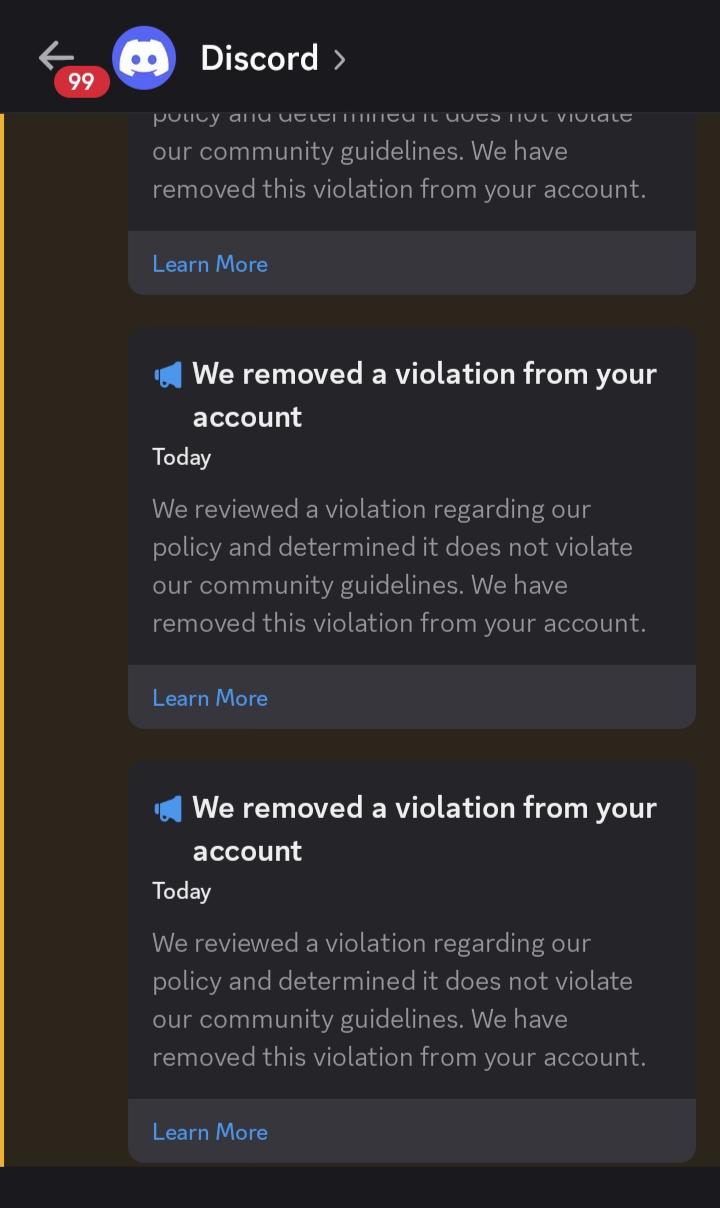
I clicked on the link but it shows the general stuff not what violation I committed.
Is there a way to check cuz I don't remember violating any rule
r/discordapp • u/Sulavin-Co • 1d ago
Haven't seen any discussion of this so i figured i give a spotlight. Recently i noticed Dyno status were mentioning about the raid command for a Dungeon crawling thing i assume they implemented recently. So someone else helped type in the command since i messed up typing it and-

The Boss image looks a lot like AI image. The skulls for example seems to be too distorted and not perfectly skull like.
I did try to check if the "Winged Titan, Fallen" were ai using synthid but got nothing and probably generated non partnered company. But when i did check that flag banner image?

SynthID was detected
Kinda dissapointing that the top moderation bot used in many servers with subscription would utilize AI rather than hiring people to actually make something
r/discordapp • u/Efficient-Debt-7405 • 5h ago

I absolutely loved the 2025 bundle but I don't think you could buy it with orbs back then.
r/discordapp • u/Noobye1 • 1d ago

Why can't text channels have capital letters? (Or spaces.)
It doesn't seem to be a problem for voice channels?
r/discordapp • u/jalenpia • 1d ago
r/discordapp • u/vivgranger • 13h ago
i did the refer a friend to 2 weeks of nitro, my friend accepted and i didnt get the orbs. ??? why didnt i get it
r/discordapp • u/Zaagreus • 20h ago
Trying to use any input from my audio interface doesn't work correctly, has this weird tremolo effect on it.
I thought it was an issue with my version of MacOS (im on 12) but the same thing was happening with my brother who is much further ahead in OS updates.
Tried changing the bitrate of the interface itself but it doesn't do anything.
any help?
r/discordapp • u/Wise_Distribution_43 • 1d ago
A couple of years ago I created a Discord account for a job and haven’t used it since. The account was created with just my phone number, which I still use. I am also still logged into this Discord account, but there is no email verified to it. I would like to start using Discord again/now.
I’ve run into an issue:
Is there any next step or do I need to delete and create a new account? Thank you!
r/discordapp • u/FoxBread2137 • 18h ago
Recently it is refusing to let me upload videos to any server and in dms but it uploads images just fine. I have nitro and everything so that isn't a issue. The little progress Circle that shows the upload progress freezes as soon as I press upload and doesn't move what's so ever. I have deleted the app and cleared the cache and none of that has helped. Its also not a internet issue because it doesn't do any on data either. I would assume i have the newest discord version and i have a galaxy s24 at the newest version as well.
r/discordapp • u/ALonerFluff • 10h ago
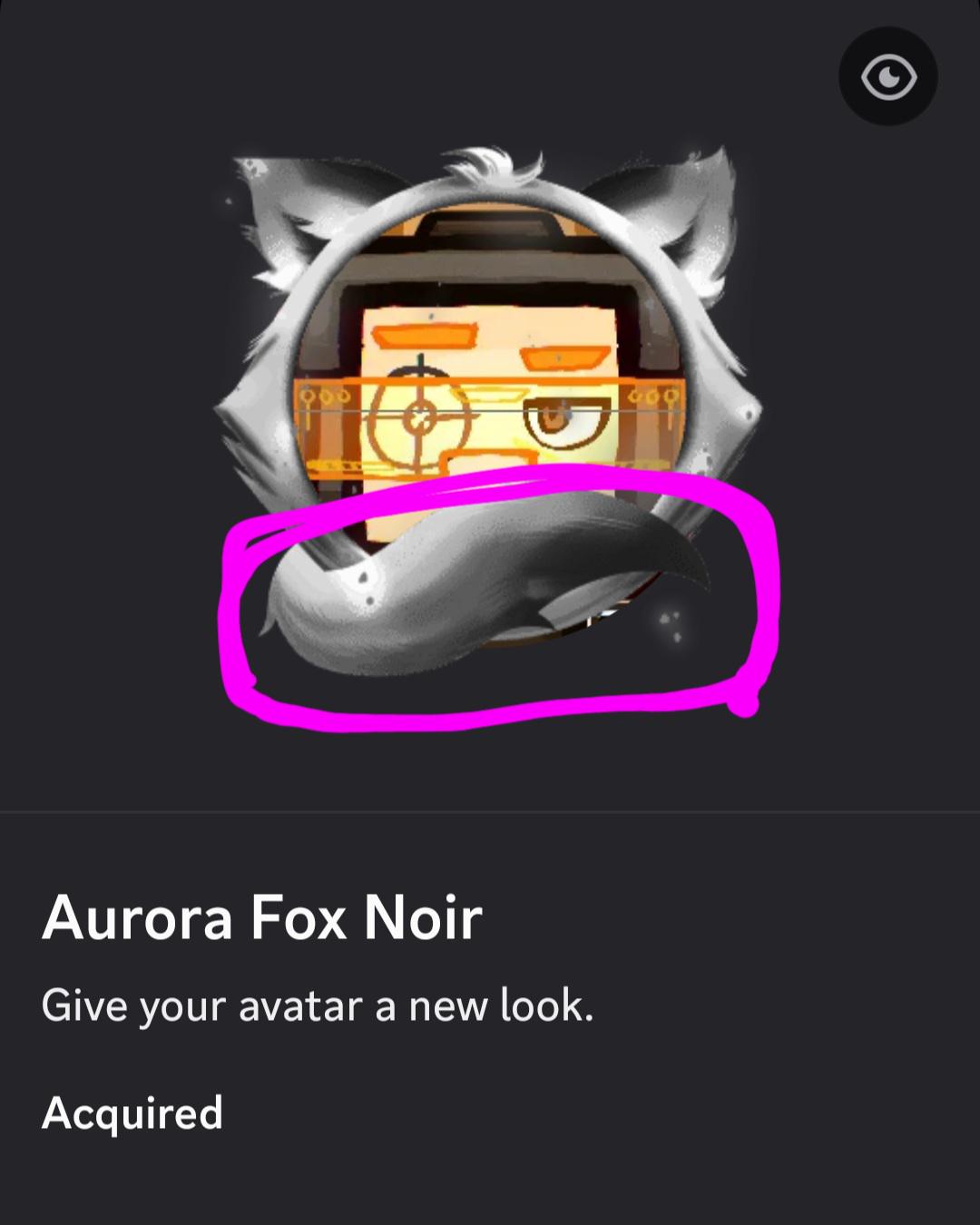
Not sure if I'm using the right flair but anyway, same problem as the original aurora fox pfp decor a while ago before it got fixed. The decor is positioned slightly upwards and is noticeable when the tail moves.
r/discordapp • u/CaterpillarOver2934 • 2d ago

I never seen anyone use this font for their display name until today, when suddenly half the people I know are now using that font? Why is this?
r/discordapp • u/mrkeviwevi • 1d ago
I am on Iphone 17 latest ios, I can not transfer my vc to xbox because it does not recognize the xbox app is installed on my phone, i tried reinstalling both apps and relinking accounts nothing has fixed this I don’t know what is causing this as it happened suddenly and i cant seem to find solutions online
r/discordapp • u/Iwantalucard • 1d ago

This has been happening for a while now but sometimes when uploading a screenshot or video file it just freezes at this exact moment of uploading and stays like that until I get the notification "upload failed" after like 20 minutes.
I've tried uninstalling, clearing cache, and relogging in nothing worked. It works fine on my computer but specifically mobile it does it. Is anyone else having this problem with their mobile discord? Above is what I'm talking about. No it's not me being impatient or anything that's just me sending a screenshot to my friend and it gets stuck like that almost every time
App version: 355.9 (35510900000000) - betaRelease
Device: r8q (SM-G781U) (33)
r/discordapp • u/Caffdy • 1d ago
r/discordapp • u/Separate_Suspect4565 • 1d ago

Hello!
I was invited to a gaming server on Discord, where an admin created a category for the game I'll host. He said he gave me all the necessary permissions, and I started creating my channels while keeping them private, since I did not want anybody to see them while they were still rough around the edges.
I also decided to make some channels read-only, such as announcements, but I discovered that I did not have the permissions to do so. The admin did not know how to solve this aside from granting new permissions for each channel individually, which he said is weird since he'd done that already for the category. Now every time I create a new channel, I have to ask him to set the management permissions.
We have tried syncing, but nothing works. Does anybody have an idea of what is happening and how to solve it?
Thanks!
r/discordapp • u/DesigningOblivion • 1d ago
My friend and I have a private server that we stream to each other on. Earlier I noticed Discord was flickering and I tried to close it through Task Manager but my PC gave me an error that I didn't have enough memory to open Task Manager, so I closed Discord through the taskbar and my PC was fine again.
Later today I have realized the issue is when my friend streams and I try to view it. Almost consistently it will buffer forever and refuse to work; while in Task Manager, my RAM usage is climbing by 200mb every second until it's capped out at 100% if I don't close it. I have 32GB of RAM so Discord literally starts to take up like 25GB on it's own. This has been consistently happening every time he starts a new stream and I try to view it. I have to force close Discord every single time to view the stream without issues. Is this happening to anybody else or just me? I feel like there was a recent update that caused this bc it wasn't happening to me before.
r/discordapp • u/Wkoblivion • 1d ago
As the title reads, I try connecting my epic account on discord or Roblox for example and it gives me an error code saying it was “unable to connect.” Do I need a console to connect my accounts?
r/discordapp • u/Suitable-Fall-1969 • 1d ago

Got charged for nitro on the 21st but it expires on the 11th of next month?
r/discordapp • u/RangerLover92 • 1d ago
Starting yesterday, when I open up Chrome and use the browser site for Discord, I'm logged out and have to not just re-log in, but I have to mute new message sound. I checked my settings and the Always Save Data option is enabled. Thing is, my log ins for other sites like Reddit and YouTube haven't changed, but the Discord log in has been buggy for me. Is there a fix?
r/discordapp • u/Ummwhatrtheseusers • 1d ago
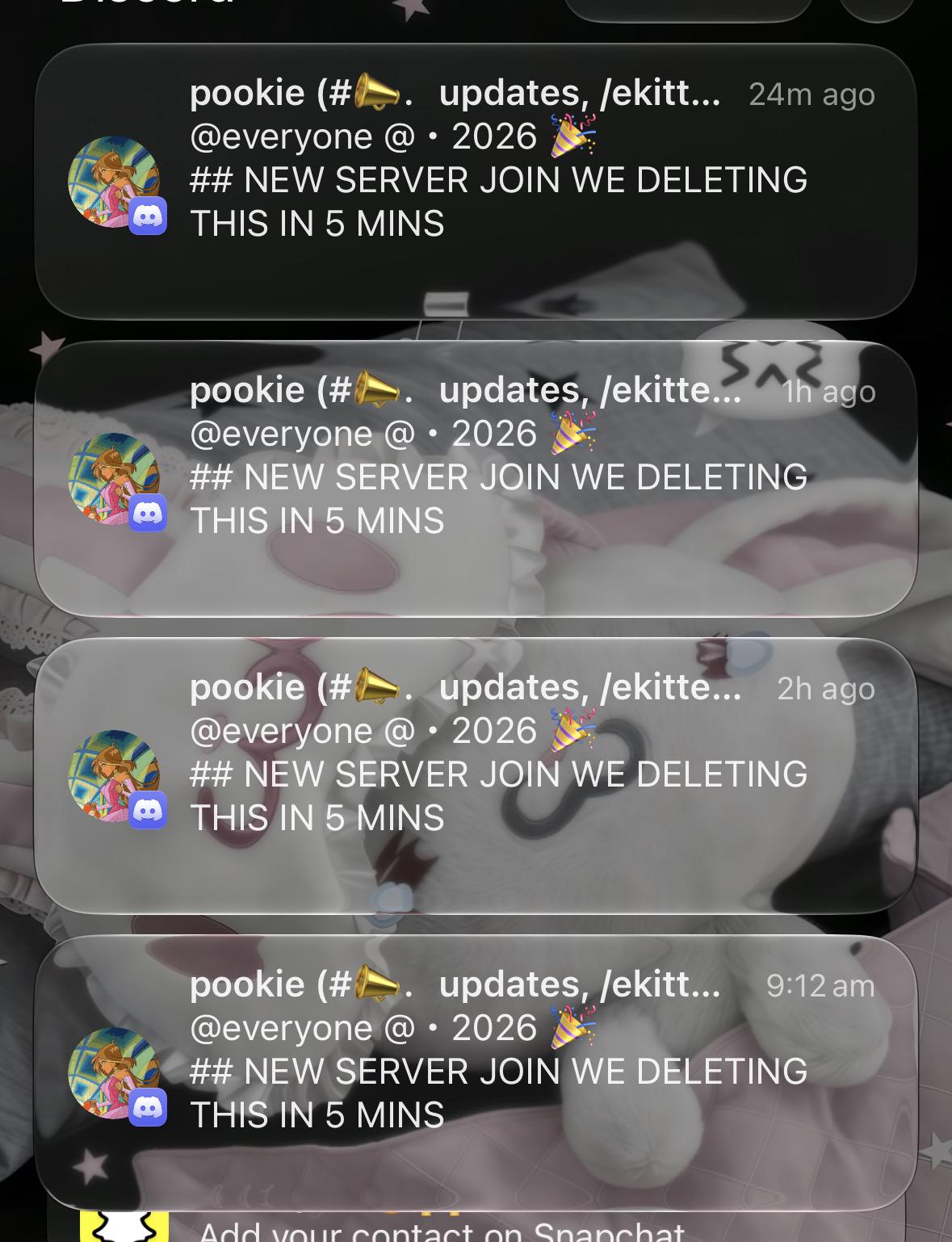
Image attached is the example, that isn’t even the brink of it either. At first it started with just one server, even when I completely muted the whole server, suppressed @everyone, even muting the channel the notification would lead me to, etc.. the notification still kept coming, even on dnd, I tried everything, and nothing worked, so I left the server… only an hour later, I get the same notification, from another server this time, checked if the server is fully muted, and it is, so wtf? I decided to leave that one too, hoping that was the last of it, but I’ve now gotten the same notification in 5 different servers now, each one from a different server every time I leave the previous one. When I click on the notification it brings me to a channel but the message isn’t there, so I’m confused? Is anyone else getting this notification or what can I do about it?