r/ebooks • • 3h ago

Question Is there any app where I could read books for free?

22 Upvotes

Been getting into classic literature but can’t find anywhere to read. My parents do not allow me to buy physical book or go to the library so it would be nice if I could find an app to read 😭


r/ebooks • • 6h ago

Question I may have gone a bit overboard testing page turners for my X4 Pro 😅 (from €0 to €180)

Post image
26 Upvotes

CrossPoint lets you map pretty much any BLE button, so I went down the rabbit hole.

Here's what I tested on my X4 Pro:

1. AB Shutter3 (came free with a tripod, a few € otherwise)

✅ Works great right away. It's cheap and has an on/off switch on the side.

➖ It feels cheap, the form factor is what it is. the click is hard and unsatisfying, and the BLE LED is on all the time. No long press.

2. IINE Gamebrick Mini (~€14–17)

✅✅✅ It looks retro and cool, and the buttons feel really smooth. You get 4 directions + 2 buttons to work with. With magnets on the bottom and a metal plate I stuck on the reader case, it snaps onto the back. Almost my favorite so far.

➖ It's small but pretty chunky (17 mm) :) Pairing was a bit fiddly at first because you have to find the right position on the mode switch, but after that it worked perfectly. No long press.

3. auvisio "Pearl" media remote (~€8–9)

✅✅✅ It's tiny, flat (8 mm) and round (30 mm). With a magnet on the remote and a metal plate I stuck on the reader case, it snaps on perfectly. You can use 4 directions + the center button. Pairing was a bit moody at first, but now it works flawlessly. For that price, I can really recommend it.

➖ The click is soft and a bit unsatisfying, and the buttons have no tactile markings, so when you move it around in your hand you have to look to find the right one. My fix: a drop of superglue on the + button, and now I can feel it. No long press as far as I tested.

👉 https://amzn.eu/d/034EHmJ8

4. Flipper Zero (~€150–180)

(The standard BLE remote apps won't connect because the reader expects a PIN.)

✅✅ So I made my own app that turns the Flipper into a universal AB Shutter3 remote, and it works really well. You can map any Flipper button to A/B, choose any orientation, and set long and short press per button. It also works with anything else that pairs with AB Shutter3 remotes (phones, cameras).

➖ It's a bit big and expensive for this, and I wouldn't buy one just as a page turner :) But mine was lying around and I had to try 😄

👉 https://github.com/Menrix/AB-Flipper3

Coming next: Flic 2 (~€39–45)

❇️❇️❇️❇️❇️❇️ ???

This is the one I have high hopes for (if it works with the x4 pro) : one high-quality button with press, long press and double click, flat and compact. Yes, it's quite pricey, but I was looking for exactly this: a small, round BLE button with just one button. It hasn't arrived yet, so I'll post an update once it's here.

Has anyone already tried one flic button with an X3/X4/X4 Pro?

What are you using to turn pages? (Except your fingers… that's boring 😉)

PS: If you spotted the dog-ear in the photo 👀, that's from my CrossPoint add-ons (dog-ear + to-do lists:) https://github.com/Menrix/Crosspoint-Addons


r/ebooks • • 24m ago

Self Promotion Actually Read: ebook reader and book tracker — looking for early readers (free access)

Thumbnail gallery
1 Upvotes

I’m the developer of Actually Read, an app for iPhone and iPad for reading and keeping track of books (Android version is under development). I’d love to hear what ebook readers think of it.

Here’s what it does:

  • Read EPUBs and PDFs: Import your own files or choose from a collection of free ebooks.
  • Listen to EPUBs: Turn English EPUBs into spoken audio, generated on your device and available offline.
  • Ask questions about your book: Use an AI reading companion to explore what you’re reading.
  • Block distractions: Choose apps and websites to block during a reading session. This works when you’re reading a physical book, too.
  • Track all your books: Keep ebooks and physical books together and follow your reading progress.

The core features are free, including reading, book tracking, distraction blocking, and the default English audio voice. A Plus subscription adds more audio voices, advanced cloud AI models, more books in Focus, and more bookshelves.

I'm looking for early users to try the product and share honest feedback. As an Early Reader, you'll get free 6-month Plus access. Comment or DM if you'd like to join the program :)

If you try it, I’d love to know what feels good, what’s frustrating, or what’s missing compared with your current reading app. Happy to answer questions too!

iOS App Store: https://apps.apple.com/us/app/actually-read-focus-reader/id6796197302

Website: https://www.actuallyread.com/

Early Reader Program: Download the app first, then complete the survey on your iPhone or iPad: https://earlyreaders.actuallyread.com/


r/ebooks • • 7h ago

Question Can I read books online for free (No need to download)

3 Upvotes

I know this is a very frequently asked question but I’ve been searching for so long now finally Im asking here

Is there any website where I can read a book online where I can read it in dark mode and just chill

i dont want to download it i just want to read it online whenever I’m free I will enter the site and read

specially the self help books!


r/ebooks • • 4h ago

Self Promotion Looking for Testers! HomeBranch Android

Thumbnail gallery
1 Upvotes

HomeBranch is coming to Android! Im looking for a handful of US based people to make HomeBranch your daily driver and help us catch any potential issues before release.

For those who don't know, HomeBranch is an ebook management platform that can be self hosted for free. Or, for readers who dont want to manage their own server, you can use our cloud hosted service for $2.99/mo (a free demo is available allowing you to try it out with up to 5 books)

In HomeBranch you can....

- Organize and read your library (epub, pdf, mp3, m4b)

- Listen to audiobooks

- Synchronize your position across devices

- Start and participate in book clubs

- Send books to your Kindle

- Enjoy metadata enrichment

And soon you can do it all natively on your Android device. Oh! And theres an E-ink mode so you can use it on your ereader. :D

If you are located in the United States and are interested in being an early access tester for Android, please let me know. We will be sending out invite links within the next week or two.

A huge thank you to the community for helping HomeBranch become what it is today! <3


r/ebooks • • 6h ago

Self Promotion What do you use to read EPUB, MOBI, FB2 and DOCX/Markdown in one app?

1 Upvotes

I read EPUB and TXT novels, but also FB2, MOBI/AZW3 (non-DRM), Markdown notes and the occasional Word/ODT document, and I got tired of switching apps. Curious what everyone here uses for a mixed library, and what you still can't open anywhere.

I ended up writing my own reader for this (I'm the developer, so take that with salt): reflowable layout with your own fonts, vertical Japanese text with ruby, footnote popups, highlights exportable to Markdown/CSV/Anki, background read-aloud with regex rules for how things are pronounced, and it reads a Calibre library or an OPDS catalog (Komga/Kavita/Calibre-Web). Reading local files is free; the cloud features are a one-time purchase.

I'm not linking it here, but the name is Yeontan Books if you want to look it up. More interested in your answers: which formats or features are still missing for you?


r/ebooks • • 6h ago

Self Promotion I made a free reading tracker that takes your whole Goodreads or StoryGraph history with you

1 Upvotes

Hi everyone, I'm Jacob. I built a reading tracker for my wife Rachel after she got fed up with Goodreads, and it's grown into NovelNet. It's free with no ads, on the web and iPhone.

The bits most relevant here: you can import everything from Goodreads or StoryGraph and on the website you can mark whether you read something as an ebook, audiobook or physical copy.

The thing it doesn't do is sync with Kindle. I know that's the main reason a lot of people stay on Goodreads, but Amazon doesn't give other apps a way to read your Kindle progress so you log your page yourself.

Other bits: DNF and paused shelves, half stars, series, page goals, and book clubs where everyone reads at the same pace.

Website: https://www.novelnet.co.uk

iPhone: https://apps.apple.com/app/apple-store/id6817437396

If you track your ebooks somewhere, what would make you switch? Or is Kindle sync the whole answer?


r/ebooks • • 9h ago

Self Promotion (SELF PROMOTION) Two dark paranormal novels, free on Kindle Unlimited — a man wakes up in Hell in a thief's body, and something wakes beneath an Iowa cornfield

1 Upvotes

Hi everyone! I just published my first two novels, and both are free to read on Kindle Unlimited.

FRACTURED LIGHT

Lincoln Oliver dies in a robbery gone wrong and wakes up in Hell wearing the thief's body.

The thief went to Heaven. Lincoln went to Hell. And Hell is slowly erasing who he is.

His only ally is Lazlo, the Devil's little brother. Lincoln has a pregnant wife waiting for him on Earth, and every month he spends trapped in Hell is only minutes for her.

https://www.amazon.com/dp/B0HS27C7QR

THE STORM ABOVE: BOOK ONE

Ten years ago, Miles Hendricks watched his older brother vanish beneath the surface of an Iowa quarry, pulled under by strange lights in the water. Miles left town and never came back.

Now his mother is dead in the one field she refused to set foot in for a decade, and her autopsy shows her brain has turned green.

The night Miles comes home, she's standing in the living room. Soaked. Muddy. Screaming at him to leave.

Then the storms come back. People start disappearing into the fog. And whatever is beneath the corn is waking up.

https://www.amazon.com/dp/B0HSM56TR4

Both books are about grief and what we'd do to get back the people we've lost, just wrapped in Hell and horror.

Happy to answer any questions!


r/ebooks • • 10h ago

[SELF PROMOTION] Hylly - a free and open source library for your eBooks

Thumbnail janisc.github.io
1 Upvotes

I made this using AI for my personal use but decided to share it in case it gives joy to others as well. It started as a mass downloader for my Humble Bundle (and few other shops) purchases but grew out to be a local eBook library and and browser based eReader.

You can use it for downloading, fetching meta data and of course reading. It only has command line tools now so setting your own library either takes some effort and / or AI assistance. See the documentation on github for further info.

All feedback is very welcome.


r/ebooks • • 15h ago

Self Promotion how should Shelf sync with Android?

Post image
2 Upvotes

with shelf for android now in development, i want to make sure your books, reading positions, bookmarks and highlights stay in sync across your iphone, ipad and android devices.

syncing will be completely free, regardless of which approach we choose.

there are two ways we could make this happen, and i'd like to hear what you think.

option 1: use your own cloud storage

sign in once to dropbox or onedrive (google drive may follow) on each device. shelf will create a small sync folder in your cloud storage.

  • your data stays in your own account. shelf never sees or stores it.
  • it will keep working as long as your cloud storage account exists.
  • eventually, this could also allow you to sync your actual book files.
  • you'll need one of these accounts and will have to connect it on each device.

option 2: scan a code, no sign-in

open shelf on a device you already use, generate a qr code, and scan it with your new device.

your data is encrypted on your device before being sent through shelf's own sync service. nobody, including me, can read it.

  • no accounts, passwords or sign-ins required.
  • syncing depends on shelf keeping its own service running.
  • it will initially sync reading progress, bookmarks and highlights, not your actual book files.

one thing i'm hesitant about with option 2:

right now, shelf never sends your reading data anywhere except your own icloud. option 2 would change that. although your data would be encrypted before leaving your device, it would still be stored on a server that i manage, rather than exclusively in cloud storage accounts you control.

option 1 keeps everything in your own dropbox or onedrive account. i'd like to know if that distinction matters to you, or if the convenience of not having to sign in matters more.

which would you prefer?

  • option 1: my own cloud storage
  • option 2: scan a code
  • either is fine
  • i'd want both

anything else you'd like to see, or any concerns with either approach?

i'd genuinely appreciate your feedback. i want to make sure we get this right before building it.


r/ebooks • • 12h ago

Bookbaby Bookshop - Did i get scammed?

1 Upvotes

I paid for a digital edition of a book and it said it has epub, mobi, or PDF format. However, none of them will open and the PDF is corrupted. I've never bought a book digitally before but now I'm worried I got scammed. Has anyone bought from them before and had success? I've seen senevral posts from people attempting to self publish claiming that they engaged in some shady activity but can't find any reviews for them as booksellers. Any help would be much appreciated


r/ebooks • • 15h ago

Twin Karma

Thumbnail air.ind.in
1 Upvotes

r/ebooks • • 15h ago

[Free Kindle Event Nov 24–25] 🎁 The Kid Who Saved Every Penny: A Warren Buffett Story (Ages 7–10) — Illustrated Money Story + 4 Activities + Parent Guide

1 Upvotes

🎁 FREE 48-HOUR KINDLE EVENT — Starting Tomorrow (Nov 24–25)! 🪙✨

Most kids learn how to spend money by age 6… yet schools rarely teach them how earning, saving, and patience actually work. 💡

📖 10 illustrated story scenes from young Warren Buffett's childhood | ✏️ 4 hands-on money activities (Save vs. Spend, 3-Jar Plan & Goal Tracker) | 👨‍👩‍👧 Parent Co-Reading Guide included!

👇 Bookmark it for $0.00 FREE tomorrow (or read FREE right now on Kindle Unlimited): https://www.amazon.com/dp/B0HSDFWL97 — Preview: https://little.heroo.win/#book-1 💛


r/ebooks • • 1d ago

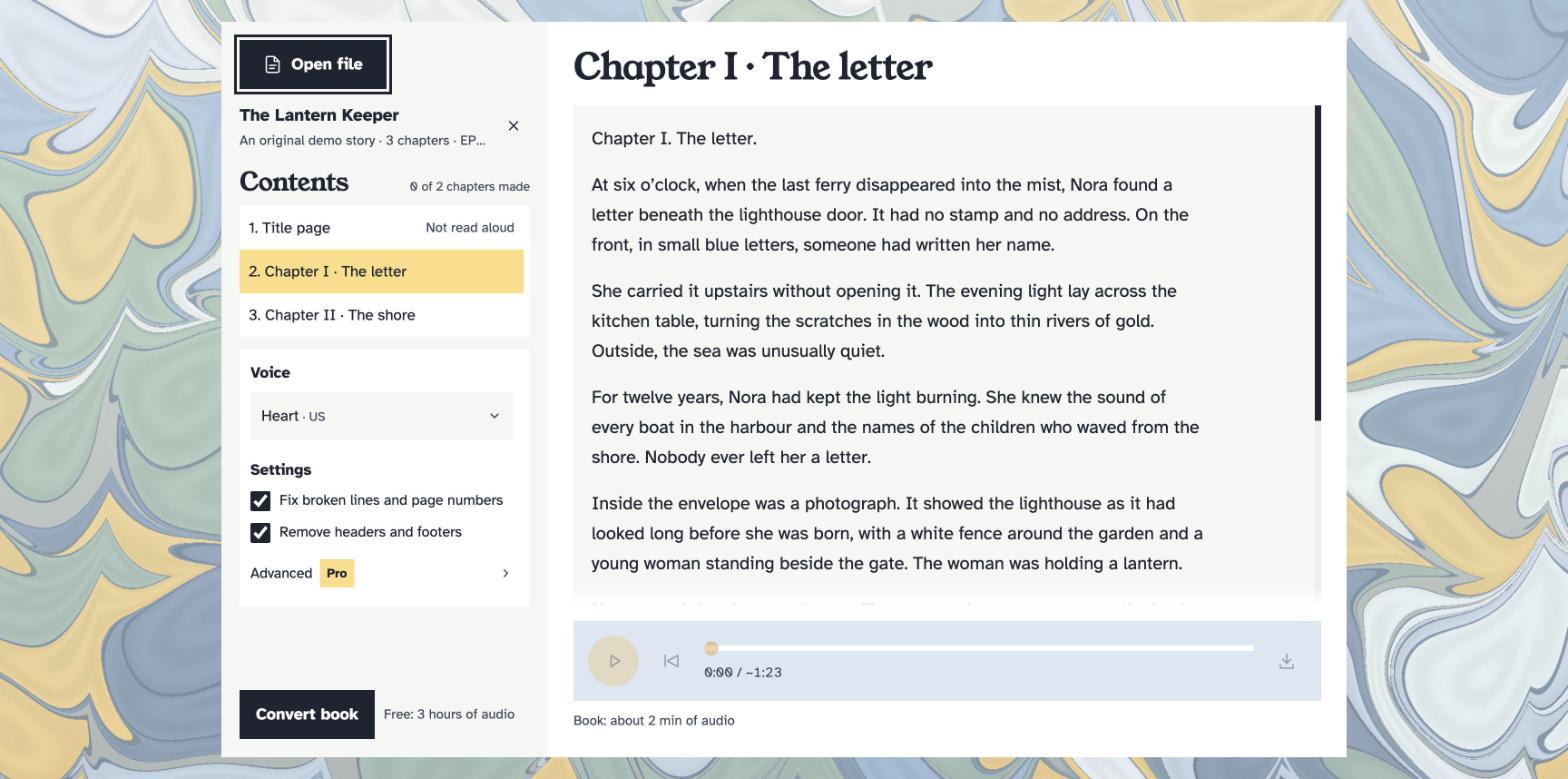
Self Promotion I built a way to turn EPUBs and PDFs into audiobooks you can keep

12 Upvotes

Hi, I'm Cleora. I built All to Audiobook for my mom after neck surgery made holding a book uncomfortable. Many of the ebooks she wanted to read had no audiobook edition, so I wanted her to be able to make one from the files she already had.

Open a DRM-free EPUB or a PDF with selectable text, choose a chapter and voice, and generate the narration on your computer. Your book's text and the audio stay on your device.

The part I care about is getting a file you can keep. You can download an MP3 for each chapter, or make one M4B with chapter markers and a cover. The finished files can go into your usual audiobook player.

There are also controls for the things that interrupt a book when read aloud: repeated headers, page numbers and footnotes. You can choose how to handle the notes and set pronunciations for names. Saved passages let you pause a conversion and continue later.

The browser app narrates in English. Studio, the Mac and Windows app, adds four more languages, character voices and a way to check and remake individual passages.

A free browser account includes three hours of MP3 generation, once per account. M4B and advanced controls require a paid upgrade; the paid versions are one-time purchases. Scanned PDFs need OCR first, and protected ebooks won't open.

Try All to Audiobook with one chapter. If you try an EPUB, I'd be interested in whether its chapter titles and opening pages come through the way you want.

Browser app: choosing a chapter, voice and cleanup settings.

Studio: exporting a chaptered M4B or an MP3 for each chapter.


r/ebooks • • 1d ago

Self Promotion Bilingua Reader: EPUB and PDF reader that translates every sentence offline(or online), for language learners (solo dev, one-time purchase)

Thumbnail gallery
15 Upvotes

I am the developer of this app. I am posting it here because the rules of the bigger Android subreddits send app posts to this sub.

Bilingua Reader is an EPUB and PDF reader for people learning a language from real books. Every sentence appears with its translation directly underneath, so you keep reading instead of stopping to look things up.

I was "patient 0" who got fustrated with this, unable to find an app that does what I wanted - and ended up making it myself.

What it does:

- Translation runs on the phone by default (downloadable offline packs), so nothing you read is sent anywhere. You can switch to DeepL, Google Translate, Azure, OpenRouter or your own LibreTranslate server if you want smoother output.

- Press and hold a word for its meaning, the sentence it came from, that sentence translated, and pronunciation.

- Saved words are highlighted in every book until you know them. Built-in flashcards with spaced repetition, or two-way sync with AnkiDroid.

- Read aloud with the screen off.

- Reading positions sync through your own Google Drive, and with calibre, Kobo sync, KOReader and Hardcover. There is no Bilingua server.

- No account, no ads, no tracking.

Price and limits

14 days free, then a one-time EUR 6.99. It is not a subscription. It cannot open DRM protected books, and it cannot translate scanned PDFs that have no text layer. Android only.

What I would like feedback on

  1. Is the first minute clear? There are two short starter books and an in-app guide.
  2. Which of the translation settings did you not understand? an
  3. What is missing that would make you use it for a whole book?

Any other feedback or question is also appriciated.

Play Store link


r/ebooks • • 1d ago

Every PDF, every screen: app turns PDFs into real book pages (iOS)

Thumbnail gallery
39 Upvotes

Meet Paperfy — a better way to read PDFs and EPUBs on your devices.

Reading PDFs on smaller screens often means endless pinching, zooming, and sideways scrolling. Paperfy solves this by extracting the text from PDFs and reflowing it into pages that fit your screen, just like an e-book.

The same book adapts to three different devices:

  • iPhone: E-book-style pages with simple swiping to turn pages.
  • iPad: Landscape reading with two pages side by side, just like an open book.
  • iPhone Duo: One page when closed, two pages when unfolded, with your reading progress preserved.

More than just PDF and EPUB reading:

  • 4 reading themes (Light, Cream, Sepia, Night) and 7 fonts, including Dyslexia and ADHD-friendly options.
  • Two-column research papers displayed in the correct reading order, with figures and tables preserved.
  • Scanned PDFs converted into readable text directly on your device.
  • Chapters, search, highlights, and notes.
  • Support for both PDF and EPUB formats.

No account. No ads.

AppStore: https://apps.apple.com/am/app/paperfy-pdf-to-text-reader/id6826549558

Have a PDF or EPUB that doesn't display correctly? Share it with the developer to help improve Paperfy.


r/ebooks • • 22h ago

Question Why are some ebooks so expensive?

1 Upvotes

I went shopping for David Byrne's new book, "Sleeping Beauties: Why Good Ideas Go Dormant and How They Wake Up", and found it to be around 16 quid. I could buy a hard cover book for a little more. I expected it to be a lot less. I guess I'll not buy it for a while.


r/ebooks • • 23h ago

PLEASE HELP 😭 How do I download a complete Wiley Reader book as PDF?

1 Upvotes

Hi everyone!

I desperately need some help with Wiley Reader.

I've purchased this book and have full online access to it. All I want is to download the entire book as a PDF so I can actually use it offline.

BUT apparently, Wiley only allows printing 10 pages at a time. The book is over 500 pages. 😭

Am I seriously expected to sit here printing 10 pages, saving, repeating, and doing this 50+ times?!

I'm not asking for a free copy. I BOUGHT IT. I JUST WANT TO DOWNLOAD THE DAMN THING.

Does anyone know a legitimate way to download the complete book as a PDF, or if there's some option I've completely missed?

Any help would be VERY appreciated. Please save my sanity.


r/ebooks • • 1d ago

Ok so question

0 Upvotes

I’m wanting a ebook reader like a kindle ebook thing or something similar but I have kiddos and if they see me on a tablet or phone they come and mess with it and my youngest sleeps in the bed with me and I love to read as I’m going to bed or putting my youngest to bed (involves cuddles laying on my side and her sippy of milk) and if I’m holding onto anything electronic that makes sounds or involves me moving she won’t go to bed so I’m also thinking about a projector and the little page turner things but I have no idea what to get or look at I’d prefer something that can only download ebooks no games or anything like that bc Ik the ebook tablets battery can last forever on a single charge thank you in advance from a tired stay at home mom who just wants to read in somewhat peace😂


r/ebooks • • 1d ago

[Request] Winning at Trial by D. Shane Read – Trial Practice Textbook (PDF)

1 Upvotes

Hello everyone,

I'm looking for a PDF copy of Winning at Trial by D. Shane Read, a trial practice textbook.

Amazon reference: https://www.amazon.com/s?k=Winning+at+Trial+D+Shane+Read

If anyone has a copy or could help me find this book, I would really appreciate it.

Thank you in advance!


r/ebooks • • 1d ago

I made a lightweight, zero-server local e-book indexer (PowerShell + HTML/JS)

Post image
8 Upvotes

I had 10k+ e-books scattered across local folders and wanted a simple way to search them without moving files, installing software, or running a local server.

So I built a small open-source (MIT) tool and wanted to share it in case it helps anyone else: https://github.com/hurkal/hurkals-local-ebook-library Feedback and contributions are very welcome!I

  • Drop the folder inside your e-books directory and run update-index.bat (auto-scans sibling folders, incremental updates, native EPUB metadata extraction).
  • Open index.html directly in your browser to search, filter, and sort completely offline (includes 19 UI languages).

Feedback and contributions are very welcome!


r/ebooks • • 1d ago

Books

Thumbnail reddit.com
1 Upvotes

r/ebooks • • 1d ago

Crosspoint-ToDoList: create, edit and tick off to-do lists right on your X4 Pro (no phone or PC needed)

Post image
1 Upvotes