r/eluktronics • • Aug 08 '24

Tech Support Intel 13th/14th gen CPU Microcode & ME Firmware updates!
Post image

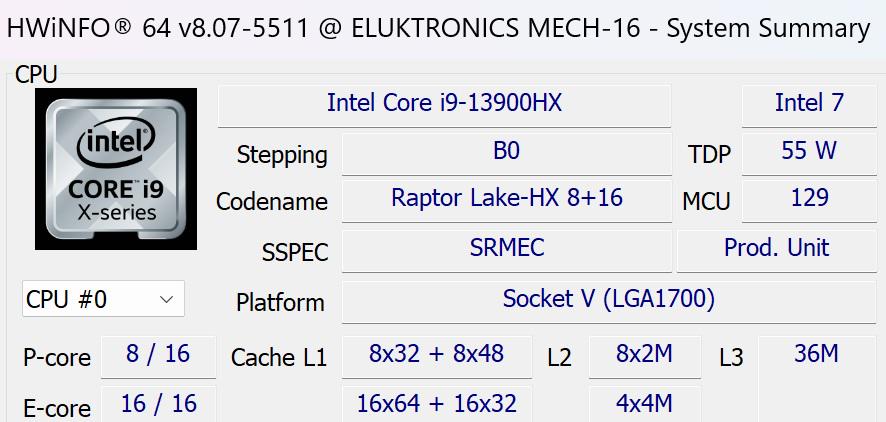
OK, guys. I've created a simple Windows updater for Intel's v129 microcode, which was released today in response to the voltage degradation issue. This will allow all Intel 13th & 14th gen (Eluktro) systems to test and use this code even though, according to Intel, the issue doesn't affect notebooks.

USE AT YOUR OWN DISCRETION!

https://mega dot nz/file/jFUUGDIJ#byEx3QzEeZdXMkoyGL2bsAi3JSgtdrERCdd7ZRXLbBw

And here is the latest Intel ME Firmware Update v16.1.32.2418 for Raptor Lake (13th/14th gen):

https://mega dot nz/file/SMkUjLiT#a67KcMpaZtqESbMeGiDN6skTLNQOoKy7HP-nuaQpLaM

Let us know your findings!

25 Upvotes

70 comments sorted by

4

u/PremaMod Sep 26 '24 edited Sep 26 '24

Intel has updated their Raptor Lake Microcode once again to version 12B. This version is 5 weeks newer than the previous version 129. I have uploaded it here for testing:

https://mega DOT nz/file/eIcVTSaY#3KeNzCt67wmDQ7gk5OoLwd-okC41h-E-pKHiKqNBYWk

More information here: https://community.intel.com/t5/Blogs/Tech-Innovation/Client/Intel-Core-13th-and-14th-Gen-Desktop-Instability-Root-Cause/post/1633239

Mobile Processors Officially remain unaffected!

1

u/sneakyslapdik Dec 21 '24

So ive been running 12b for a while now and noticed that some cores are still occasionally spike to 1.497 or so. Though i think it is requested voltage and not the actual one. Is that ok and expected behaviour? Shouldnt it be no more than 1.4v? Also is there a way to see the actual voltage used by a core?

1

u/PremaMod Dec 31 '24

Some monitoring software like HWmonitor are still using the wrong divisor (1000 vs 1024) and hence are showing inflated readings. HWInfo64 should be more accurate.

1

u/sneakyslapdik Dec 31 '24

I also have both p and e cores undervolted by -150, so spiking to 1.497 seems really weird to me. It supposed to be not more than 1.4vl as per recommendations, right? Is there any way to achieve that?

2

u/PremaMod Dec 31 '24

Make sure to use per-core voltage and not all core offset in BIOS if you are using the control center as otherwise it'll overwrite your BIOS settings.

→ More replies (6)
→ More replies (1)
→ More replies (1)

5

u/[deleted] Aug 08 '24

Thanks Premamod!

Do you suspect that (stock) notebooks are still vulnerable to the microcode issues?

7

u/PremaMod Aug 08 '24 edited Aug 08 '24

I haven't seen anything that would point to a premature degradation on 13th/14th gen Notebooks, yet. Eluktro systems are also shipped undervolted by default right out of the box (just keep the OCing option in BIOS enabled).

Simply giving users a way to make their own choices here...

2

u/sneakyslapdik Oct 14 '24

It's undervolted by -0.125 by eluktronics by default right? Was very surprised to see it in xtu

1

u/sneakyslapdik Oct 14 '24

Is it possible to undervolt it further? Mine doesnt have options lower than -0.125 and its also undevolt protected but i cant find an option in bios to turn that off

3

u/PremaMod Oct 14 '24

It's under "Tuning" and then in the "Extreme Tuning" section as well.

4

u/Number-1Dad Aug 08 '24

Real legend for this one, Prema.

3

u/PremaMod Aug 22 '24 edited Aug 22 '24

Quick Heads-up: So, I've been testing v123, v124, v125 & v129 microcodes on my HM770 Mech with 13900HX and the latter three require additional 0.025v Memory Controller Voltage (1.125v) at 6400Mhz XMP to be TM5 stable, while v123 (our 14th gen shipping version) runs them stable at BIOS defaults. No problems with either microcode at 6000Mhz.

Looks like this isn't "The One", just, yet. Will be testing newer microcodes as they are being released...

1

u/[deleted] Aug 24 '24

Anyway to uninstall the microcode when enabling or disabling hyper v virtualization my boot freezes and it doesn't want to boot . Thanks there's nothing wrong otherwise . I went into the folder and installed it but my efi boot is the problem and the bios isn't detecting it sometimes .

1

u/PremaMod Aug 24 '24

Hit the uninstaller or enable core isolation to keep it from running.

→ More replies (1)

3

u/PremaMod Jan 09 '25

Intel has updated their Raptor Lake Microcode once again to version 12C. I have uploaded it here for testing:

https://mega DOT nz/file/LQtQ2Rob#B74zlaMPyab7MEBLIkHGpq8Ef5Y9B_rVpSVhHEGXECc

1

u/MarionberryVisual463 Jan 21 '25

Would this work with non Eluktro systems?

1

u/PremaMod Jan 21 '25

Yes

1

u/MarionberryVisual463 Jan 21 '25

Another small question, I know barely anything about this stuff but have done a ton of research..

Is there an updated Intel ME in the drive I downloaded that went along with the microcode? I'm just making sure I did everything right. I'm on code 12C

1

u/PremaMod Jan 21 '25

No the ME Firmware is in a separate update for Eluktro systems. It is not part of the CPU microcode patch.

→ More replies (2)

2

u/MarionberryVisual463 Jan 21 '25

Cool. Thank you. 

3

u/PremaMod Jun 27 '26 edited Jun 27 '26

I have uploaded the latest Intel microcodes for RAPTOR LAKE 13900HX / 14900HX v137 and ARROW LAKE 275HX v122 here for your testing:

https://mega PUNCTUATION nz/file/KA1V0Kqa#en4x9HbvzGoCVerTPdGeNNP7lk5fzLeOphQows7UoUc

Depending on Windows version you may have to disable Windows Hello:

HKEY_LOCAL_MACHINE\SYSTEM\CurrentControlSet\ Control\DeviceGuard\Scenarios\ WindowsHello\Enable

Set to zero

1

u/Loose_Device4578 Jun 28 '26

Will we see a BIOS update in the future that will allow us to still have virtualization enabled?

2

u/PremaMod May 08 '25 edited May 08 '25

Intel has updated their Raptor Lake Microcode once again to version 12F and updated their journal here:

https://community.intel.com/t5/Processors/Intel-Core-13th-and-14th-Gen-Vmin-Shift-Instabilty-Update-New/m-p/1686948

I have uploaded it here for testing:

https://mega DOT nz/file/eVEmiBYK#2_4ubG3b0YBTM2f4V0NGu4GXvpgFIKCwraZPdVkXE4U

This is only for Intel 13th & 14th gen S/HX models!

1

u/Vipspike Aug 13 '25

merci a toi !

petit question , j'ai installé sur un xmg pour essai

installation et reboot. Comment être certains que c'est bien pris en compte ?

j'ai un 13900hx avec microcode 12E ,donc j'ai voulu migré a 12F

1

u/PremaMod Aug 13 '25

CPU-Z motherboard tab

2

u/[deleted] Aug 08 '24

Does this change any performance settings or just limit the voltage . (In other words will we still be able to overclock. ) I'm hesitant on applying it as the issue is not present inside note books as of my writing thanks for answering any questions. (Can I backup the current one or will this be permanent?).

2

u/PremaMod Aug 08 '24 edited Aug 08 '24

It's supposed to keep the voltage from overshooting when not intended to do so. It's not limiting power or Overclocking capabilities. The microcode updater also comes with an uninstaller, so this isn't a one way street.

2

u/[deleted] Aug 08 '24

Ahh ok then I will try it out and see.

2

u/Mornnb Aug 12 '24

Fantastic thanks for this - could you say exactly which folder/file this adds and updates?

2

u/PremaMod Aug 12 '24 edited Aug 12 '24

It installs the cpumcupdate64.inf (or 32bit depending on your OS) driver and the v129 microcode.dat under System32/drivers.

Due to dependencies there are also a couple (2) of microcode_amd files installed in the same place.

Since the driver is currently missing WHQL certification we have to keep VBS disabled in Windows for it to load.

I wouldn't be surprised to see an official Windows update pushing this or an even newer microcode in the near future as they have done before for the Spectre security patches...

1

u/PremaMod Aug 16 '25 edited Aug 16 '25

I have uploaded the latest Intel microcodes for RAPTOR LAKE 13900HX / 14900HX v130 and ARROW LAKE 275HX v11A here for your testing:

https://mega PUNCTUATION nz/file/7dtzABhS#oZ7fZxTD_SyT7nki6eWShv_tjHoqip9CqipWi56Pqho

2

u/THEBOSS619 Nov 12 '25

Just wanted to let you know Intel released v132. Tested it on my RAPTORLAKE 13650HX and observing. Just a heads up for people who follow your work 🙂

The changes is already mentioned in there own PDF file mentioned on Intel Github repository. https://github.com/intel/Intel-Linux-Processor-Microcode-Data-Files/releases/tag/microcode-20251111

→ More replies (2)

1

u/PremaMod Dec 04 '25 edited Dec 17 '25

I have uploaded the latest Intel microcodes for RAPTOR LAKE 13900HX / 14900HX v133 and ARROW LAKE 275HX v11D here for your testing:

https://mega PUNCTUATION nz/file/Cd1XyB7A#yBitBF6E1vEYC03LZQEYI-S5A6hqHLqA4Xk2LLjnRss

1

u/PremaMod Jan 22 '26 edited Mar 17 '26

I have uploaded the latest Intel microcodes for RAPTOR LAKE 13900HX / 14900HX v136 and ARROW LAKE 275HX v121 here for your testing:

https://mega PUNCTUATION nz/file/7BsGjTyA#CZQOd2sDMdUHMjtE2WlQk1I5E-gj0bQiSTPcP6V5vxU

1

u/sneakyslapdik Oct 14 '24

Thanks, been having some weird issues after 2 months or so with my GP2 (13900hx 4090). Hope 012b fixes that.

@premamod is it possible to get a bios with voltage adjustment options? I have premamod version, but i can't seem to find cpu voltage there

3

u/PremaMod Oct 14 '24

It's all under the "Tuning" > "Extreme Tuning" section.

1

u/ReedTFM Mar 24 '25

I hear Intel is pushing another microcode update beyond 12c, does Electronics have it or plans to implement?

2

u/PremaMod Apr 17 '25

I've uploaded 12E here for testing:

https://mega DOT nz/file/aFkjTD5C#uOcj0ay3gRjpK2boXGGnpa0MBgFrSo_Ejf7xSEuQgX4

2

u/ReedTFM Apr 25 '25

u/PremaMod Awesome, thank you. I think you mentioned on the Discord channel that 12D was a downgrade... Have you noticed any performance declines with this this one or need to change voltages?

I'll be testing it soon on my Hydroc16 G1, but thanks as always for the updates and info!

2

u/ReedTFM Apr 26 '25

Can confirm: Works fine with no performance degradation. Curious what Intel changed? But in any event, I have not seen a reason to not use it after lots of testing heavily loading the CPU or the entire system (CPU, GPU, and toasty Manix RAM @ 6400mhz). New microcode didn't affect stability even with my aggressive undervolting. -100 mv p-cores, -80 mv e-cores (which oddly, no matter what microcode eat more voltage than the p-cores and are the ones to jump to 1.5v, not the p-cores), and -20mv on p and e caches. Anymore and I'll get Windows Hardware Errors - CPU reported by HWInfo64, but was talking to Bob yesterday and he was impressed I can get -100mv on p-cores. Silicon lottery I guess.

Best thing I've noticed is just disabling all the e-cores when not testing it anyway. Games like Stalker 2 run just as well (if not better), CPU is cooler/pulls less wattage, and I don't really miss them because I still think Windows 11 24H2's scheduler is broken and not putting the right loads on the cores.

Anyway, thanks again, u/PremaMod, Bob, and everyone at Eluktronics. Best machine I've owned in a while and the continued support/updates are very much appreciated!

1

u/El_Gran_Tiburon Apr 18 '26

Intel are a bunch of liars i have been using the Hydroc 16 g2 for a while now, and it crashes constantly with clock_watchdog_timeouts. I have no idea how to fix it, and I can't really send it to eluktroniks HQ cause i reside outside the U.S. This is my only option rn

2

u/PremaMod Apr 18 '26 edited Apr 18 '26

HydrOC G2 has a 275HX, an Arrow Lake CPU, which isn't part of any of the degradation issues, neither Desktop nor Notebook. I would rather check the RAM for stability and the OS for errors and repair them.

1

u/El_Gran_Tiburon Apr 18 '26 edited Apr 18 '26

Thanks for the response, I think I might have got the model wrong cause my laptop has a i9 14900HX raptor lake with a microcode version of 0x120

eluktronics support sent me replacement ram because they thought the same but even that didn't fix the issue the new bios sets the ram speed to Max which doesn't cope well with the CPU I think but I don't know how I can reduce the speed since my BIOS version doesn't have any XMP or other settings available

2

u/PremaMod Apr 18 '26 edited Apr 18 '26

Gotcha! That means you can use the v136 microcode from this thread. But why does your BIOS have the old v120 microcode? The oldest PremaMod version already shipped with v123. Did you flash a stock BIOS over the PremaMod BIOS? If so, you not only lost all the features and performance tweaks, but are now also running on an older microcode.

As for the RAM: In the Control Center under "Custom" there is a toggle for "Advanced BIOS Features" or something along those lines, which will unlock the RAM BIOS settings under "Advanced" after a reboot. There you can just set a Memory Frequency Limit even if your RAM doesn't have XMP profiles.

1

u/SachsenPowl Aug 27 '26

Hey OP I have a XMG Fusion E24 with the 14900HX and official latest BIOS Update and Intel ME from XMG Download section. I have a Game which informed me that i need a newer Microcode Update. I want to be Safe for upcoming Anti-Cheat Games Like CoDMW4. I have TPM2.0 enabled and Secure Boot and this should not be a Problem for the Game itself. I dont know if upcoming Games would be a Problem If i disabled the virtualisation Feature. Hope you can assist me to be safe with the Microcode Update, outside of a BIOS Update.

3

u/Imglidinhere Nov 04 '24

I ended up just shutting off half the E-cores and limiting max boost on the P-cores to 5GHz. Voltage peak is at 1.3v and sustained all-core is below 1.1v. Never seen it spike higher than 1.3v since the change, and performance is identical in every game played. Technically my minimums and 0,1% lows are higher now, because the rest of the cores are better fed. c:

1

u/ReedTFM Dec 30 '24

Same, but less drastic, since 12B I run all cores, e-cores at (4ghz+, I think) and p cores at 6x5.6ghz, with 2x5.8ghz, and I only see tops 1.312v. I'm comfortable with that. I think they addressed it, to the extent it even was even a problem for their mobile chips. I'm just always glad to see anything pushing less voltage through these chips -- whether microcodes and/or undervolting.

1

u/Imglidinhere Jan 08 '25

You never see those frequencies on those P-cores or even the E-cores in any program or game. Like... I guarantee you might see 4.5ghz if you push 150w through the CPU, but even then you're so constrained by thermals that you'll throttle long before you get the chance to see 5.6ghz...

→ More replies (2)

3

u/ReedTFM Nov 08 '24

Just as an update on my experience: I've been on the latest 12B microcode for2 weeks (posted by Prema about a month ago):

' Intel has updated their Raptor Lake Microcode once again to version 12B. This version is 5 weeks newer than the previous version 129. I have uploaded it here for testing:

https://mega DOT nz/file/eIcVTSaY#3KeNzCt67wmDQ7gk5OoLwd-okC41h-E-pKHiKqNBYWk '

As well as the latest Intel ME in Prema's original post:

'And here is the latest Intel ME Firmware Update v16.1.32.2418 for Raptor Lake (13th/14th gen):

https://mega dot nz/file/SMkUjLiT#a67KcMpaZtqESbMeGiDN6skTLNQOoKy7HP-nuaQpLaM '

Things are still running grand.

I have not observed any performance loss that is larger than the usual variations I get between benchmark runs either. I also like that it is not integrated into the BIOS and may be uninstalled.k

Very well done, u/PremaMod and u/Eluktronics!

1

u/xChocos Mar 06 '26

Do I have to do like a bios flash to install the ME and microcode or is it just a .exe I can run?