LOL thats okay, its easy to generate the file with this command:
fastfetch --gen-config
This creates a .jsonc file at ~/.config/fastfetch/config.jsonc which you can open in a text editor, and then copy here into a comment. People share their configs all the time, mostly on github. That way we can see how your config is written and we can copy parts of it to make into our own version. They're fun to play with.
One important detail: Fastfetch supports JSONC configuration directly, so you don't actually need Python to convert JSONC into JSON. Python is useful when you want to dynamically generate or modify the configuration.
For your particular setup, I'd keep the large Python system-information renderer in a separate .py file and keep the Fastfetch configuration in .jsonc. This makes debugging much easier.
You can use Python to generate your Fastfetch configuration dynamically, but there's one important distinction:
JSONC is the configuration format (JSON with comments and trailing commas).
Python generates or modifies the configuration.
Fastfetch reads the resulting configuration file.
The cleanest approach is to let Python generate the JSON configuration and then launch Fastfetch.
subprocess.run([ "fastfetch", "--config", str(CONFIG_FILE) ]) 2. Run it bash python3 ~/.config/fastfetch/run_fastfetch.py 3. If you want to use actual JSONC files
Python's standard json module does not support JSONC comments.
Install a JSONC parser:
bash pip install json5
Then:
python import json5
with open("config.jsonc", encoding="utf-8") as f: config = json5.load(f)
This lets you write comments in your configuration:
// Display settings "display": { "disableLinewrap": false } } 4. My recommendation for your setup
Use this architecture:
config.jsonc
Your editable Fastfetch configuration
run_fastfetch.py
Reads JSONC, generates or modifies configuration
Fastfetch
Renders your logo and system information
One important detail: Fastfetch supports JSONC configuration directly, so you don't actually need Python to convert JSONC into JSON. Python is useful when you want to dynamically generate or modify the configuration.
For your particular setup, I'd keep the large Python system-information renderer in a separate .py file and keep the Fastfetch configuration in .jsonc. This makes debugging much easier.
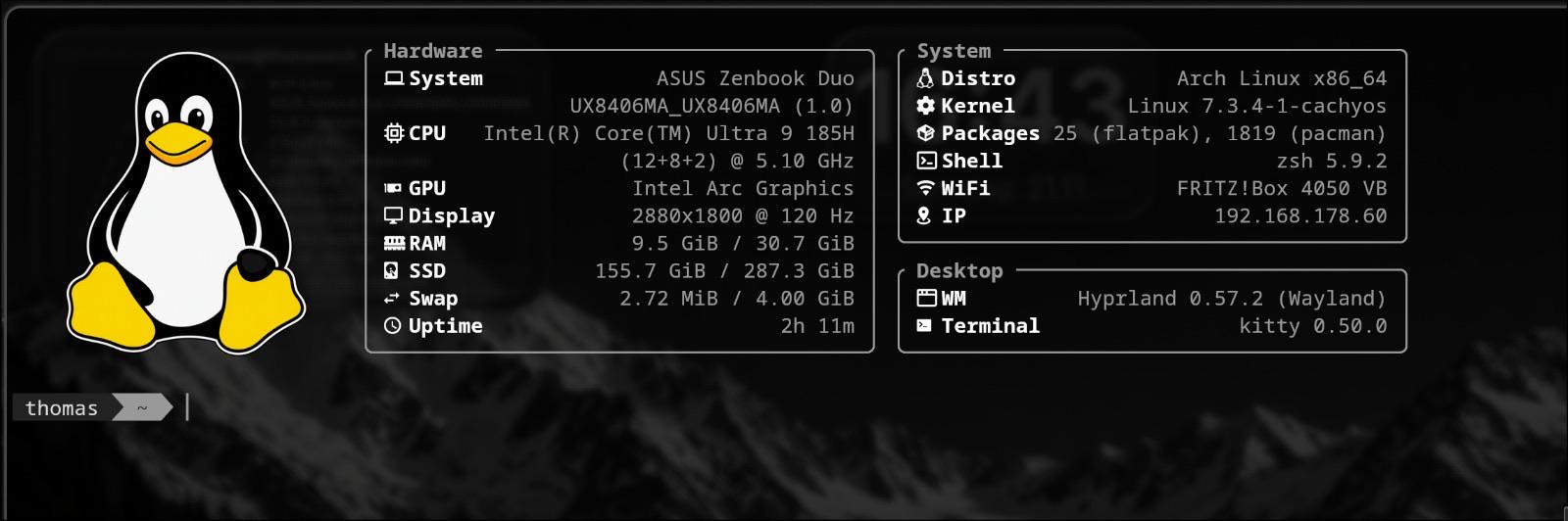
1
u/Rittergurke 2d ago
config:
{
"$schema": "https://github.com/fastfetch-cli/fastfetch/raw/dev/doc/json_schema.json",
"logo": {
"source": "~/.config/fastfetch/tux3-spaced.png",
"type": "kitty",
"position": "left",
"height": 12,
"width": 20,
"preserveAspectRatio": true,
"padding": {
"left": 4,
"right": 4,
"top": 1,
"bottom": 6
}
},
"display": {
"disableLinewrap": false
},
"modules": [
{
"type": "command",
"key": " ",
"text": "python3 - <<'FASTFETCH_PY'\n#!/usr/bin/env python3\n\"\"\"Render live Fastfetch data as a compact two-column boxed summary.\"\"\"\nimport json\nimport os\nimport re\nimport shutil\nimport subprocess\nimport unicodedata\nfrom pathlib import Path\n\nMODULES = \"OS:Kernel:Packages:WM:Host:CPU:GPU:Display:Memory:Swap:Disk:Uptime\"\nGRAY = \"\\033[38;2;153;153;153m\"\nGRAY_BOLD = \"\\033[1;38;2;153;153;153m\"\nWHITE_BOLD = \"\\033[1;97m\"\nRESET = \"\\033[0m\"\nANSI = re.compile(r\"\\033\\[[0-9;]*m\")\n\n\ndef width(text):\n text = ANSI.sub(\"\", text)\n return sum(2 if unicodedata.east_asian_width(char) in \"WF\" else 1 for char in text)\n\n\ndef wrap_words(text, limit):\n lines, current = [], \"\"\n for word in text.split():\n candidate = f\"{current} {word}\".strip()\n if current and width(candidate) > limit:\n lines.append(current)\n current = word\n else:\n current = candidate\n if current:\n lines.append(current)\n return lines or [\"\"]\n\n\ndef box(title, rows, inner):\n title = f\" {title} \"\n top = GRAY + \"╭\" + GRAY_BOLD + title + GRAY + \"─\" * max(0, inner - width(title)) + \"╮\" + RESET\n body = []\n for icon, label, value in rows:\n icon_gap = \" \"\n label_prefix = f\" {icon}{icon_gap}{label}\"\n indent = width(label_prefix) + 1\n value_width = max(8, inner - indent - 1)\n chunks = wrap_words(value, value_width)\n for index, chunk in enumerate(chunks):\n value_padding = \" \" * max(0, value_width - width(chunk))\n if index == 0:\n text = \" \" + WHITE_BOLD + icon + icon_gap + label + RESET + \" \" + value_padding + GRAY + chunk + RESET\n else:\n text = \" \" * indent + value_padding + GRAY + chunk + RESET\n text += \" \" * max(0, inner - width(text))\n body.append(GRAY + \"│\" + RESET + text + GRAY + \"│\" + RESET)\n bottom = GRAY + \"╰\" + \"─\" * inner + \"╯\" + RESET\n return [top, *body, bottom]\n\n\ndef wifi_info():\n interface = \"\"\n ssid = \"\"\n try:\n for line in Path(\"/proc/net/wireless\").read_text().splitlines()[2:]:\n match = re.match(r\"\\s*(\\S+):\", line)\n if match:\n interface = match.group(1)\n break\n except OSError:\n pass\n try:\n result = subprocess.run(\n [\"iwgetid\", \"-r\", interface] if interface else [\"iwgetid\", \"-r\"],\n text=True,\n capture_output=True,\n timeout=0.5,\n )\n ssid = result.stdout.strip()\n except (OSError, subprocess.TimeoutExpired):\n pass\n if not interface:\n try:\n interface = next(\n path.parent.name for path in Path(\"/sys/class/net\").glob(\"*/wireless\")\n )\n except (StopIteration, OSError):\n pass\n if not interface:\n try:\n routes = json.loads(subprocess.run(\n [\"ip\", \"-j\", \"route\", \"show\", \"default\"], text=True,\n capture_output=True, timeout=0.5\n ).stdout)\n interface = routes[0].get(\"dev\", \"\") if routes else \"\"\n except (OSError, subprocess.TimeoutExpired, json.JSONDecodeError):\n pass\n if not ssid:\n return \"Not connected\", \"Not connected\"\n address = \"\"\n try:\n command = [\"ip\", \"-j\", \"addr\", \"show\", \"dev\", interface] if interface else [\"ip\", \"-j\", \"addr\"]\n interfaces = json.loads(subprocess.run(\n command, text=True, capture_output=True, timeout=0.5\n ).stdout)\n for item in interfaces:\n address = next(\n (\n info[\"local\"]\n for info in item.get(\"addr_info\", [])\n if info.get(\"family\") == \"inet\"\n and info.get(\"scope\") == \"global\"\n and not info[\"local\"].startswith(\"169.254.\")\n ),\n \"\",\n )\n if address:\n break\n except (OSError, subprocess.TimeoutExpired, json.JSONDecodeError):\n pass\n return ssid, address or \"Not available\"\n\n\ndef fetch_json(command):\n try:\n result = subprocess.run(command, text=True, capture_output=True, timeout=0.5)\n return json.loads(result.stdout)\n except (OSError, subprocess.TimeoutExpired, json.JSONDecodeError):\n return None\n\n\ndef main():\n raw = subprocess.check_output(\n [\"fastfetch\", \"--config\", \"none\", \"--json\", \"--structure\", MODULES],\n text=True,\n )\n data = {item[\"type\"]: item[\"result\"] for item in json.loads(raw)}\n osinfo, kernel, packages = (data[k] for k in (\"OS\", \"Kernel\", \"Packages\"))\n wm, host, cpu = (data[k] for k in (\"WM\", \"Host\", \"CPU\"))\n gpu, displays = data[\"GPU\"][0], data[\"Display\"]\n memory, swap, uptime = data[\"Memory\"], data[\"Swap\"][0], data[\"Uptime\"]\n root_disk = next((disk for disk in data[\"Disk\"] if disk[\"mountpoint\"] == \"/\"), data[\"Disk\"][0])\n\n shell_path = os.path.basename(os.environ.get(\"SHELL\", \"zsh\"))\n shell_version = \"\"\n if shell_path == \"zsh\":\n version = subprocess.run([\"zsh\", \"--version\"], text=True, capture_output=True)\n match = re.search(r\"zsh ([\\d.]+)\", version.stdout)\n shell_version = match.group(1) if match else \"\"\n term = os.environ.get(\"TERM\", \"xterm-kitty\")\n terminal = \"kitty\" if \"kitty\" in term.lower() else term\n kitty_version = subprocess.run([\"kitty\", \"--version\"], text=True, capture_output=True)\n match = re.search(r\"kitty ([\\d.]+)\", kitty_version.stdout)\n terminal_version = match.group(1) if terminal == \"kitty\" and match else \"\"\n\n monitor_info = fetch_json([\"hyprctl\", \"monitors\", \"-j\"])\n if monitor_info:\n monitor = next((m for m in monitor_info if m.get(\"focused\")), monitor_info[0])\n resolution = f\"{monitor['width']}x{monitor['height']}\"\n refresh = monitor.get(\"refreshRate\", 0)\n display_line = f\"DISPLAY {resolution} @ {refresh:g} Hz\"\n detailed_display = f\"DISPLAY {resolution} @ {monitor.get('scale', 1):g}x, {refresh:g} Hz [{monitor.get('name', 'monitor')}]\"\n else:\n display = displays[0]\n resolution = f\"{display['output']['width']}x{display['output']['height']}\"\n display_line = f\"DISPLAY {resolution}\"\n detailed_display = display_line\n\n wifi_ssid, wifi_ip = wifi_info()\n system = [\n (\"\", \"Distro\", f\"{osinfo['prettyName']} {kernel['architecture']}\"),\n (\"\", \"Kernel\", f\"{kernel['name']} {kernel['release']}\"),\n (\"\", \"Packages\", f\"{packages['flatpakSystem']} (flatpak), {packages['pacman']} (pacman)\"),\n (\"\", \"Shell\", f\"{shell_path} {shell_version}\".strip()),\n (\"\", \"WiFi\", wifi_ssid),\n (\"\", \"IP\", wifi_ip),\n ]\n desktop = [\n (\"\", \"WM\", f\"{wm['prettyName']} {wm['version']} ({wm['protocolName']})\"),\n (\"\", \"Terminal\", f\"{terminal} {terminal_version}\".strip()),\n ]\n core_layout = \"+\".join(str(item[\"count\"]) for item in cpu.get(\"coreTypes\", []))\n uptime_seconds = uptime[\"uptime\"] // 1000\n disk_used = root_disk[\"bytes\"][\"total\"] - root_disk[\"bytes\"][\"free\"]\n\n hardware = [\n (\"\", \"System\", f\"{host['name']} ({host['version']})\"),\n (\"\", \"CPU\", f\"{cpu['cpu']} ({core_layout}) @ {cpu['frequency']['max']/1000:.2f} GHz\"),\n (\"\", \"GPU\", gpu[\"name\"]),\n (\"\", \"Display\", display_line.removeprefix(\"DISPLAY \")),\n (\"\", \"RAM\", f\"{memory['used']/1024**3:.1f} GiB / {memory['total']/1024**3:.1f} GiB\"),\n (\"\", \"SSD\", f\"{disk_used/1024**3:.1f} GiB / {root_disk['bytes']['total']/1024**3:.1f} GiB\"),\n (\"\", \"Swap\", f\"{swap['used']/1024**2:.2f} MiB / {swap['total']/1024**3:.2f} GiB\"),\n (\"\", \"Uptime\", f\"{uptime_seconds//3600}h {(uptime_seconds%3600)//60}m\"),\n ]\n\n terminal_width = shutil.get_terminal_size((120, 24)).columns\n inner = max(30, min(40, (terminal_width - 40) // 2))\n left = box(\"Hardware\", hardware, inner)\n system_box = box(\"System\", system, inner)\n desktop_box = box(\"Desktop\", desktop, inner)\n gap = max(0, len(left) - len(system_box) - len(desktop_box))\n right = system_box + [\" \" * (inner + 2)] * gap + desktop_box\n lines = []\n for index in range(max(len(left), len(right))):\n l = left[index] if index < len(left) else \" \" * (inner + 2)\n r = right[index] if index < len(right) else \"\"\n lines.append(l + \" \" + r)\n top_padding = 1\n lines = [RESET] * top_padding + lines\n print(\"\\n\".join(lines))\n\n\nif __name__ == \"__main__\":\n main()\nFASTFETCH_PY",
"useOutput": "stdout",
"splitLines": true,
"parallel": false
}
]
}
1
u/The_Hubster 2d ago
Nice. Config file?
1
u/0xt0bi03 2d ago
dude your config does not even work bro, why do you have a python file in that???
1
u/0xt0bi03 2d ago
You can use Python to generate your Fastfetch configuration dynamically, but there's one important distinction:
The cleanest approach is to let Python generate the JSON configuration and then launch Fastfetch.
1. Create a Python launcher
Create:
bash
Add:
python
2. Run it
bash
3. If you want to use actual JSONC files
Python's standard
jsonmodule does not support JSONC comments.Install a JSONC parser:
bash
Then:
python
This lets you write comments in your configuration:
json
4. My recommendation for your setup
Use this architecture:
config.jsonc
Your editable Fastfetch configuration
run_fastfetch.py
Reads JSONC, generates or modifies configuration
Fastfetch
Renders your logo and system information
One important detail: Fastfetch supports JSONC configuration directly, so you don't actually need Python to convert JSONC into JSON. Python is useful when you want to dynamically generate or modify the configuration.
You can simply run:
bash
For your particular setup, I'd keep the large Python system-information renderer in a separate
.pyfile and keep the Fastfetch configuration in.jsonc. This makes debugging much easier.You can use Python to generate your Fastfetch configuration dynamically, but there's one important distinction:
JSONC is the configuration format (JSON with comments and trailing commas).
Python generates or modifies the configuration.
Fastfetch reads the resulting configuration file.
The cleanest approach is to let Python generate the JSON configuration and then launch Fastfetch.
Create:
bash
mkdir -p ~/.config/fastfetch
nano ~/.config/fastfetch/run_fastfetch.py
Add:
python
#!/usr/bin/env python3

import json
import subprocess
from pathlib import Path

CONFIG_DIR = Path.home() / ".config/fastfetch"
CONFIG_FILE = CONFIG_DIR / "config.jsonc"

config = {
    "$schema": "https://github.com/fastfetch-cli/fastfetch/raw/dev/doc/json_schema.json",
    "logo": {
        "source": "~/.config/fastfetch/tux3-spaced.png",
        "type": "kitty",
        "position": "left",
        "height": 12,
        "width": 20,
        "preserveAspectRatio": True,
        "padding": {
            "left": 4,
            "right": 4,
            "top": 1,
            "bottom": 6
        }
    },
    "display": {
        "disableLinewrap": False
    },
    "modules": []
}

CONFIG_FILE.write_text(
    json.dumps(config, indent=4) + "\n"
)

subprocess.run([
    "fastfetch",
    "--config",
    str(CONFIG_FILE)
])
2. Run it
bash
python3 ~/.config/fastfetch/run_fastfetch.py
3. If you want to use actual JSONC files
Python's standard json module does not support JSONC comments.
Install a JSONC parser:
bash
pip install json5
Then:
python
import json5

with open("config.jsonc", encoding="utf-8") as f:
    config = json5.load(f)
This lets you write comments in your configuration:
json
{
    // Fastfetch logo settings
    "logo": {
        "type": "kitty",
        "position": "left"
    },

    // Display settings
    "display": {
        "disableLinewrap": false
    }
}
4. My recommendation for your setup
Use this architecture:
config.jsonc
Your editable Fastfetch configuration
run_fastfetch.py
Reads JSONC, generates or modifies configuration
Fastfetch
Renders your logo and system information
One important detail: Fastfetch supports JSONC configuration directly, so you don't actually need Python to convert JSONC into JSON. Python is useful when you want to dynamically generate or modify the configuration.
You can simply run:
bash
fastfetch --config ~/.config/fastfetch/config.jsonc
For your particular setup, I'd keep the large Python system-information renderer in a separate .py file and keep the Fastfetch configuration in .jsonc. This makes debugging much easier.