r/franklymail • • 19h ago

You asked for Sweep. Organize is now live in FranklyMail.

15 Upvotes

A few days ago, someone here asked whether we could add something like Outlook’s Sweep. It’s now live in webmail as Organize.

Right-click a message and choose Organize. Match by sender address, domain, or subject, then:

  • Move all matching messages to a folder.
  • Keep the newest message and move the older ones.
  • Move messages older than 30 days.
  • Move exact duplicate copies to Trash.

You get a preview before anything moves, including matches beyond the current page. Organize existing messages, keep organizing future mail, or do both.

For a simple move rule, matching new mail goes straight to the chosen folder on arrival. The other cleanup options run on a schedule, even while webmail is closed. Existing delivery rules are preserved and run first.

Thanks for the suggestion, u/beardking_ . If anyone try it, I’d love to hear what works well and what could be clearer.


r/franklymail • • 1d ago

FranklyMail adds online Office and WebDAV support to Drive

8 Upvotes

Hi everyone, Emin here.

We've been working on the file side of FranklyMail, and Drive and Office are now ready for a proper introduction. If you already use us for email on your own domain, they're included with your subscription.

Drive lets you upload files and folders, share them with teammates, invite external guests, or create a public viewing link. Office lets you create and edit documents, spreadsheets and presentations in your browser. Teammates with editor access can work on the same document; external guests and public links are read-only.

There is WebDAV access too: https://drive.franklymail.com/dav/

It connects to the same files as the browser, using your mailbox address and a device app password. Browser uploads are available over WebDAV, and WebDAV uploads show up in Drive after a refresh. We've tested rclone file transfers. You can use compatible transfer or sync tools, but automatic sync depends on the client you configure. We don't have a native desktop sync app, and clients requiring WebDAV locks aren't supported. The WebDAV mount contains your own Drive, not folders shared with you.

Office supports editing DOCX, XLSX and PPTX, plus OpenDocument formats, RTF and CSV. Older DOC/XLS/PPT files are read-only.

The base account is still $9/year with unlimited mailboxes, unlimited domains and 10 GB pooled across email and files. Drive and Office don't add a per-person fee.

For anyone who needs more storage, our Black Friday annual add-ons are available through November 30, 2026, at 23:59 Istanbul time (UTC+3):

- 100 GB extra: $35/year

- 250 GB extra + AI Boost: $99/year

- 500 GB extra + AI Boost: $150/year

These are recurring annual add-ons in USD, with base hosting billed separately. The extra space is shared by email and Drive. Boost stays included while the applicable bundle is active. Payment needs to complete before the deadline.

Full walkthrough: https://franklymail.com/blog?post=franklymail-drive-office-webdav

Storage offers: https://franklymail.com/black-friday

Has anyone here started using Drive or Office yet? We'd love to hear how it's going. Your feedback will help us shape both tools around what you actually need.


r/franklymail • • 2d ago

Consider beta testers or contributors

6 Upvotes

One thing to add to your roadmap IMO is beta testers/advocates/ambassadors.

As the product (hopefully) grows it might be a good idea to establish a program for small number of individuals who gets more direct access to you, are consulted more often on roadmap and features, and get to test new features earlier.

The idea is that this allows for word of mouth marketing without any (monetary) cost. Establishing personal relationships and giving people closer access makes them feeling like insiders, and makes them promote the product on their own.


r/franklymail • • 3d ago

Algunos bugs pequeños por solucionar

4 Upvotes

Algunos pequeños bugs por arreglar, desde ya, ¡gracias por la buena calidad del soporte! ;)

Al tocar en las listas desplegables, el recuadro desaparece rápidamente
Idioma que no se aplica

r/franklymail • • 3d ago

Storage Option in EU

2 Upvotes

Edit: Solved!

I would like to make the following suggestion:

Give people an option to choose where their emails are stored. Personally, I'm not fond of the idea that my data is leaving the EU and is stored somewhere in a US data center, instead. I can tolerate this on private email, but I know I would not be able to store client emails this way for GDPR requirements.


r/franklymail • • 4d ago

AI use

6 Upvotes

Hi Emin,
I'm using the basic $9 plan now and would like to know if you use AI to write your code.
The speed with which you release new features makes me think you make extensive use of them.
I'm using the $9 basic plan and would like to know if you use AI to write your code.
I don't like the idea of ​​my personal data and personal mails being held hostage by AI.
If possible, could you give me a brief overview of how your software development works?
Thanks


r/franklymail • • 6d ago

You asked, we shipped: six improvements to everyday email in FranklyMail

20 Upvotes

Hey everyone, Emin here, founder of FranklyMail.

We’ve just shipped a batch of improvements based on your feature requests. These came from everyday moments where using your email could be a little easier:

  • Quick actions in your inbox. Hover over a message in desktop webmail to delete, move, mark it read/unread or send it to spam. The buttons appear on the right, without opening the email.
  • Choose where imported mail goes. Uploading an MBOX archive? You can now choose Sent, Archive or an existing custom folder as the destination.
  • Easier Apple Mail setup. Download a configuration profile for your iPhone, iPad or Mac. It fills in the server settings; you enter your password separately.
  • See which address received a message. Webmail now shows a small label for aliases and catch-all addresses appearing in To or Cc.
  • Download your mail DNS records. Get a zone file from your domain settings instead of copying each record individually. Merge it with your existing zone and review SPF/DMARC before importing.
  • Your preferred calendar time format. Calendar views and event details now follow your saved 12/24-hour preference.

Everything above is live. Refresh webmail to pick up the inbox changes.

Thank you for taking the time to tell us what gets in your way. It helps me decide what to build next.

Full update notes

Emin


r/franklymail • • 6d ago

Catch-all replies just got a little easier

10 Upvotes

Multiple community member pointed out that replying to a catch-all email meant creating an alias first. Fair point, that was an unnecessary extra step.

We’ve updated FranklyMail so replies automatically use the address the email was sent to, even if you haven’t created an alias for it. You can still pick another address from the From dropdown.

Thanks for the feedback that led to this. If there are other little things making your daily email routine harder, I’d love to hear them.


r/franklymail • • 7d ago

Our Black Friday discount budget was $0. We negotiated with ourselves.

13 Upvotes

Hey everyone, Emin here, founder of FranklyMail.

It’s been a little quiet from me lately. We’ve been spending time thinking through the privacy improvements many of you have asked for. There are details we want to get right, and I’ll have more to share on that soon.

Meanwhile, November has arrived: that magical time of year when every website puts on a black banner and your inbox develops a shopping addiction.

Naturally, I looked at our $9/year base plan and tried to find room for a Black Friday discount.

The spreadsheet suggested I get a second job.

We already keep the base price about as low as we sustainably can, so that’s staying where it is. But November apparently requires a sale, and some of you might want more storage while supporting what we’re building.

There’s another reason this felt like the right offer: the response to our workspace features has been lovely. People are starting to use them in their day-to-day work, and it’s been exciting to see FranklyMail become useful beyond the inbox.

WebDAV support for Drive is coming soon, which will let you access your files through compatible apps. With more of your files finding a home here, extra storage might actually come in handy.

So here are two annual add-on offers:

  • 100 GB extra storage: $35/year instead of $40.
  • 500 GB extra storage + AI Boost: $150/year instead of $212. Boost stays included for as long as you keep this add-on subscription active.

These are add-ons to the regular FranklyMail plan, which is billed separately. The extra storage joins the shared pool used by your email and Drive.

The offers are available until November 30, 2026, at 23:59 Istanbul time (UTC+3). That deadline applies to new purchases, not your renewal price.

👉 Get the Black Friday add-ons

Pick up either offer during November and keep that annual price while your subscription stays active.

If your current storage is enough, please keep your money. Your inbox does not need a bigger apartment just because it’s November.

But if you could use the space and want to support what we’re building, I hope these offers make that a little easier.

Thanks for using FranklyMail and telling us what matters to you. The privacy feedback in particular has given us plenty to work on. More on that soon.

Emin


r/franklymail • • 7d ago

Support email from Google Mail

Thumbnail support.google.com
4 Upvotes

According to Google it is no longer supported to provide application credentials for third-party applications. In this case this means there is no way to import a Google Mail inbox into FranklyMail. Google now recommends acquiring a token via "Sign In with Google". Could I please add this feature request to add this functionality and enable Google Mail import.

Is there a repository where issues are tracked and request for enhancements can be added?


r/franklymail • • 13d ago

New in FranklyMail: Manage spam sensitivity and trusted senders from webmail

9 Upvotes

Couple of community members recently raised an important concern: their business receives inquiries from new buyers and suppliers all the time. Adding known contacts to a trusted list helps, but what about someone reaching out for the first time?

That feedback led to an update that’s now live.

Under Settings → Security → Spam protection in webmail, you can:

  • Choose Less filtering, Standard, or Stricter filtering, or use your domain’s default.
  • Add and manage trusted sender addresses for your mailbox.

Less filtering can help legitimate messages from new contacts reach your Inbox, though it may also let more unwanted mail through. Existing security checks remain active. These settings apply to new incoming messages.

Thanks to everyone who shares feedback about how FranklyMail fits into their daily work. This improvement came directly from one of those conversations.


r/franklymail • • 17d ago

Questions on CalDAV

1 Upvotes

Hi,

I just tried to migrate my existing calendars onto my franklymail address and encountered a few issues.

  1. When trying to import .ics events from my old account into franklymail the import on the calendar is limited to 500 events which is definitely not enough for long legacy calendars -> can this somehow be changed for an initial upload or any other solution?
  2. When connecting multiple franklymail calendars via CalDAV to my Android calendar app, the individual calendar colors are not included which makes it basically impossible to differentiate between the different calendars -> can this be adjusted?

Any help on these points? Thanks!


r/franklymail • • 19d ago

Daily Driver?

6 Upvotes

Anybody here using FM as their daily driver? I'm impressed with it so far. To be honest there are a couple of new email providers like them that are doing good work. It's hard to decide who to move to.


r/franklymail • • 20d ago

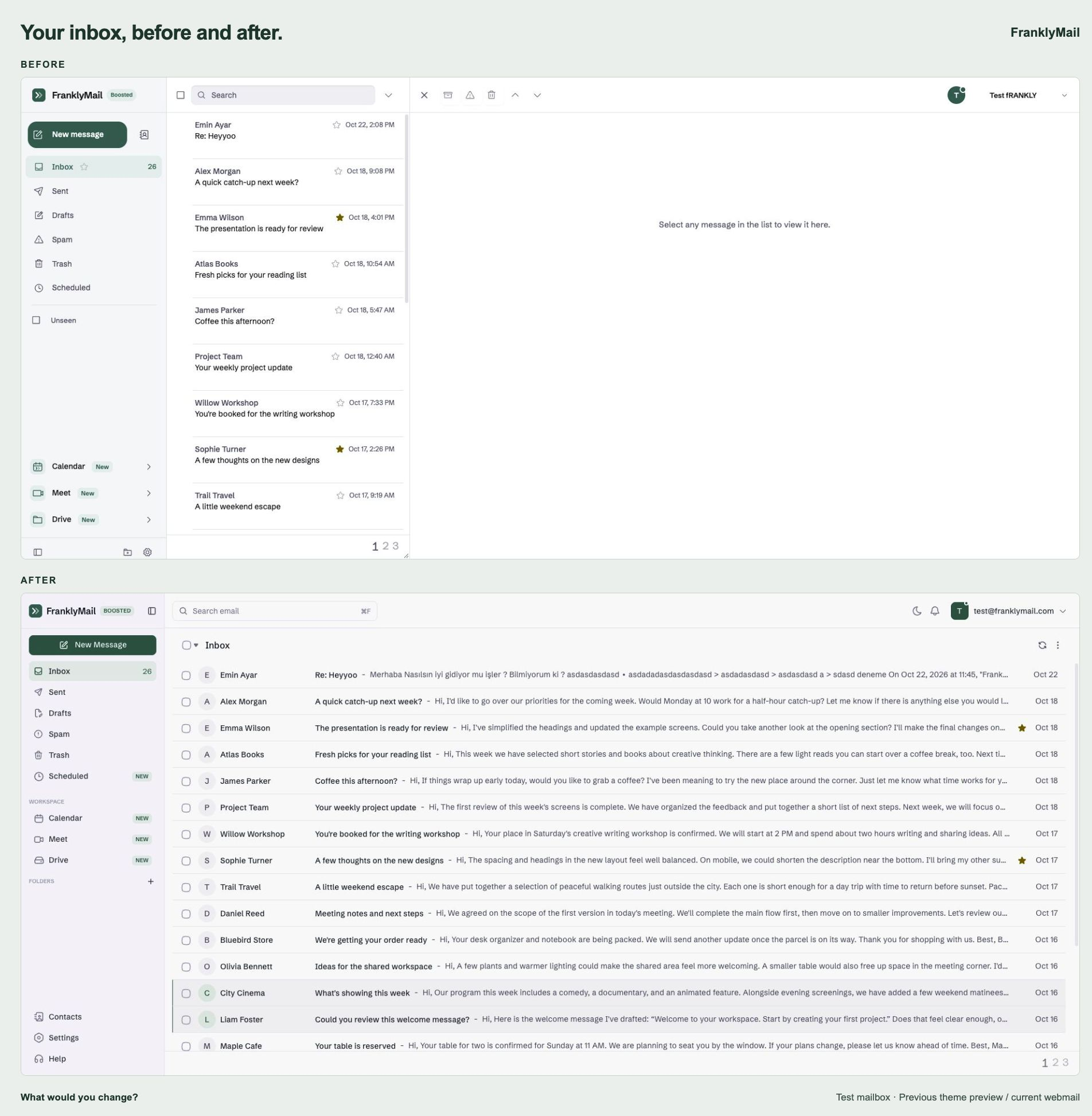
We gave FranklyMail’s webmail a fresh look. Better, or would you change something?

14 Upvotes

Hey everyone, Emin here 👋

The new FranklyMail webmail design is now live! If you’ve opened your inbox recently, you’ve probably already noticed a few changes 🙂

I wanted to share a before and after, including the new message window. I’m really happy with how it turned out, but I’m much more curious about what you think.

FranklyMail inbox before and after the redesign, showing the updated navigation, message previews, and cleaner layout using a test mailbox.
FranklyMail before and after the redesign, with the same email open and a sample draft in the New Message window, showing changes to the layout and writing controls.

Do you like the new look? How does it feel when you’re actually reading and writing emails?

If there’s something you’d like us to improve in the UI or UX, tell me. A button that’s hard to find, spacing that feels off, or something you liked better in the old version. Small details count too.

And if you haven’t tried it yet, I’d love your first impressions from the screenshots.

Thanks for helping us make FranklyMail better ❤️

* Screenshots use our test mailbox


r/franklymail • • 21d ago

Questions/comments from new FranklyMail user

4 Upvotes

Just signed up for FranklyMail to run through some paces. Glad to have an inexpensive way to test out JMAP without having to stand up my own Stalwart.

A few questions/requests:

  • can a recovery email be set up for the admin account? I'd like to change the admin account to be admin@myfranklymail.example.com. But that clearly won't work if I'm having some sort of major problem. So a recovery email that will be with some other provider would be needed.
  • I tried out google-style '.' removal from the mailbox name for delivery purposes; it doesn't work. Can it be added as an option?
  • google-style "+" addressing does work - some people might want to be able to turn this off
  • The webmail signin page has a link to the panel signin. The opposite is not true - there's no link to the webmail page from the panel login that I could find. I also couldn't find a link to the webmail login from the www.franklymail.com home page - I had to get to webmail.franklymail.com manually. Surely I'm overlooking something?
  • the signon page at webmail.franklymail.com says "Sign in to the mailbox you want to add to your assistant" at the top. I don't know what this means.
  • the dropdown in the upper right of the webmail contains an "Add Account" menu option. I can't seem to create an account from there:
  • I'm not sure I want the non-admin to be able to create mailboxes (and it seems like they can't anyway), so I don't think this menu option should show up on mailboxes except for the account owner.
  • it turn out there's an "Accounts" menu on the left side of the webmail. It behaves the same as above.
  • The "Accounts" menu also has an "Add an Identity" feature that doesn't seem to work (or I can't figure out how to make it work).

For several of these issues it's likely that I just don't understand how some feature is supposed to work.


r/franklymail • • 24d ago

Scheduled sending is live in FranklyMail, in webmail and through your AI assistant

9 Upvotes

Hey everyone, Emin here.

A member of our community recently asked for a way to draft an email with their AI assistant and have it go out later. That conversation helped shape scheduled sending, which is now live in FranklyMail.

In webmail, click the little clock next to Send (highlighted in the screenshot), choose a date and time, then review and confirm. You can close your browser afterward. FranklyMail handles the send on the server.

There's a dedicated Scheduled view where you can see what's waiting to go out, including the send time and time zone. Need to change something? Editing stops the schedule and returns the message to Drafts. Cancel send also keeps your draft, while Delete is a separate action.

It works through the AI connector too. Ask your assistant to prepare an email for a specific time, then review the message and approve the schedule yourself. Those messages appear in the same Scheduled view as the ones you schedule in webmail.

We also added HTML support to connector drafts, so links, lists and basic formatting survive the trip from your assistant to your mailbox and the eventual send.

Walkthrough: https://franklymail.com/blog?post=schedule-email-send-later-franklymail

Thanks to everyone who shares how they actually use email. These conversations make a real difference to what we build. If you try this, I'd love to hear what feels smooth and what still needs work.


r/franklymail • • 25d ago

Alias Domain Option?

3 Upvotes

Quick question:

I have now registered at franklymail and was looking for an option to set a specific domain as default alias for all my mailboxes on my main domain (e.g. have mydomain.eu as an alias for mydomain.com for all my mailboxes on mydomain.com) but was not able to find is.

Is this option currently available or planned?


r/franklymail • • 25d ago

So far so good!

9 Upvotes

Hi,

I moved one of mailboxes to frankly mail and everything looks good, obviously the solution is young and still there's a lot of things to be done, but overall experience is positive and everything just works. Thanks!


r/franklymail • • 25d ago

Support for CardDAV planned

4 Upvotes

I truly appreciate the product offering you have already created and am quite impressed by your service mentality and update speed (also here on reddit) and will likely soon subscribe to your services.

Just one remaining question: As you are already support CalDAV, is it also planned to introduce CardDAV support soon?

I fully understand that you do not intend to become a full worksuite (which I appreciate), I believe CardDAV is a core component of everyday mail usage (especially if I want to sync contacts between my families e-mail accounts)

Thanks!


r/franklymail • • 26d ago

Interest in FranklyMail...questions

5 Upvotes

As a Proton user, I'm looking into alternatives. I appreciate your candor in the Proton vs FranklyMail comparison. Questions: where is the company based? And where are the servers? Thanks.


r/franklymail • • 28d ago

FranklyMail Meet is live: video calls, Calendar integration, and no extra subscription

23 Upvotes

Hey everyone, Emin here 👋

We recently added Calendar to FranklyMail. Now you can add a video meeting to those invitations too. FranklyMail Meet is live and included with your email plan.

The team behind FranklyMail, together on our own Meet. The poses weren’t part of the test plan. 😄

Seeing the team on a screen we helped build was a pretty special moment. Well, most of the team. Five people were missing, so naturally we took the photo and called it a team photo anyway. 😄 Now I’m excited to see how you use it.

Here’s what you can do:

  • Meet with up to 10 people for 90 minutes per session.
  • Share your screen and send messages in the meeting chat.
  • Start a call immediately or create a reusable link for later.
  • Invite people outside FranklyMail. Guests can open the link in their browser and ask to join without creating an account.

It works with Calendar

Create or edit an event, choose Add FranklyMail Meet, and send your invitation. When it’s time, open the event and join the call. You can keep a reusable link for recurring conversations, too.

A client conversation can start in your inbox, become a calendar invitation, and continue over a video call, using your business email identity throughout.

You can try Meet here or schedule a call through Calendar.

What’s included, and how usage will work

Meet and Calendar are included in the current $9/year core plan, with no separate meeting subscription or per-person fee. The plan includes unlimited mailboxes with 10 GB of pooled storage; extra storage is billed separately.

Meet usage will also have a pooled allowance shared across your account. We’re still a small community, so we aren’t enforcing an account-wide meeting usage limit at this stage. The limits of 10 participants and 90 minutes per session still apply.

What’s coming next

We’re planning recording, transcription and AI notes for future updates. They aren’t available in this first release.

I want to be open about the cost side, too. Recording and storing full meetings adds significant cost, so we don’t plan to offer full-meeting video recording initially. That part will need to wait until the community has grown enough to make it sustainable. We’re still working out how these features will fit together, and I’d love to hear which would be most useful to you.

Where we’re heading

This is another step toward what I want FranklyMail to become: an affordable business suite for small teams/groups/businesses, and eventually a practical alternative to Google Workspace. We still have a lot of ground to cover, especially beyond email, scheduling and meetings. But seeing these parts work together makes that direction feel much more tangible.

Thanks for trusting a young product with your email and for taking the time to tell us what would make it better. Your support gives us room to keep building, and those conversations help us decide where to put our effort.

Would you use Meet for client calls or team catch-ups? Try it and tell me what feels good, what gets in the way, and what’s missing for your day-to-day work.


r/franklymail • • Oct 22 '26

Agentic Inbox update: folders, bulk moves, aliases and multiple mailboxes

Thumbnail
youtube.com
6 Upvotes

Hi everyone, Emin here, founder of FranklyMail. We've shipped a few Agentic Inbox improvements based on customer feedback:

• Create folders and move messages individually or in batches of up to 200. Custom folders can be deleted only when empty and without subfolders.

• Choose a sending alias when preparing a draft, or change it on the approval page. Sending still requires your approval.

• Connect up to 20 mailboxes from the same organization, with each mailbox authorized separately.

For example, you can ask your assistant: "Create an Invoices folder and move emails containing invoices and bills into it."

If you're already connected, reconnect to approve the new move and folder permissions, then refresh your assistant's tool list.

Details: https://franklymail.com/updates#agentic-inbox-organize-and-connect

We're building FranklyMail as a community-driven email provider, and your ideas help us decide what to build and improve. These updates started with feedback from people using the service. Tell us what would make your day-to-day email easier, so we can shape a better experience together.

What would make FranklyMail more useful for you?

P.S. I’ve included a video walkthrough below. English isn’t my first language, so apologies for any creative pronunciation or unexpected grammar. The email features have been tested more thoroughly than my spoken English. 😄


r/franklymail • • Oct 20 '26

A surprisingly good low-cost email provider with excellent support

14 Upvotes

I’ve been trying FranklyMail recently as an alternative to more expensive providers (I've tested Proton, Mailbox, Zoho, Fastmail, Migadu, Tuta...), and I have to say I’m genuinely impressed so far.

The first obvious advantage is the price. For custom-domain email, IMAP access, catch-all support, multiple mailboxes, AI features, tracking, etc., it is very inexpensive compared with providers such as Fastmail or Proton Mail.

But what has really convinced me is not just the feature list — it’s the way the service is being developed.

I recently migrated several thousand emails and a fairly large folder structure from Proton Mail. During that process I found a strange issue with accented folder names being displayed twice in webmail because of UTF-8 / modified UTF-7 handling. I sent a detailed report, and the developer reproduced the issue, found the cause and deployed a fix very quickly. After refreshing webmail, everything worked correctly.

I also asked about support for multiple mailboxes in their AI/MCP integration. Instead of a generic “thanks for the suggestion”, I got a direct answer saying that multi-mailbox support is already one of their top-priority items.

That has actually been a recurring theme in my exchanges with them: suggestions are listened to, discussed seriously, and in some cases acted on very quickly. You really get the feeling that feedback reaches the person building the product rather than disappearing into a support queue.

Support has also been exceptionally responsive and friendly.

FranklyMail is still a young service, so obviously I wouldn’t claim that every feature is as mature as on providers that have existed for many years. But the basics are solid, standard IMAP works well, the pricing is excellent, and the pace of development and quality of support have been a very pleasant surprise.

I’m not affiliated with FranklyMail in any way — just a paying customer who thinks it deserves more attention.


r/franklymail • • Oct 18 '26

A busy two weeks building FranklyMail: calendars are here, and our apps go to review this week!

14 Upvotes

Hey everyone!

I've been looking forward to sharing this update. Quite a lot has happened with FranklyMail over the past two weeks, and some of my favorite changes came directly from conversations with people using it.

We have a calendar now!

You can create events, invite people, see who's coming, and manage recurring meetings right inside webmail. There are shared calendars, reminders, and CalDAV support too, plus .ics import/export if you're bringing an existing calendar over.

It feels good to finally have this alongside email. You can start using it inside your webmail or directly from https://calendar.franklymail.com

One family email address, separate inboxes

Someone asked if both partners could receive school emails and family bills without sharing a mailbox login. That turned into shared aliases.

An address like family@ can now deliver a copy to everyone's own inbox. The same works for support@ or other team addresses.

And you can now reply from those addresses directly in webmail. If someone emails support@, your reply automatically uses the matching alias. You can also choose the sender when writing a new message, including aliases from different domains you own. Thanks to u/pbeens and u/Far-Sound-2743.

More room to actually write your emails

This is a smaller change on paper, but one I'm really happy about: you can now expand the compose window or pop your draft out into a separate window. This was also came us from our feature suggestion form directly form one of our users.

Keep your reply open, look through another email for the details you need, then carry on writing. We also fixed compose-window restore issues and worked on those annoying sign-in prompts and delays when switching connected accounts.

“What happened to my email?”

You can now check delivery history in Settings, including recorded deliveries, delays, rejections, and bounces.

Hopefully this saves some of you a support conversation when you're trying to track down a missing message. It shows delivery information without storing subjects or message contents. It also distinguishes what we can actually know: another server accepting an email doesn't tell us which folder it ended up in.

Imports got faster

We saw close to a 10x speedup in our import/mailbox migration performance tests. I'm especially happy about this one because waiting for your old mail to move over isn't anyone's idea of a good afternoon.

The apps are built, and we're submitting them for review this week!

This is the part I've been most excited to show you.

Here's a video of the apps in action & Here's a video of the macOS app in action

I'd love your honest feedback. Could you see yourself using this day to day? What looks awkward? What's missing that you rely on in your current email app?

There's still room to make things better, and hearing from people outside our own little development bubble would mean a lot.

A few more things we've been working on

  • Boost now covers your connected accounts. One Boost subscription now includes AI writing and open tracking across your connected accounts, including accounts from other providers. New subscriptions are $12/year, and we've also improved the writing suggestions to make them sound more natural. Personally, this is one of the features I use most. I regularly check whether an email has been opened and use the AI to tidy up my emails before sending them. But it hasn't caught on with users as much as I expected, and I'm curious why. Does $12/year feel too expensive for what it offers, or are these simply features you don't really need? I'd love to hear your honest thoughts. Something being useful to me doesn't automatically make it useful to everyone else.
  • More free email tools. We added header analysis, DMARC report analysis, SMTP connection testing, and deeper DNS checks. Header and DMARC report analysis stay in your browser.
  • Smoother setup. We've fixed DNS verification issues and login problems that affected some newly added domains.

And the website now speaks 12 languages

We used AI for the translations, and I'm sure some phrases will sound a little odd to native speakers 😅

If anyone in the community would enjoy helping improve their language, we'd be really happy to hear from you. You don't need to translate a whole page. Even “hey, nobody says it like that here” is useful feedback.

Thanks to everyone who's sent us a suggestion, reported something broken, or taken the time to explain how they use email. The family alias request is a good example of how much those conversations help.

Let me know what you think, especially about the app video & Calendar feature. I'm excited to finally get these into your hands.

One last little favor 🙂

We've passed 200 users, but we're still sitting at 3 reviews on Product Hunt and 2 on AlternativeTo. It's a little lonely over there!

If you've used FranklyMail, sharing your experience on those sites or here on Reddit would mean a lot. You don't have to make it glowing. What you like, what frustrates you, and what you'd change are all worth sharing, in your own words.

Those honest reviews help other people discover us and decide whether FranklyMail is right for them. They also help us grow the community, figure out what to improve, and keep us motivated to keep building. If you've been quietly using it, we'd love to hear from you.


r/franklymail • • Oct 16 '26

Replying from Alias?

3 Upvotes

I've set up a support@ alias email address which forwards to my primary email.

Is there a way that I can reply to that forwarded email and have the "sent from" email address the same as the alias?

A dropdown would be great, but automatically replying from the alias would be even better.