r/gnome • • 4d ago Heartwarming

Let’s Build the Future of GNOME Together!

173 Upvotes

GNOME is an independent computing platform enjoyed by millions of people worldwide. What if a small fraction of them helped financially sustain it? Together, we could give GNOME the resources to accomplish so much more.

Thanks to your generosity in 2025, we were able to launch the GNOME Fellowship program in April 2026. The Fellowship allows us to directly support two talented members of this community, who in turn spend dedicated time enhancing the long-term sustainability and health of the GNOME project. In their first three months, Fellows Peter and Sophie have modernized the file previewer, made substantial improvements to image handling, and fixed many problematic bugs — some of which have existed for years.

Our goal is to raise an additional $60,000 to keep the Fellowship going throughout 2027.

GNOME isn’t just a desktop environment. It’s an alternative to a world where corporations decide how you should use your hardware, treat your personal data as a commodity, and disregard your privacy.

If you’re reading this, GNOME matters to you. And your donation matters to GNOME! Please give what you can today. Every single gift helps make a stronger, healthier GNOME possible.

https://go.gnome.org/eoyred

A colorful illustration of a rocket soaring through a starry sky above the words “Donate to GNOME.”

r/gnome • • Sep 16 '26

GNOME 51 released!

172 Upvotes

Look forward to faster screen recordings, an Auto Rotate option for screens with accelerometers, offline maps, and much more.

Check out our release video! 👉️️ https://tube.kockatoo.org/w/5vARny78Rv2215JwEwNh8t
Full release notes 👉️️ https://release.gnome.org/51/

We spent the last 6 months polishing the experience, to make it more accessible and more user-friendly. Unlike the current tech industry, we go slow and fix things!

Big thanks to our contributors and donors who made this release possible🩷️ GNOME 51 should arrive to your distribution in the coming weeks, but you can check out GNOME OS Nightly in a VM/bare metal 👉️️ https://os.gnome.org

‼️GNOME OS is still experimental, don't use it for important stuff!

We also want to thank our gracious donors! Every donation matter and they allow us to be able to continue our Fellowship program, keep our infrastructure alive and support our community. Please become a friend of GNOME today! We need your support to keep going for another 29 years!

https://donate.gnome.org


r/gnome • • 19m ago

Apps Chelsea: A stremio client for GNOME

Thumbnail
gallery
7 Upvotes

Hi! I am the developer of Kaori.
I have been working on a Stremio libadwaita client for a bit, I hope you like it!
https://github.com/riyaniii/Chelsea


r/gnome • • 14h ago

Apps I built Deskence: a dock, folder stacks, clipboard history and more, designed to feel native to GNOME

Thumbnail
gallery
53 Upvotes

Hi! I’m developing Deskence, a collection of GNOME enhancements with one GTK4/libadwaita settings app.

I’ve used GNOME since around 2002, including many years on Ubuntu. I liked its desktop improvements, but eventually wanted a different direction for the distribution itself. Deskence brings similar convenience to my favourite distributions, Fedora and Debian, while preserving GNOME’s familiar workflow.

The main goal is integration: menus, styling, animations and behaviour should feel like part of GNOME.

What’s implemented:

  • Dock: bottom or side placement, compact/full-length layouts, magnification, auto-hide, scrolling, custom colours/transparency and multi-monitor options.
  • Window previews: live thumbnails, window selection and closing, temporary peeking and always-on-top controls.
  • Folder stacks: browse pinned folders through scrollable lists or grids, with thumbnails, sorting and subfolder navigation.
  • App badges and progress: information supplied by compatible applications through LauncherEntry.
  • Desktop icons: free positioning or grid alignment, remembered positions, file operations, drag and drop, Home, Trash and drives.
  • Applications view: alphabetical/manual ordering and customizable backgrounds, folder tiles and hover effects.
  • Clipboard history: searchable text/image cards, pinning, plain-text pasting and optional persistence.
  • System tray, timed Keep Awake, window button settings and an option to start directly on the desktop.

Settings include search, a shortcut editor with conflict checks, and presets with JSON import/export, a change preview and undo. A CLI and man page provide configuration and recovery without GTK. Local diagnostic reports exclude clipboard contents, window titles and personal paths; nothing is uploaded automatically.

Deskence uses its own six GNOME Shell extensions, a desktop-icons process and the settings app. It isn’t a configuration wrapper around Dash to Dock or DING. Components can be enabled independently in your regular GNOME session.

I’m a web developer professionally; desktop development is outside my usual stack. I started the project manually and worked out its functionality and design myself. Development now continues with coding-agent assistance. I review and test changes, drawing on my software development experience while learning GNOME-specific conventions.

Version 0.10.0: Fedora 45 / GNOME 51 is tested in a VM and daily use. Debian 13 / GNOME 48 has a DEB package but needs broader testing. Other distributions, including Ubuntu and its bundled extensions, haven’t been verified. Native RPM/DEB packages use system dependencies.

The interface currently supports English and Polish, my native language. More translations are planned, along with an in-app language selector so you can choose your preferred language independently of the system language.

Source and downloads: https://github.com/grochala/deskence

Before reporting a bug, please check for conflicting extensions or local customizations where possible. Include reproduction steps, your GNOME/distribution versions and Deskence’s diagnostic report. AI-assisted troubleshooting is welcome but optional — you don’t need to identify the root cause; just tell me what you tried.

Everything listed is implemented, but testing and polishing continue. I’d love to hear whether you like it, any problems you find, and ideas for useful additions.


r/gnome • • 1h ago

Fluff Wireless notes/highlights sync to Bookx from KOReader, a ebook management software for GNOME.

3 Upvotes

Syncing your highlights/notes/bookmarks/reading progress from you KOReader to Bookx is that easy now! All done wirelessly.


r/gnome • • 9h ago

Question What is the future of GNOME Builder?

11 Upvotes

With Builder being seemingly unmaintained now, what is the best way to develop apps for GNOME? I see that Foundry is being actively developed, so would the answer be to use another editor / IDE then building with Foundry? Or are there plans to develop a new version of builder that uses libfoundry as a basis? Thanks!


r/gnome • • 17h ago

Question Is GNOME ever going to take performance seriously?

34 Upvotes

I’m sensitive to dropped frames, and in that regard GNOME has never delivered for me. Frame pacing in Mutter has long felt like a best-effort affair. There was a time when it could fall back to 60 FPS even on a 144 Hz display.

Now GNOME Shell’s JavaScript garbage collection causes frame drops on my setup roughly every 10 seconds, at every refresh rate I’ve tried. Open vsynctester.com and you'll see frame drops too. GJS queues a GC callback with a 10-second delay, and its “Big Hammer” path can force a full round of garbage collection in the worst possible place: the compositor’s main loop. See also GNOME Shell issue #8227.

Philip Chimento’s GUADEC 2026 talk covers why the Big Hammer needs to go and what’s being done to replace it. This workaround goes back to 2018.

JavaScript and GJS make shell UI code easier to write. Putting them on the compositor’s main loop was a braindead decision. GJS has to bridge JavaScript’s garbage collector and GObject’s reference counting, which makes it harder to predict when cleanup will run and how long it’ll take. At 144 Hz, refreshes are 6.9 ms apart. Even a short GC pause at the wrong moment can cost you a frame.

When is GNOME going to clean out the bad architecture it’s been carrying around for years?


r/gnome • • 13h ago

LLM Assisted Releasing Bookx, a GNOME native ebook library, reader and EPUB editor in Rust (public beta, looking for testers)

Thumbnail
gallery
10 Upvotes

Hey peeps. I'm releasing the first public beta of Bookx, an e-book library, reader and EPUB editor for GNOME. It is written in Rust with GTK 4, libadwaita and Relm4. It keeps your books on your computer and has no accounts.

What it does

  • Library: custom columns, saved searches, duplicate and edition detection, a Library Health view, and Move to Trash with Undo.
  • Reader: EPUB, plus many other formats through converters (FB2, MOBI/AZW3, DOCX, CBZ comics and others). It has typography settings, vertical Japanese and Chinese text, a Notes view for highlights, read aloud with offline voices, speed read, book map, audiobooks, and a comic reader with smart zoom and webtoon mode.
  • Editor: a syntax-highlighted code view with live preview, a Problems panel, a command palette, and structure tools.
  • Devices and sync: a Devices window for Kobo, Kindle and other e-readers, plus KOReader sync for highlights, notes and bookmarks, wired/wireless (using a KOReader plugin).
  • Backups: encrypted, incremental backups to a folder, drive, network share or WebDAV.
  • Languages: English, with German, Spanish, French and Hindi (machine-translated, native reviews welcome).
  • MCP to connect LLM to analyze your highlights and notes

honestly, it's in beta, and a large parts of the code were written with LLM, with me directing the design and reviewing the results. My background is in software engineering, so yes the project has a large automated test suite and CI, and the security model is documented, but you should know how it was made before you trust it with your library. Eh, did I told you it's backed by about 6,000 automated tests :)

  • It can have bugs. Please keep a backup of anything you care about; Bookx can back up your library for you.
  • Not tested on real hardware yet: I did tested on my Kobo Libre Color, but it does need to be tested on several e-reader models, real sound cards (read aloud, audiobooks), WebDAV and NAS backups, and CBR and DJVU files.
  • Linux x86_64 only for now. There are no macOS or Windows builds, and it is not on Flathub yet.
  • On a system without a keyring, the first time you open Preferences it asks for a master password. That is a known bug.

Try it from github releases: https://github.com/adhadse/Bookx/releases/tag/v0.3.0-beta.1 and do check it's wiki: https://bookx.adhadse.com.

Install it and tell me what breaks. I'm also interested in which formats and devices you try, and whether the install worked on your distribution, missing features, bugs.

Oh yeah do give a love, and star the repo on Github. It means a lot!


r/gnome • • 16h ago

Apps Kaori 1.0.0!

Thumbnail
gallery
14 Upvotes

Hi everyone, my comic app Kaori has reached version 1.0.0! ( Should be on Flathub shortly )

This release includes:

  1. Authentication for distant Suwayomi Servers.
  2. Added tracking with AniList, MyAnimeList and more.
  3. Added backups, source settings and more server options.
  4. Live download and library update progress.
  5. A new welcome and sign-in flow, and a guide for the reader.

Download Kaori at: https://flathub.org/en/apps/io.github.riyaniii.Kaori
It's also on macOS :)

Thanks for reading!


r/gnome • • 2h ago

Question Why doesn't Gnome have its own 3D File viewer?

Post image
0 Upvotes

I think this might be a more general question cause I also question why KDE doesn't offer one as well. One of the weird software quirks I miss when using Windows was when I double clicked on a 3D model and am able to quickly view it both as a file preview and in it's own 3D Viewer. Like an OBJ, GLTF, or FBX File. It's way more simpler and straight forward than just downloading Blender and having to manually look for a file, set the materials, etc.

I had to personally vibe code my own solution, with a visual below. Is there a reason why Gnome doesn't natively ship one or have one in Gnome Circle?


r/gnome • • 7h ago

Apps Keep missing your meetings? Use cal-bar

0 Upvotes

After joining a new company, I kept missing meetings because I don't always have a web tab open, built an app that shows next meeting in your bar, and produces a full-screen reminder Five minutes (or whatever you configure in settings) before a meeting.

Clicking the bar opens the upcoming meeting list, with meeting links, calendar event links, and accept/decline actions where supported.

It’s free and open source, currently tested on GNOME Shell 46, Ubuntu 24.04. The README has screenshots and installation instructions.

https://github.com/romaad/cal-bar

It’s still early, fully vibecoded, and I’d appreciate feedback


r/gnome • • 21h ago

Extensions Tasks – aka the return of the lite

9 Upvotes

Hi all,

If you need a task bar, this is the return of a super lite version of Tasks in Panel. Why? We all see a lot of huge codes due to a "significant rise in extensions entropy" (you got it? ^^' ). So I feel the need to suggest a simple and thoroughly tested one.

You just get the tasks (aka windows) per workspace. Nothing more, no settings here. It does not change the GNOME behavior.

I know some of you consider using extensions is a sin... but sorry some of us do not want to see the overview animation nor using alt-tab features, especially when projecting content onto an external screen. :-)

Tasks - Extensions GNOME Shell


r/gnome • • 17h ago

LLM Assisted Ongoing experiments with Gnome desktop add-ons

4 Upvotes

As part of my working through the LLM-aided development learning curve, did a series of small projects to make the Gnome desktop more useful. Count this in part as scratching an itch.

As part of the learning curve, ended up compiling a common set of project rules:

Took a few months to get here. Quite a few iterations to capture my internalized rules around development acquired over the last five decades. Rate at which I am adding new rules has dropped, and I am looking at code that is much as I would have written.

In particular, I find the filetype integration rather often useful, and the appimage integration.

At the point where I could use another set of eyes. These Gnome add-ons might fit my mind, but may or may not fit others as well. Could use feedback as to what works well and less well.

In past I would have "volunteered" a coworker, and watched as they interacted with a newly-developed user interface. As I am retired, there are no coworkers to exploit. :)

In particular, the filetype integration seems much an improvement, but I have this itch in back of mind hinting there is something as yet undone. Would be interested in other's impression.


r/gnome • • 17h ago

Question Multi-Monitor setup issues

3 Upvotes

Hi,

I'm using a multi-monitor setup with three displays (HD, 2K, and 4K), and some things don't seem to work as expected. Additionally 2 monitors are connected via DP, one is connected via HDMI.

One example is that GNOME seems to be one of the few environments where I experience a noticeably blurry interface. Other office applications, such as EuroOffice (OnlyOffice), seem to handle this better.

Another issue occurs with Steam games. For example, Terraria detects the combined desktop resolution as a single 6K × 4K monitor. While the game itself renders correctly, its behavior becomes extremely weird as a result. I can e.g. only interact with a small portion of the screen that it thinks is the desktop.

I'm currently using fractional scaling because, without it, the 4K monitor's interface elements are simply too small to use comfortably. However, increasing the font size while keeping scaling at 100% causes other issues.

KDE handles multi-monitor settings better, but the issue with KDE is that somehow most of the KDE workflow I adjust leads me to a copy of GNOME. And it still does not look 100% the same.

Is there a recommended way to handle mixed-DPI multi-monitor setups in GNOME without running into these problems?


r/gnome • • 1d ago

Platform Please GET RID OF THE "this app is not responding popup"

38 Upvotes

At least do what KDE does and wait at least like 20 seconds before you put up that popup. On gnome that bullshit shows up on screen if the app freezes for like half a second and by the time the popup appears the app has probably already started moving again.

It's so atrociously annoying that gnome just puts this annoying ass popup that doesn't go away unless you manually click it even if the given app is LITERALLY MOVING IN THE BACKGROUND.


r/gnome • • 20h ago

Question How can I set a custom image (or video) as my lock screen background on Fedora 45 (GNOME)?

Thumbnail reddit.com
4 Upvotes

Hi everyone,

I'm running Fedora 45 with GNOME. I want to change my lock screen background to a custom image, and ideally a video or animated wallpaper.

Right now the lock screen shows a blurred version of my desktop wallpaper. I tried changing the wallpaper in Settings, but I can't set a separate image just for the lock screen.

Is there a built-in way to do this, or do I need a GNOME extension or another tool? I'd also like to know if the login screen (GDM) can be changed separately.

Any step-by-step guidance would be appreciated. Thanks!


r/gnome • • 19h ago

Question directory selector turned back to od version?

Post image
3 Upvotes

Hello. i updated gnome to 51 while ago and im not sure but dialog which is displayed when i want to move files to other directory with tooltip "move to" is this old ones not mini nautilus? i dont have also anymore thumbnails or pictures in other directories in nautilus even with installed gst-libav pasckage which was resolve this issue before.

but anyway, when i want to move files i have this old dialog


r/gnome • • 6h ago

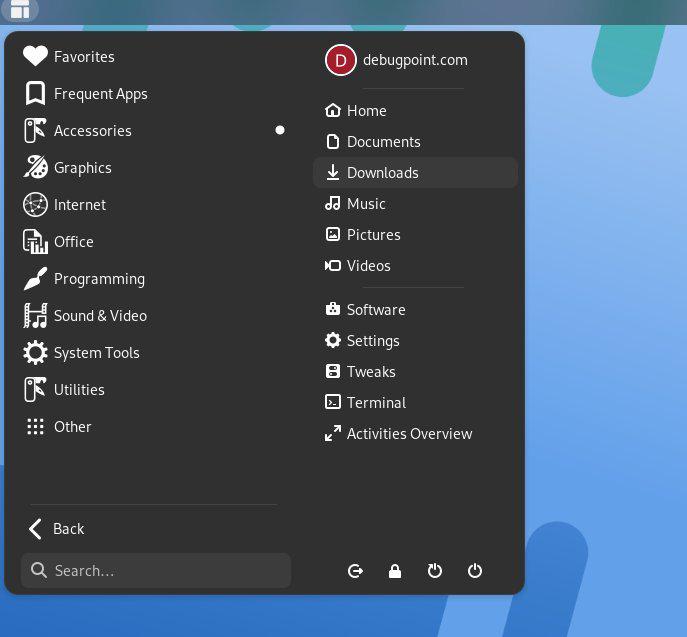
Opinion Será posible un menú clásico (nativo) en Gnome.

Post image
0 Upvotes

Será posible un menú clásico en Gnome, para los que no nos gusta Genome Shell, sin tener que recurrir a otros entornos como Cinamon o extensiones como Arc Menú


r/gnome • • 1d ago

LLM Assisted GNOME shell on the Steam Frame

Thumbnail
gallery
76 Upvotes

This is a little proof of concept running GNOME shell on the Steam frame. It was entirely generated by Opus 5.5 but is fairly polished, dare I say more so than Valve's KDE desktop mode implementation.

It's an additional desktop along side KDE, using a rootless podman container and some hacks to make the experience smooth, using the existing kwallet rather than gnome keyring for example.

User data and Flatpak apps are all accessible from within it. Mouse/keyboard works. WiFi/Bluetooth menus/quick settings work as expected. Audio input and output works as well as screen sharing on Discord. Deskflow remote control works. Everything just kind of works and I'm a little baffled by it to be honest. I love GNOME and think it is a great option for VR interfaces with its touch-centric workflow.

Again it is entirely vibecoded and just a proof of concept, but you can find the code and more info on Github:

https://github.com/Joseph-DiGiovanni/gnome-steam-frame


r/gnome • • 2d ago

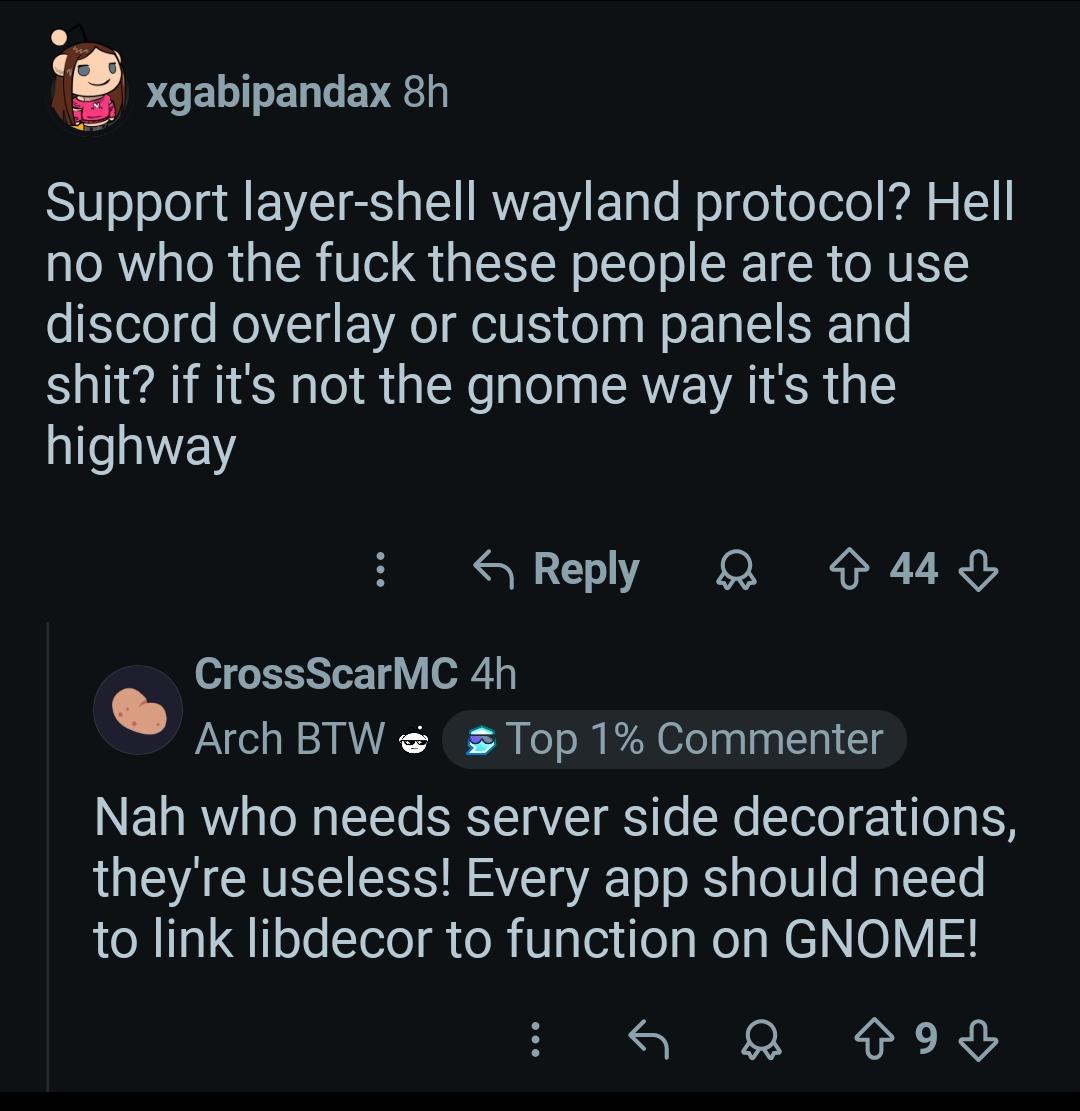
Question Can someone ELI5 what they are talking about?

Post image
76 Upvotes

r/gnome • • 1d ago

Question Any light/white theme with high contrast sync?

3 Upvotes

Hi! I've been trying to get a light/white theme that works with the High Contrast native option from Gnome, but I haven't found one yet. I would like to have a light top bar and menu after pressing the SUPER key. Thx!


r/gnome • • 1d ago

Community #275 Grand Theft Auto-Paste - This Week in GNOME

Thumbnail
thisweek.gnome.org
38 Upvotes

r/gnome • • 15h ago

Extensions Super G - 1 Gnome Extension That Does It ALL

Thumbnail
gallery
0 Upvotes

I made SuperG for myself to make the Ubuntu UI feel better. It's free, and I'm sharing it here in case anyone else wants it.

https://github.com/soheil03/super-g

One GNOME Shell extension and one theme for a clean, consistent Ubuntu desktop. Instead of nine separate extensions that each patch the shell their own way, Super G runs everything as modules of a single extension, driven by a single colour and shape palette, with one settings window.

Built for Ubuntu 26.04 LTS / GNOME 50. An independent project, not affiliated with GNOME or Canonical. Dock magnification follows Dhruva by NarkAgni.


r/gnome • • 2d ago

Extensions Ever dreamed of uninstalling an app easily from Gnome GUI ?

Post image
139 Upvotes

Hey everyone !
Ive been working (me and AI that helped me a little, why shouldnt i use its help intelligently lol) on a project called App Uninstaller, a Gnome Shell extension that adds a simple Uninstall option when you right-click an application in the GNOME overview. One thing that always bothered me about Linux DEs is that uninstalling an app isnt always as straightforward as it could be especially when you have applications installed from different sources.
So I thought why not make it possible to uninstall applications directly from Gnome ?

Heres what it does :
Adds an Uninstall option to application right-click menus
Automatically detects installation sources (APT, DNF, Pacman, Flatpak, Snap, AppImage and many others)
Shows a confirmation dialog explaining what will be removed before doing anything.
Offers optional cleanup of application data and unused dependencies when supported
Protects essential system components from accidental removal
Includes preferences for notifications, protected applications, and uninstall behavior
And Supports GNOME Shell 45-51.
It also has experimental support for Nix/Guix and handles applications from Steam, Wine, Waydroid and other environments..
The project is open source (GPL-3.0) and available on GitHub :
https://github.com/becabdev/app_uninstaller_gnome
It’s still a young project and im the only one maintaining it so there may be bugs or edge cases i havent encountered yet. I’ve tested it in virtualized environments and on real hardware even on my personal pc, but id really appreciate feedback from people using different distributions.
It’s also planned for publication on extensions.gnome.org.

Contributions, bug reports, and suggestions are more than welcome!
Thanks for reading :)