A long time ago, for about 60 days, I had an AI Pro subscription. Still, I cancelled it after the code quality plummeted; also, most of my conversations with Gemini were full of hallucinations, even going so far as to invent new laws of physics. Later, "Argon" came out; it couldn't even analyse a two-paragraph PDF document, yet it managed to burn through my entire usage for a week.
Anyway, I’ve since switched to Claude Pro, and I’m using it extensively. Between the hundreds of integrations, the "computer use" feature for automation, and the support for internal documents and artefacts. I’m absolutely thrilled with it.
Today, an offer popped up to get a Pro subscription at half price, and I’ve heard Google has released some new models. Is it worth giving it another try?
Does antigravity offering now have a comparable number of integrations, and does it include a "computer use" feature? I’d like to hear the opinions of those who use both assistants.
Seriously, why does it take this long just to read a basic prompt or a simple error? Even saying "hi" freezes it.
8h 39m, this isn't Antigravity, this is antiproductivity. I could've rewritten the whole script from scratch ten times by now. Even saying "hi" takes 10m. Can't believe this.
TL;DR: Despite recent criticism and rants about AGY's rough edges, watching agents make real progress during a break reminded the author how much time AI saves—turning a multi-month grind into something manageable without waiting for AGI. They're encouraging newcomers to block out negativity and experiment, while asking the community what they're building and how their workflows have evolved over the past month.
I've seen and shared my thoughts and made a few mean comments about AGY on subs, so here's another post sharing some well deserved love for AGY and the community. Sharing is caring!!! So read on.
I was waiting on my agents to complete a long running session today and was wondering about the progress, thinking why is there no AGY app out there yet.
I got back to the session and this made me smile - thinking how fast things change and what others could be building right now. Not to sound like a Google fanboy, believe me I have had my fair share of rants at them, the quote from one of my fav characters "this is exhilarating" comes to mind.
I'm not waiting for AGI, this is good enough for now. Just don't drop the ball Deepmind and keep accepting feedback!!!
Let it cook!!!
I rarely find the time to share so here's some more thoughts while I'm at it. TBH we take things for granted and overreact based on the high standards and expectations set upon others. This task would have taken me a couple of months to do right without AI - that's if I didn't say to myself "fuck it!!!" and stop giving it my best effort and get things over with.
To those figuring things out or just starting their journey using AI, just don't stop - weed out the negative influences and focus on staying relevant with the latest changes. Don't be afraid to try new things yourself, there's always something new and better you can learn every waking day.
What are you doing new with the tools and harnesses today? How are you using them differently vs a month ago?
I was doing some DFT simulations a question regarding a chemical compound triggered safety response now the whole chat is simply unusable any query i sent is responded with the same "This request was blocked by Gemini's filters. They can occasionally trigger by mistake on safe coding, security, or biology-related queries. Please try rephrasing your prompt. You can send feedback or read more about our policies here." message. any way to rescue chat and get rid of this dumb safety restrictions.
Otherwise I am going to run out of usage sooner than I have to on an ultra 5x because I can't for the life of me remember not to continue an expired conversation. I hate that we end-users have to manage stuff like this but at least give us a deterrant, a reminder to prevent accidental wastes.
I'm gathering some feedback on the /swarm command. For those who have used it, what are some cool things you've made with it? How do the results compare to non swarm conversations in AGI?
I've been using it a bit and the UI is very pretty but so far I'm not impressed with the results. Seems like I could have done just as much working with Neon in sequential messages.
For pro users, how quickly does it eat your usage?
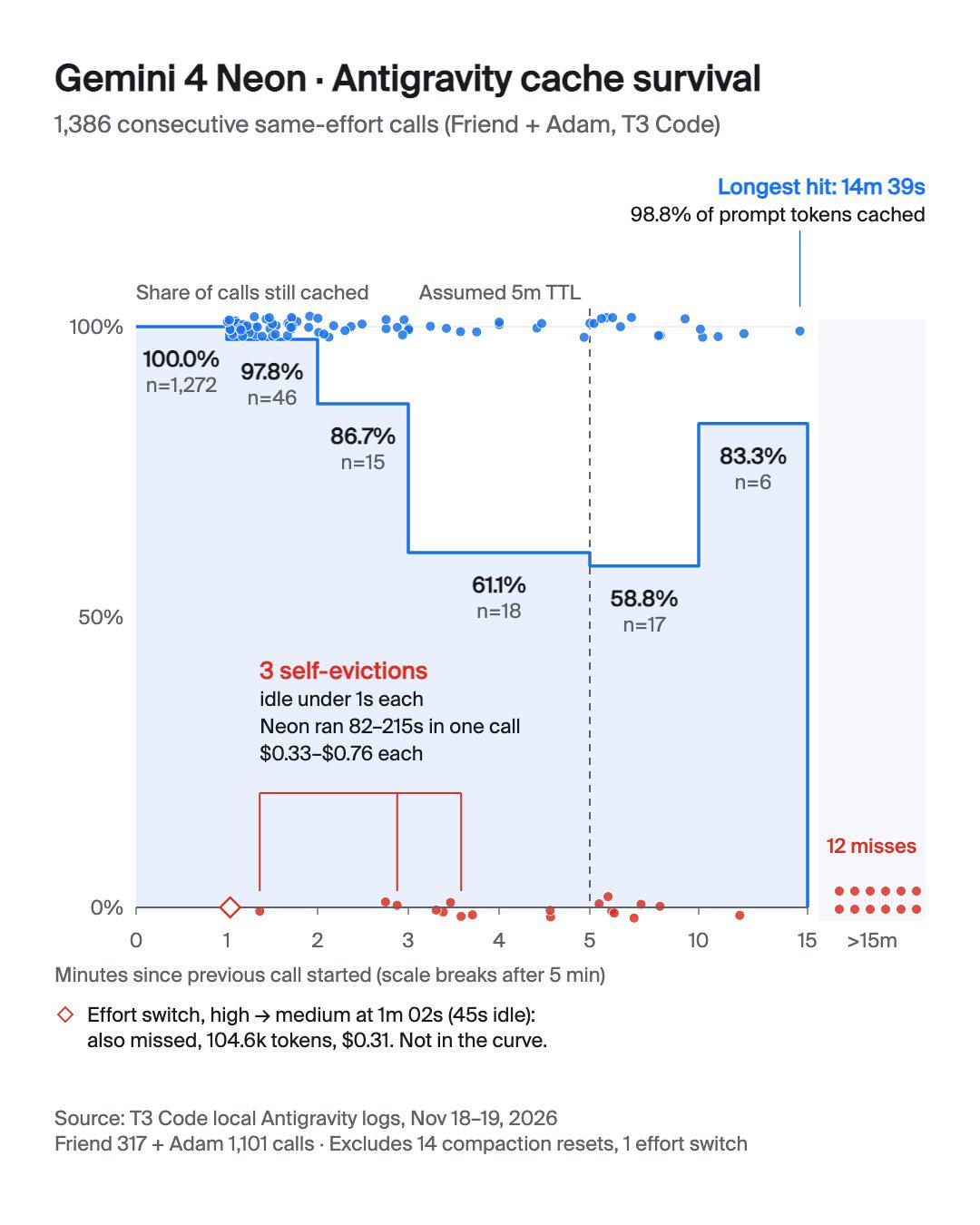
DeepMind really needs to fix how prompt cache eviction works for Gemini 4 Neon. Looking at 1,386 consecutive calls from local Antigravity logs (via T3 Code) (post from : https://x.com/AdamHoltererer/status/2124525866206089433/photo/1), the overall hit rate only looks fine because rapid sub-minute turns pad the average (100% across 1,272 calls), while real agentic turns get burned:
Self-eviction during long turns: Three calls with less than 1 second of idle time completely missed the cache just because Neon took 82 to 215 seconds to finish generating, costing $0.33 to $0.76 per cold re-read. Either the cache timer starts at prompt ingestion instead of completion, or KV blocks are getting evicted while the model is still thinking.
No reliable 5-minute TTL: Cache survival already starts dropping after 1 minute (97.8% at 1-2m, 61.1% at 3-5m), yet some entries survive up to 14m 39s before hitting a hard 15-minute cutoff. That behaves like aggressive LRU eviction under cluster load rather than an actual 5-minute TTL.
Effort toggles wipe the cache: Switching reasoning effort from high to medium after just 45 seconds of idle time invalidated a 104.6k-token cache ($0.31 wasted).
In real coding sessions, the exact moments your context is largest (right after a 2-minute reasoning pass, or when you lower effort for a quick follow-up) are when the cache drops out from under you.
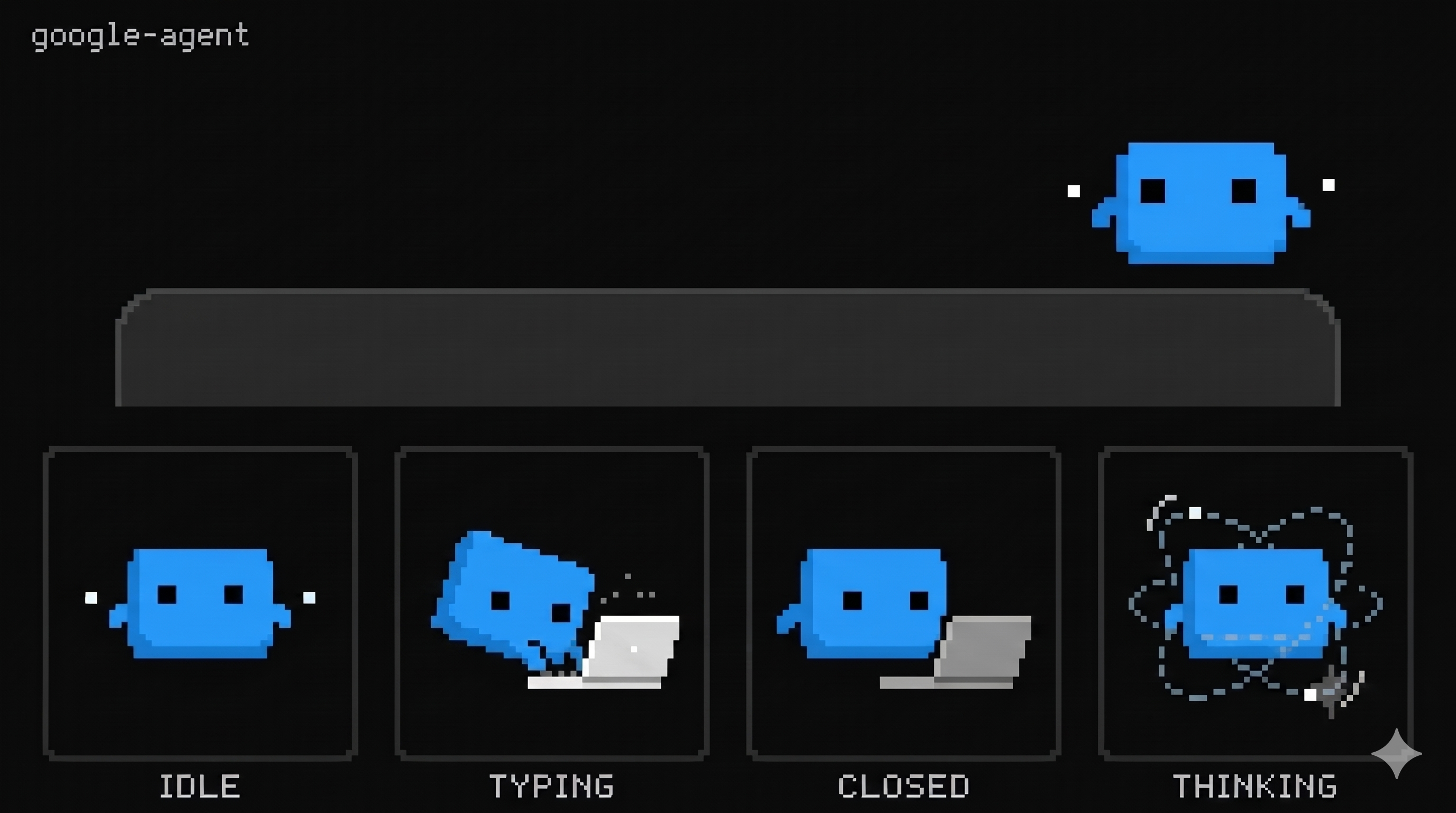
Just sharing the GIF and sprite sheet for now, if the response is good, I'll work on it further and improve the animations (and maybe build it out into a working companion).
Feedback and ideas for other Antigravity states are welcome!
Just finished an overnight grind for the Builders Buildathon, a coding hackathon with four tracks and a $5,000 prize per track. I competed in Mech Royale against 409 teams, where you build an autonomous bot scored on placement points across 96 matches against 15 house bots, and only the top 32 make finals.
I ran Neon Orchestrator on extra high in Antigravity (plus Neon in Gemini web chat later when usage was low for analysis) alongside Claude Opus 5.5 on extra high in Claude Code CLI. We finished #141 out of 409 with a best score of 5.16 against a 6.05 top-32 cutoff, so we lost. Still, watching how differently these two handled a real deadline was hilarious Claude Code literally ended up auto-drafting a bug report admitting its own ideas underperformed another assistant's (bottom of the first screenshot).
Here is how the night went down.
Claude started on a Python bot and immediately stalled in the 3.x range. Instead of using the info it already had to try real ideas while the clock was ticking, it kept waiting on more data collection, chasing perfectionism, getting way too pessimistic, and basically giving up.
While Claude was stuck, Neon in Antigravity built the entire Rust bot from scratch and broke 4+ right away at 4.29. That suddenly gave Claude hope again. It ditched its Python bot, pulled a branch straight off Neon's Rust branch, and started iterating on it, only to produce nothing.
Then Neon stalled around 4.0 to 4.40 on the gun-and-laser setup. That's when Claude finally got a small breakthrough by observing what Gemini had already built, adding a supply-drop chase that bumped us +0.26 up to 4.66. Right after that it stalled again testing around 20 ideas and missing on 18 of them went straight back to telling me our odds of qualifying were minimal, and burned a ton of time when submission slots were tight (it even thought we had 6 slots an hour when it was actually 4).
Neon in web chat then pulled off another big breakthrough with a farm-first gate, which pushed us past 5+ to 5.16. Claude tried building off that again, and right when we needed one more jump toward 6.05, I ran out of my Google AI Pro allowance. With only Neon web chat left and no Antigravity runs remaining, time ran out and we lost.
The clearest takeaway from all of this: Neon clearly beat Opus 5.5 on analysis and reasoning, while Opus does build better.
Neon was way ahead on strategy calls, video breakdowns, and real breakthroughs (2 big ones out of 12 ideas, though its local simulator was miscalibrated about 2 points too high). Opus just couldn't reason its way to winning ideas on its own under time pressure, but as a pure builder it's legitimately great. It managed 35 verified branches, added a crash guard and build-rule checks, modeled the scoring and luck variance, checked claims against the code, caught an accidental resubmission of an already-scored commit, and cleanly built out Neon's winning 5.16 strategy.
Slide 1 is the head-to-head table Claude generated with the self-own bug report at the bottom, Slide 2 is the phase progression, and Slide 3 is the final leaderboard. Honestly, Neon to think + Opus to build felt like the real setup just sucks hitting the Google AI Pro wall right at the finish line.
Is anyone else seeing the weekly plan on Google AI Pro shrink this aggressively?
Right now, burning through a single 5-hour takes at least 30% of the entire weekly plan— and in my case, it just wiped out almost half of it (5-hour hit 0%, weekly dropped to 52% with 5 days and 23 hours left until reset).
Setup:
Plan: Google AI Pro
Orchestrator: Gemini 4 Neon (High)
Executor: Gemini 4 Hydrogen (High)
I get that running High on both Orchestrator and Executor burns tokens faster, and I'm fine with hitting the 5-hour cap. What doesn't make sense is the ratio between the 5-hour and weekly pools. If 2–3 full 5-hour sessions wipe out the entire week, the 5-hour rolling reset barely matters anymore.
Went into using the Neon model with pretty low expectations, honestly. My setup is super minimal - just a single agent with no orchestration - so the model has to hold context on its own without a heavy harness holding its hand.
After running it through my actual work for a bit, I'm genuinely impressed. It handled two pretty unforgiving things way better than I expected:
First, porting an app across UI toolkits. After a quick back-and-forth interview to clarify requirements, it actually one-shotted the base UI port autonomously without breaking layout logic or introducing messy state bugs.
Second, porting an Android tablet to the mainline Linux kernel (7.4). I've been using it while working on camera, USB PD, panel bring-up, Wake-on-WLAN, and suspend/resume paths. It actually kept track of subsystem quirks and current kernel APIs instead of hallucinating outdated bindings like models usually do.
As for the $20 tier - it's fine for small, simple codebases, though for heavy stuff like kernel trees and full UI ports, your usage burn through like nothing xD Still, the actual results speak for themselves. For a basic single-agent setup doing low-level kernel work and UI refactoring, it's punching well above what I anticipated.
Debating doing the 6 month trial (Samsung device offer) or just taking the BF deal of $99 1 year. But I'm reading mixed reports on whether Hydrogen is available in agy for the trial or not, does anyone know?
Also, my trial offer expires Oct 2027. Anyone know if the offer will still be valid after cancelling the paid plan?
Welcome to the weekly support and known issues thread!
This is your space for all things technical—whether you've hit a quota limit or found a bug in the latest version. To keep the main feed clean, all standalone posts about these topics will be redirected here.
Update: Standalone posts regarding Jio are no longer permitted on the main feed and will be automatically redirected to this weekly thread.
To get help from the community, please use this format:
OS/Version: (e.g., Windows 11 | Antigravity v1.19.6)
Model & Plan: (e.g., Gemini 3.1 Pro | Pro Tier)
The Issue: (Describe the error, bug, or limitation you're facing)
Use this thread for:
Quotas: "I hit my limit 2 hours early today."
Bugs: "Is anyone else seeing [Error X]?"
Updates: Discussing official updates from the Antigravity Changelog.
Do not use this thread for:
General venting without technical context.
Duplicate complaints without adding new data or logs.
Requests for exploit tools or auth-bypass plugins (strictly prohibited).
If your MacBook gets hot and Antigravity IDE's main Electron process sits at 100%–200%+ CPU even while idle, I traced the exact root cause using ps, lsof, and sample.
What's Happening
The main Electron process gets 1–2 libuv-worker threads permanently stuck at ~100% CPU each (STAT = R). Restarting (Cmd + Q) clears it temporarily, until it triggers again while editing/saving files.
Running sample <PID> 1 on the main Electron process shows the libuv-worker thread spinning forever in:
And lsof -p <PID> shows a workspace file paired with a User/History/... destination file stuck open indefinitely, even though 100% of the file's bytes have already been written (reproduced on both 109 KB and 5.4 KB files).
Root Cause
This is the known upstream uv__fs_copyfile infinite busyloop bug when a file is concurrently modified/truncated while VS Code's Local History (fs.copyFile) is copying it — which happens easily when an AI agent edits files rapidly: