r/googlesheets • • 6h ago

Waiting on OP How do you search on mobile?

1 Upvotes

Like the title says, does Google Sheets have a search function for mobile Android. For example, I can search for key terms in Excel using control F. I was wondering if anything similar exists in Google Sheets for mobile Android


r/googlesheets • • 14h ago

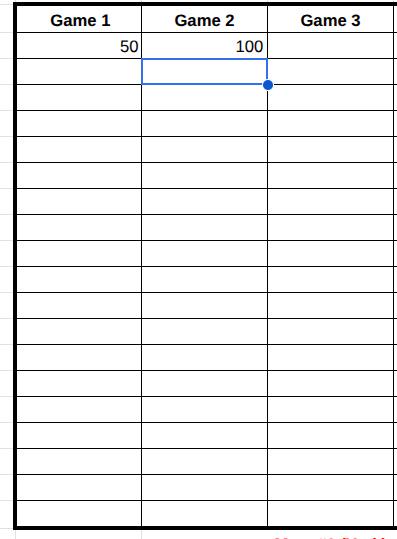
Solved I’m trying to make a code where it counts that there were 2 games played out of the 3 and it just says “2” because only 2 games were played.

Post image
3 Upvotes

Any help would be appreciated, thank you!


r/googlesheets • • 10h ago

Waiting on OP Comment copier une ligne vers une autre feuille en fonction de la valeur d’une cellule dans Google Sheets ?

1 Upvotes

Bonjour, j'essaie de copier une ligne de plusieurs colonnes dans une autre feuille en fonction de la sélection d'une valeur mais je n'y arrive pas avec FILTER ou QUERY

J'aimerais bien copier les colonnes de A à G de la feuilles COMPTES GLOBAUX, depuis la ligne 24, vers la feuille correspondante (exemple ici dans la feuille MOCHE IN TEST) à la valeur définie dans la colonne H

Je peux noter les formules dans les feuilles d'arrivée des données en fonction de la valeur mais les formules que j'ai essayé ne fonctionnent pas

Comment puis-je faire ? merci et belle soirée !!


r/googlesheets • • 1d ago

Waiting on OP Help with building out an equation sheet for a game

3 Upvotes

Hello, I'm really sorry to bother you all, I'm not sure if this is how this question is meant to be posited, but I really could use some help. I'm experimenting a a little bit with creating a card game in my free time.

For the simple premise of what I'm looking for, I have a deck of 21 cards. For simplicity's sake, 7 of the cards in the deck are Aces, 14 are Jacks. The Aces are the main thing I care about tracking.

I know that a basic hypergeometric calculator will help me find my chances of drawing a certain number of Aces in that 21. I can get that working and assuming I draw two cards from the deck, my chance of getting an ace is 11% and some change, and I can easily scale that until the chance is 100%, as seen in the first picture. (I also know how to convert it to a percentage for convenience but that's neither here nor there.)

Here's my main problem. When two cards are draw, whatever card is not accepted (usually an Ace) is put back on TOP of the deck. So we're working with dependent probabilities now. What are my chances of drawing two, getting an ace, AND if I had an ace already on top of my deck, what's the chance the second card is an Ace as well?

I don't need to explore every possible permutation (I think...?) but I more so need a good idea of, accounting for aces on top of the deck, how much worse does your chances of NOT drawing Jacks become as you continue along the drawing events.

The main things I want to tweak with this at scale are

  1. Can I do it again but change the Jack/Ace ratio
  2. What are the differences between drawing two cards and putting one back on top, and drawing three cards and putting two back on top mathematically? How drastic is the reduction of the chance that, even with stacking Aces back on top of your deck, you will only draw Aces?

Unfortunately, I'm an idiot who barely passed high school math class. How could I build out an equation like this in a Google Sheet, and what could I realistically accomplish with both hypergeometric calculations and dependent probabilities? Would I reasonably have to check EVERY possibility, would I be able to get a very reasonable equation to give me the basic gist of the odds?


r/googlesheets • • 2d ago

Waiting on OP Split Row into Multiple Rows

Post image
3 Upvotes

Was wondering if theres a way to a row with data into multiple rows. Some of my dads data got merge into 1 row and we want to spli the row without have to re type the data. Also my bad is stupid when comes to computers hes almost 80. So was just wondering if theres is a way to do that.

So for example Row 5 has 3 names dates payments, but we want each of those in their own row, how do we do that with out deleting everything in row 5 and just put everything in its own row.

No thats not the real data thats just stupid quick example i made. my dads daya is a bit more. then that,


r/googlesheets • • 2d ago

Waiting on OP My table interface is lagging

Thumbnail gallery
3 Upvotes

I want to calculate some things for a lot of days, but this horrible-looking bug in google doesnt let me ,it happens only in google (Edge has no problems) and without incognito. Interface is still clickable, it just looks very wrong


r/googlesheets • • 2d ago

Solved Conditional formatting: Can you condition when also using drop down options in cells?

Post image
4 Upvotes

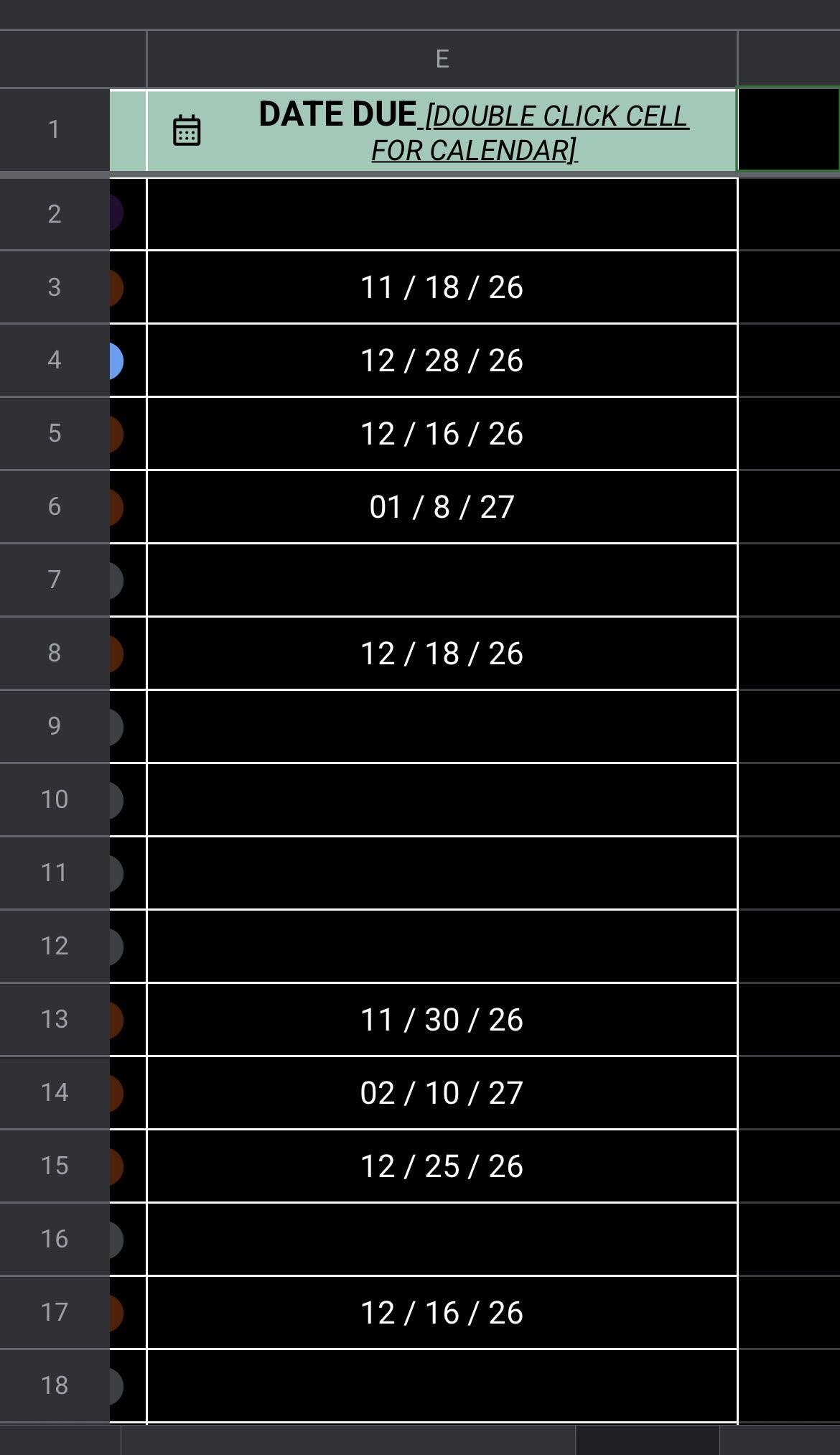
I re-read the rules, I hope I adjusted my post to fit, if not I apologize! I cannot post all data because I work in healthcare. I am trying to condition format to color code cells in Column E based on a drop down option in Column C.
I went to conditional formatting and tried typing in what I want [apply to range- E2:E106 > custom formula- C2:C106 ‘NAME’] and it won’t flag it but it also won’t do what I want… is it because the names in column C are chosen using ‘dropdown’ option and not typed in??
- The reason is, the dropdown names are individual workers, and I want the due date in Cells E highlighted the color assigned to the worker utilizing the dropdown option. I had this rule in place when first making the doc because it seemed easier, but if I need to redo that I can (just a pain)
Thanks!


r/googlesheets • • 3d ago

Unsolved Fixing pressing “Tab” to move to next cell

4 Upvotes

Hello. I’m not sure if this was an update by Google or if I’m doing something wrong, so I wanted to check here about it. I do a lot of copying and pasting into Google Sheets. I used to be able to input that text into the formula bar and then press the Tab key on my keyboard to move to the next cell. Now it’s suddenly moving instead down to the Add Sheet button on the bottom of the screen. I used the formula bar because often times, the copied text is not formatted the way it would need to be for Sheets (eg: if pasted directly into the cell, the font size, alignment, etc. would be off). Double-clicking on the cell itself in order to press the Tab key to move to the next cell is way less efficient, so I’ve ended up just clicking on each cell box individually in order to paste into the formula bar now. Is this a global issue? Is there a fix for this? Thank you


r/googlesheets • • 4d ago

Solved Is there an easier way to make a blank cell then ' =IFERROR(1/0) '?

7 Upvotes

I'm aware you can do ="" but that's not truly blank and breaks some things.


r/googlesheets • • 4d ago

Waiting on OP How can I share this Google Sheet (grade book) in such a way that names are visible to me but hidden to families?

6 Upvotes

Pic of Sheet

5th grade teacher. I want to be able to share my grade book with families so they can see what their student is missing. However, I want to make it so the names are hidden to families but not to me. Families could still know which row (number) their student is, but I could still see the names when inputting assignments.

Is there a way to do this?


r/googlesheets • • 4d ago

Solved How to put 100 after 99 w/text

Post image
5 Upvotes

How do I make 100 come after 99 and not after 10? Im really a beginner and kinda slow so please explain it like im 5. Also how do I make a separate column that automatically generates numbers 1 - 200?
Example

1 - Miss Me 1
2 - Miss Me 2
3 - Miss Me 3
4 - Rock Revival 1
5 - Rock Revival 2

So i can know the number of jeans in THAT BRAND specifically AND the number of jeans i have overall.


r/googlesheets • • 4d ago

Solved Checking boxes under certain conditions?

Post image
4 Upvotes

Hello, novice Google Sheets user here!

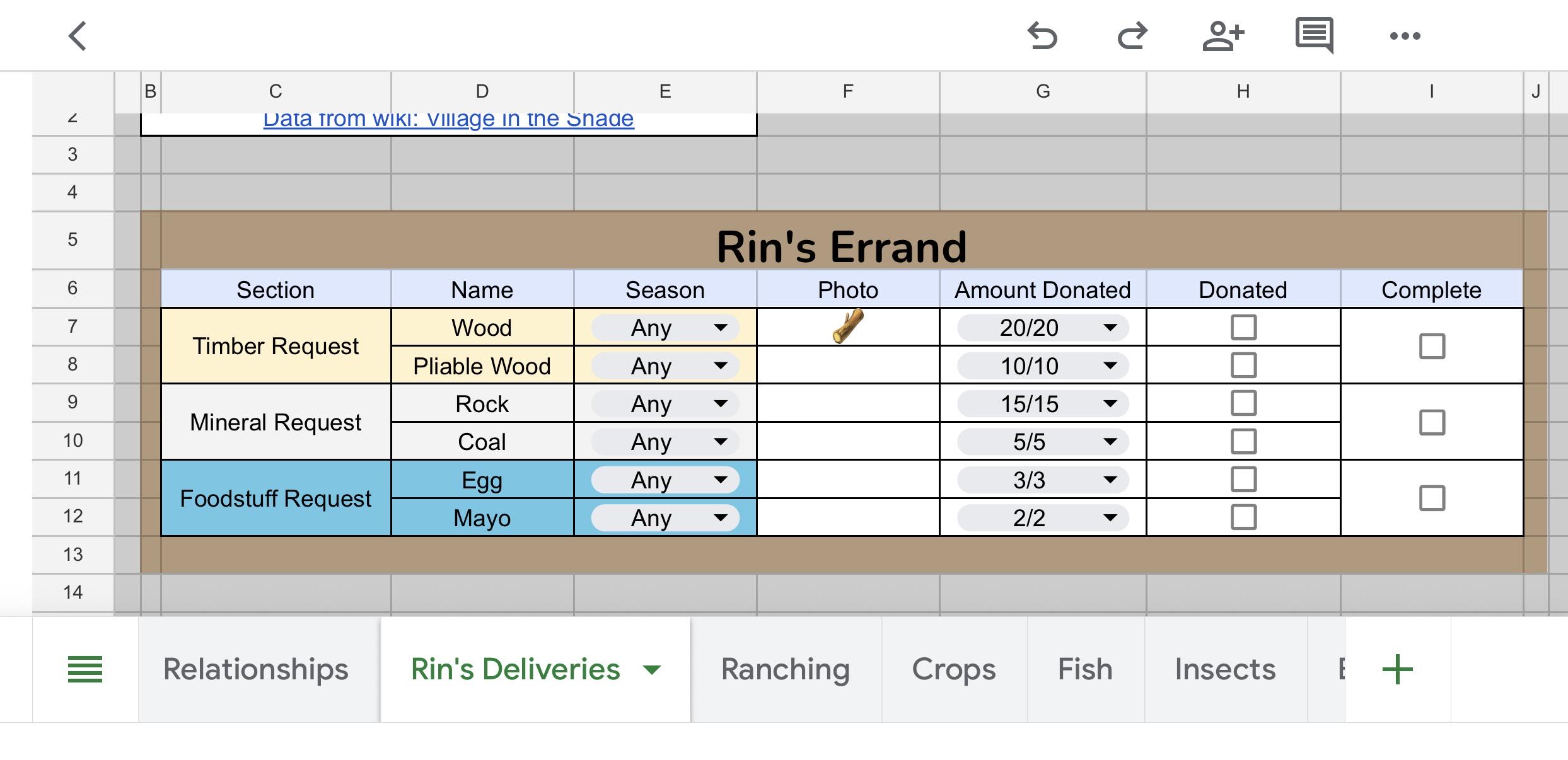
I’m making a tracking sheet for me and a friend of mine for a game we play. I’ve attached what I got so far, but it’s pretty basic. I’m stumped on how to get it to do what I’m wanting to do however. Currently, when the boxes are checked, the cell they’re in turns green. They only affect the cell they reside in and nothing else.

Here’s what I’m wanting:

-When the amount donated has been completed (aka, 5/5 has been hit in the drop down for example), the Donated box for that row is checked and text is striked through.
-when all Donated boxes for a section is complete and all boxes checked for that section, it will check the Completed box on the last row and strike through the section
-When the Competed box is checked for a section, it will check the associated Donated boxes for said section and strike through it’s text.

I’ve been playing around with things trying to figure out to do everything, but like I said I’m stumped.

Hopefully I explained things alright, but I’m happy to elaborate or try to explain better.

Anyone have any ideas?

Edit: After talking with a couple of people, I’ve realized that not all of it may be possible. That’s totally fine. Me and my friend are prone to forgetfulness and losing track, so I was trying to meet those needs.

I looked ahead and it appears that from now on each section will have a total of three rows. The values for the donated column will fluctuate, but seem to bounce 99% of the time between 1, 2, 3, and 5 as their maxes. The remaining 1% is for a single section where the max value is 10, 15, and 20.

If having a box checked when that max value is selected from the dropdown isn’t possible or too difficult, it’s totally fine to just leave it out. I’d say the checkboxes are the most important. Or if there is a better way to do it, let me know! I’m happy to change things up.

I’m currently at work, but as soon as I have more than second, I’ll whip up a couple of pictures as an example and add it to my post, though I’m sure it would look very similar to what is currently there.

r/googlesheets • • 4d ago

Solved =query different sums in same row

3 Upvotes

I'm trying to sum specific columns of information based off of the text data of another row. I managed to do this for one text data, but I want to sum different groups of data.

Using the function,=QUERY(A:E, "select sum(E) where A='PROJECT TITLE'", -1) , you can result the sum of each project, but the column clogs up the chart.

Is there a way to sum different projects in the same query? Or is there a way to completely get rid of the column title in a query? Or will I have to just bite the bullet and have a clogged-up chart?


r/googlesheets • • 4d ago

Waiting on OP Assistance with extracting data from google form and creating live chart that updates with new form submissions

Thumbnail gallery
3 Upvotes

I am trying to create an easy way to view changing data submitted from google forms into an easy to interpret chart. I have a partial creation but have not been successful in getting the sheet to do what I want. I am currently very rusty with sheets/excel. The google form is to track daily product productions for my job so anyone with permission can easily view a chart that is up to date. I currently have it set up so employees can scan a QR Code to access the forms, but the auto generated graphs/charts that the form creates is not useful.

Ideally the chart can be organized by date, name, type of product and quantity. I currently have the start of a graph that is a stacked column chart but I need it to be slightly different and live so it will auto update if possible. I am struggling to get it to differentiate by name of each person. Currently it is only doing quantities for each date.

I have tried to follow different tutorial videos posted on Youtube and some forum pages that I get the basics of but lack the knowledge of how to fully apply it to the creation of the charts. Any hel would be greatly appreciated.


r/googlesheets • • 5d ago

Waiting on OP How to set up data validation to check whether the sum of multiple cells in one sheet is equal to a single cell in another sheet.

2 Upvotes

I am a biologist who is doing lab work sorting various different species of beetle from field samples. I am interested in three main species and have a spreadsheet counting the number of each that I find within each sample (see image below)

I then have three other sheets that are to count the different sexes of each beetle that are found in the sample.

I would like to set up a data validation rule (if that is the right way to go about it) such that the SUM of the 3 values entered into the "sex" sheet have to be equal to the value of the TOTAL number of that species found in the sample.

E.g. in the images I provided, in the first image you can see the highlighted cell shows that 7 "Zophosis gracilicornis" were found in that sample. Then in the second image, the highlighted range shows 5 Female, and 2 Male, and 0 undetermined, Zophosis beetles. Since the 5+2+0 is equal to the original value of 7, this is valid. I would like it such that if these three entered values on the secondary sheets are ever not equal to the original, then you get warned.

So far I have been able to figure out how to do it so that the original cell from the first sheet gets a warning, but this is not ideal as the data in the first sheet should be treated as the "true" data. If I am not getting myself across clearly I apologise. I am still fairly new at doing more advanced things in spreadsheets.


r/googlesheets • • 5d ago

Solved Is there a way to highlight repeating data, even when the data is in a different order?

Post image
1 Upvotes

Image attached for the effect I would like to achieve! I know how to get repeating data to highlight (when "1,2" appears more than one time in a colum) but I havent been able to figure out if theres a way to highlight cells if the info is in a different order, but has the same data (ie. I want "1,2" to highlight if "2,1" is present. Its the same "pair" of data, just shown in a different order)

Thank you in advance for the help!


r/googlesheets • • 6d ago

Solved 1st- Ranking positions for fantasy teams

Post image
5 Upvotes

I help with keeping track of a fantasy sport teams league, and I’m having trouble with the ‘RANK’ function. I’m honestly not even sure if I’m using the right formula.
As you can see, under the totals there used to be a ranking system, that went through the whole sheet and let you know that persons placing for that specific night.

Unfortunately when I took over keeping track though, that function decided to stop working/wasn’t transferred over correctly? And I cannot figure out how to get it back to working


r/googlesheets • • 6d ago

Solved Why is there no "mark cells read-only"?

2 Upvotes

I know that I can restrict who can edit sheets and ranges with "Protect Sheets and Ranges" but it appears I can't restrict myself? I have several sheets with =query() in A1, if I accidentally edit any cell in the result set the entire result set disappears. It would be nice to disallow accidental editing.

I tried using onEdit() under Extensions->App Script but that was useless.


r/googlesheets • • 7d ago

Solved Assigning Different Numerical Values to Different Cells

4 Upvotes

Hi, I am using google sheets to track my graduation requirements for college. In my current system, I have courses listed in column A and a dropdown menu in column B featuring any given requirement a course could fulfill. I then have a separate section which lists out all of the graduation requirements and tallies the amount of courses I have taken for each requirement via a countif checking how many instances appear in column B—this means that every instance is worth 1. I have also taken several half-unit courses, and would like to have those included in the tallies as well, but they would each only be worth 0.5 instead of 1. Is there any way to change the value of a cell? Currently, the only solution I have is manually adding a "+0.5" to my countif formulas, but I would love a way for this to be automated. I've attached a basic mockup of what my tables look like without the actual details as to not dox myself. Thank you so much!


r/googlesheets • • 7d ago

Solved Moving a Sheets Spreadsheet to a Docs Template Help

2 Upvotes

Hi all,

I am currently in sheets/docs hell and was hoping for some advice.

What I would like to do is take the collated column of addresses I have for the attendees of my upcoming wedding in google sheets and transfer them unchanged to a google doc that has been templated for the avery address labels I am using. My first attempt had portions of the address drifting down to the next label in the chain. My second attempt had addresses with seemingly no rhyme or reason drifting down in the application such that even to my eye I can see that the address in the third column will be printed at least 1/2" lower than the one in the first column.

As far as I can tell the formatting for my labels in sheets is exactly what I want. When I try to import the sheets doc, all I am returned with is a blank page, even though it expressly says "import labels from sheets". If it makes a difference, the sheet I am importing from is a formula import from a previous page where I had collated a name column and an address column into a single column.

I don't know what I'm doing wrong and would love some advice.

Edit: also a simple copy/paste gets me a line of characters along the edge of each label while only the last label in the sheet is legible


r/googlesheets • • 7d ago

Self-Solved Font text color goes back to default whenever I edit the text or even double click the cell. Even with a new blank spreadsheet

1 Upvotes

I have a spreadsheet where if I have text of a different color and edit the text, it turns back to default (black). Even if I just double click the cell, it does this too.

I thought it was just that spreadsheet, but I opened a brand new fresh sheet and tried, and it's doing the same thing.

EDIT: For those finding this, I found the problem was a browser extension which darkens webpages called Dark Reader, and it's default Dynamic Mode. It was causing the text color to auto default to the inverted color scheme.


r/googlesheets • • 7d ago

Solved Help with understanding RE2; If text equals case A, case B, etc.

1 Upvotes

Hello, this is V_nytrix! I'm back again with my sheet, and I'm trying to set up a conditional formatting if the text of each row of the first column matches these values [Limited], [Mission], [Achievement], or [Barn].

Tried to figure this out myself, and came up with the general idea of the REGEXMATCH function. I'll set it up right here:

=REGEXMATCH(REGEXEXTRACT($A3;$A, ... ), ... )

I just found out that there's some form of syntax where it can accept any cases of these above words - unfortunately, I'm new to this form of RE2 syntax, and I couldn't quite figure out what syntax I needed to be able to match my above conditions!

Do you think you could teach me on some RE2 fundamentals?


r/googlesheets • • 8d ago

Sharing Display a formula while keeping the color syntax highlighting

Post image
11 Upvotes

Here's something I learned recently. To display a formula while preserving its syntax highlighting and font style, you can either remove the = or insert an apostrophe (') before it, then immediately press Enter. The key is to perform the edit and press Enter in quick succession. This converts the entire formula into Rich Text.


r/googlesheets • • 8d ago

Solved an IFS statement breaks even though the same code above it works just fine

Thumbnail docs.google.com
4 Upvotes

The Cell W11 is showing a No Match error despite it working just fine above and below, it only breaks when there are three options filled in a row, I can even toggle it between a working and broken state with the out of place button at the top. I have no idea why three options breaks it when i specifically broke up the code into different cells to make it easier for me to understand when making it.

its such a simple bit of code I am completely lost at how to go about fixing it, so i'd appreciate some help fixing it so i don't have to brute force it.


r/googlesheets • • 9d ago

Waiting on OP how do i make a cell change value based on another cell but only under certain conditions

3 Upvotes

OKAY SO the title doesn't quite explain it right, but i didn't want to make it too long. so basically, i want to hook up cells to change based on the value of a cell in another sheet. but ONLY if yet ANOTHER cell has a specific value in it - and if not, then i want the cell to keep the value that it has. so basically, if a2 says "sarah" and b2 says "25" then i want c14 to say "25", but if a2 changes to "lexi" and b2 changes to "23" then i want c2 to *stay* as "25" and have d14 change to "23" instead

i was thinking of trying an "if(a and b)/else" but i don't know what the else would have to be to keep it at the value instead of changing to an error