r/homecockpits • u/EggComprehensive5240 • 12h ago
Homecockpit Bau Boeing 737-800 X-Plane 12 Zibo Mod

2
Upvotes
r/homecockpits • u/EggComprehensive5240 • 12h ago
r/homecockpits • u/peterharriss • 1d ago

Currently in the process of developing an affordable seat for A320 builders.
Currently around $2k USD for two seats shipped internationally via DDP.
Fore/aft travel: 230 mm
Vertical adjustment: 60 mm
Seat cushion height: 390 mm to 450 mm off the ground
To cut costs, the back cover will be a 3d printable download that you can print and assemble in sections. Options armrest covers can be placed over the stock ones that look like the real thing. Arm rests are adjustable.
Garnering interest on how many units to make in the next batch.
r/homecockpits • u/Ok_Scratch3226 • 1d ago

If you call in while ordering your SimFab cockpit they have a flight oriented v3 seat with minimal bolstering intended for a long flights as an option. And it's definitely comfy. I got mine in military green and I think they have many other colors but this is my experience so far I don't think there's any other photos out there and they have yet to update their website but I'm sure that'll come soon. so far I'm very happy with my purchase.
r/homecockpits • u/BiTRiP_ • 1d ago
Hello, a friend of mine is building a home cockpit with a 180° screen and he has been advised by Optoma for a good projector and they advise 2x ZU507TST projector, WUXGA (1920 x1200) with 16:10 ratio.
They also did an alternate offer of 2x ZK608TST projectors which are 4K UHD (3840 x 2160) with a 16:9 ratio but say that for this homecockpit a 16:10 projector is better.
What do you think of what the experts here suggest? I'm afraid 1920x1200 will be too low and blurry compared to 4K but I might be wrong if they are right with the ratio issue.
The projectors will be connected to a RTX5080 machine and maybe later to a 5090 when they are better available for a fair price instead of 10K now.
Please advice. Much appreciated.
r/homecockpits • u/InternationalBerry62 • 2d ago

We built a USB-C desktop flight guidance panel for the ATR 72-600. It’s now available on our BRASS WORKS website for US$169.
You can turn the heading knob to set a heading, push it to sync with your current heading, and dial in your selected altitude. Press VS and use the pitch wheel to adjust your climb or descent rate. The buttons have mode indicators, and the panel backlight follows the cockpit dimmer.
Setup is plug and play on Windows. Plug it in over USB-C and open Brassworks Connect. It maps the controls automatically. The same panel works with the DeltaWing ATR 72-600 in X-Plane 12 and the Microsoft / Hans Hartmann ATR 72-600 in MSFS 2024.
You can see it working in the one-minute demo on the product page:
ATR 72-600 FGCP
r/homecockpits • u/Robossbomb20 • 3d ago

Good news is Thanks to the help of a tech and documents he had we were able to figure out the pinout
5v ac for lighting
115v 400hz for the main power
Since the lights are just incondesoint bulbs 5v dc worked but for main power I assume that not going to be the case where DC works in place of AC
Any ideas or experience on powering this thing up, I’ve seen inverters online that convert DC 28v to the 115v 400hz but all the ones I’ve found currently for sale are overpriced and untested
r/homecockpits • u/EstablishmentDue796 • 2d ago

Hi all,
I'm adding a clock to my set up using a Boeing 737 Electronic Clock (Meggitt Avionics P/N 35000-00-01, Boeing P/N 5231W130-3) with the 24-pin circular rear connector (MIL-DTL-83723 / 16-24 insert) that I found on eBay.
I only need to power the clock and get the backlighting/dimming working-I don't need any of the ARINC 429 data buses (GPS/MMR, FMC, FDAU, CVR) hooked up right now.
Could anyone with access to Boeing WDM/SSM 31-22-11 (Connector D714 for Captain's Clock or D716 for F/O Clock) or Meggitt CMM 31-25-01 share the pin assignments for just the power, ground, and lighting lines? Specifically looking for cavity numbers (1-24) for:
• 28V DC Hot Battery Bus (keep-alive)
• 28V DC Battery Bus (display power)
• DC Ground / Power Return
• 5V AC Instrument Lighting (High & Return)
Any help or a quick look at the connector pin table would be hugely appreciated so I don't risk applying voltage to any of the ARINC pins and torch this thing.
Thanks in advance.
r/homecockpits • u/Ok_Scratch3226 • 2d ago
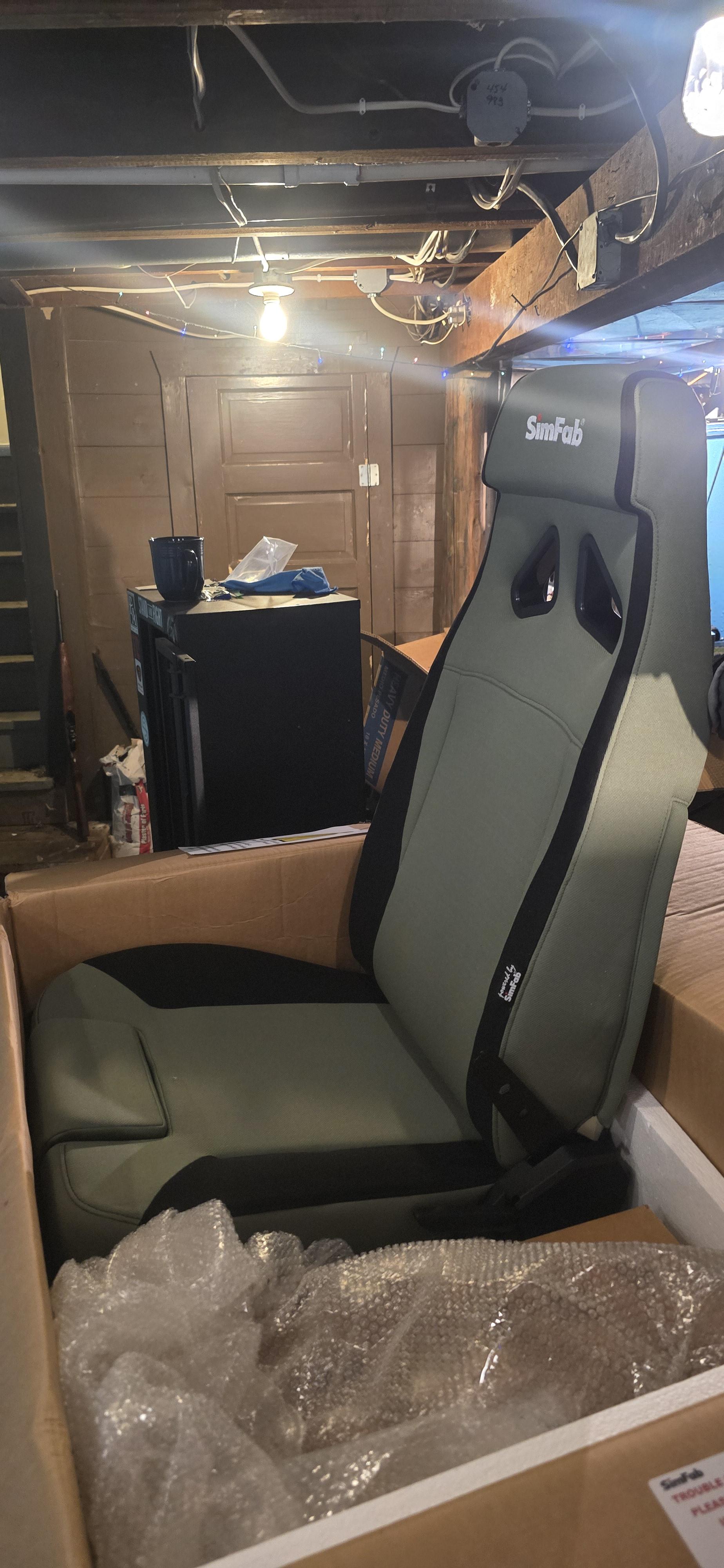
I'm about to assemble my first professional cockpit and simfab hooked me up with a brand new military Green version 3. Supposed to be much more comfortable for a long flight than the bolstered seat. And it was included in the normal price.
r/homecockpits • u/Greedy_History_6683 • 2d ago
r/homecockpits • u/Rotaidem • 2d ago
Update 1.2.1 of HeavyPro is released!
What does it do?
Fixes some braking bugs where it would be hard to stop when taxing and parking.
Rudder and braking movement no longer disconnects the AutoPilot as it was very sensitive before.
Engine type for the Ifly 737. Where it would mix up.
Update now!
r/homecockpits • u/FarYou2602 • 2d ago
my son is 12 and has been asking for slight similatir for a couple of years. Could i get some advice on a good beginner setup? it will be based around an x box series x .
r/homecockpits • u/Loneregister • 3d ago
I2c, with differential. All rj45 cabling to keep the nightmare of custom cables away. In this example its a simple F16, SNSR panel, with switches and backlight control.
The control board auto detects the panel plugged in, and the panels are hot swappable and detect upon plugin.
r/homecockpits • u/almstAlwysJokng4real • 3d ago

7800x3d 7900xtx 64gb 6000mt RAM.
r/homecockpits • u/Extreme-Attitude3910 • 3d ago

I'm a teen developing a modular, USB-C plug-and-play Textron Aviation S3325-6 style airspeed indicator for home flight simulator cockpits.
The gauge is 3D-printed, features a working stepper-driven needle, and connects directly to your PC. Custom software or a Mobiflight config and a USB-C cable are included.
It's designed for flight simulation only, not real aircraft use.
I'm currently gauging interest and looking for feedback from the home cockpit community. Planned price: 79 EUR.
For transparency, a few parts of the ASI are based on Captain Bob's designs, which I give him full credit for. We also have a royalty arrangement sketched out for when the product enters production.
r/homecockpits • u/Tiny_Experience_626 • 3d ago

I got this 737-500 standby attitude indicator that used to bean aircraft part but then was converted to a trainer part. Looks like a Thales H341ANM1. Relatively good condition. Does anyone know how much it would be worth?
r/homecockpits • u/Iron_1316 • 3d ago

r/homecockpits • u/Delos20 • 4d ago
Built a Standalone CJ4 Standby Instrument That Talks Directly to MSFS 2024
One last project before heading out for Thanksgiving!
I've been working on a replica of the Goodrich GH-3100 standby instrument for my full-scale Citation CJ4 home cockpit. After finishing the mechanical design and 3D-printing the housing, I decided to tackle the software.
Rather than using a pop-out window from MSFS, I built a standalone application that renders the entire instrument using vector graphics and receives live flight data directly from the simulator.
A small bridge application reads attitude, airspeed, altitude, heading, and slip data from MSFS 2024 at 30 Hz and sends it over the network to the display.
The video shows the instrument running on my desk while I adjust the barometric setting in the sim. You can see the indicated altitude responding in real time.
It's a fairly simple demonstration, but this was my first real attempt at developing software that communicates directly with MSFS, so seeing it work was a pretty satisfying milestone!
The display also includes the standby's independent baro setting and menu functions, modeled after the real GH-3100. Next up is a custom PCB to connect the physical rotary encoder and buttons.
I've also just received a huge shipment of newly manufactured cockpit panels, so there should be plenty of assembly and testing updates after Thanksgiving.
For anyone building custom instruments, have you gone the pop-out route, used something like Air Manager or Glassout, or developed your own display software? Curious to hear what others are doing.
I'm documenting the entire CJ4 build and sharing the project resources at https://525charlie.com
Happy Thanksgiving to everyone following along!
r/homecockpits • u/0MEK0 • 4d ago

Not a whole cockpit lol, but Im building my version of Main instrument panel on the f16 for DCS
r/homecockpits • u/Fabulous_Airport496 • 4d ago

I've been working on building VortexLab, a Canadian brand focused on designing and 3D-printing desktop cockpit panels for home flight simulators.
The goal is simple: bring a more realistic cockpit experience to your desk without needing a full-size simulator setup.
Here's what we're working on:
🛫 AIRBUS A320 DESKTOP PANEL
Captain-side main instrument panel featuring PFD, ND, ECAM and SD across two 15.6" monitors.
Starting at US$349.
🛩️ CESSNA SIX-PACK PANEL
Classic six flight instruments on a single 15.6" portable monitor.
Starting at US$100.
✈️ BOEING DESKTOP PANEL
Currently in development. More details coming soon!
🇨🇦 All panels are designed and 3D-printed to order in Canada.
I'd love to hear from fellow simmers:
EXPLORE VORTEXLAB:
🌐 Website: https://vortex-lab.co/
📸 Instagram: https://www.instagram.com/vortexlab3d/
▶️ YouTube: https://www.youtube.com/channel/UCf5TGpG4zSLOABa2T10-8TQ
Thanks for supporting a small Canadian flight-sim hardware project!
Note: FCU, throttle, sidestick and gauge software shown are not included.
r/homecockpits • u/infosec_james • 5d ago
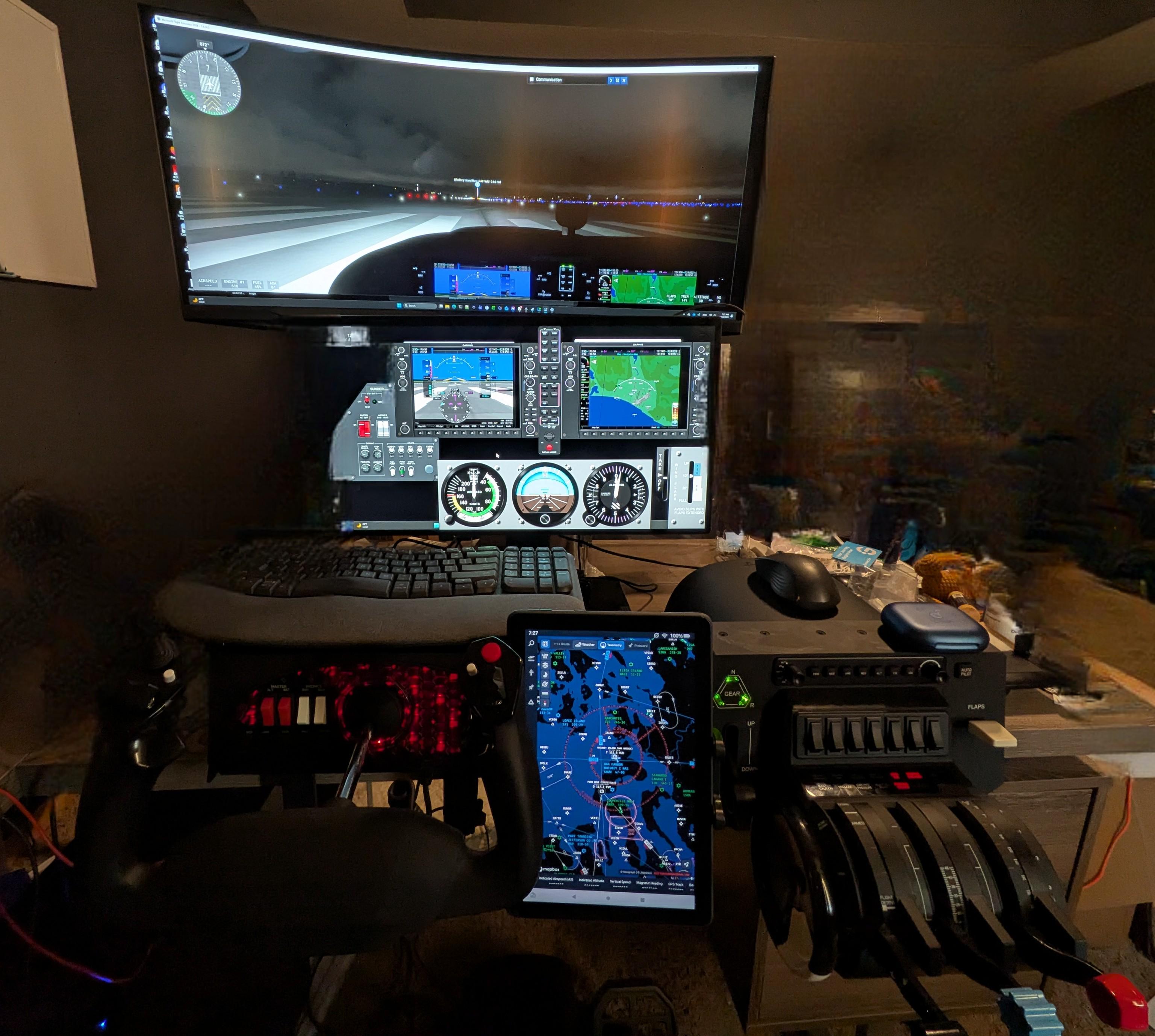
While still trying to finish moving our home office into a real office and figure out what to do with both our family's estates I decided to Frankenstein something.
What I really need is finding a cockpit setup I can use that will play nice with HOTAS but also my Honeycomb set. I am adding a 2nd touch screen to sit below the curved monitor and likely will go bigger with it. Tablet between yoke and throttle running EFB and checklists
Happy for suggestions!
