r/hyprland • u/dhruvsha • 1h ago
PLUGINS & TOOLS GLSL shaders for opening and closing windows
12
Upvotes
Made a plugin that can use custom shaders to open and close windows
r/hyprland • u/iamaregee • 11h ago
Been on Awesome for the last ten years. Saw that Hyprland shipped Lua config support and had to try it, since my whole setup was an rc.lua anyway. Took ten years to leave X11 and about two days to forget it.
What is new because Lua made it easy: every workspace has its own wallpaper, a script pulls two hues out of the picture, and on each switch the border gradient changes in the same frame while Waybar, kitty, rofi, mako and hyprlock recolour through small include files. The keybind sheet (SUPER+I) is drawn from the binds' own descriptions, so it cannot go stale. The record in the corner is DeaDBeeF, with the real stream format read off the file.
Config: https://github.com/aregee/.dotfiles (bare repo, start with .config/hypr/hyprland.lua and wallpaper.sh)
r/hyprland • u/EnthusiasmSecure8912 • 10h ago
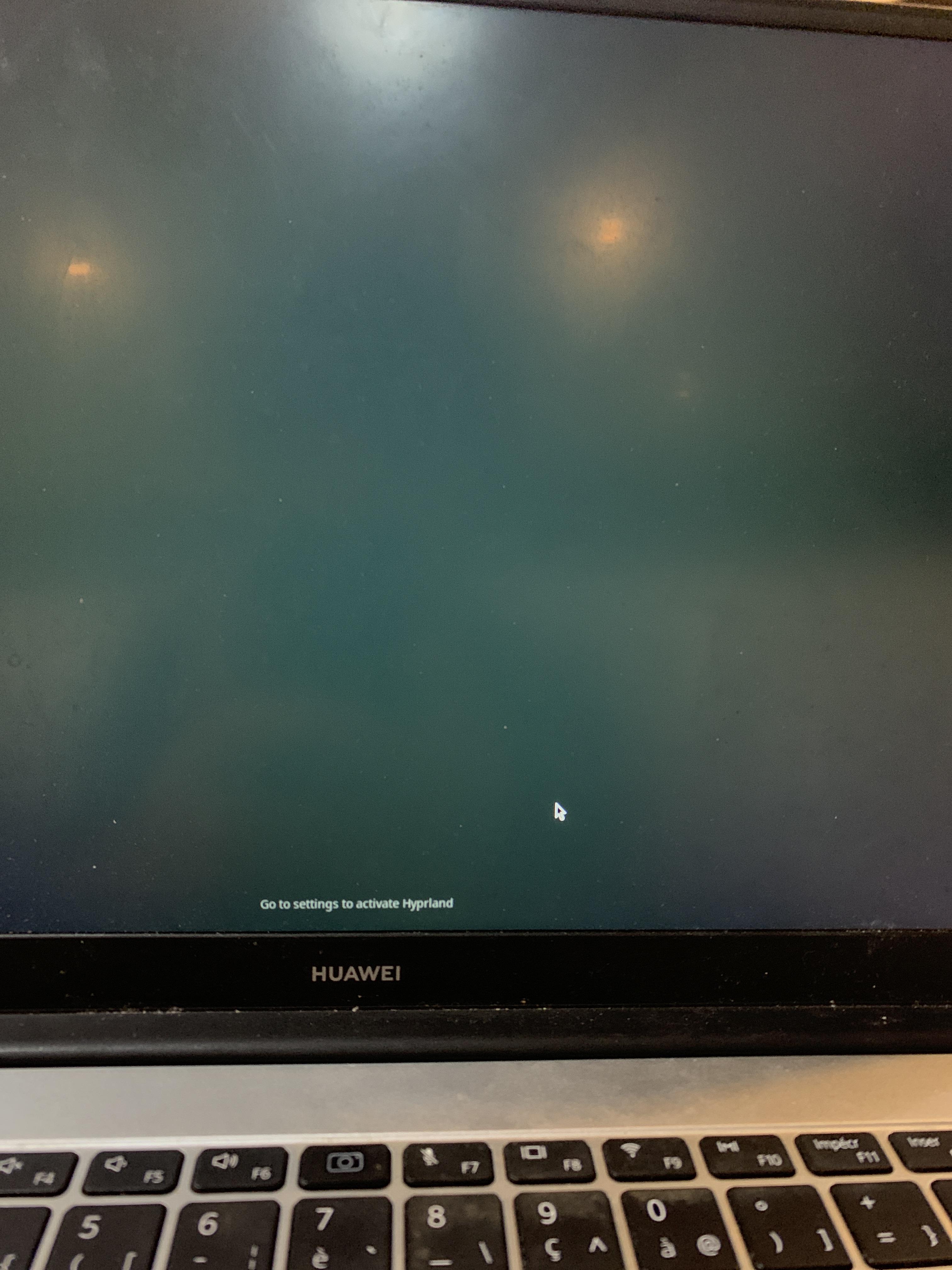
My hyprland was working fine until now(caelestia) but when i ran it the ui interface doesnt show
r/hyprland • u/Giorgos_Kappa • 14h ago

r/hyprland • u/FilesFromTheVoid • 13h ago

r/hyprland • u/Tricky-Engineer-9755 • 4h ago
Is this a WM issue or a thinkpad issue? Hardware is T420 thinkpad. My volume keys do not work I am either using mpv keys or alsamixer directly.
Pipewire instance https://bpa.st/EWXVG
hyprland.lua https://bpa.st/SHGIY
r/hyprland • u/Ok_Salamander_7245 • 4h ago


I'm running NixOS + Hyprland, and I've been trying to get Nautilus to look like the GTK file picker that appears when I open/save files in Helium.
The first image is my actual Nautilus window, and the second is the file picker inside Helium.
As you can see, they're noticeably different in terms of:
I initially tried fixing this through my Home Manager GTK configuration, but my agent ended up messing around with some GTK settings and CSS overrides without really getting the result I wanted.
What I actually want is for Nautilus to resemble the file picker: compact toolbar, similar sidebar, charcoal background, tighter spacing, and generally the same visual appearance.
A few questions:
xdg-desktop-portal-gtk?System specs:
I'd appreciate any suggestions.
r/hyprland • u/ApprehensiveGuess865 • 8h ago
My setup is a Hyprland laptop next to a Windows desktop, and I wanted one keyboard and mouse for both. I tried the existing tools (Deskflow, Input Leap, lan-mouse) and none gave me everything I wanted together on this pair, so I built Mickey.
How it works on Hyprland:
- Cursor position and monitor layout come from Hyprland's IPC socket.
- Screen edges are one-pixel wlr-layer-shell strips, so nothing in your config changes.
- While you control the other PC, touchpad taps and two-finger scrolling still follow your Hyprland touchpad settings (a contributor added this in 0.5.0).
Also: shared clipboard (text, images, files), the sound of every PC on one pair of headphones, pairing with a six-digit code shown on both screens, and everything encrypted (Noise). Works on GNOME, KDE, Sway, X11, COSMIC and Windows, and any PC can drive the others.
About trust, since this touches your keyboard and clipboard: it's GPL-3.0, you can build it from source, and every release ships SHA256SUMS signed with the release key. The Windows installer is not code-signed yet, so SmartScreen will warn you.
That last part is where I could use a hand: I applied to SignPath's free code signing for open source and was turned down for not having enough public visibility yet. If Mickey is useful to you, a star on GitHub, an issue with your setup, or a comment here all count toward that.
https://github.com/EduardoMG12/mickey
Happy to answer anything about the Wayland side, which was the hard part.
r/hyprland • u/LeLab-Creator • 17h ago
Hi all, hyprdesk is a desktop layer for Hyprland. It adds a bar, a dock, a launcher, desktop icons and widgets, notifications, a lock screen, an optional greetd greeter and a settings drawer. It all stays out of the way until you press SUPER + D. The last post was the user's tour. This one is for people who want to know how it's built, and what stops it from wrecking a session.
The 60-second video was recorded on the real installed 0.2.1, in a throwaway nested Hyprland session. No mockups.
It's a Cargo workspace split by responsibility:
hyprdesk daemon (iced 0.14 + layer-shell, one surface per screen). It owns the bar, dock, desktop, Panorama and Settings, and it is the only process that talks to Hyprland. A systemd user service runs it, and a flock on the instance keeps it to one daemon per Hyprland instance.hyprdesk <cmd> is a short-lived client. It sends one line over a Unix socket and exits, so key bindings, scripts and the CLI all take the same path.Four dedicated binaries link only what they reach. None of them pulls in the daemon, Lua or the file index:
hyprdesk-lock: ext-session-lock-v1, PAM, fprintdhyprdesk-greeter: the greetd screen, run under the greeter accounthyprdesk-polkit: the authentication agent, supervised by the daemonhyprdesk-theme-engine: no iced, no LuaShared crates:
hyprdesk-auth: PAM, fprintdhyprdesk-i18n: the catalogue and a tr! macrohyprdesk-theme-client: lets third-party apps follow the themeRestarting or updating the daemon never takes down the lock screen or the login screen.
1. A lock that outlives the daemon. The lock goes through ext-session-lock-v1, so if the lock process crashes, Hyprland keeps the session locked. It moves itself into its own systemd scope before doing anything else. A systemctl --user restart hyprdesk therefore can't kill it. The film shows it: the daemon PID changes underneath while the lock's PID stays the same. PAM also checks the account phase, and the password buffer is zeroized.
2. Lua that can't break the session. Config is settings.lua (generated by the Settings drawer) plus your own hyprdesk.lua (never rewritten, last word), both speaking hd.*. Each reload builds a fresh Lua state and swaps it in only if it runs clean. Otherwise you get file:line and the last valid config stays active. The mlua state isn't Send, so it lives on its own thread and the rest of the program talks to it by messages. Widgets and bar modules are plain Lua files.
hd.wallpaper({ path = "~/.wallpapers/default.jpg" })
hd.bar({ left = { "menus", "workspaces", "window" }, right = { "tray", "volume", "session" } })
hd.widget("clock", { anchor = "top-right", format = "%H:%M" })
3. Write Hyprland, then have Hyprland check it. Screens, input, shortcuts, layouts and animations apply live over the Lua IPC (hl.config). Then they're written to binds.lua, inputs.lua and monitors.lua, which your hyprland.lua loads. If Hyprland reports a new error after a write, the previous file comes back. Screen changes revert on their own after 12 s unless you keep them, and there are 30 days of config snapshots (hyprdesk config history).
4. State that doesn't drift. Events from .socket2.sock are not replayed onto a local copy. Any screen or workspace event triggers a full re-read of j/monitors (a few hundred bytes). Window moves are queued through a sequential IPC actor, so nothing blocks rendering.
5. Native for the visible, orchestrated for the rest. Notifications, tray and the polkit agent are native. hypridle, cliphist and hyprsunset are orchestrated. A D-Bus name is only taken if nobody holds it (DoNotQueue), so mako or dunst stay in place if you run them.
6. A theme that runs nothing. A pack is a theme.toml, never code. The palette is computed in OKLCH, contrast is verified, reloads come from a closed list (signal, kitty socket, gsettings, hyprctl), and rendered files are checked line by line: no exec, source, bind or env. If a target fails, it rolls back on its own while the others keep the new theme. Every engine subcommand takes --json:
$ hyprdesk-theme-engine use ambre --mode dry-run --json | jq -r '.targets[] | "\(.id)\t\(.status)\t\(.files|length) files"'
hyprland  ok  1 files
hyprlock  ok  2 files
kitty     ok  1 files
gtk       ok  6 files
fonts     ok  0 files
icons     ok  0 files
cursors   ok  0 files
sounds    ok  0 files
qt        ok  1 files
Your own app can follow the theme without depending on the daemon:
use hyprdesk_theme_client::ThemeClient;

let client = ThemeClient::new();
let accent = client.palette()?.slot("accent");
let _watch = client.subscribe(|pal| { /* redraw what changed */ })?;
The engine publishes palette.json by atomic rename. The client watches the directory rather than the file, so it doesn't lose the inode on the first swap. Apps started from hyprdesk also get HYPRDESK_BG, HYPRDESK_ACCENT and the other HYPRDESK_* variables.
# isolated preview: demo data, no IPC, no writes
cargo run --locked -- preview
# fmt, strict Clippy, tests, isolated D-Bus
bash scripts/verify.sh
# validate a Lua config without touching the daemon
hyprdesk check ~/.config/hypr/hyprdesk.lua
# see what a theme would change, write nothing
hyprdesk-theme-engine use foret --mode dry-run
Installing is ./scripts/install.sh, which shows a summary before touching anything, and ./scripts/uninstall.sh --restore puts every file, service and package back as it was. There are packages for Debian/Ubuntu (.deb), Fedora/openSUSE (.rpm), Arch, and on the AUR.
--json values. Those are tracked and being fixed. The JSON values should become a stable enum, which matters if you script against it.hyprdesk-theme-client API, if you write Wayland apps.Rust 1.99+, Hyprland 0.57+, GPL-3.0-or-later, not affiliated with the Hyprland project.
docs/ADVANCED.md · plugins: docs/WRITING_PLUGINS.md · integration: docs/SDK.mdr/hyprland • u/somniasum • 18h ago

r/hyprland • u/Glass-Commission-272 • 1d ago

r/hyprland • u/Machine-V1 • 1d ago
I tried to use the scrolling layout, but it seems to produce some weird behaviour.
This video is more than 2 months old, but the same issue is still there even now. I opened a Discussion on Hyprland's repo, but got no answers.
r/hyprland • u/Ok-Lake9296 • 1d ago

Hey everyone! I’ve been building MuhOS (a Fedora-focused fork of Serpantinum), a complete desktop shell for Hyprland designed to bring a frosted-glass, macOS-style workflow to Fedora 44 and 45 without touching or breaking your existing GNOME setup.
What’s in it right now:
Where I need help & collaborators: Right now, MuhOS is tested in Fedora 44/45 VMs and daily-driven on an Intel/NVIDIA laptop. I’m looking for folks to help with:
If you want to take it for a spin, there’s a one-command installer (with --dry-run and SHA256 verification) or manual RPMs on the site and repo: 🌐 Website: https://alex-muhscience.github.io/MuhOS/
r/hyprland • u/Anonyboy26 • 1d ago
Built-in Quickshell
Read more updates here: https://github.com/LUCKYS1NGHH/ChillPill-Shell/releases/tag/v0.16.0
Repository URL to download the shell: https://github.com/LUCKYS1NGHH/ChillPill-Shell
NOTE: the video may look a bit choppy while showcasing the shell because it's compressed by reddit.
r/hyprland • u/drhoome • 1d ago

I think you can see my Plasma roots and habits
r/hyprland • u/Accomplished_Soil682 • 2d ago
Shell: https://github.com/myamusashi/vast-shell
FYI: I'm using quickshell with some patches that can help your shell reduce memory usage and GPU usage under some conditions. The conditions are:
shell.qml://@ pragma DiskCache
//@ pragma RenderControlThe other thing is that you need to apply this Hyprland patch: https://github.com/myamusashi/Hyprland/commit/a481570f1290308a11e2b80554556e6cf8dfd454. For some reason Hyprland does not partially update a surface, so it uses more GPU because it damages the entire surface of your screen whenever something changes (mostly layer-shell).
Credit:
quickshell patches: https://github.com/quickshell-mirror/quickshell/pull/1448 and https://github.com/quickshell-mirror/quickshell/pull/1049
r/hyprland
•
u/Lukpedturnoi
•
2d ago
dotfiles: https://github.com/lukpednoi/Anserin
Note: Pushed to GitHub! Ready to try now.
WM: hyprland
r/hyprland • u/InsuranceFast • 2d ago
Synergy and Input Leap never really worked for me on Wayland, so I wrote my own. It's called edgehop.
You push the mouse off the bottom of my desktop's screen and it shows up on the laptop below it, keyboard included. Push it back up and you're home. It grabs the real input devices with evdev and replays them on the other machine through uinput over an encrypted link, so even the laptop touchpad works with gestures when I use it on the desktop.
The second half of the video is remote view: while I drive the laptop, its screen can show up on the desktop monitor (gpu-screen-recorder into mpv), so I don't have to look over at it.
It's written in Rust and Hyprland only for now, since it reads the monitor layout from hyprctl.
https://github.com/Tjabooo/edgehop
Happy to hear what breaks on your setup.
r/hyprland • u/MineBlackPL • 1d ago
Hi, I downloaded arch linux with hyprland today and encountered some bugs that I can't use arch linux at all appears my session on a gray background cursor that is in a black frame and once appears and once does not appear
r/hyprland • u/Trackerlist • 2d ago
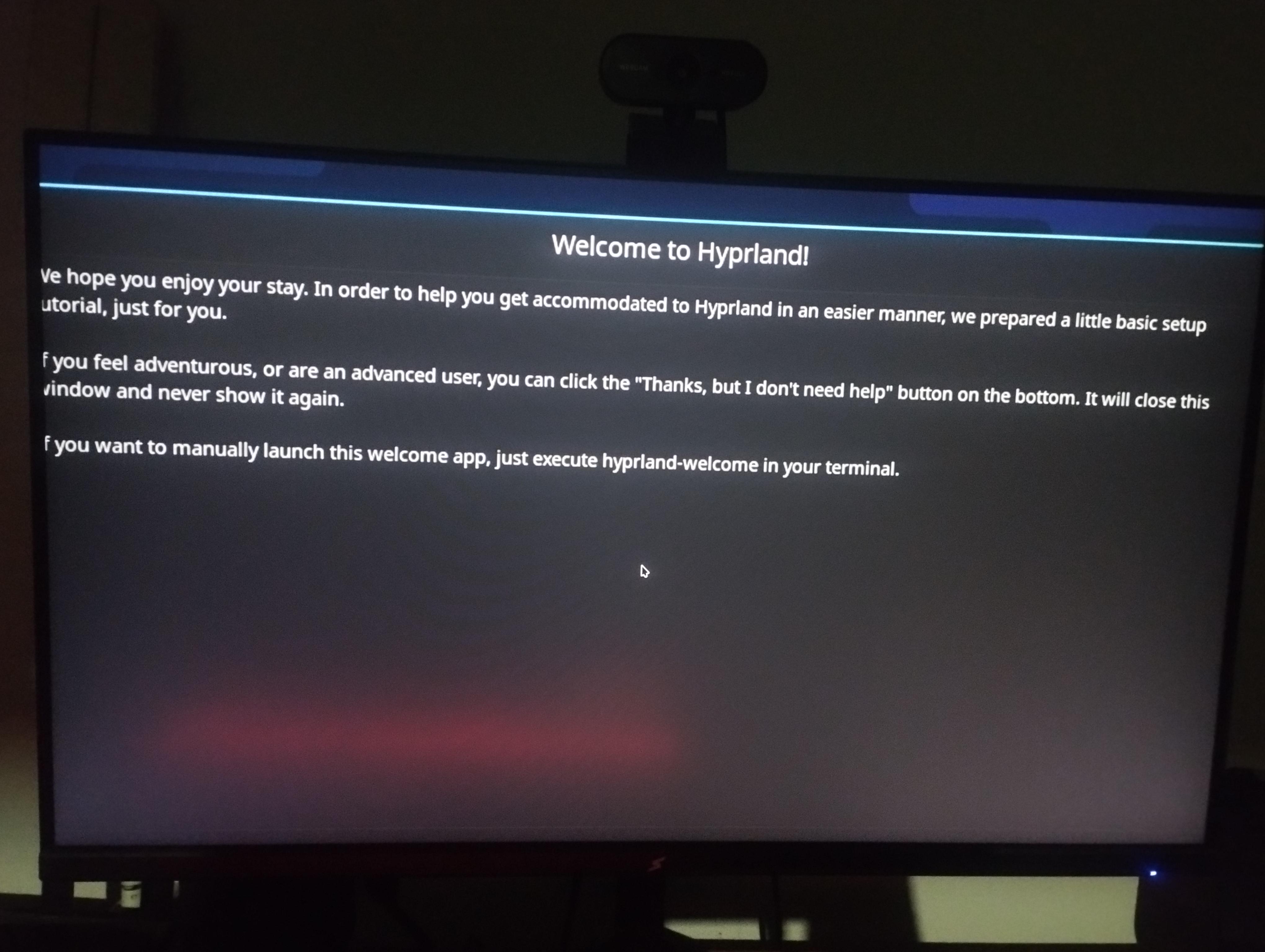
I'm new to Hyprland. As you can see, the screen looks zoomed in the center, leaving the edges out of the screen. I searched for something similar, but couldn't find any solution. I already erased the .lua file, but no success. Also, my cursor is not moving visually, but it is working since I can click on the windows, but it's just stay there.
I'm on Arch, with Nvidia 1050ti and I alao have KDE installed. Hyprland is on the latest version according to pacman.
Edit: Thanks to u/Adn0nnymous for finding the solution!
Both issues are somehow related to HDR, so disabling it on Hyprland config file fixes these problems. To do this, add the line supports_hdr = -1 to the config file, in monitor settings:
hl.monitor({
output = "YourMonitorName”
supports_hdr = -1
})r/hyprland • u/_shadowww_ • 2d ago
Hey everyone! I've been working on my Quickshell rice for Hyprland (and niri) for a while, and V5 is a big update.
What's new:
- Minimal mode: a clean, square look across the bar, menus and settings
- Redesigned dock
- Material 3 animation styles
- 39 color themes
- Font installer in Settings
- Adjustable notification sounds
Video is above. The repo link is in the first comment. Feedback welcome!
r/hyprland • u/Sudden-Willow2875 • 3d ago
First time installed cachy os hyprland, it looks amazing.
r/hyprland • u/shizukun • 3d ago
