r/iFLYTEKAINOTE • u/AINOTE • 16h ago
Tutorial [How to] submit feedback on AINOTE 2 when you encounter an issue
Hey everyone 👋
Ever run into an issue with your AINOTE 2 and wonder how to get help or report it effectively?
When something goes wrong, submitting feedback with a screenshot and a clear description can help our product support team better understand the issue and investigate it. Here’s how to do it!
- Take a screenshot of the issue
When the issue occurs, we recommend taking a screenshot of the page to help show what went wrong. You can also swipe down with three fingers to capture the screen.

- Open Feedback in Settings
Go to Settings → Feedback, then tap New Feedback to start a submission.

- Describe the issue and attach your screenshot
Describe the problem in detail and attach your screenshot for reference. To add it, tap Add Attachment, open the screenshot folder, select the image and tap Confirm. When you’re ready, tap Submit.
Including a screenshot and a clear description helps our product support team diagnose the issue more efficiently.

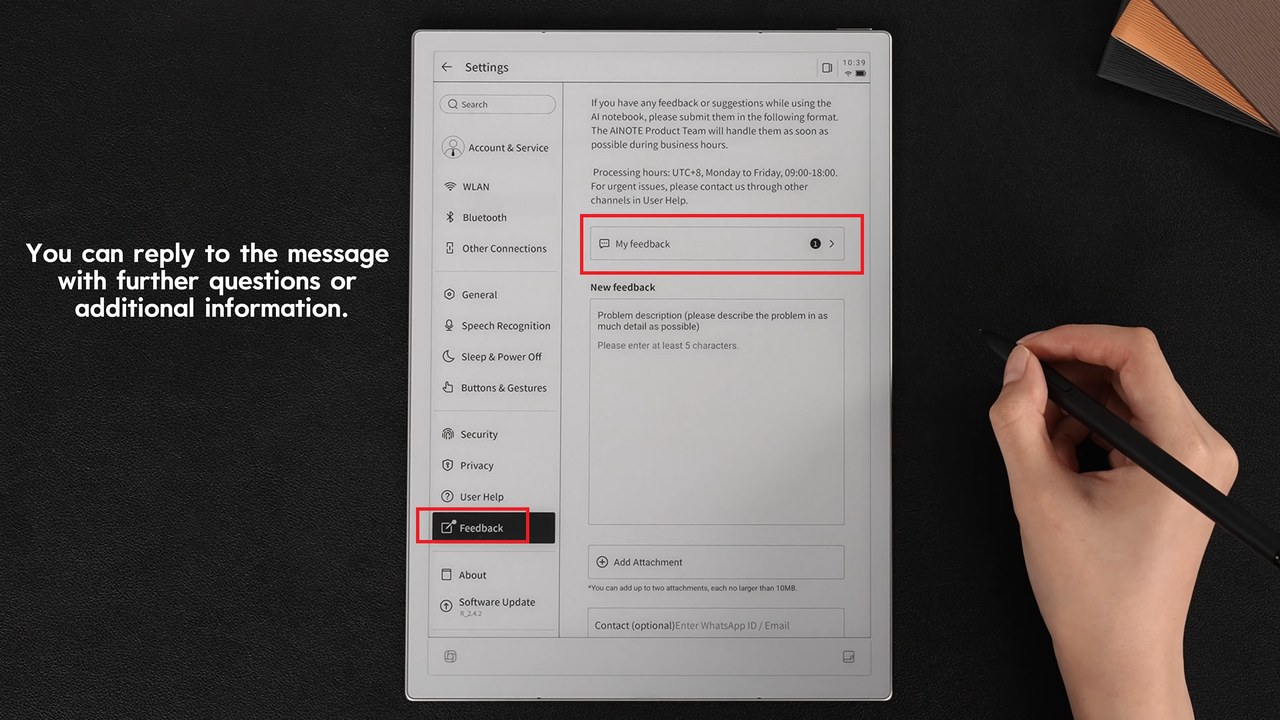
- Check your Feedback Records for replies
After submitting your feedback, keep an eye on the notification dots in Settings and Feedback. When you receive a reply, open My Feedback and check your Feedback Records.
Have more questions or additional information to share? You can reply directly to the message to continue the conversation.



- Need help with other questions? Try AI Support
You can also open AI Support to ask the AI assistant questions and get help.

A few small steps can make getting support easier:
- Show what went wrong with a screenshot.
- Help the team investigate with a detailed description and error logs.
- Stay in the loop by checking Feedback Records and replying when needed.
Have you used the feedback feature before? Let us know how it went or share any questions in the comments!