r/iPhoneTipsTricks • u/incomecsm • 18h ago
How To Connect & Use USB Flash Drive On MacBook

1
Upvotes
r/iPhoneTipsTricks • u/incomecsm • 18h ago
r/iPhoneTipsTricks • u/Internal-Opinion-335 • 19h ago

Apple's Universal Clipboard doesn't work with Windows, so I built a small workaround called ClipBridge.
How it works: copy text or a photo on your iPhone, double-tap the back of the phone, and paste on your PC. The Shortcut is just two actions: Get Clipboard → Get Contents of URL (POST, with a secret header). A small Python server on the PC puts it on the clipboard.
What it handles:
- Text and photos (HEIC gets converted automatically)
- Text copied from photos or the camera (Live Text), which iOS stores as rich text and which would otherwise paste as RTFD/code
- Pastes into Paint, Word, browsers and File Explorer
Uses the PC's .local name, so it keeps working when you switch Wi-Fi networks.
Limitation: iOS can't watch the clipboard in the background, so it's a tap to send, not fully automatic.
GIF above shows it in action. The repo has the full step-by-step setup: https://github.com/piyushdev0204/ClipBridge
I made this, and I'm happy to answer questions. Ideas welcome, especially a PC → iPhone direction.
r/iPhoneTipsTricks • u/incomecsm • 2d ago

r/iPhoneTipsTricks • u/hfml85 • 3d ago

r/iPhoneTipsTricks • u/incomecsm • 3d ago

r/iPhoneTipsTricks • u/itstitas • 4d ago

r/iPhoneTipsTricks • u/Miserable-Mess-Again • 4d ago
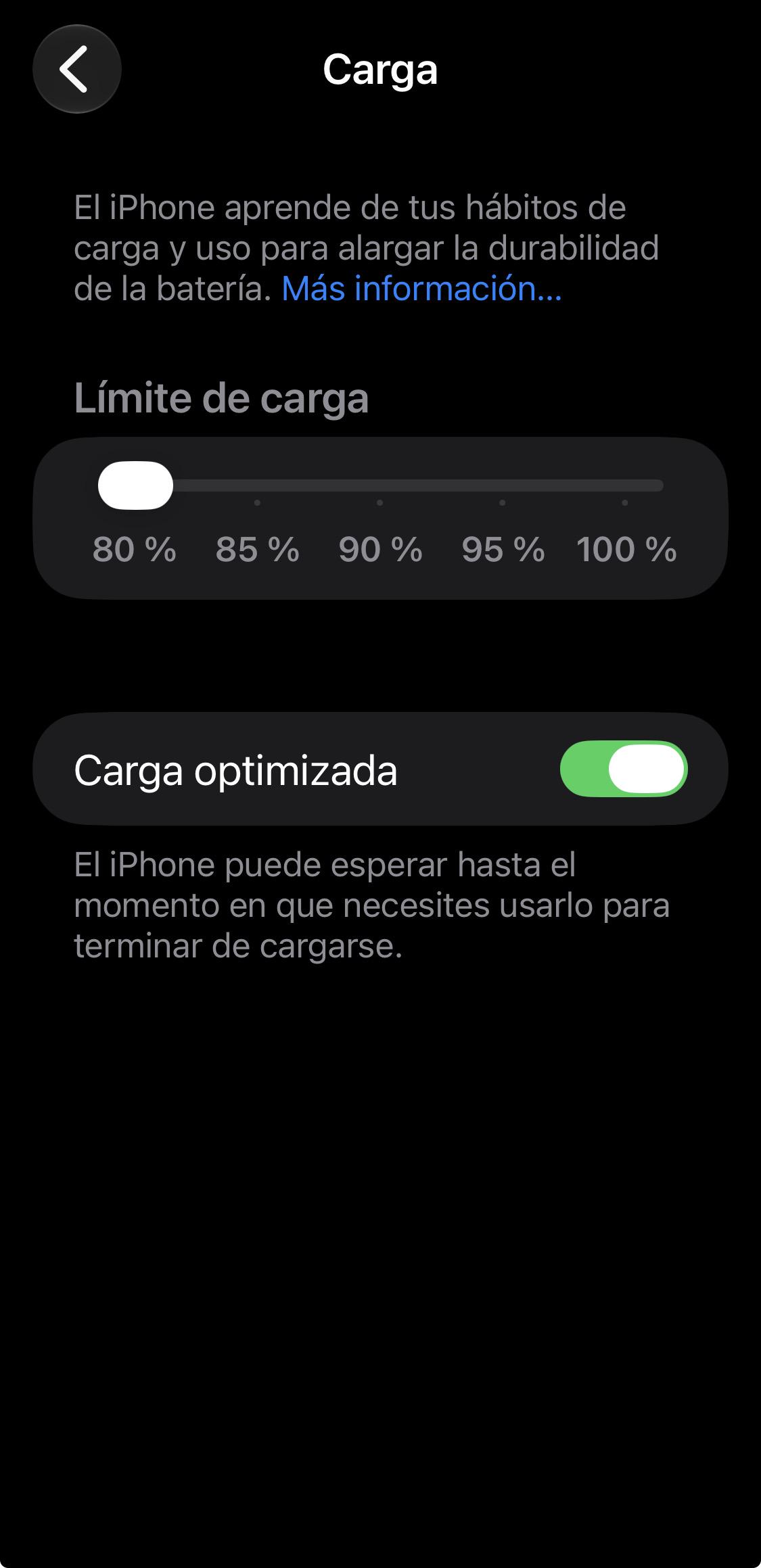
Fue a partir del Iphone 15 la opcion de entrar a la configuracion de la bateria para limitar la carga al 80%, 85%, 90%, 95%
Haciendo pruebas con atajos he conseguido acceder a un menu oculto en mi Iphone 14 Pro Max que me permite configurar esto, pero solo puedo acceder a traves de atajos.
Lo he probado en un Iphone 13 y no funciona. No he tenido ocasion de probarlo en 13 Pro Max ni en 14 normal, imagino que 14 Pro sera igual que 14 Pro Max.
https://www.icloud.com/shortcuts/ccdd1fe7f85f4fff966d57bb0455925d
Curioso, el 14 Pro Max admite gestionar esto, pero no lo incluyeron en los menus…
r/iPhoneTipsTricks • u/incomecsm • 4d ago

r/iPhoneTipsTricks • u/Unable_Mention_5757 • 4d ago
Is it possible to have a focus mode where:
My mum used to have this setting on all the time so that people could call in an emergency, including on WhatsApp because that’s where most of my family call, without being disturbed by msgs. She made this as a focus mode. Since resetting her phone, she can’t work out how she made the setting. We know she managed to do it because she used it for ages where it would come on automatically at nighttime, but I’ve researched and it doesn’t seem possible
Any help??
Thanks so much
r/iPhoneTipsTricks • u/incomecsm • 4d ago

r/iPhoneTipsTricks • u/incomecsm • 4d ago

r/iPhoneTipsTricks • u/erlndltf • 5d ago
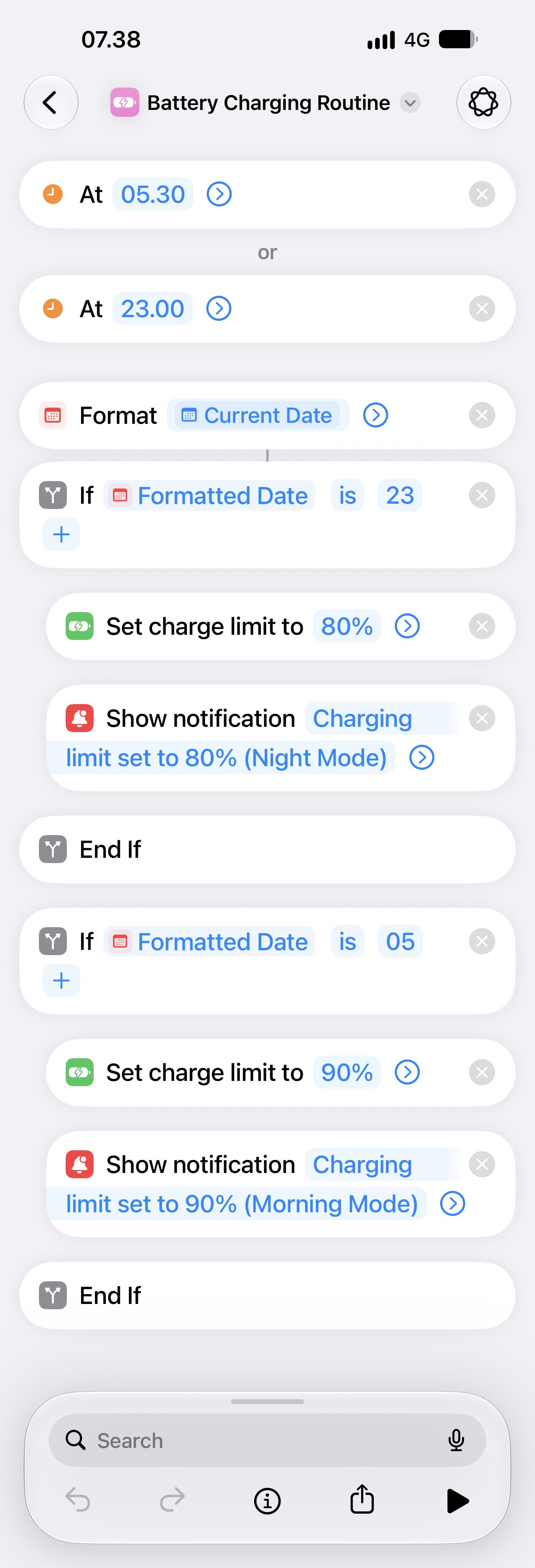
thank me later ✌🏻
r/iPhoneTipsTricks • u/thakruthaalam • 5d ago
r/iPhoneTipsTricks • u/Immediate-Try6990 • 5d ago
What really happens when you delete an unknown text on your iPhone and report as spam?
r/iPhoneTipsTricks • u/Sufficient_Source_23 • 5d ago
r/iPhoneTipsTricks • u/incomecsm • 6d ago

r/iPhoneTipsTricks • u/Professional_Mall253 • 6d ago
r/iPhoneTipsTricks • u/BTCLSD • 7d ago
Hello, I'm Drake. I am the developer of Thumbwise.
I made Thumbwise to replace the functionality that iTunes used to have, and to solve the issues many report with Apple Configurator for using it to edit personal iPhone layouts.
How it works:
Free to try: reading, editing, optimizing and connecting your AI assistant are all free. A one-time $14.99 purchase unlocks applying to your iPhone (one license covers up to 3 Macs).
Requires a Mac with Apple silicon on macOS 15 or later, and an iPhone on iOS 27 with a USB data cable.
There's a short demo on the website: https://thumbwise.app
Happy to answer questions here!
r/iPhoneTipsTricks • u/Thick-Barracuda-1385 • 7d ago
I’ve come to the realization today that I’m most definitely not using my iPhone to its full potential. My husband got the duo and I’ve been looking at him like he’s living in the future. I bought myself an iPhone 17 last year after having an 11 until then. Please tell me all the ways I should be using my iPhone so I can feel like I’m living in the future too.
