r/iptvPlayerStream • • 2h ago

CozyTV — whole-home DVR, commercial skipping, 9-channel multi-view, and backup streams for Android TV & Fire TV

Thumbnail
gallery
3 Upvotes

CozyTV, a live TV player for Android TV, Google TV, and Fire TV.

The guide is only part of it. CozyTV also brings recording, antenna TV, media libraries, and multiple TVs together. Here are the features I think make it worth a look:

  • One TV records for the house. Choose a TV as your Central DVR. Other TVs can schedule recordings on it and play from the same recording library.
  • Commercial skipping built into the DVR. CozyTV detects ad breaks while recording. Press OK to skip a detected break, or enable automatic skipping during playback.
  • Backup streams for individual channels. Assign a backup feed to a channel. If the main feed fails, CozyTV switches to the backup — including during a recording.
  • Up to nine channels on screen. Multi-view lets you move between tiles with the remote, choose which channel you hear, and save your favorite layouts.
  • Move what you’re watching between TVs. Screen Beam sends playback to another TV in the house. It works with live channels, multi-view, and movies.
  • Download only the channel groups you want. When adding a provider, choose the groups you actually watch. Unselected groups aren’t downloaded or stored. You can separately hide channels and groups you keep.
  • Antenna channels alongside your other sources. Connect a compatible HDHomeRun or USB tuner to watch, pause, and record over-the-air TV. With a USB drive configured for buffering, you can pause and rewind live TV for up to two hours.
  • Recording destinations beyond the TV. Record to local storage, USB, or network storage using SMB, NFS, WebDAV, FTP, or SFTP.
  • Set up another TV with a four-digit code. Easy Setup copies sources and settings from an existing CozyTV installation over your home network.

For sources, CozyTV supports M3U, Xtream Codes, MAG portals, TVHeadend, and compatible antenna tuners, plus movies and series from Plex, Jellyfin, and Emby. There are also multiple guide themes, custom backgrounds, PIN-protected channels and groups, and guided tutorials inside the app.

CozyTV is a player, not a channel subscription. You bring your own authorized sources; no channels, movies, or shows are included. It’s a paid app, with current plans listed below.

Happy to answer questions about how a particular feature works with your setup. If you try it, let me know your device model and which features you use most — especially recording, multi-view, or antenna TV.

ATTENTION: CozyTV needs dedicated testers for Google Play, if interested PM me and we will get you setup, I need 15 testers. The testers that complete the review period will be rewarded with a lifetime subscription to CozyTV.
r/iptvPlayerStream • • 53m ago

I built a free, open-source IPTV player for Android TV that cuts the delay the player itself adds

1 Upvotes

I watch a lot of live football, and I got tired of finding out about goals from my neighbours before I saw them. So I built my own player for the Nvidia Shield.

To be clear about what it does: no player can remove the delay that comes from your provider. That part is fixed. But a lot of players add another 20–30 seconds on top by keeping a large buffer. This app keeps that extra delay as small as your connection allows. You choose one of three latency modes depending on how stable your internet is.

It's only a player, like VLC or TiviMate. It doesn't come with any channels, playlists or links, and I won't recommend any providers. You use the Xtream account or M3U link you already have.

Features

- Live TV with three latency modes, buffer recovery and automatic reconnect

- Movies and series, with continue watching, favourites, and audio and subtitle selection (including DTS/TrueHD)

- XMLTV programme guide, with a "Live now" row

- Multiple accounts, English and Portuguese, HTTP and HTTPS servers

Privacy

- I don't run a server. The app talks directly to your provider, and your credentials stay encrypted on your device.

- No analytics, no telemetry, no ads.

- There's an optional diagnostic report, off by default. You see exactly what's in it, account details are removed first, and it's only sent if you choose to send it.

- The code is fully open source (GPL-3.0), and the APK is built from it automatically by GitHub Actions.

Install: Android 11 or newer. In the Downloader app, use code 9183430. I've tested it on the Shield. It should work on Fire TV, but I haven't tested that yet.

Code: https://github.com/ricardofsc10/Offside-IPTV

This is a personal project and I'd love feedback and bug reports, here or on GitHub. If this doesn't fit the subreddit's rules, mods, feel free to remove it.


r/iptvPlayerStream • • 21h ago

Kepler: How to add a Stalker portal (MAC address) on Android TV and Fire TV, step by step

Post image
1 Upvotes

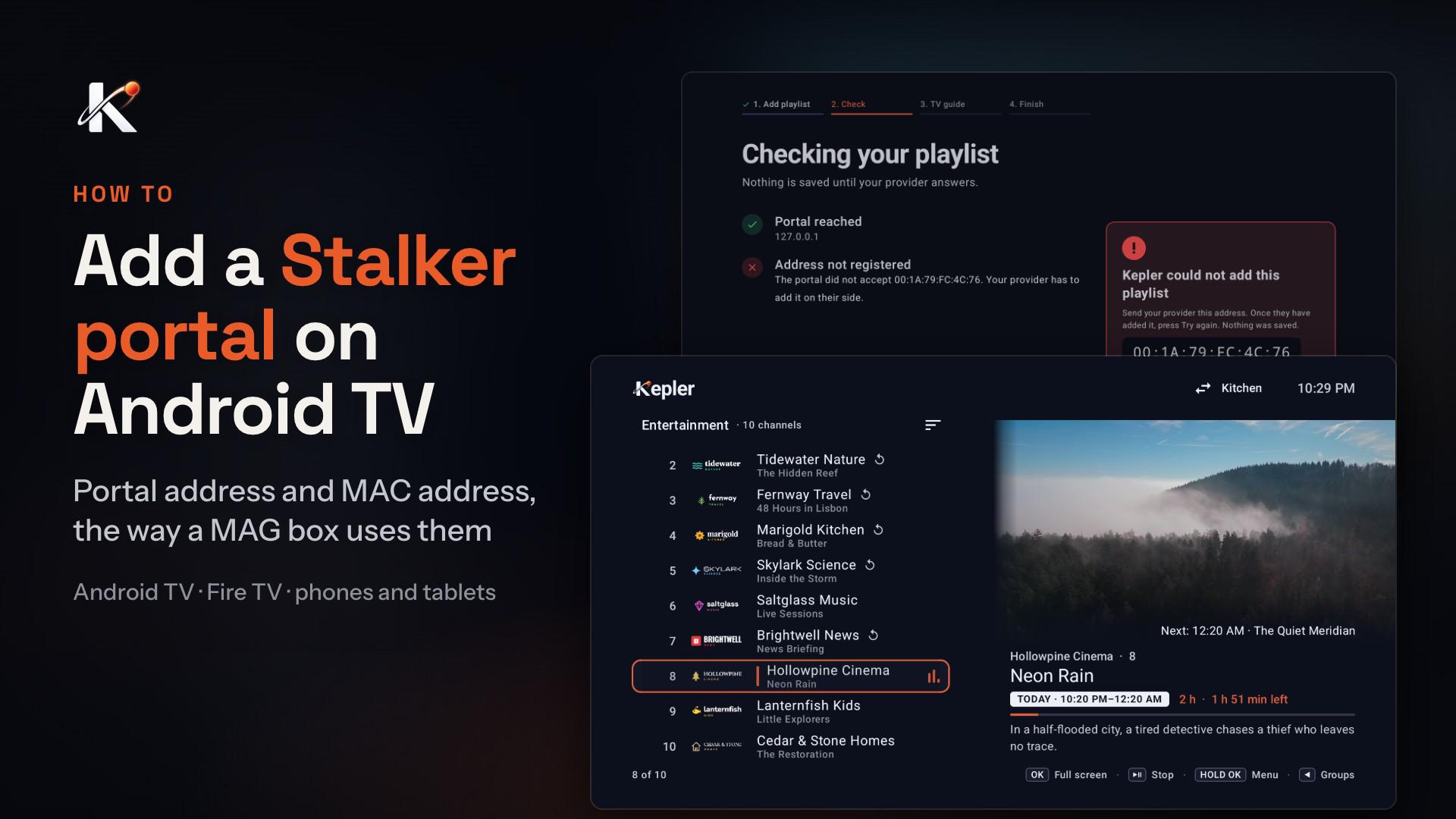
If your provider sent you a portal address and a MAC address instead of a username and password,

that's a Stalker portal, the kind a MAG box uses. Kepler adds them on Android TV, Fire TV, phones

and tablets. Here's the whole thing on a TV.

Stalker portal ui
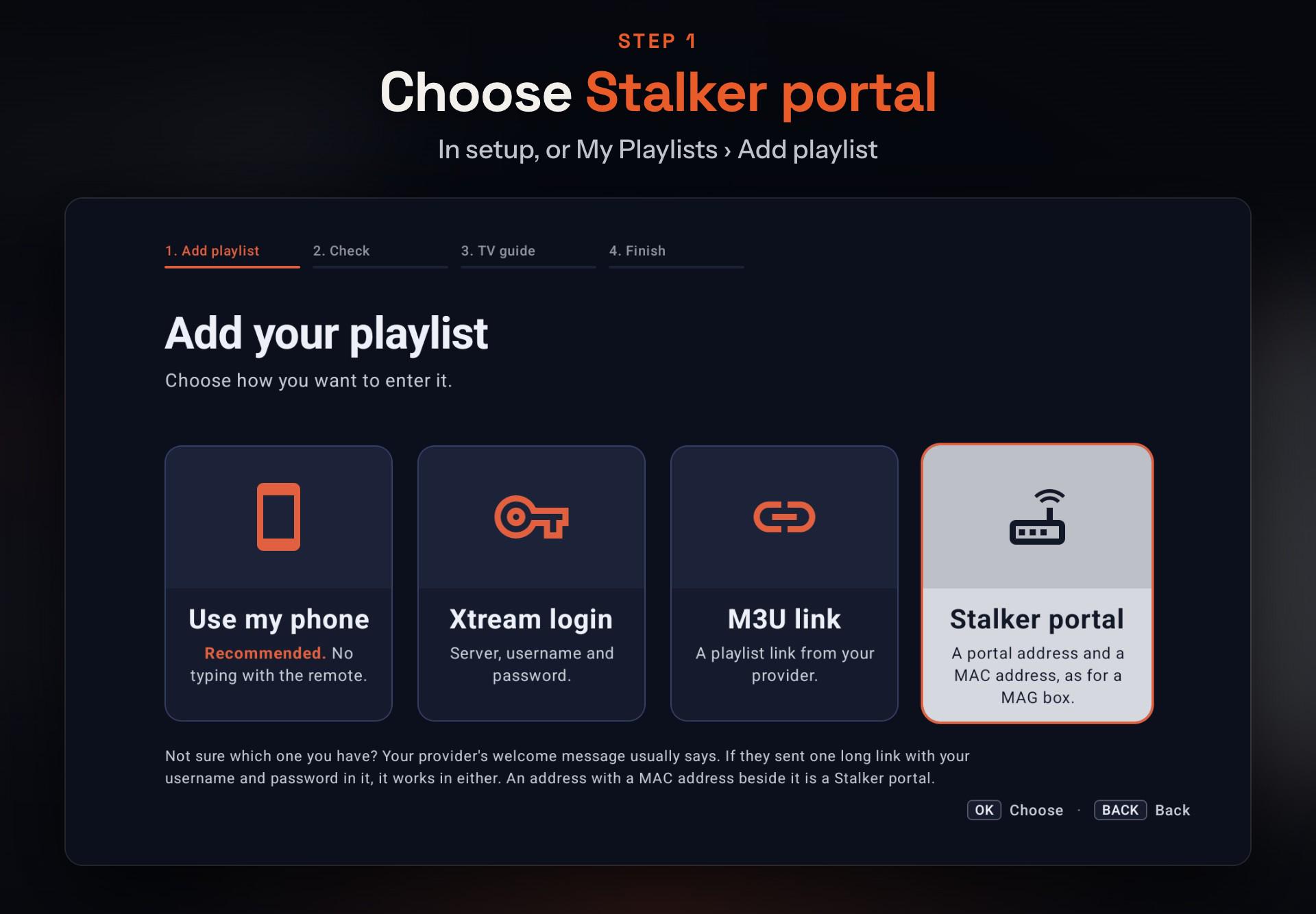
  1. In setup (or My Playlists › Add playlist), choose Stalker portal.

2. Type the portal address from your provider's message. It usually ends in /c/. For the MAC

address, keep this TV's own (Kepler shows it), or choose "One my provider registered" if you're

moving from a MAG box and type that one.

3. Kepler asks the portal before saving anything. If the portal doesn't know your MAC address

yet, it says so and shows the address to send your provider.

4. Once they've added it, press Try again. There's nothing to type again.

5. The TV guide comes from the portal. You can add another guide for channels it doesn't cover.

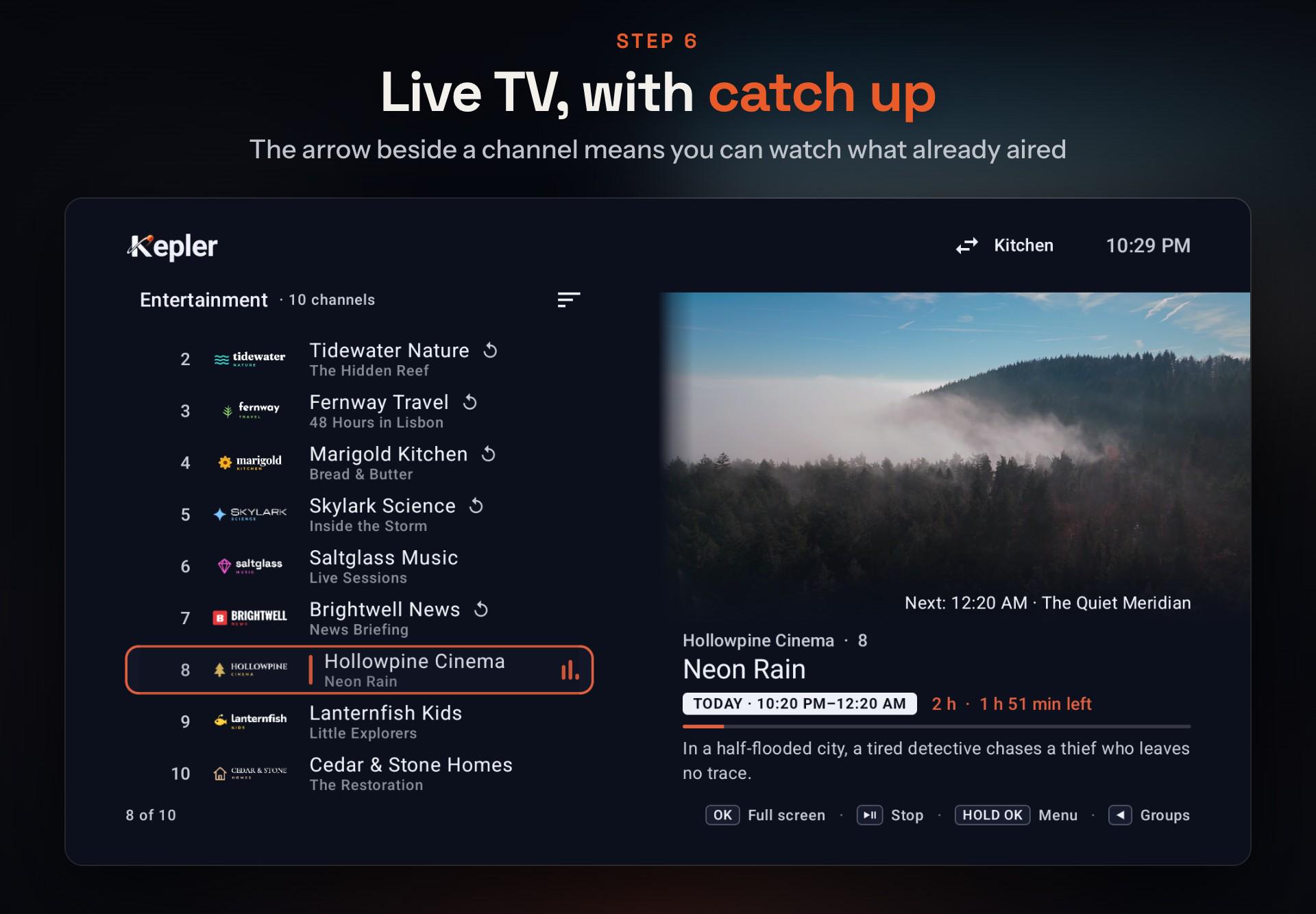
6. Live TV, with catch up: the arrow beside a channel means you can go back and watch what

already aired.

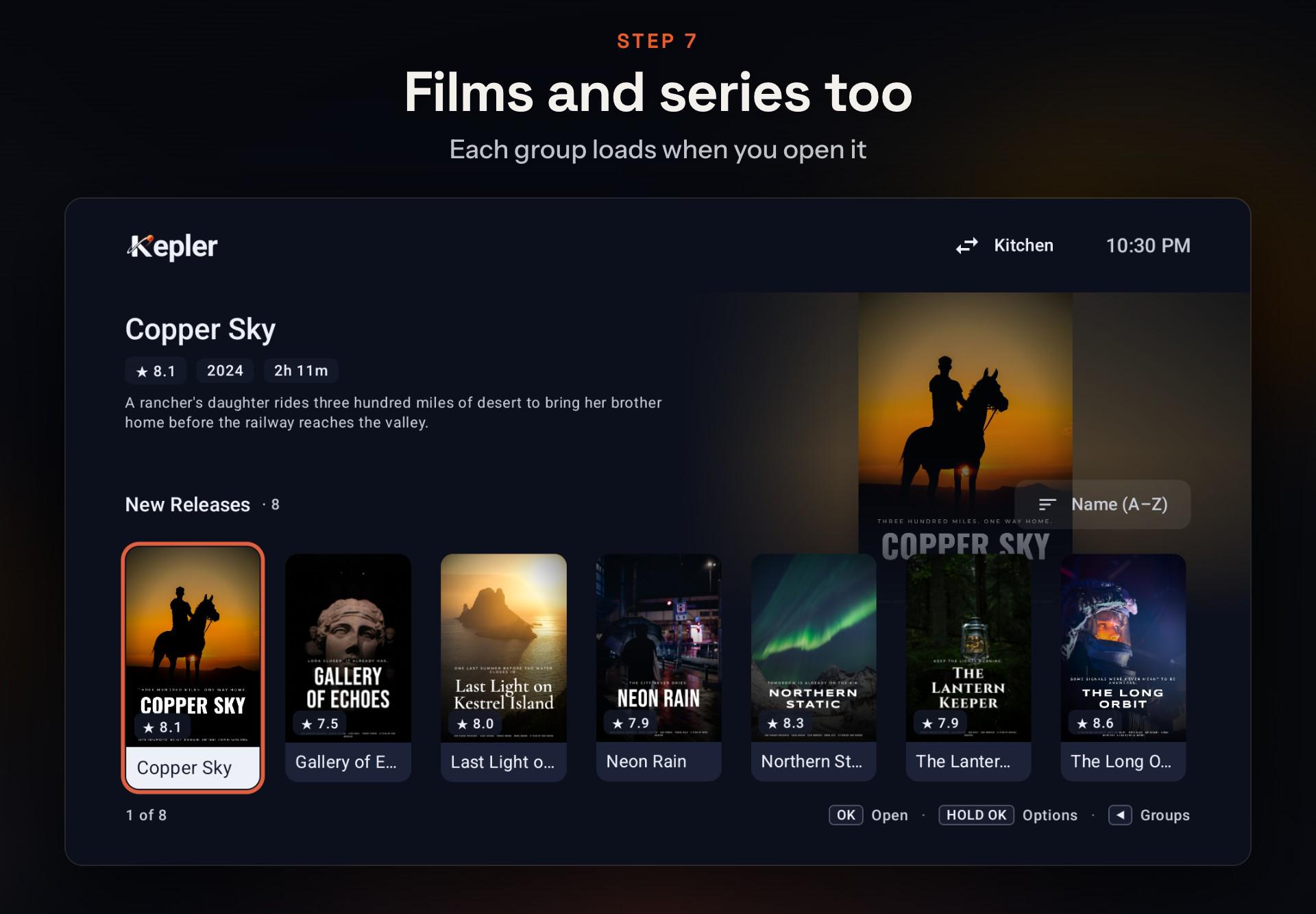
7. Films and series are there too. Each group loads when you open it.

A full guide with a video is here: https://keplerplayer.com/help/stalker-portal/

Google Play: https://play.google.com/store/apps/details?id=com.keplerplayer.app

Amazon Appstore (Fire TV): https://www.amazon.com/dp/B0HNY2TTR6

Questions: join our telegram group


r/iptvPlayerStream • • 23h ago

We built an IPTV player with cloud sync and watch together (Android TV, Fire TV, Philips, Windows)

0 Upvotes

Hey, me and two friends have been working on this for the last 9 months and we're still on it every day. It's called ZiroTV, a player for your own M3U or Xtream login. No channels or content in it.

We started it mostly because we were annoyed none of the players we used had cloud sync. So you can pause something on the TV in the living room and continue in the bedroom, or at work on your PC.

Besides cloud sync, we added a few things we kept missing in other players:

  • Watch together. Start a room and watch the same live channel, film or episode with friends far away, each from your own playlist.
  • Playlist sharing. Share a playlist with someone you trust, straight from your account.
  • Profiles. Everyone in the house gets their own profile with their own continue watching, and you can put a PIN on the ones you want locked.
  • No typing with the remote. Scan a QR code on the TV, type your login on your phone, and the TV picks it up the moment you save.
  • Playlists managed online. Add or edit them at app.zirotv.com and every TV and PC on your account follows by itself.
  • A TV guide that actually fills up, because it also matches channels by name when your provider's EPG IDs don't line up.

And the usual stuff done properly: live rewind and catch-up (where your provider keeps an archive), films and series with posters and synopses, next episode starts on its own.

Works on Android TV, Fire TV, Philips TVs (Titan OS), Android phones, Windows, Mac and Linux. Samsung and LG are waiting on store approval.

Every account comes with 2 screens for now. We're working on letting you add more soon.

It's paid, but there's a 7-day free trial, no card or account needed. On Windows and Mac you'll get a warning when installing because we haven't signed it yet.

If something's broken, you can always email support@zirotv.com. For quick support, feedback, ideas or if you just want to talk, we just opened our Discord, the invite link is on our website.

Please go easy on us, it's just the three of us running all these platforms :)

https://zirotv.com/android-tv/