r/macosprogramming • u/smcroissant • 1d ago
[Open Source] Puerto — A tiny macOS menu bar app to see and close processes using your ports
Hey everyone!
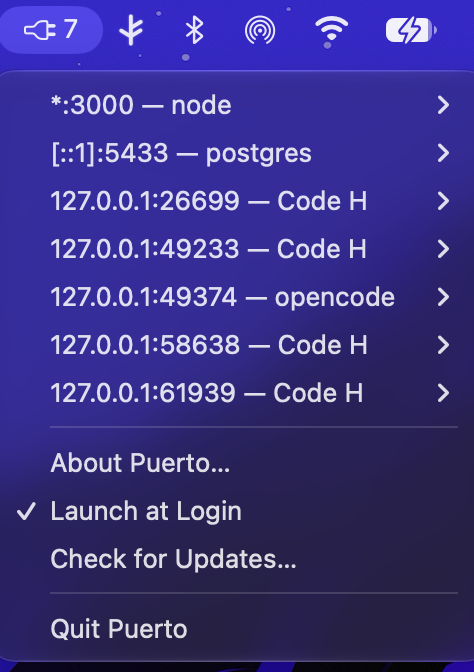
I vibe coded Puerto, a small native macOS menu bar utility that lets you see which TCP ports are currently listening on your machine and close the processes using them with a single click.
As a developer, I often have multiple local servers running (Node.js, Vite, Docker, databases, etc.). Sometimes I forget to stop one, and the next time I start a server, I run into the classic EADDRINUSE error.
I wanted a simpler way to manage this without constantly switching to the terminal.
What it does
- Shows your open TCP listening ports directly in the macOS menu bar.
- Shows the process name and port for each entry.
- Lets you close a process directly from the menu.
- Automatically refreshes port information.
- Filters out many common macOS system processes.
- Supports launching automatically at login.
- Includes an in-app update checker.
Safety
Puerto only manages processes owned by your user account. When closing a process, it sends SIGTERM first and escalates to SIGKILL if needed.
Built with
It's a native macOS app written in Swift, using lsof to discover listening ports and Apple's native menu bar APIs.
It's open source under the MIT license.
GitHub: https://github.com/croissantsam/puerto
Install with Homebrew:
brew tap croissantsam/tap
brew trust --cask croissantsam/tap/puerto
brew install --cask puerto
1
u/Sectumsempra777 1d ago
Two things I noticed in PortCloser and PortDiscoverer that are worth tightening.
The 0.4s SIGTERM → SIGKILL path only checks kill(pid, 0) before escalating. That just means some process still has that PID, not that it's still the one lsof saw. If the original process exits quickly and the kernel reuses the PID, the SIGKILL can hit a brand-new process. I'd re-resolve the port (or compare proc_pidinfo start time) right before SIGKILL, and wait longer than 0.4s so a database or dev server can shut down cleanly.
Also, lsof's COMMAND column defaults to 9 characters — that's why ControlCe is already in the system-process list. lsof +c 0 -nP -iTCP -sTCP:LISTEN lifts the limit, so the menu can show full names and the filter can match ControlCenter, SoftwareUpdate, etc. without the short aliases.