r/MacStack • u/blackSecre_t • 7d ago
I built an open-source, subscription-free voice dictation app for Mac (TypeLess)

1
Upvotes
r/MacStack • u/blackSecre_t • 7d ago
r/MacStack • u/jasshans1 • 7d ago
r/MacStack • u/quanre • 7d ago
Hi, I’m Lokman, the developer of ListingPrompt. Every time I shipped a game, I had keyword research in one place, copy in another, translations in documents, and the final changes in store dashboards. I built this Mac app to keep that release workflow together.
It tracks keywords and competitors, drafts titles, subtitles and descriptions within store limits, localizes metadata and app strings, and helps prepare screenshots and releases for App Store Connect and Google Play. Its local MCP server lets Claude Code or Codex work through the steps while I review changes before publishing. The 1:22 demo shows the workflow with my game Slingjet.
It’s for indie developers shipping apps in multiple languages. It needs macOS 14+ (Intel or Apple silicon), and AI features use a tool you connect, such as Claude Code, Codex or Ollama. The current Black Friday price is $39.99 one-time for up to two Macs ($59.99 after the sale): https://listingprompt.com/
I’d be interested to hear which part of store release prep takes the most time for you.
r/MacStack • u/GANKAI-0073 • 7d ago
I recently built and open-sourced my first macOS app: SpacedOut
It’s a native reminder and micro-task timer designed around one idea: reminders shouldn’t be easy to miss.
It includes natural-language task entry, countdown timers, a floating desktop widget, full-screen alerts, and Apple Reminders + Calendar integration.
Built with Swift, SwiftUI, and AppKit.
Would love to get feedback from fellow Mac users and developers!
GitHub: https://github.com/gagankishoreint-glitch/SpacedOut
r/MacStack • u/Over-Drawing-7768 • 7d ago
I mean text or details copied from one app into another that still need adjusting to fit the destination. One concrete example from the last time is enough.
r/MacStack • u/Busy_Buddy_174 • 7d ago
r/MacStack • u/Dismal_Market5514 • 8d ago
We built Nagbar because of one problem: everything reaches you as a notification, and a notification is easy to swipe away.
Problem
I dismiss notifications without reading them. Apple Reminders asks once, I click the banner away, and the thing is gone for the day. Every reminder app I tried accepts "later" forever.
Nagbar doesn't. When something is due:
It reads your macOS Calendar and Apple Reminders lists, so there's nothing to move over, and Done syncs back to Reminders. Meeting alerts have a Join button (Meet, Zoom, Teams, Webex, Slack, FaceTime).
Most of the work went into making it not obnoxious:
New in 0.4 (both stay off until you turn them on)
Also included, same price
nagbar:// links for Shortcuts, and a connector so Claude can add and finish reminders.Comparison
Pricing
Privacy
No analytics, no tracking, no account. Speech recognition, rewriting, Mail sorting and screen reading all run on your Mac. Your words leave it only when you hand them off: "Do it for me" passes a task to Claude or ChatGPT on your own account (you review it and press Send yourself), and the Claude connector also uses your own Claude account. None of it comes to us. Apart from that, Nagbar only goes online for a licence check with Polar about once a week, update checks, and one-time model downloads. Payment goes through Polar.
Limits
Apple silicon, macOS 14 or later. No iPhone app. Mail works through Apple Mail. It's version 0.4 and young, so there will be rough edges; we fix what gets reported.
How it's built
Native Swift, no Electron. Speech-to-text is Parakeet on the Neural Engine. The optional models are Apple Intelligence or Qwen3.5, which runs on your Mac in a size that fits its memory.
Site: https://nagbar.app
One question for you: where's the line between a reminder that's persistent and one that's just annoying? I'd like to know what would make you turn this off.
r/MacStack • u/Admirable_Gear_2365 • 7d ago
Most break reminders are a notification or a gray overlay I instantly dismiss. So I tried something sillier: when it’s break time, water slowly fills your actual screen and it turns into an aquarium. Fish swim over your windows, there’s also seaweed
It’s a design, not released yet. Honest questions:
r/MacStack • u/Silly_Association_67 • 8d ago
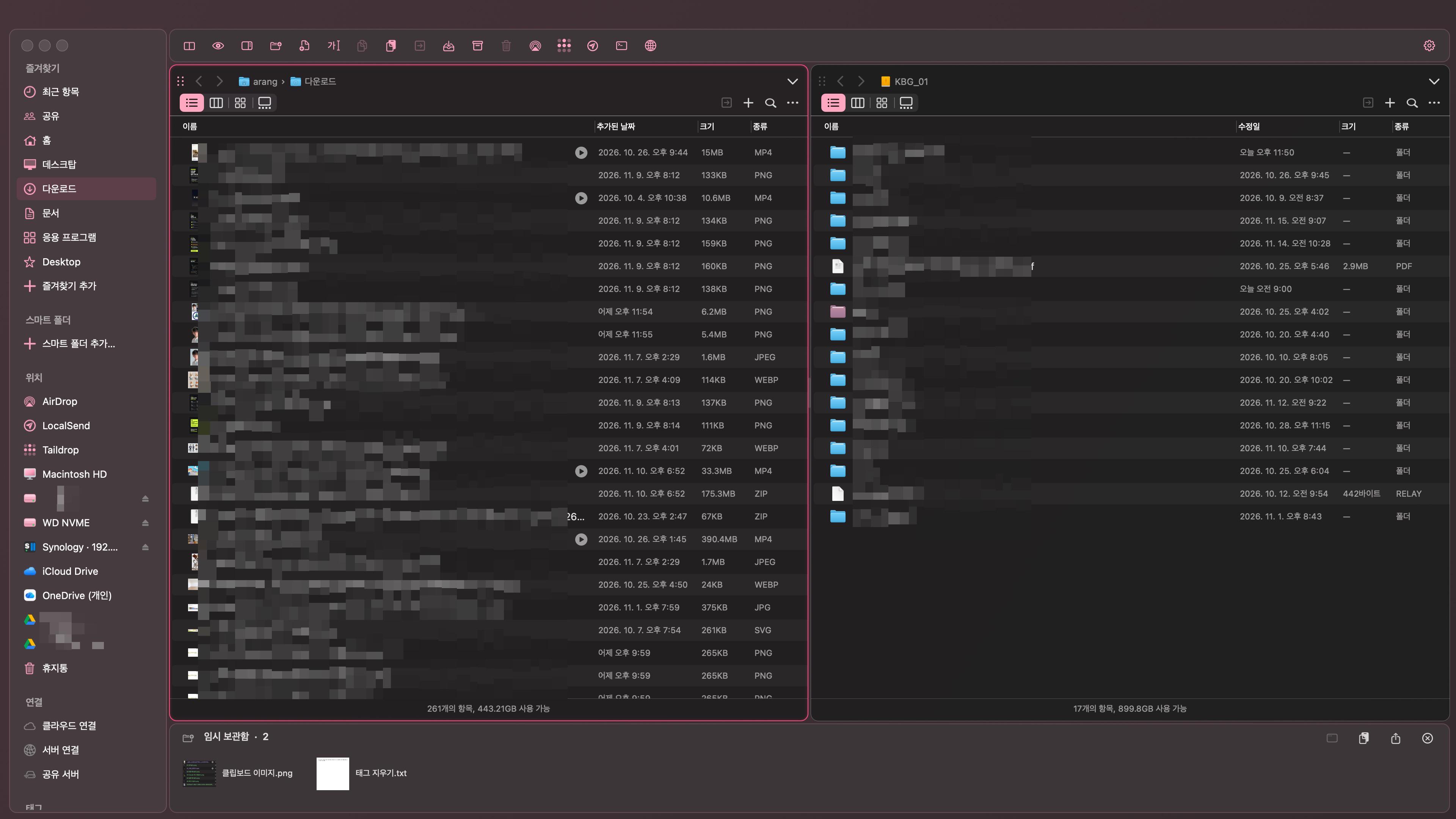
Hi everyone! I've been working on FileDesk, a macOS file manager for people who regularly work across several folders.
The current public release is 1.22. Some of its features include:
• Up to six file panes, tabs, pinned tabs, and saved workspaces.
• An optional temporary shelf for collecting files and folders before copying or moving them.
• Quick Look previews, spring-loaded folders, and customizable keyboard shortcuts & toolbar.
• Disk usage breakdown, Smart Folders, and Spotlight full-content search (without the 8 MB file limit).
• Batch renaming, duplicate finder, folder comparison, and one-way/two-way folder synchronization.
• Network, server, and cloud storage connections (Google Drive, OneDrive, pCloud, Dropbox, S3, Backblaze B2, Rackspace, SFTP/NAS), plus Taildrop transfers and basic Git operations.
• Finder's native Get Info window (including default app settings) and photo EXIF/metadata viewer with privacy-safe PNG export.
• Light and dark modes, customizable themes, folder color/icon badges, and multiple languages.
It supports Apple Silicon and Intel Macs running macOS 14 or later.
The standard edition is free for personal, non-commercial use. Business and organizational use requires separate paid licensing.
I'm also developing a paid Pro edition, coming later, with image editing and collages, PDF editing, audio editing, conversion tools, and advanced archive features.
👉 Website, screenshots, and downloads:
I'd appreciate feedback on the interface and everyday workflows. What file-management tasks would you most like to make easier on your Mac?
r/MacStack • u/Jaded-File6089 • 8d ago
I built Fokus, a free and open source website blocker + screen time tracker for macOS, no browser extension
Body: Fokus blocks distracting websites in Chrome, Safari and Edge and shows you where your time actually goes, per app and per website, hour by hour. Everything stays on your Mac, no account and no subscription.
Heads up, it isn't notarized yet, so the first launch needs System Settings → Privacy & Security → Open Anyway. After that it updates itself, and every update is signed.
Download and source: https://github.com/Jnooo-cloud/fokus
r/MacStack • u/security_enthus • 8d ago
Hi everyone, I'm the solo developer of Glueys, a smart break reminder for Mac.
I kept forgetting to rest my eyes, stand up and drink water while working. Notification pop-ups got swiped away, so I made something that sits quietly in the menu bar instead.
What it is:
Privacy: no account, no analytics, no network access. It only knows whether you're at the Mac or away. It never counts keys or records your screen, camera or microphone.
Price: free to download with a 7-day trial, then a one-time unlock, no subscription. It's $1.99 until December 4 for Black Friday, then $2.99.
Mac only, macOS 14 or later: https://apps.apple.com/app/glueys/id6818794891
It's my first app release and I'd really like feedback: which reminders do you actually follow, and what would make it less annoying? I'll answer every comment.
r/MacStack • u/persistentchaos • 8d ago
r/MacStack • u/No-Bad-9202 • 8d ago

r/MacStack • u/Silly_Association_67 • 8d ago
r/MacStack • u/Reasonable_Set_2760 • 8d ago

Hi, I'm Nico, an indie Mac developer from Germany (and yes, this is my own app).
Every now and then I record videos for a podcast. My notes sat on a second monitor, and in every take my eyes wandered off to the side like I was reading a hostage statement. So I built a teleprompter that sits in the notch, right under the camera. I built it becuase I needed exactly this kind of app myself. If it helps other people too, that would make me really happy.
Yes, I know, there are already teleprompter apps for the Mac. I tried a few. They were either surprisingly expensive, wanted a pricey monthly subscription, or didn't follow my voice at all. I stopped to take a breath and the text just kept going without me.
So instead of building yet another standalone app, I added it to my existing app Final Call. Final Call shows a fullscreen reminder before your video meetings so you can't miss them, and lets you join with one click. It already lives in the notch, so the teleprompter fits right in, for recordings as well as calls.
How it works
Pricing
- $9.99 one-time (launch price) or $0.49/month
- 14-day free trial, no account needed
For this sub: 50% off the one-time purchase, so you pay $4.99 instead of $9.99. Valid until November 30 or for the first 500 redemptions.
The code works for US App Store accounts only, sorry to everyone outside the US.
Code: TELEPROMPTER50
https://apps.apple.com/redeem?ctx=offercodes&id=6809144118&code=TELEPROMPTER50
Website: https://www.finalcallapp.com
I'd love feedback: does the voice tracking keep up with how you talk, and what's missing?
r/MacStack • u/onmyway133 • 8d ago
I make Mac apps under IndieGoodies, and for Black Friday everything paid is half price until the end of November.
Here's what changed this year, so you know what you'd actually be getting:
- PastePal (clipboard manager): Secret type, screenshots, and a lot of performance work
- Almighty (Mac tweaks): more tweaks, and a launcher with Zeus AI built in
- Typefu (new): helps you type less, with snippets and a pie menu on any text
- Overcal (new): a calendar in your menu bar, with a bunch of light and dark themes
How to get the 50%:
- App Store: the price is already cut, nothing to enter
- Direct download from our site: use code INDIEGOODIESBF26 at checkout
A few apps we put out this year are free and stay free: Turbo (launcher), Cleana (clears developer junk like caches and old simulators), Dojo (dev tools in one app), BetterConnect (App Store Connect on your Mac) and MacDestroyer (blow up your desktop, nothing real gets hurt).
We also collect Black Friday deals from other indie Mac devs here: https://indiegoodies.com/blackfriday
Which of these do you actually use day to day, and what's missing from it?
you can also reach us at support@indiegoodies.com
r/MacStack • u/Connect_Fee_443 • 8d ago
I'm an indie Mac developer in the UK, and for the last few months my side project has been MicroNotch. The idea is simple: do a small job at the top of the screen and get straight back to what you were doing.
What it does:
1.2.0 came out this week. It has a redesigned Home, a few things people asked for (dragging several files out of the Shelf at once, Code mode filters), and it now opens on click by default because hovering kept opening it by accident.
It's macOS 15 or later, and a notch is optional. It's £14.99 one-off with a 3-day trial and no card needed: micronotch.app
What I'd really like to know: which of these would you actually use every day, and what feels like clutter? I'm trying to decide what to cut as much as what to add.
r/MacStack • u/Savings-Arrival-7817 • 8d ago
Start with Apple Notes if you want to find drafts by project and writing stage. It already has tags and Smart Folders. Bear is worth a small trial when you want nested tags while writing in Markdown, or regularly need to export a project's notes together.
For example, take a guide you're writing and keep separate notes for research, the draft and cut material. The useful question is whether you can find the unfinished draft next week and get it into the app where you'll finish it. A prettier sidebar doesn't answer that.
In Apple Notes, give the relevant notes a project tag such as #garden-guide. Give unfinished drafts a second tag, #draft.
Choose File > New Smart Folder, add a Tags filter and require both tags. That gives you a saved view of this project's drafts without moving them out of their existing folders. Smart Folders reference notes; they don't hold separate copies.
Keep the tags boring enough to remember. If you keep inventing new names for the same stage, another app won't fix the retrieval problem.
Apple Notes also isn't limited to PDF export anymore. Markdown import and export arrived with macOS Tahoe 26. Apple's current guide calls the export menu File > Export To; the Tahoe menu may say Export as. Select a note and choose Markdown. Check the menu on your macOS version rather than following an older PDF-only tutorial.
Use copies of a few non-sensitive notes, not your whole library. In Bear, try #garden-guide/research and #garden-guide/draft. The slash creates nested tags, so you can browse the project and its stages in the sidebar. A note can carry more than one tag.
Write a short draft using Markdown headings and lists. Then click the project tag and choose File > Export Notes, or press Shift-Command-S. Bear can export the notes under a tag together; nested tags become folders. That is the part to compare with exporting individual notes from Apple Notes.
Bear's free version includes local notes and Markdown, TextBundle, plain-text and RTF export. You don't need Pro just to try this workflow. Pro adds iCloud sync and exports including DOCX and PDF, among other features. The listed US price is $2.99 monthly or $29.99 yearly; check your local App Store price.
Attachments deserve a separate check. Bear lets you drag files into a note, but attachments larger than 250 MB won't sync between devices. Export one sample containing an image and a PDF, then open the result in the destination app. A successful text export doesn't prove that your attachments and formatting arrived as intended.
Bear's current Mac listing requires macOS 12.4 or later. That doesn't make newer Apple Notes features available on an older Mac: the Markdown comparison above depends on macOS 26 or later.
For one week, use one project and a handful of notes. At the end, find a draft without remembering its title, export the project, and inspect the files somewhere outside the notes app.
Stay with Apple Notes if its saved view gets you back to work and occasional Markdown export handles the handoff. If you only write on one Mac, Bear's free version may also be enough. Pay for Pro when you actually need its sync or paid export formats, after the local workflow has earned a place. Don't migrate a library just to discover that tagging was never the thing slowing you down.
r/MacStack • u/DeadShotGunV1 • 8d ago

r/MacStack • u/Crafty_Philosophy588 • 8d ago
Disclosure: I work on PressSpeak.
PressSpeak is a focused dictation app for Apple-Silicon Macs. Press a shortcut, speak, then press it again to finish. The speech model runs on your Mac, and your recording isn't uploaded to PressSpeak.
There are 2 editions:
• Direct can insert the finished text into the app you were using. It needs Microphone and Accessibility permissions.
• The Mac App Store edition uses Microphone permission and copies your text for you to paste with Command-V.
It supports automatic language detection and a personal vocabulary for names and technical terms. There's no app account or subscription.
A few limits: it requires Apple Silicon and macOS 14+, doesn't record meetings, and doesn't rewrite or polish your words.
Try it free for 7 days, then unlock it for $19.99 once.
If you try it, I'd appreciate hearing which apps you use it with and whether the shortcut and microphone setup are clear.
r/MacStack • u/Zealousideal-Bad5498 • 8d ago
I regularly have to download builds of the app I work on from Github to test features as they come in. I'm running macOS Tahoe 26.6.1.
When I download a build, there are several steps I have to do every time when attempting to open it for the first time:
"app_name.app" Not Opened
Apple could not verify "app_name.app" is free of malware that may harm your Mac or compromise your privacy.
2. Then I go to System Settings > Privacy and hit "Open anyway" there.
3. Then there's ANOTHER dialog where you have to select "Open anyway" again:
Open "app_name.app"?
Apple is not able to verify that it is free from malware that could harm your Mac or compromise your privacy. Don’t open this unless you are certain it is from a trustworthy source.
4. Then finally, a Privacy & Security check that requires password entry/Touch ID:
You are attempting to open an app that may cause harm to your Mac or compromise your privacy.
An administrator’s Touch ID or enter an administrator’s password to allow this.
I understand the risks in what I'm asking for here, but I don't want to have to confirm three times manually that I want to open the app. Is there any shortcut to skipping any of these checks that I'm missing? Or a way to whitelist an app with a specific name or other metadata?
r/MacStack • u/Admiral-ZX • 9d ago

Hi everyone, some of you may remember the Classic Mac OS inutility "Gravité" by Sylvain Demongeot, which added psychics to drag & drop.
It was discontinued in 2002.
I had so much fun with it that I created a modern version called "Gravitay".
What it does
This is an "inutility", in other words a utility that has no meaningful purpose other than having fun. Gravitay lets windows, icons and anything else you drag & drop dangle on your mouse pointer with physics.
Who it is for
Anyone who likes to enjoy fun UI things on the Mac.
Pricing & availability
Free to download and use. A "Buy me a Coffee" link is available.
Privacy
This app does not send or store any data anywhere. No tracking and analytics. Visit the privacy policy.
Trust
This app is available as a DMG installer. The app bundle is signed and notarised by Apple.
AI
I have been a senior software developer for Apple platforms for over 10 years. For this app, some parts of the physics engine were code by Claude AI.
More info and download: https://hotdogsoup.nl/apps-and-games/gravitay-the-classic-mac-os-inutility-gravite-revisited/
All comments and criticism is welcomed,
Thank you all and have fun!
r/MacStack • u/niiotyo • 8d ago

Disclosure: I'm the developer of Meboki and I sell the licence.
Meboki is a spelling and grammar checker for macOS. It puts underlines under mistakes while you type in Mail, Slack, Notion, Safari, Chrome, Obsidian and most native text fields. Click an underline to see the fix and a short reason. The check itself happens on your Mac, so your emails and chats don't go to a server.
Who it's for: people who write a lot of English on a Mac and want Grammarly-style checking without a cloud service or a subscription.
How it works
Pricing
Limitations
Source code (GPL-3.0): https://github.com/mebokihq/meboki Website: https://meboki.com (privacy policy). The app is signed and notarized by Apple.
Happy to answer questions.
r/MacStack • u/Beardy4906 • 8d ago

Hi everyone! I'm Umang Surana, the developer of Sxitch, an app thats designed to be a replacement for the native macOS CMD Tab menu. I've been working on it since April this year, and it's gotten so much better than the first few versions.
The macOS CMD Tab menu has no fixed order, making it incompatible with muscle memory. Additionally, it isn't friendly to any sort of typos or customisation.
Sxitch literally makes a brand new CMD Tab app switcher panel that's fully customisable, and lets you pick apps using their name. G picks Ghostty, or M picks Music. If you have Spotify and Sxitch to pick between, Sp for Spotify, and Sx for Sxitch. There's no cycling involved at all.
x will act like Fi, filtering between Finder and Firefox directly)Black Friday Discount posted in the megathread here as well: https://www.reddit.com/r/macapps/s/Zq7q4A8d8G
RCMD: Sxitch extends on what rcmd has by getting you exactly to your destination. No stops at other apps needed :)
Dory: Sxitch focuses on being keyboard friendly, has a free version. And on top of that, Sxitch adds hiding / quitting apps, window picking, and window previews.
AltTab: AltTab is similar to Sxitch, where it's also open source and also offers this concept of "switching". However it still doesn't solve the problem of switching directly to the window you want without cycling, and is more expensive for the lifetime version in comparison to Sxitch.