r/softwaresworthpaying • • Oct 11 '26

MAGNT review: Are AI photos for Tinder worth paying for?

3 Upvotes

I started using MAGNT for my Tinder and Instagram photos. I liked the results, so I put them on my profiles. After that, I got more interest on Tinder and more attention from women on Instagram. A slightly less professional use case than headshots, but here we are.

For updating dating profile photos, yes, I think it’s worth paying for. MAGNT is an AI photo generator and editor, and I’m judging it on the photos I used for those two profiles.

I was happy with how the pictures turned out, but getting a better response was what made me care about the tool. I can’t prove the photos alone caused the extra attention, so I wouldn’t take this as a promise of more matches or dates. My experience was positive.

Plans start at US$14.99 a month, billed monthly. Given the results I got, that feels reasonable for making some new profile photos. Keeping another subscription running indefinitely is a harder sell, especially since unused subscription credits don’t roll over. I’d pay when I had photos to make.

My bigger reservation with AI photos for Tinder is taking them too far. I’d only use pictures that still represent how I look in person. Getting someone interested in a version of me they’re never going to meet doesn’t sound particularly useful.

And if you already have photos you’re happy with, I’d skip the subscription. Asking a friend to take some new pictures would be my first free alternative before paying for an app.

Anyone here tried a similar photo tool for their dating profile and felt it earned its price?


r/softwaresworthpaying • • Sep 22 '26

Worth Paying The Software Worth Paying For Megathread: My Best Finds, Kept Updated

4 Upvotes

Last updated: October 13, 2026

A good app can still be a bad subscription. Before paying, I want a plain answer to one question: what job does this do often enough to earn another bill?

These are the paid tools I'd consider for the jobs below. Each has a catch, and each has a cheaper way to do at least part of the job. These recommendations come from current product documentation and our published reviews.

New this week

The subscription audit is live. Use it to decide what to keep, downgrade, rotate or cancel. Check the work each tool does regularly, the next renewal charge and what would stop working if you left.

The archive now has 51 published reviews and guides, including seven newer office, communication and scheduling reviews. The shortlist stays at seven apps; no new promotions this week.

The shortlist

Kitful: for a website that publishes regularly

Kitful Starter costs $39 a month for one site and 250 credits. Kitful is built by a friend of mine, and I trust him. That link is an affiliate link, so I may earn a commission if you subscribe.

Moving a blog post through research tabs, prompts, image tools and your website editor can get annoying. If you do that regularly, Kitful is worth a look. It brings the keyword research, writing, images, internal links and publishing together in a workspace that knows your site and its writing rules. You can research a topic, generate and review a draft, add images and links, then send it to your site. It also has campaigns and tools to improve existing pages using Search Console data.

Starter advertises up to 10 articles. Research, articles and images all use credits, so the amount you get depends on how you spend them. Unused monthly credits don't roll over. You get 30 introductory credits with free access, enough for one base article. Campaigns and publishing connections need an active paid plan. Watch the credit budget, and check the facts in the draft yourself. An editor or someone who knows the subject still needs to review it.

WordPress, Ghost, Shopify and Framer have direct connections. For other systems, a webhook can send the article to your own publishing setup.

For a site owner or small team that publishes regularly, putting the steps together is the reason to consider paying. If you publish occasionally, already have a workflow you're happy with, or expect guaranteed rankings and accurate articles without review, skip it. Search Console, a general AI assistant, an editorial checklist and the website editor you already use can cover the cheaper route.

The AI subscriptions comparison explains where Kitful fits beside ChatGPT, Claude, Perplexity and Google AI. Give it a recurring website-content job before adding the bill.

Kagi: try your own searches before paying

Kagi Professional is $10 a month for unlimited searches. Annual billing is 10 percent cheaper: $108 upfront instead of $120 over twelve monthly payments. Sales tax may apply.

The appeal is ad-free search with more control over the results. You can change how websites rank and use lenses to narrow what you search. Professional also includes a standard allowance for Kagi's AI Assistant. That has its own limits.

Use the free trial's 100 searches on questions you'd normally look up. If the results don't justify replacing your free search engine, there's no reason to add the bill. If you like Kagi but don't search much, Starter is $5 for 300 searches per month. Free, ad-supported Brave Search is another option.

Privacy Pass can be a reason to choose Professional over Starter, which doesn't include it. The tradeoff is that it turns off personalized results, custom bangs and custom lenses. Safari isn't supported, and there's a monthly limit of 3,000 tokens. Kagi's privacy policy also permits temporary logs for diagnosing problems.

Professional makes sense if the trial favors Kagi for frequent searches, or if Privacy Pass matters enough and its restrictions fit. Otherwise, use Starter or stay with free search.

Full Kagi review

ChatGPT Plus: pay when the free limits interrupt useful work

Plus is $20 a month. It gives you more model and tool access than Free, with higher limits. API usage is a separate bill.

The case for it is repeated work with reasoning, documents, files, images or deep research. If it handles jobs you'd otherwise need separate writing, brainstorming, document-analysis or image tools for, the subscription can make sense.

The free plan already does a lot. Plus still has limits, and those can vary by feature and demand. For occasional questions, or if you rarely hit a limit, start with Free. Upgrade when you can name the recurring job that makes the $20 worthwhile.

Full ChatGPT Plus review

Before paying for both ChatGPT and Claude, try them on the same work. The AI subscriptions comparison covers that overlap, plus the separate jobs that could justify Perplexity, Google AI or Kitful.

Readwise Reader: useful if your highlights turn into something

Reader costs $119.88 a year, advertised as $9.99 a month with annual billing, or $12.99 month to month. The trial lasts 30 days.

Articles, newsletters, RSS feeds, PDFs and DRM-free EPUB ebooks go into one reading app. You can annotate them, revisit the highlights and export them into your notes. If your reading becomes study material, citations or finished work, that can replace a read-later app, an RSS reader, a PDF annotation routine and some manual copying.

If saved articles mostly become an unread pile, this is an expensive and fairly involved way to build that pile. A browser reading list and manual notes may be enough. For research papers and citations, consider Zotero.

Reader is a cloud service without end-to-end encryption. I'd skip it for confidential material that shouldn't be stored on servers that can read it, or if all you want is a simple reading queue.

Before renewing, look at what you did with recent highlights. Keep Reader if they still feed useful notes, study material or finished work. If that has stopped, export what you want to keep and reconsider the bill. The subscription audit walks through the renewal terms and checks to make before changing a plan.

Full Readwise Reader review

Fastmail: for an email address you can take with you

Individual is $60 a year, or $6 month to month, with a trial of up to 30 days. The annual price works out to $5 a month.

The reason to pay is your own domain, useful aliases and an ad-free inbox that works with standard mail clients. An address on your domain can move with you when you change providers. Masked Email and extra addresses help keep different parts of your life separate. For many personal setups, that can replace a free inbox plus a separate alias service.

You do give up some of Gmail's convenience with other Google services. Fastmail also isn't end-to-end encrypted email, and exporting your mail has practical limits.

If Gmail already suits you, keep it. If you have iCloud+, its custom-domain email may cover what you need, depending on its limits. I'd consider Fastmail for the domain and alias setup, but skip it if you need a full office suite or end-to-end encrypted mail.

Full Fastmail review

Backblaze: for files that need a copy somewhere else

Computer Backup is $9 a month, $99 a year or $189 for two years, per computer. There's a 15-day trial.

For one Mac or Windows PC with a lot of local files, the draw is automatic backup away from your home or office. It backs up user files and directly attached drives without a storage cap for ordinary use. An external drive sitting beside your computer leaves both copies in the same place.

Check what it backs up before subscribing. This is file backup; it excludes the operating system and applications and won't give you a bootable system image. Big restores need planning, and each computer needs its own license.

It's worth considering for one machine with a large amount of data and no reliable copy elsewhere. Multi-computer households with modest data, Linux users, NAS owners and anyone needing full-disk recovery should consider another setup. For a Mac, Time Machine covers local backups. Windows Backup can sync selected folders to OneDrive. Check their storage and restore coverage against what you need. A local-only copy doesn't replace an off-site one.

Full Backblaze review

Bitwarden Premium: check whether Free already covers you

Premium is $19.80 a year for one person. Bitwarden Free already gives you unlimited passwords and devices, password generation, autofill, passkeys and sync.

Premium is worth considering for its integrated authenticator, emergency access, encrypted attachments or security reports. Depending on what you use, those can replace a separate authenticator or a small secure-file setup. You're paying for those extras; the basic vault and device model already work on Free.

If all you need is a password manager, use Bitwarden Free. Pay for Premium when there's a specific extra you'll use.

Full 1Password vs Bitwarden review

What earns a place here

A tool needs to solve a job you repeat, replace a bill or protect something you'd hate to lose. A long feature list isn't enough. The price also has to fit a particular kind of user, with an honest drawback and a cheaper option worth considering.

A conditional recommendation is fine. An affiliate program on its own doesn't earn a place. I check prices and plans before material updates, but they can change between edits.

Complete SWP review archive

The shortlist contains recommendations. The archive contains every published review, including apps that didn't earn a place above.

Update changelog

  • 2026-10-13: Added the neutral subscription audit and seven published daily reviews (51 archive entries). Added a renewal check to the Reader verdict. Rechecked the seven listed products' prices, plans and limitations. No price changes, new promotions, removals or verdict downgrades.
  • 2026-10-06: Added the AI subscriptions comparison and six other published reviews (43 total). Updated the ChatGPT and Kitful summaries, clarified Kitful free access and credits, Reader ebook imports and backup alternatives. Rechecked the seven listed products. No price changes, promotions, removals or verdict downgrades.
  • 2026-10-01: Rewrote the shortlist in plain English, consolidated the Kitful disclosure beside its link, and added the Sketch and DaVinci Resolve Studio reviews (36 total). Rechecked prices and terms. Updated the ChatGPT feature summary. No products were promoted or removed.
  • 2026-09-29: Added the full Kagi review and seven daily reviews to the archive (34 total). Refreshed Kagi's conditional verdict, Starter/Professional distinction and privacy limitations. Clarified Bitwarden's two-step-login wording. Rechecked the seven listed products' prices, with no price changes found. No products were promoted, removed, or given a downgraded verdict.
  • 2026-09-22: Launched the hub with seven Best Finds and 26 published reviews in the archive.

If a price has changed or a cheaper app does the same job, say which one and what you'd replace. I'll use that to review the list.

r/softwaresworthpaying • • 8m ago

Developer Post SuperLoupe - Search inside anything on your Mac and Fast

1 Upvotes

Hey everyone 👋 i tried many content search app on Mac and wasn't happy with any so i decided to build my own.

Where SuperLoupe is better: it has its own index, so it doesn't break when Spotlight's index does or rely on it. Integrates Messages, Notes, WhatsApp and Mail and soon Google drive and more apps. it highlights matches inside the preview, so you don't have to open any files

SuperLoupe indexes, stores and searches your files entirely on your Mac, meaning everything happens on your mac. Your folders are indexed using our own algorithm, which skips anything you've excluded in settings. The index is stored locally in a sqlite table, so nothing leaves your Mac, and searches run against it instantly. It updates itself whenever a file changes.

There's currently a Black Friday deal until the 30th if you use BFR25

superloupeapp.com


r/softwaresworthpaying • • 11h ago

Worth Paying Best Password Manager for Beginners? NordPass Is My Paid Pick

3 Upvotes

For beginners using an iPhone and a Windows PC, I think NordPass Premium is the best paid password manager to start with. It keeps you signed in on both devices and gives you a way to set up emergency access for someone you trust.

TechRadar ranked NordPass first overall in its hands-on comparison and found it easy to use. That's the appeal if your goal is to stop resetting passwords and get autofill working on both devices.

What paying actually changes

NordPass Free saves and fills passwords and syncs them across your devices. The catch is one active session at a time. Premium lets you stay signed in on several devices, which matters if you fill a login on your laptop and then reach for your phone. NordPass also has apps for macOS, Android and Linux.

Premium adds Emergency Access. Once a trusted contact accepts your invitation, they can request access to your saved passwords and notes. NordPass grants the request after seven days if you haven't responded, so choose that person carefully.

Try this before moving your whole vault

Start with Free on your phone and computer. Save a couple of low-stakes logins, check that they sync, and try autofill in the browser you use most. NordPass can export passwords to CSV. If you rely on passkeys, plan how you'll move those separately before switching.

If you just want a free vault that works across multiple devices, start with Bitwarden Free. I'd pay for NordPass Premium if I preferred its autofill day to day and wanted to stay signed in on both devices or set up Emergency Access. The free test tells you more about that decision than any ranking.


r/softwaresworthpaying • • 8h ago

TLE pro subscription

Thumbnail reddit.com
1 Upvotes

r/softwaresworthpaying • • 9h ago

Developer Post SignFastAi: PDF signing for freelancers — 10 documents/month free, and when Pro makes sense

1 Upvotes

Disclosure: We're the team behind SignFastAi. This is a developer introduction, not an independent review.

SignFastAi is a browser-based tool for sending PDFs for signature: upload a PDF, place the signing fields, and send the signing link. A typical use case is sending a final client agreement after the terms are settled.

If you send only a few documents, start with Free. It includes:

• 10 documents per month

• One reusable template

• Up to five saved clients

• Multiple-signer ordering and an audit trail/completion certificate

Pro costs USD 9.90 billed monthly, or USD 79 billed annually. It adds unlimited documents subject to fair use, unlimited reusable templates, and automatic reminders, among other features. If the free limits cover your work, there's no need to upgrade just to try the signing flow.

A few limitations: uploads must be PDFs, so Word files need converting first. The free template and saved-client limits may feel restrictive with many recurring clients. An audit trail records the signing process; it doesn't guarantee that a particular agreement meets every legal requirement.

Before using it for client work, try a dummy agreement and check the recipient experience and completed records against your needs.

Product and current plans: https://signfastai.com/pricing

Happy to answer specific questions about the workflow or plan limits here.


r/softwaresworthpaying • • 19h ago

Comparison Toggl Premium for a small team: pay for timesheet review, or stay on Starter?

1 Upvotes

For a small service team, I'd start with Starter unless someone needs to review and close timesheets before client billing. Premium makes more sense when that review is a recurring job with a named owner.

This comparison is based on Toggl's plans and help docs, not hands-on testing. The old Track pricing page now points to the newer Toggl product. If you already use Toggl Track, check your subscription: its separate billing guide lists Premium at US$18 per license per month on annual billing, or US$20 on monthly billing. The example below is for the newer Toggl.

Price the whole team

Toggl currently lists Starter at US$9 per user per month billed annually, or $12 monthly. Premium is $16 per user per month billed annually, or $24 monthly. Free supports up to three users. There's a 30-day trial.

Assume five people need paid licenses, including the person reviewing time. Annual Starter is $540 upfront; Premium is $960. That's a $420 annual upgrade, equivalent to $35 a month. With monthly billing, the five-person totals are $60 and $120 instead. These are subscription costs before any applicable tax, not predicted savings.

Licenses matter beyond headcount. Removing someone doesn't automatically remove their paid license. Check the license count separately. Guests don't use paid seats in the newer Toggl product, but they can't track time or use Reports, so a contractor logging hours needs more than guest access.

Try one weekly billing review

Use a recent week during the trial. Have everyone record the client project and a description that explains the work. The reviewer checks missing detail and suspicious durations, gets corrections, then prepares the billing report.

On Starter, billable rates and team reporting already cover much of that routine. A five-person team doesn't need Premium just because it sends clients reports. Free is a more limited comparison: the current offer emphasizes personal reporting and doesn't include Starter's billable rates or team reporting. A team of up to three that only needs hours can still compare Free with a shared spreadsheet and manual sign-off.

Premium adds submitted timesheets and approvals. Members can't change a submitted or approved period without it being reopened through the workflow. Approvers can request corrections before signing off. That gives the reviewer a defined closing step instead of a message saying "these hours look fine."

It isn't an immutable accounting record. People with the relevant approval permissions can still correct locked entries. Approvals are on web and desktop, not the mobile app. Check both details before buying it for a manager who does everything from a phone.

Premium's labor costs and profitability reporting are useful if you maintain cost rates and use the results to price work. Billable revenue alone isn't profit. If nobody maintains those inputs or acts on the reports, they add little to this decision.

Don't pay just to get your hours back out

Toggl documents CSV and PDF report exports. Free PDFs retain Toggl branding; paid plans let you replace the logo and remove the footer note. Test an export with your actual project names, dates and descriptions before committing. A report file also shouldn't be assumed to recreate the approval workflow in another app.

Time records can reveal client work. Keep sensitive client details out of descriptions unless they belong there, and check who can see team time and rates. Toggl's private desktop activity timeline is separate from shared time logs; window titles stay on the device. That doesn't make the time logs you choose to share private from your workspace's authorized reviewers.

Clockify Standard is a genuine cheaper comparison if approvals are the main requirement. Its listed US price is $5.49 per seat per month billed annually, or $6.99 monthly, with approvals and locking. Test the review and export routine there too, rather than treating Toggl's Premium tier as the only way to close a timesheet.

My verdict: choose Starter for a team that already reviews its time reliably and mainly needs rates and reports. Try Premium when you can name the person who will approve every period and the billing problem that approval would fix. If the trial ends with unreviewed timesheets, don't buy an annual promise that the team will start reviewing them later.


r/softwaresworthpaying • • 1d ago

🎉 Introducing a whole new Nifty with Requests, Portals, Agent Hub and more!

Thumbnail gallery
1 Upvotes

We've been building NiftyPM around the idea that teams shouldn't need separate tools for project management, documents, team chat, client portals and approvals.

With our latest release, clients can participate without creating an account, teams can manage incoming requests and approvals in one place, and everyone can bring their existing AI assistants into a shared workspace.

What's particularly interesting about Agent Hub is that teammates can see each other's connected AI assistants and their activity, rather than everyone working with AI in isolation.

Our goal is to consolidate work without forcing people to give up the tools and AI subscriptions they already use.


r/softwaresworthpaying • • 1d ago

Comparison Freedom vs Cold Turkey: pay for blocking across devices, or stricter desktop blocks?

1 Upvotes

Choose Freedom if blocking your laptop just sends you to your phone. Choose Cold Turkey Pro if the distraction stays on your Windows PC or Mac and you want more control over when a block can be changed.

But try the free versions first. Cross-device blocking alone no longer requires Freedom Premium.

This comparison uses the current plans and help docs, not hands-on testing.

What the payment buys

Freedom Free includes synced blocking on unlimited devices, desktop app blocking and sessions you start now, up to two hours. Premium adds recurring schedules, sessions scheduled for later, longer sessions and Locked Mode. You're paying to make the routine automatic and harder to interrupt.

Freedom supports Mac, Windows, iOS, Android and Chromebook, although Chromebook doesn't get app blocking. Website exceptions are limited to Mac and Windows, so check that your required work sites remain usable on each device.

Cold Turkey Free covers timed website blocks and website exceptions. Pro adds app blocking, scheduled blocks, breaks and the full set of locking options. It supports Windows and macOS, not phones, Linux or ChromeOS. One purchase covers the computers you personally use.

That desktop limit can decide the comparison before price does. Cold Turkey won't solve a habit of picking up your phone whenever the computer becomes boring.

How strict do you want it?

Freedom's desktop Locked Mode prevents quitting or logging out during an active session. You need to enable Locked Mode separately on the dashboard and each device. Its documented early-exit allowance is once every seven days unless you've disabled that option. There's also a first-minute adjustment window. It isn't an unconditional promise that every session is impossible to end.

Cold Turkey lets you choose how unlocking works, including a timer or a delay. Its locked blocks resist extension removal and uninstalling. That makes it the stronger fit for someone who keeps changing desktop rules mid-task, but a mistaken block becomes more inconvenient too. Strictness depends on the settings you choose.

The bill

Freedom's website currently shows $39.99 a year, $8.99 monthly and a discounted $99.50 Forever option, plus applicable tax. The annual plan has a seven-day trial that charges afterward. Monthly and annual subscriptions renew unless canceled; cancellation keeps access until the term ends. Forever has no recurring charge, so this isn't simply a subscription-versus-lifetime choice.

Cold Turkey's US pricing response currently quotes US$45 for Pro. It's a one-time purchase with lifetime updates, and Free includes a seven-day Pro trial. Check your own checkout currency and total rather than treating either site's figure as universal.

Try one ordinary work block

Hypothetical test: you need 45 minutes to finish a proposal. Before enabling a strict lock, check that your document, research and essential communication still work. Then block the actual distractions.

If you switch from computer to phone, test Freedom on both. If you stay at the computer but keep relaxing the rules, test Cold Turkey Pro's locking options on a short session. Judge whether the proposal moves forward without blocking necessary work, not whether the settings look impressive.

If gentle limits are enough, Apple Screen Time offers App Limits and scheduled Downtime. Android Digital Wellbeing has app timers and scheduled Focus mode on supported devices. You may not need another purchase.

My verdict: Freedom Premium makes sense when a recurring block needs to follow you between devices. Cold Turkey Pro makes sense when desktop enforcement is the missing piece. Stay free if manually starting a short block already does the job. Don't prepay for years of use before finding out which problem you have.


r/softwaresworthpaying • • 2d ago

Developer Post Miss Rainmeter? I built Widgetscape for Mac, with native widgets and a one-time Pro upgrade

3 Upvotes

Hi everyone, I’m Viorel from VPO Labs, the developer of Widgetscape.

The idea came from missing Rainmeter: useful information that feels like part of your desktop, with a look you can change without writing skins.

Widgetscape puts native widgets on your Mac for your calendar, music, weather, system readings and more. They share a grid and coordinated colours and materials. Most offer several styles and up to eight sizes, with different layouts and information rather than stretched copies. There’s also a wallpaper library with 400+ choices, and you can arrange widgets separately on your desktop and Lock Screen.

So what would you actually pay for?

  • Day Timeline: your calendar becomes a dial along a screen edge, with event details and a Join button for calls.
  • Now Playing: music information and playback controls on the desktop.
  • Token Pulse and Repo Pulse: coding-tool usage from local logs, plus an overview of your Git repositories.
  • The wider collection: agenda, reminders, notes and other widgets, all using the same visual system.

Eight widgets stay free forever: Time, Analog Clock, Calendar, Focus Timer, System Pulse, Batteries, Weather and Moon Phase. If those cover your needs, there’s no reason to buy Pro.

The direct download includes a 14-day trial of everything, with no account or card. Pro is €9.99 + VAT once, for up to two Macs, with a 14-day refund. No subscription.

A few limits: macOS 14+ and Apple silicon only. Desktop widgets sit behind your windows, and Widgetscape doesn’t run Rainmeter skins or custom widget code.

Each widget explains what it reads in its Privacy tab. Anonymous usage and technical reports are enabled by default and can be switched off in Settings. The direct download is signed and notarized by Apple.

Download, pricing and details

What would make desktop widgets worth paying for in your setup?


r/softwaresworthpaying • • 2d ago

Hubstaff Black Friday 2026: Get 30% Off + Other Hubstaff Discounts and Offers

1 Upvotes

Looking for a Hubstaff Black Friday deal or wondering whether Hubstaff coupon codes actually work?

We've got some good news. Our Black Friday 2026 offer is here, and eligible new customers can save 30% on Hubstaff for 12 months.

Save 30% today

Here's everything you need to know about the offer and other ways to save.

Hubstaff Black Friday 2026: Save 30%

Our Black Friday promotion is available for a limited time.

The offer:

  • Discount: 30% off eligible annual Hubstaff plans
  • Dates: November 19 – December 1, 2026
  • Eligibility: New Hubstaff customers only
  • Duration: 12 months from when the discount is applied
  • Exclusions: Add-ons and existing subscriptions aren't eligible.

After 12 months, your subscription returns to the then-current standard rate unless canceled before renewal.

How to claim your Black Friday discount:

  1. Visit our official Black Friday offer page.
  2. Sign up for a new Hubstaff account.
  3. Choose an eligible annual plan.
  4. Follow the promotional signup process to claim your discount.

Other ways to save on Hubstaff

1. Referral discounts

Already using Hubstaff? You can earn 10% off for 12 months for each successful referral.

Each qualifying referral adds an additional 10%, up to 100% off, with 10 active paid referrals. The referred team must sign up through your unique referral link and subscribe to a paid plan within 90 days.

2. Free 14-day trial

Not ready to commit? Try Hubstaff free for 14 days with no credit card required.

3. Annual billing savings

Choosing annual billing gives you lower per-seat pricing, equivalent to two months free compared with monthly billing.

Do you need a Hubstaff promo code?

You don't need to search third-party coupon websites. The safest way to find verified Hubstaff discounts is through our official website and promotional offers.

A few important things to remember:

  • The Black Friday offer is available to eligible new customers only.
  • It cannot be combined with referral discounts or other promotions.
  • Discounts cannot be applied retroactively.
  • Promotional pricing lasts 12 months.

Have questions about Hubstaff's Black Friday offer?

Drop them in the comments.

Whether you're comparing plans, exploring Hubstaff for the first time, or wondering which discounts you're eligible for, we're happy to help.

Read the full guide: Hubstaff coupon codes, discounts, and special offers.

Terms and eligibility restrictions apply.


r/softwaresworthpaying • • 2d ago

Developer Post Is a clipboard manager worth paying for? I built Jot! with OCR, Shelf for Files, MultiCopy, Floating Notes & More! (Mac + Windows) [40% Off Launch Deal]

0 Upvotes

Hey everyone! Full disclosure, I'm the developer of Jot! Clipboard.

I recently launched the Mac version after originally building it for Windows!

The idea was to make something that goes beyond a traditional clipboard manager. Instead of paying for several little productivity utilities, Jot! brings them together in one app.

Here's what's included:

  • Clipboard History: Save and reuse copied text, images, links, and files
  • Deep Search & OCR: Search old clips, including text inside images
  • Screen to Text: Capture anything on your screen and extract copyable text
  • Floating Jot: Keep a quick notepad accessible while working
  • MultiCopy: Collect multiple copied items without constantly switching windows
  • Shelf: Stage files from different folders and copy them together
  • Quick Picker: Quickly search and paste previous clips
  • Privacy Controls: App exclusions, sensitive-content protection, and capture controls

Jot! is local-first, works offline, and doesn't require a subscription.

It's best suited for people who copy and paste frequently, work with screenshots, collect research, or regularly move between files and applications.

One thing worth mentioning: if all you need is basic clipboard history, your operating system's built-in tools or a free alternative might be enough. Jot! is really for people who would use several of these additional tools.

To celebrate the Mac launch, I'm offering 40% off for the first 50 users!

Discount code: REDDIT40

https://jotclipboard.com

I'd love to hear what everyone thinks. What would make a clipboard manager worth paying for in your workflow?


r/softwaresworthpaying • • 2d ago

Comparison Is PhraseExpress worth buying? A one-time license makes sense only if you'll use more than shortcuts

2 Upvotes

PhraseExpress looks most interesting for someone who repeatedly builds slightly different versions of the same text: a quote with different options, a report with several selectable sections, or a letter that needs the same information in multiple places.

If you just want a shortcut to expand into your email address, buying a large automation tool is hard to justify.

This is a researched assessment of the current documentation and purchase terms, not a hands-on review.

The license really is a one-time purchase. It includes 12 months of updates, upgrades and major versions. After that, you can keep using a version released during your covered period, but getting later releases requires renewed maintenance. The vendor also says support ends when maintenance expires. Keep the installer: it doesn't maintain an archive of old downloads.

That's a reasonable arrangement for a stable setup. It's less reassuring if your plan is to upgrade your operating system regularly and never pay again. A perpetual license doesn't promise that an old build will remain compatible.

Choose the edition around one actual task. Standard covers professional use. Professional adds input forms and desktop menus on Windows and Mac, which is where a solo buyer who needs to fill in changing details should start looking. Enterprise adds more advanced features, including dynamic forms. Macro Recorder integration also requires a separate Macro Recorder Enterprise license.

For a hypothetical letter template, the useful test is whether you can enter a name and select the relevant options without repeatedly editing the finished text. Build that example during the demo. Then check which edition its features require before paying. A demo that lets you try everything isn't proof that Standard includes everything you tried.

Prices need a checkout check rather than a remembered dollar figure. During this research, the Windows purchase pages displayed Standard at GBP 70.38 before VAT and Professional at GBP 105.66 before VAT. Your currency and tax treatment may differ. Maintenance renewal pricing requires your license key, so don't budget an unverified flat renewal amount.

There are two other reasons to slow down.

First, free personal use doesn't mean free freelance work. The vendor requires a license after 30 days for activity that produces financial benefit, including salary or revenue. Personal use has feature limits too; paid-feature use can produce license reminders. Use the trial to check your actual apps, not just whether an abbreviation expands in an empty document.

Second, Windows and Mac have different feature sets. A key can move between them, but it can't cover both simultaneously. PhraseExpress supports Windows 10/11 and has a separate Mac application. Don't buy the Windows feature list expecting identical Mac behavior.

For a simpler alternative, Espanso is free and open source, supports Windows, macOS and Linux, and uses configuration files. It also has forms and scripts, so PhraseExpress doesn't win merely by having automation. The choice is whether PhraseExpress's way of building and organizing your particular templates is worth paying for instead of maintaining files.

My verdict: trial PhraseExpress if you work alone with recurring, variable-heavy templates and want a perpetual license. Buy only the edition your working example actually needs, with a budget for optional future maintenance. For basic text replacement, start free. Avoiding a subscription isn't enough reason to buy a tool you'll barely configure.


r/softwaresworthpaying • • 3d ago

Claude pro worth it??

6 Upvotes

Hi, I am a founder of an edtech platform by 5 to 9 and a job holder at an MNC by 9 to 5. I am kinda interested for buying claude pro 20 usd package from Bangladesh but is it really worth it. I mean if the scenario matches yours kindly give me your usecases like what you do how much you do!! I think that will be gove me an idea if i am to buy it or not. I have 12 people to lead in my business.

Thanks in advance.


r/softwaresworthpaying • • 3d ago

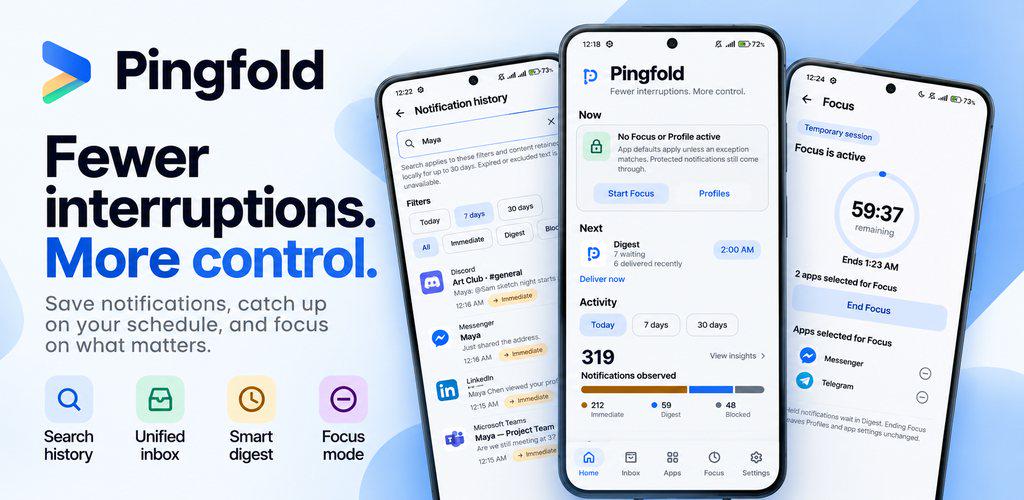
Developer Post Pingfold on Android: notification batching is free — when would PRO be worth it?

Post image
2 Upvotes

I'm Pingfold's solo developer. This is a developer introduction, not an independent review. I built it for a frustrating Android tradeoff: a delivery or shopping app sends useful status updates and marketing pushes, but its own notification controls sometimes lump them together.

The free core lets you set an app to Immediate, Digest (scheduled catch-up), or Block; make title/message/channel-based Exceptions; use a shared Digest schedule; and search retained notifications in an on-device history. For example, you could keep an order-status phrase Immediate and batch routine promos, provided the notification itself exposes distinguishable wording.

Optional PRO is for more complex routines: separate Digest times per app, Allowed Hours, reusable scheduled Profiles, plus CSV history export. The free core is enough if a shared catch-up schedule and a few Exceptions solve your problem. PRO is offered monthly, annually, or as a one-time Lifetime purchase; check Google Play for local prices, taxes, and eligible trial offers rather than assuming one universal price.

The tradeoffs: Android Notification Access is required; Pingfold can act only on notification content Android exposes, not hidden email sender details. If two alerts look identical in that content, a phrase-based rule can't reliably distinguish them. I would not use a third-party filter as the sole safeguard for emergency or home-security alerts. Native per-app notification categories are simpler when an app respects them.

I'd value a practical buying decision: would the free shared Digest cover your use, or is there an actual reason you'd pay for different schedules or Profiles? Which app mixes must-see alerts with promos on your phone?

See Pingfold on Google Play


r/softwaresworthpaying • • 3d ago

Comparison Is TextExpander worth paying for on a support team? Count shared replies and maintenance

1 Upvotes

TextExpander looks worth paying for when several people need the same maintained replies across different apps. For a handful of personal shortcuts, start free.

This is a researched comparison of the published plans and documentation, not a hands-on review.

For support and operations teams, start with a shared Snippet Group: a library of shortcuts that insert saved text. One person maintains the approved wording and teammates get the updates through the group. Fill-ins ask for details that change before inserting the reply. Start with an approved escalation template with blank fields rather than a saved customer conversation. Give most teammates access to use the replies and assign someone to keep them current.

That owner still needs to review policy changes and retire bad replies. Faster insertion makes a stale answer easier to send, too. Test expansion and formatting in the apps your team actually uses before buying seats.

Which plan would you need?

Free allows five active snippets, one snippet swap every two weeks, and sharing with up to five users across three teams. New accounts get a 30-day preview of paid features. Pro removes the active-snippet limit but still caps users at five. Business removes that user cap and adds snippet requests and seven days of snippet activity history. Enterprise has custom pricing and more security and admin controls.

The US pricing page is inconsistent: its cards show Pro at $6 and Business at $12 per user per month, alongside annual totals of $60 and $120. Its FAQ says those annual totals equal $5 and $10 per month. Monthly billing is available. Check the billing choice and checkout total, rather than assuming the card is an annual rate. These US prices exclude tax.

A break-even example, with made-up numbers

Assume six people on Business at the listed $120 annual price each: $720 paid for a year, or $60 a month for comparison.

Suppose each person uses 20 snippets per workday, each saves 10 seconds compared with their current method, and there are 20 workdays a month. That's 400 minutes saved across the team. Subtract an assumed 60 minutes a month for maintaining the library, and you're left with 340 minutes.

At an assumed labor value of $30 an hour, that's $170 of time, minus the $60 monthly-equivalent subscription: $110 left. With those same assumptions, the team needs 180 minutes of gross monthly savings just to cover maintenance and the subscription.

None of that is measured performance or a promise of lower payroll. Compare against your current saved replies, not typing everything from scratch. Include setup time separately, and ask whether those minutes free up useful capacity.

Reasons to stay free or choose something else

If five active snippets cover the work, Free already includes sharing. On a Mac, built-in Text Replacements can handle simple shortcuts, though Apple says they aren't available in every app. Espanso is a free, open-source option for Windows, macOS and Linux; it uses configuration files, so consider who would maintain those instead of a shared team interface.

Privacy can rule out the cloud workflow. TextExpander documents server-side snippet storage with encryption at rest and in transit. Don't treat that as permission to store customer records or secrets. Its own guidance recommends a password manager for passwords and credentials. It also warns that incorrectly marked password fields can feed snippet suggestions; suggestions can be disabled. Get approval for the actual data your team would store.

Before leaving, export your snippet groups and test the important templates in the replacement tool. Downgrading to Free retains snippets but limits active ones. Deactivating the account is different: the support guide says it freezes expansion. Annual plans run through the paid term, so cancellation isn't an immediate refund.

My verdict: try a small approved library first. Pay when shared wording across apps is useful, the measured savings survive maintenance, and the data policy fits. Stay free when a few shortcuts do the job. Don't pay for a larger library nobody owns.


r/softwaresworthpaying • • 4d ago

Developer Post Pluely: live call transcripts and answers on your desktop, free on your own API keys (I'm the developer)

Thumbnail
gallery
3 Upvotes

Disclosure up front: I'm the developer of Pluely, so take this as a maker post.

What it is: a small desktop AI assistant (about 10-20 MB) for macOS, Windows and Linux.

Use case: you're on a call and want notes and help without adding a bot to the meeting. It transcribes both sides live on your computer, and nothing joins the call, so it works with Zoom, Meet, Teams, Webex, Slack Huddles and Discord. When someone asks a question it suggests an answer, and you can ask about anything on your screen (screenshot, a region, or a file).

Price:

  • Free: $0 forever on your own AI and speech-to-text keys (OpenAI, Claude, Gemini, Groq, Ollama and more), no signup.
  • Limited Pro: $15/mo ($150/yr), no keys needed, includes 5 hrs of live transcription and 300 AI requests a month.
  • Unlimited Pro: $35/mo ($350/yr), 30 hrs of transcription and 2,000 AI requests a month, 2 devices (these are monthly budgets).
  • Dev Pro: $150 once, every feature on your own keys (hosted models not included).

Privacy: your transcripts, chats and files are saved locally on your computer and never stored on our servers.

Drawbacks, honestly:

  • macOS system audio capture needs macOS 14.2 or newer.
  • On Linux the overlay can't be hidden from a full-screen share.
  • Paid plans have monthly budgets, and there are no refunds after activation.

pluely.com

Happy to answer questions.


r/softwaresworthpaying • • 4d ago

Comparison Is PandaDoc worth paying for sales proposals? Price Business before choosing Starter

3 Upvotes

PandaDoc makes more sense for a team that keeps rebuilding proposals than for someone who occasionally needs a signature on a finished PDF.

This is a researched comparison of the current US plans and documentation, not a hands-on review.

For a sales team, the useful question is where each proposal gets stuck. Are reps copying the same service descriptions, entering prices again, or waiting for someone to approve a quote? Those are better reasons to consider PandaDoc than wanting a nicer signature box.

The proposal tools change the price

Starter includes document editing and unlimited manual document sends, but only five templates. PandaDoc's own pages showed different Starter prices. Check the price and billing commitment for your account before budgeting.

Business is $49 per seat per month billed annually, or $65 monthly. That's $588 per seat for a year at the annual rate, before tax. An illustrative three-seat team would pay $1,764 annually, before extras.

Business is where the sales case gets stronger. Its product catalog lets you reuse products, services and prices in quotes. The content library gives the team reusable proposal sections. It also includes unlimited templates and approval workflows that send a document to internal reviewers before the customer receives it.

That can justify the upgrade when several people repeatedly assemble similar proposals. If every proposal is bespoke and someone still rewrites it all, maintaining the catalog and templates becomes another job.

There's a distinction within approvals, too: routing only when a condition is met, such as a discount threshold, costs extra on Business. Don't assume the base plan includes every approval rule your sales process needs.

Check what "tracking" means

Business includes recipient analytics, including page viewing time. Basic notifications aren't the same thing. That detail can help decide where to follow up, but a long page view isn't proof that a buyer wants to proceed.

There's also a practical reporting catch: PandaDoc says editing a sent document removes its old analytics. Its suggested workaround is to duplicate the document if you need to preserve that history.

Automation needs a separate budget. The unlimited manual document allowance doesn't mean unlimited API or automated document creation. Those use Usage Credits, so price the actual CRM or automation workflow before signing up.

When to spend less

If the proposal is already finished in Word or Google Docs and the remaining job is adding fields and collecting signatures, start with a simpler signing tool. SignWell Free allows three documents a month for one sender. Light is $12 monthly, or $10 a month billed yearly, with unlimited documents and five templates per sender. That comparison is about the remaining signing job, not replacing PandaDoc's proposal workflow.

PandaDoc also advertises Free at five documents a month shared across the account. Older annual Free accounts can have a 60-per-year allowance, so don't assume the limits are interchangeable. Its current pricing page and detailed plan comparison disagree about Free editor access. Check what your account actually includes before planning to build proposals there.

Before buying a year, use the trial offered to your account to rebuild one real proposal and get it approved. Check its duration and limits before starting. Keep an independent copy of completed documents and reusable material before downgrading: the Free-plan guide warns that content library items become inaccessible.

Verdict: Business is worth considering when reusable quotes and internal approvals will become part of the team's normal proposal work. Starter fits document creation without that shared sales machinery. For occasional field-and-signature sends, buying the proposal system is hard to justify.


r/softwaresworthpaying • • 4d ago

Developer Post Before paying for a backtester, check what $1 per order means for your trade size

2 Upvotes

I’m on the eStockes team. The daily stock and ETF comparison I tested below runs in a web browser for $0, without an account.

A quick way to check whether a backtester’s cost model fits your use case is to convert a flat charge into basis points at the order size you’re testing. A hypothetical $1 charge on a $500 order is 20 basis points. On $2,000 it is 5 basis points. On $10,000 it is 1 basis point. Those are costs per side, so model the entry and the exit separately if order values differ. Commissions and slippage are separate assumptions.

I tested a daily 20-day moving-average crossover on VB from Nov 22, 2021 to Nov 20, 2026. The guest result showed 86 trades, −2.2% before modeled costs and −10.3% after costs, versus +25.8% holding. Its guest setup uses 5 basis points of slippage per side and zero commission for this example. It does not simulate the $1 fee above, and it excludes trading charges from the holding benchmark. If you need a flat fee per order, check that a tool supports it before paying for the tool.

If you already have a daily rule you’re evaluating, pick your ticker and press Run historical test in the free form. If a result is already open, use Change rule first. If you try it, tell me the ticker and rule, which finished ahead, and whether you could find the per-side assumption. No personal balances needed.

Open the free VB example


r/softwaresworthpaying • • 5d ago

Comparison Docusign pricing: is Personal worth paying for if you only send a few contracts?

1 Upvotes

This is a researched comparison of current US plans, not a hands-on review.

If you send a couple of contracts a month, try a free signing tool before committing to Docusign for a year. Personal makes more sense when a client requires Docusign, or when you'll repeatedly use its templates and signing records. The name alone wouldn't justify the bill for me.

The monthly price can mean three different commitments

Docusign lists these Personal options for one sender, before applicable tax:

Billing optionCostCommitment
Annual, paid upfront$120 a year, advertised as $10/monthOne year
Annual, paid monthly$11/month, $132 for the yearStill one year
Monthly, no annual contract$15/monthMonth to month

The $11 option isn't the flexible monthly plan. If you only need one busy month, compare the $15 option with the full annual bill, not with the advertised $10 monthly equivalent. Paid subscriptions auto-renew unless you stop renewal.

Personal includes five envelopes per month. Paying annually doesn't turn that into a pool of 60 sends you can use whenever you like. A sixth send in one busy month can change the decision even if the rest of your year is quiet. Docusign directs Personal users who need more than five to upgrade; its self-service purchase of extra envelopes is for Standard and Business Pro accounts.

Count signing requests, not pages or signatures

An envelope is the package you send for signing. It can contain several documents and several recipients. A contract and its attached scope of work, sent together for both parties to sign, can be one envelope. Reusing the same contract for a separate client needs a separate request.

Recipients can sign a Docusign request for free without creating an account. You don't need to buy sender subscriptions for everyone whose signature you need.

Personal already includes reusable templates, reminders and an audit trail. For a freelancer sending the same agreement regularly, those are the useful parts to try. Use Docusign's no-credit-card trial to check the actual contract and recipient experience before paying, and compare the features you use with Personal rather than assuming everything in a trial belongs to that plan.

What the cheaper option covers

SignWell Free has one sender, one template and three documents per month, with multiple signers and an audit trail. Its pricing page defines a document as a signing request that can contain multiple files and signers, so don't compare its quota with Docusign by counting PDF pages.

If that allowance fits, there's a credible reason to spend nothing. For more frequent manual sends, SignWell Light is $12 month to month, or $120 billed yearly. It includes unlimited signing requests and five templates per sender. Those are eSignature plan limits, not a promise of unlimited API use.

That doesn't settle client acceptance or your security requirements. Try a representative agreement, check who receives which documents, and make sure you can save the finished record. Don't upload a confidential client contract just to experiment without permission.

Docusign lets subscribers download the completed documents and Certificate of Completion. Keep both in your own records before leaving. Its underlying transaction data is different: Docusign says it retains that data after the subscription ends and can't delete or export it on request. Downloading your PDFs isn't a complete removal of your transaction footprint.

An audit trail records the signing process. It doesn't guarantee that every agreement meets every legal requirement. Check the required process for your document and jurisdiction, particularly if notarization or other formalities apply.

My verdict: start free for occasional straightforward contracts. Choose Docusign Personal when a specific client requirement or recurring workflow earns its cost, and five monthly sends are enough. For a short project, price the no-annual-contract option first. A quiet calendar isn't a good reason to prepay for a year.


r/softwaresworthpaying • • 6d ago

Developer Post Tax Preparation Software

Post image
3 Upvotes

Hoping to stay within the rules - recently stumbled across this sub. I'm a CPA with 15 years of experience that just went out on my own for this coming filing season. Long story short, I now have my perfect tax preparation software. I had used UltraTax and CCH Axcess exclusively, they are the two biggest players. But anyone that has been around the tax world will know, their software SUCKS. What I actually want help on is the individual only spinoff that would compete with Turbo Tax. The individual version is still very much in development, but it uses the exact engine from my professional line.

Here's my pitch - I'm a power user in every software a CPA firm uses, except I've now made my own. I've made it for my practice and want everyone to be able to file taxes easier. Every American will be able to use almost identical software to those used by CPA firms.

Here's a demo for the Individual spinoff, it's version may be old compared to where the pro line is now, still really good compared to competition.

I'm not asking for money right now. Eventually it will be released for free and only charges if someone wants to efile to the IRS or state.

https://ntmcpa.com/indy


r/softwaresworthpaying • • 6d ago

MacAudio: a native volume mixer for mac

26 Upvotes

I tried many Mac audio mixers I could find and wasn't happy with the sound from any of them, so I built my own. MacAudio puts every app and browser tab on its own slider in your menu bar, and for supported apps it moves their own volume control, so the audio stays at full quality.

Try at MacAudio.app


r/softwaresworthpaying • • 6d ago

Comparison Wave Pro vs Starter: when is the $19 monthly upgrade worth it for a tiny business?

1 Upvotes

If you run a tiny business, Wave Pro is worth considering when entering bank transactions and sorting receipts have become a regular chore. The payment discount alone won't cover the subscription.

This is a researched comparison of Wave's published terms, not a hands-on review.

For new subscriptions, Pro costs US$19 a month or US$190 billed annually, per business, before applicable tax. Canadian pricing is C$25 a month or C$250 annually. Wave supports businesses in the US and Canada, excluding US territories. The full accounting service runs in a browser, with an iOS and Android app for mobile tasks.

Starter is $0 and lets you create unlimited estimates, invoices, bills and bookkeeping records. If a monthly statement upload and manual categorization are manageable, staying free is a reasonable choice.

The payment saving stops at $6 a month

On Starter, Visa and Mastercard payments cost 2.9% plus $0.60 each. Amex is 3.4% plus $0.60. Discover uses the 2.9% rate but is available only to US businesses.

Pro removes the $0.60 charge for the first ten cumulative card transactions in each monthly subscription period. After that, Starter's fees apply again. The percentage doesn't drop. Ten waived fees save at most $6 a month, however large those invoices are. Bank payments cost 1%, with a $1 minimum, on either plan.

Paying for Pro doesn't guarantee payment-processing approval. There's a separate application. Don't budget around the discount before you're approved.

Human support also isn't exclusive to Pro. Wave's support guide says an approved online-payments application makes that business profile eligible too. Pro includes chat and email support, but there isn't an inbound phone line. If support is your only reason to upgrade, check whether you already qualify.

Pay for less entry work, if it really is less work

Pro adds automatic bank imports through Plaid, transaction merging and categorization, plus unlimited receipt scanning. Receipts can come from the mobile app, desktop uploads or email forwarding. For someone regularly catching up on a pile of expenses, that's a more convincing reason to pay.

You still need to check the results. Compare receipt amounts and categories with the originals. Test your actual business bank account before committing to a year: Wave doesn't guarantee that every institution connects or that a connection will keep working. Bank imports also mean sharing financial data with Plaid.

If receipts are the only annoyance, Wave sells a separate Receipts plan for US$8 a month or US$72 annually, before tax. Canadian prices are C$11 and C$96. That includes unlimited scans and human chat/email support without buying all of Pro.

A useful monthly test: assume you're in the US, use all ten discounted card transactions, and value your admin time at $30 an hour. The $19 subscription minus $6 in fee savings leaves $13. Pro would need to save about 26 minutes a month after checking and correcting its output. With no card savings, it's 38 minutes. Those are assumed values for the calculation, not promised time savings.

Try the workflow before the annual bill

Wave's terms describe a discretionary 14-day Pro trial for new accounts, without a card. Use it if offered; don't assume every account gets it. Otherwise, a monthly subscription limits the initial commitment.

Pro auto-renews. Cancel at least one day before renewal through whoever bills you, Wave, Apple or Google. Access lasts through the paid period. Direct Wave purchases generally aren't refunded for cancellation or unused time; app-store refund rules differ. After Pro ends, paid features stop, but your data remains on the standard plan.

Before moving away, download accounting records and receipt images. Wave has exports for both, but invoice PDFs can't be exported in bulk. Test the destination's import rather than assuming those files will recreate everything.

My verdict: stay on Starter if a regular manual session keeps the books current. Choose the Receipts plan if scanning is the only paid job you need. Pro earns its place when your bank connection works and the recurring reduction in entry work is worth the remaining bill after any actual fee savings.


r/softwaresworthpaying • • 6d ago

Otter.ai review (ran the same meeting through 7 AI notetakers)

Thumbnail
reddit.com
1 Upvotes