r/MacStack • • 6d ago

App Launch Spotlight & Finder on steroids 🚀 Findy - good alternative

4 Upvotes

Hi all,

for a long time, finding a file on my Mac went like this: open Spotlight, type something, get an app, a web suggestion and a file from 2019. Give up, open Downloads, sort by date, scroll.

The thing is, I usually remember *something* about the file. It was a PDF. Someone sent it on Gmail. It was last week. Spotlight just doesn't let me search like that.

So recently I built Findy. You type what you remember, the way you'd say it:

- pdfs from gmail last week

- downloaded from safari

- videos from august

- zips bigger than 1gb older than 6 months

Findy picks the kind, date, size and source out of the sentence and shows you how it read it. Then it looks for the rest in file names, inside PDFs and in the text on screenshots and photos.

It also has:

- Shelves for images, videos, music, documents, archives and apps, with big thumbnails

- Downloads grouped by where they came from (Gmail, Slack, WeTransfer, any website)

- A Quick Search panel you can open from any app with a shortcut

- Clean Up and Duplicates, which only ever move files to the Trash, and you can undo

- Search in 13 languages, not just English

Everything is indexed on your Mac. There's no account and no cloud, it works offline, and nothing about your files leaves your computer.

Price: $19 once for one Mac ($27 for two), no subscription, one time payments, lifetime updates. Needs macOS 14 or later.

With REDDIT50 50% off

I'm a solo dev, so I'd love feedback. Happy to answer anything in the comments!


r/MacStack • • 6d ago

Your own video as the Mac wallpaper: the three things that decide battery, sharpness and whether the loop looks bad

1 Upvotes

I make a Mac wallpaper app (Mac+), so disclosure up front. This is what I've learned about video wallpapers on macOS, whatever tool you use.

1. Resolution vs your display. A clip smaller than your screen gets scaled up and looks soft. A clip far bigger than your screen costs decoding work for nothing. Match it to the display, roughly.

2. Codec and file size. Apple Silicon decodes H.264 and HEVC in hardware. Exotic codecs or huge bitrates are where battery and fan noise come from. Re-encoding a clip once is usually worth it.

3. The loop seam. Most "ugly" video wallpapers are a jump cut at the loop point. Pick a clip where the first and last frames are close, or crossfade the ends before you use it.

Also worth checking in any app: does it pause when a window covers the desktop, when you're on battery, or in fullscreen apps?

macOS's own Wallpaper pane still won't take a video file of yours, which is why I built Mac+. Guide here: https://macplus.pro/live-wallpaper-mac?utm_source=reddit&utm_medium=post&utm_campaign=jv-h33ccf (free version, or 7-day trial then €1.99/month).

What do you run as a video wallpaper?


r/MacStack • • 6d ago

FeelOS Update for FeelMyMac. 5,000 downloads! Thank you! 💜

Post image
4 Upvotes

Thanks r/MacStack community, as always you've been amazing!


r/MacStack • • 6d ago

Workflow BBEdit on Mac: search a folder of text files before changing anything

1 Upvotes

BBEdit makes sense when the job is finding or changing text across files: exported logs, Markdown folders, configuration copies. If you just need to write a short .txt file, TextEdit's Format > Make Plain Text may be enough.

The useful starting point is BBEdit's free mode. Multi-file search and replace, including pattern matching, remain available after the 30-day full-feature evaluation. Text Factories and Projects need a license. You don't need to buy those to search a folder.

Try a search that can't damage the originals

Make a disposable folder in Finder. In BBEdit, save these fictional lines as two separate .txt files inside it:

sample-a.txt:

STATUS: waiting
NOTE: waiting for artwork

sample-b.txt:

STATUS: approved
NOTE: approved wording still needs a date

Choose Search > Multi-File Search, or press Shift-Command-F. Drag your test folder into the search target area and make it the only selected source.

Enter ^STATUS: .+$ in Find, enable Grep, leave Replace empty, and click Find All. Grep means a pattern search: this one asks for a line starting with STATUS: followed by at least one character. The result should contain the two status lines, not the notes. Inspect both matches and their filenames before trying a real folder.

Find All doesn't replace text. An empty Replace field does not make Replace All safe, though: don't click that button for this exercise.

For real work, search a copy of one relevant folder first. Open a few results and check what the pattern missed as well as what it found. A batch edit is worth doing only once you can describe exactly which lines should change. Keep an untouched copy outside the target folder before making replacements.

Where paying starts to make sense

A Text Factory saves a sequence of text transformations so you can run it again without programming. For example, Bare Bones documents using a Change Line Endings action across a folder of files. Projects group related files in one browser even when they live in different locations. Those are useful reasons to pay if the same cleanup or file group keeps returning.

The direct BBEdit 16 license is US$59.99 before tax. The Mac App Store version uses a subscription instead, so check which purchase route you're choosing. The current release is 16.1, requires macOS 14 or later, and runs natively on Apple silicon.

Don't buy it just because a file is described as huge. Bare Bones says some operations can be limited above 2GB. Try a copy of your actual file during the evaluation rather than assuming every search or transformation will work at that size.

For occasional plain-text writing, keep TextEdit. For searching a folder, start with free BBEdit. Pay when reusable transformations or Projects solve a recurring job, not just because the trial exposes them.


r/MacStack • • 7d ago

App Recommendation Black Friday 2026 Mac app deals: 40 apps, most of them pay-once (codes and end dates inside)

51 Upvotes

Disclosure first: the first four apps are ours. The rest are other developers' deals that I collected, with no affiliate links. Check the price at checkout before you pay, because some codes start or end on different days.

Ours

AppWhat it doesDeal
ByteSweepDisk cleaner for Mac, Windows and Linux. Shows what fills your disk, removes only what you pick, undo for 7 days50% off: $29.99 $15 once, applied at checkout, until Dec 31
EarmixVolume mixer for Mac: per-app and per-tab volume, an output per app, EQ50% off: $12.99 $6.50 once, code BLACKFRIDAY50, until Dec 1
FindowScrolling window manager for Mac, with tiling, a window switcher and saved workspaces$19.99 $5 once, applied at checkout, until Dec 1
PaneStackFinder alternative with up to 16 floating panesNot a Black Friday code: launch price $4.99 for the first 20 copies, then it rises in steps to $29.99

All four are one-time purchases with a free trial.

Utilities and menu bar

AppWhat it doesDeal
OpenInPick the browser or app each link opens in60% off, code BLACKFRIDAY26, Mac App Store $11.99 $4.79
DisplayBuddyBrightness and input control for external displays33% off, code BLACKFRIDAY26, until Dec 15
JuicyBattery app with custom alerts40% off lifetime, code BFCM26, $24.99 $14.99, until Dec 1
Mac 4 BreakfastBattery health in the menu bar50% off, code BLACKFRIDAY26, $9.99 $4.99
Almighty100+ Mac tweaks in one app50% off, code INDIEGOODIESBF26, $14.99 $7.49
PastePalClipboard manager50% off, code INDIEGOODIESBF26, $14.99 $7.49
CleanClipMinimal clipboard manager30% off, code BF2026, $19.99 $13.99
FilesideFile manager with unlimited panes50% off, code BLKFRD26, $33 $16.50, Nov 23 to 30
UbidropAirDrop between Mac, Android and iPhone60% off, code BLACKFRIDAY2026, 1 Mac $29 $11.60
NeoTilerWindow manager with shortcuts30% off, code BF30, $9.99 $6.99
PicmalConvert and compress images and video50% off, code BLACKFRIDAY, $29 $14.50
PeakHourNetwork and Wi-Fi monitor30% off lifetime, $49.99 $34.99, no code
DictionariesDictionaries for 80+ languages50% off, code BF26, until Dec 3

Productivity

AppWhat it doesDeal
CraftNotes, docs and tasks40% off yearly Plus and Family, code BLACKFRIDAY26-A
ChronoidAutomatic time tracking50% off, code BLACKFRIDAY26, lifetime $149 $74.50
PresentifyDraw on your screen while presenting30% off, code PRESENTIFY30, $14 $9.80
ScreenSnap ProScreenshots and screen recording50% off, code BLACKFRIDAY, lifetime $39 $19.50
VoiceInkOn-device dictation40% off Mac lifetime, code BFVI2640, 1 Mac $25 $15
WickDeadlines as burning wicks50% off, code BLACKFRIDAY, $15.99 $7.99
ShiftPlusSwitch your whole workspace with one key40% off, code BF2026, $24 $14.40
TypefuText expander50% off, code INDIEGOODIESBF26, $7.99 $3.99
bytemailNative email app30% off lifetime, $99 $69, no code

AI

AppWhat it doesDeal
BoltAINative AI workspace for ChatGPT, Claude, Gemini and local models40% off, code BFCM2026, Pro $99 $59, until Dec 1
TypingMindChat UI for your own API keys60% off lifetime, code BLACKFRIDAY2026, until Dec 1
PDF PalsChat with your documentsLifetime $249 $149, until Dec 1

Developer tools

AppWhat it doesDeal
ProxymanInspect and change HTTP/HTTPS traffic30% off all plans, code BF2026, until Dec 3
JuxtaCodeCompare Git branches, resolve merge conflicts40% off, code BLACKFRIDAY26, $40 $24
ShellHistorySearch and sync shell history60% off, code BLACKFRIDAY26, Mac App Store $13.99 $5.59
WhaleDeckDocker manager40% off lifetime, $57 $35, no code
MailScopeEmail debugging$29 $19 once, code bf2026

Design, audio and video

AppWhat it doesDeal
SipColour picker50% off, code BLACKFRIDAY26, Nov 27 to Dec 1
ZipicCompress and resize folders of images33% off, code BF2026, 1 device $19.99 $13.39
CrispOffline video and photo upscaler50% off, $29 $14.50, no code
MotionShineScreen recorder with auto zoom50% off, code BF50, Pro $49 $24.50
SmoothCapturePolished screen recordings50% off, code BLACKFRIDAY26, Personal $79 $39.50
Recorder.appScreen, window and camera recorder60% off lifetime, $44.99 $17.99, no code

Know a Mac deal I missed? Drop it in the comments and I'll add it.


r/MacStack • • 6d ago

App Launch I built Aedon to personalize how your microphone sounds on Mac

0 Upvotes

I'm a lecturer and a PhD student based in Budapest. During one of my online lectures, a student's microphone wasn't very clear. That got me thinking about building something that could improve mic audio and give people more control over how they sound.

That became Aedon. It improves your own microphone before the audio reaches your meeting app, so the student would need it installed on their Mac. I've given all my students free licenses.

During setup, you record a short voice sample, and Aedon adjusts four presets to your voice: Clear, Broadcast, Podcast and Warm. Then you choose Aedon as your microphone in your meeting app and pick a style. Clear stays close to your natural voice; the others give it a different character.

It also removes background noise, has an optional restoration mode for muffled audio, and can record your mic together with the meeting playback. Audio processing happens locally on your Mac, and recordings are saved locally.

You can hear the presets at https://aedon.app/ and switch between the original and processed voice mid-sentence without installing anything.

It runs on Apple Silicon Macs with macOS 15 or later and is signed and notarized by Apple. There's a 7-day free trial, with no card required. Through December 1, Standard is $29 once with a year of updates, and Lifetime is $69 once with all future updates. Both cover two Macs. Standard keeps working after that year; further updates are optional. Privacy policy: https://aedon.app/privacy

The short video uses AI-generated animation and narration from ElevenLabs. It’s not perfect, but the voice styles you hear in the video were processed through Aedon.


r/MacStack • • 6d ago

OpenGestures: free, open-source trackpad gestures for macOS, mapped to your own actions

Thumbnail
reddit.com
1 Upvotes

I built OpenGestures, a small free open-source (GPL) menu bar app that maps trackpad gestures to custom actions: swipes (2 to 5 fingers), taps, pinch, rotate, TipTap, edge and corner gestures. You can add modifier keys, limit a binding to one app, and set everything up in a visual editor. All bindings live in one readable JSON config file you can keep in git.

Out of the box, 4-finger swipes walk through your recently used windows, ⌘ plus a 4-finger swipe moves a window to the previous or next display, a 4-finger tap maximizes, and sliding along the edges changes volume on the right and brightness on the left.

You build it from source for now, and the README walks you through it. It should work on macOS 14 or later, but I've only tested it on macOS 27 on Apple Silicon. You need a trackpad.

This project was very vibed, but it turned out really good. Feedback and PRs are welcome, and I'm happy to fix any issues opened on GitHub.

https://github.com/01wil/OpenGestures


r/MacStack • • 6d ago

App Launch Harbor: a Dock replacement for macOS 26 with live widgets, Spaces and notes (one-time price, 7-day free trial)

6 Upvotes

Hello, I'm the developer of Harbor, a Dock replacement for macOS, and since it isn't on the Mac App Store I want to introduce myself and the app properly.

  • Who I am: I'm a solo indie developer running MiniLever LLC in Texas. I build apps and games for Apple platforms: Harbor is my Mac app, and I'm also finishing a game for iPhone, iPad and Mac. Harbor is a native Swift app, signed with a Developer ID and notarized by Apple, and I answer every support email myself.
  • Why I built it: The Dock hasn't changed much in years. It only holds app icons, so to check the weather, my calendar, what's playing or how hard my Mac is working, I had to open something else. I wanted one bar I could glance at, and I couldn't find one that felt like it belonged on the Mac. It started out super simple and it has evolved over the past months into something bigger and better. Most other options are very expensive, offer only with subscription, or dont offer lifetime updates, so I made this.
  • What problem it solves: Harbor replaces the Dock with a bar of apps and live widgets: clock, weather, calendar, now playing, system meters, notes, games and more. Click a widget and a panel opens above it, and you can pin panels so they stay on screen. You can put a bar on any edge of any screen, with a different layout on each monitor.
  • What it brings to the Mac: A Dock you can actually make your own, with themes, bar sizes, widget sizes and multiple screens, while still looking like part of macOS. It's an independent app with lifetime updates, so it keeps improving without a subscription, and I read all the feedback.

Pricing - https://harbordock.app/pricing :

  • free 7 day trial
  • One time Purchase, no subscriptions!
  • Lifetime Updates on all licenses:

    • $9.99 for one Mac
    • $14.99 for three
    • $19.99 for five
  • Notarization: Developer ID signed and notarized by Apple. It is a direct download from my site, not from the Mac App Store.
  • Privacy: no third-party trackers and no analytics in the app; your layout, notes and settings stay on your Mac. Widgets that show online data, like weather and stocks, fetch it when you use them. Privacy policy: https://harbordock.app/privacy
  • Requirements: macOS 26 or later, Apple silicon.
  • AI Disclosure: I build Harbor with AI help. I use Claude Code (Anthropic) to help design some of elements. I code, design, test, and ship it all myself apart from those few design elements.
  • Links:

  • Feedback: tell me which widget or panel you'd want next. I read everything and I'll answer every question here.

r/MacStack • • 6d ago

I built an open-source, subscription-free voice dictation app for Mac (TypeLess)

Thumbnail
reddit.com
1 Upvotes

r/MacStack • • 6d ago

I forked Cotabby (the open-source Cotypist alternative) and tuned it on my M1 Pro 16GB it now feels on par with Cotypist

Thumbnail reddit.com
1 Upvotes

r/MacStack • • 6d ago

App Launch ListingPrompt: a Mac app for preparing store listings with Claude or Codex

1 Upvotes

Hi, I’m Lokman, the developer of ListingPrompt. Every time I shipped a game, I had keyword research in one place, copy in another, translations in documents, and the final changes in store dashboards. I built this Mac app to keep that release workflow together.

It tracks keywords and competitors, drafts titles, subtitles and descriptions within store limits, localizes metadata and app strings, and helps prepare screenshots and releases for App Store Connect and Google Play. Its local MCP server lets Claude Code or Codex work through the steps while I review changes before publishing. The 1:22 demo shows the workflow with my game Slingjet.

It’s for indie developers shipping apps in multiple languages. It needs macOS 14+ (Intel or Apple silicon), and AI features use a tool you connect, such as Claude Code, Codex or Ollama. The current Black Friday price is $39.99 one-time for up to two Macs ($59.99 after the sale): https://listingprompt.com/

I’d be interested to hear which part of store release prep takes the most time for you.


r/MacStack • • 6d ago

App Recommendation Spaced out

1 Upvotes

I recently built and open-sourced my first macOS app: SpacedOut
It’s a native reminder and micro-task timer designed around one idea: reminders shouldn’t be easy to miss.
It includes natural-language task entry, countdown timers, a floating desktop widget, full-screen alerts, and Apple Reminders + Calendar integration.
Built with Swift, SwiftUI, and AppKit.
Would love to get feedback from fellow Mac users and developers!
GitHub: https://github.com/gagankishoreint-glitch/SpacedOut


r/MacStack • • 6d ago

What’s the most annoying thing you have to fix after pasting between Mac apps?

1 Upvotes

I mean text or details copied from one app into another that still need adjusting to fit the destination. One concrete example from the last time is enough.


r/MacStack • • 6d ago

I made a free Mac app that sorts files by what's inside them. How do you organise yours?

Thumbnail gallery
1 Upvotes

r/MacStack • • 7d ago

App Launch Nagbar: a Mac reminder app that won't accept "later" forever

4 Upvotes

We built Nagbar because of one problem: everything reaches you as a notification, and a notification is easy to swipe away.

Problem

I dismiss notifications without reading them. Apple Reminders asks once, I click the banner away, and the thing is gone for the day. Every reminder app I tried accepts "later" forever.

Nagbar doesn't. When something is due:

  1. Before: a countdown to the next thing sits in the menu bar, or in the notch if your Mac has one.
  2. At the time: a card drops from the top of the screen.
  3. If you snooze or ignore it: the next ask takes the whole screen, on every display, over full-screen apps.
  4. It asks again every few minutes until you press and hold Done.

It reads your macOS Calendar and Apple Reminders lists, so there's nothing to move over, and Done syncs back to Reminders. Meeting alerts have a Join button (Meet, Zoom, Teams, Webex, Slack, FaceTime).

Most of the work went into making it not obnoxious:

  • On a call or presenting, alerts stay a small card and never take the keyboard.
  • Quiet hours, pause, and a daily cap on how often it asks.
  • After a few "Not now"s it asks "Still want this?" instead of nagging forever.
  • After sleep you get one "While you were away" card, not a stack of takeovers.
  • You choose how it talks when you're late: Gentle, Firm or Savage.

New in 0.4 (both stay off until you turn them on)

  • Mail: Nagbar reads Apple Mail on your Mac and sorts it into To answer, Needs action, Waiting on them, FYI and so on. A bill that's due or an account about to be paused gets one question: "Remind you before it's due?" You can reply from Nagbar with a draft written by the AI on your Mac, with 8 seconds to undo. It keeps short summaries, not your emails.
  • "Remind me about this": say it, and a model on your Mac looks at the window in front and names the reminder for what's in it. Needs 16 GB of memory or more. The picture is never kept or sent.

Also included, same price

  • Add by typing or by voice: hold ⌥⌘V and say "remind me to call Mom at 6, nag me".
  • Dictation in any app: hold right ⌥ and talk. Speech-to-text runs on the Mac (Parakeet), with 11 built-in styles plus your own.
  • Edit by voice: select text, hold right ⌘ and say "make it friendlier".
  • It hears what you promise: dictate "I'll send Sam the deck by Friday" and it offers a reminder for Friday. Nothing is added without your click.
  • A focus timer that holds reminders until the session ends.
  • Do Not Disturb, keep awake and mute from the same panel.
  • nagbar:// links for Shortcuts, and a connector so Claude can add and finish reminders.

Comparison

  • Apple Reminders: asks once. Nagbar reads the same lists and adds the persistence.
  • Due: the standard for repeating nags, and it's on iPhone. If you live on your phone, Due is the better pick. Nagbar is Mac-only; the difference is that it escalates to the full screen and works from your Calendar and Reminders instead of its own list.
  • In Your Face, Chimr, Dato: full-screen alerts, built around meetings. In Your Face also has iPhone and Watch apps. Nagbar's takeover is for tasks as well, and it keeps coming back until the task is done.

Pricing

  • $20 once: 2 Macs, every update. Not a subscription.
  • Black Friday: $10 with code NAGBAR50, until the end of 30 Nov (Pacific time).
  • There's no free trial yet: you buy, then download. 14-day refund by email, no questions. I know that's a weaker offer than a trial.
  • No account. Direct download from nagbar.app, not on the Mac App Store.

Privacy

No analytics, no tracking, no account. Speech recognition, rewriting, Mail sorting and screen reading all run on your Mac. Your words leave it only when you hand them off: "Do it for me" passes a task to Claude or ChatGPT on your own account (you review it and press Send yourself), and the Claude connector also uses your own Claude account. None of it comes to us. Apart from that, Nagbar only goes online for a licence check with Polar about once a week, update checks, and one-time model downloads. Payment goes through Polar.

Limits

Apple silicon, macOS 14 or later. No iPhone app. Mail works through Apple Mail. It's version 0.4 and young, so there will be rough edges; we fix what gets reported.

How it's built

Native Swift, no Electron. Speech-to-text is Parakeet on the Neural Engine. The optional models are Apple Intelligence or Qwen3.5, which runs on your Mac in a size that fits its memory.

Site: https://nagbar.app

One question for you: where's the line between a reminder that's persistent and one that's just annoying? I'd like to know what would make you turn this off.


r/MacStack • • 6d ago

I want to make break time flood my Mac screen into an aquarium

1 Upvotes

Most break reminders are a notification or a gray overlay I instantly dismiss. So I tried something sillier: when it’s break time, water slowly fills your actual screen and it turns into an aquarium. Fish swim over your windows, there’s also seaweed

  • How much time you focus decides the fish type
  • the longer you focus the rarer or bigger fish you hatch
  • You got the fish in your aquarium
  • break time --> your aquarium shows the fish you hatched

It’s a design, not released yet. Honest questions:

  1. Would this actually get you to take breaks, or would it drive you nuts?
  2. Would you pay a one-time ~$2–3?
  3. Idea I’m unsure about: earn a new fish for every focused session, so your tank fills up over the week. Fun, or unnecessary?

r/MacStack • • 7d ago

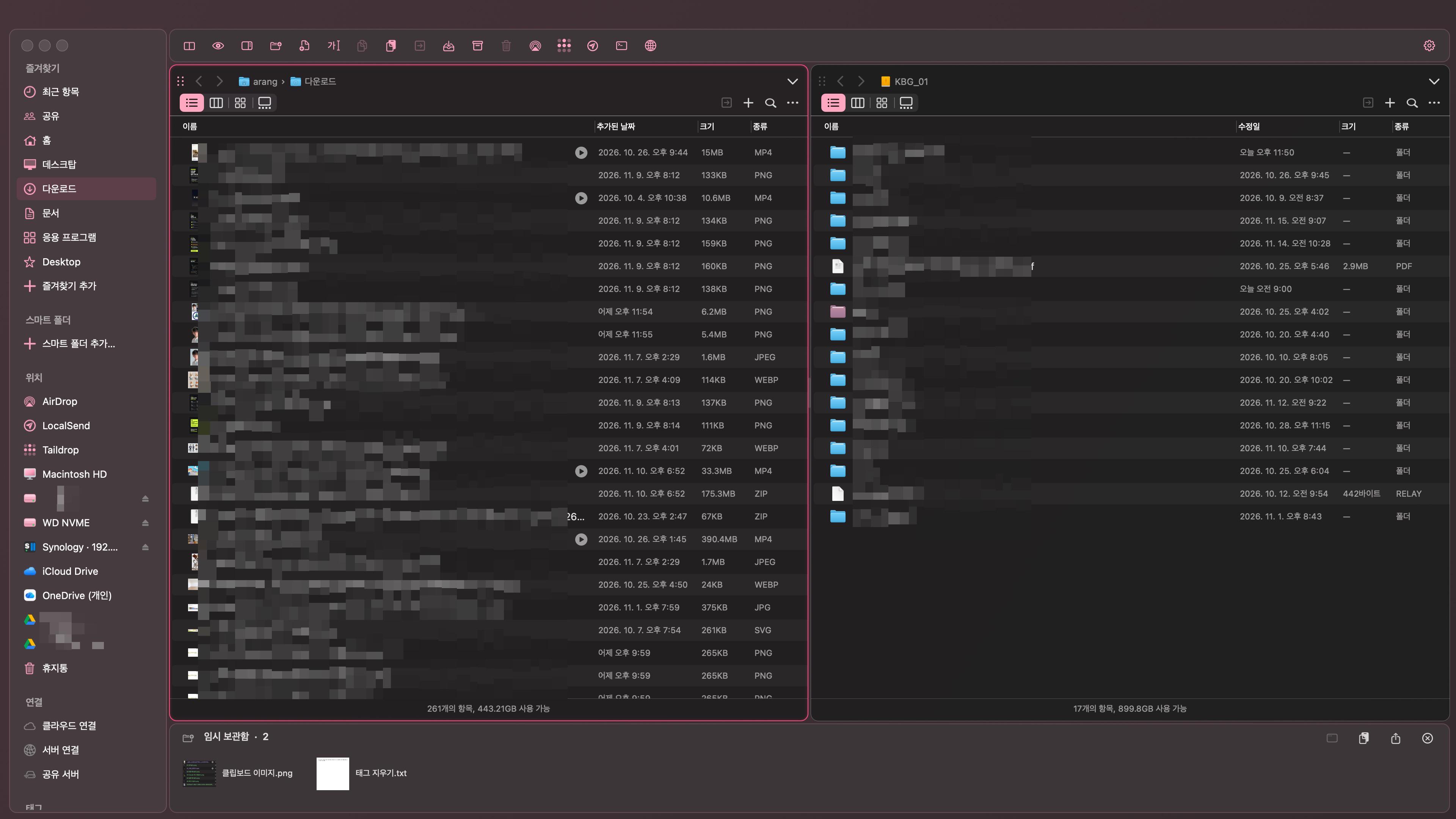
I'm building FileDesk, a multi-pane file manager for macOS [Free]

Post image
11 Upvotes

Hi everyone! I've been working on FileDesk, a macOS file manager for people who regularly work across several folders.

The current public release is 1.22. Some of its features include:
• Up to six file panes, tabs, pinned tabs, and saved workspaces.
• An optional temporary shelf for collecting files and folders before copying or moving them.
• Quick Look previews, spring-loaded folders, and customizable keyboard shortcuts & toolbar.
• Disk usage breakdown, Smart Folders, and Spotlight full-content search (without the 8 MB file limit).
• Batch renaming, duplicate finder, folder comparison, and one-way/two-way folder synchronization.
• Network, server, and cloud storage connections (Google Drive, OneDrive, pCloud, Dropbox, S3, Backblaze B2, Rackspace, SFTP/NAS), plus Taildrop transfers and basic Git operations.
• Finder's native Get Info window (including default app settings) and photo EXIF/metadata viewer with privacy-safe PNG export.
• Light and dark modes, customizable themes, folder color/icon badges, and multiple languages.

It supports Apple Silicon and Intel Macs running macOS 14 or later.

The standard edition is free for personal, non-commercial use. Business and organizational use requires separate paid licensing.

I'm also developing a paid Pro edition, coming later, with image editing and collages, PDF editing, audio editing, conversion tools, and advanced archive features.

👉 Website, screenshots, and downloads:

https://filedesk.win

I'd appreciate feedback on the interface and everyday workflows. What file-management tasks would you most like to make easier on your Mac?


r/MacStack • • 6d ago

I made a smart Mac menu bar break reminder with tiny companions (bunny, koi, lumberjack, cat)

1 Upvotes

Hi everyone, I'm the solo developer of Glueys, a smart break reminder for Mac.

I kept forgetting to rest my eyes, stand up and drink water while working. Notification pop-ups got swiped away, so I made something that sits quietly in the menu bar instead.

What it is:

  • A tiny companion lives in your menu bar (you can also drag it anywhere on screen). There are four: Gloop the bunny, Ripple the koi, Cedar the lumberjack and Maple the cat. Each with it's own personas
  • It reminds you to rest your eyes (the 20-20-20 habit), stretch, stand up and drink water, and it counts what you actually did.
  • You can set it to wait for your click instead of interrupting you.
  • It hides when your mic is in use and doesn't show in screen sharing.

Privacy: no account, no analytics, no network access. It only knows whether you're at the Mac or away. It never counts keys or records your screen, camera or microphone.

Price: free to download with a 7-day trial, then a one-time unlock, no subscription. It's $1.99 until December 4 for Black Friday, then $2.99.

Mac only, macOS 14 or later: https://apps.apple.com/app/glueys/id6818794891

It's my first app release and I'd really like feedback: which reminders do you actually follow, and what would make it less annoying? I'll answer every comment.


r/MacStack • • 6d ago

App Launch Fader: Supercharge your workflows with this Mac trackpad utility

1 Upvotes

r/MacStack • • 6d ago

Buffera: an open-source clipboard manager for macOS with local AI

Thumbnail
reddit.com
1 Upvotes

r/MacStack • • 7d ago

App Recommendation [OS] free and open source website blocker + screen time tracker for macOS, no browser extension needed

1 Upvotes

I built Fokus, a free and open source website blocker + screen time tracker for macOS, no browser extension

Body: Fokus blocks distracting websites in Chrome, Safari and Edge and shows you where your time actually goes, per app and per website, hour by hour. Everything stays on your Mac, no account and no subscription.

  • Focus sessions with three levels, Flexible, Commit (no ending early) and Hard Mode (no quitting, no unlocking)
  • Schedules that start on their own, e.g. Mon to Fri 9 to 5
  • Per-subdomain exceptions, block facebook.com but keep business.facebook.com
  • Unlocking asks for a reason and a wait that grows every time you do it that day
  • Weekly report with a heatmap of when you drift off and your biggest time sinks
  • Your own categories, and optional rules on page titles ("YouTube with tutorial in the title counts as work")
  • A read-only MCP server with a built-in focus coach, so Claude can answer questions about your screen time and tell you what to change
  • English and German

Heads up, it isn't notarized yet, so the first launch needs System Settings → Privacy & Security → Open Anyway. After that it updates itself, and every update is signed.

Download and source: https://github.com/Jnooo-cloud/fokus


r/MacStack • • 7d ago

I'm building FileDesk, a multi-pane file manager for macOS [Free]

Post image
1 Upvotes

r/MacStack • • 7d ago

I built a teleprompter for the Mac notch that follows your voice (one-time purchase, 50% discount for this sub -> $4.99)

Post image
4 Upvotes

Hi, I'm Nico, an indie Mac developer from Germany (and yes, this is my own app).

Every now and then I record videos for a podcast. My notes sat on a second monitor, and in every take my eyes wandered off to the side like I was reading a hostage statement. So I built a teleprompter that sits in the notch, right under the camera. I built it becuase I needed exactly this kind of app myself. If it helps other people too, that would make me really happy.

Yes, I know, there are already teleprompter apps for the Mac. I tried a few. They were either surprisingly expensive, wanted a pricey monthly subscription, or didn't follow my voice at all. I stopped to take a breath and the text just kept going without me.

So instead of building yet another standalone app, I added it to my existing app Final Call. Final Call shows a fullscreen reminder before your video meetings so you can't miss them, and lets you join with one click. It already lives in the notch, so the teleprompter fits right in, for recordings as well as calls.

How it works

  • The notch expands into a teleprompter, with the current line right under your camera
  • Follow my voice: speech recognition highlights the word you're on and scrolls as you talk. Pause, ad-lib or jump ahead, and it finds its place again
  • Speech recognition runs on your Mac. Nothing is sent anywhere or stored
  • Prefer a steady pace? Switch to a fixed speed in words per minute
  • Paste your text or drop in a .txt or .md file. Markdown works: # sections, **bold**, [Pause], and > stage directions that the voice tracking skips
  • Hover over the notch for controls (previous/next sentence, pause, font size), plus keyboard shortcuts (⌃⌥T to start/stop)
  • No notch? On external displays it shows a notch-style panel at the top of the screen
  • While you're reading, meeting reminders wait until you're done (unless a meeting starts within a minute)

Pricing

- $9.99 one-time (launch price) or $0.49/month

- 14-day free trial, no account needed

For this sub: 50% off the one-time purchase, so you pay $4.99 instead of $9.99. Valid until November 30 or for the first 500 redemptions.

The code works for US App Store accounts only, sorry to everyone outside the US.

Code: TELEPROMPTER50

https://apps.apple.com/redeem?ctx=offercodes&id=6809144118&code=TELEPROMPTER50

Website: https://www.finalcallapp.com

I'd love feedback: does the voice tracking keep up with how you talk, and what's missing?


r/MacStack • • 7d ago

Get our apps for 50% off during Black Friday

4 Upvotes

I make Mac apps under IndieGoodies, and for Black Friday everything paid is half price until the end of November.

Here's what changed this year, so you know what you'd actually be getting:

- PastePal (clipboard manager): Secret type, screenshots, and a lot of performance work

- Almighty (Mac tweaks): more tweaks, and a launcher with Zeus AI built in

- Typefu (new): helps you type less, with snippets and a pie menu on any text

- Overcal (new): a calendar in your menu bar, with a bunch of light and dark themes

How to get the 50%:

- App Store: the price is already cut, nothing to enter

- Direct download from our site: use code INDIEGOODIESBF26 at checkout

A few apps we put out this year are free and stay free: Turbo (launcher), Cleana (clears developer junk like caches and old simulators), Dojo (dev tools in one app), BetterConnect (App Store Connect on your Mac) and MacDestroyer (blow up your desktop, nothing real gets hurt).

https://indiegoodies.com/

We also collect Black Friday deals from other indie Mac devs here: https://indiegoodies.com/blackfriday

Which of these do you actually use day to day, and what's missing from it?

you can also reach us at support@indiegoodies.com


r/MacStack • • 7d ago

Solar and Lunar transit captures.

Thumbnail gallery
2 Upvotes