r/MacStack • u/Little_Job1435 • 2d ago
Clevershot : names your screenshots, and you can search inside them

1
Upvotes
r/MacStack • u/Little_Job1435 • 2d ago
r/MacStack • u/Able-Place • 3d ago
Round 2 of the Black Friday Mac list: deals Mac developers posted in the comments on the first list, plus more I found since. None of these were in round 1. Most are pay-once.
Disclosure: the first four apps are ours. The rest come from their developers' comments and public 2026 deal lists, with no affiliate links. I haven't tested every code, so check the price at checkout. Many end Nov 30 or Dec 1.
| App | What it does | Deal |
|---|---|---|
| ByteSweep | Disk cleaner for Mac, Windows and Linux; removes only what you pick, undo for 7 days | 50% off: |
| Earmix | Per-app and per-tab volume, an output per app, EQ | 50% off: |
| Findow | Scrolling window manager with tiling and saved workspaces | |
| PaneStack | Finder alternative with up to 16 floating panes | Launch price $9.99 rising in steps to $29.99 |
All four are one-time purchases with a free trial.
| App | What it does | Deal |
|---|---|---|
| BetterDisplay | Custom HiDPI resolutions, extra HDR brightness, virtual screens | 33% off Pro, code BFCM2026, |
| EdgeBar | Trackpad edges become volume and brightness sliders | 33% off, code BLACKFRIDAY (first 100 orders, then REDDIT for 20%), $9 once |
| Chocolatebar | A second menu bar for icons hidden by the notch | 33% off, code BLACKFRIDAY |
| Rubarb | Evens out screen brightness so white pages don't flash you | Free with code STRAWBERRY |
| AppGrid | Launchpad replacement with pages and folders | 50% off lifetime Pro, code BF2026, |
| uBar | Windows-style taskbar instead of the Dock | 30% off, code REDDITBF26, until Dec 1 |
| Gesturely | Trackpad gestures to snap windows, screenshot, change brightness | 25% off, code BLACKFRIDAY26, $3.75 once, until Dec 1 |
| Ejectify 2 | Unmounts external drives before sleep, remounts on wake | |
| Backup Status | Last Time Machine backup time on your desktop | |
| Paste Formatter | Strips fonts and colours from pasted text, keeps links | |
| Awesome Copy | Clipboard manager with snippets and iCloud sync | |
| ShowMeYourHotKeys | Shows the shortcuts of the app you're in | 70% off, code BLFRIDAY, until Dec 10 |
| Notch Radio | Internet radio that lives in the notch | |
| Vitals | Menu bar CPU, memory and network monitor | 73% off lifetime, |
| Sensei | Mac performance monitor and optimiser | 50% off, |
| TextSniper | Copy text from anything on screen, scan QR codes | 70% off lifetime, |
| Lidnight | Keeps the Mac awake with the lid closed | 50% off, |
| Network Radar | Scans and monitors devices on your network | 50% off, |
| Paddock | Menu bar utility from OpenIn's developer | 60% off Pro, |
| Kilobat Pro | Battery utility | 30% off, |
| Keystro | Shows your keystrokes on screen | 30% off, |
| App | What it does | Deal |
|---|---|---|
| Lattix, Muffle, WindowBunny | Save/restore layouts; blur inactive windows; trackpad window switcher | 50% off all three, code BLACKFRIDAY26, until Dec 2 |
| Snapback | Saves your window layout, restores it in one click | 40% off, code BF2026, |
| DockFlow, ExtraDock, ExtraBar, CoolDock, Shiori | Dock and menu bar tools, bookmarks | 50% off all, until Dec 1 |
| ActiveDock 2, DockView 2, SuperTab 7, Quick Exposé 3 | Dock replacement, Dock previews, Cmd-Tab switcher, window overview | 30% off each, code MACPLUSBLACKFRIDAY26, until Nov 30 |
| DockMagic | Dock customisation | Up to 50% off lifetime, |
| PaperMac | Scrolling window manager | 50% off, Lifetime |
| Wins | Window snapping | 40% off, code BF_26, until Dec 1 |
| HazeOver | Dims background windows | 60% off, |
| Desktop Composer | Desktop window layouts | 50% off, |
| Cursor Teleporter 2 | Jumps the pointer between screens | 50% off, |
| App | What it does | Deal |
|---|---|---|
| Capture | Quick notes sent to Things, Notion, Obsidian, Todoist | Pro Lifetime |
| DeskRest | Break reminders with stats and a clock-out reminder | 80% off lifetime, code BLACKFRIDAY80, |
| Nagbar | Reminders that take over the screen until done, plus dictation | |
| Brisqi | Offline-first Kanban board | 30% off, code BF2026, until Dec 2 |
| ClingSpace | Project files, links and notes in one workspace | |
| TabLinker | Save and restore browser tabs across browsers, iCloud sync | Lifetime Pro |
| Glueys | Eye, stretch and water break reminders | |
| SubsDay, Toplify, DeskMinder | Subscription tracker; App Store rank tracker; desktop reminders | 40–45% off lifetime, code BLKFR2026, until Dec 1 |
| journeybot | Private travel planner and packing list, with MCP | 50% off lifetime, code BLACKFRIDAY, until Nov 30 |
| Briskmail | Native Mac app for Gmail and Google Workspace | |
| Paperman | Makes your Mac feel like paper | 25% off lifetime |
| SideNotes | Notes in a panel at the screen edge | 35% off, |
| Timemator | Automatic time tracking | 50% off lifetime, code TM-BLACKFRIDAY26, until Dec 5 |
| Pippin | To-do list | 51% off lifetime, |
| Smolpad | Markdown notes | 50% off Pro Lifetime, |
| Paste | Clipboard manager | 50% off first year, |
| Superlist | Tasks and notes | 50% off first year, code SUPERFRIDAY2026, until Nov 29 (subscription) |
| Anybox | Bookmark manager | 40% off, no code, until Dec 2 |
| Everlog | Journal | 50% off lifetime, |
| Outliner | Outliner | 30% off Pro, code BLACKFRIDAY26, until Nov 30 |
| App | What it does | Deal |
|---|---|---|
| NameQuick | Renames PDFs, scans and photos by what's inside | 25% off, Nov 23 to 30 (in the app: BLACKFRIDAY26), self-managed |
| WTFile | Offline automatic file renaming | |
| LocalRemote | File manager for developers | 40% off lifetime, code BF2026, $11.40 |
| FileMinutes | File tools | Up to 60% off |
| VaultSort | File organiser | 25% off, code BLKFRDAY, |
| FileOctopus | File manager | 50% off Pro, |
| EagleFiler, DropDMG | File/mail/web archive; disk images | 25% off, code BLACKFRIDAY2026, until Nov 30 |
| Hardcopy | Backs up iCloud Photos to a local disk | 60% off, |
| Pack | Archive manager | 51% off lifetime, |
| TidyShelf | File and desktop tidying | 50% off, |
| Unduped | Duplicate file finder | 50% off, |
| App | What it does | Deal |
|---|---|---|
| Lexter | Translator and rewriter running a local model | 40% off, code LEXTERBF, Standard |
| LLM Radar | Which local model is holding your RAM and disk | 40% off Pro, code BF2026, 1 Mac |
| Transcrybe | Live translated subtitles, on-device | Lifetime |
| Synclet | Encrypted dotfile and app-config sync, Mac and Linux | 50% off, |
| Warplet | Connects ChatGPT, Claude, Perplexity to local MCP servers | 40% off first year, code BLACKFRIDAY2026 |
| FontPlonk | Convert and subset fonts for the web | 40% off, code BF2026, until Dec 1 |
| Vinaa | AI tools | Up to 45% off |
| Tower | Git client | Up to 50% off first year, no code, until Dec 6 (subscription) |
| TablePlus | Database client | 25% off, code BLACK_FRIDAY_2026, until Dec 3 |
| TablePro | Database client | 40% off Pro, |
| DevUtils | Offline developer toolbox | 60% off, code BLACKFRIDAY2026 |
| RunJS | JavaScript/TypeScript playground | 30% off, code BLACKFRIDAY2026, until Dec 1 |
| Poedit | Translation file editor | 30% off, code BF26, until Dec 3 |
| Diffacto | Compare files and folders | 40% off Pro, |
| LocalCan | .local domains and public URLs for dev servers | Lifetime $69 with LIFETIME69, or 50% off first year with BF50, until Dec 1 |
| RewriteBar | AI rewriting in any app | 50% off lifetime, |
| Enconvo | AI launcher and agent | 30% off lifetime, |
| Parallels Desktop | Windows and Linux virtual machines | First year Standard $49.99, code PD50, until Nov 30 (subscription) |
| App | What it does | Deal |
|---|---|---|
| FluidCast | Podcast player synced across devices, ad detection | 50% off lifetime, |
| GIFBarn | Menu bar GIF search for Slack and chats | Pro |
| Facet | Turns your photos into frosted-glass wallpapers | |
| Digital Photo Frame | Mac as a photo frame from iCloud, Google Photos, Immich | 50% off first year, |
| Eagle | Organises images and design assets | 30% off, no code, until Dec 1 |
| ScreenSage Pro | Screen recorder | Up to 53% off, codes BFS2026L / BFS2026P, until Dec 15 |
| Shotomatic | Automatic screenshots | 40% off lifetime, code BF2026, until Dec 31 |
| SnapApp | Screenshot tool | 50% off, Lifetime |
| Darkroom | Photo and video editor | 50% off first year, |
| Backdrop | Live wallpapers | 30% off lifetime, |
| Wallper | Moving wallpapers | 50% off Pro, |
| SoundBar | Menu bar audio control | 76% off, |
| Recut | Removes silences from video | |
| Compresto | Compress video, images and files | 40% off, code BFCM26 |
The first list (40 apps: OpenIn, PastePal, Proxyman, BoltAI, VoiceInk and more) is still up on my profile. Developers: post your deal in the comments and I'll add it.
r/MacStack • u/adibfhanna • 2d ago

Hi, I'm Adib. Most people know Lumary Canvas (formerly Screen Annotations) as the app for drawing on your Mac screen and whiteboarding while you teach or present. It also has a Designs side that I haven't shown much: pages of frames and layers for laying out app screens, websites, posts and graphics, in the same library as your boards. The screenshot is a hiking-app mockup laid out in it on the Mac.
What Designs has:
The rest of the app is still there: draw over any app while presenting or recording, whiteboards with 100+ shapes and LaTeX that renders as you type, and Apple Pencil on iPad.
Honest limits:
Pricing: free download with everything open for 14 days (the Mac and iPad each get their own trial), then a one-time $29.99 unlock covers both. No subscription, no account, no analytics.
If you mock up screens or graphics on your own, what would you need from a tool like this before switching?
Disclosure: I built Lumary Canvas. https://lumarycanvas.com/
r/MacStack • u/breukr • 3d ago
TL;DR — Shotbolt 1.5 is out, and a lot of this update came from feedback after the first release. The base app is free, Pro is $9.99 once (50% off until December 31), and if you own Pro from shotbolt.app by December 4, you get the new Showcase Pack for free.
Hey again r/MacStack! Sam here, the main developer behind Shotbolt :)
I posted the 1.2.4 demo here on October 31, and I wanted to come back and give you an update. Since the launch, I’ve heard from people who gave it a try, bought Pro, or switched over from apps like CleanShot X. I also got a lot of specific feedback about what was missing and what could work better. So first of all, thanks to everyone here who tried it and told me what they thought!
Why I built it this way
I help companies with automation, software, and AI, so I take screenshots pretty much all day. Taking the screenshot is usually the easy part. Then I need to hide a client’s email address, fix a typo, add an annotation, translate something, share it, or find it again a week later. I wanted one native Mac app that could handle all of that.
Some of the features people seem to like most:
I’ve been working on Shotbolt for six months, and a lot of that was just using it for my own work. Some of the things below were already on my list. Your feedback helped decide what came first and how it should work.
What changed since my last post
Newest first. ⭐ marks features people asked me for.
| Update | What’s new |
|---|---|
| 1.5 ⚡ | Remove Background in one click · Capture multiple areas in one session ⭐ · Capture menus and pop-ups · Edit GIFs like videos ⭐ · AI can write your step guides ⭐ using Apple Intelligence, a local model, or your own API key in the website edition · Quick Access follows you to the display you’re on · The first add-on, the Showcase Pack |
| 1.4 | Send a screenshot with private details covered straight to your AI app or coding agent · Use your saved background on every capture ⭐ · Color palettes in the editor ⭐ · Capture a video call or other moving content without freezing the screen ⭐ |
| 1.3 | Fixed shortcuts that could stop responding after a while · Password-protected links by default · Upload to your own S3, R2, or B2 bucket ⭐ · Settings rebuilt like System Settings, with search and room to scroll on a 13-inch Air ⭐ |
| 1.2.5 | ⌘E copies a share link · German, Japanese, Spanish, French, and Simplified Chinese ⭐ · Add a text box and arrow in one drag with the Label tool · Workflows that chain OCR, Translate, and Speak ⭐ · Scrolling capture without repeating footers ⭐ |
A thank-you for trying Shotbolt
1.5 launches with the Showcase Pack. Put your screenshot on a 3D Mac, iPhone, or iPad, turn it, light it, and export a 4K image or video mockup.
If you own Shotbolt Pro from shotbolt.app by December 4, we'll send you the Showcase Pack for free. That includes everyone who already bought Pro. If it hasn’t arrived by December 5, email support@shotbolt.app and we'll sort it out.
Pricing
Also on the App Store!
Shotbolt Lite is available on the Mac App Store, and the iPhone Version lets you hide sensitive info or annotate screenshots on your phone. On Mac, I’d still point you to the website edition if you want everything in the video. It has the full feature set and gets updates first.
Keep the feedback coming
If you tried the October build, I’d love to hear what you think of 1.5. And if there’s still something you open another app for after taking a screenshot, tell me what it is and we'll take it into consideration! I always read all comments, DMs, and emails (a lot of what changed through the updates was based on this feedback from users)
shotbolt.app · Privacy · Terms · support@shotbolt.app · r/Shotbolt
r/MacStack • u/octa_ro • 2d ago
Hey everyone, as RAM got super expensive I've decided to build a program thatll allow you to monitor/free up your memory on your Mac.
Mac Memory Monitor sits in your menu bar, shows what's actually eating your RAM, and lets you quit or relaunch stuff in one click. If you use Claude Code it can also pause sessions you haven't touched (conversations stay saved).
Free, open source, ~50MB: https://github.com/ryan-helou/MacMemoryMonitor
It's not notarized yet so macOS will warn you the first time, the readme shows how to open it. Feedback welcome and would love to hear how you think we can improve it! If you like a star is free 🙂
r/MacStack • u/whyMiso1 • 3d ago
r/MacStack • u/ysnows123 • 3d ago
Hi everyone, I'm the developer of Enconvo.
I started building it in May 2023, about five months after ChatGPT came out. Even then I could tell this space was going to get very crowded, but I kept going. AI has changed every few months since, and I've kept shipping the whole way.
It's on 2.5.18 now, and today I want to show you what it looks like. The video follows one workday with it.
Most AI on the Mac still lives in a chat window, so you copy things in and paste answers back. Enconvo works in your apps instead:
Who it's for: people who spend the day in Mac apps and want AI to work there, not in another chat window.
How it compares:
Pricing: Free with your own API keys or local models. One-time licenses: Standard $59 and Premium $119. A subscription only if you want Enconvo to provide the AI, from $10/month. Through Dec 7, licenses and your first Cloud payment are 30% off. enconvo.com
Limitations: Requires macOS 14 or later, plus Accessibility and Screen Recording permissions so it can work inside your apps. The free tier caps things like devices and knowledge bases. Standard covers 1 Mac with 1 year of updates.
Giveaway: I'm giving away 3 Standard licenses here. Leave a comment with the app you'd use it in first, and I'll pick 3 at random in 3 days and DM the codes.
Thanks for reading this far. I'm really glad I stuck with it, and that it ended up being the app I wanted to build.
r/MacStack • u/sathesh95 • 3d ago
Hey guys,
I spent the last 7 days going through all the reddit threads, github repos, and twitter to find all mac apps that are running black friday deals.
I came up with 573 black friday mac apps deals in total.
Once I had the list, I went checking each of their site to verify the app & the deal status.
This left me with 130 black friday deals as of now. I've listed them all on this website
These deals were manually curated by me. And no one paid to have the deal on the site.
If you are running a black friday deal, you can share it in comments.
I will add verify and add the deal to the site during our next update.
I hope this is helpful for you.
r/MacStack • u/Easy_Professional_75 • 3d ago

r/MacStack • u/Lopsided_Nerve1652 • 3d ago
Hey everyone,
I'm running a Black Friday sale on TabLinker, a browser session manager I built for Mac (with iPhone and iPad companion apps). For the next few days, Lifetime Pro is 45% off ($9.99 instead of $17.99) directly in the app through November 30, 2026.
The Problem
Managing dozens of tabs across multiple browsers gets messy and consumes memory, yet closing them means losing the tabs and window layouts I want to return to.
What TabLinker Does
⌃⌥⌘T) or trigger an instant backup (⌃⌥⌘B), and run entirely from the menu bar with the Dock icon hidden.Comparison: Session Buddy is free and offers powerful tab searching and session history, though it focuses on Chrome-based browsers. Tabs Saver for Safari offers a polished Safari-focused experience with iCloud sync, but costs $17.99/year or $34.99 for lifetime access and doesn't capture live sessions across multiple browsers like TabLinker. For a flat $9.99 Black Friday one-time payment (regularly $17.99), TabLinker supports Safari, Firefox, Chrome, Arc, Brave, Edge, and more, preserving multi-window layouts with automatic backups and iCloud sync across Mac, iPhone, and iPad. No subscriptions.
Available on the App Store: TabLinker: Tabs Manager
I'm the solo developer behind TabLinker. Feel free to ask me anything right here in the comments!
r/MacStack • u/MN6TOXIC • 3d ago
r/MacStack • u/Efficient-Price-8322 • 3d ago
I'm the developer of ViPKM, so this is a post from the maker, not a user review.
What it does: you point it at folders you already have, and every file and folder gets a page for notes, tasks and tags. The files stay where they are and are never changed; if you rename or move one in Finder, its notes follow. You can also go from a file in Finder straight to its page in the app.
Inside there's a PDF reader, a web reader and a video player. Highlights and clips land in your notes with a link back to the exact page, passage or moment, and PDF highlights are saved into the PDF itself. Videos and voice notes can be transcribed on your Mac, offline.
Around that it's an outliner: tags with fields, saved searches, daily notes, a calendar with a Gantt chart, whiteboards, a graph of linked notes and flashcards. AI is optional: Claude, ChatGPT or Gemini with your own key, or a local model through Ollama or LM Studio, plus an MCP server.
Who it's for: people who work with lots of documents (research, engineering, study) and want their notes next to their files instead of in a separate app.
Pricing: €20 one-time, one personal license for all your own computers, 14-day free trial, no account.
Limitations:
- No iPhone or iPad app yet.
- No ViPKM cloud. Sync goes through your own iCloud Drive, a folder you already sync (Syncthing, Dropbox and so on), or your own WebDAV server or NAS.
- macOS 13 or later on Apple silicon.
- Video download and transcription use free open-source tools (yt-dlp, ffmpeg, Whisper) that you install once; Settings → Extra tools lists them with the install commands.
- There is also a Windows version under the same license, but this post is about the Mac.
Site: https://vizshelf.com/studio.html
I'll answer questions here.
r/MacStack • u/jezpas • 3d ago

TLDR: Auto triage your inboxes connected to apple mail and auto unsubscribe from all your newsletters
I have a small weekend project I'd love to get into other peoples' hands, both in the hope that it will be useful for you as well as to get some feedback on it.
I've been an "inbox zero" person for a long time but I find myself drowning in newsletters, I can easily get 100+ newsletters a day (e.g. weekly messages since 10 years ago I once flew with an airline in SE Asia, bought a sofa 6 years ago etc.)...
I use Spark as my primary email client and it effectively categorizes my inboxes but still I usually mark most of them "Done" and they're sent to my archive. For fun I started toying with the idea of building a tool to not only categorize the emails but unsubscribe from them in bulk.
I've seen some tools online but they are usually paid and usually require you to give them access to your credentials (or sso etc). So I decided to build something that is free and open source, runs locally and doesn’t require you to give it (/me) access to your credentials. Instead it uses osascript to interact with Apple Mail, it is fully local, doesn't pass your email to an llm etc.
It iterates over all the emails in your inbox(es), categorizes them and gives a recommended action, you can of course override the action and your preference will be remembered (i.e. newsletters you want to keep receiving won't be marked as "unsubscribe + archive" on the next run). You can execute actions only on a subset of the emails or batch process everything.
For unsubscribing from newsletters, it not only opens the unsubscribe link but also uses playwright to click the unsubscribe button (etc) in the browser in the background. It should auto-detect success/fail and flag any failures or uncertain outcomes and you can manually check the screenshot of the result and choose the appropriate actions.
It can do a few other things right now as well; Open the pertinent links from your important emails in your default browser, auto respond to decline consultancy offers (that's something that plagues my own inbox) and a few minor features. It is not mean to be an all-in-one email client, just a triage tool to enable you to, over time, reduce the number of emails in your inbox and get back in control.
The app can be used from the command line, or from a web interface - there is also a menu bar companion to manage the server, perform some automated tasks etc!
Since this weekend it has unsubscribed me from 100+ newsletters and I figured this could be useful for others as well.
However as stated; This is a weekend project, as in THIS weekend. It's called Nollpost (zero mail in Swedish) and you can find it here: https://github.com/hessius/nollpost - Mac only and only compatible with the Apple Mail app.
r/MacStack • u/Louisthemagic • 3d ago
r/MacStack • u/Ok_Personality_4933 • 3d ago
Hi r/MacStack, I’m Viorel from VPO Labs. Showglass is the app we make.
The workflow I wanted to improve happens before opening a file: checking whether an archive contains the folder you need, whether a font has the look you want, or whether a data file is the right export.
Showglass adds previews to Finder’s existing Space-bar workflow. A ZIP becomes a browsable file tree. A font gets a specimen and glyph grid. JSON becomes a collapsible tree, and SQLite gets a view of its tables. Supported 3D models can be rotated in the preview.
Code and Markdown are part of it too: highlighted source with an outline, or a formatted document. The collection covers 83 file types, with a shared light and dark interface.
Code, config and Markdown previews are free. Pro adds richer views for the other families. The website edition includes a 14-day Pro trial; the regular price is US$9.99 + VAT once for two Macs.
For anyone who wants Pro, REDDIT50 makes it US$5 + VAT until December 20, 2026. It applies at the website checkout, not to the separate Mac App Store purchase.
Requires macOS 26+. Some file types stay with macOS, and archives are inspected without extracting their contents. The preview extensions have no network access; anonymous usage counts from the app can be switched off in Settings.
Showglass — download and details
What files do you usually inspect before you decide to open them?
r/MacStack • u/MrMacvos • 3d ago
With MMArchiver you can archive emails into a MySQL database.
v1.9
(25 Nov 2026)
New:
- Added progressbars to the archive and import dialogs.
Fixes:
- Improved check of already imported emails when copying MailSteward Pro emails.
- (Re)Start, or stop, the archiving timer when Preferences are saved.
- No macOS notification when archiving is interactive.
r/MacStack • u/blyout • 4d ago

I’m the developer behind Pipa Desk. I started it because I wanted to use my Mac from another room without carrying a keyboard and trackpad around, and the existing options I tried felt heavier than what I needed.
It’s a native iPhone/iPad app with a small macOS Host. The phone can work as a trackpad, keyboard, or touch controller, and it can wake the Mac and switch between displays. It connects directly on the local network and has an encrypted relay fallback when a direct connection isn’t possible. There’s no Pipa account.
The Mac Host is free. The iPhone/iPad app has a free daily limit, then a one-time purchase instead of a subscription.
App Store: https://apps.apple.com/app/id6832209845 Mac Host: https://pipadesk.com
I’ve been using it on an iPhone 15 over Wi‑Fi and 5G. I’m especially interested in feedback from people using it away from their home network: does the pointer feel responsive, and does the first connection behave well?
r/MacStack • u/Ariochar • 4d ago
Disclosure: I'm Vincent, the developer (Wonderlink, a small studio in Spain).
My stack used to be the Finder plus a bunch of apps to make it bearable. Here's what Folia Files took over:
And what I was missing:
Who it's for: people who are in files all day (developers, photographers, anyone with a NAS or a few clouds), and people coming from Windows.
Limits, so you don't waste a trial:
Price: $49.99 once for 3 Macs, $69.99 for 6, every future update included, no subscription. Black Friday: 30% off until December 1, so $34.99 or $48.99. No code, it comes off at checkout, website edition only. 7-day trial with everything, no account or card. Notarized by Apple, no analytics.
https://foliafiles.com/?ref=r-macstack
What's the file layer of your stack? And if you tried a Finder replacement and went back, what sent you back?
r/MacStack • u/Prestigious-Act-263 • 4d ago

r/MacStack • u/ThatIOWGuy • 4d ago
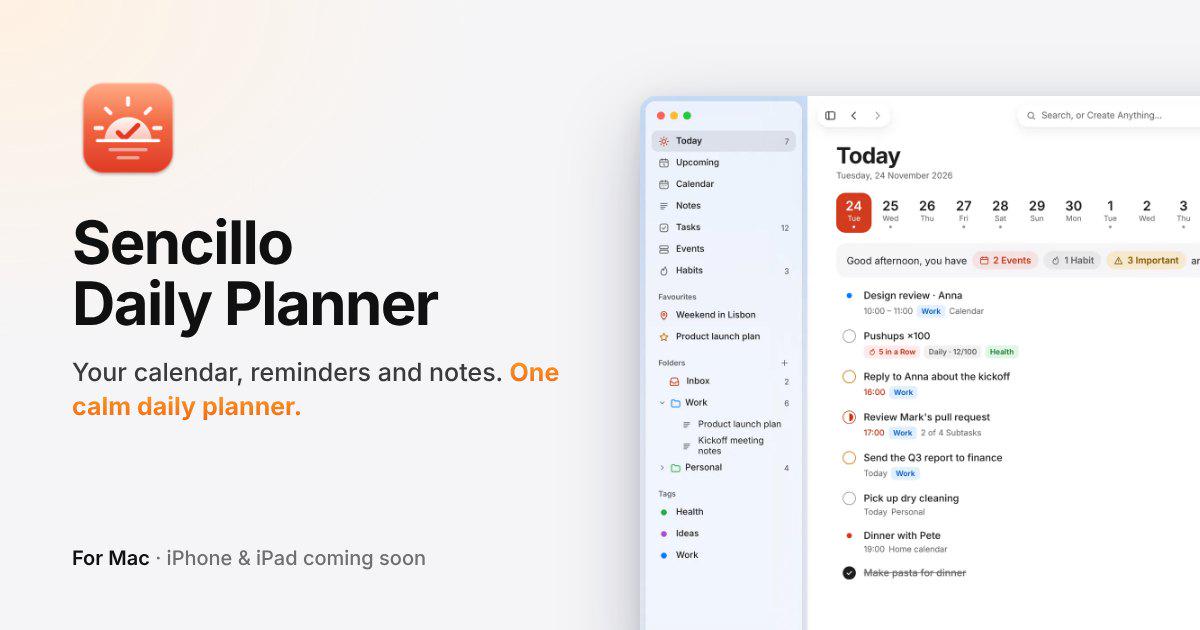
Hi everyone 👋
I've just released Sencillo Daily Planner, a native Mac app that puts your Apple Calendar events, Apple Reminders tasks and your notes in one place, so you can plan your day without jumping between three apps.
It uses your existing calendars and reminders (iCloud, Google, Exchange — anything you've added to your Mac), so everything you change in Sencillo syncs to your iPhone, iPad and Apple Watch through Apple's own apps.
What it does
Privacy
No accounts, no analytics, no tracking and no servers of mine. Events and tasks stay in Apple Calendar and Reminders, and Sencillo's own notes, tags and habit streaks sync through your private iCloud. I can't see any of it. The website doesn't use cookies either.
Problem
Planning a day on a Mac means switching between Calendar for events, Reminders for tasks and Notes for everything else. None of them shows the whole day in one place. Adding things is slow, with a form and pickers for every date, and most planner apps that fix this want a subscription, an account, and your data on their servers. Sencillo puts Apple Calendar, Apple Reminders and your notes into one calm daily view. You add things by typing naturally ("Lunch with Pete fri 12:30 for 1h #work"), and everything stays in Apple's apps and your own iCloud.
Comparison
Pricing
It's a one-off purchase, no subscription. For Black Friday it's $4.99 (normally $9.99) until 6 December.
iPhone and iPad apps are coming soon, and they're included in the price. If you buy the Mac app now, you won't pay again when they launch.
Requirements: macOS 26 Tahoe or later on Apple silicon (M1 or later). Apple Intelligence is optional.
Site, screenshots and download: https://sencillo.lowworks.co.uk
This is version 1.0, so I'd really love feedback — what's missing, what's annoying, what you'd want in the iPhone app. Bug reports are welcome here or at hello@lowworks.co.uk. Happy to answer any questions!
r/MacStack • u/Financial-Warthog610 • 4d ago
Taking inspiration from the guy who built the "trackpad speaker", this is my iteration of using IO tools for something totally different from their intended puroses. its free to use for anyone thats interested! HAVE A BLAST AND HAVE FUN https://github.com/zaenae/QWERTYgroove
r/MacStack • u/Savings-Arrival-7817 • 4d ago
OrbStack is worth trying if your Mac work happens through Docker Compose. Keep Docker Desktop until the same project passes its normal checks under OrbStack, including the database and file-watching parts. A container starting successfully is a fairly small part of that decision.
OrbStack documents support for Docker Compose and includes a Docker engine. On a Mac, that engine runs in a Linux virtual machine. Your containers aren't running directly on the macOS kernel, and passing this local check doesn't establish production Linux compatibility.
Take one existing development project and make a disposable test copy. Keep its Compose file, image versions and CPU architecture consistent between runs. Give it fixture data rather than your only copy of a useful database. Review bind-mount paths and credentials before starting it: a copied project folder can still point at real files or services.
Run your normal checks in Docker Desktop first. Then stop that project's containers before trying OrbStack, so the two copies don't compete for published Mac ports or write to the same mounted files.
A Docker context selects which engine the CLI talks to. OrbStack uses orbstack; Docker Desktop uses desktop-linux. Check docker context ls, and use an explicit context for trial commands, such as docker --context orbstack compose ps. Check tools that use a Docker socket separately, since their connection may not follow your terminal's selected context.
Under each engine, check that the app can reach its database, that editing a Mac source file triggers the expected reload, and that the app is reachable through the same published localhost port. If your work depends on a VPN or private registry, include those too. These are suggested checks, not results from a hands-on comparison.
A bind mount exposes a Mac path to a container. A named volume stores data on the Linux side. Switching contexts isn't a data-transfer step, even if the volume names look familiar.
OrbStack has an optional Docker Desktop migration that copies data, including containers, images and volumes. Its documented entry point is File > Migrate Docker Data. Keep an independent backup and check the copied database through the application before retiring the old environment. Don't assume new writes in OrbStack will appear when you switch back to Desktop.
For the disposable trial, write a recognizable fixture record, stop and restart the project, and check that it survives. Avoid volume-removal commands while you're still working out which engine and data copy you're using.
Stay with your approved setup if your team requires Docker Desktop management or security features. Compose compatibility alone doesn't replace those requirements. On Apple silicon, also test any required linux/amd64 images: OrbStack documents Rosetta-based emulation, but that isn't evidence that your workload behaves identically.
OrbStack currently requires macOS 14 or newer and has Apple silicon and Intel builds. Docker Desktop supports both chip families, requires at least 4 GB RAM, and supports the current and two previous major macOS releases. Check those requirements before changing an older Mac.
OrbStack is free for personal, non-commercial use; business and commercial use requires Pro, listed at $96 per user annually. Docker Desktop has its own free-use eligibility, so changing engines isn't automatically a saving. Apple's separate container tool runs Linux containers on Apple silicon with macOS 26 or later, but it isn't a built-in replacement to assume will run this existing Compose workflow unchanged.
Try OrbStack when you can keep the old environment intact and verify one real project. Keep Desktop when required team features or a failed project check outweigh the reason you wanted to move. Decide performance on that workload, not a vendor's headline benchmark.
