r/MacStack • • 1d ago

App Launch Pizazoo for Mac sorts your screenshots into categories as they land, and 1.0.19 lets AI assistants search them over MCP (I'm the developer)

1 Upvotes

I'm Bazi, and Pizazoo is my side project, so read this as a maker post.

What it does: it watches the folder your screenshots save to and copies each new one into a library, sorted into a category like Code, Receipts, Chats, Errors or Design. It works with the macOS screenshot tool, CleanShot X, Shottr or Xnapper; Pizazoo doesn't take screenshots itself. The text in each screenshot is read on the Mac, so you can also find one by a word in it, and opening a screenshot shows the visually similar ones next to it, which helps when you need the other screens from the same bug or the same order.

Who it's for: people who take a lot of screenshots for work and can't find the right one a week later.

New in 1.0.19 (out yesterday): the menu bar panel got quicker. Space opens a large preview, the arrow keys page through recent captures, and right-click gives Show in Finder, Copy Image, Rename and Move to Trash. A lot of that came from one Redditor's list of notes. The other new part is AI Assistants: a local MCP server, off by default. Turn it on and an AI app that supports MCP can search your library and read a screenshot's text, and, only if you also turn on Allow changes, tag or re-sort screenshots for you. It isn't tied to one AI. One honest caveat: sorting and text reading run on your Mac, but whatever your AI app reads through MCP goes to that AI app's own service.

Pricing: the core app is free with no time limit (automatic import, categories, text search, similar screenshots, markup). Pro is a one-time purchase, $15 for one Mac, $25 for three, $35 for five, and adds custom categories, color tags, saved searches, iCloud Sync with the iPhone and iPad app, and AI Assistants. The code BLACKFRIDAY30 takes 30% off on the website until December 1.

Limits, to be upfront: macOS 14 or later (Apple Silicon and Intel). It's sold from pizazoo.com, not the Mac App Store (signed and notarized). Custom categories need Pro, and the Apple Intelligence review step only runs on Macs that support it. No account, no ads, no Pizazoo server.

Links are in the first comment. If you'd hand your screenshots to an assistant, what would you want it to do with them?


r/MacStack • • 1d ago

[Launch + Giveaway] TidyMac v0.81 — Native Swift, Apple-notarized Mac cleaner & visualizer (Giving away 10 × 1-Year Pro licenses to the first 50 testers — 20% odds via RedditRaffler)

0 Upvotes

Hi , Indie developer here — over the past months I built **TidyMac**, a native Swift, privacy-first macOS cleaner and system toolkit. Version **0.81** just went live (Apple-notarized, Universal for Apple Silicon & Intel, macOS 14+ with built-in auto-updates).

### 1. The Problem

macOS "System Data", orphaned app leftovers, Xcode/browser caches, and background memory hogs quietly eat tens of gigabytes — while the biggest commercial cleaners push heavy background agents and €40–€70/yr subscriptions.

### 2. Comparison (How TidyMac compares to existing tools)

* **vs. Free single-purpose tools (Pearcleaner / AppCleaner + GrandPerspective + OnyX):** Honestly, those free tools are awesome. TidyMac is for people who prefer having **Smart Scan, Storage Cleaner, interactive Disk Visualizer treemap, App Uninstaller, Process Manager, Login Items, Privacy Cleaner, RAM Guard, Homebrew App Updater, and Maintenance scripts** unified in one clean native SwiftUI app — with a **Staging (Undo) tray** so cleaned files remain restorable before permanent deletion.

* **vs. CleanMyMac (€39.95/yr or €119.95 one-time):** TidyMac has **zero background bloat**, **strictly opt-in anonymous analytics** (off unless you consent), transparent file review before anything is touched, and costs **half as much** — with both an affordable annual option and a one-time license.

### 3. Pricing & Link

* **Website & Free Download (+ 4-min guided video tour):** https://toolsforabetterworld.com/tidymac/

* **Trial / Free Tier:** 7-day full Pro trial, followed by days 8–30 with core features unlocked (no credit card or account required).

* **Pro Pricing:** **€2.99/mo**, **€19.99/yr** (1 Mac), or **€49.99 One-Time** (updates until v2.0). Multi-Mac tiers (2 & 5 Macs) also available.

---

### 🎁 Giveaway: 10 × Free 1-Year Pro Licenses (1-in-5 / 20% Chance to Win!)

Instead of bots grabbing raw keys in 30 seconds, I want licenses to go to real Mac users who actually try the app. I'm drawing **10 × 1-Year Pro licenses as soon as we reach 50 registered testers** — so you have a **20% (1-in-5) chance of winning**!

My only ask if you win: **a fair, unfiltered opinion after 1–2 months of real usage** (both what you like and what sucks / needs improvement — no praise or upvotes expected).

**How to enter (takes ~60 seconds, no purchase necessary):**

  1. Download & open **TidyMac v0.81** from https://toolsforabetterworld.com/tidymac/ and run at least **one scan** on your Mac.
  2. If you like how it feels, click **Community Draw** in the left sidebar to claim your hardware-verified **`[TM-XXXXX]`** token (you can also see the live registered Mac counter right there).
  3. Leave a top-level comment on this post including your **`[TM-XXXXX]`** token (feel free to share your Mac model or any first impressions/criticism!).

As soon as we hit **50 registered users**, I'll draw the **10 winners** transparently using **RedditRaffler** (`redditraffler.com`, filtered to comments containing `TM-`) and post the public verification link right here.

*(Disclaimer: No purchase or upvote necessary to enter. Independently run by Tools For A Better World; not sponsored, endorsed, or administered by Reddit.)*


r/MacStack • • 1d ago

nami: new easy declarative package manager for macOS and Linux

Thumbnail reddit.com
0 Upvotes

r/MacStack • • 1d ago

I’m building FileDesk, a multi-pane file manager for macOS [Free]

Thumbnail reddit.com
1 Upvotes

r/MacStack • • 2d ago

We were tired of Milanote's 100-note limit and our ideas living in someone else's cloud, so we built our own visual workspace

Thumbnail
gallery
15 Upvotes

Hi r/MacStack 👋🏼 We're Sarah and Gerald, a husband-and-wife team from Nuremberg, and we've been building things together for almost 2 decades. Our latest project is visualOS, a visual workspace for Mac, iPhone and iPad.

For years our planning stack was a mixture between Milanote, Notion, Miro and Freeform. These are great tools, but three things always bugged us: free plans cap you right when it gets useful (100 notes on Milanote), if you hit the limit, subscriptions tie you to the tool for years, and our most valuable ideas lived in someone else's cloud or are hidden inside the app container...

We wanted something we can work with directly in our file system, without the obligations. So we built visualOS, where your boards are real files in the Finder.

Documents are Markdown files, images stay plain image files (in full res), and boards inside boards are folders inside folders.

Put that folder in iCloud Drive and your Mac, iPhone and iPad stay in sync on your own storage. No account needed, and your work never lands on our servers.

New in the latest Mac App

  • Grids, the most requested feature on our public roadmap: notes, pictures, to-dos, tables and docs in columns and rows.
  • Frames for high-res exports as PNG, JPG or PDF.
  • A background remover that stays on your Mac: one click, nothing gets uploaded, no limit.

What it isn't: a team whiteboard. visualOS is single-user by design, a thinking space for your own projects. If you want multiplayer, Miro, Freeform and Milanote are still the better alternatives.

It's completely free to use in the browser with no note cap and no board cap: https://visualos.app

The Mac app comes with the same one-time purchase as iPhone and iPad (currently $12.99 / €14.99), no subscription: https://apps.apple.com/app/visualos-infinite-canvas/id6787359589

If you have any questions, please let me know! Happy to answer anything.

Sarah & Gerald


r/MacStack • • 2d ago

App Launch Using Chrome on a Mac? Your new tab page can finally match your system

Thumbnail
gallery
3 Upvotes

Chrome's default new tab page always felt out of place on my Mac, so I built my own: Startwerk, a start page that looks and feels like macOS. Clean and calm, nothing flashing at you.

My favorite part is the weather background. It shows the weather outside your window, softly blurred as if you were looking through a misted window. It follows the real sunrise and sunset times, and at night you get a starry sky that changes with the cloud cover.

What's in it:

  • Website blocker (Focus): pause distracting sites for 25, 50 or 90 minutes, or automatically during working hours. When you open a blocked site, you get a calm pause page with a breathing exercise instead.
  • Pomodoro timer right on the start page
  • Breathe: a short breathing exercise with soft light and four rhythms to choose from
  • Spaces: keep work and free time apart, each with its own bookmarks and widgets
  • Weather, calendar (iCal), notes, habit tracker, RSS feeds, countdown, analog or digital clock
  • Light, dark or automatic, plus a weather background that follows the real sky outside

No account, no sign-up, no tracking. Everything stays in your browser.

It's 100% free. To be open about it: Startwerk is funded by sponsored content widgets and occasional partner recommendations marked "Ad". Delete them, or simply don't add them.

I'd be really happy if some of you like it, and I'm glad to hear what you'd change.

👉 Download for free


r/MacStack • • 2d ago

I built a Mac app that tidies your messy Downloads folder, with preview and undo (one-time purchase, 40% off with FRIENDSGIVING)

4 Upvotes

My Downloads folder was full of files like invoice_final_FINAL.pdf and IMG_4821.HEIC, so I made Arrayo. It suggests a folder system and date-first names, and shows you a preview before changing anything. It never deletes files, you can undo a cleanup in one click, and your files stay on your Mac.

It's free for your first 30 files. After that it's €19 once, and FRIENDSGIVING takes 40% off. It needs macOS 14 or later: https://arrayo.app

I'm the developer and I'd love honest feedback, especially if it sorts something strangely.


r/MacStack • • 2d ago

Update: We gave our Mac menu bar app a Christmas update. Krampus moved in.

1 Upvotes

r/MacStack • • 2d ago

SideNotes: quick notes that live at the edge of your Mac screen + 35% Black Friday offer

6 Upvotes

Hi! I’m Marcin from Apptorium.

SideNotes is a native Mac app that keeps your notes at the edge of the screen, ready whenever you need them.

Why?

While working, we constantly need somewhere to put small pieces of information: a task to remember, a link, a fragment of text, a screenshot, or something we’ll need again in a few minutes.

Opening a full note-taking app often means switching context, finding the right place, and then returning to what you were doing. SideNotes stays hidden at the side of the screen and appears when you move the pointer to the edge, click the Open Bar (default behavior), or use a keyboard shortcut. It also works over full-screen apps and in Stage Manager.

You can use SideNotes for:

  • quick notes, tasks, and checklists
  • links, snippets, and frequently reused text
  • screenshots and images
  • shortcuts to files and folders
  • temporary project materials you want to keep close

Notes can be organized into folders, reordered, colored, pinned, folded, and searched. SideNotes supports Markdown, but hides the markup completely while you write (you can choose to make markup visible if you need). There’s also a formatting toolbar for people who prefer not to use Markdown syntax directly.

Your notes can sync between Macs through iCloud. SideNotes Mobile, sold separately (currently 40% off), extends the same library to iPhone and iPad. The Mac app also creates automatic backups and integrates with Apple Shortcuts, AppleScript, URL schemes, Alfred, Raycast, Hookmark, PopClip, and other apps.

SideNotes is private by design. Notes are stored locally and, if you enable synchronization, in your private iCloud account. The app does not collect usage analytics or telemetry.

Black Friday offer

The direct version of SideNotes normally costs $19.99, but it is currently $12.99 through December 6, with no discount code needed.

It’s a one-time purchase for the current major version, with no subscription. All SideNotes 1.x updates are included, and a free 30-day trial is available.

Requires macOS 13 or later.


r/MacStack • • 2d ago

Notel for Mac - The Best Sticky Notes App for Mac! (40% OFF)

Thumbnail
youtube.com
9 Upvotes

r/MacStack • • 2d ago

Launcher open source +500app

Post image
1 Upvotes

r/MacStack • • 2d ago

App Launch [Black Friday] Outbound — Mac firewall that blocks app telemetry automatically

1 Upvotes

Hey r/macstack! I'm Abhi, the solo developer of Outbound. I launched it a couple of weeks ago, and thanks to a lot of honest feedback it's grown fast since: a free trial, Little Snitch and LuLu rule import, and a lot of polish.

For Black Friday, Outbound is 30% off with code BLACKFRIDAY30: $20.30 instead of $29, paid once, with every future update included. Runs until December 4.

Problem:

Your Mac's apps are talking to servers all day. Analytics, crash reporters, ad networks, usage tracking, often from apps you haven't even opened. macOS doesn't show you any of it, and its built-in firewall only handles incoming connections, so there's no way to stop an app phoning home without deleting it.

Outbound is a native macOS firewall that fixes that. It automatically blocks known telemetry and tracking servers, shows you exactly which apps tried to reach which companies, and lets you decide where every app is allowed to connect. Zoom keeps working, telemetry.zoom.us doesn't.

Comparison:

Little Snitch is the one most people know, with 20 years of polish behind it, and if you're happy with it, it's a great app. But it's a single license with paid upgrades for new major versions, and it doesn't block telemetry for you out of the box. Outbound is a one-time purchase that includes every future version, ships with a built-in tracker database that blocks telemetry automatically, and adds per-app data limits and a report showing which companies each app talks to. You can import your Little Snitch rules directly.

LuLu is free, open source and simple, and if you just want basic per-app blocking on an older Mac, it's a solid choice. Outbound goes further with rules per host inside an app, automatic telemetry blocking, Ask/Learn/Strict modes and a live network monitor. LuLu rules import too.

What else it does:

  • Asks you when an app connects somewhere new, showing who signed it, where it's going and whether that server even belongs to the same developer
  • Starts in Learn mode so you're not flooded with popups, then switch to Ask or Strict when you're ready
  • Rules by app, host, domain, IP, range, port, protocol and direction (incoming too), lasting once, until quit, until restart or forever
  • If an app's code changes, it gets asked about like a new app
  • Live monitor with a map and 3D globe of where your traffic goes, and an inspector that tells you which rule decided each connection
  • Daily data limits per app, 60 blocklists, profiles, Control Center widgets, a menu bar panel and a CLI
  • "Network Not Working?" in the menu bar shows recent blocks with a one-click allow if anything breaks

Pricing:

  • Personal: $20.30 for Black Friday (normally $29). Covers 2 Macs, paid once, every future update included
  • Family: $41.30 for Black Friday (normally $59). Covers 5 Macs
  • Code BLACKFRIDAY30 at checkout, valid until December 4, 23:59 UTC
  • 7-day free trial with the full app, no card or account, and a 14-day refund

Pricing · Download Outbound

Requires macOS 14 or later, Apple silicon and Intel. Built on Apple's Network Extension filter, no kernel extension. It never reads inside a connection, your history stays encrypted on your Mac, and crash reports and usage stats are off by default.

Would love to hear what you think, good or bad, so please do reach out :)

Transparency: Website · Every connection the app makes · Terms Trust: Notarized by Apple · LinkedIn · Privacy Policy · GitHub


r/MacStack • • 2d ago

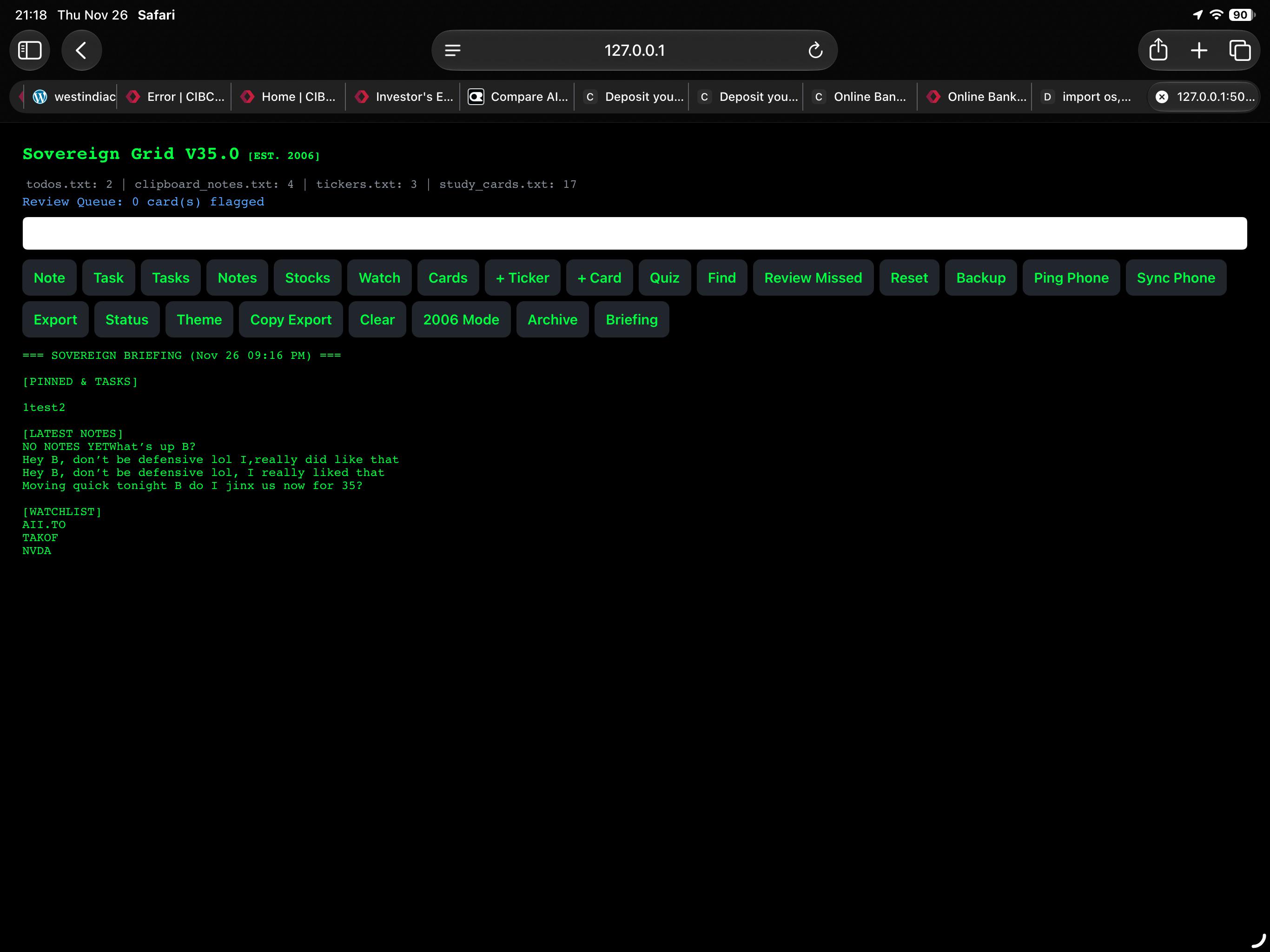
Sovereign Grid V35.0: Control a zero-cloud Python hub on iPad (a-Shell) from Apple Watch & iPhone Shortcuts over local Wi-Fi

Post image
1 Upvotes

r/MacStack • • 2d ago

I built a local-first Python mesh so my iPad, iPhone, and Apple Watch sync directly over home Wi-Fi (Zero cloud, zero accounts — V16.0)

Thumbnail reddit.com
1 Upvotes

r/MacStack • • 2d ago

Sovereign Grid V8.0: A Zero-Cloud, Local-First iPad & iPhone Web Dashboard Built Inside a-Shell

1 Upvotes

\*\*Sovereign Grid V8.0: A Zero-Cloud, Local-First iPad & iPhone Web Dashboard Built Inside \`a-Shell\` (Single-File Installer)\*\*

After months of iterative building on an iPad Pro and iPhone using nothing more than Python inside \*\*a-Shell\*\*, \*\*Sovereign Grid V8.0\*\* is officially sealed and packaged into a single, self-contained installer (\`install_grid.py\`).

There are no cloud accounts, no external databases, no third-party tracking, and no App Store subscriptions. Everything runs locally over your own home Wi-Fi (\`192.168.1.x:5002\`) or offline loopback (\`127.0.0.1:5002\`) using Python's standard library.

\### Grab the Single-File V8.0 Installer
\* \*\*Source Code (\`install_grid.py\`):\*\* https://dpaste.org/KmQSW

\### What V8.0 Does Out of the Box
When you run \`install_grid.py\`, it unpacks the entire system into \`\~/Documents/sovereign_grid\` and launches a dark-mode, mobile-first Web App (\`dash.html\`) that you can save directly to your iPhone or iPad Home Screen:

\* \*\*Full-Stack Watchlist & Offline Price Cache:\*\* Pull live stock quotes (\`/stocks\`) via Yahoo Finance, add or remove tickers on the fly (\`+Stock\` / \`-Stock\`), and automatically cache prices to \`stock_cache.txt\` so your watchlist still loads cleanly in Airplane Mode.
\* \*\*Daily Voice & Wrist Briefing:\*\* One tap (\`/briefing\` or \`Speak\`) compiles your live market snapshot, active task count, and latest notes—and reads them aloud via iOS text-to-speech (\`say\`).
\* \*\*Local Notes & Task Checklists:\*\* Jot down quick notes (\`/clip\`, \`/read\`) or manage your daily task list (\`/todo\`, \`/todos\`, \`Done #1\`) in plain text files right on your device.
\* \*\*Offline Study & LSAT Flashcard Drills:\*\* Add custom \`Question | Answer\` cards (\`+Card\`) and quiz yourself anywhere (\`/quiz\`) with zero internet required.
\* \*\*16-Slot Local Integrity Audit:\*\* Verify your local file manifest, heartbeat freshness, and subnet isolation (\`/audit\`) in one tap.

\### How to Install & Run It in 60 Seconds

  1. Install the free \*\*a-Shell\*\* terminal app on your iPad or iPhone.
  2. Save \*\*\`install_grid.py\`\*\* from the link above into your \`a-Shell\` \`Documents\` folder and run:
    \`\`\`bash
    python install_grid.py
    \`\`\`
  3. Open \*\*Safari\*\* on your device and go to \*\*\`http://127.0.0\`\*\* (or your iPad's local Wi-Fi IP, like \`http://192.168.1\`).
  4. Tap \*\*Share -> Add to Home Screen\*\* (with \*\*Open as Web App\*\* enabled) to turn it into a full-screen dark-mode app icon on your phone.

\*(Licensed under GNU GPLv3 — open, inspectable


r/MacStack • • 2d ago

Built a local Python bridge on iPadOS (a-Shell) that lets my Apple Watch & iPhone pull flashcards, stock quotes, and clipboard notes over local Wi-Fi (V7.5)

Thumbnail reddit.com
1 Upvotes

r/MacStack • • 2d ago

Skippy: 21 small Mac tools in one launcher (paid, one time, beta)

0 Upvotes

I'm Shrey, the developer of Skippy. Sharing it here as a paid Mac app, currently in beta.

What it is: a launcher that puts the small Mac jobs close by, so you don't open another app for each one. Put it on any screen edge, the notch, the menu bar, the Dock, or let it float. Click it and the tools fan out.

Key features:

Draw on Screen: pens, highlights, lines and shapes over what's open, handy for calls.

Pick Colour: pick any pixel, hex gets copied.

Extract Text: drag over an image or PDF and it reads the text on your Mac.

File Shelf, Convert and Compress: drop files in, convert or compress, drag them out. Shift drag is the quick convert.

Clipboard history with search.

Screenshots: area, window or display, and combine several regions into one image.

QR Tools, Notes, Calculator, Temporal, Stay Awake, Calendar, Downloads, Search, Quick Launch, Music, Mac readings and Recent Actions.

Pricing: pay once, no subscription. $9.99 for 2 devices or $19.99 for 5 devices, all 21 tools on every plan.

Code SKIPPY-F9F486B8A177 gives 20% off. https://tryskippy.app/pricing/

Compatibility: macOS 14 or later, Apple silicon and Intel. It's a 1.0 beta, downloaded directly from the site, and it isn't notarized by Apple yet.

Site: https://tryskippy.app

Scripted demo on a mock Mac screen, not the real app: https://tryskippy.app/live/

I'd like honest feedback. Which of these tools would you actually use, and what's missing? Would love it if you guys help me make the product better. Thanks.


r/MacStack • • 2d ago

MinkNote: I made 700 saved Reddit posts searchable on my Mac with plain Markdown (pay-once $19.99 for Black Friday)

1 Upvotes

r/MacStack • • 2d ago

App Recommendation CodeShell — SSH Client for iPhone, iPad & Mac

Thumbnail
codeshell.webzler.com
1 Upvotes

r/MacStack • • 2d ago

Anyone else find macOS storage management surprisingly inadequate

Thumbnail
gallery
2 Upvotes

Between development environments, AI models, virtual machines, media libraries, caches, and external NVMe drives, storage management can get complicated pretty quickly.

What frustrates me about most storage utilities is that they tell you what’s taking up space today, but not necessarily what’s been consuming it over time or why.

That’s the problem I’ve been tackling with DiskLore, a native macOS storage intelligence app.

It brings interactive storage maps, APFS-aware analysis, historical storage tracking, external drive exploration, and controlled cleanup into one interface.

The idea is to make storage something you can actively explore and understand rather than something you only investigate when you’re running out of it.

I’m particularly interested in how other Mac Studio owners manage their storage.

Are you primarily using external NVMe drives? Do you actively monitor storage growth, or just deal with it when space becomes an issue? What tools are you using?

For anyone curious about DiskLore, here’s the project: https://disklore.lippalabs.dev

Would love to hear how everyone handles their storage-heavy workflows