r/magicproxies • u/Cautious_Gene_5287 • 5d ago
Need Help Lamination Issue
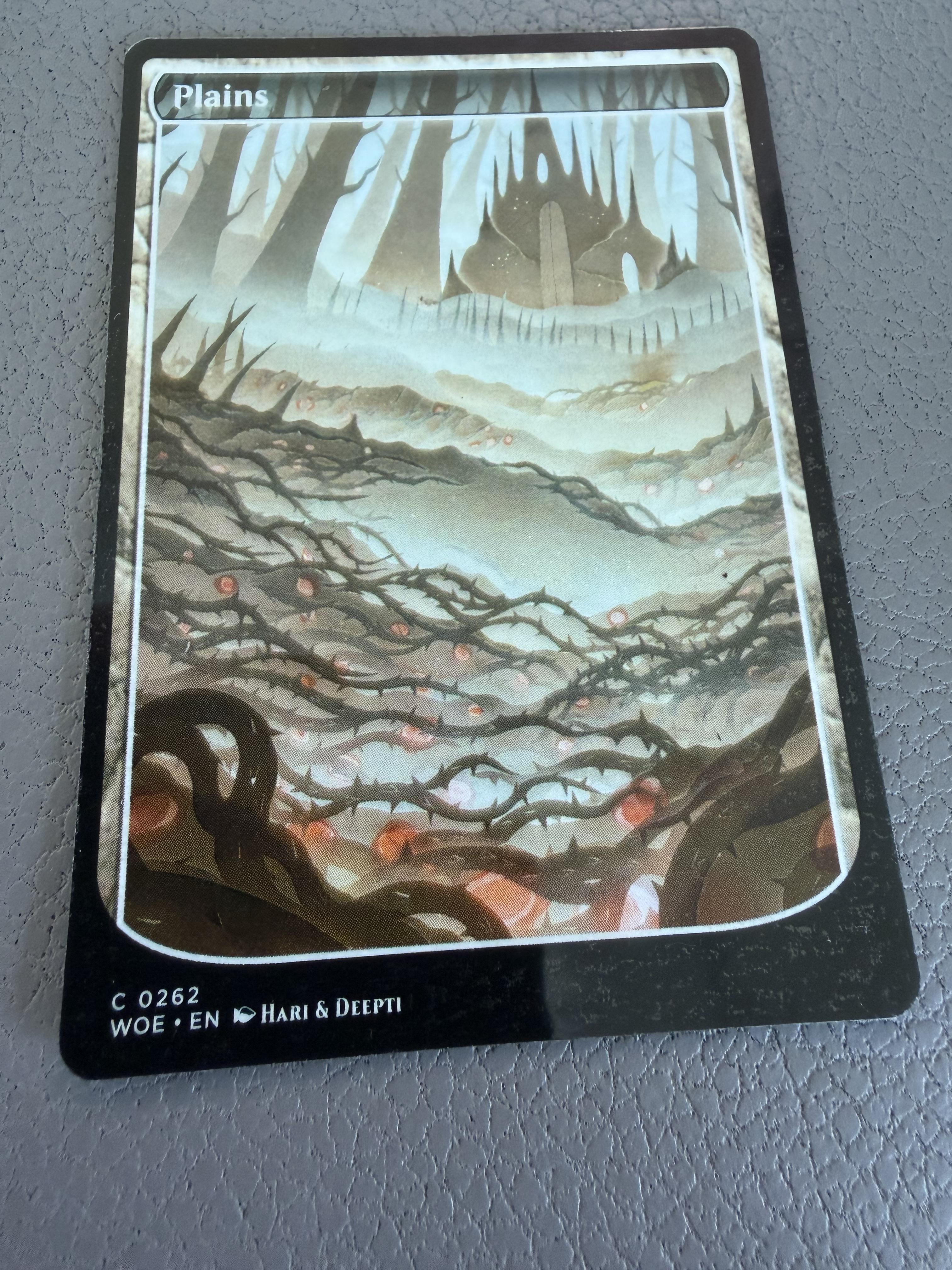
Hi yall,
I recently bought a new laminator and am curious if you’ve seen these results.
Does this happen from it being too hot?
Any cloudiness or imperfections in the past were typically solved from running the card through lamination a 2nd time after being cut out.
8
Upvotes
1
u/GKing360 5d ago
For me, this happened when I hadn’t dried the ink enough after printing, I now have a high powered fan that I give each sheet a once over with before laminating. Hope it helps you as it did me!
1
u/UntapUpkeepDraw4 5d ago
Those don’t look like temperature issue bubbles, what kind of paper are you using? Based on how directional some of the errors are it almost looks like dust / ink residue
1
u/PraecoVeritatis 5d ago
It does look like it could be from being too hot. Good way is to just test. Run it though again and see if it gets worse.
1
u/two-stroke-tony 5d ago
Agreed with some others. Doesn’t seem like a heat issue. I’d try letting your paper dry for like 12-24 hours and then laminate.