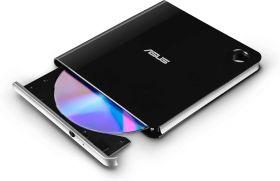
ok everyone i am officially out of all drives you can still email me for links if i ever get more in so you can buy right away in a restock but they will be rare mostly and desktop pioneers 5.25.
my links dont let you buy if its out of stock fyi.
expect delays in shipping as i just got 50+ emails to order in 2 hours and i only have the ability to flash and test 24 drives a day.
PSA do not manually send me money to my email you must use my purchase links or it wont automatically categorize your drive color and auto print your label
this will massively delay your order as im doing those last i am one person i cant manually find all this stuff please stick to my system.
MakeMKV Update INFO
MakeMKV now supports pioneer drives for ripping UHD discs
MakeMKV Discount INFO
The makemkv Discount code is only for current and past drive/flasher customers and you must use both the link i provide and the code not 1 or the other. if you want one and bought previously email me with the email you bought the drive or flasher from me on.
the code is sent out with the tracking information.
About the Drives I sell
All Drives I sell are new only opened Flashed to make it works with UHD discs, tested and repackaged with all original packing material all original accessory's are included if you buy an upgrade cable or not.
All drives I sell work with UHD discs and are LibreDrive enabled even if the model listed does not normally as i convert them to a UHD model with firmware.
All drives I sell work with Anything that can Run MakeMKV on any OS Windows Mac Linux.
you don't need my UHD Drives or anyone else's for regular Blu-Ray or DVD these are only Needed for UHD discs but they work with standard Blu-Ray and DVD too.
There is no Need for SGX or an Intel with these drives the firmware and MakeMKV get around those requirements.
I recommend Pioneer drives over LG or Asus Pioneer Drives are more reliable, get less read errors and are much quieter. LG drives are Faster.
Pricing
Pre Flashed Pioneer BDR-XD08B USB C with BDR-XD08-UMBS Firmware See PayPal flashed tested and shipped Works with MakeMKV for UHD.
Pre Flashed Pioneer BDR-XD08S USB C with BDR-XD08-UMBS Firmware See PayPal flashed tested and shipped Works with MakeMKV for UHD.
Pre Flashed Pioneer BDR-XD08G USB C with BDR-XD08-UMBS Firmware See PayPal flashed tested and shipped Works with MakeMKV for UHD.
Pre Flashed Pioneer BDR-212 SATA 5.25 SATA with BDR-212UBK Firmware See PayPal flashed tested and shipped Works with MakeMKV for UHD.
Pre Flashed Pioneer BDR-213/2213 SATA 5.25 SATA with BDR-S13UBK Firmware See PayPal flashed tested and shipped Works with MakeMKV for UHD.
Pre Flashed Pioneer BDR-S13UBK SATA 5.25 SATA See PayPal flashed tested and shipped Works with MakeMKV for UHD.
Pre Flashed Pioneer BDR-S13U-X SATA 5.25 SATA See PayPal flashed tested and shipped Works with MakeMKV for UHD.
Pre Flashed Pioneer BDR-X13U-S 5.25 USB See PayPal flashed tested and shipped Works with MakeMKV for UHD.
Pre Flashed Pioneer BDR-X13U-X 5.25 USB with BDR-X13U-S Firmware See PayPal flashed tested and shipped Works with MakeMKV for UHD.
I do not and will not sell desktop LG or ASUS drives 25% of them like the Asus BW-16D1HT or LG WH16NS60 are defective and will get read errors on UHD discs
Remote Flashing Service
$40 per drive
Stock Levels
Pre Flashed Pioneer BDR-XD08B USB C Check PayPal links for stock
Pre Flashed Pioneer BDR-XD08S USB C Check PayPal links for stock
Pre Flashed Pioneer BDR-XD08G USB C Check PayPal links for stock
Pioneer BDR-212 SATA 5.25 SATA Check PayPal links for stock
Pioneer BDR-213 SATA 5.25 SATA, Check PayPal links for stock
Pioneer BDR-S13UBK 5.25 SATA, Check PayPal links for stock
Pioneer BDR-S13U-X 5.25 SATA, Check PayPal links for stock
Pioneer BDR-X13U-S 5.25 USB Check PayPal links for stock
Pioneer BDR-X13U-X 5.25 USB Check PayPal links for stock
Confused about flashing your drive have the person who made the howto videos on it do it for you! For remote flashing you will need a computer running Windows NOT A VM of WINDOWS and to send me your makemkv drive info section with drive letter and i will make an automated flasher just for you having your drive flashed in just a few clicks.
The Pioneer flasher cant downgrade drives only crossflash if it is build/has fw before 12/22ex XS07S > XS07UHD
Shipping
I ship to the USA only Shipping is included in the price. standard shipping is 2-3 day priority mail
Payment
payment options listed below,
PayPal for drive orders and flashes
or zelle remote flashes only
Support: I will help you setup the Drive and do things related to the drive.
Important information to know
All Drives i sell are flashed to Read Rip and unofficially play UHD discs even if they are a non UHD model they have been flashed to a UHD model.
In MakeMKV 1.12.3+ keys are automatically downloaded
These drives retain their full warranty with pioneer as its just stock old firmware if pioneer sends you a drive with new fw don't worry we can just trade it out or reflash it for one of mine for free just pay shipping.
If your "UHD Friendly" drive currently has "unfriendly firmware", you can purchase a DIY "Single Drive Flasher" or a "ready to go!" drive from me!!
NEW Single Drive Flasher is now available: A fast, reliable Windows tool for flashing optical drives using the MT1959 drive platform, with a clean interface and secure licence activation. The tool clearly shows you the recommended version for your chosen drive and also other available firmware versions. Choose whichever version you want. You also have the option to change the firmware version at anytime, if you prefer to use a different one.
Each purchase includes an instant download and a unique licence key delivered at checkout.
ASUS SBW-06D5H-U (Flashed to BU40N 1.00) (UHD ready!) - AUD$449.00 + shipping & insurance costs.
2 available
0 incoming
UHD Enabled Drives website (https://uhdenableddrives.com) has now closed down. To purchase one of the remaining drives, please email me at martymcnuts@outlook.com. I am not taking any pre-orders and will update my MakeMKV thread if/when any stock becomes available.
I do not ship drives to USA!! For shipping to other countries, please ask if it is possible and provide the shipping address for a quote.
Don't forget, the "NEW Single Drive Flasher" is available worldwide for drives using the MT1959 drive platform!! Easily perform the drive flash yourself in your own time, whenever you are ready... * NEW Single Drive Flasher * available to purchase at https://payhip.com/b/MyeJ9
Drive Payment Options:
** Paypal only **
** Direct Bank Transfer (available for Australian customers only) **
Firstly, thank you to the dev team and their surrounding community for enriching media experiences over countless years.
I wanted to share something I thought this community may be excited about: DVDemu, a UI and UX-rich (I hope) application for people looking to elevate their ISO-playback experience.
This is currently on Amazon App Store, and coming very soon to Google Play/iOS, including for TV devices. Coming here first for feedback, any one interested in early access, feel free to DM! Read more about it here.
I have tried both my UHD copy of the Hunger Games and The Hunger Games Catching fire and both disks fail to copy (I'm copying the movie Title only, not the whole disk). I gave up before trying the other disks. I just got these from the 2023 4K Steel Book that went on sale on Amazon for $40 (sold out): https://www.amazon.com/dp/B0CN1JKSQ1?ref=ppx_yo2ov_dt_b_fed_asin_title
When trying to read the disks, I get the following types of errors: -Error 'Scsi error - MEDIUM ERROR:L-EC UNCORRECTABLE ERROR' occurred while reading '/BDMV/STREAM/00006.m2ts' at offset '60908765184' -Error 'Posix error - Input/output error' occurred while reading '/dev/rdisk5' at offset '60908765184' -Error 'Scsi error - STATUS_05' occurred while reading '/BDMV/STREAM/00006.m2ts' at offset '60908888064'
Additionally, after these errors my drives do a rhythmic "grinding" until I get MakeMKV to release the disk. My drives have always worked for other 4K disks.
Note: I have put these disks in my Panasonic DP-UB450 player and the disks appear to be playing just fine. (Unfortunately this release stacks the disks, so they are not free from scratches, but they play fine in the player, so this feels like an issue with the way Lionsgate is protecting these disks that MakeMKV cannot currently account for.)
I'm using MakeMKV v2.0.0 but this issue occurred with 1.18.3 as well. I've tried ripping the disk in two different LG drives (one basically never used and the other years old) on two different Mac systems.
As most of you know, MakeMKV's local HTTP stream server has been discontinued. What would be a good replacement for this in Linux? I am looking to stream (the contents of) my optical drives on my LAN without having to rip it to file first. (AI has a bunch of very confusing suggestions about this.)
was following these instructions step by step, and it appears that the 3d blu-ray when placed on my blu-ray drive doesn't register this as a 3D video. would this be an issue before i hit make mkv and waste a hour or two for broken results?
I'm getting the same error for random DVD's and Blu Rays when attempting to rip them: OS error - STATUS_DEVICE_NOT_CONNECTED.
My laptop recognises my disc reader and it recognises the contents of the disc, but when I open Make MKV to rip it to my drive, same error.
This isn't happening for every disc; it seems to happen randomly, actually. I'll try to rip multiple discs from the same set or series, and one or two discs simply error-out with the above message.
My discs are clean, no smudges or dirt. The disc reader is new (seen here). I've checked my drives, and there's no issues there (disc reader has it's own power supply so it's not a power issue). Currently using MakeMKV version 2.0.
At this point, I'm completely stumped. If anyone could help me sort this, I'll buy you a pint or three.
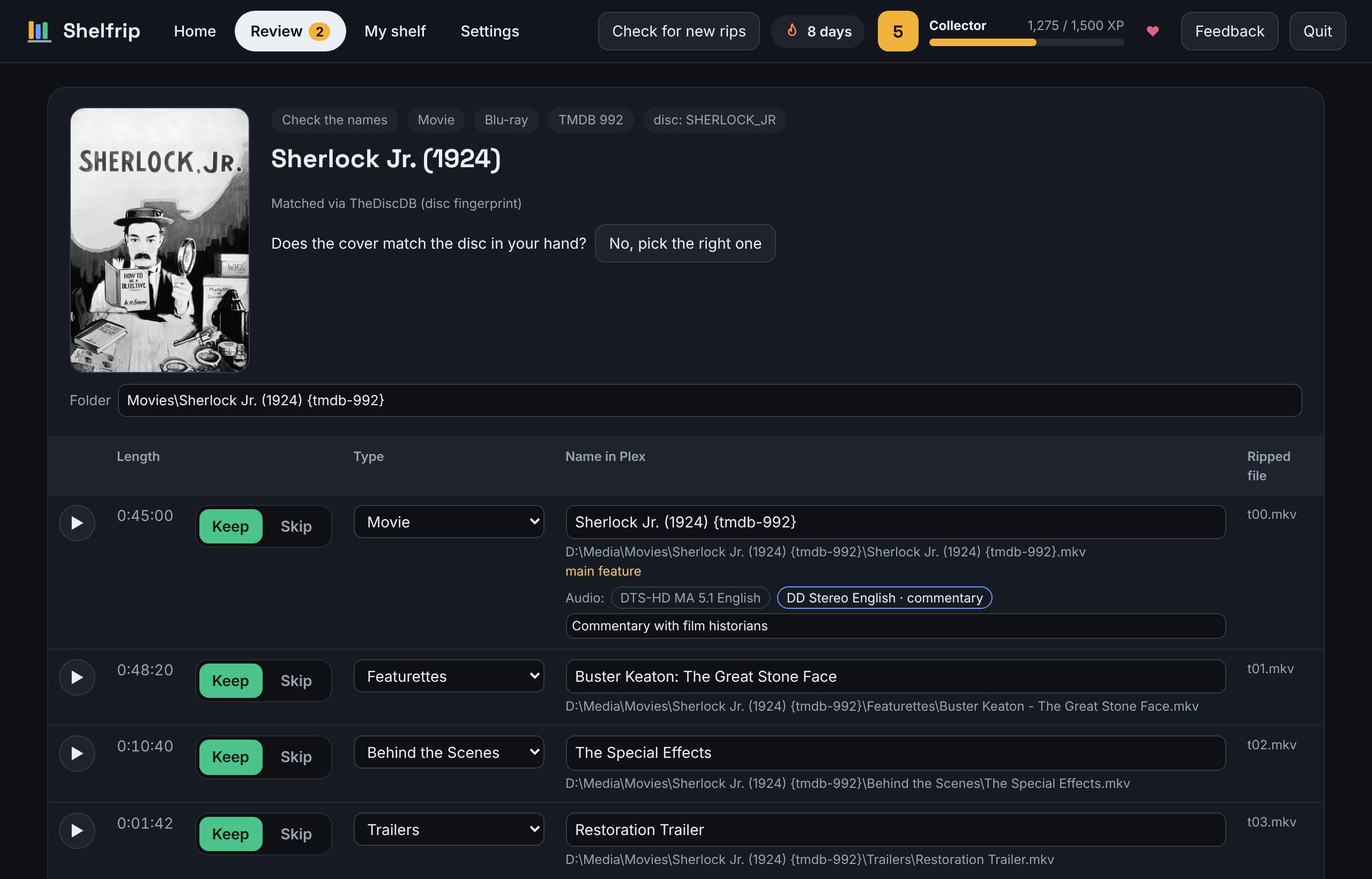
I've ripped my discs with MakeMKV for years, and the slow part was never the rip. It was working out which title_t07.mkv is the deleted scene and which is a trailer, then renaming everything the way my media server wants.
So I built Shelfrip. It runs MakeMKV for you (or starts on its own when a disc goes in), then:
works out movie or TV, the main feature, and which titles are episodes, in order
names special features by matching run times against TheDiscDB and a shared disc database, and sorts them into Featurettes, Deleted Scenes, Behind the Scenes and so on
sets menus, warnings, promos and Play All titles to Skip
shows you every name on a review card before a single file moves, then files it all for Plex, Jellyfin, Emby or Kodi
It doesn't decrypt anything or replace MakeMKV: you still need MakeMKV and your key. Rips are remuxes, so nothing is re-encoded. It does music CDs to FLAC too, if you have cyanrip.
It's free and open source (MIT). Windows 10 and 11 only for now, and it isn't code-signed yet, so SmartScreen will warn you on install.
There is nothing in the integration menu to tick. I'm using ubuntu. When I put a disc in and look in mkv, it also never gets past the 'this disc is being loaded' stage. I'm not entirely sure what I'm doing wrong, as I used to use it on windows and never had any issues.
In an effort to use my storage space more efficiently, I am only ripping the base movie (foregoing special features, commentary tracks, etc.). Some DVD files show very similarly sized Trqcks (e.g., Track 1 being 2.6GB and Track 2 being 2.9GB). Out of caution I've downloaded both, but when reviewing the files, they seem to be identical versions of the same movie. I'd like to delete one of those files to free up space, but I don't know if that would be a mistake. What am I missing?
( Currently, using computer storage, and I will be transferring everything over to a separate portable, S.A. state)
I do also intend to buy some hard drives, probably going to start out with just a terabyte or 2 since I don't think I have as many movies as most people that use it would have. Although my bulk is mainly in anime blue rays, and I am still trying to add to my blockbuster case collection.
Sadly, there are many discs that I have used my reader on that haven't been able to rip up the movies off of. The constant issue that I am getting is the message that repeats each time it fails.
ILLEGAL REQUEST: MEDIA REGION CODE IS MISMATCHED TO LOGICAL UNIT REGION
Now I have only opened it from the box, and I haven't done anything to the actual drive, mainly because I didn't no, that I had to or even how to do it. Sadly, I am not very smart when it comes to computer stuff, i'm very nervous to try things myself without a clear guide, because i'm afraid of what may happen to the reader.
I have however seen one that was put into a comment by a moderator when it comes to blue ray
Blueray reader that was listed in the guide/ posted in a comment by a mod: Buffalo Mediastation 6X Portable BDXL Blu-Ray Writer with M-Disc Support (TAA Compliant)
My main question would be whether or not there is a guide on how to properly set the region of the one that i've already purchased so that it works on the discs that don't work, if that would just mess up the ones that do work, or if I should just buy the other one as well.
In the meantime, I do plan on purchasing the storage for it as well as the full mkv product to do blue ray disks. I just wanted to run this plan five people with more experience so that they can tell me if i'm doing anything incorrectly or could do things more efficiently.
Edit: I am currently weighing my options of whether or not to wait until christmas just so that I have a bit more cash on hand in the event that something comes up, as well as potentially buying a larger storage hard drive
Well my 2 month old buffalo BRxL-16U3 is dead after 100 movie rips. I’m not sure if Buffalo will warranty it being I’m not the original purchaser, the forum guy that flashed it is. Pop a disc in and it says no disc now and just clicks. I have treated it pretty well by giving plenty of cool off time between rips. What can I do?
Some might have seen my post about this drive a couple of weeks ago. I wanted to know if the Pioneer model for sale supported Libre with a firmware.
It sparked several debates beyond my original question. A few people had legitimate reservations about the drive pictured in the Newegg ad that it might not actually be a Pioneer drive like it said it was in the add. Others were pretty sure I’d lose my money even though I paid with a credit card, even after I had told everyone I wasn’t worried. And if it was fraud, I was confident I’d get my money back after some effort on my part.
The drive arrived today. It took longer than the slim one that was cheaper and I purchased from Korea via eBay. The slim one has been working fine. I’ve encountered 2 UHD movies that would not rip all the way through do to read errors. One I can see physical damage to the disk. The other had maybe been taken out only once since I bought it. Still the other 10 or so all ripped fine (along with several Blu-ray Discs) too.
The latest drive pictured here seems to work in limited testing. And it came installed with Libre compatibility. No firmware update was required. Newegg did not mention it had the Libre firmware. So I thought I’d have to flash it. But that wasn’t necessary.
In very limited testing, so far THIS DRIVE WORKS FOR RIPPING UHD DISCS.
A few users thought the drive had a sticker lopped on the front with that Ultra HD text on it. I can assure everyone, IT IS NOT A STICKER. In fact none of the text on the drive fore are stickers. But is it a “real” pioneer drive? I wouldn’t know for certain. But there seems to be a legitimate Pioneer sticker on the top with a January 2022 date. Is that a forgery? Again, I can’t say. But as long as it works, it is not really important to me at this point.
If someone else is considering buying one of these through that Newegg third party offer from Asia and wants me to check some particular detail on the case for some telltale markings that only the real drive would have, I’d be happy to take a look for them and report back. But for now, I’m assuming it’s a real drive. And again, as long as it remains reliable in reading and ripping UHD discs, I’m not personally concerned if it’s actually authentic. But from my limited knowledge, I’m thinking it’s authentic.
If i start having issues ripping with this drive, I’ll edit this post’s main area with an update section.
===========
At this point in my project I’ve about run out of space on the Windows hard drive Ive been using to temporarily store ripped movies from a Plex server. Now that I know I can rip UHD and play them back over my network on Plex server-compatible client apps, I’m working on a more permanent hardware solution using a NAS for storage. My first 3 14TB EXOS drives are in route now. And I’m just waiting to pull the trigger on the NAS I want for a holiday sale.
===========
Update 24 hours later, several members have told me it’s a fake “pioneer” drive. I’ll trust their knowledge. While I don’t like the idea of a fraudulent knock-off pretending to be genuine, I’m less concerned if the drive functions properly.
Today, I ripped about a dozen UHD discs. A few didn’t rip on the first try. But in the end, every disc I tried to rip did rip. I used a microfiber cloth on some before a second attempt.
The bottom line is the drive is working. Now some have suggested that since it’s not genuine that it won’t last and I should never buy any drives from Asia. One said, seemingly with pleasure, that the drive would die in 2-3 months. And of course it might. But when I was shopping for drives online, I saw some American sellers charging 3 times as much and offering no warranties. One I saw in Turkey (is that in Asia or Europe) offered a two-week warranty. That’s something at least. But it’s not 2 months like I was told was all I could expect this knockoff to last.
Without a guarantee that the drive you buy is covered against failure, paying 3 times the price for a used drive doesn’t “sound” like a great deal to me. What exactly are you paying for with the extra money. I know, a “real” drive. But it’s not like a fake Rolex that doesn’t have the real diamonds.
I’m more pragmatic. If I can use it to copy digital files perfectly to my disk drive, that’s my priority. Lasting more than 2 months is secondary. I can buy a replacement drive that’ll last another 2 months (if that claim is even accurate) and still be ahead in costs.
I understand why the one person replied to tell me it’s fake. He wanted to sell me one of his. But he didn’t even bother to read my post before chiming in informally with me like we are drinking buddies. If someone wants to sell something to me, I expect them to have a modicum of respect. Acknowledge what I said and provide a sales pitch that’s not the least offensive that tells the story of why what he sells is better and worth buying for my needs.
Maybe a lot of people respond positively to his type of sales pitch. But I don’t. I’d never buy anything from that guy after his making fun of me.
I don’t really understand The other guy’s motivation for his chiming in the way in which he did unless he’s the same person as the guy selling. Why would anyone care enough about my using a knockoff drive to basically finger-wag with a “you’ll be sorry!” Type admonishment? What’s it to him if I’m out some money. He took it as a personal offense that I dared to buy one of these units. Unless he’s part of the “sales team”, it makes no sense.
If he really cared about my well-being over my transaction, he too would have told me the information he thought I needed to hear without the judgmental tone. I’m really perplexed why some people here seem to take it personally that I bought this thing for not a ton of money and is working for me so far? It’s like there is some sort of unwritten group-think “rule” I’m breaking or something?
This can be quite informative. It’s just a few people who want to be aggressive and demeaning. But those folks are typically the most vocal.
Anyway, at this point, I’m happy. I hope to be done with my ripping and storing project in 2-3 weeks. I just hope my 2 drives I purchased from Asia can last 3 weeks.
Do yall know how it works? I'm straight lost on it :( I've flashed my drive etc (I've done normal Blu-ray before) and I'm semi confident that my drive can read 4k? but maybe not? I have the LG 6x WP50NB40 External Portable Slim. Any help is much appreciated :)
So im trying to start my own collection of backed up media and for bluray im curious if this buffalo brand is any good or if theres any other recommendations.
Hello I’m just getting started making a library and I have a mountain of movies I’d like to rip, but they are so expensive. Any recommendations for 4K BluRay players?
I've got a BDR-XD07TS_with_BDR-XD07TUHD firmware and a Bluray 3D disc I'm trying to rip. Not having any luck so far as the disc just keeps like ticking over inside the player and not making any progress. The disc does work when played normally although it does have some tiny scratches. Player also still works with other regular Bluray discs. Am I doing something wrong with my setting/track selections?
I've already ripped all 75 2k Blu-Ray discs (other than the 6 I just received today for $7 each). But I have not started ripping any UHD discs--Until today.
Today, I received my new thin BD-ROM from Korea (via eBay) capable of reading UHD discs! Would it work? Will it have the correct firmware--or at least be able to update to the correct firmware?
First thing, I ripped one of the new Blu-rays with it as is. That worked fine. Next, I checked the firmware with trevbot flash. It checked and said I could update the firmware to the compatible Libre version for MakeMKV.
First try at updating stopped before the update started. Turns out I still had the disc drawer open. I didn't see from the error log why it didn't work. But I'm assuming that was it because I tried closing the tray and started flashing again and it worked!
Once Flashed, it was time to thy ripping the UHD disc "The Martian". Now this was a pretty good test because my oppo player would NOT play this disc, and its brand new.
Long story shot, it ripped fine. There were a couple of errors shown in the MKV window but it seemed to rip fine.
The Martian loaded right into Plex and plays fine from my AppleTV4k clients over the network. And it looks absolutely stunning on my 77' LG OLED C5 tv. And it recognizes HDR (no Dolby vision encoding and I would not expect Dolby vision to be played back anyway)
The Martian turned out to be 43GB. The next movie I'm ripping is Braveheart. Its longer and should be over 80GB when finished.
What I don't understand is why these discs seem to have duplicate titles? The blu-rays were often like this too. But what's the differences and how do you know which one to rip? Both listed at 88GB in the Make software and I only checked one of the two to rip.
The Martian read rate was mostly 6x. Braveheart was ripping at 6x too. But after around 50GB, it slowed down to 3.9x. I'm at the 60GB now and elapsed time is 45 minutes.
So far so good with Phase II ripping. I've got my NAS hard drives ordered. I went with "renewed" drives (3x14TB Exos). The new drives are just so expensive right now. I have not purchased the NAS box yet. I'm kind of hoping for a black Friday or cyber-Monday sale. But I should have enough space locally on my windows machine until after thanksgiving.
I even have all my 2k Blu-ray rips backed up (second copies) on a hard drive with nothing but those movies on that drive. Thank drive will be taken out of service unless or until I need to recover.
I have an extensive 4k UHD Library and am keen to keep expanding it. I have an LG WH14ns40 that I got 2 or 3 years ago and has worked like a champ. With LG leaving the space I have no backup, if this drive fails I am stuck. Should I snag a used/new one from ebay for $200? Do I wait and see how this shakes out and if someone new enters the space?