r/nbn • • Jul 28 '25

Asking a Question? Read this first!

48 Upvotes

Important!

Please provide some key information when asking a question.

  1. What technology are you on (FTTP, FTTN, FTTC, FTTB, HFC, FW)
  2. What is your service class (1 to 34). Check here https://www.aussiebroadband.com.au/network/connection-insights/
  3. How are you connected to your modem / router? WiFi or Ethernet. You should test with your device on Ethernet. If your connection is poor on WiFi but good on Ethernet, then it's a WiFi issue, not an NBN issue.
  4. Who is your provider (e.g. Telstra, Optus, TPG, Aussie Broadband, etc)
  5. What brand and model is your modem / router? If you're not sure, take a picture of it and upload it to imgur or similar (don't upload it as part of your post)
  6. Describe your problem, and what steps you have tried.

Useful Links

Speed tests

Check NBN availability

If you're NOT on FTTP, you may be eligible for an upgrade to the far superior FTTP.

https://www.nbnco.com.au/connect-home-or-business/check-your-address

See what NBN types are available in your suburb, and when there might be upgrades. https://nbn.lukeprior.com/

Check Service Class

Aussie Broadband provide a great tool to determine your service class and technology type, and what that means:

General Tips

You almost certainly don't need the fastest internet plan. Generally start with a slower plan, and if you are happy, then all good. If you are finding it slow you can always upgrade. You should also check if it's your internet (NBN) or internal network (e.g. WiFi) that is slow. A faster plan might not help if you internal network is the problem.

Beware of plans with very slow (5 or 10mbit) upload speeds. These are legacy plans left over from the old HFC/Cable days. If you do have one of these legacy plans, you should think about upgrading.

WiFi (Don't use it if you care about speed!)

WiFi is subject to interference from all kinds of sources. It slows down through walls, congestion from neighbours, etc will slow it down, and can cause issues. It's also a shared medium, which means that all your devices share the bandwidth, so lots of devices operating at once means slower speeds for devices.

Where practical use Ethernet to connect devices. Ethernet is more reliable and lower latency. While some WiFi claims to be faster than Ethernet, that is the cumulative total, not the rate to a single device. Even the latest WiFi6 is only approaching Ethernet speed, and that is only when there is no other traffic on the wireless spectrum - including Bluetooth and your Microwave!

There are some cases where WiFi is better (e.g. TV's with 100Mbps ports that you want to stream very high bit rate to from local sources), but almost always Ethernet is better if available. The down side is it's not always possible to run Ethernet (e.g. rentals), and not every devices has Ethernet ports (e.g. phones, tablets).

Mesh Networks

If your WiFi isn't fast enough, consider getting a mesh network. This provides multiple access points (typically 3) so you can get better coverage. If practical connect each mesh point via Ethernet (wired backhaul). Ethernet backhaul has the same advantages as connected devices by ethernet.

WiFi Frequencies

WiFi can be on 2.4GHz, 5GHz or 6GHz. Most devices work on 2.4GHz. Lots also work on 5GHz as well. The newest ones use 6GHz in addition to 2.4 and 5GHz.

2.4GHz has the best range, but lowest speed, and the most congested.

5GHz is shorter range, and has a higher speed because there's less congestion due to the shorter range

6GHz is extremely short range (it does not penetrate walls well) but it is designed to work in parallel with the 5GHz signal to provide the fastest speeds possible.

When buying a new wireless device, you should look for one branded 'WiFi 6'(802.11ax) or the newest standard, 'WiFi 7'(802.11be). The previous standard was called '802.11ac' or WiFi 5. These are usually cheaper, but in most situations are perfectly capable.


r/nbn • • Jul 01 '26

Pinned PSA: Thinking about changing ISPs for a better deal? Here's what THEY are paying

50 Upvotes

I keep seeing a bunch of posts about people churning to save money. Here's the wholesale ex-tax price that your ISP is paying to connect to the NBN network. This is NOT including IP traffic, APNIC fees, backhaul, staff, support, infrastructure like routers and switches, and space in a Data centre.

https://www.nbnco.com.au/corporate-information/media-centre/media-statements/Wholesale-Price-Changes-from-1-July-

Link to full pricelist: https://www.nbnco.com.au/content/dam/nbn/documents/sell/sau/FY27-Tariff-List-v1.0%E2%80%93010526.pdf.coredownload.pdf

Here's the planned price increases, too: (Updated 2026-09-20)

https://www.nbnco.com.au/content/dam/nbn/documents/sell/sau/FY27-FY29-Pricing-Roadmap-v1.0%E2%80%93010526.pdf.coredownload.pdf

If you look at that, you'll see that you're paying, on average, $20 for your ISP to provide everything APART from the connection to your place. Support, Internet, Routing, Redundancy, infrastructure, etc.

Don't churn to an ISP that is losing money. You'll never end up happy, or you'll just be churning again in a few months time.

Yes, I am a NBN provider. No I'm not telling you which one.


r/nbn • • 14h ago

Churning from Superloop to Origin - a quick PSA on their 30 days notice

Post image
67 Upvotes

Serial NBN churner here. I'm currently paying Superloop $70/mo (including a $5 static IP) and decided to jump ship to the Origin Internet Everyday Rewards promo ($59/mo for 6 months + $100 Uber Eats voucher).

Totally missed that Superloop enforces a strict 30-day cancellation notice. My bad, so I pushed my Origin start date back to avoid overlapping bills.

Went to cancel via Superloop's chat (got past their AI bot to a real person), turned down a weak retention offer, and asked to set my end date for Jan 17. Because that was 54 days away, they told me I couldn't even submit my notice yet; I had to reach back out within 45 days of the end date.

Felt pretty dodgy that they wouldn't let me give more notice than required. As soon as I asked for the chat transcript to send to the regulator, the agent miraculously found a way to log a case and schedule my cancellation for Jan 17 anyway.

Lesson learned: always read the fine print on notice periods. If you're looking for a decent NBN deal right now, check out the Origin one. Just don't forget to give Superloop your 30 days!

*** Updates ***
I contacted them again and challenged them, mentioning that I'd escalate the matter to the TIO and ACCC. They eventually agreed to waive the 30-day notice period. However, they still threatened to cancel the service immediately, so I told them I simply wanted to continue using the service until the date I've already paid up to.

Agent: If we placed a cancellation today, since I can waive the 30 day notice, the service will cancelled tomorrow, 24th of November, however as I mentioned all the generated invoice showing now, will remain payable. You can check your superloop account

Me: I already paid for it, and you are supposed waiving the fee from December 16, 2026 onwards and I am not waiving the days that I already paid. This is not a trade off situation and I hope you know what you telling me. All this chat will be screenshot and I am more than happy to publish it on the internet as well as share to TIO and ACCC.

Then they back down:

Agent: Thank you for your patience. Upon checking, your billing cycle ends on 17 December. Thank you as well for providing the screenshot. Based on the information you shared, we can process the cancellation effective 16 December. If the cancellation is completed before the next billing cycle begins, no new invoice will be generated.

The reason I asked about the payment is that there is still an outstanding balance showing on the account, which appears as payable in our system. Since you have already provided proof of payment, that clarifies the situation. I understand that you were not asking whether the payment had been reflected yet. I was simply explaining why I raised the question, as the balance was still showing as outstanding on my end.

If the payment has already been made, that's great.

Please let me know if you would like me to proceed with the cancellation effective 16 December.


r/nbn • • 1h ago

NBN Box lights on. Tried multiple routers, still no internet connection.

Thumbnail gallery
4 Upvotes

I have recently moved apartments. The apartment has a HFC connection with service class 24. The NBN box has all of its lights on (image attached). I initially connected a d-link router, which created a wi-fi that I could connect to but did not provide any internet.

I spoke with my internet service provider (Dodo), who after various fruitless tests informed me that I would have to contact the router manufacturer. I did so, and they performed many more tests (I power cycled the router well over a dozen times during the phone call). When all that failed, they advised me to return the router.

I did so, and purchased a new router (TP-Link AX3000 - image attached). The issue persisted, identical to the d-link router. I also tried connecting my PC directly to the NBN box. The PC recognised an Ethernet connection, but again no internet connection was available.

I called Dodo again, and they had me perform all the same tests as last time, before again telling me to contact the router provider. Given the same issue has been present across multiple routers and my PC, I believe it is unlikely the issue is with the router.

I figured it might be worth asking for advice here before I tried changing my ISP. If anyone has any advice they can provide I would be very grateful. Cheers.


r/nbn • • 12h ago

Advice HFC in Apartment

7 Upvotes

I am in the process of moving into a new rental and organizing NBN connection. NBN and internet provider sites all indicate that HFC is available. There is also an NBN wall plate in the lounge room but no HFC box.

In setting up my internet service I have been required to arrange an NBN technician to attend this week (something I didn’t have to organise for my last place). In reaching out to the owner to obtain their permission, they have provided a very detailed response advising NBN is not available at the property and that the installation of the required cabling would be complex and costly.

I am hesitant to believe HFC isn’t available given everything indicating it is, but now I am nervous I won’t be able to get an NBN connection at this property which could affect my ability to WFH.

Does anyone have any insight as the earliest appointment I could get isn’t until the end of the week and I am feeling stressed!


r/nbn • • 10h ago

Troubleshooting How to make it so these ethernet ports work?

Thumbnail gallery
5 Upvotes

Help meee!!

I'm trying to get the Ethernet ports around my house working, but I'm having a bit of trouble. There are quite a few Ethernet wall ports in different rooms, and I wanted to make use of them instead of relying solely on Wi-Fi. I tried connecting my modem/router to the nearest wall Ethernet port using a LAN cable, thinking that would somehow activate the other ports around the house. However, when I plugged my laptop into another Ethernet port in a different room, nothing happened. It doesn't detect any Ethernet connection at all.

I've heard that there might be a central Ethernet box or patch panel somewhere in the house that connects all these ports, but I haven't been able to find it yet. I'm not really familiar with how these setups work, so I'm wondering if anyone could point me in the right direction. Do I need to find that central box and connect everything there first? Also, where are these usually located in Australian houses, particularly rental properties?

Any help would be appreciated. Thanks!


r/nbn • • 5h ago

UDM Pro on Exetel One plan

0 Upvotes

Current Exetel customer with FTTC. l am looking to take up the free upgrade to FTTP & move to the One plan but I am unsure if my UDM Pro will still connect.

The exetel support page states connection type is IPoE/Dynamic IP. I don't see this as option on the UDMP config page. Some sites suggest selecting DHCP should just work, but cannot confirm.

Anyone able to verify whether the UDM Pro will still works? Thanks.


r/nbn • • 9h ago

Advice Determining access for fibre upgrade

2 Upvotes

Currently on FTTN, trying to get the free FTTP upgrade. Tech came out today and said that he'd have to go into my neighbours backyard to upgrade the connection, they weren't home so he said I'll have to reschedule. I don't really interact with my neighbours. After he left I remembered that when they were finishing the new build on the other side of me nbn techs had to come and dig up the access pit for them which was right next to my mailbox. Is there a reason why that wouldn't provide access to my place? Is there a way for me to find that out? I'd rather not have to inconvenience my neighbours by getting their yard dug up, if I can get access on my own property thats obviously ideal, even if for some reason it requires extra time or work.


r/nbn • • 13h ago

Wifi issues

2 Upvotes

I live in an apartment on OptiComm. My WiFi was working well but suddenly stopped yesterday. I reset the router and left it off overnight, but it's still not working.
All the lights are on except the Internet light, which is orange. There are no outages or problems reported by OptiComm or my internet provider. Is the router the issue? It's pretty new, about 8 months old (TP-Link Archer AX10).

Any help would be appreciated! Thanks


r/nbn • • 12h ago

Kogan nbn

1 Upvotes

Anyone have issues getting them to active Kogan to there house been 8 days I rang they said it was still sitting there pending speed test which they confirmed it was fine said the swap from your previous provider 4-24 hours that was last Thursday?


r/nbn • • 1d ago

Advice AS/CA S009:2020 Cabling Separations

8 Upvotes

Download here if required.

These are found on page 58.


r/nbn • • 1d ago

Advice I need help picking a new router

4 Upvotes

Hey wonderful people of Reddit. I need some help picking a new router and am pretty useless at knowing which one is best for what I need.

A little back story. I live in a 2 story townhouse, our nbn box and current router live in the garage on the furthest wall from the house (real annoying I know). I have the Superloop ultra plan with 1000 down. I currently have a TP link router that’s about 5 years old. I am lucky to hit over 100 down and 30 up. My biggest concern is not getting the full potential from my internet plan and the spotty reception and range issues.

I don’t have a budget as long as it’s easy to set up and use. I’ve heard of mesh systems that are apparently good but again I am clueless. Any help would be greatly appreciated! Thank you


r/nbn • • 1d ago

Internet keeps disconnecting but router has all lights on.

1 Upvotes

Regularly (anywhere from once a day to many times an hour) our unit loses internet without any of the lights on the router turning off. Our plan is FTTN with Swoop.

When I say lose internet, I mean all devices connected via wifi or ethernet lose internet but remain connected.

We share a modem with 5 other units so our internet is already slow but other than these times, its pretty consistent.

This usually happens when it is overcast so FTTN shouldn't be affected but it is somehow.

We have called our provider and they did a check and said there was no issues.

Our property manager has checked our modem and wires and says they all look good.

I am unsure of the problem or where to go from here to fix it. We are in a pretty built area so I would have thought if it was an NBN issue others would be experiencing it to the point it gets fixed.


r/nbn • • 2d ago

Discussion RSPs giving Public IPs to residential customers

19 Upvotes

I'm currently with Leaptel, and have a public IP for myself at home.

Does anyone have an upto date list of RSPs that have public IPs available for residential customers? The RSPs that I have looked at do not seem to make their public IP offerings easily discoverable, and I know that there are many, many RSPs which I have never come across which may have them available.


r/nbn • • 2d ago

Upgrading to fttp in a private unit complex

1 Upvotes

Hey! I’ve recently purchased a unit in a privately owned community title not under strata, all 5 units are owned by all tenants (as far as I’m aware), unfortunately it’s FTTN, so slow, what exactly is the process of getting the fttp upgrade? I’m aware that all units have to pay $275 and they all have to agree but I don’t know where to start at all, and I’m really starting to feel the slow speeds lmfao.


r/nbn • • 2d ago

Discussion New CMDU Contract

2 Upvotes

Any subcontractors out there confirmed which DPs won the new multi-dwelling unit contract?
Confirmed DECON didn’t win it nationally.


r/nbn • • 3d ago

There's more than one photo! NBN deals cheat sheet (Black Friday edition!)

137 Upvotes

​

​It's that time of year when there are far too many NBN deals to keep track of, and it's a bit hard to compare them or see all the offers in one place. Let me know if this is helpful or if you'd like more info!

I've gone through 26 NBN providers and highlighted the plans with price offers running right now. Exetel is the only exception. I genuinely think its flat price is just as competitive as an intro deal if you hate switching around.

I've rounded up some of my favourites for Black Friday here too: https://www.finder.com.au/news/best-black-friday-nbn-home-internet-deals-2026. You can get more info on the latest deals etc on Finder.


r/nbn • • 3d ago

Advice NBN says I need an electrician. Electrician says I need a handyman. Who am I actually meant to call?!

16 Upvotes

I’m in Brisbane and trying to upgrade to NBN FTTP. I just want faster internet, but I’m getting conflicting advice about who needs to do what.

Here’s what happened:
An NBN technician attended the property and advised that:
Only an existing phone line is present.

A conduit pathway needs to be installed underneath the house, running approximately 15m from the under-stair storage room (where the existing Ethernet data points are) to the corner of the house closest to the electrical pole.
NBN technicians are apparently not permitted to crawl underneath houses to install this conduit.

I was told I’d need to organise an electrician to complete this work before NBN could proceed.

The NBN technician explained the next steps:
Step 1 – Organise an electrician
Have an electrician install the conduit pathway underneath the house, from the storage room to the external corner of the property.

Step 2 – NBN returns
Once the conduit is installed, NBN will return to install the internal NBN connection box in the under-stair storage room, next to the existing data points.

The technician will then submit a report requesting the NBN trenching crew attend.

Step 3 – NBN trenching crew attends
On a separate day, the trenching crew will connect the property to the network near the electrical pole and through the garden.

Here’s where I’m confused.
I contacted a well-known electrical company to organise the conduit installation underneath the house, as instructed by NBN.

Their response? “That’s a job for a handyman.”

So now I’m being told by NBN to hire an electrician, and by an electrician to hire a handyman.

My questions:

  1. Who actually installs this type of conduit pathway? An electrician, registered cabler, communications technician or handyman?
  2. Does the work require any particular licence or certification, given that NBN will be installing the actual fibre cable themselves?
  3. Has anyone had a similar FTTP installation where NBN refused to go underneath the house?
  4. Is this normal NBN procedure, or am I being sent on a wild goose chase?
  5. Does anyone in Brisbane/SEQ have recommendations for someone who can actually complete this work?

I’m happy to organise and pay for the conduit pathway if that’s what’s required. I just want to know who I’m supposed to be calling!

At this point, I just want faster internet without having to become a qualified NBN project manager. 😂


r/nbn • • 3d ago

Superloop overcharged me $432 and then lied to me when I spoke to Billing Support - I hugely regret signing up with them.

Thumbnail gallery
57 Upvotes

Long story short, In July I opened an account with Superloop and ordered 2 modems from them, paid in advance with my debit card as is required and got the modems delivered.
Last week on 17/11 Superloop invoices me for 2 modems again and by 18/11 have deducted the full amount of $432 from my bank account. I call them up and in 30 minutes of back and forth they admit to billing me in error but say it will take more than a week for my case to be settled. I got annoyed with them and asked to speak to a supervisor who came on the line and assured me that I will be credited by the next day.
2 days later, I have still not been credited. When I call them they lie to me saying the whole amount has been reversed, which is not true as you can see from the screenshot, and they say it will take 4 more days to pay me back.
My service is not that great as the people online claim the speeds to be, screenshot shows my average download speed on a daily basis. I used to get better speeds with TPG which was not even FTTN.
BUYER BEWARE, do not believe the online hype and from my personal support experience, I claim that that they lied to me and are extremely unprofessional.


r/nbn • • 3d ago

New apartment has FTTP available but no NBN box, can I connect my router directly to the wall socket?

Thumbnail gallery
11 Upvotes

Hey everyone,

I’ve just moved into an apartment in Parramatta, NSW.

Dodo’s address checker says my apartment has NBN FTTP available. However, I can’t find an NBN connection box (NTD) anywhere inside the apartment.

The only connections I can see are a wall socket with a computer symbol and a couple of coaxial sockets (photos attached).

At my previous apartment, I simply connected my modem-router to a similar-looking wall socket and everything worked.

I currently have a TP-Link Deco E4 mesh Wi-Fi system.

My questions are:

Can I connect a router directly to this wall socket?
If the apartment has FTTP, where would the NBN connection box normally be located?

Do I need a separate modem, or can I use my existing Deco E4?

Should I contact Dodo or my building manager about the missing box?

Would appreciate any advice before I spend money on equipment I might not need.

Thanks!


r/nbn • • 3d ago

Advice UPDATE: FTTC -> FTTP nightmare fixed after almost 6 weeks of no internet, thanks to one good NBN tech

Thumbnail reddit.com
12 Upvotes

TL;DR

  • NBN refused to roll back our service class to FTTC due to what seemed like a very complicated FTTP upgrade - even after the TIO asked multiple times
  • 4 NBN techs said there was no conduit into the house, so we needed civil works: 6m of footpath dug up, council approvals, another 2 to 3 months offline
  • The 5th tech poked around the grass near our mailbox, found the conduit about 1cm under the dirt, and had us online in under 2 hours

The long version

Original post: https://www.reddit.com/r/nbn/comments/1xbda0p/fttc_fttp_nightmare_no_internet_for_over_a_week/

After that post it was weeks of back and forth between the TIO, Superloop and NBN. Superloop washed their hands of it, and to be fair they didn’t do much wrong. The TIO pushed NBN for a rollback multiple times and NBN said no each time - and stressed that we're looking at 3 - 4 months of no internet. Their answer was the same: upgrade to FTTP...

So we started booking NBN appointments with ABB - each one took a quick look, said there was no existing conduit, and passed it to the remediation team. That meant digging up 6 metres of footpath to lay new conduit from the pit, plus council approvals, with a 2 to 3 month wait. I took each of those reports back to the TIO hoping NBN would give us the copper back in the meantime to no avail...

I gave up and accepted the civil works. We booked one more appointment so a tech could install the NTD and raise the ticket for the remediation team.

The last technician that showed up felt different (probably my confirmation bias now) and I purposely didn't tell him the history with all the other techs came to as I wanted to see what he would conclude himself. He checked the pit, looked around the front yard, then felt around the grass near the mailbox and found the conduit about 1cm under the dirt. Cut it open, pulled the fibre through, drilled a small hole next to the front door, done. About an hour of work and we were online within two. Now getting 500 down with ABB.

He couldn’t believe how many techs had been out before him and failed to identify the conduit. His take: plenty of subbies do the bare minimum and pass anything tricky to the next person/team

Takeaways

  1. The tech you get is luck of the draw - don’t treat what they say as final
  2. Don’t count on a rollback - once NBN flips your service class to FTTP, it looks close to impossible to reverse

Thanks to everyone who helped out in the OP! I'm mainly sharing this in case it ever helps anyone else in the future...

Everything came online just in time for GTA 6 too hehe


r/nbn • • 4d ago

New Install

Post image
80 Upvotes

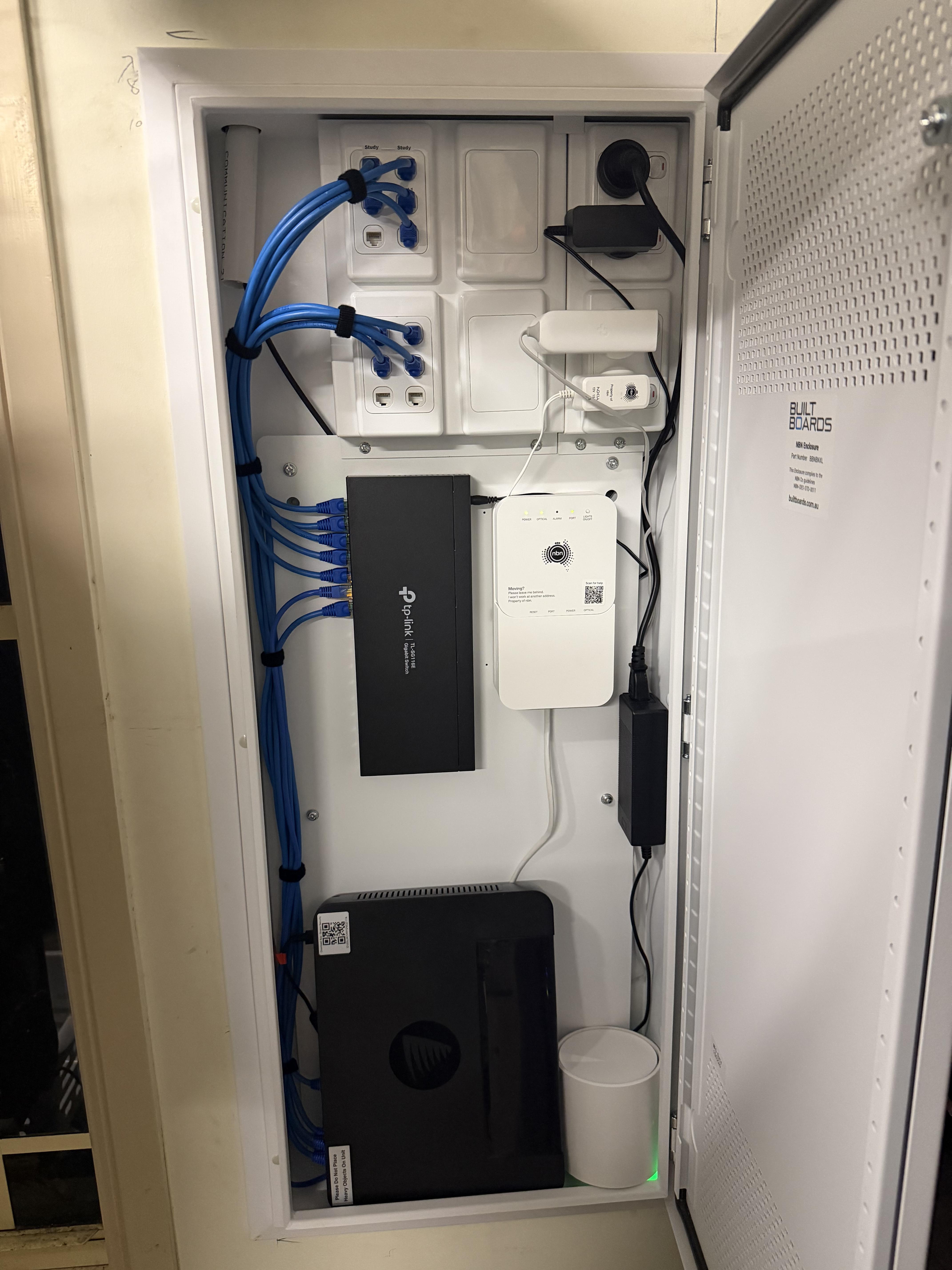
BuiltBoardXl in the wall, about 4m of conduit over the where old Telstra line came in, nbn lad rocked up and all hooked up in under an hr, pretty happy with it for a home setup, any feedback? First time doing this sorta thing


r/nbn • • 4d ago

Advice New neighbours canceled internet.

128 Upvotes

I live in what my lease agreement says is a granny flat, but I have my own address that is seperste to my neighbours. My address number ending in an "a". It may as well look like a duplex looking at it front on.

Over the past two years, I've had three different sets of people move in and each time they'd try and get the internet, I'd get an email from my ISP(Superloop) saying that I've canceled it. I call them say I haven't and sometimes they've been able to cancel the cancellation.

The second time this happened I contacted my ISP and told them to get me my own Location ID so this should hopefully not happen again. I now have that, but in doing so, the it would appear that the NBN removed the original Location ID for the main house.

I've just now gotten some new neighbours who've signed up for the internet and I've yet again gotten a cancellation notice which has already gone through, although it said it'd end on the 16th of next month. I now no longer have the internet yet again.

I've since been told by my ISP to start up yet another new order with them using my Location ID. I did this and they've said it's connected to someone else. I've now for the third time put in a tenancy agreement form in the hopes that this helps.

I've put in a complaint with Superloop as well as the Ombudsmen who I haven't heard back from yet trying to get this sorted in some kind of concrete way.

Is there anything else I can do? I am genuinely at my wits end at this point. The fact that Superloop keeps putting this onto me to get things rolling is beyond a joke to me at this point.

Any help would be much appreciated as I am at a loss at this point.


r/nbn • • 3d ago

New house, No FTTP NTD box?

1 Upvotes

Just moved to a relatively new townhouse and can't figure out where the FTTP NTD box is... I've done the usual googling already but only internet infrastructure I can see is an ethernet port upstairs.

Is it possible the NTD is internal or something or am I gonna have to start paying for a connection and let the ISP figure out?

There were tenants before us so I don't really get how they had internet.