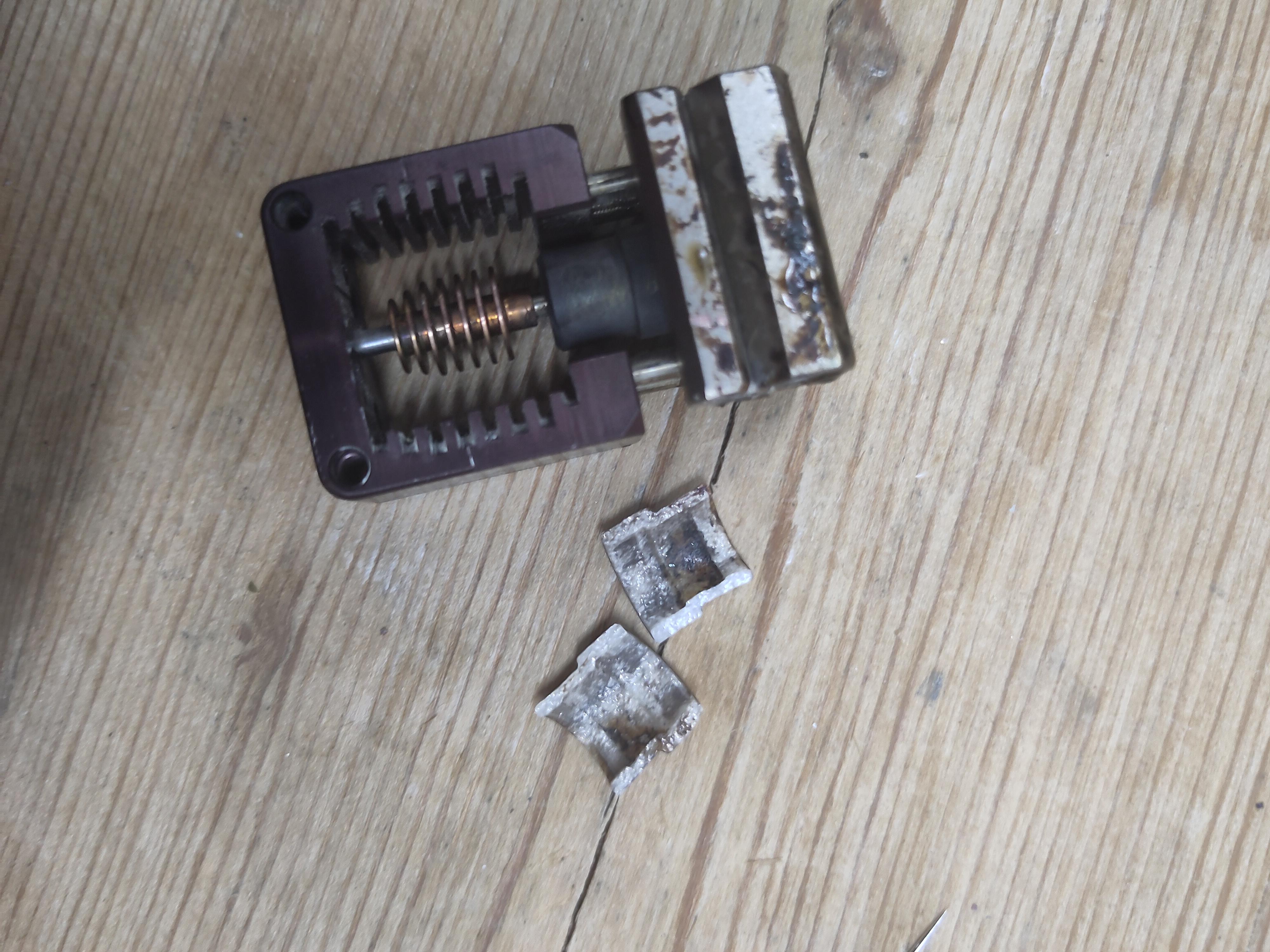
r/prusa • u/Left-Engineering1840 • 30m ago
Question [Prusa one core + Gen 2] Nozzle Cleaning not Working

1
Upvotes
r/prusa • u/Left-Engineering1840 • 30m ago
r/prusa • u/zekybomb • 13h ago
I noticed last week that the prusa slicer has a feature through prusa connect to keep track of the material in your inventory, even going so far as to allow you to note print temps and location you have it stored, which i thought was really cool.
But uh, now i have all that data saved, none of those material presets are saved to my software. Is there a quick way for me to download all the profiles for the filament I have logged in the database?
Or am I going to have to write down what I have then add them all myself through the wizard?
r/prusa • u/IronInEveryFire • 3d ago

I've been fighting an issue off an on with the K1C at my workplace that has suddenly rendered itself unsolvable. When entering my speed controls into Prusa Slicer (right) it seems to produce G Code with the opposite format of Creality (left) in that the F-Parameter is on the opposite end of the line. I would expect Creality is smart enough to parse the parameters from the line in any order, but it seems to buffer them in the order they are received. This has the effect that the rapid travel speeds are used in the print moves, and vice versa. I previously resolved this by setting all of the moves to the desired print speed so I could focus on other tasks.
Recently, with no changes to the firmware, it has suddenly started ignoring the speed commands for specifically infill moves, which it is performing at the maximum printer travel speed of 600 mm/s (eyeball guess) rather the commanded 300 mm/s (right code shows 150 as it is a project with combined infill). It prints wicked fast, but with less than half the infill it is supposed to have.
Is there some setting or G Code substitution I can make to resolve this, or will I need to make a script to reorder all the F-commands to the start of the line?
r/prusa • u/Bobson1729 • 5d ago
So I have a GPIO Hackerboard, an MK4 Enclosure Basic Board, and the White LED strip (from the enclosure add-on).
I want to add additional lighting to the Core One INDX. There are several options, but to power the basic board I need 24v and using the enclosure psu is adding even more bulk to an already bulky printer. Can I just run two power cables and hook them up to the Core One PSU in parallel? I don't think the basic board is going to draw enough current for it to be a problem, but I don't know. Also, ya know, I don't want it to be dangerous.
Thanks for the help.
r/prusa • u/Squatch_II • 5d ago
r/prusa • u/mygiguser • 8d ago
When i set my printers colors for a project, next time i open the slicer they are all back to Prusament and different colors. Is there a way to make my colors stay as default?

It was fine until yesterday; printer shows and says connected at printer screen and also on my router so it's on the LAN but now Prusaslicer won't connect... any help suggestions would be appreciated ...
I've been receiving email notifications recently where someone is mass messaging?
I see a list of usernames in that notification email.
r/prusa • u/SpikeyTwitch20 • 10d ago
r/prusa • u/frankenechie • 10d ago
Got my upgrade kit today!
XL 5T with new dwarf boards! Looking forward to upgrading next week.
I am located in the PNW USA.
r/prusa • u/Individual_Cycle_222 • 10d ago

How to control where the branch starts? I have this single tree coming from the centre, which fails because of the number of branches. I tried to increase the diameter, decrease the angle and generally any other organic support settings, but it won't disappear.
r/prusa • u/xkayaking • 11d ago
It has served me well, and is around 6 years old now and has printed over 100kg of material only needing a new hotend and thermistor/sensor, it got a revo which is now worn and I have only one nozzle left, everything else is too worn.
But it still prints and prints well when it feels like it.
The core issue, these blobs of plastic, the filament can be pristine, brand new, the nozzle I put was the last one I have left; the extruder is in bad shape, but it is smashing on those blobs that is causing the problem.
The blobs of plastic ooze even if it is not pushing filament, a dry filament makes it "worse" paradoxically, so I am printing with old wet filament because it is less likely to do that and print quality is better and I am confused what the hell is going on.
Once it hits a blob the extruder plastic breaks further, causing more damage.
The blobs are more likely to occur on the lower layers, and between transitions; the drier the filament the more likely it throws a blob.
If no blob occurs then it works fine.
These blobs would normally not cause any damage other than layer shift but the extruder plastic is too old now, that is quite literally breaking plastic; and not just printable parts, fans are falling apart, but even printing them parts dont quite fit, showcasing the whole thing has warped over the years and will need a complete overhaul.
I just want to keep it alive for its last nozzle before I completely replace everything I guess.
Started with a Core One OG kit, and have upgraded it twice. Once to Core One+, and now to Gen 2.
Printed a largish object the other day, and got some print quality dropoff in back left corner (when facing front door). Some filament that just ended up looped outside the print (not stringing). I assume there's some gantry un-squareness? I've always found the belt adjustment a touch fiddly... but I think it's pretty decent.
I do get some resonance (sound) during certain movements in the X-Y direction. So maybe that's causing some issue in that back corner?
Anyone else seen this issue? Sorry, know there's not a lot to work with... but not sure what else to descrive.
r/prusa • u/MavericWolf • 12d ago
So I've got a 2th 2024 XL, and decided to go all out and have the 3 extra toolheads, the XL+ upgrade (with 2 uprated dwarf boards), and the XL+ enclosure as I'm hoping to do some ASA printing in the future.
For anyone who's done a similar radical upgrade, is there any advice in what order to do them? Am planning to go; extra toolheads - XL+ - enclosure.
But was wondering whether toolheads and XL+ could be lumped in together without issue?