r/prusa3d • u/Conmantheuber • 6d ago
Solved✔ How to prevent Interface layer generating in middle of supports?
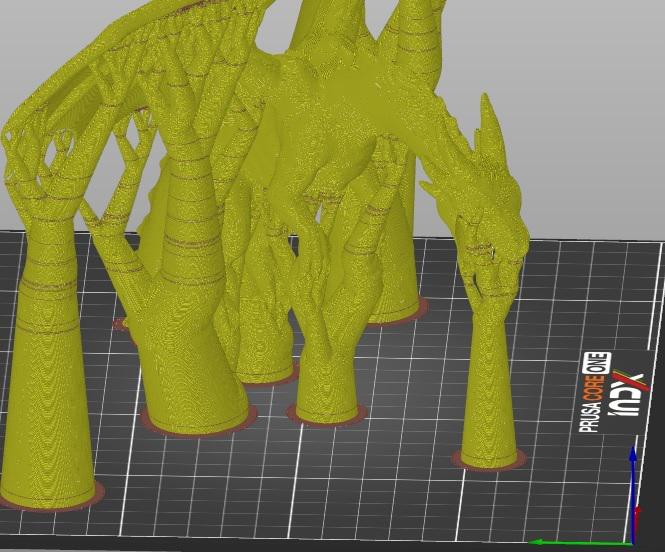
Hey all, looking for some advice as I'm guessing I'm doing something incorrectly and haven't been able to figure it out on my own.
C1 with an 8 tool INDX. Trying to print out a dragon using organic supports (though this happens with any support type) and wanted to use PETG as the support interface layer to make it detach cleanly. (the main print is all PLA)
I've set the support material/raft interface extruder to use the PETG tool head.
It works.... except it seems like any time that PETG would be used.. it prints that entire support layer in PETG.
In the picture you can see that by brown stripes in the middle of the yellow PLA supports.
The problem, of course is that it means that the supports end up detaching before the print is completed which caused a print failure.
Is there some way that I am missing to force the slicer to *only* use the second material when there is an actual interface layer? I'm not concerned about the additional time or tool changes this would need
I've tried every option I can think of but no luck ; using both Prusa slicer 3.0 alpha 13 and 2.9.7.
I see that I can set the Support Material/Raft Skirt Extruder) to the PETG toolhead and then ALL of the supports will be generated using that....
and that might be what I end up trying without a solution...
But that's just not what I'm trying to do and I feel like I'm just missing some combo of settings to get it right?
EDIT:
I was a derp.
I'd tried setting the support extruder to use PETG.. but it didnt dawn on me to explicitly set it to use the PLA one. (Previously I'd left it as automatic)
So now I have the support extruder as PLA and the interface one as PETG and in the slicer it looks like it does the trick.
Currently printing it now and will see how it works
•
u/AutoModerator 6d ago
When posting a support question, please include the following as applicable:
Help us, help you
I am a bot, and this action was performed automatically. Please contact the moderators of this subreddit if you have any questions or concerns.
6
u/Recent-Midnight6376 CORE One 6d ago
Set the supports to be printed with the specific tool you want it to use. That's how I did it.
2
u/litanyoffail 6d ago edited 6d ago
I think this is happening to minimize tool changes; see if the layers in your supports line up with other interface layers.
I'm not sure how to force it one way or the other but it might narrow your search by knowing why it's doing it.
Edit: I misread and you already know this lol; I guess to do this the way you need it's just printing the whole support from what I can see but my search is far from exhaustive